
PSWP4BK - Mp3-player Pyle - Kostenlose Bedienungsanleitung
Finden Sie kostenlos die Bedienungsanleitung des Geräts PSWP4BK Pyle als PDF.


| Produkttyp | MP3-Player |
| Modell | PSWP4BK |
| Marke | Pyle |
| Abmessungen (ca.) | 10 x 5 x 1,5 cm |
| Gewicht (ca.) | 50 g |
| Stromversorgung | Integrierter Lithium-Ionen-Akku, USB-Ladung |
| Speicherkapazität | 8 GB (erweiterbar per microSD) |
| Audioformate | MP3, WMA, WAV |
| Anschlüsse | USB 2.0, 3,5-mm-Kopfhöreranschluss |
| Display | OLED, 1,8 Zoll |
| Bedienelemente | Tasten (Play/Pause, Vor/Zurück, Lautstärke) |
| Wiedergabemodi | Zufallswiedergabe, Wiederholung, Ordnerwiedergabe |
| Akku-Laufzeit | Bis zu 20 Stunden Musikwiedergabe |
| Ladezeit | Ca. 2 Stunden |
| Reinigung und Pflege | Mit einem weichen, trockenen Tuch reinigen; keine Flüssigkeiten verwenden |
| Sicherheitshinweise | Nicht in Wasser eintauchen; vor Feuchtigkeit schützen; kein extremen Temperaturen aussetzen |
| Ersatzteile / Reparierbarkeit | Ersatzakku erhältlich; Reparatur durch Fachpersonal empfohlen |
| Zubehör im Lieferumfang | USB-Kabel, Kopfhörer, Bedienungsanleitung |
Häufig gestellte Fragen - PSWP4BK Pyle
Benutzerfragen zu PSWP4BK Pyle
0 Frage zu diesem Gerät. Beantworten Sie die, die Sie kennen, oder stellen Sie Ihre eigene.
Eine neue Frage zu diesem Gerät stellen
Laden Sie die Anleitung für Ihr Mp3-player kostenlos im PDF-Format! Finden Sie Ihr Handbuch PSWP4BK - Pyle und nehmen Sie Ihr elektronisches Gerät wieder in die Hand. Auf dieser Seite sind alle Dokumente veröffentlicht, die für die Verwendung Ihres Geräts notwendig sind. PSWP4BK von der Marke Pyle.
BEDIENUNGSANLEITUNG PSWP4BK Pyle
USER'S MANUAL
www.pyleaudio.com
PYLE® SPORTS

Waterproof Neckband MP3 Player And Headphones For Swimming, Water Sports
User's Manual
Warning
- Please use the three steps earbuds when swimming to prevent water from leaking in and damaging the player. Please choose among different size of earbuds according to your comfort level.
- For your safety, please don't use the player when driving, riding a bike, or jogging on the road. When the volume is high, be careful crossing the street.
- Listening to music at high levels for extended periods of time will cause hearing damage.
■ Press and hold the Power Button for 5 seconds to power ON/OFF.
When diving or swimming forward very fast, player may be pulled down due to water resistance, this problem can be solved if you put your swimming goggles against the connecing rod at the point near ear(see right picture).

Function Keys

Special attention: The USB cover has positive and negative directions. Please close the USB cover according to the instructions in the manual or the USB cover may be damaged allowing water to seep into the player, further damaging it.
The volume may go down when swimming. This is due to a thin film of water that forms on the waterproof net or speaker. If this occurs, gently blow on the earbuds and squeeze them to release the water. You may also let the earbuds sit in a dry place for 10 hours ensure proper playback.
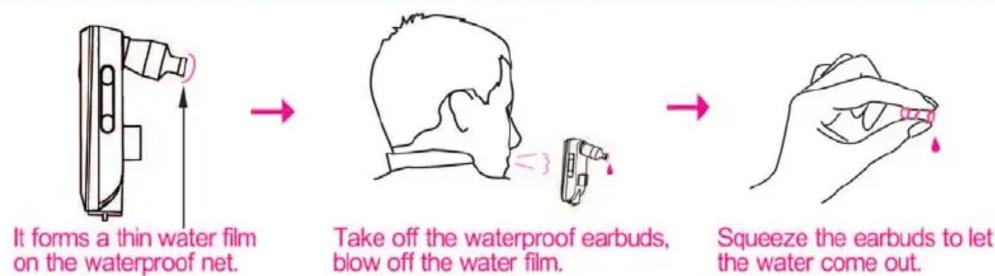
flowchart
graph LR
    A["It forms a thin water film on the waterproof net."] --> B["Take off the waterproof earbuds, blow off the water film."]
    B --> C["Squeeze the earbuds to let the water come out."]
Basic Functions
• Waterproof sport Mp3, IP rating: IPX8.
• Support MP3 and WMA formats.
• USB 2.0 high-speed.
• Built-in rechargeable lithium battery 190mAh, operating time 10hours.
■ Precautions
- Do not use the player in extreme temperatures or extremely dry environments. The player may not work in temperatures above 40^ (104°F) or below -5^ (23°F).
- If the player is handled roughly, surface may be scratched, battery may fail, and firmware may be damaged.
- Do not disconnect the player when it is formatting, downloading, or uploading. Otherwise, it will cause a "program error" or "Computer unrecognized" message.
- Do not repair, dismantle or rebuild the player without permission from the manufacturer.
- Keep volume low to avoid hearing damage.
We are not responsible for any personal data losses or other indirect losses caused by improper operation, software, hardware, product maintenance or other accidents. - User's manual is subject to change without prior notice.
Troubleshooting
If problem persists after going through the troubleshooting guide, please contact technical support.
| Problems | Solutions |
| No response after pressing Power ON/OFFStops automaticallySystem powers off automatically when unplugged | Please charge. |
| No sound from earbuds | Make sure the volume is set above "0". Damaged Mp3 files may result in hearing noise or failure to play music. Make sure the files are uncorrupted. |
| Unable to download music | Check if the USB line is broken or not connected well.Check if the driver is installed appropriately.Check that storage memory is not blank. |
| Can not be read by computer | Check if the USB wire is broken or not connected well.Check if the operation is incorrect.Check if the driver software is installed. |
| Failure to play the compressed MP3 | Damaged Mp3 files may result in hearing noise or failure to play music. Make sure the files were uploaded completely. |
■ Description of Function Keys
| Key | Press | Playback Mode | Pause Mode | |
| Power ON/OFF Pause Play | ▶II | Press and hold for 5 seconds | Power ON/OFF | |
| Press | Pause | Resume playback | ||
| Select F.FWD F.REV | ▶◀ | Press | Next and playing | Next |
| Press and hold | Rewind | Next | ||
| Press | Previous and playing | Previous | ||
| Press and hold | Rewind | Previous | ||
| Volume+ | VOL+ | Press | Volume increase | Volume increase |
| Press and hold | Fast Volume increase | Rewind | ||
| Volume- | VOL- | Press | Volume decrease | Volume decrease |
| Press and hold | Fast Volume decrease | Fast Volume decrease | ||
Shuffle play mode: *All 2013 models now come with the Shuffle function
When the player is on, press pause(Power ON/OFF) button, then press NEXT button, the player will be in random play mode.
When in random play mode, press pause(Power ON/OFF) button, then press PREVIOUS button, the player will be in normal play mode.
Attention: MP3 player keys are multi-functional. The pressing modes contain Press & Hold and Press. Different operating modes stand for different function.
Accessories
MP3 player comes with the following
-
MP3 player
-
USB cable
-
Manual

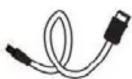

- Two series of earbuds


Swimming use waterproof earbuds
Land use earbuds
Specifications
| IP Rating | IPX8 |
| Dimensions | 124mm x 33mm x 150mm |
| Weight | 22g |
| USB Interface | USB 2.0 (High speed) |
| Battery | Lithium battery 190 mAh |
| Memory | 4GB |
| Music format | MP3, WMA |
| File Format | FAT16, FAT32 |
| MP3 bite rate | 8Kbps~320Kbps |
| WMA bite rate | 32kbps~192kbps |
| Earphone output power | 5mW+5mW |
| Frequency response | 20Hz-20KHz |
| S/N | >70dB |
| Distortion | <0.1% |
| Operating environment | -5°C~40°C(23°F~104°F) |


Marke : Pyle
Modell : PSWP4BK
Kategorie : Mp3-player