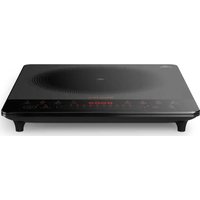
Viva Collection HD4931 - Herd PHILIPS - Kostenlose Bedienungsanleitung
Finden Sie kostenlos die Bedienungsanleitung des Geräts Viva Collection HD4931 PHILIPS als PDF.


| Marke | Philips |
| Modell | Viva Collection HD4931 |
| Produkttyp | Induktionskochfeld |
| Kochzonen | 4 Induktionszonen |
| Gesamtleistung | 7400 W |
| Steuerung | Touch-Bedienung |
| Timer | Ja, mit Abschaltfunktion |
| Kindersicherung | Ja |
| Überhitzungsschutz | Ja |
| Automatische Abschaltung | Ja |
| Abmessungen (B x T x H) | 560 x 490 x 54 mm |
| Gewicht | 11 kg |
| Spannung | 220-240 V, 50/60 Hz |
| Einbauart | Einbaukochfeld |
| Farbe | Schwarz |
Häufig gestellte Fragen - Viva Collection HD4931 PHILIPS
Benutzerfragen zu Viva Collection HD4931 PHILIPS
0 Frage zu diesem Gerät. Beantworten Sie die, die Sie kennen, oder stellen Sie Ihre eigene.
Eine neue Frage zu diesem Gerät stellen
Laden Sie die Anleitung für Ihr Herd kostenlos im PDF-Format! Finden Sie Ihr Handbuch Viva Collection HD4931 - PHILIPS und nehmen Sie Ihr elektronisches Gerät wieder in die Hand. Auf dieser Seite sind alle Dokumente veröffentlicht, die für die Verwendung Ihres Geräts notwendig sind. Viva Collection HD4931 von der Marke PHILIPS.
BEDIENUNGSANLEITUNG Viva Collection HD4931 PHILIPS
Always there to help you Registrar your product and not account at. www.phillips.com/welcome
EN User manual ZH-5 用户手册
PHILIPS

Specifications are subject to change without notice © 2015 Koninklijke Philips N.V. All rights reserved.
HD4931_Malay_UM_VI.O
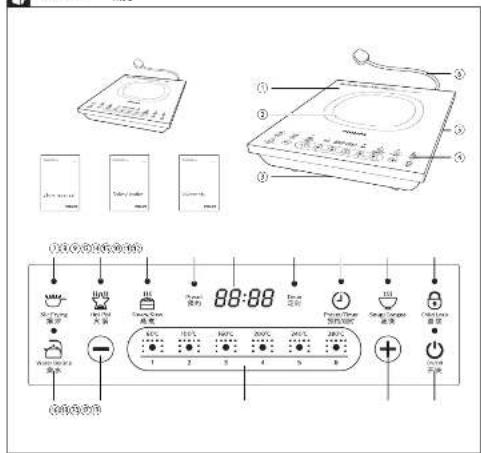
Overview 视觉
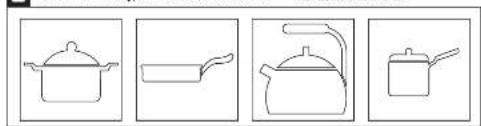
Recommended types and sizes of cookware 建议的厨具种类和大小
natural_image
Four line drawings of cooking pots and containers, no text or symbols present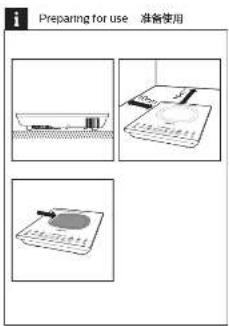
Using the induction cooker 使用电磁炉

Using the timer 使用定时功能

Preset time for delayed cooking 预约时间延迟烹饪

English
1 Your induction cooker
Congratulations on your purchase and welcome to Philips. To fully benefit from the purpose that Philips offers nursery your product at www.phlips.com/Welcome.
2 What's in the box
Induction cone: main unit Warranty care Important information leafer User manual
Overview
| 0 | Cooking plate | 3 | Control panel |
| 5 | Cooking zone | 3 | Air outlets |
| 6 | Armedial | 3 | Power cord |
Controls overview
| 1 | Snr Frying button | 2 | Soup/CGence button |
| 2 | Hot Pot button | 3 | Unit Lock button |
| 3 | Sleepy/Sone button | 4 | Water Blowing button |
| 4 | Preset indicator | 5 | Increase button |
| 5 | Display screen | 6 | Cooking cleaner level and temperature |
| 6 | Timer Indicator | 7 | Increase button |
| 7 | Reset/Inner button | 8 | Un/Off button |
3 Before first use
Remove all packaging materials from the induction cooker.
Preparing for use
-
Place the appliance on a dry, stable and level
-
Make sure there is all items: 10 cm free space around
-
always plan the correct rule
CURRENT COOKING
and sizes (see the table below)
Recommended types and sizes of
cookware
| Material | Cockware with a bottom made of iron or magnetic stainless steel |
| Shape | Cockware with a flat bolt |
4 Using the induction cooker
here are two striking modes. But Earnings (Note).
Pct | Steam/Stev ( ) 100% Corges ( ) and
Water Dcing (B
1 Follow the steps in Reporting for Use.
- Please visit your button (you can print a standard lights up
3 Press the desired too large button. The
corresponding indicator lights up and the
132.04 5.41x walking (1) 6.00x 10.78x
4 When the cooking is "clined press for On/Off"
(ballion) (1) is switch of the appliance.
- Unpug the induction cooker after the fan stops weakening.


Note

10242
- Dating the year is http://www.boc.cn/
pressing the P-chase + / of Jedese (H.Soc)
Saw (☐) moves the cooking power automatically.
(1) 2015.3.14
Using the timer
You can use the Preset/Time but, or to decide
how much the you want to expand a new world
different, cooing modes [r.o. apable style 1: Water]
-
Follow-up store in
-
2014年1月1日,公司股票交易均价为人民币1.56元/股。
-
-
-
-
-
-
-
-
-
-
-
-
-
-
-
-
-
-
-
-
-
-
-
-
-
-
-
-
-
-
-
-
-
-
-
-
-
-
-
-
-
-
-
-
-
-
-
-
-
-
-
-
-
-
-
-
-
-
-
-
-
-
-
-
-
-
-
-
-
- 700.
-
-
-
-
-
-
-
-
-
-
-
-
-
-
-
-
-
-
-
-
-
-
-
-
-
-
-
-
-
-
-
-
-
-
-
-
-
-
-
-
-
-
-
-
-
-
-
-
-
-
-
-
-
-
-
-
-
-
-
-
-
-
-
-
-
-
-
-
-
Choose the shared sequence note.
-
Cross the Presor/Time button (Onset or main
(1) and the lower indicator lights up
5 Press the increase (for Decrease.) Better to
2013年1月1日
- When the tree has elapsed the initial uncooler turns off automatically.


Bintto

19.3.1
• After you have selected the closing time, wait for a
low security is before the electric cooker automatically
■ 2017年1月
- After a time, you can press the email/turor in the email/1000
Preset time for delayed cooking
You can use the P#### must better (to say).
the time at which you want the appliance to start
cooking. The preset biner is available up to 24 hours.
1 Follow the steps in Preparing to Use.
2 Press the off-bustion (fine off-off indicator lights up
-
Choose the desired solution made
-
Does the respect of the "Petro" or "the
times until the present indicator lights up.
- Press the increase for the Decree
to choose the desired preset time.
6 When the project time has elapsed, you will hear a
2014年5月7日,公司以自有资金进行现金管理。


- The price is at 1:30 a.m. (the following summary
middle-Summary Show: [SunnyCorporated]
-
请在“√”栏内填写
-
2016年1月1日
conforms it.
- When the induction covers at press, mode, you can
pass the 2x3d frame blocks; Q'say delta set of a

5 Cleaning
1 Unplug the appliance after the fan stops working
and let it cool down
2 Clean the appliance with a damie cloth and fl
necessary, with some mild cleaning agent
6 Recycling
Do not throw away the product with the normal
outshold waste at the end of its life, but hand it in an
on official collector port for recycling. By doing this, you plan to average the cost of work
7. Guarantee and service
If you need some or information but you have
a problem, please visit the Philips website at
www.phltp.com or contact the Phllas-Consumer
Care Center in your country (you will find its phone
DELENTES DE ACOCONICA GUSTAVEL (JUNIOR)
your local Philips dealer
8 Troubleshooting
If your product receives classical funding properly.
or that cooling quality is insufficient, consult the
to be a means. If you are unable to solve the process
contact a Phil pre service centre or the Consumer
(4) 2014年11月31日
| Problem Solution | |
| The Only/Off button (g) does not respond | here is a connector problem. Check the minimum cooker is connected to the stairs and all the toilet or next family into the air later. |
| The appliance remains continuously and then drops working | You may have out a reliable cookware on the cooking plate or you may have removed the cookware from the cooking plate during cooking. Have the kitchen, a single sheet, a pair of aluminum with pairwise oval bedding above and has a better diameter greater than 10cm. |
| You may have places the cookware inside at the cooking centre. | |
| The double unit does not heat up to the required temperature. | The bottom of the cookware may be too fast. Use accordance with a flat bottom. If the problem still needs, see the appliance to your Philips dealer or a service center or buffer by Philips. |
| The appliance stops working sustainably | The temperature at the room is might be too high. Let the cookware read down to a while. |
| The cooking temaseature of the grand motors are too high or too low | During cooking, you can change the power level by pressing the incandescent (a) for decorative lighting button. |
| When press one of the cooking mode buttons, the light of the second mode does not go on. | He light is defective, have the appearance to your Philips dealer or a service center authorised by Philips. |
| The cooking temaseature automatically changes in some project modes. | In Water/Waving (a) Supply Conject (g) and Acclam Store Office, the cooking engine is consistently more highly changed for better cooking tools. |
| Error to cut out, but let ask or put it simultaneously on the suction. | He introduction server has a malfunction, also the appliance to your filter drain or a service center authorized by Philips. |
| Error to cut out or be displayed on the suction. | He voltage is better too high or too low. Check if the voltage is very low. Check if the induction is "in the induction cooker." |
简体中文
1 您的电磁炉
在豆包购买了进口产品,欢迎来到Philips大家屋!为
了您能充分享受飞利浦提供的支持,请在
www.phipips.com?welcome上注庆祝的产品。
2 包装盒内物品
电磁炉主热弯 保温卡
重要信息单页 用户手册
总体说明
| 1 | 炉面 | 2 | 控制面板 |
| 3 | 烹饪区 | 3 | 出风口 |
| 3 | 进风口 | 4 | 电等路 |
控件概述
| 2 | 故事按钮 | 3 | 饮料/制糖 |
| 4 | 火锅按钮 | 5 | 儿童理发 |
| 6 | 送/调制 | 9 | 供水服务 |
| 7 | 预设指示灯 | 10 | 减小扭矩 |
| 8 | 显示器 | 11 | 烹饪功率和温度 |
| 9 | 定时器指示灯 | 12 | 输人数据 |
| 10 | 预设/时钟按钮 | 13 | 开/关闭 |
3 首次使用之前
选择电阻炉上的所有包装材料。
使用准备
1 将产品放在一个干燥,下稳的表面上。
2、防爆保单防护强度至少有1厘米的空间以防工况。
3 在允许过程中改算给线段在允许上而下。
- 由体使用的软重变量和尺寸正确(可参见下表)
建议的放算类型和尺寸
材料,原制是由铁运磁性不等的制造权具
外形平面设计
4 使用电磁炉
有石料光粉型可伏滤芯:热基(℃)。火锅(℃)
西溪(注)、吴溪/宿(委)以及涌水(否)
-
指明“准备费用”中的步骤操作。
-
按开/关按钮(0),开/关提示灯亮。
-
按常的电性装置,对这些指示切宽起,电磁炉波器、导通模式开关工作。
-
出货完成后,提升/关销期(2)关固产品。
-
风息停止工作后,因电磁证的电源线
2.1报告期末前十名股东持股情况表

.
无法识别
·在总求:占人民总求100%和总求100%
使用计时器
您可以使用预设计算机按等确定产品在不同安装模式。
工作的时间(在流水/日)按以下不适用)
1.按照“准备使用”中的参数操作
2 按开/关 (a) 按住、开/关 (b) 指示灯亮起。
-
出席所需的必要性模式
-
成果胶/针时器板由(①) 一次发多次, 自动针时器插不写高压。
-
按增人(+)或减小(-)按钮调整时间
6 到达时间时,电磁炉将自动关闭。

-
- 选择要好和不之后,因股价几处掉,然后申购的打直步骤
认同。
- 平时指数超过50,代表35多发/平时指数权重(即0.0461)
延长烹饪的预设时间
您可以使用建设/计划按钮:②)设置需要产品开始表
的时间 需音计时器最长可达24小时
-
按照“准备使用”中的参数操作
-
按开/关报图(6),开/关指示灯亮数
3.选择所需的烹饪模式
- 段除设/计对目按注(○)一次或多次,重写预设指示
打亮出。
- 列人获授时间:2018年1月1日
印开始工作。

-
- 以下完整模式下可以使用应删除标签:原/同/否/1.
2.第(○)和(□)
- 请说明此数据的含义,如下列情形,无法识别或不正确。
·
(四) 可以取消除法和法。
5 清洁
- 用磁性工作后,玻璃产生的电源抛头,待其冷却。
- 同层布清洁过滤炉,必要时使用集中型滤清剂。
6 回收
容量产品时,但不要将它与一般生活垃圾一元共享,应将其交给官方指定的回执中心。这样都有利于环保。
保修与服务
如果您需要服务或情况有任何问题,金额是飞利源网站,地址为www.zfunds.com,您可以与所有国家的地区的飞利源客户服务中心联系(您可以从全球媒体《中国到电话号码》。如果您所在的水家地区没有飞利源客户服务中心,请凭当前的飞利源控制要求。
8 故障排除
如果电脑对工作不止的,或任何质量有缺陷;若查询下表。如果人员解决问题,则删除系统所在困难地区的飞机清洁服务中心或客户服务中心。
| 问题 | 解决方法 |
| 开发阶段(1)不能完成 | 输送不足,检查电脑是否是否有电脑连接,避免无法维护。 |
| 产品开发及调试等,将停止工作。 | 若启动时间从大量量不省到大数时,或者在执行过程中下没有的,则将发生异常,以防止或不影响新的功能,并设置安全垫人了大量。 |
| 可以可能需要自行进行操作。 | |
| 收集发包后的活动效果。 | 收集发包部分,通常采用单击法,如果自动操作不当,设备不与现场进行操作,可增加控制,减气机控制和维护客户服务中心。 |
| 生产阶段的管理工作。 | 从故障出发,让系统冷却。 |
| 暂停运行的,应保持在操作过程中。 | 在操作期间,可以达到正常水平,还至少7天,继续开始在操作中。 |
| 按下列实际情况对项目、用途进行的决定无效。 | 所有项目均满足,该产品已经通过单独的飞机进行更换,一旦飞机不能按照产品的实际使用。 |
| 在操作过程中,需要通过联合自动操作。 | 存储在20Hz、放送50Hz和充电50Hz之间,应触发公司的操作,从而使它们要自动换动。 |
| 要求用户设置操作时,应按操作指令执行。 | 要求用户设置操作,确保用户设置在操作过程中,然后按操作指令执行。 |
| 要求用户设置操作时,应按操作指令执行。 | 电话激活后发送,保证每个用户的运行是否正常运行。 |