
PLAD3300D - Empfänger Pyle - Kostenlose Bedienungsanleitung
Finden Sie kostenlos die Bedienungsanleitung des Geräts PLAD3300D Pyle als PDF.


| Produkttyp | Auto-Stereo-Empfänger |
| Modell | PLAD3300D |
| Marke | Pyle |
| Abmessungen (B x H x T) | ca. 178 x 50 x 160 mm (DIN-Einbauschacht) |
| Gewicht | ca. 1,5 kg |
| Stromversorgung | 12 V DC (Fahrzeugbordnetz) |
| Ausgangsleistung | 4 x 50 W (max.) |
| RMS-Leistung | 4 x 18 W |
| Frequenzbereich | 20 Hz – 20 kHz |
| Verstärkertechnologie | Moskito (est.) |
| Radiofunktionen | AM/FM, 30 Senderspeicher |
| Abspielmedien | USB, SD-Karte, AUX (3,5 mm) |
| Bluetooth | Ja, Freisprechen und Audio-Streaming |
| Display | LCD, beleuchtet |
| Equalizer | 7-Band-Equalizer, mehrere Voreinstellungen |
| Fernbedienung | ja, IR-Fernbedienung im Lieferumfang |
| Audioeingänge | AUX (vorne), USB (vorne) |
| Audioausgänge | 4 x Chinch (Front/Rear), Subwoofer-Ausgang |
| Lautsprecherimpedanz | 4–8 Ohm |
| Besondere Merkmale | Vorbereitung Lenkradfernbedienung, abnehmbare Frontplatte |
| Reinigung | Mit einem weichen, trockenen Tuch abwischen |
| Sicherheitshinweise | Nicht in Feuchträumen verwenden, Sicherung nicht überbrücken |
| Reparatur | Nur von autorisiertem Fachpersonal durchführen lassen |
Häufig gestellte Fragen - PLAD3300D Pyle
Benutzerfragen zu PLAD3300D Pyle
0 Frage zu diesem Gerät. Beantworten Sie die, die Sie kennen, oder stellen Sie Ihre eigene.
Eine neue Frage zu diesem Gerät stellen
Laden Sie die Anleitung für Ihr Empfänger kostenlos im PDF-Format! Finden Sie Ihr Handbuch PLAD3300D - Pyle und nehmen Sie Ihr elektronisches Gerät wieder in die Hand. Auf dieser Seite sind alle Dokumente veröffentlicht, die für die Verwendung Ihres Geräts notwendig sind. PLAD3300D von der Marke Pyle.
BEDIENUNGSANLEITUNG PLAD3300D Pyle
PYLE® DRYVER
CLASS-D MONO BLOCK
POWER AMPLIFIERS
PLAD3300D
OWNER'S MANUAL

TABLE OF CONTENTS
TABLE OF CONTENTS
INTRODUCTION & FEATURES 2
SPECIFICATION 3
FEATURES & CONTROLS 4-6
INSTALLATION & PRECAUTIONS 7
SYSTEM WIRING 8-9
WIRING DIAGRAM 8
BRIDGING TWO AMPLIFIER 9
TROUBLE SHOOTING....10
INTRODUCTION
Congratulations on your purchase of a PYLE amplifier. You have purchased a quality product designed and engineered to give you many years of un compromised musical service. PYLE amplifiers are designed with the latest technology available, incorporating a DC to DC Switching Power Supply, which provides headroom for even the most demanding peaks and dynamic ranges found on modern CD's and recordings.
FEATURES
■ Mono Block Subwoofer Amplifier
■ 1 Ohm Stable
■ PWM(Pulse-Width-Modulated) System
■ Glass Epoxy PCB
■ Gold plated RCA Inputs
■ Custom Terminal Block for Speaker Connections
■ Thermal, Overload & Short Protection
■ Variable Lowpass Filter(50Hz \~ 150Hz, 24dB/ Octave)
■ Variable Subsonic Control(15Hz \~ 40Hz, 24dB/ Octave)
■ Phase Control 0 \~ 180 degree
■ Remote Bass Level Control
■ Power and Protection LED Indicators
■ Input Impedance: 10K Ohms
■ Soft Turn On/Off
■ RED Lighting Illumination
■ Side Leg Mounting
■ Heavy Duty Power Coated Heatsink
SPECIFICATION
| PLAD3300D | |
| RMS at 4 Ohms | 1 X 600W |
| MAX at 2 Ohms | 1 X 1800W |
| MAX at 1.3 Ohms | 1 x 3600W |
| LOWPASS | 50Hz ~ 150Hz |
| SUBSONIC | 15Hz ~ 40Hz |
| PHASE | 0 ~ 180 degree |
| T.H.D | <0.1% |
| S/N RATIO | >90dB |
| Input Sensitivity | 200mV ~ 8V |
| FREQ. Response | 15Hz ~ 150Hz |
| Dimensions(W x H x L) | 8.6" x 2.27" x 15" |
PLAD3300D
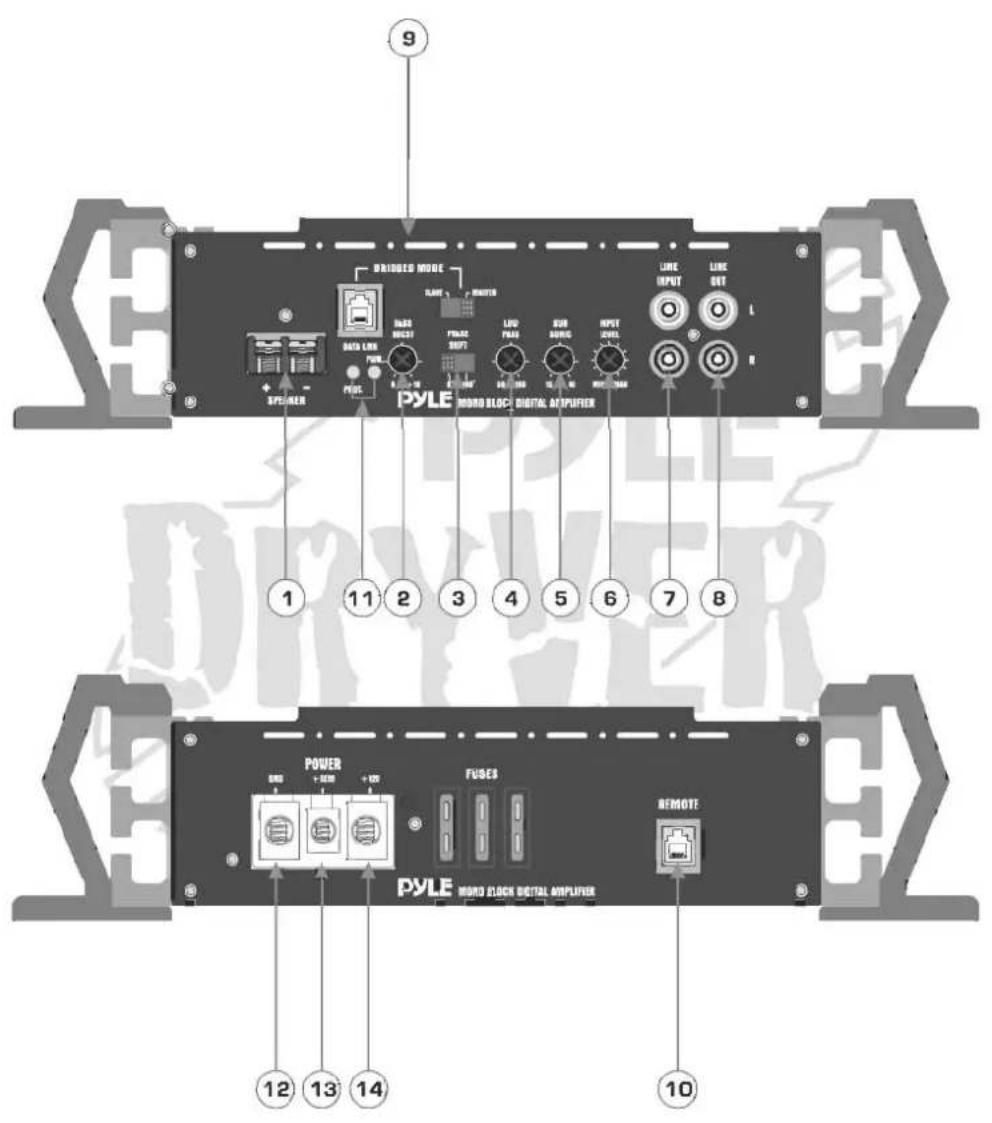
1. SPEAKER TERMINAL
2. BASS BOOST CONTROL
By using the BASS BOOST function, bass notes at 45Hz are emphasized as much as 18dB.
3. PHASE SHIFT SWITCH(0 \~ 180 DEGREES)
Allows you to change the phase of your subwoofer from 0 to 180 degrees to help compensate for timing differences between mid and sub drivers.
4.VARIABLE LOW-PASS FILTER (50Hz \~ 150Hz)
Adjust variable crossover frequency with control as desired. The amplifier input circuit filters out everything above the frequency selected, so only the deepest bass notes are amplified..
5.VARIABLE SUBSONIC CONTROL(15Hz - 40Hz)
6. INPUT LEVEL(INPUT SENSITIVITY ADJUSTMENT)
This control adjust the amplifier's input sensitivity. Input sensitivity is variable from 200Milli volts to 8 volts. Clockwise increases sensitivity. Counterclockwise decreases sensitivity.
This knob is not a volume control signal levels. A lower signal level will require increased sensitivity for full power. A higher signal level will require decreased sensitivity.
7. LINE INPUT RCA JACKS
These inputs are for signal cables from the source. Always use high quality shielded RCA cables.
8. LINE OUT RCA JACKS
The LINE OUT allows you to build multiple amplifier systems without having to use splitter cords to distribute the signal. Now it is simple a matter of bringing one set of RCAs into the first amplifier, then using the line out RCA jacks as the feed to the next amplifier.
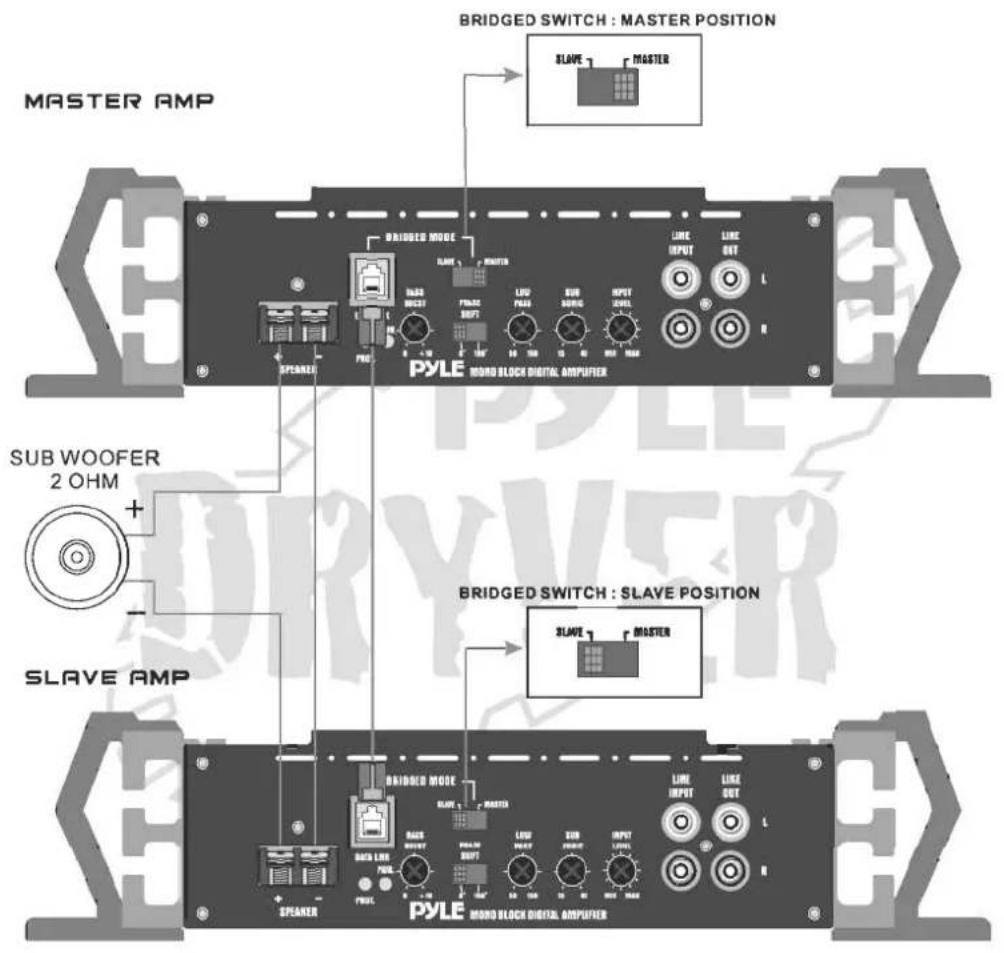
9. BRIDGED MODE
10. REMOTE CONTROL INPUT
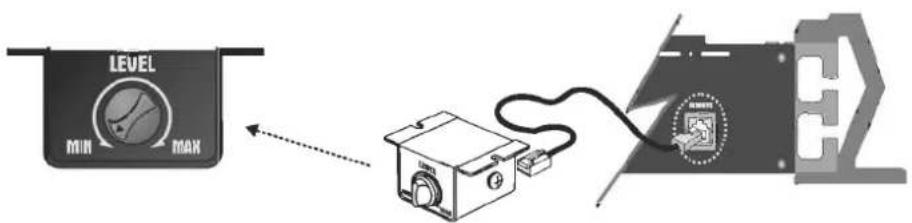
Remote Bass Level Control
Remote Bass Boost Control : This control adjusts the Bass Boost gain for the amplifier's speaker output (0 - +18dB)
11. LED Indicator
- POWER: This GREEN LED will illuminate when the amplifier is turned "ON". If it fails to illuminate, check the power connections to the Amplifier and fuses.
- PROTECTION: The amplifier protection circuitry will disable the amplifier if input overload, short circuit or extremely high temperature conditions are detected. When the protection mode is in operation, the LED indicator on the side panel will be illuminated, indicating the amplifier has gone into a self preservation mode.
If you observe that the Protection LED is lit, please check the system carefully to determine what has caused the protection circuit to engage. The amplifier can be reset by turning the remote power off and then on again. If the amplifier shut down due to a thermal overload condition, please allow it to cool down before restarting. If the amplifier shut down because of an input overload or short circuit, be sure to repair these conditions before attempting to power up the amplifier again.
12. B- TERMINAL (CHASSIS GROUND)
To avoid unwanted ignition noise caused by ground loops, it is essential that the Amplifier be grounded to a clean, bare, metal surface of the vehicles chassis.
13. REMOTE POWER ON
To remote wire car stereo. This amplifier is turned "ON" remotely when vehicle's stereo is turned "ON".
Note: IF YOUR RADIO DOES NOT HAVE +12 VOLT OUTPUT LEAD WHEN TURNED ON, THE "REMOTE" TERMINAL ON THE AMPLIFIER CAN BE CONNECTED TO VEHICLES ACCESSORY CIRCUIT WHICH PROVIDES +12V WHEN THE CAR IS ON.
14.B+ TERMINAL (BATTERY POSITIVE)
Due to the power requirements of the Amplifier, this connection should be made directly to the positive(+) terminal of battery. For safety measure, install an in-line fuse Holder (not included) as close to the battery positive(+) terminal as possible with an ampere rating not to exceed total value of fuses in Amp.
INSTALLATION
- Find a suitable location in the vehicle to mount the amplifier.
- Make sure there is sufficient air flow around the intended mounting location.
- Bolt the amplifier to the mounting surface.
- Connect the power ground terminal to the nearest point on the chassis of the car. Keep this ground wire less than one meter (39") in length. Use 8 gauge wire.
- Connect the remote terminal to the remote output of the head unit using 14 gauge wire.
- Connect an empty fuse holder within 300 mm (12") of the battery and run 8 gauge or larger high quality cable from this fuse to the amplifier location.
- Make sure there is no fuse in this fuse holder. Then make the connection to the "BATT" connection on the amplifier.
- If multiple amplifiers are being used, use cables (each with it's own fuse at the battery) or a # O or #2 cable from the fuse holder at the battery to a distribution block at or near the amplifier's location.
- Connect all line inputs and outputs using high-quality RCA-RCA cables.
- Insert fuse(s) at the battery fuse holder(s).
- Recheck all connections before powering up.
- Set all level controls to their least sensitive positions and set all crossover controls, switches, etc. To the desired frequency or position.
- Once the system is powered up, set the volume control on the head unit to about the 2 O'clock position, and then set all the amplifiers' level controls for maximum output level.
- Further fine tuning of the various controls may be m\necessary to obtain the desired results.
PRECAUTIONS
- Before you drill or cut any holes, investigate your car's layout very carefully. Take care when u work near the gas tank, fuel lines, hydraulic lines and electrical wiring..
- Do not operate the amplifier when it is unmounted. Attach all audio system components securely within the automobile to prevent damage, especially in an accident
- Do not mount this amplifier so that the wire connections are unprotected or in a pinched condition, or likely to be damaged by nearby objects. Be sure to select a location inside your vehicle which has adequate ventilation..
- Before making or breaking power connections in your system, disconnect the vehicle battery. Confirm that your head unit or other equipment is turned off while connecting the input jacks and speaker terminals.
- If you need to replace the power fuse, only replace it with a fuse identical to that supplied with the system. Using a fuse fo a different type or rating may result in damage to your system which isn't covered by the manufacturer's warranty.
SYSTEM WIRING
WIRING DIAGRAM
PLAD3300D
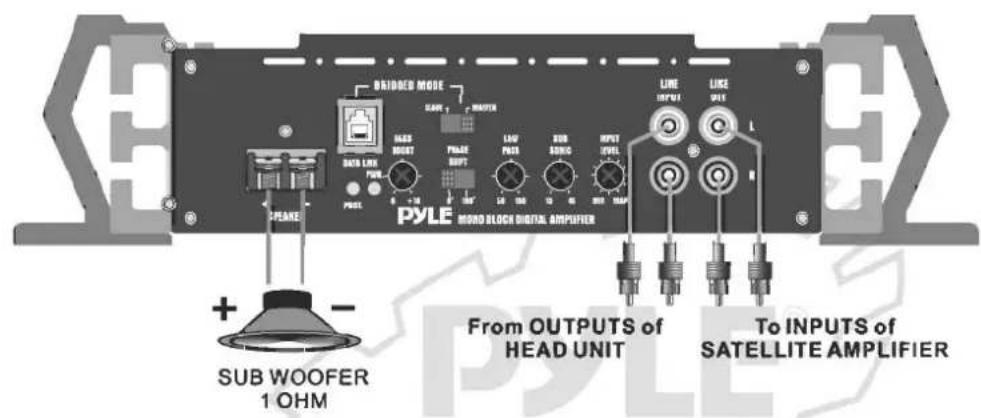
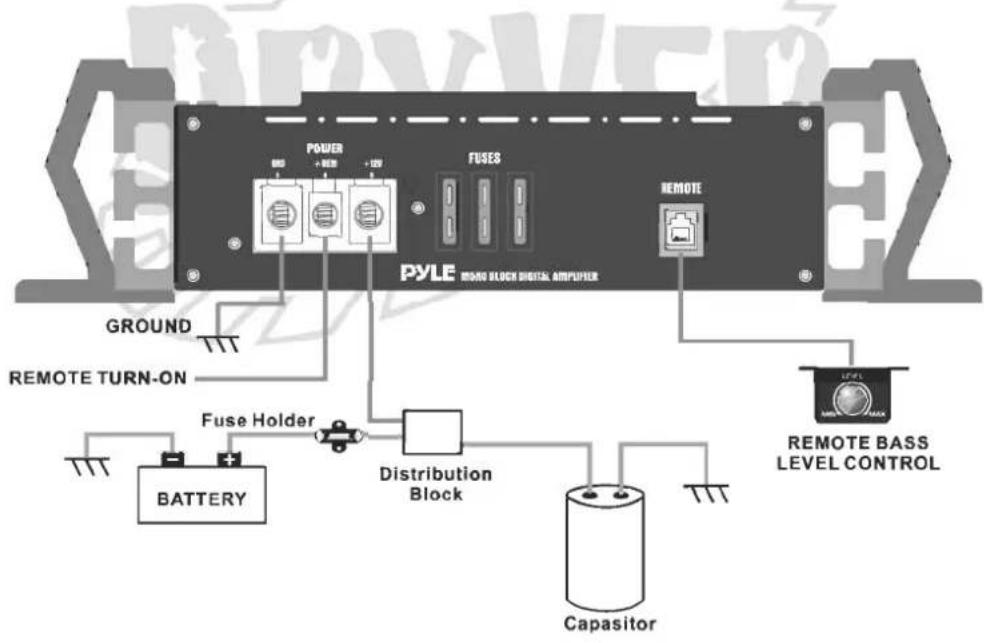
BRIDGING TWO AMPLIFIER
PLAD3300D
TROUBLESHOOTING
Amplifier will not power up.
- Check for good ground connection.
- Check that remote DC terminal has at least 3V DC.
- Check that there is battery power on the + terminal.
- Check all fuses.
- Check that Protection LED is not lit. If it is lit, shut off amplifier briefly and then repower it.
High hiss or engine noise (alternator whine) in speakers.
- Disconnect all RCA inputs to the amplifier(s)-if hiss/noise disappears, then plug in the component driving the amplifier and unplug it's inputs. If hiss/noisedisappears, go on until the faulty/noisy component is found.
- It is best to set the amplifier's input level as low as possible. The best subjective S/N ratio is obtainable this way. Try to drive as high a signal level from the head unit as possible.
Protection LED comes on when the amplifier is powered up.
- Check for shorts on speaker leads.
- Check that the volume control on the head unit is turned down low.
- Remove speaker leads, and reset the amplifier. If the Protection LED still comes on, then the amplifier is faulty.
Amplifier(s) gets very hot.
- Check that the minimum speaker impedance for that model is correct.
- Check for speaker shorts.
- Check that there is good airflow around the amplifier. In some applications, an external cooling fan many be required.
Distorted Sound
- Check that the Level control(s) is set to match the signal level of the head unit.
- Check that all crossover frequencies have been properly set.
- Check for shorts on the speaker leads.
High squeal noise from speakers.
- This is almost always caused by a poorly-grounded RCA patch cord.
PYLE® DRYVER
www.pyleaudio.com
Printed in korea.


- PYLE® DRYVER
- TABLE OF CONTENTS
- INTRODUCTION
- FEATURES
- SPEAKER TERMINAL
- BASS BOOST CONTROL
- PHASE SHIFT SWITCH(0 \~ 180 DEGREES)
- 4.VARIABLE LOW-PASS FILTER (50Hz \~ 150Hz)
- 5.VARIABLE SUBSONIC CONTROL(15Hz - 40Hz)
- INPUT LEVEL(INPUT SENSITIVITY ADJUSTMENT)
- LINE INPUT RCA JACKS
- LINE OUT RCA JACKS
- BRIDGED MODE
- REMOTE CONTROL INPUT
- LED Indicator
- B- TERMINAL (CHASSIS GROUND)
- REMOTE POWER ON
- 14.B+ TERMINAL (BATTERY POSITIVE)
- INSTALLATION
- PRECAUTIONS
- SYSTEM WIRING
- WIRING DIAGRAM
- PLAD3300D
- BRIDGING TWO AMPLIFIER
- TROUBLESHOOTING
- Amplifier will not power up.
- High hiss or engine noise (alternator whine) in speakers.
- Protection LED comes on when the amplifier is powered up.
- Amplifier(s) gets very hot.
- Distorted Sound
- High squeal noise from speakers.
Marke : Pyle
Modell : PLAD3300D
Kategorie : Empfänger