
Cat.6 Keystone Jack unshielded LSA+ - Kabel für Computer und Peripheriegeräte Equip - Kostenlose Bedienungsanleitung
Finden Sie kostenlos die Bedienungsanleitung des Geräts Cat.6 Keystone Jack unshielded LSA+ Equip als PDF.


| Produkttyp | Cat.6 Keystone Jack (unshielded) |
| Modell | LSA+ Anschluss |
| Marke | Equip |
| Kategorie | Netzwerkzubehör |
| Farbe | Weiß oder transparent (je nach Ausführung) |
| Material | Kunststoff (flammwidrig, UL 94 V-0) |
| Abmessungen (ca.) | 20 x 15 x 15 mm |
| Gewicht | Ca. 5 g |
| Anschlusstyp | RJ45 Buchse (8P8C) auf LSA+ Klemmleiste |
| Kategorie | Cat.6 (TIA/EIA-568-C.2) |
| Abschirmung | Unshielded (U/UTP) |
| Verdrahtungsstandard | T568A/T568B (kompatibel) |
| Betriebsfrequenz | Bis zu 250 MHz |
| Übertragungsrate | Bis zu 1 Gbit/s (Gigabit Ethernet) |
| Installation | LSA+ Anschlusstechnik (punch-down) ohne Werkzeug möglich |
| Kabeldurchmesser | Für AWG 22–26 (0,64–0,5 mm) |
| Betriebstemperatur | -10 °C bis +60 °C |
| Lagertemperatur | -40 °C bis +70 °C |
| Luftfeuchtigkeit | Bis zu 85 % (nicht kondensierend) |
| Reinigung | Mit trockenem, fusselfreiem Tuch abwischen, keine aggressiven Reiniger |
| CE-Kennzeichnung | Ja |
| RoHS-konform | Ja |
Häufig gestellte Fragen - Cat.6 Keystone Jack unshielded LSA+ Equip
Benutzerfragen zu Cat.6 Keystone Jack unshielded LSA+ Equip
0 Frage zu diesem Gerät. Beantworten Sie die, die Sie kennen, oder stellen Sie Ihre eigene.
Eine neue Frage zu diesem Gerät stellen
Laden Sie die Anleitung für Ihr Kabel für Computer und Peripheriegeräte kostenlos im PDF-Format! Finden Sie Ihr Handbuch Cat.6 Keystone Jack unshielded LSA+ - Equip und nehmen Sie Ihr elektronisches Gerät wieder in die Hand. Auf dieser Seite sind alle Dokumente veröffentlicht, die für die Verwendung Ihres Geräts notwendig sind. Cat.6 Keystone Jack unshielded LSA+ von der Marke Equip.
BEDIENUNGSANLEITUNG Cat.6 Keystone Jack unshielded LSA+ Equip
- Strip approximately 40mm of the cable jacket.
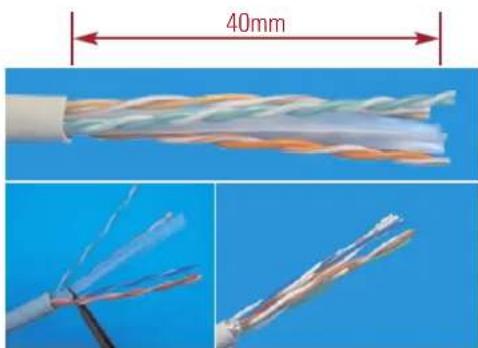
- Follow the color-coding to position T568A or T568B wiring.
T568A T568B
Pin 1 White/Green Pin 1 White/Orange
Pin 2 Green Pin 2 Orange
Pin 3 White/Orange Pin 3 White/Green
Pin 4 Blue Pin 4 Blue
Pin 5 White/Blue Pin 5 White/Blue
Pin 6 Orange Pin 6 Green
Pin 7 White/Brown Pin 7 White/Brown
Pin 8 Brown Pin 8 Brown
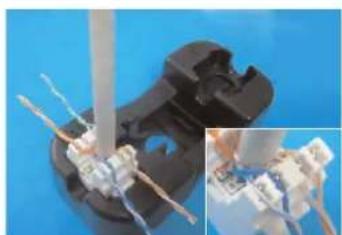
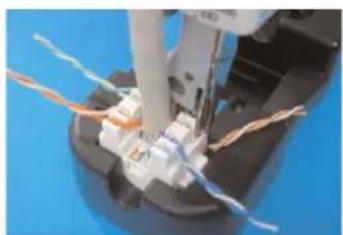
- Follow the wiring sticker to place the wires into IDC slot. Make sure to keep the pairs twisted as long as possible.
- Punch the wires with a 110 or Krone impact tool and cut off the surplus wires.
Unshielded Type:
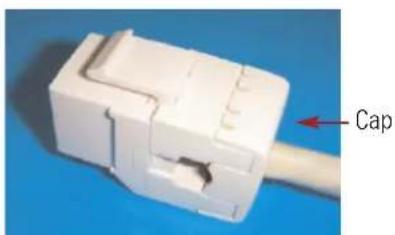
- Snap in the IDC cap to fix the wires, and finish the installation.
Shielded Type:


- Tie up the cable by cable tie, and finish the installation.


Marke : Equip
Modell : Cat.6 Keystone Jack unshielded LSA+
Kategorie : Kabel für Computer und Peripheriegeräte