
Cat.6 Keystone Jack - Kabel für Computer und Peripheriegeräte Equip - Kostenlose Bedienungsanleitung
Finden Sie kostenlos die Bedienungsanleitung des Geräts Cat.6 Keystone Jack Equip als PDF.


| Produkttyp | Cat.6 Keystone Jack Modul |
| Kategorie | Cat 6 |
| Normen | TIA/EIA-568-B.2, ISO/IEC 11801 |
| Anschlussart | IDC (Krone) für Litzen- und Massivleiter |
| Kontakte | 8 (RJ45 Buchse) vergoldet |
| Schirmung | Ungeschirmt (UTP) und geschirmt (STP) verfügbar |
| Farbcode | T568A und T568B (kundenseitig wählbar) |
| Gehäusematerial | Kunststoff, halogenfrei |
| Kontaktmaterial | Phosphorbronze, vergoldet |
| Abmessungen (ca.) | 20 × 16 × 21 mm (B × H × T) |
| Gewicht (ca.) | 8 g |
| Betriebstemperatur | -20 °C bis +60 °C |
| Lagertemperatur | -40 °C bis +70 °C |
| Luftfeuchtigkeit | 10 % – 90 % (nicht kondensierend) |
| Kompatibilität | RJ45 Stecker der Klasse Cat5e, Cat6, Cat6a |
| Montage | Werkzeuglos (LSA+/Krone) – Abisolieren, Einlegen, Bügel schließen |
| Bewertung (Handbuch) | 8.5 / 10 |
| Garantie | 2 Jahre |
| Hersteller | Equip |
Häufig gestellte Fragen - Cat.6 Keystone Jack Equip
Benutzerfragen zu Cat.6 Keystone Jack Equip
0 Frage zu diesem Gerät. Beantworten Sie die, die Sie kennen, oder stellen Sie Ihre eigene.
Eine neue Frage zu diesem Gerät stellen
Laden Sie die Anleitung für Ihr Kabel für Computer und Peripheriegeräte kostenlos im PDF-Format! Finden Sie Ihr Handbuch Cat.6 Keystone Jack - Equip und nehmen Sie Ihr elektronisches Gerät wieder in die Hand. Auf dieser Seite sind alle Dokumente veröffentlicht, die für die Verwendung Ihres Geräts notwendig sind. Cat.6 Keystone Jack von der Marke Equip.
BEDIENUNGSANLEITUNG Cat.6 Keystone Jack Equip
- Strip approximately 40mm of the cable jacket.

- Follow the cap color code to place the wires into the cap slot. Make sure to keep the pairs twisted as long as possible.
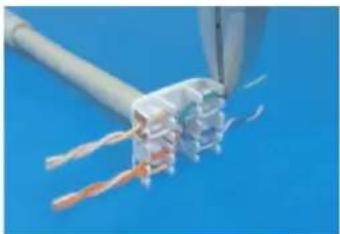
- Lock the side caps with "CLICK" means successful connection.

- Follow the color-coding to position T568A or T568B wiring.
T568A T568B
Pin 1 White/Green Pin 1 White/Orange
Pin 2 Green Pin 2 Orange
Pin 3 White/Orange Pin 3 White/Green
Pin 4 Blue Pin 4 Blue
Pin 5 White/Blue Pin 5 White/Blue
Pin 6 Orange Pin 6 Green
Pin 7 White/Brown Pin 7 White/Brown
Pin 8 Brown Pin 8 Brown
- Follow the color sign to put the cap onto IDC.

- Tie up the cable and finish.
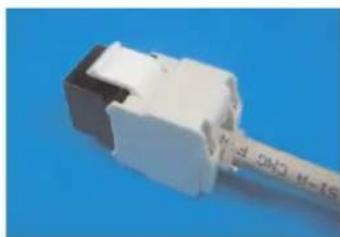
Unshield
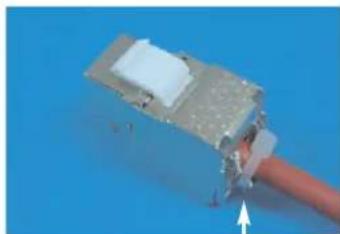
Shielded
connect the drain wire to the shielded shell


Marke : Equip
Modell : Cat.6 Keystone Jack
Kategorie : Kabel für Computer und Peripheriegeräte