
Talkabout T100 - Radio MOTOROLA - Gratis brugsanvisning og manual
Find enhedens vejledning gratis Talkabout T100 MOTOROLA i PDF-format.


Brugerspørgsmål om Talkabout T100 MOTOROLA
0 spørgsmål om dette apparat. Besvar dem du kender, eller stil dit eget.
Stil et nyt spørgsmål om dette apparat
Download vejledningen til din Radio i PDF-format gratis! Find din vejledning Talkabout T100 - MOTOROLA og tag din elektroniske enhed tilbage i hånden. På denne side er alle dokumenter nødvendige for brugen af din enhed offentliggjort. Talkabout T100 af mærket MOTOROLA.
BRUGSANVISNING Talkabout T100 MOTOROLA

MOTOROLA
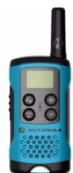
TALKABOUT® TWO-WAY RADIO T1XX SERIES
[NO TEXT]
![MOTOROLA Talkabout T100 - [NO TEXT] - 1](/content/2026/05/884157/images/5bdb2774524a1ea7df4b1ab9576a8c04080ccaa069ea59a772b5aa16adacc74d.jpg)
MN002664A01-EN
MOTOROLA, MOTO, MOTOROLA SOLUTIONS and the Stylized M logo are trademarks or registered trademarks of Motorola Trademark Holdings, LLC and are used under license. All other trademarks are the property of their respective owners. © 2016 Motorola Solutions, Inc. All rights reserved.
Safety and General Information
RF Exposure and Product Safety Instructions for
Portable Two-Way Radios General Populated and Uncontrolled Environments
Uncontrolled Environments
Before using this radio, refer to the important operating instructions for safe usage and RF energy awareness and control for compliance with applicable Standards and Regulations.
Compliance with RF Exposure Standards
Your Motorola Two-Way radio complies with the following RF er exposure standard and guidelines:
United States Federal Communications Commission
Code of Federal Regulations; 47 CFR et seq. & FCC.
• Institute of Electrical and Electronic Engineers (IEEE • International Commission on Non-Ionizing Radiation
Protection (ICNIRP)
• Ministry of Health (Canada) Safety Code 6 & Industry Canada RSS-102.
• Australian Communications Authority Radiocommunications
Standard et seq.
Transmit and Receive Procedure
Your two-way radio contains a transmitter and a receiver. To control your exposure and ensure compliance with the general population/
uncontrolled environment exposure limits, always adhere to the
following procedure: Transmit no more
• To receive calls, release the Push-to-Ta
• To transmit (talk), press the PTT button in front of the face • Held the radio in a vertical position with the microphone (o
- Hold the radio in a vertical position with the microphone (and other parts of the radio including the antenna) at least one inch
(2.5 centimeters) away from the nose or lips. Keeping the radio at a proper distance is important to ensure compliance.
Note: RE exposure decreases with increasing distance from the
Note: For exposure decreases with increasing distance from the antenna.
• Body Worn Operation. When worn on the body, always place
the radio in a Motorola-approved clip, holder, hoister, case of body harness for this product.
Please refer to the following websites for more information on what
RF energy exposure is and how to control your exposure to a compliance with established RF exposure limits:
- http://www.fcc.gov/oet/rfsafety/rf-faqs.html
• www.who.int/en/
- http://responsibility.motorlasolutions.com/index.php/downloads/dow07-rfexposureassessmentstand/
Two-way Radio Operation
• Use only Motorola-approved supplied or replacement
antennas, batteries, and audio accessories. Use
Motorola-approved antennas, batteries, and wired or wireless
accessories may exceed the applicable RF exp guidelines (IEEE, ICNIRP or ECC)
a list of Motorola-approved accessories for your radio
model, visit the following website: http://
www.motorolasolutions.com/TalkaboutAccessories
Electromagnetic Interference/Compatibility
Note: Nearly every electronic device is susceptible to
electromagnetic interference (EMI) if inadequately shielded
designed or otherwise configured for electromagnet compatibility.
This device complies with part 15 of the FCC Rules. Operation is
subject to the following two conditions:
- This device may not cause harmful interference, and 2. This device must accept any interference received, in
interference that may cause undesired operation.
This device complies with Industry Canada licence-exempt RSS
standard(s). Operation is subject to the following 1. This device may not cause interference, and
- This device must accept any interference received, including
interference that may cause undesired operation of the device. Expiliting
Facultures Tetrahedron, 100% of the following: Human & Life, 25
To avoid electromagnetic interference and/or compatibility conflicts, turn off your radio in any facility where posted notices instruct you to
do so. Hospitals or health care facilities may be using equipment that
is sensi
Aircraft
When instructed to do so, turn off your radio when onboard an aircraft. Any use of a radio must be in accordance with applicable
aircraft. Any use of a radio must be in accordance with applicable regulations per airline crew instructions.
Medical Devices – Pacemakers, Defi
Implanted Medical Devices
Persons with pacemakers, Implantable cardioverter-defibrillators
(ICDs) or other active implantable medical devices (AIMD) shall consult with their physicians regarding the potential risk of
Consult with their physicians regarding the potential risk of interference from radio frequency transmitters, such as
portable radios (poorly shielded medical devices may be more
susceptible to interference).
- Turn the radio-off immediately if there is any reason to suspect that interference is taking place.
- Do not carry the radio in a chest pocket or nea
implantation site, and carry or use the radio on the opposite side of their body from the implantable device to minimize the
side of their body from the implantable device to the potential for interference.
Hearing Aids
Some digital wireless radios may interfere with some hearing aids. In
the event of such interference, you may want to consult your hearing aid manufacturer to discuss alternatives.
Other Medical Devices
If you use any other personal medical device, consult the
manufacturer of your device to determine if it is adequately shielded
from RF energy. Your physician may be able to assist you in obtaining this information.
Use of Communication
Always check the laws and regulations on the use
areas where you drive.
- Give full attention to driving and to the - Use hands free operation, if available
- Use hands-free operation, if available. - Pull off the road and park before making
driving conditions or regulations so require.
For Vehicle With Air Bags
Refer to the vehicle manufacturer's manual prior to installation of electronic equipment to avoid interference with air bag wiring.
electronic equipment to avoid interference with air bag wiring. Do not place a portable radio in the area over an air ban or in the air
Be not place a portable radio in the area over an air bag or in the air bag deployment area. Air bags inflate with great force. If a portable
radio is placed in the air bag deployment area and the air bag inflates. The radio may be cancelled with road force and save
inmates, the radio may be propelled with great force and cause serious injury to occupants of the vehicle.
Sonicous injury to occupants of the vehicle. Potentially Explosive Atmosphere
Potential
Turn off your radio prior to entering any area with a potentially explosive atmosphere. Only radio types that are especially qu
explosive demorphore: Only basic types that are especially qualified should be used in such areas as "Intrinsically Safe". Do not remove.
install or charge batteries in such areas. Sparks in a potentially
explosive atmosphere can cause an explosion or fire resulting in bodily injury or even death.
D
Note: The areas with potentially explosive atmosphere referred to above include fueling areas such as below decks on boats.
above include fueling areas such as below decks on boats, fuel or chemical transfer or storage facilities, areas where the
Air contains chemicals or particles (such as grain, dust or
metal powders) and any other area where you would be advised to turn off your vehicle engine. Areas with
be advised to turn on your vehicle engine. Areas will potentially explosive atmospheres are often – but not always
potentially explosive atmospheres are often – but not always posted.
Blasting Caps and Areas
To avoid possible interference with blasting operations, turn off your
radio when you are near electrical blasting caps, in a blasting area, or in areas posted "Turn off two way radions". Obey all signs and
in areas posted "Turn on two-way radios : Obey all signs and instructions.
。
Operational Cautions
A
Do not use any portable radio that has a damaged antenna. If a
damaged antenna comes into contact with your skin, a minor burn
can result. Batteries
E
All batteries can cause property damage and/or bodily injury such as burns if a conductive material touches exposed terminals. The
burns in a conductive material touches exposed terminals. The conductive material may complete an electrical circuit (short circuit).
conservative material may complete an electronic street (e.g. street), and become hot.
• Exercise care when removing AAA batteries. Do not use sharp
or conductive tools to remove these batteries. • Exercise care in handling any charged battery, part
Exercise care in handling any charged battery, particularly when placing it inside a pocket, purse or other container with
metal objects.
Do not discard your battery in a fire.
- Do not replace the battery in any area labeled "Hazardous Atmosphere". Any sparks created in a potentially explosive
atmosphere : Many spots created in a pet atmosphere can cause explosion or fire.
- Do not disassemble, crush, puncture, shred or otherwise
attempt to change the form of your battery. • Do not dc a wet batten or damp batten with an
- DO NOT DRY IS HOT BATTERY OF CLAMP BATTERY WITH AN APPLIANCE OF heat source, such as a hair dryer or microwave oven.
• If the radio battery contact area has been submerged in water
dry and clean the battery contacts before attaching the battery to the radio.
[Non-Text]
Licensing Information
[Non-Text]
Use of GMRS frequencies is subject to the Rules and Regulations of
the Federal Communications Commission (FCC).
The FCC requires that all operators using GMRS frequencies obtain a radio losses before operating their equipment. To obtain the FCC
a radio license before operating their equipment. To obtain the FCC forms, please visit the FCC website at wireless.fcc.gov/uls/
index.htm?job=home to source form 605 and 159, which includes all
the instructions you will need. If you wish to have the document fixed or mailed, or if you have
If you wish to have the document taxed or mailed, or if you have questions, please use the following contact information:
| For a fax:Contact the Fax-On-Demand system | For mail service:Call the FCC Forms Hotline | If you have questions about the FCC License:Call the FCC |
| 1-202-418-0177 | 1-800-418-FORM (3676) | 1-888-CALL-FCC(225-5322) |
[Non-Text]
Canada
Use of Motorola radio in Canada is subject to the rules & regulations of Industry Canada (IC). IC requires challenges when elected in
of Industry Canada (IC). IC requires no license when operated in Canada.
Changes or modifications not expressly approved by Motorola
Solutions may void the user authority granted by the IC/FCC to
operate this radio and should not be made. To comply with ICFCC requirements, transmitter adjustments should be made only by or
Under the supervision of a person certified as technically qualified to
perform transmitter maintenance and repairs in the private land
mobile and fixed services as certified by an organization representative of the user of those services. Replacement of any
representative of the case of those services. Replacement of any transmitter component (crystal, semiconductor, etc) not authorized by
the IC/FCC equipment authorization for this radio could violate IC/
FCC rules.
Note: Use of this radio outside the country where it was intended to be distributed in subject to government regulations and may
be distributed is subject to government regulations and may be prohibited
[Non-Text]
Use of GMRS frequencies is subject to the Rules and Regulations of
the Federal Communications Institute (IFT) requires that all operators
using GMRS frequencies obtain a permit before operating their equipment. To obtain a permit from the IET, the user must proceed in
equipment. To obtain a permit from the 4-1, the door must proceed in accordance with Articles 14 and 15 of the Federal
Telecommunications Law. Consult your local IFT office for more
information: www.ift.org.mx
Uruguay
Use of GMRS frequencies is subject to the Rules and Regulations of
the Regulatory Unit Communications Services (URSEC), URSEC
requires that all operators using GMRS frequencies obtain a permit before operating their equipment. The authorization shall depend on
Before operating their equipment. The authorization shall depend on the channel availability at the time the authorization is requested. To
obtain a permit from URSEC, consult your local URSEC office for
[Non-Text]
Banama
The Republic of Panama does not require authorization to use FRS/
GMRS radio equipment frequencies.
[Non-Text]
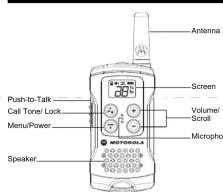
Control Buttons
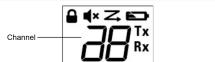
Display Screen Guide
0
-
广力云智慧零售收银系统
d
图2
-
Z
B
-
[Non-Text]
Ty
TXI
Batt
Bott
BOM
Stat
rece
[Non-Text]
Getting Started
Installing the Batteries
Installing the Batteries
- Make sure your radio is OFF
-
To remove the battery,
-
To remove the battery compartment door, by pressing the tab of the bottom of the compartment door. Remove the door
at the bottom of the compartment door. Remove the Insert 3 AAA batteries into the battery compartment.
- Replace the battery compartment door.
Battery Level and Low Battery Alert
[Non-Text]
This
icon
who
n belt
imm
ediat
(二) AD = AC = 1
[Non-Text]
e TH
ree
o off
of the
of the MOV
c. ear
to the
tery
•
[Non-Text]
when
five
atteri
Urine
it dat
d Re
- p/12
Tclp
lt clir
n clip
-
. . . .
ase to
sp at
m = 311
B
m = 311
nce
[Non-Text]
Ra
(1)
the N
Vo
7.15
urne
UH0
the
thy 8
e So
n b
a De by dit
DOR
he
- 定
ha O
utton
than
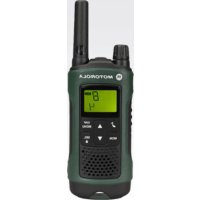
Mærke : MOTOROLA
Model : Talkabout T100
Kategori : Radio