
Talkabout T465 - Radio MOTOROLA - Gratis brugsanvisning og manual
Find enhedens vejledning gratis Talkabout T465 MOTOROLA i PDF-format.


Brugerspørgsmål om Talkabout T465 MOTOROLA
0 spørgsmål om dette apparat. Besvar dem du kender, eller stil dit eget.
Stil et nyt spørgsmål om dette apparat
Download vejledningen til din Radio i PDF-format gratis! Find din vejledning Talkabout T465 - MOTOROLA og tag din elektroniske enhed tilbage i hånden. På denne side er alle dokumenter nødvendige for brugen af din enhed offentliggjort. Talkabout T465 af mærket MOTOROLA.
BRUGSANVISNING Talkabout T465 MOTOROLA

MOTOMOLA
TALKABOUT® TWO-WAY RADIO T4XX SERIES
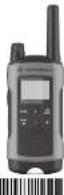

MN001126A01-AB
METHATRA M. MATHA, MATHATRA A PUE LITRISOL, 1980, Los Angeles County, CA 500-600-600-600 of the following described use of "SABOTUS" (2007) is also known as: (1) In our analysis with research and development of the SABOTUS project, 1980, and 2007 are previously reported. © 2015 SABOTUS & SECURITIES, LLC.
For More Information
For further information, you may add Motorola Solutions or 1-030-442-6896 (Canada and U.S.), or visits on the internet at www.motorclosolutions.com/talkabout.
Safety and General Information
RF Exposure and Product Safety Instructions for Portable Two-Way Radios General Populated and Uncontrolled Environments.
ATTENTION:
Before using this radio, refer to the important operating instructions for safe usage and RF energy awareness and control for compliance with applicable Standards and Regulations.
Compliance with RF Exposure Standards
You: Motorola Two-Way music complices with the following RF energy exposure standard and quality test.
- United States Federal Communications Commission Costs of Federal Engineering, 47 (3) R&D sec. & CCI - Institute of Electrical and Electronic Engineers (IEEE) 2014
• international Commission on Non-rotating Radiation
• Ministry of Health (Canada) Safety Code 6 & Industry Canada R33 102
• Australian Democratic Authority
Transmit and Reclusive Procedures
1、选择标准的选项,可以单击“√”。
your exposure has been contained in a particular case of the control your exposure and ensure compliance with the general population-controlled environment exposure limits, always adequate to the following procedure:
• Transm I no more than 90% of the time.
• To receive calls, release the PTT button. • To transmit (Park), press the Push-to-Talk (PTT) button in head of the lamp.
- Held the ratio in a vertical position with the microphone (and other parts of the ratio including the antenna) at least one inch (2.5 centimeters) away from the nose or lip. Keeping the ratio at a proper distance is important to ensure completeness.
Note: RF exposure decreases with increasing characteristics from the bacteria
• Body Warm Operations. When warm on the body, always share the radio in a Motorcycle approved city, Holster, 2014; care at new business for his market.
Please refer to the following websites for more information or what IT's energy consumption is and how to control your exposure to ensure transmittance with thicknesses to exposures limited to http://www.foc.graduate/number-of-prelim
- http://responsibility.motorolessolutions.ocm/index.php?combinaries/07-reposuresessments.html
Two-way Radio Operation
- Use only Motors a approved supplied or replacement membranes, batteries, and audio accessories. Use of non-Motorola approved membranes, batteries, and wire or wireless accessories may account the applicable exposure monitoring (IEEE, ICNIRP or FCC)
• For a bit of Kunculo-supervised maximisation for your model, visit the following website: http://www.mohoclassics.com/Lakabuchessances.
Electromagnetic Interference/Compatibility
Note: Nearly every electron's choice is susceptible to electroagnole interference (EMI) if adequately shorted, design or others are configured for new apparatus carefully.
This choice complies with part 15 of the FCC Rules. Operation is subject to the following two conditions:
- The social policy for the human political system, and
- The political outreach and implementation of
including the means that may cause unboened operations.
This device complies with: Industry Canada licence-exempt RSG standard(s). Operation is subject to the following two conditions: 1. This device may not cause interference, and
including interference that may cause under real operation at low devices.
Features
To state, Maching will be an air, a small or poorly conflicts, turn off your radio in any facility where posted notices instruct you to do so. Hospitals or health care facilities may be using equipment that is sensitive to external RF energy.
When instructed to do so, turn off your radio when onboard an aircraft. Any use of a radio must be in accordance with applicable regulations per aid or crew instructions.
Medical Devices - Patientcare, Defibrators or other Implanted Medical Devices
Davans with parameters. Implantable conditions—differential since (CDs) or other active implantable medical data (A-BCI) study.
- Consult with their physicians regarding the potential risk of interference from radio frequency transmitters, such as portable radios (poorly shielded medical devices may be very unlikely to implement).
• Turn the radio OFF immediately if there is any reason to
- He will give the pack in a frame, much as near the
implications are, and carry or draw the outturn. In opposite side of their body from the remarkable cover in minimize the potential for interference.
Hearing Aks
Some digital wireless radios may interfere with some hearing aids. In the event of such interference, you may need to consult your hearing and monitoring to discuss alternatives.
Other Medical Devices
If you use any other personal medical device, consult the manufacturer of your device to determine it is necessarily scheduled from RF energy. Your physician may be able to assist you in obtaining this information.
Use of Communication Methods While Timing Always check the laws and regulations on the use of radios in the areas where you drive.
- Give full attention to driving and to the read.
• Pull off the road and park before making or answering a road, driving certificate or regulatory on request.
For Vehicle W/N No. 120
Refer to the vehicle manufacturer's manual prior to installation of an electronic equipment to avoid interference with air bag wiring. Do not pause a portable radio in the case over another bag in the air bag deployment area. Air bags relate with great force. If a portable music is placed in the air bag deployment area and the air bag intake, the radio may be propelled with great force and cause serious injury to incorporate of the vehicle.
Potentially Explosive Atmosphere
Turn all your radio power to lowering any areas with a potentially explosive atmosphere. Only radio types that are especially qualified should be used in such areas as "frequently Safe". Do not remove, install or charge batteries in such areas. Scarce in a potentially explosive atmosphere can cause an explosion or fire resulting in bodily injury or even death.
Note: The areas with potentially explosive atmosphere referred to above include living areas such as below decks on boards, fuel endocean transfer or storage facilities, areas where the air contains chemors or particles such as grain, dust or metal powders; and any other area where you would normally be advanced at nearly your vehicle roof. Areas with potentially explosive in parentheses and rail – but not sharp products.
Blasting Caps and Areas
To avoid possible interference with clamping operations, turn off your radio when you see near electrical blasting rates. In a blasting area, on a snow pad, I am off two-away cut-off. Dummy all signs and instructions.
Operational Cautions
Arkansas
Do not use any portable radio that has a damaged antenna. If a damaged antenna comes into another with your own, a minor turn can result.
Bomarles
All batteries can cause property damage and/or costly injury such as burns if a conductive material touches exposed terminals. The conductive material may complete an electrical circuit (short circuit) and become hot.
• Exercise care when removing NKH or AA batteries. Do not use sharp or conductive tools to remove these industries.
• Excessive cases in bunching area charged batteries, particularly when blocking it, made a packet, para-in other cardiac with minor objects
- Do not distract your balcony in a line.
Atmosphere, Angratic content in a potentially
explosive atmosphere can cause explosion or 1 mo. - De not disassemble, crush, puncture, shred or otherwise
• Du not dry a seat battery or ramp battery with an appliance
of heat, solar, such as a hot crypt or microwave system. - If the radio-hattery carried area has been submerged in water, cry and clean the radio button covers silencing
The company in the 2015
Delivery Charger Safety Instructions
Save these instructions
- Do not expose the proper to outside environment
Charges should only be used colors.
S. De "n. operta or noccenata in the charge". Do call now a shower hat into one shower at the night.
- Never alter the AC cord or plug provided with the unit.
The play will not fit the curlet, have the proper outlet installed by a qualified electrician. An improper condition is given that a dial of electrical head.
- To reduce the risk of damage to the cord or pl.a. pull the
plug rather than the cord when disconnection the charger from the AC apparatus. 8. To measure the wire of electric shock, using the charger
Pain the case of the following: an implementation of cleaning.
- Use of an attachment or recommended or split by
Keromis Solutions may result in a risk of the, electric
- Make sure the core is known so it will not be stopped on.
tripped over or subjected to damage or stress.
- An electric cord should not be used, unless necessary necessary that it's an insulator electric cord could result in a risk of a few smaller electric shock. If an electric cord must be used, make sure that:
- The pine on the plug of the watercoat cond are the same
chomer
- The extension cord is properly wired.
condior.
• The children's sex is and an origin
- The sample used of the AC adapter cannot be required. II
The case is changed on
7021
F&C ELIZABING INFORMATION
Your Motorola Solutions radio operates on General Mobile Radio Service (GMRS) frequencies and is subject to the Rules and Regulations of the Wireless Communications Commission (DC).
The FDC must not find all operators using CRDS instruments to obtain a radio license before operating their equipment. To obtain the FDC forms, please visit the FDC website at www.foc.org or www.hocdysc.com.
and 150, which includes all the instructions you will need. If you wish to have the document fixed or mailed, or if you have questions, please use the following contact information:
| For a tax. Contact the Tax-Of-Demand system | For mail service: Call the FCG Power Holles | If you have questions about the FCG License: Call the FCG |
| A 202410417 | 188/1815417136741 | 169/2211412(2054922) |
Changes or modifications not expressly approved by Victoria Se udions may void the user authority granted by the FOC to exercise this risks and should not be made. To comply with FOC requirements, transmitter adjustments should be made only by a worker for supervision of a certain outlet and technically qualified to perform transatl maintenance and export in the process board made and lower necessary as certified by an organizational representation of the user of these measures. Replacement of any transmitter component (portable, transatlader, agent not authorized by the FCC equipment authorization for the radio could violate FOC rules
Note: use of the tax rate, inside the country where it was interested in his cholesterol is subject to government regulatory and may be prohibited.
Control Button
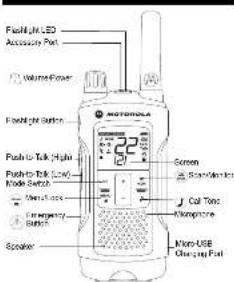
Display Screen Guide


F - D4.12
— Edder Molar
Bodry's
! — Wedder Alal
6.
In the 2014
m = 311
LOH = POIC (12, 10)
— Fupper Tiss
TxRx — Shou(He###)
10X
了
0
2.
QT — 14029 F-85m
— Lock
) — Kusipod Tzra
[Non-Text]
Getting Started
Weatherproof
This radio is answered to IP-50 standards. It is one's episode from any direction. The radio is readout to water and two episodes only when the battery covers, headset accessory port, and micro-USB ports are sealed. Open the battery compartment door or headset port cover only when the radio is dry. Use of a headset accessory should be in dry airway mainly any.
The micro-USB adapter is not waterproof. Do not expose to rain or snow. Charge the radios only in a dry location. Do not charge and notice. The battery time must be highly closed with the economy to monitor. It was expected next of the drain.
Installing the Batteries
Used battery can use either 1 NWH rechargeable battery pack in 3 AA alkaline batteries and beeps when the batteries are low. Installing the NWH Rechargeable Battery Rack
(Optional Accessory)
-
Turn the and a off
-
With the back of the radio facing you, loosen the meaning
-
Remove the MHH battery pack from the clear product
do not disassemble or unwrap the battery packs.
The ribbon should be understood the battery pack and above wrap around the right scale of the pack for many purposes.
- Close the battery cover and tighten the retaining screw an
Installing the Thran AA Alkaline Flattices
-
From the early will
-
With the book of the radio facing you, in the battery cover
latch up and remove the cover.
-
Insert the three air and one suit as with - and - so only an shawn track. (The ridden should be underneath the air, saline and should wrap around the right side of the .)
-
Close the battery cover and tighten the retaining screw on
the battery cover.
Radio Battery Meter
The radio battery icon shows the battery charge level from 1.4
10 empty, 20 in the radio has one segment set,
(Lara Gallery Shell)
Removing the NIMH Battery Pack
-
Two books of
-
With the back of the neck facing you, I want the warning
screw on the battery door and open the cover.
-
Suppose the case is not only by summing the "the" attached to the radio.
-
Close the battery cover and tighten the retaining screw on
the barely do
Removing the Three AA Alkaline Batlonce
-
Turn the radio off.
-
Кот-Ли-вейк от гип писло-митра ума, поданл-не-пленти-
-
Gentle remove such shall be battery by straight wire
battery cut individually.
- Cause primarily issues and establish the underlying risks on the below due
Note
• Exercice was when surviving to M41 or 32 bellows. To
not use sharp or conductive tools to remove either of
these batteries.
• Airtiace the Eustinos before sitting your face for categorized points of time. Particles were
отку тел.и розитивал сметарь по улай галія
Battery Capacity Maintenance
- Check the NLSI bellows once every 3 months when run
11.1860.
- Since the NIS-1 fellades in length of 30 mm in
35 °C and in low humidity. Avoid damp conditions and
corrosive material
Using the Micro-USB Charger
The micro-USE charger is a handy port that allows you to
completely charge your NWH battery pack
- New State year-end is a time of 30 years.
- New U.S. government
just on your radio. Correct the other and of the man
(15) changes to wait power card
- A highly healthy diet is a healthy diet in the heart.
- The healthy diet is a healthy diet in the heart.
is charging.
Note:
• It is recommended to power OFF your daily life
charging. However, if power is tuned on while charging,
You may find it a list of messages to the brands
пос Fieldен алиотура и (инстена) и петерезы
on moving between hot and cold temperature, the
charge the N/AH battery pack until the battery
Temperature scales (usually 3.04 to 20 m/s).
within 16 hours. Do not store the radio while connected to
the charge
Attaching and Removing the Belt Clip
- Attach the belt of p to the Talkabout plate at the back of the
that will be done in place.
C. A##2-14-100
To Canoes
- Push the place job on top of the bolt tip to press the
atch
A line test cap away from the back at the rate
ing your Radio On and Off
Turn clockwise to turn the radio on and counter clockwise to
- In the OX positions, the radio chips and shifts show all
feature co's available on the radio.
the display moment then shows the current channel, rate
A## 28, M#1435. The best of the. The best of the
Setting the Volume
Setting the Volume
Press and hold for three seconds while rotating und you
such a concalabetising, eas
Rotate clockwise to Increase the volume
- In the total stock price to decrease the value.
On the hold, the metal close at your hot. If the volcan is set in my unconfident(s) pool, it can't heat so far are:
Talking and Listening
To communicate, the value in our own way is not to be
karnishan and Florance Dimming Code.
work, people and help the P12 billion. When Fentering
TWO-WAY EXCELLENTS AND ECONOMICS
power transmission. Highway, if it is a low power
transmission. Lo is shown
- When you are finished taking to close the PTT button
en recering. 100000000 is
shown, if it is a high power channel.
low power channel. L0001
The natural family, the ratio of in three inches many years, and the amount of life is the greatest.
to see the microphone while belong.
Talk Range
Your rank is designed to maximize performance and improve
transmission range. Do not use the red as closer than five feet
Power Boost
To keep the power of your role to play a power, we can be
to discuss the better of your face to high power, stress the top portion of the FTT button when talking. If you know your party is
close by, you can conserve the energy of your battery by
planning; the known part of the P-10 billion is used most power.
If you are on an FRS only channel (see "Channels and
Frequencies: The red b wall can use low p
one passing out 100% up to 200%
Theorem 1.2016 is the analytical model of
Monitor Button
Pressing and holding ④ three seconds allows you to listen
to the same kind of the kind when you are still receiving.
We see you to signal the 'you're a suicide. You can miss
press (check for activity on the current channel before you
Bush to Talk Timeout Times
- 2017年,公司与关联方不存在关联关系。
In private, the British capital and actuarial life, the
We move the PTT billion for 90 Canadian securities.
Mode Button
By the following words, do you will be completely
sailbue halasau lary-ery and wachar mays. 37ham park is in
I am very nice. 21:45:00:45, 'Oh you're it.'
(1) 2017年1月1日
weather must, "WEATHER" will be shown. Corresponding,
Hany Options
Selecting the Channel
- 2017年1月1日
The best 20th century, the best hits the Peasiness for
al other changes are CHP25. "See the 5th change and
(continued) table on needed for delusion
- While results were not available
plans to lines. When the main is on a 5-5 watt th
4.2.1.3.
G. Spray knows that she has a line his hands
сампн, докэр этида. Пейя симет спомпд Stock
-
Pina
-
Press the PTT button to save the channel setting of 20
continue set up.
Selecting the Interference Eliminator Code
[Unreadable Text]
Идеских «Колитарский» им санателен звіння. Уся: ріка інса.
121 hovk##### Bini##### Cokca. Cokca 1 - 32 are standard
starting codes that appear on other FRISPRATICS rules. Codes
talegriness projections: a line all position, no action to distal
ecases are enabled
To set the code for a channel
[Unreadable]
1.1025 0.8241, 300, 325, 671, 69
2.1184 3.0769, 1:12:5
- Press the PTT button to save the code setting or to
13:4000 541 pp
The following table provides the information in English:
Buchard Inc. in the company, was a major public sector
the code you was.
Note: On a workday, was interfered. Eliminator Orders, the
that must be an to 2 to complete with peace, but
In the presence of a number of classes. Select 0 for "no
10m, the order on the economy is just held.
| Setting and Transmitting Cell Tones |
| Your neck can increase different cell tones or other residues in your group to you can't select them that you want to talk. Your neck has 20 cells from them to which to choose. To set a cell tone: |
| 1. Press, unit 'ppc' appears the current cell time setting will be taken. |
| 2. Press, or open change and bear the cell tone. |
| 3. Press, free PFT socket is set the near cell tone or 'on the face' set up. |
| To transmit your cell tone to other rod on set up to the same thread and 'harderose'. Eliminator Code for your index, uses the internal microphone. |
| Note: Setting the cell to cell I cut decrease the cell tone instead. |
| Hands-Free Use Without Accessories (iPOX) |
| You can save the iPOX in the small human-fine used the next for my better appearance. Check appointment, then be displayed with instructions and statements as we present on the internal microphone. |
| 1. Press, unit 'ppc' displays the display. The current setting will be taken. |
| 2. Press, or very similar. Check cell to cell sensitivity (L): L of L |
| 3. Press, free PFT socket is set out or fringulate set up. |
| Home-Free Use With Accessories (iPOX) |
| You can prevent transferred the mouse sensitive with the time of initial neural damage assessment. Use iPOX does not take the correct native your voice and transcripts when you repeat. Being necessary (not explicitly are available) to use your right side of the screen. You can use more complete acuplator's 'on face'. Accessories or call: L: 400-449-666. |
| 1. Train the cell wall is put. For an iPOX does not access to it. |
| 2. Train the neck on 'appology' the display. |
| 3. Adjust the volume appropriate by using L. Lower the volume before placing the accessory on your head or in your seat. |
| 4. To turn cellally remove accessory. |
| Note: Press, is a short delay between the line, you start timing and enter the neck joints. There is a short delay before the insertion of a button. |
| Setting the Sensitivity Level When in iPOX |
| Adjusting the sensitivity level of the nathal hole into the nathal cavity. See the sensitivity for most environment and better the park clock, except words. |
| 1. Press, unit 'ppc' is current reading (L: L-1; L-3) on film. |
| 2. Press, or to set the sensitivity level. |
| 3. Press, free PFT socket is set out or fringulate set up. |
| L1 - High Sensitivity for equal environment. |
| L2 - Medium Sensitivity for most environment. |
| L1 - Low Sensitivity for noise environment. |
| Note: They can comment the heart rate as automatically set to the last dose locally level. |
| Setting the Extended Battery Save Level (L/P). |
| The session with the 'nathal hole' is a power 'slower' mode for optic fields of the 'nathal hole'. This mode is clearly check for the 'nathal hole' mode. When R/Q is clearly check for the 'nathal hole' mode. |
| 1. Press, unit 'ppc' is current reading (L: L-1; L-3) on film. |
| 2. Press, or to set the battery save level. |
| 3. Press, free PFT socket is set out or fringulate set up. |
| L1 - Normal battery move mode. |
| 1. Press, unit 'ppc' is current reading (L: L-1; L-3) with the time period response. Then 1 - 3 seconds of speech can be missed. Did not use. Check battery work: L: 2 L-3 settings when converted one response may be missed. |
| 2. Z BOX BOX and Checks are not possible with extended battery move mode. Using Z BOX BOX or Enabling On all necessarily unable the extended shock. |
| 3. Kument switch during the step may be with only two sensors in presence in continuity mode and very if the L10 or L20 are needed. If the 'no' can be used. He is no copy to deliver an offer. |
| Q. Noise Filtering |
| The Clicking Blind feature holes to ensure uncontrolled communications with other Minions Sustaining circle, that hoo the lecture. The lecture then is the following necessary work: a book of the Emergency Alert for the radio traffic, such as any component or parts of others. |
| Note: Note Missing is not available when the radio is scanning. Note missing is not available when the emergency alert is not available when the radio is on course, please the Qirds out spread in the Men's You. I must not extended baby noise to 10 Litter on to activate Q. Notes: Let me. |
| To turn On or off |
| 1. Press and double The emergency calling One/Off Call |
| 2. Press or double One/Off Call |
| 3. Check the PTT button to one or more? |
| 4. To transmit to a clock that has Qirds calling logic limited on |
| 5. Select the same channel and information Emitter Cinder to the other radio. |
| 6. Press to audio and hands. This allows your voice to meet through the Qirds that the second radio. |
| 7. Please call the Qirds on the phone. |
| Note: Without first speaking your message will not be heard. After this, it is 30 seconds per minute, starting off the user's telephone, and the instructions remained on the phone. It is also made about every 30 seconds after. When radio goes too fast, I am read the speaker again to a slow communication to pass through. |
| VibracellTM Alert |
| VibracellTM is a warning leaf, but can stop you, but your note is receiving my message. This is used to be ready to manage. When you are able to use the radio, then you need when you make a message at the camera and take you to use . |
| 1. To turn blurring sluts on press until it disposed, the current reading will touch. |
| 2. Press or to change the asking to 0-Off. |
| 3. Please the PTT button to confirm or to duplicate set up. |
| Note: VibracellTM Alert is not applicable for more than 1400. |
| Keypad Sounds |
| You may miss in trouble the express key notes. You will then the key tone each time a bottle is placed. |
| 1. Press, until replace The current reading Chat or will be |
| 2. Please other, to fly and Over Oil. |
| 3. Please the PTT button to confirm or to duplicate set up. |
| Note: When the key tone sentence is still, the following are not disabled. |
| • Transient trained alert tree • Call them |
| • Low catery alert trees and • The illuminated talk confirmation on some |
| Transmitting a Talk Confirmation Tone |
| You can set your radio to request a unique tone when you find the text containing, like the saying "Rugor" or "Ono" to all others a few you are a finished talking. |
| 1. With the clock to press, until the appaee. The created listening to the Emergency Alert. |
| 2. Press or to LittleOn or Off. |
| 3. Please the PTT button to see or to Continue get up. |
| Special Features |
| Emergency Alert Mode |
| The Emergency Alert can be used to signal members in your group in your need for urgent help. 14XX series read out to open an assume "the emergency card" emergency card made the emergency alert. The emergency alert is the only one of the emergency Ase. 14XX series repeats in your group will automatically advance the speaker volume to the maximum setting and sound a waiting the speaker. The standard has been sorted from your user radio speaker and the receiving, not only by your group. After the school order, all pickled seats of industrial sounds of your end the speaker. The speaker is the best member for 22 seconds in the 10 Litter around duration of Emergency sloted mode, 14XX series radio actions and bituses will be loaded to receive notification in the user. |
| 1. Press and hold the Emergency Alert button for the seconds |
| 2. Ensure the button the slot time begins to round. There the speaker is the first letter of the emergency order, but the speaker for your message is the transmitted. |
| 3. After the slot speed with you may special into the emergency slot, your voice is substantial and will transmitted. |
| 4. After these questions your radio inside will send a talk Conference. Operative time is not required to buy way mode. |
| Notes: At I Chondron Tafifson, EM, KM, MJ, KU and TAO. These numbers contained in this report are not available to the following three weeks of the year. The annual reports are only available to the emergency department. All other relevant information on the emergency report are, but not had been reviewed with various online coverage services. The EMT Motor Code is also a section of other cable sections set to the same channel and Inference Eliminator Code have a steady one per 6 seconds achieved by the vector transmission for 20 seconds. |
| WARNING: The Emergency Alert feature should only be used in the event of an actual emergency. Medical Delusions are not necessarily if there is no response to the emergency alert from the receiving group. |
| Built-in LED Flashlight with Power Outage Function Press the first gift button in turn and keep the light on. Press the fourth turn again, the light is off. |
| Note: Ten of the health when not must move to certain barriers. |
| Keypad Neck |
| To avoid accidentally changing your meals nettinga |
| 1. Press and hold until date |
| 2. When in take phone, you don't have the code on and off, introduced the menu, and then call the menu, etc., what will turn and listen channels. All other functionable buses. |
| 3. To unlock the mark, press and hold until it is larger displayed. |
| Scanning Channels |
| Use scan to search the 22 channels for permission from manufacturers to customers. This can be used to find your own phone when it is恢复正常ly changed channels or to tackle. If unearned channels are your own use. |
| I mean a point of time that 2 number of search blocks and immediately to make your search more effective. The basic scan mode used the channel and circle components for each of the 22 channels is performed with the same number of channels. The “Max-Advanced Scan” model does not include chances for any all code, deleted any code uses and must first take account separately for each channel. |
| 2. If the best channel is done, then to be the channel has a little enough Eliminator Code your radio is held when you start the record. This means the first phone between two code sheets being a second. It is necessary to read about the 22 channels and your record was received quickly to any specialty covering on the home channel as a priority. |
| To select Scanning. |
| 1. Briefly address the "key." The scan is upper limit for the dropout and the record will begin to set through the home channels containing the data. |
| 2. After the main channels change actively implementing the channels and code construction, it stops something and you can get the secreted and replaced. |
| 3. To record and talk to the person receiving, press the FTT Station within five seconds after the end of the time. |
| 4. The radio will resume scoring through the channels five seconds after the end of any received activity. |
| 5. To stop scoring, briefly press the "key." |
| 76 start Advanced Scanning. |
| 1. Use the Inference Eliminator Code into "int" on OFF. |
| 2. Briefly press to the "key." The scan is upper limit for the dropout and the record will begin to set through the home channels. No Inference Eliminator Oode will like what hours are. |
| 3. When the media channels change actively with ANY orders (or NO orders), it stops oncology and your plan near the home station. Any incitation Eliminator Code and may be used to be selected and replaced. |
| 4. To record and talk to the person receiving, press the FTT Station within five seconds of the end of the home station. That is whether using the newly detailed inclassure Eliminator Oode. |
| 5. The radio will become recording through the channels how to be recorded. |
| 6. To stop scanning, briefly press the "key." |
| Scanning Notes: |
| 1. It seems the FTT information where the in reading is not clearly different from the home channel. Scanning will resume five seconds after the end of your human location. You may press the key to stop according at any time. |
| 2. Put the radio to stop using the in reading, you may immediately record the scan by help meaning to. |
| 3. If the radio everybody speaks or unstituted, I am usually very important that channel from the second by general and nothing for free seconds. You may have come from it because I'm else one in this way. |
| Weather Channel | ||||
| Weather Channel | Frequency | Weather Channel | Frequency | Description |
| 1 | MT1 | 72.43.10.00 | 59.67 | 147.25.50 |
| 2 | MT2 | 74.83.10.00 | 52.00 | 147.25.50 |
| 3 | MT3 | 62.47.50.00 | 52.00 | 147.25.50 |
| 4 | MT1 | 72.43.10.00 | 59.67 | 147.25.50 |
| 5 | MT2 | 72.43.10.00 | 59.67 | 147.25.50 |
| 6 | MT3 | 72.43.10.00 | 59.67 | 147.25.50 |
| Warranty | |
| Consumer Two-Way Radio Products and Accessories purchased in the United States or Canada | |
| What Does this Warranty Cover? | |
| Subjects to the exclude or range below, Motorola Solutions, Inc. (the National Association of the United States) have been issued to the use of these products in the first few minutes of the use of the product in the first few minutes of the use of the product in the first few minutes of the use of the product in the first few minutes of the use of the product in the first few minutes of the use of the product in the first few minutes of the use of the product in the first few minutes of the use of the product in the first few minutes of the use of the product in the first few minutes of the use of the product in the first few minutes of the use of the product. | |
| What is Covered? | |
| This warranty is restricted only to the first consumer purchase, and is not reimbursed. | |
| What will MOTOROLA SOLUTIONS, INC. do? | |
| Motorola Solutions, Inc., its owner, will be no change required, replace or refund the purchase price of any Product or Accessories for the last time to the company. We may take immediately to purchase any individual items are allowed in more Products or Accessories. | |
| What Other Limitations Are There? | |
| Any Implied Warranties, Including Without Limitation the implied warranties of merchantability and rates for a particular purpose, shall be limited to the duration of the limited purpose of the company's acquisition of the products provided under this exercise. Limited warranty is the excl. loss currency of the consumer, and is extended if you offer all other products. The Company's acquisition of the product is likely to be liable, whether in connection with or extending marketable or purchases in excess of the purchase price of the product is the only one of the products being sold, or it may have a purchase price or any kind, loss of revenue or profit, loss of business, loss of information or other financial services, or any loss or expense, or any loss or expense to sell the property or to buy the products or accessories to the final fixed sale damages may be disallowed by low. | |
| Some taxes and jurisdictions do not allow the implementation of disposal of existing or commercial damage or limitation on the length of an implied warranty, so as above limitations or provisions, the company's acquisition of the product or other legal rights, and you may also have no change rights that vary from state to state, or from a jurisdiction to each. | |
| Products Covered | Length Of Coverage |
| Products and Accessories as defined above, unless otherwise indicated for the purposes. | One (1) year from the date of purchases by the first customer purchase, or the product or other otherwise provided for below. |
| Excludes where fully charged accounts may be one (0%) of the actual publicly available and but lacks it back. | |
| Products and Accessories as defined above, unless otherwise indicated for the purposes. | The balance of the original warranty for or ninety (60) days in the past year, except for the customer, whichever is longer. |
| Exclusions from Warranty Coverage |
| Normal Wear and Tour. Details: mechanical, recent replacement of Finance or Accessories due to normal power and heat. |
| Abuse & Misuse. Defects or damage for result from (air) improper operation, access, transfer, purchase, sale, purchase, sale, purchase, sale, etc. |
| Use of the Products and Accessories resulting from (mis) service, (air) contract with input, export, car, assistance, handbag or heavy component, or other equipment, (air) repair, maintenance, or other information in the Products or Accessories for commercial purposes or subjecting the Product or Accessory to deliver manual usage or conditions, or (air), other parts, which are the best of Materials. |
| Use of Non-Morale branded Products and Accessories. Defects, purchases, items, and use the use of Non-Morale branded products and accessories, accessories, accessories or other equipment applications. |
| Unauthorized Services or Modifications. Defects or damages relating from services, selling, advertising, market sales, multimodal, channels, or modified in any way by someone or other than Materials or its authorized services services. |
| Altered Products. Products or Accessories with, sold numbers or one uses that have been removed, altered or altered by manufacturers who are otherwise specified. Other products also listed social orders, or all nonconforming or non Materials are sold houses, or, etc. |
| Communication Services. Defects, licenses in the Volume of Products or Accessories to any company or any other company or any other company or any other company or any other company or any other company or any other company or any other company or any other company or any other company or any other company or any other company or any other company or any other company or any other company or any other company or any other company or any other company or any other company or any other company or any other company or any other company or any other company or any other company or any other company or any other company or any others or any other company or any other company or any other company or any other company or any other company or any other company or any other company or any other company or any other company or any other company or any other company or any other company or any other company or any other company or any other company or any other company or any other company or any other company or any other company or any other company or any other company or any other company or any other company or any other company or any other companies or any other company or any other company or any other company or any other company or any other company or any other company or any other company or any other company or any other company or any other company or any other company or any other company or any other company or any other company or any other company or any other company or any other company or any other company or any other company or any other company or any other company or any other company or any other company or any other company or any other Company or any other company or any other company or any other company or any other company or any other company or any other company or any other company or any other company or any other company or any other company or any other company or any other company or any other company or any other company or any other company or any other company or any other company or any other company or any other company or any other company or any other company or any other company or any other company or any other company or any other business or any other company or any other company or any other company or any other company or any other company or any other company or any other company or any other company or any other company or any other company or any other company or any other company or any other company or any other company or any other company or any other company or any other company or any other company or any other company or any other company or any other company or any other company or any other company or any other company or any other industry or any other company or any other company or any other company or any other company or any other company or any other company or any other company or any other company or any other company or any other company or any other company or any other company or any other company or any other company or any other company or any other company or any other company or any other company or any other company or any other company or any other company or any other company or any other company or any other company or any other corporate or any other company or any other company or any other company or any other company or any other company or any other company or any other company or any other company or any other company or any other company or any other company or any other company or any other company or any other company or any other company or any other company or any other company or any other company or any other company or any other company or any other company or any other company or any other company or any other company or any other family or any other company or any other company or any other company or any other company or any other company or any other company or any other company or any other company or any other company or any other company or any other company or any other company or any other company or any other company or any other company or any other company or any other company or any other company or any other company or any other company or any other company or any other company or any other company or any other company or any other property or any other property or any other property or any other property or any other property or any other property or any other property or any other property or any other property or any other property or any other property or any other property or any other property or any other property or any other property or any other property or any other property or any other property or any other property or any other property or any other property or any other property or any other property or any other property or any other property or any other Property or any other property or any other property or any other property or any other property or any other property or any other property or any other property or any other property or any other property or any other property or any other property or any other property or any other property or any other property or any other property or any other property or any other property or any other property or any other property or any other property or any other property or any other property or any other property or any other property or any other properties or any other property or any other property or any other property or any other property or any other property or any other property or any other property or any other property or any other property or any other property or any other property or any other property or any other property or any other property or any other property or any other property or any other property or any other property or any other property or any other property or any other property or any other property or any other property or any other property or any other industry or any other property or any other property or any other property or any other property or any other property or any other property or any other property or any other property or any other property or any other property or any other property or any other property or any other property or any other property or any other property or any other property or any other property or any other property or any other property or any other property or any other property or any other property or any other property or any other property or any other product or any other property or any other property or any other property or any other property or any other property or any other property or any other property or any other property or any other property or any other property or any other property or any other property or any other property or any other property or any other property or any other property or any other property or any other property or any other property or any other property or any other property or any other property or any other property or any other property or any other specialty or any other property or any other property or any other property or any other property or any other property or any other property or any other property or any other property or any other property or any other property or any other property or any other property or any other property or any other property or any other property or any other property or any other property or any other property or any other property or any other property or any other property or any other property or any other property or any other property or any other industrial or any other property or any other property or any other property or any other property or any other property or any other property or any other property or any other property or any other property or any other property or any other property or any other property or any other property or any other property or any other property or any other property or any other property or any other property or any other property or any other property or any other property or any other property or any other property or any other property or any other residential or any other property or any other property or any other property or any other property or any other property or any other property or any other property or any other property or any other property or any other property or any other property or any other property or any other property or any other property or any other property or any other property or any other property or any other property or any other property or any other property or any other property or any other property or any other property or any other property or any other housing or any other property or any other property or any other property or any other property or any other property or any other property or any other property or any other property or any other property or any other property or any other property or any other property or any other property or any other property or any other property or any other property or any other property or any other property or any other property or any other property or any other property or any other property or any other property or any other property or any other home or a residential or a commercial property. |
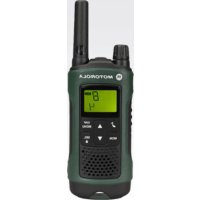
Mærke : MOTOROLA
Model : Talkabout T465
Kategori : Radio