EK3052 - Køkkenvægt CAMRY - Gratis brugsanvisning og manual
Find enhedens vejledning gratis EK3052 CAMRY i PDF-format.


Brugerspørgsmål om EK3052 CAMRY
0 spørgsmål om dette apparat. Besvar dem du kender, eller stil dit eget.
Stil et nyt spørgsmål om dette apparat
Download vejledningen til din Køkkenvægt i PDF-format gratis! Find din vejledning EK3052 - CAMRY og tag din elektroniske enhed tilbage i hånden. På denne side er alle dokumenter nødvendige for brugen af din enhed offentliggjort. EK3052 af mærket CAMRY.
BRUGSANVISNING EK3052 CAMRY
text_image
00:00 200°C 300 2 mins■ AUTO SHUT OFF
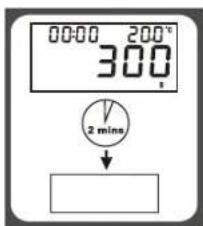
Auto shut-off occurs if display shows '0' or shows the same weight reading for 2 minutes.
text_image
ON/OFF■ MANUAL SHUT OFF
To maximize battery life, always press ON/OFF again to turn off the scale after using.
■ WARNING INDICATORS
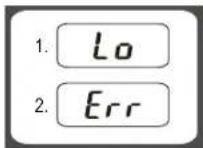
- Replace new battery.
- Scale overload. Remove item to avoid damage. Max.weight capacity is indicated on the scale.
text_image
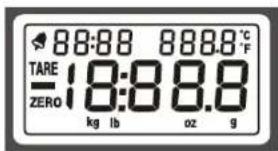
TARE ZERO 88:88 888.8 °C 18:88.8 kg lb oz g: Alarm
TARE : Tare Weight
: Negative Value
ZERO : Zero Weight
0000 : Alarm Timer
kg : Kilograms
g : Grams
lb : Pounds
oz : Ounces
°C / °F : Temperature
⚠ CLEANING AND CARE
- Clean the scale with a slightly damp cloth. DO NOT immerse the scale in water or use chemical/abrasive cleaning agents.
- All plastic parts should be cleaned immediately after contact with fats, spices, vinegar and strongly flavored/colored foods. Avoid contact with ac ids citrus juices.
- Always use the scale on a hard, flat surface. DO NOT use on carpet.
CAMRY
ELECTRONIC KITCHEN SCALES
INSTRUCTIONS FOR USE


ISO 9001:2000 CERTIFIED BY SGS
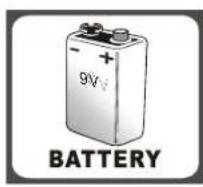
■ BATTERY
1X9V (not included)
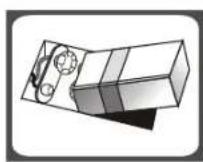
■ TO REPLACE BATTERY
Remove battery compartment cover and d attach new battery onto the 9-volt battery snaps. Please observe the polarity.
text_image
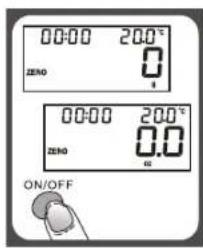
00:00 20.0°C ZERO 0 00:00 20.0°C ZERO 0.0 ON/OFF■ TO OPERATE SCALE
- Please put the scale on a hard and flat surface.
- Place bowl(if used) on the scale before turning on the unit.
- Press and release ON/OFF button to turn on the unit.
- Wait until LCD shows all information.
text_image
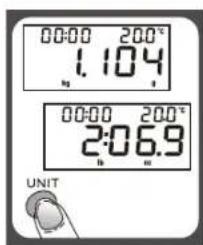
00:00 200° 1.104 00:00 200° 2:06.9 UNIT■ TO CONVERT WEIGHT UNIT
If the scale is with both measuring system of Metric (kilograms, grams) and Imperial (pounds, ounces), you can press UNIT to convert between two systems during the course of weighing.
Remark: The unit system of scale depends on sales destination or the requirement of distributor.
■ "ZERO" OR "TARE" FUNCTION
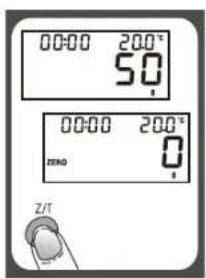
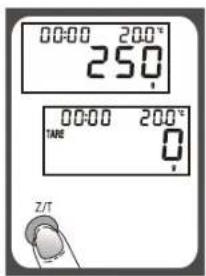
To weigh different loads consecutively without removing loads from the scale. Put first load on the scale, get weight reading. Press Z/T button to reset the LCD reading to "0" before adding next load. You can repeat this operation.
text_image
00:00 200° 5.0 00:00 200° ZERO 0 Z/T■ Condition 1: "ZERO" function When total sum of all loads on scale ≤ 4% of scale's max.weight capacity. (4%=80g when capacity is 2kg; 200g when capacity is 5kg)
LCD will show “----” or “0g” each time Z/T is pressed. “----” means not stable, please wait for a moment. “0g” and meanwhile an icon “ZERO” on lower left corner of LCD mean “ZERO” function is active. Max. capacity remains unchanged.
text_image
00:00 200° 250 TARE 0 Z/T■ Condition 2: "TARE" function When total sum of all loads on scale >4% of scale's max.weight capacity. (4%=80g when capacity is 2kg; 200g when capacity is 5kg)
LCD will show "----" or "0g" each time Z/T is pressed. "----" means not stable, please wait for a moment. "0g" and meanwhile an icon "TARE" on upper left corner of LCD mean "TARE" function is active. Max. capacity is reduced by total weight of all loads.
■ TO SET ALARM TIMER

text_image
Press ON/OFF 00:00 250° Press T-SET 0:00:250° Press ▲ Sat time span 02:00 250°- Press T-SET to confirm and go to next digit.
- After setting time span, press T-SET to start counting down.
- Press any key to stop counting down.
- Press T-SET to clear time span
- When timer counts down to "00:00", alarm will start "beeping" for 60 times and the scale will automatically shut off.
- Max.time span: 99:59
■ TEMPERATURE SENSOR
- Current temperature is shown at the higher right corner of LCD.
- Temperature range: 0\~+40°C
- Division: 0.5°C