MPG-4094NR - Mp3-afspiller DENVER - Gratis brugsanvisning og manual
Find enhedens vejledning gratis MPG-4094NR DENVER i PDF-format.


Brugerspørgsmål om MPG-4094NR DENVER
0 spørgsmål om dette apparat. Besvar dem du kender, eller stil dit eget.
Stil et nyt spørgsmål om dette apparat
Download vejledningen til din Mp3-afspiller i PDF-format gratis! Find din vejledning MPG-4094NR - DENVER og tag din elektroniske enhed tilbage i hånden. På denne side er alle dokumenter nødvendige for brugen af din enhed offentliggjort. MPG-4094NR af mærket DENVER.
BRUGSANVISNING MPG-4094NR DENVER
Major Function
- It supports the music format of MP3/WMA
•• Built-in rechargeable battery
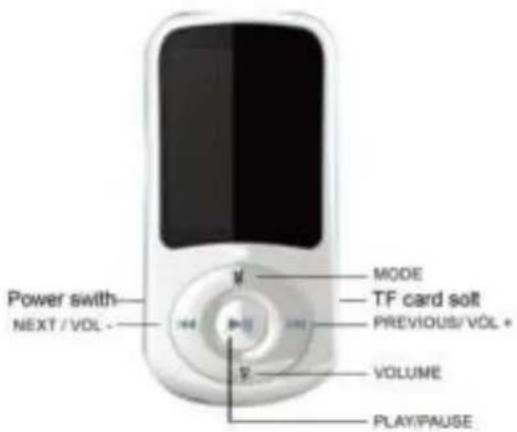
Buttons
text_image
Power switch NEXT /VOL - MODE TF card soft PREVIOUS/VOL + VOLUME PLAY/PAUSEKEYS OPERATION:
- Play/Pause: Short press Play/Pause music ; Long press Power on/off
- VOLUME: Press VOL to access volume menus.
- PREV: Last item(Long press stop search close bluetooth)
- NEXT: Next item(Long press search the Bluetooth)
5.MODE: Short press the menu to confirm ; Long press return.
6.Power on/off: Connect or disconnect the power supply.
Data connection
Through the USB cable connected to the computer, the information in hard copy need to MP4.
Charging
1、Use the computer USB charging
USB cable can be used for data transmission, charging at the same time.
2、Use the charger (No configuration)
Input:110v\~240v 50/60HZ 100mA
Output: DC5.0V-5.5V 500mA(USB)
Interface standards:MINI USB
Instructions
Open the player
1、Open the power supply;
2、Long press the play/pause key 3-5s open the player.
The main interface
Feature selection: Short press on the prev /next can browse each option.
The Play/Pause to confirm: Short press the Play/Pause to confirm.
MUSIC
- Play/Pause music:
Short press "PLAY/PAUSE" key to play/ pause music - Select music:
PRE: Short press PREV key to select previous track
NEXT: Short press NEXT key to select next track - Control volume:
Press VOL to access volume menus. Press Previous to increase volume, press Next to decrease.
- Return
Long press the menu to back at the main interface
Movie
- Play/Pause movie:
Short press "PLAY/PAUSE" key to play/pause movie
- Select movie:
PRE: Short press PREV key to select previous track
NEXT: Short press NEXT key to select next track
- Control volume:
Press VOL to access volume menus. Press Previous to increase volume, press Next to decrease.
- Return
Long press the menu to back at the main interface
Photo
PRE: Short press PREV key to select previous track
NEXT: Short press NEXT key to select next track
Long press the menu to back at the main interface
Rec
Short press "PLAY/PAUSE" key to play/pause the recording.
Long press the menu to save the recording and return to main interface.
E-book
PRE: Short press PREV key to select previous track
NEXT: Short press NEXT key to select next track
Long press the menu to back at the main interface
Setting
PRE: Short press PREV key to select previous track
NEXT: Short press NEXT key to select next track
Short press menu key to Confirm the operation.
Long press the menu to back at the main interface