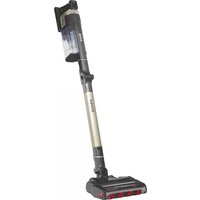
WV251UK - Støvsuger SHARK - Gratis brugsanvisning og manual
Find enhedens vejledning gratis WV251UK SHARK i PDF-format.


Brugerspørgsmål om WV251UK SHARK
0 spørgsmål om dette apparat. Besvar dem du kender, eller stil dit eget.
Stil et nyt spørgsmål om dette apparat
Download vejledningen til din Støvsuger i PDF-format gratis! Find din vejledning WV251UK - SHARK og tag din elektroniske enhed tilbage i hånden. På denne side er alle dokumenter nødvendige for brugen af din enhed offentliggjort. WV251UK af mærket SHARK.
BRUGSANVISNING WV251UK SHARK
Shark.
CORDLESS HANDHELD VACUUM CLEANER
WV251UK
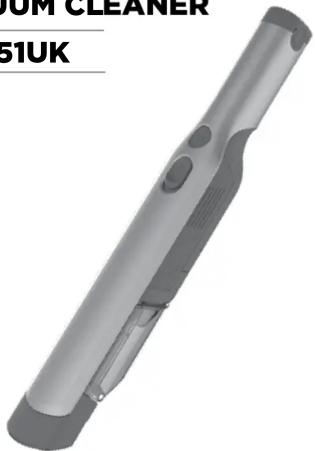
natural_image
3D rendered image of a handheld vacuum cleaner (no text or symbols visible)IMPORTANT SAFETY INSTRUCTIONS
FOR HOUSEHOLD USE ONLY
READ CAREFULLY BEFORE USE
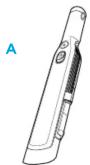
A Cordless Handheld Vacuum Cleaner
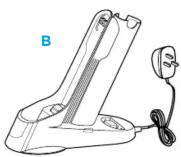
B Charging Dock
© Multi-Surface Pet Tool
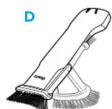
D Duster Crevice Tool
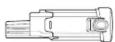
E 2nd Battery
C

E
IMPORTANT SAFETY INSTRUCTIONS - FOR HOUSEHOLD USE ONLY READ CAREFULLY BEFORE USE
⚠ WARNING
To reduce the risk of injury, fire, electric shock, and property damage resulting from improper use of the appliance, carefully observe the following instructions. This unit contains electrical connections and moving parts that potentially present risk to the user.
POWER SUPPLY, CHARGING DOCK, AND VACUUM CONTAIN ELECTRICAL CONNECTIONS:
1ThereareNO serv
2 DO NOT use to vacuum any liquids.
3 DO NOT immerse in water or other liquids.
4 If vacuum is damaged, discontinue use.
5 To avoid fire, explosion, or injury, inspect vacuum and charging dock for any damage before use.
DO NOT use damaged vacuum or charging dock.
6 DO NOT use outdoors or on wet surfaces. Use only on dry surfaces.
7 If vacuum cleaner is not working as it should, or has been dropped, damaged, left outdoors, or immersed in water,
return it to SharkNinja Operating LLC for examination, repair, or adjustment.
8DO NOT handle charger or vacuum cleaner with wet hands.
9DO NOT leave vacuum cleaner unattended while powered on.
10 Keep vacuum away from heated surfaces.
11 Always turn off vacuum before connecting charging dock.
12 Use only Shark ^ chargers and batteries. Other types of batteries may burst, causing injury and damage.
13 Use charging dock on flat and stable surfaces only.
14 DO NOT incinerate appliance, even if it is severely damaged, as lithium-ion battery may explode in a fire.
GENERAL USE
15 DO NOT carry the charger by the cord or pull to disconnect from a socket; instead grasp the plug and pull
to disconnect.
16. Keep charger cord away from heated surfaces.
17. Use only as described in this manual
18 Keep your work area well lit.
19 To avoid unintentional starting, always turn off the vacuum cleaner before picking it up or carrying it, and before
attaching or detaching the charger, dust cup, filter, or any accessories.
20 DO NOT put any objects into openings.
21 DO NOT use if any opening is blocked; keep free of dust, lint, hair, or anything that may reduce airflow.
22 DO NOT allow young children to operate the appliance or use as a toy. Close supervision is necessary when any
appliance is used near children.
23 DO NOT use without dust cup and filter in place.
24 DO NOT use if airflow is restricted; if the air paths become blocked, turn off the vacuum cleaner. Clear all obstructions and power on again.
25 Keep nozzle away from hair, face, fingers, uncovered feet, or loose clothing.
26 Only use manufacturer's recommended attachments.
27 DO NOT charge at temperatures below 50°F (10°C) or above 104°F (40°C). Charging improperly or at temperatures
outside of the specified range may damage the battery and increase the risk of fire.
28 Store the appliance indoors. DO NOT use or store it below 37.4°F (3°C). Ensure the appliance is at room temperature before operating.
DUST CUP/FILTERS/ACCESSORIES
Before turning on the vacuum
29 Make sure filter is thoroughly dry after routine cleaning.
30 Make sure dust cup and filter are in place after routine maintenance.
31 Make sure accessories are free of blockages and keep openings away from face and body.
32 Use only Shark® brand filters and accessories. Using other brands will void warranty.
GENERAL CLEANING
33 DO NOT vacuum up hard or sharp objects such as glass, nails, screws, or coins that could damage the vacuum cleaner.
34 DO NOT vacuum up drywall dust, fireplace ash, or embers.
35 DO NOT use as an attachment to power tools for dust collection.
36 DO NOT vacuum up smoking or burning objects such as hot coals, cigarette butts, or matches.
37 DO NOT vacuum up flammable or combustible materials (e.g., lighter fluid, gasoline, or kerosene) or use vacuum in areas where they may be present.
38 DO NOT vacuum up toxic solutions (e.g., chlorine bleach, ammonia, or drain cleaner).
39 DO NOT use in an enclosed space where vapours are present from paint, paint thinner, moth-proofing substances, flammable dust, or other explosive or toxic materials.
40DO NOT immerse vacuum cleaner in water or other liquids.
41 Use extra care when cleaning on stairs.
LITHIUM-ION BATTERY
42 The battery is the power source for the appliance. DO NOT carry the appliance with your finger on the power button. DO NOT charge appliance with the power on.
43 Use only the included charging dock to charge. Use of incorrect charger may create a risk of fire.
44 Use appliance only with included lithium-ion battery. Use of any other battery may create a risk of injury and fire.
45 Under abusive conditions, liquid may be ejected from the battery. Avoid contact with liquid, as it may cause irritation or burns. If contact occurs, flush with water. If liquid contacts eyes, seek medical help.
46 Store the appliance indoors. To maintain battery life, DO NOT use or store battery at temperatures below 37.4°F (3°C) or above 104°F (40°C).
47 DO NOT expose appliance to fire or temperature above 266°F (130°C) as it may cause explosion.
48 There are NO serviceable parts. To ensure safety, DO NOT modify or attempt to repair the appliance.
CHARGING THE BATTERYWHAT'S INSID
natural_image
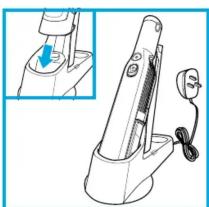
Line drawing of a handheld electric shaver with a cable, shown from an inset view (no text or symbols)Prior to first use, the lithium-ion battery must be charged completely, even if it comes with a partial charge.
Place the Shark Cordless Handheld Vacuum Cleaner onto the charging dock with the nozzle in the charging dock.
Plug the charging dock into a socket.
natural_image
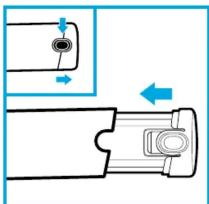
Diagram of a mechanical component with directional arrows indicating movement or force (no text or symbols)Press release tabs on battery cap and pull to remove.
To insert for charging or use, align battery with handle and push to engage.
In Use

Solid blue
Low Battery

Blinking
Charging

Fades in and out
Charged

Dim
USING YOUR CORDLESS HANDHELD VACUUM CLEANER
natural_image
Illustration of a hand holding a handheld device with a button, no text or symbols visible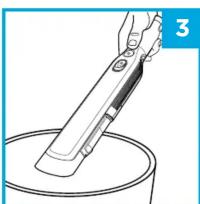
natural_image
Line drawing of a hand holding a brush over a container with a lid, no text or symbols present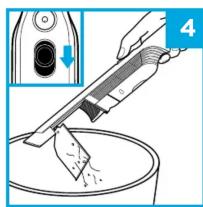
natural_image
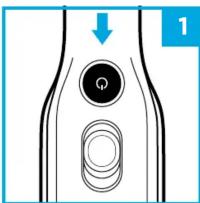
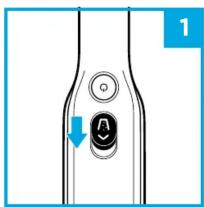
Illustration of a hand using a tool to clean or brush the liquid in a bowl, with an inset showing a device (no text or symbols)- Press Power button.
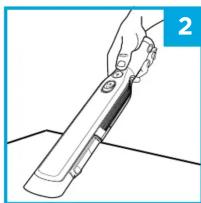
- Run the air-intake nozzle over the surface to be cleaned.
- Hold over bin
- Push dust cup release button forwards to release debris
NOTE: During first use, discharge fully to properly condition the battery. It takes approximately 2.5 hours to charge completely.
NOTE: For maintenance, see reverse.

MAINTENANCE MAINTENANCE
EMPTYING THE DUST CUP

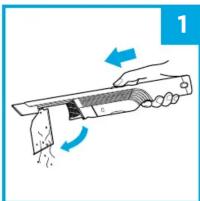
natural_image
Illustration of a hand holding a cleaning or cleaning tool with arrows indicating motion (no text or symbols)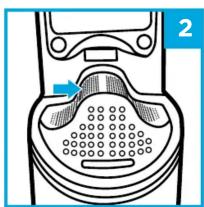
natural_image
Diagram of a device with a perforated base and control panel, no text or symbols present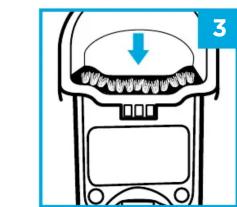
natural_image
Diagram of a mechanical device with a downward arrow indicating force or movement (no text or symbols present)- With the power off, push the Open Dust Cup button forward, and the dust cup will swing open.
- Tap dust cup filter screen lightly to knock off dust and debris.
- Wipe dust cup bristle lightly with cloth to remove dust and dirt.
CLEANING THE FILTER
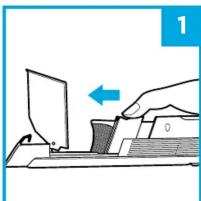
natural_image
Illustration of a hand using a computer to press documents on a keyboard, with no visible text or symbols.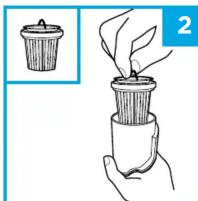
natural_image
Illustration of a hand holding a small plant with leaves, showing a magnified view of the seed being inserted (no text or symbols present)- With the dust cup open and the power off, pinch both sides of the filter housing and slide forward to remove.
- Lift the filter by the metal ring to remove it from the housing.
To clean the fabric filter, tap to remove dust and large particles. To deep clean, hand-wash only with lukewarm water and leave to air-dry for 24 hours before reinstalling.
To clean the filter housing, make sure the filter is removed, then hand-wash only with lukewarm water.
TROUBLESHOOTING
LIGHT INDICATOR WHAT IT MEANS
| Light blinking blue Low battery. | |
| Light blinks blue twice, then pauses | Blockage. Turn off power and remove blockage, then turn power back on. |
| Solid blue light Power is on. | |
| Blue light fades in and out steadily Unit is charging. | |
| Dim blue light Unit is fully charged. | |
| No light | Power is off, or unit needs to be charged. |
CLEANING THE DUST CUP
natural_image
Illustration of a hand using a tool to cut or press a piece of paper (no text or symbols present)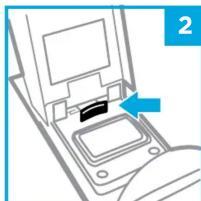
natural_image
Diagram of a device with an arrow pointing to a component, no visible text or symbols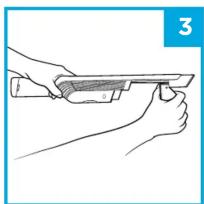
natural_image
Line drawing of hands holding a tool, no text or symbols present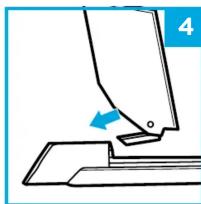
natural_image
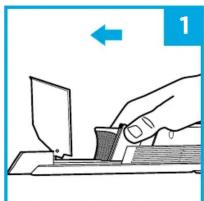
Diagram of a sewing machine needle and base, showing a blue arrow indicating the needle (no text or symbols present)- With the dust cup open and the power off, slide the filter housing forward to remove.
- Open the dust cup and press the release tab.
- While pressing the tab towards the dust cup pull the dust cup away from the unit. Handwash with lukewarm water only and leave all parts to air-dry before reinstalling.
- To reinstall, slide the dust cup tab into the slot on the bottom of the nozzle until it clicks into place.
NOTE: Do not wash any part of this vacuum or its accessories in a dishwasher
The Cordless Handheld Vacuum Cleaner will not operate.
• The battery needs to be recharged.
- Try using a different electrical outlet to charge.
- The battery is damaged and needs to be replaced.
The Cordless Handheld Vacuum Cleaner will not pick up debris or suction is weak.
• The dust cup is full. Empty the dust cup.
- The filter needs cleaning or replacement. Clean or replace the filter.
• The battery needs to be recharged.
- The filter screen is clogged and needs cleaning. Open dust cup and clean filter screen.
Dust is escaping from the Cordless Handheld Vacuum Cleaner.
- The filter is not installed correctly. Remove filter, then reinstall.
- The dust cup filter has a hole or a puncture and needs to be replaced.
- The dust cup is not installed correctly. Remove dust cup, then reinstall.
I dropped my unit and the dust cup fell off.
- To reinstall, slide the tab on the dust cup into the slot on the bottom of the nozzle until it clicks into place.
REGISTER YOUR PURCHASE

registermyshark.com

Scan QR code using mobile device

TECHNICAL SPECIFICATIONS
Battery Voltage: 10.8V
Motor Watts: 115W
Amps: 10.6A
TWO-YEAR LIMITED GUARANTEE
When a consumer buys a product in the UK, they get the benefit of legal rights relating to the quality of the product (your "statutory rights"). You can enforce these rights against your retailer. However, at Shark we are so confident about the quality of our products that we give you an additional manufacturer's guarantee of up to two years (1 year as standard plus 1 year when you register). These terms and conditions relate to our manufacturer's guarantee only - your statutory rights are unaffected. Please note that the 2 year guarantee is available in all EU countries and in the UK if it stops being an EU country during the guarantee term. Every Shark machine comes with a free parts and labour guarantee. Our customer service is not allowed to open from 9:00am to 6:00pm Monday - Friday. It's free to call, and you'll be put straight through to a Shark representative. You'll also find online support at www.sharkclean.eu/uk.
How do I register my extended Shark® guarantee?
You can register your guarantee online within 28 days of purchase. To save time, you'll need the following information about your machine:
- Model Number
- Serial Number (only if available)
- Date you received the machine (from your in-store receipt or delivery note)
To register online, please visit www.sharkclean.eu/uk/register-guarantee
IMPORTANT
- The manufacturer's guarantee covers your product for 12 months (or for 2 years, if registered) starting on the date of delivery.
- Please keep your receipt at all times. Should you need to use your guarantee (standard 1 year or further 1 year extended) we will need your receipt to verify the information you have supplied to us is correct. The inability to produce a valid receipt may invalidate your guarantee.
How long are new Shark machines guaranteed for?
Our confidence in our design and quality control means that your new Shark vacuum cleaner is guaranteed for a total of two years (12 months plus an extended guarantee of 1 year). What is covered by the free Shark guarantee?
Repair or replacement of your Shark machine (at Shark's discretion to decide whether to replace or repair) including all parts and labour. A Shark guarantee is in addition to your legal rights as a consumer.
What is not covered by the free Shark guarantee?
1 Blockages - For details of how to unblock your vacuum cleaner, please refer to the Instructions.
2 Normal wear and tear of parts which require regular maintenance and/or replacement to ensure the proper functioning of your unit.
3 Accidental damage, faults caused by negligent use or care, misuse, neglect, careless operation or handling of the vacuum cleaner which is not in accordance with the Shark Instructions supplied with your machine.
4 Use of the vacuum cleaner for anything other than normal domestic household purposes.
5 Use of parts not assembled or installed in accordance with the operating instructions. 6 Use of parts and accessories which are not Shark spares.
7 Faulty installation (except where installed by Shark).
Where can I buy genuine Shark spares and accessories?
Shark spares and accessories are developed by the same engineers who developed your Shark vacuum. You'll find a full range of Shark spares, replacement parts and accessories for all Shark machines at www.sharkclean.eu.
Please remember that using non-Shark spares may invalidate your manufacturer's guarantee. However, your statutory rights are unaffected.
BATTERY REMOVAL AND DISPOSAL
This product uses rechargeable and reusable lithium-ion batteries. When the
battery no longer holds a charge, it should be removed from the hand vacuum and recycled. DO NOT incinerate or compost the battery.
When your lithium-ion battery needs to be replaced, dispose of it or recycle it in accordance with local ordinances or regulations. In some areas, it is illegal to place spent lithium-ion batteries in the bin or in a municipal solid waste stream. Return spent battery to an authorised recycling centre or to retailer for recycling. Contact your local recycling centre for information on where to drop off the spent battery.

LITHIUM-ION BATTERY
MUST BE RECYCLED OR
DISPOSED OF PROPERLY

RECORD THIS INFORMATION
Model Number:
Date Code
Date of Purchase:
(Keep receipt)
Store of Purchase:
Copyright © SharkNinja Operating LLC 2018
Euro-Pro Europe Ltd, Unit 15 Mariner Court, Calder Business Park, Wakefield,
West Yorkshire, UK
0800 862 0453
sharkclean.edu
SHARK IS A REGISTERED TRADEMARK OF SHARKNINJA OPERATING LLC. Printed in China.
Illustrations may differ from actual product.
WV251UKSeries_IB_MP_180702_mv1

- Shark.
- CORDLESS HANDHELD VACUUM CLEANER
- IMPORTANT SAFETY INSTRUCTIONS - FOR HOUSEHOLD USE ONLY READ CAREFULLY BEFORE USE
- ⚠ WARNING
- POWER SUPPLY, CHARGING DOCK, AND VACUUM CONTAIN ELECTRICAL CONNECTIONS:
- GENERAL USE
- DUST CUP/FILTERS/ACCESSORIES
- GENERAL CLEANING
- LITHIUM-ION BATTERY
- CHARGING THE BATTERYWHAT'S INSID
- USING YOUR CORDLESS HANDHELD VACUUM CLEANER
- MAINTENANCE MAINTENANCE
- EMPTYING THE DUST CUP
- CLEANING THE FILTER
- TROUBLESHOOTING
- CLEANING THE DUST CUP
- The Cordless Handheld Vacuum Cleaner will not operate.
- Dust is escaping from the Cordless Handheld Vacuum Cleaner.
- I dropped my unit and the dust cup fell off.
- REGISTER YOUR PURCHASE
- TECHNICAL SPECIFICATIONS
- TWO-YEAR LIMITED GUARANTEE
- How do I register my extended Shark® guarantee?
- How long are new Shark machines guaranteed for?
- Where can I buy genuine Shark spares and accessories?
- BATTERY REMOVAL AND DISPOSAL
- RECORD THIS INFORMATION
Mærke : SHARK
Model : WV251UK
Kategori : Støvsuger