
SL-PG590 - Hi-Fi System PANASONIC - Gratis brugsanvisning og manual
Find enhedens vejledning gratis SL-PG590 PANASONIC i PDF-format.


Brugerspørgsmål om SL-PG590 PANASONIC
0 spørgsmål om dette apparat. Besvar dem du kender, eller stil dit eget.
Stil et nyt spørgsmål om dette apparat
Download vejledningen til din Hi-Fi System i PDF-format gratis! Find din vejledning SL-PG590 - PANASONIC og tag din elektroniske enhed tilbage i hånden. På denne side er alle dokumenter nødvendige for brugen af din enhed offentliggjort. SL-PG590 af mærket PANASONIC.
BRUGSANVISNING SL-PG590 PANASONIC
Compact Disc Player
SL-PG590
SL-PG490
SL-PG390
Operating Instructions
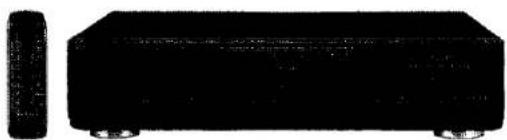
natural_image
Black rectangular electronic device with two small pins, no visible text or symbolsThe photograph shows model SL-PG590.

E EB EP
Technics®
Note:
The "EB" indication shown on the packing case indicates United Kingdom.
Before connecting, operating or adjusting this product, please read these instructions completely.
Please save this manual.
RQT4196-B
Dear customer
Thank you for purchasing this product.
For optimum performance and safety, please read these instructions carefully.
These operating instructions are applicable to the SL-PG590, SL-PG490 and SL-PG390 models.
These operating instructions, however, fundamentally explain the operation of SL-PG590 model.
Table of contents
Caution for AC mains lead 3
Suggestions for safety 4
Connections 5
Concerning the remote control SL-PG590 SL-PG490 .. 5
Controls 6
Sequential play Basic Play 7
Direct access play SL-PG590 SL-PG490 7
Program play 8
Random play.... 9
Other CD playback functions
Repeat 10
A-B repeat SL-PG590 SL-PG490 10
Output level control SL-PG590 SL-PG490 10
Time fade SL-PG590 11
Time mode selection 11
Auto cue 12
Peak search 12
CD edit recording SL-PG590 13
To listen with headphones SL-PG590 SL-PG490 ..... 14
Concerning CDs 15
Maintenance 15
Troubleshooting guide .... Back cover
Technical specifications .... Back cover
Supplied accessories
Please check and identify the supplied accessories.

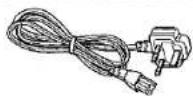
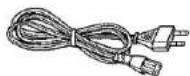
☐ AC power supply cord .... 1 pc.
For United Kingdom (RJA0044-C)
For areas except United Kingdom (RJA0043-C)
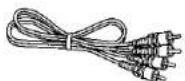
□ Stereo connection cable (SJP2249-3) ..... 1 pc.
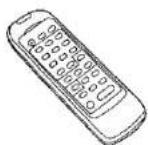
SL-PG590 SL-PG490 Remote control (EUR643900) 1 pc.
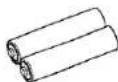
SL-PG590 SL-PG490 Batteries for remote control (UM-4, AAA, R03) ... 2 pcs.
Use numbers indicated in parentheses when asking for replacement parts.
(For United Kingdom)
("EB" area code model only)
For your safety, please read the following text carefully.
This appliance is supplied with a moulded three pin mains plug for your safety and convenience.
A 5-ampere fuse is fitted in this plug.
Should the fuse need to be replaced please ensure that the replacement fuse has a rating of 5-ampere and that it is approved by ASTA or BSI to BS1362.
Check for the ASTA mark 📍 or the BSI mark 🌼 on the body of the fuse.
If the plug contains a removable fuse cover you must ensure that it is refitted when the fuse is replaced.
If you lose the fuse cover the plug must not be used until a replacement cover is obtained.
A replacement fuse cover can be purchased from your local dealer.
CAUTION!
IF THE FITTED MOULDED PLUG IS UNSUITABLE FOR THE SOCKET OUTLET IN YOUR HOME THEN THE FUSE SHOULD BE REMOVED AND THE PLUG CUT OFF AND DISPOSED OF SAFELY.
THERE IS A DANGER OF SEVERE ELECTRICAL SHOCK IF THE CUT OFF PLUG IS INSERTED INTO ANY 13-AMPERE SOCKET.
If a new plug is to be fitted please observe the wiring code as shown below.
If in any doubt please consult a qualified electrician.
IMPORTANT
The wires in this mains lead are coloured in accordance with the following code:
Blue: Neutral, Brown: Live.
As these colours may not correspond with the coloured markings identifying the terminals in your plug, proceed as follows:
The wire which is coloured Blue must be connected to the terminal which is marked with the letter N or coloured Black or Blue.
The wire which is coloured Brown must be connected to the terminal which is marked with the letter L or coloured Brown or Red.
WARNING: DO NOT CONNECT EITHER WIRE TO THE EARTH TERMINAL WHICH IS MARKED WITH THE LETTER E, BY THE EARTH SYMBOL ⊥ OR COLOURED GREEN OR GREEN/YELLOW.
THIS PLUG IS NOT WATERPROOF—KEEP DRY.
Before use
Remove the connector cover.
How to replace the fuse
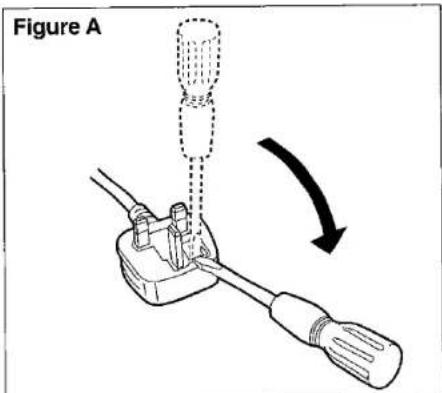
The location of the fuse differ according to the type of AC mains plug (figures A and B). Confirm the AC mains plug fitted and follow the instructions below. Illustrations may differ from actual AC mains plug.
- Open the fuse cover with a screwdriver.
text_image
Figure A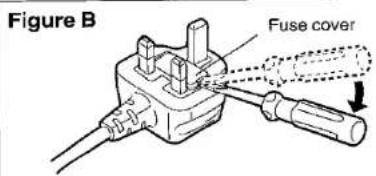
text_image
Figure B Fuse cover- Replace the fuse and close or attach the fuse cover.
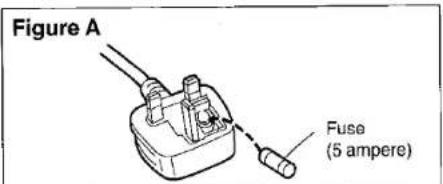
text_image
Figure A Fuse (5 ampere)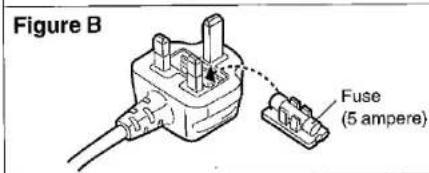
text_image
Figure B Fuse (5 ampere)Placement
Avoid placing the unit in areas of:
- direct sunlight
• high temperature
• high humidity
• excessive vibration
- uneven surfaces (Place the unit on a flat level surface.)
Such conditions might damage the cabinet and/or other component parts and thereby shorten the unit's service life.
To protect the unit against sound distortion and acoustical effects, please place the unit at least 15 cm away from wall surfaces etc.
Stacking
Never place heavy items on top of the unit or the AC power cord.
Voltage
- It is very dangerous to use an AC power source of high voltage such as for an air conditioner.
A fire might be caused by such a connection.
• A DC power source can not be used.
Be sure to check the power source carefully, especially if on a ship or other place where DC is used.
Power cord protection
- Avoid cuts, scratches or poor connection of the AC power cord, as this may result in fire or electric shock.
Excessive bending, pulling or slicing of the cord should also be avoided. - Do not pull on the cord when you are disconnecting the power, as this could cause an electric shock. Grasp the plug firmly when you disconnect the power supply.
- Never touch the plug with wet hands or a serious electric shock could result.

text_image
CLASS 1 LASER PRODUCT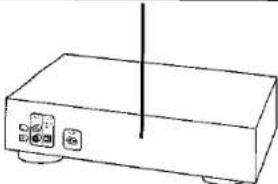
natural_image
Line drawing of a rectangular electronic device with a vertical line and control buttons (no text or symbols)(Back of product)
| DANGER | INVISILE LASER RADIATION WHEN OPEN.AVOID DIRECT EXPOSUT TO BEAM. | (Inside of product) |
| ADVINSEL | USYNA LASERIRALING VED AMING, NAR SASHIKHSIRSHIPMEBRADE OF RIVITON UNDAIDOSATEUR SHAKI RAPALINE. | (Indersiden ist apparatot) |
| VARDI | AVATHESSA ANA SUJALUNIONS ONTETENESSA QLET AL TUNIA NAVYMATONIAL LASERSATELY LLE AL A KARDI SATESIEN. | (Tuotteen sisällä) |
| VARNING | USYM DE LASERSHÄLE MNE NAR DINAEL DE ED PRYAND GOTSPARREN ARUNKOPPLID BETRKATAU SINHALEN. | (Apparatens adis) |
| ADWARE | USYLAGE LASERWANGAI AND KISEL AHMES DESKIKPEDRIS BRYES LINNAG EXPOSPENDOR SINHALEN. | (Produktets innside) |
| VORSICHT | UNTCHRIEHE LASERSHÄRUNG, VENNÄRBEÖRDUNG GEÖFNET,NICH ÖBSÄSTRIHL ALGSE CEM | (Im Inneren des Gerätes) |
Foreign materials
- Ensure that no foreign objects, such as needles, coins, screwdrivers etc., accidentally fall into the unit.
Otherwise, a serious electric shock or malfunction could occur. - Be extremely careful about spilling water or liquid on/into the unit, as a fire or electric shock could occur.
(Disconnect the power plug and contact your dealer immediately if this occurs.) - Avoid spraying insecticides onto the unit as they contain flammable gases which can be ignited.
- Insecticides, alcohol, paint thinner and similar chemicals should never be used to clean the unit as they can cause flaking or cloudiness to the cabinet finish.
Service
- Never attempt to repair, disassemble or reconstruct the unit if there seems to be a problem.
A serious electric shock could result if you ignore this precautionary measure. - If a problem occurs during operation (the sound is interrupted, indicators fail to light up, smoke is detected, etc.) contact your dealer or Authorized Service Center immediately.
- Disconnect the power supply if the unit will not be used for a long time. Otherwise the operation life could be shortened.
AC Power supply cord
Even when the connector is perfectly inserted, depending on the type of inlet used, the front part of the connector may jut out as shown in the drawing.
However there is no problem using the unit.
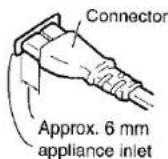
CAUTION!
THIS PRODUCT UTILIZES A LASER.
USE OF CONTROLS OR ADJUSTMENTS OR PERFORMANCE OF PROCEDURES OTHER THAN THOSE SPECIFIED HEREIN MAY RESULT IN HAZARDOUS RADIATION EXPOSURE.
DO NOT OPEN COVERS AND DO NOT REPAIR YOURSELF. REFER SERVICING TO QUALIFIED PERSONNEL.
CAUTION!
DO NOT INSTALL OR PLACE THIS UNIT IN A BOOKCASE, BUILT IN CABINET OR IN ANOTHER CONFINED SPACE IN ORDER TO KEEP WELL VENTILATED CONDITION. ENSURE THAT CURTAINS AND ANY OTHER MATERIALS DO NOT OBSTRUCT THE VENTILATION CONDITION TO PREVENT RISK OF ELECTRIC SHOCK OR FIRE HAZARD DUE TO OVERHEATING.
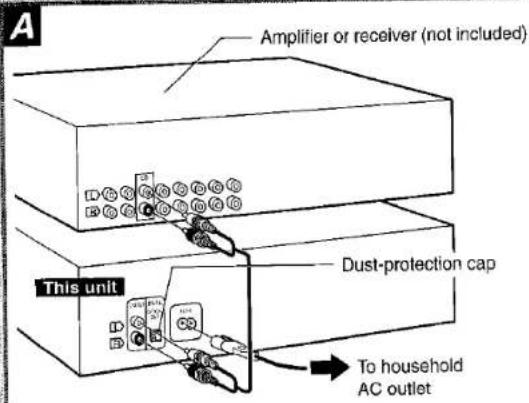
Connections
text_image
A Amplifier or receiver (not included) This unit Dust-protection cap To household AC outletFor United Kingdom: BE SURE TO READ THE CAUTION FOR THE AC MAINS LEAD ON PAGE 3 BEFORE CONNECTING.
B
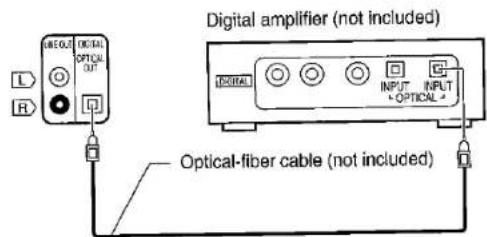
text_image
Digital amplifier (not included) Optical-fiber cable (not included)C
Insert the batteries in the correct polarities (⊕, ⊖).
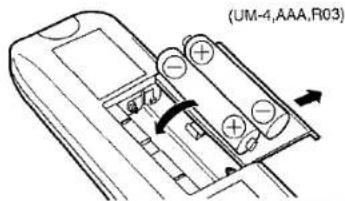
text_image
(UM-4,AAA,R03)D
text_image
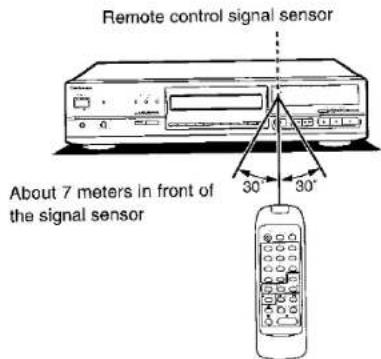
Remote control signal sensor About 7 meters in front of the signal sensor 30° 30°Before making connections, be sure that the power of this unit and all other system components is first turned off. A

text_image
Stereo connection cable White (L) Red (R)Note
Although the figure shows the AC power supply cord being connected to a household AC outlet, if the amplifier (or receiver) is equipped with a AC outlet, connect the cord to that outlet.
To connect a digital amplifier B
Note
Remove the dust-protection cap which is inserted in the DIGITAL OPTICAL OUT terminal only if you connect a digital amplifier. When this terminal is not being used, attach the cap as shown in the illustration.
Concerning the remote control SL-PG590 SL-PG490
Battery installation
Use of batteries
- Do not mix old and new batteries, or batteries of different types (manganese and alkaline, etc.).
- Never subject batteries to excessive heat or flame; do not attempt to disassemble them; and be sure they are not short-circuited.
- If the remote control is not to be used for a long period of time, remove the batteries and store them in a cool, dark place.
- Do not attempt to recharge alkaline or manganese batteries.
- Do not use rechargeable type batteries.
Correct method of use
Operations notes
- Do not place obstacles between the remote control signal sensor and remote control unit.
- Do not expose the remote control signal sensor to direct sunlight or to the bright light of an inverter fluorescent light.
• Take care to keep the remote control signal sensor and end of the remote control unit free from dust. - If this system is installed in a rack with glass doors, the thickness and color of the glass doors might make it necessary to use the remote control a shorter distance from the system.
To prevent damage
- Do not place heavy items.
- Do not disassemble or reconstruct.
- Do not spill water or other liquids.
A
text_image
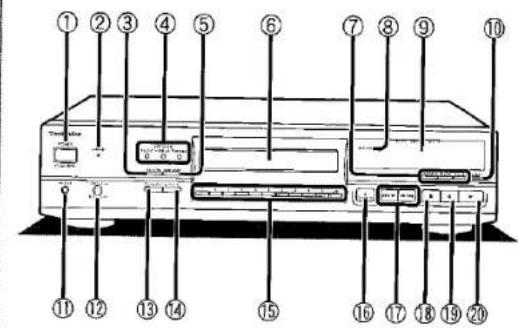
Diagram of a computer front panel with numbered labels pointing to ports and indicators for data access.SL-PG590
B
text_image
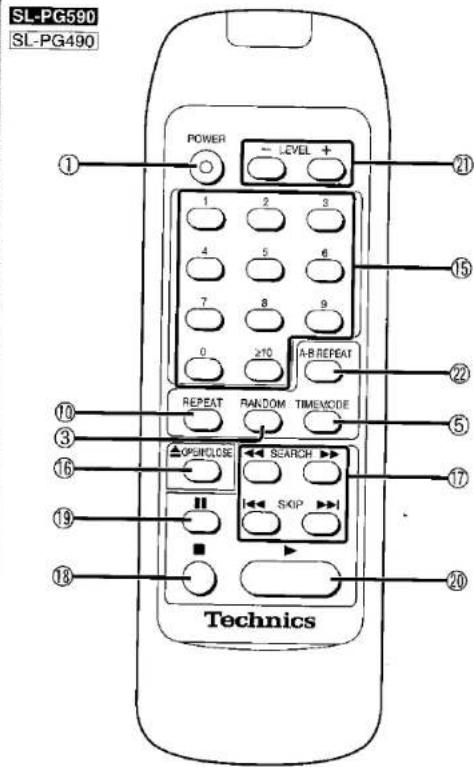
SL-PG590 SL-PG490 POWER — LEVEL + 1 2 3 4 5 6 7 8 9 0 ≥10 A-B REPEAT REPEAT RANDOM TIMEMODE ⑩ ③ ⑯ ⑲ Technics OPENCLOSE SEARCH SKIP ⑰ ⑱ ⑲ ⑳Controls
Main unit A
① Power "STANDBY ⏻/ON" switch (POWER, STANDBY ⏻/ON) Press to switch the unit from on to standby mode or vice versa. In standby mode, the unit is still consuming a small amount of power.
② Standby indicator (STANDBY) When the unit is connected to the AC mains supply, this indicator lights up in standby mode and goes out when the unit is turned on.
③ Random play button ( RANDOM )
④ SL-PG590
CD edit record buttons (EDIT GUIDE)
• Tape length button ( TAPE LENGTH )
• Tape side select button (SIDE A/B)
• Time fade button (TIME FADE)
⑤ Time mode select button (TIME MODE)
⑥ Disc tray
⑦ Program play buttons
•Program button (PROGRAM)
•Clear button ( CLEAR )
•Recall button ( RECALL )
⑧ Remote control signal sensor (SENSOR)
There is no "SENSOR" indication on SL-PG390. SL-PG390 can be operated by using the remote control provided with a Technics amplifier or receiver.
⑨ Display panel
⑩ Repeat button ( REPEAT )
⑪ SL-PG590 SL-PG490
Headphones jack ( PHONES )
⑫ SL-PG590 SL-PG490 Headphones volume control ( PHONES LEVEL )
⑬ Peak search button ( PEAK SEARCH )
⑭ Auto cue button ( AUTO CUE )
⑮ SL-PG590
Numeric buttons (1\~9, 0, ≥10)
⑯ Disc tray open/close button ( ▲ OPEN/CLOSE )
⑰ Skip/search buttons ( ◀◀◀/◀◀,▶▶/▶▶▶ I )
⑱ Stop button ( ■ )
⑲ Pause button ( Ⅲ )
⑳ Play button ( ▶ )
Remote control B
SL-PG590 SL-PG490
Buttons ①, ③, ⑤, ⑩, and ⑮ – ⑳ have the same functions as the corresponding buttons on the main unit.
② Level control (-LEVEL +)
② A-B repeat button (A-B REPEAT)
Sequential play Basic Play A
A
text_image
A 1 2·3 4 SL-PG5901
2
text_image
OPENCLOSE CLOSELabel must face upward
3


4

B

C
text_image
1 0 0 z10 TerhadexSL-PG590
SL-PG590
SL-PG490
text_image
Diagram showing a device with labeled buttons and an arrow pointing to a numeric keypad, likely illustrating a control or navigation process.
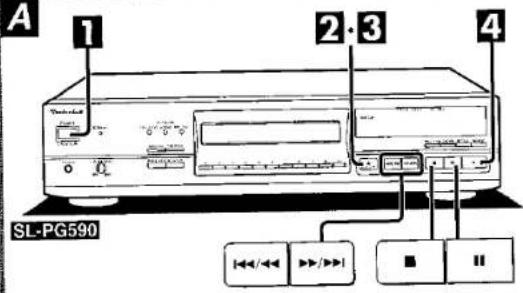
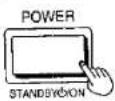
Press POWER (Power goes on).
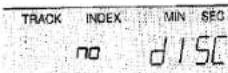
- "no dISC" indicates that a CD has not been inserted.
- If a CD is already in the disc tray, it automatically begins playing from the first track.

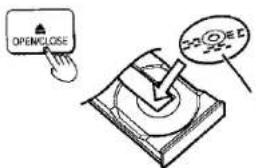
Press ▲ OPEN/CLOSE to open the tray and insert a disc.

Press ▲ OPEN/CLOSE to close the tray.

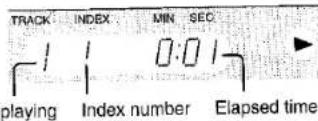
Press ▶ (Play begins).
Play stops automatically after all tracks have been played.
To stop the disc play
Press ■
| To pause | Press || during playback.To resume playback, press ▶. |
| To search forward/backward (SEARCH) | Hold down ◀◀/◀◀ (backward)or ▶▶/▶▶ (forward) during playback. |
| To skip forward/backward(SKIP) | Press ◀◀/◀◀ (backward) or ▶▶/▶▶ (forward) during playback. |
For your reference
- If you skip step 3 and press ▶, the tray automatically closes and play begins from the first track.
SL-PG590
- When you use the timer with another unit, be sure to turn this unit on.
- When there are 17 or more tracks on the CD, "▶" will appear.
Notes
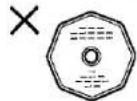
- Do not use irregular shape CDs (heart-shape, octagonal, etc.). B
• During random play (see page 9):
You cannot skip backward to previous tracks.
You can search only in the current track.
• During program play (see page 8):
Forward and backward skipping is performed in the programmed track order.
You can search only in the current track.
• During A-B repeat (see page 10):
Searching can be performed beyond the A-B segment. (A-B repeat will not be cancelled.)
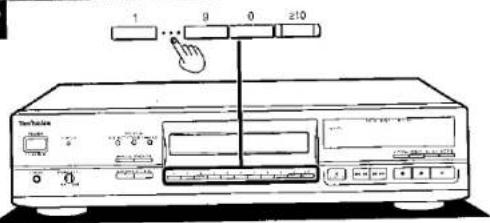
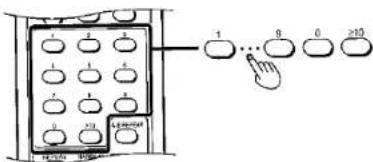
Direct access play SL-PG590 SL-PG490 C
With this function, a disc is played from a desired track to the last track and then stops automatically.
On model SL-PG490 Direct access play is available only on the remote control.
Press the numeric buttons.
Play will begin from the selected track number.
To select a two-digit track
Press ≥ 10 and then the two numbers you want within 7 seconds.
For example
Track No. 25: ≥10 → 2 → 5
Track No. 30: ≥10 → 3 → 0
text_image
SL-PG590 2 1 3 PROGRAM CLEAR 2① 1·2② 3 SL-PG490 (SL-PG390) PROGRAM CLEAR
text_image
PROGRAM TRACK INDEX MIN SEC PGM 0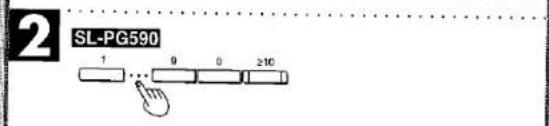
text_image
2 SL-PG590 7 9 0 ≥10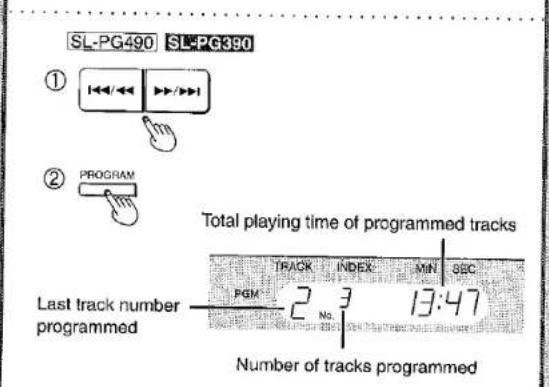
text_image
SL-PG490 SL-PG390 ① ② PROGRAM Total playing time of programmed tracks PGM 2 No 3 13:47 Last track number programmed Number of tracks programmed
text_image
3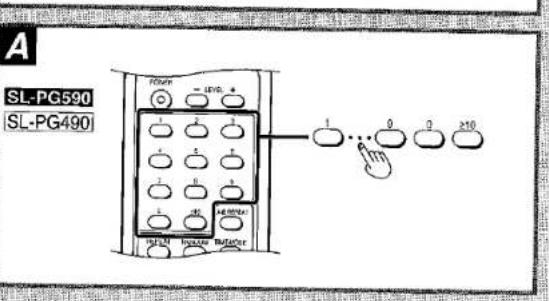
text_image
A SL-PG590 SL-PG490 Power 1 2 3 4 5 6 7 8 9 10 1 2 3 4 5 6 7 8 9 10 Input Output BuffererProgram play
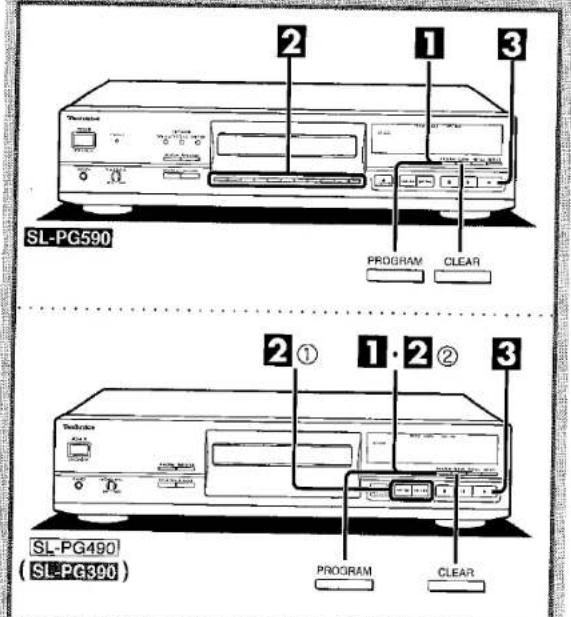
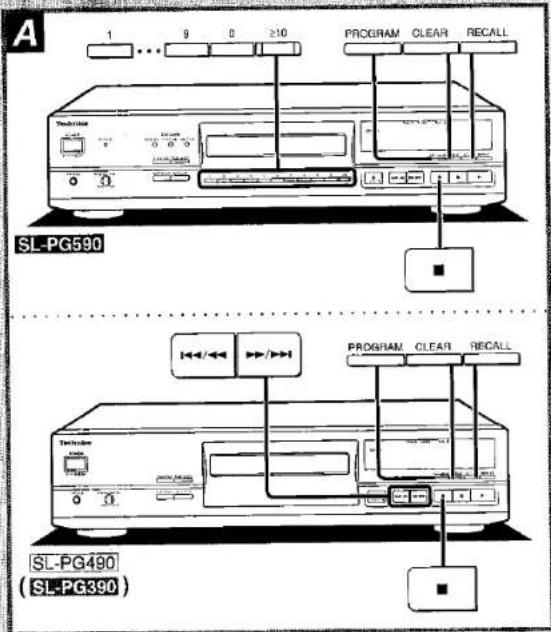
With this function, you can program up to 20 tracks in any order you like.
1 While the disc is stopped: Press PROGRAM.
If the button is pressed while the disc is playing, that track is programmed as the first.
2 Select the track to be programmed. SL-PG590
Press the numeric buttons to specify the track numbers in order.
SL-PG490 SL-PG390
① Press ◀◀/◀◀ or ▶▶/▶▶ to specify the track number.
② Press PROGRAM.
③ Repeat steps ① and ② until you have completed the entry.
If you make a mistake when pressing a track number, press CLEAR.
3 Press ▶.
Tracks are played in the programmed order, and then play stops automatically.
Program contents are stored even after playback ends.
To play the same program contents again, press ▶.
To cancel program mode
Press PROGRAM.
SL-PG590 SL-PG490 A
Selection of tracks (step 2) can be done on the remote control.
Press the numeric buttons to specify the track numbers in order.
To select a two-digit track
Press ≥ 10 and then the two numbers you want within 7 seconds.
For example
Track no. 25: ≥10 → 2 → 5
Track no. 30: ≥10 → 3 → 0
(Continued on next page)
text_image
A 1 ... 9 0 ≥10 PROCGRAM CLEAR RECALL SL-PG590 PROCGRAM CLEAR RECALL SL-PG490 (SL-PG390)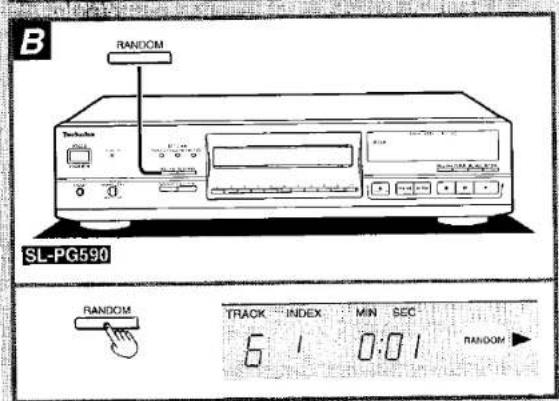
text_image
B RANDOM SL-PG590 RANDOM TRACK INDEX MIN SEC 6 1 0:01 RANDOMChecking program contents
Press RECALL
Each time the button is pressed, a track number and sequence number are displayed.
To program additional tracks
SL-PG590
Press the numeric buttons.
SL-PG490 SL-PG390
While the disc is stopped:
Press ◀◀/◀◀ or ▶▶/▶▶ and then press PROGRAM.
To erase programmed tracks
• To erase the last programmed track
While the disc is stopped:
Press CLEAR.
One track is erased each time the button is pressed.
• To erase a track within the program
Press RECALL to display the track to be erased, and then press CLEAR to erase the displayed track.
• To erase all tracks
While the disc is stopped:
Press ■
Program mode is also switched off.
For your reference
"-F" appears on the display:
When 21 tracks have been specified (no further programming possible).
“---:---” appears on the display:
- When the total playing time of the programmed tracks exceeds 99 minutes and 59 seconds.
- When a track numbered 21 or higher has been specified. In these instances, the total playing time will not be displayed, but up to 20 tracks can still be programmed.
Random play B
With this function, all tracks on a disc are played one time each in random order, and then play stops automatically.
Press RANDOM.
Random play is cancelled when play is stopped.
To cancel random play
Press RANDOM.
For your reference
During program play:
The programmed tracks will be played in random order.
text_image
A REPEAT TL-PG590 REPEAT TRACK INDEX MIN SEQ 12 56.08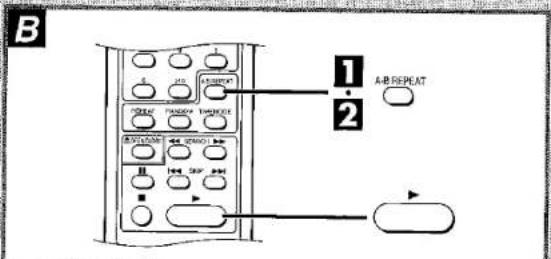
text_image
B 1 2 A-B REPEAT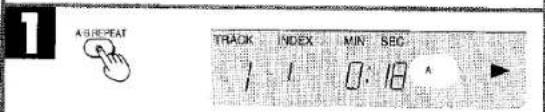
text_image
1 A#1#2EAT TRACK INDEX MIN SEC 1 1 0:18 A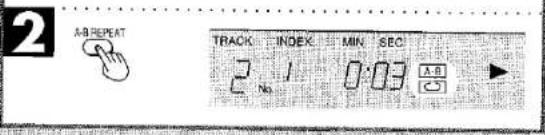
text_image
2 AB REPEAT TRACK INDEX MIN SEC 2 No 0.03 A-B S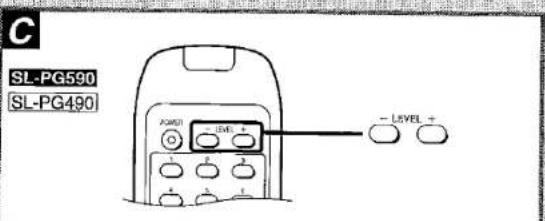
text_image
C SL-PG590 SL-PG490 P2001 - Level + - LEVEL +
text_image
-LEVEL + TRACK INDEX MIN SEC LEVEL 2 dB Indicates that output level has been decreased by 2 dBOther CD playback functions
Repeat
A
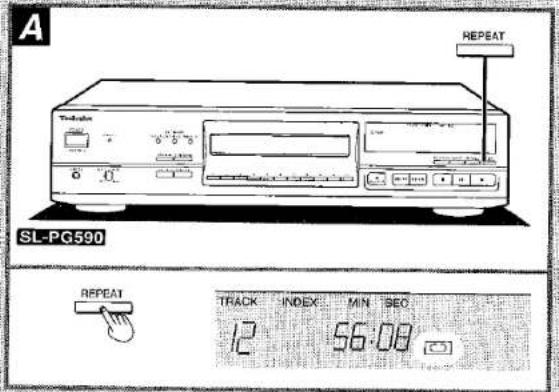
Playback of all tracks or desired tracks will be repeated.
Press REPEAT before or during play.
To cancel repeat
Press REPEAT.
To repeat only one track or specific tracks
① Specify the track numbers.
Perform steps 1 and 2 on page 8.
② Press REPEAT.
③ Press ▶
A-B repeat
B
SL-PG590 SL-PG490
(Available only from the remote control)
While a disc is playing, if you specify a start point (point A) and an end point (point B), that segment will be repeated.
1 While the disc is playing:
Press A-B REPEAT at the start point (point A).
2 Press A-B REPEAT at the end point (point B).
The segment between A and B is played repeatedly.
To cancel A-B repeat
Press A-B REPEAT.
For your reference
- A-B repeat is not possible during random play (see page 9) and program play (see page 8).
- If you press ▶ during A-B repeat, playback returns to point A.
- If you only specify point A, playback will still return to point A if you press ▶ at any point.
Output level control
C
SL-PG590 SL-PG490
(Available only from the remote control)
Rather than adjusting the volume of the amplifier, you can temporarily lower the sound by decreasing the output of the CD player.
Press - LEVEL to decrease the volume.
Each time the button is pressed, the volume changes as follows.
0dB → -2dB → -4dB ... → -12dB
To increase the output after it has been decreased
Press LEVEL +
Note SL-PG590
During CD edit recording (see pages 13 and 14), in order to maintain a constant recording level, the output level cannot be adjusted.
For your reference
- If the unit is turned off and then turned on again, the output level returns to 0 dB (normal sound level).
- When the output level is decreased, the headphone volume decreases as well.
A
text_image
A 1 2 3 SL-PG590 TIME MODE CLEAR1

2
3

B
text_image
TIME MODESL-PG590

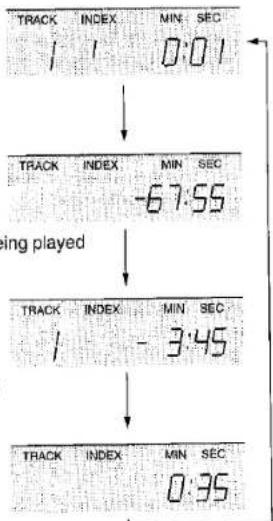
(Original state)
Elapsed time of track being played

Time remaining on disc

Elapsed time of entire disc
text_image
TRACK INDEX MIN SEC 1 1 0:01 ↓ TRACK INDEX MIN SEC -67:55 ing played ↓ TRACK INDEX MIN SEC 1 - 3:45 ↓ TRACK INDEX MIN SEC 0:35Time fade
A
SL-PG590
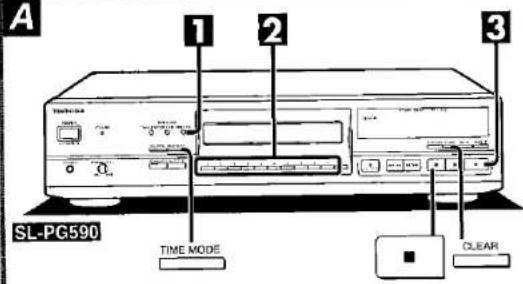
With this function you specify a time, and when that time is reached, the volume is gradually decreased and playback ends.

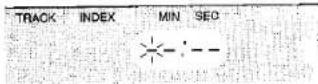
While the disc is stopped or paused: Press TIME FADE.

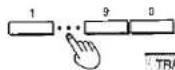
Press the numeric buttons to specify the play-back time.
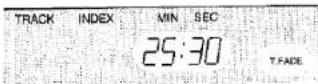
(5 seconds through 99 minutes and 59 seconds) For example, to play a disc for 25 minutes and 30 seconds and then stop: 2 5 3 0 If you make a mistake while specifying the time, press CLEAR and specify it again.

Press ▶.
Five seconds before the specified time "T.FADE" flashes, the volume is gradually decreased, and the disc is paused. Time fade is canceled simultaneously.
To cancel time fade
Press ■.
To check the time remaining until fade out
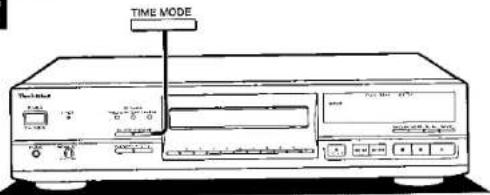
Press TIME MODE three times during playback.
Note
This function may not work properly if the disc is scratched or soiled.
Time mode selection
B
While the disc is playing or paused:
Press TIME MODE.
Each time the button is pressed, the display changes in the order shown in the illustration.
If playback is stopped and then started again, the display returns to its original state.
For your reference
The following exceptions exist:
- During playback of tracks numbered above 20; Display ③ appears as "----".
- During program play; Time for programmed tracks appears for displays ② and ④.
- During random play; Display ② appears as “----”, and display ④ as “----”.
SL-PG590
•During CD edit recording (see pages 13 and 14);
Display ② shows the time remaining on the side of the tape being recorded on.
• During time fade;
The time remaining until fade out is displayed between displays ③ and ④.
B
text_image
B 1 ... 9 0 ≥10 DeviceSL-PG590
SL-PG590
SL-PG490
text_image
1 2 3 4 5 6 7 8 9 10 11 12 13 14 15 16 17 18 19 20 21 22 23 24 25 26 27 28 29 30 31 32 33 34 35 36 37 38 39 40 41 42 43 44 45 46 47 48 49 50 51 52 53 54 55 56 57 58 59 60 61 62 63 64 65 66 67 68 69 70 71 72 73 74 75 76 77 78 79 80C
text_image
Dentrolux 1SL-PG590
Other CD playback functions
Auto cue
A
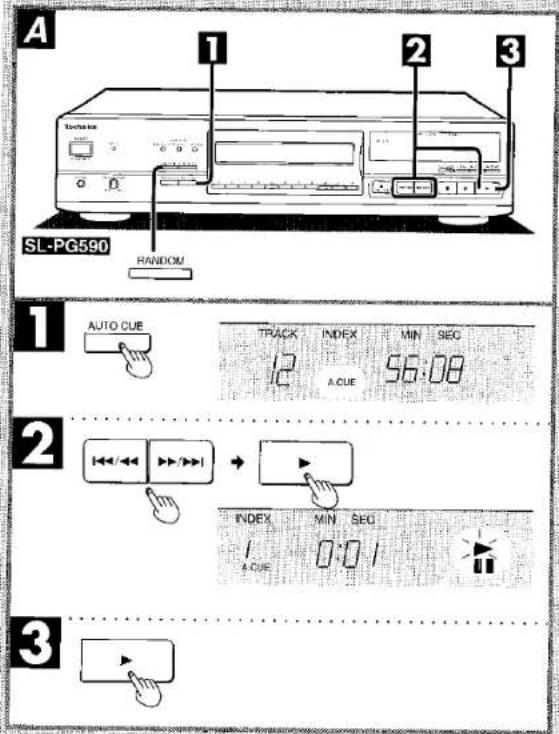
With this function, playback is paused at the beginning (where sound can be heard) of all tracks, one track at a time.
1 Press AUTO CUE.
If the disc was playing, playback is paused at the beginning of the next track.
2 Press 1◄◄/◄◄ or ►►/►► I to select the track number and then press ►.
The unit switches to the play standby mode.
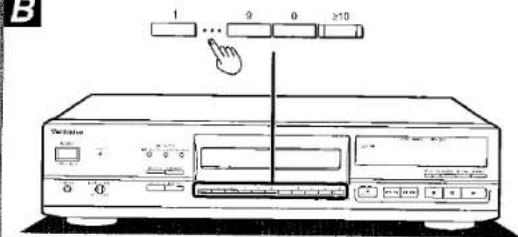
SL-PG590 SL-PG490 B
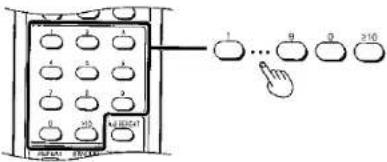
To select the track number with the numeric buttons.
Press the numeric buttons.
The unit immediately switches to the play standby mode.
3 Press ▶
Sound can be heard immediately.
To play tracks successively, press ▶ for each track.
To cancel auto cue
While the disc is playing:
Press AUTO CUE.
In combination with program play
Instead of step 2 above, program tracks following steps 1 and 2 on page 8 and then press ▶.
In combination with random play
Instead of step 2 above, press RANDOM.
Note
This function may not work properly on tracks which have soft sounds at the beginning, or on tracks which have large amounts of noise, etc.
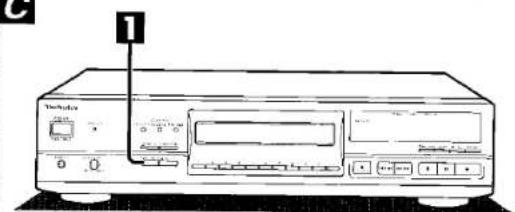
Peak search
C
This function searches for the peak level on the disc.
This is convenient when adjusting the recording level on the cassette deck.
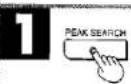
1 Press PEAK SEARCH.
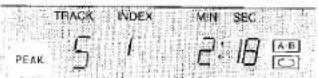
The search for the peak level is started.
Searching for the peak level takes about 2 minutes and 30 seconds for a 60 minute CD. When the peak level is found, the unit repeatedly produces an approximately 6 second segment around the peak level.
2 Adjust the recording level on the cassette deck.
Refer to the operating instructions of your cassette deck for details on this procedure.
For your reference
Since multiple peaks exist on compact discs, even for the same disc a different peak level may be found each time a peak search is performed on a disk.
text_image
3 2 4 5 SL-PG590 SIDE AB
text_image
2 TAPE LENGTH arbitrary tape length → C-46 → C-60 → C-90 → C-- Number of tracks on side A Last track on side A Time remaining on side A TRACK INDEX MIN SEC PGM 5 No. 5:32 EDIT * T 2 3 4 5 6 7 8 9 10 11 12 13 Track numbers on side A Track numbers on side B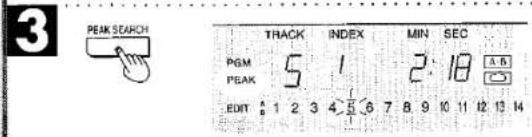
text_image
3 PEAK SEARCH TRACK INDEX MIN SEC PGM 5 1 2:10 A.B PEAK EDIT 1 2 3 4 5 6 7 8 9 10 11 12 13 14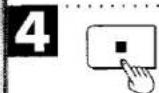
text_image
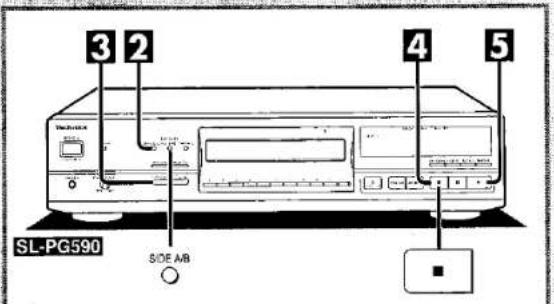
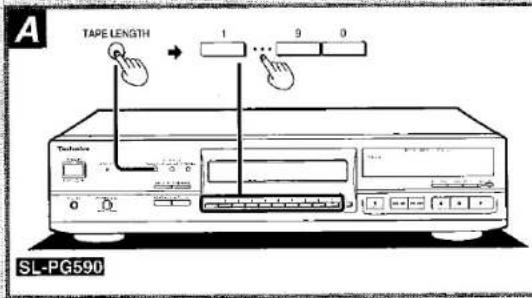
A TAPE LENGTH 1 9 0 SL-PG590CD edit recording is a function which allows you to specify a tape length and then automatically performs editing such that no tracks get cut off at the end of the tape.
With this function, an interval is automatically added between tracks if an interval doesn't already exist. This is so tape search functions that use 4 second intervals to find the beginnings of tracks will work correctly. (auto space function)
1 Prepare the cassette deck.
- Wind the leader tape and insert the tape.
- Select noise reduction.
- (Double-side playback decks only)
Set the reverse mode to single side playback (←→), and set the running direction of the tape to ▶. - Set the cassette deck to recording standby mode.
(For details, refer to the operating instructions for the cassette deck.)
2 Press TAPE LENGTH to specify the tape length.
This function divides the tracks on a disc between the two sides of a tape.
Each time the button is pressed, the tape length changes as illustrated.
• To select an arbitrary recording length, see below.
• To add tracks in the extra space on the tape, see page 14.
- To check the edit contents for side B or make changes, press SIDE A/B.
3 Press PEAK SEARCH to search for the peak level on the disc, and adjust the recording level on the cassette deck.
(see page 12)
4 Press ■.
5 Press ▶ at the same time you begin recording on the cassette deck.
- When the tracks allotted to side A have been recorded:
The CD player pauses at the beginning of the first track on side B. The cassette deck continues to record to the end of side A and then stops automatically.
• To record side B:
- Remove the tape to wind the leader.
2.(For a double-side playback deck)
Re-insert the tape and set the running direction to ◀. (For a single-side playback deck)
Turn the tape around and re-insert it.
- Press ▶ at the same time you begin recording on the cassette deck.
To cancel CD edit mode
Press ■
To select an arbitrary recording length A
Press TAPE LENGTH to select "C---" and enter the total time for both sides of the tape (1 to 99 minutes).
For example
To select 30 minutes: 3 → 0
To select 5 minutes: 0 → 5
If you make a mistake when entering this value, select "C---" again.
(Continued on next page)
text_image
A 1 ... 9 0 210 SL-PG590 SIDE A/B TIME FADE 1 ... 9 0 >10 Minus sign display (insufficient time on tape) TRACK INDEX MIN SBC PGM 12 No - 0:35 EDIT: T 2 3 4 5 6 7 8 9 10 11 12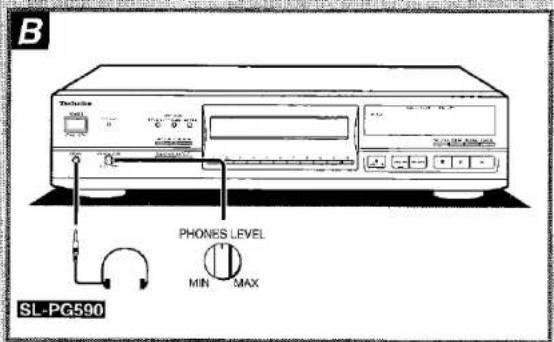
text_image
B TL-PG590 PHONES LEVEL MIN MAX SL-PG590To add tracks in the extra space on the tape A
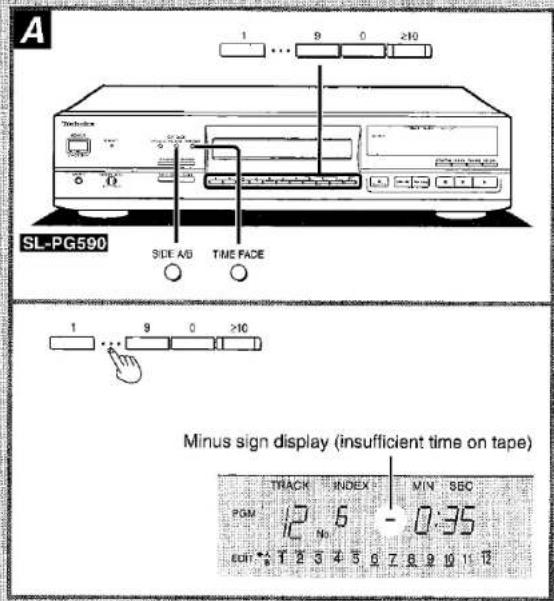
After step 2 on page 13, press the numeric buttons to specify the track number.
(See page 8.)
When a minus sign appears on the display, it indicates that the time remaining on the tape is insufficient.
To fade out at the end of the tape when the minus sign is displayed
Press TIME FADE.
At the end of the tape the sound will gradually decrease and recording will end.
If you want to fade out at the end of side B, press SIDE A/B, then repeat the same procedure described as above.
Note
Editing cannot be performed on more than 20 tracks or on tracks numbered above 20.
In such instances, don't use the edit recording function, and simply perform recording in the normal playback mode.
To edit record programmed tracks
Program your tracks as in steps 1 and 2 on page 8 and then follow the steps on page 13.
Program tracks so that the total playing time is less than the length of the tape.
To listen with headphones
SL-PG590 SL-PG490 B
Reduce the volume, and connect the headphones.
Plug type: 3.5 mm stereo
To adjust the headphones volume
Adjust the volume with PHONES LEVEL.
Note
Avoid listening for prolonged periods of time to prevent hearing damage.
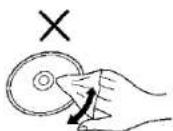
Concerning CDs
A
×

×
B
How to return CDs to their case
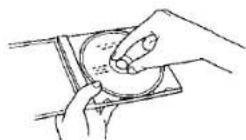
Face label upwards and press downward from above.
C
How to hold CDs
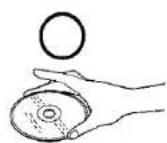
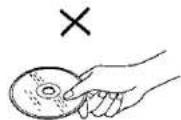
Do not touch the recorded surface.
D
How to clean CDs
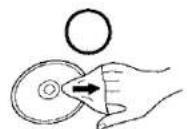
Wipe from inside outward.
With this system, you can only play CDs having this mark.
However, do not use irregular shape CDs (heart-shape, octagonal, etc.). CDs of the sort can damage the unit. A

Handling precautions
Be sure to handle CDs according to the precautions shown on the left (B - D). Failure to do so may damage the CD or the unit.
- If you are taking the CD from a cold to a warm environment, moisture may form on the CD. Wipe this off with a soft, dry, lint-free cloth before using the CD.
- Do not write on the label side with a ball-point pen or other writing instrument.
- Do not use record cleaning sprays, benzine, thinner, static electricity prevention liquids or any other solvent.
- Do not attach labels or stickers to CDs. (Do not use CDs with exposed adhesive from tape or left over peeled off stickers.)
- Do not use scratch-proof protectors or covers other than those specified for use with this system.
Storage precautions
Be sure to store CDs in their cases to protect them from dust, scratches, and warping.
Do not place or store CDs in the following places
- Locations exposed to direct sunlight
• Humid or dusty locations - Locations directly exposed to a heat vent or heating appliance
• In the glove compartment or on the rear deck of an automobile
Maintenance
To clean this unit, wipe with a soft, dry cloth.
If the surfaces are extremely dirty, use a soft cloth dipped in a soap-and-water solution or a weak detergent solution.
- Never use alcohol, paint thinner, benzine, or chemically treated cloths to clean this unit.
- Before using chemically impregnated cloth, read the instructions that came with the cloth carefully.
[Unreadable]
[Unreadable]
[Unreadable due to severe pixelation and distortion]
Before requesting service for this unit, check the chart below for a possible cause of the problem you are experiencing. Some simple checks or a minor adjustment on your part may eliminate the problem and restore proper operation.
If you are in doubt about some of the check points, or if the remedies indicated in the chart do not solve the problem, refer to the directory of Authorized Service Centers (enclosed with this unit) to locate a convenient service center, or consult your dealer for instructions.
| Problem | Probable cause(s) | Suggested remedy | Reference page(s) |
| After inserting a disc, the tray will not close even after pressing ▲ OPEN/CLOSE. | Is the disc inserted properly ? | Re-insert the disc. | 7 |
| Even after inserting a disc, the total number of tracks and other indicators do not appear on the display.Even after pressing ▶, disc playback does not begin. | Is the disc inserted upside-down ? | Re-insert the disc. | 7 |
| Is the disc dirty ? | Wipe with a soft cloth. | 15 | |
| Is the disc scratched ? | Use another disc. | ||
| Is the disc extremely warped ? | |||
| Are you using a non-standard disc ? | |||
| Has moisture condensed in the unit ? | Wait an hour before using. | ||
| Specific areas do not play properly. | Is the disc dirty ? | Wipe with a soft cloth. | 15 |
| SL-PG590 SL-PG490The remote control does not work. | Are the batteries inserted with the ⊕ and ⊖ ends reversed ? | Insert with the ⊕ and ⊖ oriented correctly. | 5 |
| Are the batteries worn out ? | Replace batteries. | 5 |
Technical specifications
•Audio
| No. of channels | 2 (left and right, stereo) |
| Frequency response | |
| SL-PG590 | 2-20,000 Hz, ±0.5 dB |
| SL-PG490 SL-PG390 | 2-20,000 Hz, ±1 dB |
| Output voltage | 2 V (at 0 dB) |
| Dynamic range | |
| SL-PG590 | 96 dB |
| SL-PG490 SL-PG390 | 92 dB |
| S/N | 100 dB |
| Harmonic distortion | |
| SL-PG590 | 0.0035% (1 kHz, 0 dB) |
| SL-PG490 SL-PG390 | 0.005% (1 kHz, 0 dB) |
| Total harmonic distortion | |
| SL-PG590 | 0.004% (1 kHz, 0 dB) |
| SL-PG490 SL-PG390 | 0.007% (1 kHz, 0 dB) |
| Wow and flutter | Below measurable limit |
| DA converter | MASH (1 bit) |
| Output impedance | 1 kΩ |
| Load impedance | More than 10 kΩ |
| Headphone output level | |
| SL-PG590 SL-PG490 | 15 mW max. 32 Ω (adjustable) |
- Pickup
| Wavelength | 780 nm |
| Laser Power | No hazardous radiation is emitted(with safety protection) |
•General
| Power supply | AC 50 Hz, 230-240 V |
| Power consumption | 13 W |
| Dimensions (W×H×D) | |
| SL-PG590 | 430×103×283 mm |
| SL-PG490 SL-PG390 | 430×92×283 mm |
| Weight | |
| SL-PG590 | 3.6 kg |
| SL-PG490 | 3.2 kg |
| SL-PG390 | 3.1 kg |
Note
| Specifications are subject to change without notice. Weight and dimensions are approximate. |
MASH is a trademark of NTT.
Umweltfreundlich gedruckt auf chlorfreigebleichtem Papier.
Environment friendly printed on chlorine free bleached paper.
Matsushita Electric Industrial Co., Ltd.
Central P.O. Box 288, Osaka 530-91, Japan
RQT4196-B
M0198X0