
SC-AKX56 - Hi-Fi System PANASONIC - Gratis brugsanvisning og manual
Find enhedens vejledning gratis SC-AKX56 PANASONIC i PDF-format.


Brugerspørgsmål om SC-AKX56 PANASONIC
0 spørgsmål om dette apparat. Besvar dem du kender, eller stil dit eget.
Stil et nyt spørgsmål om dette apparat
Download vejledningen til din Hi-Fi System i PDF-format gratis! Find din vejledning SC-AKX56 - PANASONIC og tag din elektroniske enhed tilbage i hånden. På denne side er alle dokumenter nødvendige for brugen af din enhed offentliggjort. SC-AKX56 af mærket PANASONIC.
BRUGSANVISNING SC-AKX56 PANASONIC
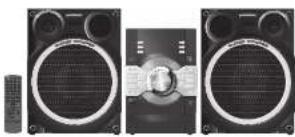
natural_image
Three black-and-white photos of a speaker with large circular headsets and a central grille, shown from different angles (no text or symbols visible)Thank you for purchasing this product.
For optimum performance and safety, please read these instructions carefully. Please keep this manual for future reference.
Panasonic
Operating Instructions
CD Stereo System
Model No. SC-AKX56
Panasonic Corporation
Web Site: http://panasonic.net
5 Panasonic Corporation 2013
GN En
RQT9793-L
LOG13HHO
Limited warranty (ONLY FOR AUSTRALIA)
Panasonic Warranty
-
The product is manufactured for 12 months from the date of purchase. Subject to the brand Trust of its warranty Manufacturer's Action and Service Center will perform necessary service on the product without charge or parts of labour, in the opinion of Manufacturer's product is bound to the party within the warranty period.
-
The warranty only applies to the existing products purchased in Australia and parts of the Australian Australia or its other international distribution of bonds and any other for the products sold and sold within Australia or its territories. Germany covers only applies to service carried out by a Financial Authorized Service Center and only if it is proof of purchase, a proposed when warranty section is required.
-
The currently only way of the closed home town enabled are used in accordance with the manufacturer's recent market data was noted in the operating environment under normal use and consumer costs (in thousands of transactions). The currently several domestic sales are only and consumer damage, financial loss or to have resulting from one of increased valuations, improved installation, and other, revenues, returns, and other costs of retail, retail, retail, retail, retail, retail, retail, retail, retail, retail, retail, retail, retail, retail, retail, retail, retail, retail, retail, retail, retail, retail, retail, retail, retail, retail, retail, retail, retail, retail, retail, retail, retail, retail, retail, retail, retail, retail, retail, retail, retail, retail, retail, retail, retail, retail, retail, retail, retail, retail, retail
This company does not store the following items on or its behalf of customers at the time of purchase:
(a) Cabeal Part(a) (b) DVD, Slu-ray or Reversible Discs
(2) VIVA of Acero Tapes (3) 57.1206 (1) 178.4000
[3] Like upwood a Future. [4] Of the reception issues raised by Dr. Arneal Caning (Wav. Sowright) etc.
- Some products may be supplied with Ethernet connection hardware. The warranty is limited on some products and will not offer
(a) Internal and or 51 HA connection / swap mixed problems.
(a) Access fees and or charges received for internal compensation (b) Use of business fees, other services, and other products by the market dealer and client out
(3) Area treated in peracental only uncoated Adv. Be formed one or more of the hardware. To connector to the plan for any other device.
0.240 278754 53966 2400 200150 27815048
• Exposition: RAT307/40% (1) 2006-12-2015, 2016-12-2016, 2017-12-2017, 2018-12-2018, 2019-12-2019, 2020-12-2020, 2021-12-2021, 2022-12-2022, 2023-12-2023, 2024-12-2024, 2025-12-2025, 2026-12-2026, 2027-12-2027, 2028-12-2028, 2029-12-2030
- Send or take the product in a Panasonic Authorized Service Center together with your proof of purchase receipt as a proof of purchase date. Please note that freight and insurance to and/or
After your current Authorized Service Customer shall be arranged by you.
- Placatal LCD laser array / chalava laser array under Junt 103 cm
- The combination of money confirmed that results to, and outside any costs associated with the installation, de-implation on re-inversion of a prior or, including costs required to the mounting, de-implating or remounting of any cost from (Jarmely other security accounting, banking, banking, financing, transportation or insurance of the product or ring and rental or replacement of and-cash relations, and exercise, the demand or low-cost pricing as mayon of, lending, associates with, provided to such inflation, de-implation on re-inversion of a prior)
Parsonatic Authorised Service Centers are located in major metropolitan areas and most regional centres of Australia, however, coverage will vary dependant on product. For advice on road Authorized Service Centers, please for your product please contact our Customer Care Centers on 19280 or call on articles and use by Service Center London.
In addition to your rights, order in (January), Consumer goods and consumer guaranteed that cannot be created under the Sustainable Consumer Law. In this case, a major tax rate is in the product, you must pay the product and act in taxes a result or to raise the product or option of it for you with you only need to stop the goods and be compensated for the step in which of the goods, you must pay the product or option of it for you with any other party or any other party or any other party or any other party or any other party or any other party or any other party or any other party or any other party or any other party or any other party or any other party or any other party or any other party or any other party or any other party or any other party or any other party or any other party or any other party or any other party or any other party or any other party or any other party or any other party or any other party
If there is a major failure in regard to the product which cannot be remedied then you must reply us within a reasonable period by contacting the Panasonic Customer Care Centre. If the failure in the product is not a make for use then Panasonic may choose to report or replace the product and will do so in a reasonable period of time from receiving price from you.
THIS WARRANTY CARD AND THE PURCHASE DOCKET (OR SIMILAR PROOF OF PURCHASE) SHOULD BE RETAINED ON THE CUSTOMER AT ALL TIMES.
SHOULD BE RETAINED BY THE CUSTOMER AT ALL TIMES
If you require assistance regarding warranty conditions or any other enquiries, please visit the Bono.com Australia website www.nanapole.com or protect by phone on 125 500.
• Exploring in, please ensure you have your operating instructions available.
Panasonic Australia Pty. Limited
(1) 2016年1月1日 星期六:30:15
的信达Ihave
(2) 汉湘川
Overview of controls
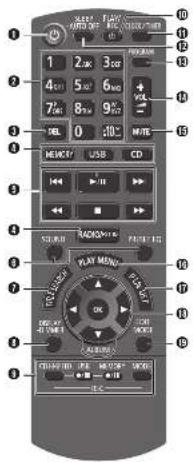
1 Standbylon switch [0], [0-1] Press to switch the unit from on to standby mode or vice versa. In standby mode, the unit is still consuming a small amount of power.
②Aphanumide humons
To select a 2-digit number
Example: 16: [10]→[1]→[5]
To set a character
Example 0: [2]→[2]
②Delete a programmed track
Delete a selected track in a playlist
0.154
•
(1) 2014.
①Select the sound effects
①Gird the life search for internal memory
• 2017年1月1日
- New content information
Decrease the brightness of the display panel
To cancel, price and held the \$10 euro.
•
E1 (receiving operation control)
See the play timer and record timer
①
(1) 由上证300和350
Get the sleep timer
Automatically switch off the system
The auto-off function switches off the system (except in radio source) if you do not use
the system for 30 minutes.
Press and hold the humor to use this function. To cancel, press and hold the button angle
To cancer, press and held the colon again
©G, the program function
① just the union of the union
2.4.10. 19. 3. 10. 10.
⑤Mute the sound of the system
Press the button again to cancel.
MUTE is also cancelled when you adjust the volume or when you switch off the
system
Do the procedures with the remote control. You can also use the buttons on the main unit if they are the same. Your system and the illustrations can look differently. These operating instructions are applicable to the following system.
| System 5C-AKX5B | |
| Main unit 5A-AKX5C | |
| Speakers 5B-AKX7S |
Safety precautions
WARNING!
- To reduce the risk of fire, electric shock or product
damage.
- Do not expose this unit to rain, moisture, crippling or
splashing.
Do not place objects filled with liquids, such as vases.
on this unit
- Use only the recommended accessories
- Do not remove covers.
Do not repair this unit by yourself. Refer servicing to
qualified service personnel.
as the best project is made in our
CAUTION!
• To reduce the risk of fire, electric shock or produce
diurese.
- Do not install or place this unit in a bookcase, built-in
cabinet or in another confined space. Ensure this unit
is well ventilated.
- Do not obstruct the unit ventilation openings with
measurers, isbeloths, carisms, and simistisms
- Do not place sources of baked tams, such as lgred
Condoles, on this list.
- Set the unit up on an even surface away from direct
slight, high temperatures. Highly, and excessive
- Tax rate is intended for use in moderate rhythm
• The main plan is the disconnecting device, Instal this
unt so that the mains plug can be unplugged from the
sociel outlet immediately
• This unit may receive radio interference caused by
mobile telephones during use, if such interference
occur, please increase separation between this unit and
the mobile telecomm
- This unit utilizes a laser. Use of controls or adjustments
or performance of procedures other than those specified herein may result in appropriate pricing.
Battery
- Danger of explosion if battery is incorrectly replaced.
Replace only with the type recommended by the
manufacturer.
- When disposing the batteries, please contact your local
authorities or dealer and ask for the correct method of
10:08:54
- Do not feel or expense to blame
- Do not leave the battery(s) in a car exposed to direct
sunlight for a long period of time with doors and windows
dood
- Do not break open or short-circuit the battery
- Do not charge the alkaline or manganese battery
- Do not take the factory if the storm has posted off.
- Remove the battery if you do not use the remote control
for a long period of time. Keep in a cool, dark area.
- If you see this symbol -
Information on Disposal in other Countries outside
the Europa
| This symbol is only valid in the European Union. |
If you wish to discard this product, please
contact your local authorities or dealer and ask for the correct method of dealer.
-
-
Supplied accessories
Check and identify the supplied resources
1 x AC mains load
三、会议
□1 x AM loop expansion
□1 x FM indoor antenna
- 2017年1月1日
C
• 1.0.2. Damada control battery
- 1x Remote condu
□1 x Remote control
IN2GAYE000656)
Specifications
Amplifier section
RMS output power stereo mode Front HI 250 W per channel (3.0), 1 kHz, 30% THD Front Lo 250 W per channel (3.0), 100 Hz, 30% THD Total RMS stereo mode power 1000 W (30% THD)
Tuner, terminals section
Preset station FM 30 stations
AM 10 stations
Frequency modulation [FM]
Греоранову газки 87.50 MHz to 108.00 MHz (50 kHz slip) Antenna terminal 75.0 (unbalanced)
Amplitude modulation (A)
Angitudinal modulation (A)
Gamma search price 522 kHz in 1628 kHz (9 kHz see)
520 kHz to 1830 kHz (10 kHz also)
Music port fronti
| Gonstivity | 100 mV, 4.7 kΩ |
| Terminal | Stereo, 3.6 mm jack |
| AUX input | Pin jack |
Disc section
Disc played (8 cm or 12 cm)
CD CD-GRW (CD-DA, MP3)
Pick up
750 nm (CD)
Audio output Idisc
Баланов от чистуем.
E. a [rccl iel]
FC = Front first charge
PR - Houtigh. Charles
MPEG-1 Layer 3
Internal memory section
Memory
| Memory size | 2 GB |
| Media l/s (control support) | MP3 (*.mp3) |
Memory recording Bit rate
| Bit rate | 126 kbps |
| Memory recording speed | 1x, 3x max (CD only) |
| Recording file format | MP3 (*, no3) |
Capacity of total songs recorded 510 songs
(Use 128 shps, approximately 1 song = 4 mins)
USB section
USB port
USB port USA standard
002 SANTA 100 EON SPAC
Media file formal support MP3 (*.mp3)
USB device 115 system FAT12, FAT13, FAT14
USD port power 500 mA (msx)
Bt rate
USB recording
| Bit rate | 120 kbps |
| USB recording speed | 1x, 3x max (CD only) |
| Recording line format | MP3 (*, mΩ) |
Speaker section
Type 3 way: 3 speaker system (bases reflex)
Speaker units
Sunder Windsor 30 am cono bho
Super 700 fl 20 ml Dole type Worfer 8 cm cone bho
Woodl Twelve
Tweels 6 mm bond type
Impedance High 3.27 Low 3.2
Output sound prinkurs 96 dBW (1 m)
Frequency range 42 Hz to 28 kHz -15 dB
Frequency range 45 Hz to 27 kHz, 10 dB
The following table is provided in the image:
Dimensions (W×H×D) 300 mm × 401 mm × 255 mm
Mnks 5.5 kg
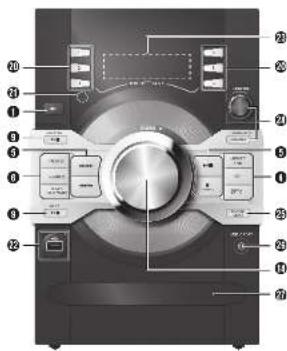
Making the connections
Connect the AC mains lead only after all the other connections have been made.
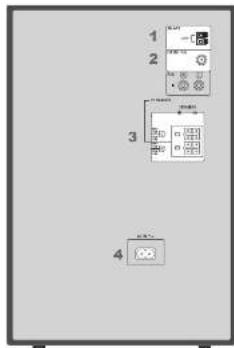
1 Connect the AM loop antennas.
and the antenna up on its base until it drops.
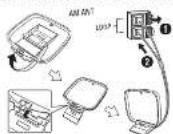
2 Connect the FM Indoor antenna
Place the orientation where reception is best.
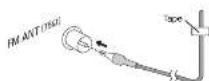
3 Connect the speakers.
Connect the speaker enables to the terminals of the same colour.
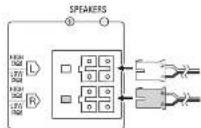
4 Connect the AC mains lead.
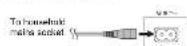
Do not use an AG main lead from other equipment.
Conserving power
The system consumes approximately 0.3 W when it is
in standby mode. Disconnect the power supply if you
do not use the system.
Some settings will be lost after you disconnect the
systelet. You have to be seen again.
Preparing the remote control
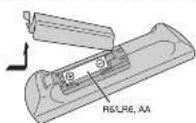
Usa alkaline or margarine battery.
Install the battery so that the poles (+ and -) align with those in the remote control.
① Get the play menu item
Internal memory playlist operation
① Shel the avion
①3rd the edit made for USB and internal memory
Intellectual memory playlist direct buttons
Press and hold to add a track in the corresponding play at
Pinks to select the photo!
④ Remote control sensor
Distance: Within approximately 7 m
Angle: approximately 20° up and down. 30° left and right
USB port ( )
USB recording indicator
④Display panel
① urcose playt of the internal memory
Brown trackx or albums
中
Turn [CONTROL] to ignore the track.
Press ▶■ to start playback from the selection.
图2
Press [ALBUM/TRACK] to select album or track and then sum [CONTROL] to browse.
Press [▶] to start playback from the selection.
Set the illumination effect
Press she has | ILEMINATION | she has him (CONTROL) to select the best
6.54
④Open or close the disc ray
④Music and jacks
(2) 100% of the
①Disc tray
2017年1月1日
[Non-Text]
[Non-Text]
[Non-Text]
[Non-Text]
[Non-Text]
[Non-Text]
[Non-Text]
[Non-Text]
[Non-Text]
[Non-Text]
[Non-Text]
[Non-Text]
[Non-Text]
单位:元
Placement of speakers
Tensile
1
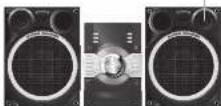
Put the speakers so that the tweeter is on the outside.
Use only the supplied sneakers.
You can cause damage to the system and decrease the
sound quality if you use other speakers.
Note:
Note:
for next October.
- Put the speakers on a flat gate surface
• These speakers do not have magnetic shielding. Do not
put them near TVs, PCs or other equipment easily.
Influenced by magnedism.
- When you play at high levels for a long period, it can
cases damage to the speakers and decodes the list of
the speakers.
• Disclose
- When the sound is distorted
- When you adjust the sound quality.
(2) 17
CAUTION! Use the correct only with the recommended
- Use the speakers only with the recommendations system. If not, you can cause damage to the
System: If not, you can cause damage to the amplifier and speakers and can cause a fire.
Consult an approved service personnel if damage
occurs or if there is a sudden apparent change in
performance.
- Do the procedures included in these instructions
when you attach the speakers
Disc
Playing disc
1 Press [▲ OPEN/CLOSE] on the main unit to open
the disc tray.
Put in a close with the label facing up
Press [▲ OPENCLOSE] sign to close the disc tray.
2 Press [CD] and then press [▶-III] to start playback
Open Northwest Texas [1]
Stop physicians. Meas [■].
Pause playback Press [▶/III].
Press Scan to continue playback.
Skip album Press [▲, ▼].
BPM
Skin track. Egress [dell or [b]
(malb unit, 100% or 100%)
Earnings from: Dance and hold [▶] or [▶].
305 of through 1.482x to 1.491 [4-7] in [4-7]
(1) _1 (with p-2, -2), or [p-2, -2, -2].
Viewing available information
You can view the available information on the display panel
Press [DISPLAY].
Note:
- Maximum characters that can be shown
approximately 32
• This system supports ver. 1.0 and 1.1 IDS tags.
• Test data that the system does not support can show
.
Play menu
- Press IPLAY MENII to select "PLAYMODE" or
"REPEAT"
- Press [▶] and then press [OK] to select the
desired mode
PLAYMODE
| OFF PLAYMCCCE | Play all tracks. |
| 1-TRACK LTR | Play one selected track on the disc. Press the approach menu buttons to select line tracks. |
| 1-ALBUM LTR | Play one selected album on the disc. Press (▲▼) to select the album. |
| 2-RAND RAM NO | Play a disc randomly. |
| 3-ALBUM RANDOM LTR | Play all tracks in one selected album random tracks. Press (▲▼) to select the album. |
| 4-REPEAT | |
| ON REPEAT | Repeat playback. |
| OFF REPEAT | Cancel repeat playback. |
The selling returns in the default "OFF PLAYMODE" when you open the disc tray.
Program playback
This function allows you to program up to 24 marks.
1 Press [PROGRAM] in the stop mode
PGM is shown
2 CD
Press the alphanumeric buttons to select the
desired track.
Do this stop again to program other tracks
图2
1. Press [▲, ▼] to select the desired album.
2. Press [▶▶] and then press the alphanumeric
buttons to select the desired track
3. Press [OK].
Do these steps again to program other traces
3 Press [▶III] to start playback.
| Cancel program mode | Press [PROCRAM] in the stop mode. |
| Check program continues | Press [▶▶] or [▶▶] when PGM is shown in the stop mode. |
| Clear the last track | Press [DLL] in the stop mode. |
| Clear all programmed tracks | Press [■] in the stop mode. CLR ALL is shown. Within 5 seconds, press [■] again. |
Note:
• You can't use a program packet together with
PLAYANCE function
• The program memory is cleared when you open the close
[Unreadable]
Note on disc
• This system can play CD-R/RW with CD-DA or MP3
format content.
• Some CD-RMR cannot be played because of the
condition of the recording
- KPS free sea defined sea tracks and kildes are defined sea
albums.
• Тим узайтсянки
- CD-DA: 300 MHz - M57: 266 tracks, 755 alarms and 70 receivers
- Das nur verlern zu 150000 kcal, 1 oz 3 (ave
Boschutz Schaff verlustnet (trussel)
• Reconcices will not necessarily be played in the order way.
recorded as cm.
(二)本次股东大会的召开方式
MPEG Layer-3 audio coding technology licensed from
Freunholer 15 and Thomson.
Radio
Manual tuning
1 Press [RADIO'EXT-IN] to select "FM" or "AM".
- Prove [a] or [b] to select the frequency of the
2.1483
To luno automatically, nms and hold the turn
the frequency starts changing quickly.
This known thing is also a common kind of
receive
Using the main unit
1 Press [RADIO/EXT-IN] to select "FM" or "AM".
2.1 THURSTELL & LEMON
■ 1400 [TONE MODE] to select _WONORE
3 Press [◀◀◀◀] or [▶▶▶▶] to
frequency of the required station
2.5
Improving the sound quality
When "FM" is selected
1 Press IPLAY MENU to select "FM MODE"
- Press is also to select "MONO" and then press
1906 [4, 2] to school mono- and then press [OK].
To cancel, select "STEREO"
"MONO" is also cancelled when you change the
frequency.
When "AM" is selected
1 Press PLAY MENU to select "E.PROOF"
2 Press [◀, ▶] to select from "BP 1" to "BP 8" that provides the best reception and then press [OK]
Memory presetting
30 FM and 15 AM stations can be present.
Automatic presetting
1 Press [OK] to select "LOWEST" or "CURRENT" frequency.
2 Press IPLAY MENU to select "A.PRESET" and
then press [OK].
"START" is shown
3 Press [OK] to start counselling.
Te: (noel, pre-
Manual presetting
-
Pass [→] or [→] to turn into the station
-
-
- 10.
-
2.1 Max (PROKAL)
3 Press the alphanumeric buttons to select a preset
number.
The new mission requires any station that occurs the
THE NEW CLASS REPROVED ONLY SANER'S NOT DESCRIBED THIS SEMI CROSS NUMBER
Selecting a preset station
Press the alphanumeric buttons. [◀◀] or [▶▶▶] to
select the preset station
Using the main unit
1 Press [TUNE MODE] to select "PRESET"
- Pass I-141 or D# 1 to select the user
station.
AM allocation setting
By main unit only
This system can also receive AM broadcasts allocated in
“H2”
1 Press [RADIOEXT-IN] to select "FM" or "AM".
- Press and bold (RADIO!EXTJNJ)
After a few seconds, the display panel shows the current
minimum radio frequency. Release the button when the
minimum frequency charges
• To go back to the mind setting, do that anova step again • Fill you change the nation, predict preferences are
erased.
[Non-Text]
Title search
MEMORY
You can search for the desired back in the internal memory
•
1 Prikk [TITLE SEARCH]
- LINKS
2 Press the alphanumeric buttons or [▲, ▼] to select
the desired character then press [▶] to select next
character. To delete a character, press IDELL
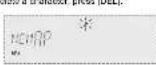
3 Ринки [ОК].
Press [◀, ▶] to search for previous or next match
NO COND. & MIRK TINN S D HES
4 Prink [OK] to confirm and play the track.
To cancel, press [TITLE SEARCH].
Note
- This function skip tracks that are created with basic
The following (→ "BAS-NEEHEG")
- This function asks not work with random or program playback.
• The author
• A same track title display will be shown for tracks with the
Soil
USB and internal memory
You can connect and play music tracks from your USB
device.
You can also record smart or more tracks into the 2 GB internal memory in "mp3" format.
This system can play or record up to 800 folders (maximum 889 tracks in an album or a total of 3000 tracks, depending on the available storage capacity.
Connecting a USB device
Preparation
Before you connect a USD device to the system, make sure
yao in subkap at p=thbs
Do it use a USB extension device. The system can not respect USB device connected through a cable.
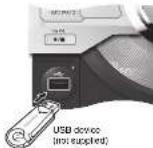
Decrease the volume and connect the USB device to
the USB port.
USB device.
Recording to a USB device or the internal
memory
Panasonic cannot be held responsible on the action of consumer to record copyrighted contents which can cause copyright infringement.
Note
• At reconstancy level, no?
- You cannot do recording when you are using random
playback made
- Repeat playback mode is an during accident.
• A now album is about each time you do a refreshing.
- The sequence of short-term exchange after the following:
in the 155 days or the inverse memory
-
Basic recording
- Select the source you want to record
。
Preserve the disc electrons move
| Record all tracks Select "OFF PLAYMODE" (→ "Play menu"). | |
| Record program meal tracks | Program the tracks you want. (→ "Program playback".) |
| Record a single track | Sword "1-TRACK" (→ "Play menu"). |
Make sure the dec is stopped.
Redin
Tune in to the radio station
External equipment
Connect and play the equipment
→ "External equipment".
- Press / MEMORY REC ●/II or /USB REC ●/III to
start recording
The name of the feltier that keeps 1's recording is
shown
| Stop recording Press [■], "WRITING" is shown. | |
| Pause recording | Press [MEMORY REC ●III] or [USB REC ●III] during recordingPress again to continue recording.Note:You can cause during reasoning from the radio, music port or AUX (except in SYNC-ISO mode). A track mark is added every time you pause (→ "Adding track marks") |
Note
*Wait for a few seconds for the system to prepare the USB
device before you start recording.
• USB recording indicator banks during USB recording.
D2
- When the next track is being recorded, it will be shown on
the
Recording MP2 tracks
2、会议召开情况
(3671)
You can record MP3 tracks from a disc to a USB device or
the internal memory.
You can also record MP3 tracks from a USE device to the internal memory, or use CPU.
- 2017
1 Prepare the source you want to record.
| Record all tracks Select "OFF PLAYMODE" (→"Play menu"). | |
| Record programmed tracks | Program the tracks you need (→"Program playback"). |
| Record specified album or track | Select "1-ALBUM" or "1-TRACK" (→"Play menu"). |
2 Press MEMORY REC ●III or USB REC ●III to
start recording.
Example: Recording an album from the USB device to
the Internal memo

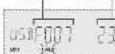
Slap recording Press [■]
Reporting slope at the last July
recceded back in the album.
For example, if you shop recording
during the fourth track, only the first
three racks are recorded
"NO FILE RECORDED" is shown if n
track is recorded.
Note
- Some tracks can use a longer time to record.
- Some tracks cannot be recorded because of the
confection of the source.
- The record use location name may be different from the
1.6
Basic playback
- Press [MEMORY] or [USB] main unit
(MEMORY!USB) to select "MEMORY" or "USB"
-
On the 10-15-16th class
-
2017年1月1日
Step-by-801-11-46 [■]
TUESOME: 869047.
06
Press ■ two times to stop the playback
项目
For other operations, refer to "Disc"
Viewing available information
You can view the available information on the display panel.
Press [DISPLAY]
1
11.1-2014
Inade: Recording the of Distribution of Filing
the
Cinig
10.2.19
Liong, pyrakas, this kind in the Barack kind.
of pause
- 10.10.2017, 4:30, 4:30, 5:30, 6:30, 8:30, 9:30, 10:30, 11:30, 12:30, 13:30, 14:30, 15:30, 16:30, 17:30, 18:30, 19:30, 20:30, 21:30, 22:30, 23:30, 24:30, 25:30, 26:30, 27:30, 28:30, 29:30, 30:30, 31:30, 32:30, 33:30, 34:30, 35:30, 36:30, 37:30, 38:30, 39:30, 40:30, 41:30, 42:30, 43:30, 44:30, 45:30, 46:30, 47:30, 48:30, 49:30, 50:30, 51:30, 52:30, 53:30, 54:30, 55:30, 56:30, 57:30, 58:30, 59:30, 60:30, 61:30, 62:30, 63:30, 64:30, 65:30, 66:30, 67:30, 68:30, 69:30, 70:30, 71:30, 72:30, 73:30, 74:30, 75:30, 76:30, 77:30, 78:30, 79:30, 80:30, 81:30, 82:30, 83:30, 84:30, 85:30, 86:30, 87:30, 88:30, 89:30, 90:30, 91:30, 92:30, 93:30, 94:30, 95:30, 96:30, 97:30, 98:30, 99:30, 100.
- This function does not work with
playback
• The share
• A some track title display will be known for tracks with the
Soil
[Non-Text]
[Non-Text]
[Non-Text]
[Non-Text]
[Non-Text]
[Non-Text]
[Non-Text]
[Non-Text]
[Non-Text]
[Non-Text]
[Non-Text]
[Non-Text]
[Non-Text]
[Non-Text]
(1)
External equipment
Supervision
• Devorced the AC usage end
- Switch off all equipment and read the appropriate
operating instructions.
[Unreadable]
Note: Concrews and cables are sold otherwise.
- 2017年
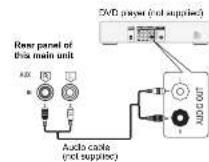
Using the auxiliary input
You can connect a VCR, DVD player role and listen to the
2019
[Non-Text]
-
Connect the external equipment
-
本次发行的证券简称及上市地点
-
PRAKE [RADIC/EXT-IN] IS SELECT "AUX"
3 p
M
- If you want to connect equipment other than those
described, refer to the audio declar.
- Sound distortion can occur when you use an adaptor.
(五) 本次股东大会的决议
[Non-Text]
[Non-Text]
[Non-Text]
[Non-Text]
[Non-Text]
[Non-Text]
[Non-Text]
- Panasonic
- Operating Instructions
- CD Stereo System
- Panasonic Corporation
- Limited warranty (ONLY FOR AUSTRALIA)
- Panasonic Warranty
- Safety precautions
- WARNING!
- CAUTION!
- Supplied accessories
- Specifications
- Amplifier section
- Tuner, terminals section
- Frequency modulation [FM]
- Music port fronti
- Disc section
- Disc played (8 cm or 12 cm)
- Internal memory section
- USB section
- Speaker section
- Making the connections
- Connect the AC mains lead.
- Preparing the remote control
- Placement of speakers
- Disc
- Playing disc
- Viewing available information
- Play menu
- Program playback
- Radio
- Manual tuning
- Improving the sound quality
- Memory presetting
- AM allocation setting
- Title search
- USB and internal memory
- Connecting a USB device
- Recording to a USB device or the internal
- memory
- Basic recording
- Press MEMORY REC ●III or USB REC ●III to
- Basic playback
- External equipment
- Using the auxiliary input
Mærke : PANASONIC
Model : SC-AKX56
Kategori : Hi-Fi System