
P1448-LE - Overvågningskamera AXIS - Gratis brugsanvisning og manual
Find enhedens vejledning gratis P1448-LE AXIS i PDF-format.


Brugerspørgsmål om P1448-LE AXIS
0 spørgsmål om dette apparat. Besvar dem du kender, eller stil dit eget.
Stil et nyt spørgsmål om dette apparat
Download vejledningen til din Overvågningskamera i PDF-format gratis! Find din vejledning P1448-LE - AXIS og tag din elektroniske enhed tilbage i hånden. På denne side er alle dokumenter nødvendige for brugen af din enhed offentliggjort. P1448-LE af mærket AXIS.
BRUGSANVISNING P1448-LE AXIS
AXISP14NetworkCameraSeries
AXISP1445-LENetworkCamera
AXISP1447-LENetworkCamera
AXISP1448-LENetworkCamera
Aboutthismanual....3
Solutionoverview....4 ....4
Productoverview....5 ....5
Findthedeviceonthenetwork....6
Accessthedevice....6
Securepasswords....6
Additionalsettings....7
Needmorehelp?7
Imagequality....7
Overlays....10
Streamingandstorage....1 1
Events....14.
Applications....16
Troubleshooting....17
Resettofactorydefaultsettings....1.7.
Checkthecurrentfirmware....17
Upgradethefirmware....17.
Technicalissues,cluesandsolutions.... 18
Performanceconsiderations.... 19
Specifications
LEDIndicators 20
SDcardslot 20
Buttons.... 20
Connectors.... 20
Aboutthismanual
ThisUserManualprovidesinformationontheproductregarding:
- Access
- Mainusecases
- Troubleshooting
- Specifications
Note
TheUserManualmayincludemorethanoneproduct.Partofthecontent,e.g.someusecasesorspecifications,mayonly applytosomeofthem.Formoreinformationontheexactfeaturesetandspecifications,seetheproduct'swebpageand datasheetatwww.axis.com
Solutionoverview
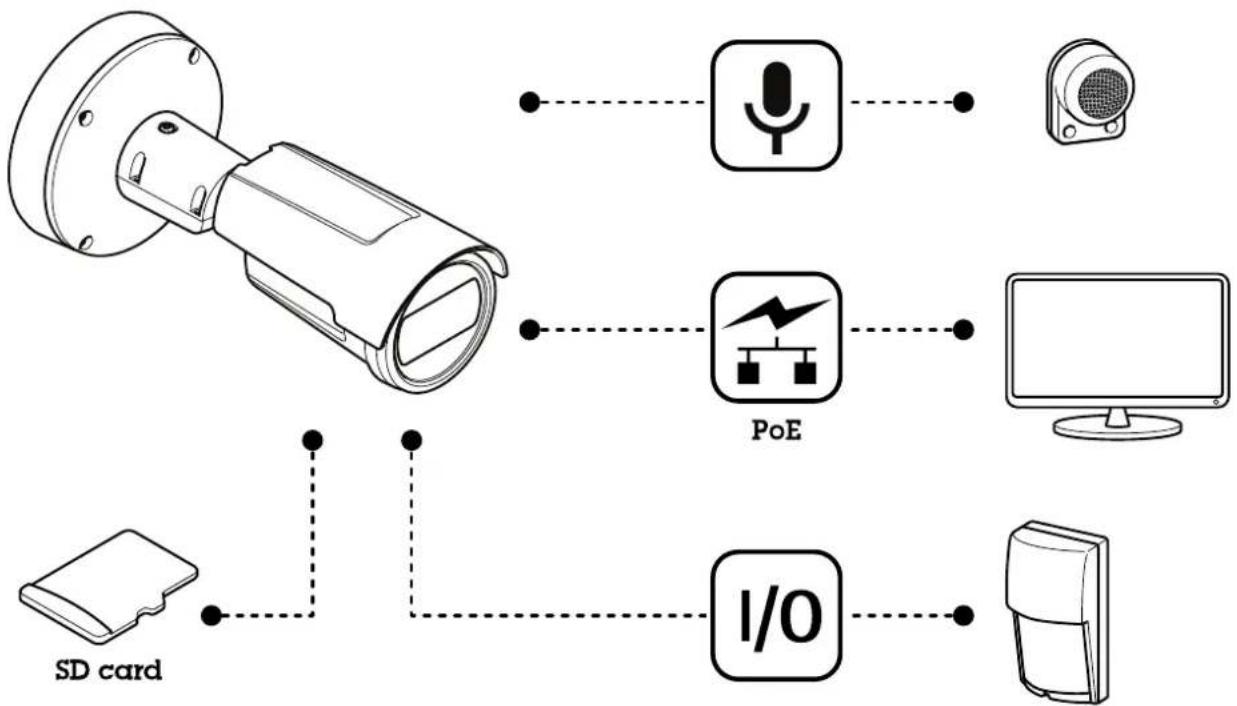
flowchart
graph TD
    A["Security Camera"] --> B["VoE"]
    A --> C["Monitor"]
    A --> D["I/O"]
    A --> E["SD card"]
Productoverview
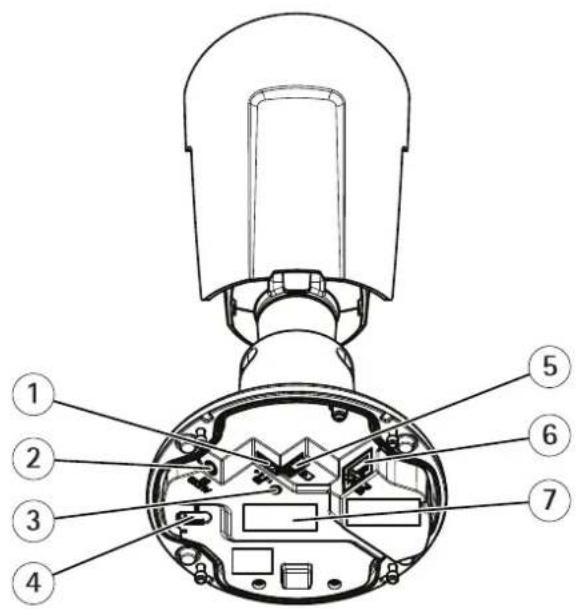
1 I/Oconnector
2 Audioconnector
3 StatusLEDindicator
4 Controlbutton
5 microSDcardslot
6 Networkconnector
7 Partnumber(P/N)&Serialnumber(S/N)
Findthedeviceonthenetwork
TofindAxisdevicesonthenetworkandassignthemIPaddressesinWindows®, useAXISIPUtilityorAXISDeviceManager. Both applicationsarefreeandcanbedownloadedfromaxis.com/support.
FomoreinformationabouthowtdfindandassignRaddressesseethdocumentHowtassignRaddressandaccessyourdeviceonthedevicepageataxis.com.
Accessthedevice
1.OpenabrowserandenterthelPaddressorhostnameoftheAxisdevice.
If you have a Maccomputer(OSX), goto Safari, click Bonjour and select the device from the drop-downlist. To add Bonjour as a browser bookmark, goto Safari > Preferences.
If you donot know the IP address, use AXISIP Utility or AXISDevice Manager to find the device on then network.
Entethusernameandpasswordyouaccessthe deviceofthfirstimeyoumustetheroopasswordSeeSetnewpasswordfortherootaccountonpage6.
- Theliveviewpageopensinyourbrowser.
Securepasswords
Important
Axisdevicessendtheinitiallysetpasswordincleartextoverthenetwork.Toprotectyourdeviceafterthefirstlogin,setupasecureandencryptedHTTPSconnectionandthenchangethepassword.
The device password the primary protection for your data and services. Axis devices do not impose a password policy as they may be used in various types of installations.
Toprotectyourdatawestronglyrecommendthatyou:
- Useapasswordwithatleast8characters,preferablycreatedbyapasswordgenerator.
- Don'texposethepassword.
- Changethepasswordatarecurringinterval, atleastonceayear.
Setanewpasswordfortherootaccount
Important
The default administrator username root the password for roots of the device factory default settings.
Type:password:Followthenstructions about secure password See Secure passwords or page 6
- Retypethepasswordtoconfirmthespelling.
3.ClickCreatelogin.Thepasswordhasnowbeenconfigured.
Additionalsettings
Needmorehelp?
Youcanaccessthebuilt-inhelpfromthedevice'swebpage.Thehelpprovidesmoredetailedinformationonthedevice'sfeaturesand theirsettings.
Imagequality
Selectexposuremode
There are different exposure mode options in the camerath at adjusts aperture, shutterspeed, and gain to improve image quality for specific surveillance scenes. Get Settings Image Exposure and select between the following exposure modes:
- Formostusecases,selectAutomaticexposure.
Fo environments with certain artificial lighting for example fluorescent lighting selec Flicker-free.
- Forenvironmentswithcertainartificiallightandbrightlight,forexampleoutdoorswithfluorescentlightingatnightand sunduringdaytime,selectFlicker-reduced.
- Tolockthecurrentexposuresettings,selectHoldcurrent.
Viewarea
Aviewareaisacroppedpartofthefullview.Youcanstreamandstoreviewareasinsteadofthefullviewtominimizebandwidth andstorageneeds.IfyouenablePTZforaviewarea,youcanpan,tiltandzoomwithinit.Byusingviewareasyoucanremoveparts ofthefullview,forexample,thesky.
Whenyousetupaviewarea, were recommendyoutosetthevideostreamresolutiontothesamesizeasorsmallerthantheviewarea size. If yousetthevideostreamresolutionlargerthantheviewareasizeitimpliesdigitallyscaledupvideoaftersensorcapture, which requires more bandwidth without adding image information.
Hidepartsoftheimagewithprivacymasks
Youcancreateoneorseveralprivacymaskstohidepartsoftheimage.
- GotoSettings>Privacymask.
2.ClickNew. - Adjustthesize, color, and name of the privacy mask according to your needs.
Adjustthefocus
GoSettingsImageFocusandClickShowArea.
- Adjust the autofocus are at cover the part of the image that you want to be in focus.
If you don't select an autofocus area, the camera focuses on the entire scene. Were recommend that you focus on a static object.
3.ClickAutofocus.
4.Tofinetunethefocus,usethefocusslider.
Remotefocusandzoom
Theremotefocusandzoomfunctionalityallowsyoutomakefocusandzoomadjustmentstoyourcamerafromacomputer.Itisa convenientwaytoensurethatthescene'sfocus,viewingangleandresolutionareoptimizedwithouthavingtovisitthecamera's installationlocation.
Improvelicenseplaterecognition
Tobetterrecognizethelicenseplateofacarpassingbythecamera,youcanapplyandadjustanumberofthings.
Oneoptionistousethepixelcounterinyourcameratosettheoptimalpixelresolution:
GoSettingsSystemOrientationandclick

- Adjustthesize and placement of the rectangle in the camera's live view around the area of interest, for example where the license plates of passing cars are expected to appear. You can then see the number of pixels represented by the sides of the rectangle.
Note
Youcanuseanobjectofaknownsizeintheviewasareferencetodecidehowmuchresolutionisneededforrecognition.
Inaddition, you can try to adjust the following to optimize license platerecognition:
- Shutterspeed
•Gain
•Zoom
Monitorlongandnarrowareas
Usecorridorformattobetterutilizethefullfieldofviewinalongandnarrowarea,forexampleastaircase,hallway,road,ortunnel.
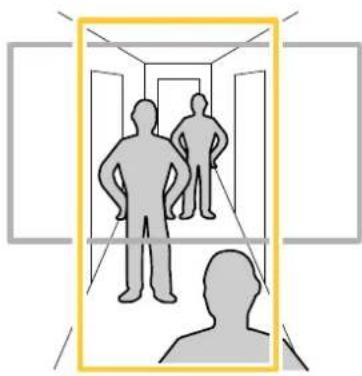
natural_image
Silhouettes of two human figures walking down a hallway with open doors, enclosed in a yellow rectangular frame (no text or symbols)- Depending on your device, turn the camera or the 3-axis lens in the camera 90° or 270°.
12hdevicdoesn'totattheviewautomaticallylogrthewebpaganddSettingsSystemOrientation.
3.Click

- Rotatetheview90° or 270°.
Findoutmoreataxis.com/axis-corridor-format.
Reducenoiseinlow-lightconditions
Toreducenoiseinlow-lightconditions,youcanadjustoneormoreofthefollowingsettings:
- Settheexposuremodetoautomatic.
Note
Ahighmaxshuttervaluecanresultinmotionblur.
- Toslowdowntheshutterspeed, setmaxshuttertothehighestpossiblevalue.
• Reducesharpnessintheimage. - Setthemaxgaintoalowervalue.
Handlesceneswithstrongbacklight
Dynamicrangeisthedifferenceinlightlevelsinanimage.Insomecasesthedifferencebetweenthedarkestandthebrightest areascanbesignificant.Theresultisoftenanimagewhereeitherthedarkorthebrightareasarevisible.Widedynamicrange (WDR)makesbothdarkandbrightareasoftheimagevisible.
- GotoSettings>Image>Widedynamicrange.
- If required, turn on WDR.
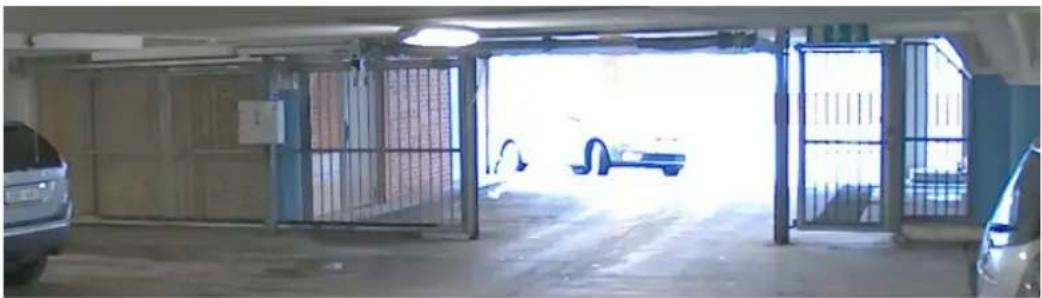
natural_image
Interior view of a parked garage with open doors, metal grilles, and parked cars (no visible text or symbols)ImagewithoutWDR.
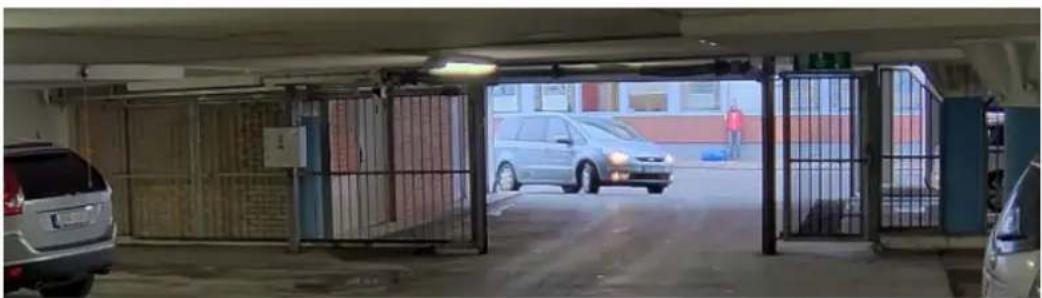
natural_image
Interior view of a parking garage with parked cars and metal gates (no visible text or signage)ImagewithWDR.
Note
WDRmaycauseartifactsintheimage.
FindoutmoreaboutWDRandhowtouseitataxis.com/web-articles/wdr.
BenefitfromIRlightinlow-lightconditionsusingnightmode
Yourcamerausesvisiblelighttodelivercolorimagesduringtheday.Astheavailablelightdiminishes,youcansetthecamerato automaticallyshifttonightmode,inwhichthecamerausesbothvisiblelightandnear-infraredlighttodeliverblack-and-white images.Sincethecamerausesmoreoftheavailablelightitcandeliverbrighter,moredetailed,images.
GoSettingsImageDayandightandmakesurthathdRufilterisetoAuto.
To determine what light every you want the camera to shift tonight modem move the threshold lidetoward Bright or Dark.
EnableAllowRlluminationandSynchronizeRlluminationtousthecamera'sRightwhemightmodeactivated.
Note
Ifyousettheshifttonightmodetooccurwhenit'sbrighter,theimageremainssharperastherewillbelesslow-light noise.Ifyousettheshifttooccurwhenit'sdarker,theimagecolorsaremaintainedforlonger,buttherewillbemore imageblurduetolow-lightnoise.
Maximizedetailsinanimage
Important
If you maximized details in an image, the bitrate will probably increase and you might get a reduced framerate.
- Setthecompressionaslowaspossible.
- SelectMJPEGstreaming.
•TurnoffZipstreamfunctionality.
Overlays
Overlaysaresuperimposedoverthevideostream.Theyareusedtoprovideextrainformationduringrecordings,suchasatimestamp,orduringproductinstallationandconfiguration.Youcanaddeithertextoranimage.
Showatextoverlayinthevideostreamwhenthedevicedetectsmotion
Thisexampleexplainshowtodisplaythetext"Motiondetected"whenthevicedetectsmotion:
MakesurethatAXISVideoMotionDetectionisrunning:
GoSettingsAppsAXISVidedMotionDetection.
-
Start the application if it is not already running.
-
Makesureyouhavesetuptheapplicationaccordingtoyourneeds.
Addtheoverlaytext:
4.GotoSettings>Overlay.
5.Enter#Dinthetextfield.
6.Choosetextsizeandappearance.
Createarule:
- GotoSystem>Events>Rulesandaddarule.
8.Typeanamefortherule. - In the list of conditions, select AXIS Video Motion Detection.
- Inthelistofactions, selectUseoverlaytext.
11.Selectaviewarea. - Type "Motiondetected".
- Settheduration.
14.ClickSave.
Streamingandstorage
Bitratecontrol
Withbitratecontrol,youcanmanagethebandwidthconsumptionofyourvideostream.
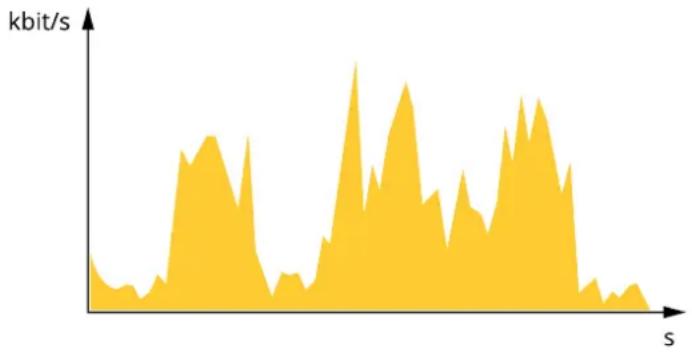
Variablebitrate(VBR)
With variable bitrate, the bandwidth consumption varies based on the level of activity in the scene. Themoreactivity in the scene, themore bandwidth you need. You are guaranteed constant image quality but it requires storage margins.
area
| s | kbit/s | | --- | --- | | 0 | 0 | | 1 | 10 | | 2 | 20 | | 3 | 30 | | 4 | 40 | | 5 | 50 | | 6 | 60 | | 7 | 70 | | 8 | 80 | | 9 | 90 | | 10 | 100 | | 11 | 90 | | 12 | 80 | | 13 | 70 | | 14 | 60 | | 15 | 50 | | 16 | 40 | | 17 | 30 | | 18 | 20 | | 19 | 10 | | 20 | 0 |Maximumbitrate(MBR)
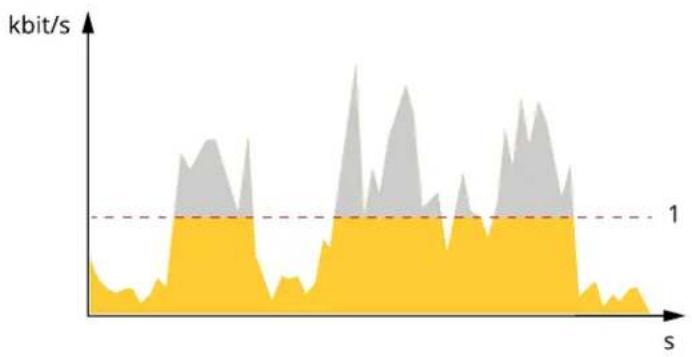
With maximum bitrate, you can set a target bitrate to handle bitrate limitations in your system. You may see a decline in image quality or framerate when the instantaneous bitrate is kept below these specified target bitrate. You can choose either prioritize image quality or framerate. Were recommend that you configure the target bitrate to a high value than the expected bitrate. This gives you a margin for additional complexity that need to be captured.
area
| s | kbit/s | | ---- | ------ | | 0 | 0 | | 1 | 1 | | 2 | 0 | | 3 | 1 | | 4 | 0 | | 5 | 1 | | 6 | 0 | | 7 | 1 | | 8 | 0 | | 9 | 1 | | 10 | 0 | | 11 | 1 | | 12 | 0 | | 13 | 1 | | 14 | 0 | | 15 | 1 | | 16 | 0 | | 17 | 1 | | 18 | 0 | | 19 | 1 | | 20 | 0 | | 21 | 1 | | 22 | 0 | | 23 | 1 | | 24 | 0 | | 25 | 1 | | 26 | 0 | | 27 | 1 | | 28 | 0 | | 29 | 1 | | 30 | 0 | | 31 | 1 | | 32 | 0 | | 33 | 1 | | 34 | 0 | | 35 | 1 | | 36 | 0 | | 37 | 1 | | 38 | 0 | | 39 | 1 | | 40 | 0 | | 41 | 1 | | 42 | 0 | | 43 | 1 | | 44 | 0 | | 45 | 1 | | 46 | 0 | | 47 | 1 | | 48 | 0 | | 49 | 1 | | 50 | 0 | | 51 | 1 | | 52 | 0 | | 53 | 1 | | 54 | 0 | | 55 | 1 | | 56 | 0 | | 57 | 1 | | 58 | 0 | | 59 | 1 | | 60 | 0 | | 61 | 1 | | 62 | 0 | | 63 | 1 | | 64 | 0 | | 65 | 1 | | 66 | 0 | | 67 | 1 | | 68 | 0 | | 69 | 1 | | 70 | 0 | | 71 | 1 | | 72 | 0 | | 73 | 1 | | 74 | 0 | | 75 | 1 | | 76 | 0 | | 77 | 1 | | 78 | 0 | | 79 | 1 | | 80 | 0 | | 81 | 1 | | 82 | 0 | | 83 | 1 | | 84 | 0 | | 85 | 1 | | 86 | 0 | | 87 | 1 | | 88 | 0 | | 89 | 1 | | 90 | 0 | | 91 | 1 | | 92 | 0 | | 93 | 1 | | 94 | 0 | | 95 | 1 | | 96 | 0 | | 97 | 1 | | 98 | 0 | | 99 | 1 | | Note: The actual values for 'kbit/s' are not provided in the code. I have indicated that these values are based on the chart's label 'kbit/s'.1 Targetbitrate
Averagebitrate(ABR)
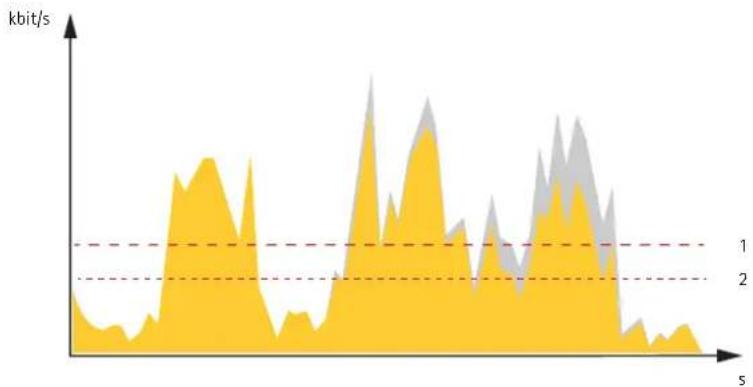
Withaveragebitrate,thebitrateisautomaticallyadjustedoveralongertimescale.Thisissoyoucanmeetthespecifiedtargetand providethebestvideoqualitybasedonyouravailablestorage.Bitrateishigherinsceneswithalotofactivity,comparedtostatic scenes.Youaremorelikelytogetbetterimagequalitywhenneededwhenusingtheaveragebitrateoption.Youucandefinethetotal storagerequiredtostorethevideostreamforaspecifiedamountoftime(retentiontime)whenimagequalityisadjustedtomeetthe specifiedtargetbitrate.Specifytheaveragebitratesettingsinoneofthefollowingways:
- Tocalculatetheestimatedstorageneed,setthetargetbitrateandtheretentiontime.
- Tocalculatetheaveragebitrate, basedonavailablestorageandrequiredretentiontime, usethetargetbitratecalculator.
area
| Time | Value (kbit/s) | |------|----------------| | 0 | ~0.5 | | 1 | ~1.0 | | 2 | ~0.8 | | 3 | ~1.2 | | 4 | ~0.6 | | 5 | ~1.5 |1 Targetbitrate
2 Actualaveragebitrate
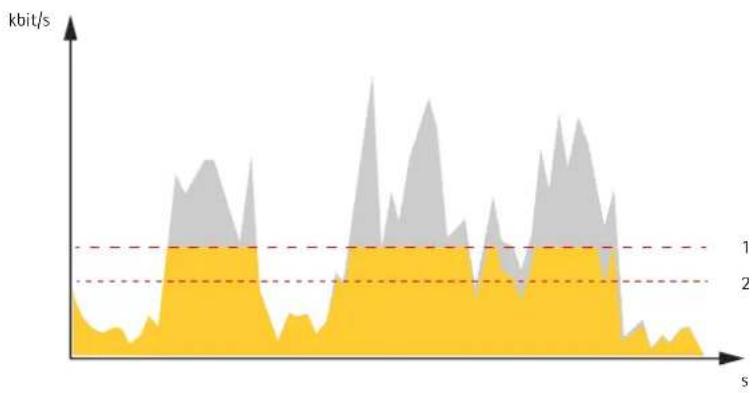
Youcanalsoturnonmaximumbitrateandspecifyatargetbitratewithintheaveragebitrateoption.
area
| s | kbit/s (Lower Bound) | kbit/s (Upper Bound) | | ---- | -------------------- | -------------------- | | 0 | 0.5 | 1.0 | | 1 | 0.6 | 1.1 | | 2 | 0.7 | 1.2 | | 3 | 0.8 | 1.3 | | 4 | 0.9 | 1.4 | | 5 | 1.0 | 1.5 | | 6 | 1.1 | 1.6 | | 7 | 1.2 | 1.7 | | 8 | 1.3 | 1.8 | | 9 | 1.4 | 1.9 | | 10 | 1.5 | 2.0 | | 11 | 1.6 | 2.1 | | 12 | 1.7 | 2.2 | | 13 | 1.8 | 2.3 | | 14 | 1.9 | 2.4 | | 15 | 2.0 | 2.5 | | 16 | 2.1 | 2.6 | | 17 | 2.2 | 2.7 | | 18 | 2.3 | 2.8 | | 19 | 2.4 | 2.9 | | 20 | 2.5 | 3.0 | | 21 | 2.6 | 3.1 | | 22 | 2.7 | 3.2 | | 23 | 2.8 | 3.3 | | 24 | 2.9 | 3.4 | | 25 | 3.0 | 3.5 | | 26 | 3.1 | 3.6 | | 27 | 3.2 | 3.7 | | 28 | 3.3 | 3.8 | | 29 | 3.4 | 3.9 | | 30 | 3.5 | 4.0 | | 31 | 3.6 | 4.1 | | 32 | 3.7 | 4.2 | | 33 | 3.8 | 4.3 | | 34 | 3.9 | 4.4 | | 35 | 4.0 | 4.5 | | 36 | 4.1 | 4.6 | | 37 | 4.2 | 4.7 | | 38 | 4.3 | 4.8 | | 39 | 4.4 | 4.9 | | 40 | 4.5 | 5.0 | | 41 | 4.6 | 5.1 | | 42 | 4.7 | 5.2 | | 43 | 4.8 | 5.3 | | 44 | 4.9 | 5.4 | | 45 | 5.0 | 5.5 | | 46 | 5.1 | 5.6 | | 47 | 5.2 | 5.7 | | 48 | 5.3 | 5.8 | | 49 | 5.4 | 5.9 | | 50 | 5.5 | 6.0 | | 51 | 5.6 | 6.1 | | 52 | 5.7 | 6.2 | | 53 | 5.8 | 6.3 | | 54 | 5.9 | 6.4 | | 55 | 6.0 | 6.5 | | 56 | 6.1 | 6.6 | | 57 | 6.2 | 6.7 | | 58 | 6.3 | 6.8 | | 59 | 6.4 | 6.9 | | 60 | 6.5 | 7.0 | | 61 | 6.6 | 7.1 | | 62 | 6.7 | 7.2 | | 63 | 6.8 | 7.3 | | 64 | 6.9 | 7.4 | | 65 | 7.0 | 7.5 | | 66 | 7.1 | 7.6 | | 67 | 7.2 | 7.7 | | 68 | 7.3 | 7.8 | | 69 | 7.4 | 7.9 | | 70 | 7.5 | 8.0 | | 71 | 7.6 | 8.1 | | 72 | 7.7 | 8.2 | | 73 | 7.8 | 8.3 | | 74 | 7.9 | 8.4 | | 75 | 8.0 | 8.5 | | 76 | 8.1 | 8.6 | | 77 | 8.2 | 8.7 | | 78 | 8.3 | 8.8 | | 79 | 8.4 | 8.9 | | 80 | 8.5 | 9.0 | | 81 | 8.6 | 9.1 | | 82 | 8.7 | 9.2 | | 83 | 8.8 | 9.3 | | 84 | 8.9 | 9.4 | | 85 | 9.0 | 9.5 | | 86 | 9.1 | 9.6 | | 87 | 9.2 | 9.7 | | 88 | 9.3 | 9.8 | | 89 | 9.4 | 9.9 | | 90 | 9.5 | - | | ... (repeated) for all values: The actual values may vary due to the random nature of the data generation.1 Targetbitrate
2 Actualaveragebitrate
Videocompressionformats
Decidewhichcompressionmethodtousebasedonyourviewingrequirements,andonthepropertiesofyournetwork.The availableoptionsare:
MotionJPEG
MotionJPEG,orMJPEG,isadigitalvideosequencethatismmadeupofaseriesofindividualJPEGimages.Theseimagesarethen displayedandupdatedataratesufficienttocreateastreamthatshowsconstantlyupdatedmotion.Fortheviewertoperceivemotion videotheratemustbeatleast16imageframespersecond.Fullmotionvideoisperceivedat30(NTSC)or25(PAL)framespersecond.
TheMotionJPEGstreamusesconsiderableamountsofbandwidth,butprovidesexcellentimagequalityandaccesstoeveryimage containedinthestream.
H.264orMPEG-4Part10/AVC
Note
H.264isalicensedtechnology.TheAxisproductincludesoneH.264viewingclientlicense.Toinstalladditionalunlicensed copiesoftheclientisprohibited.Topurchaseadditionallicenses,contactyourAxisreseller.
H.264can, without compromising imagequality, reduce the size of a digital video file by more than 80% compared to the Motion JPEG format and by as much as 50% compared to the MPEG-4 standard. This means that less network bandwidth and storage space are required for a video file. Or seen another way, higher video quality can be achieved for a given bitrate.
Reducebandwidthandstorage
Important
If you reduced the bandwidth hit can result in loss of details in the picture.
- GotoliveviewandselectH.264.
2.GotoSettings>Stream.
3.Dooneormoreofthefollowing:
-TurnontheZipstreamfunctionalityandselectthedesiredlevel.
-TurnondynamicGOPandsetahighGOPlengthvalue.
-Increasethecompression.
-TurnondynamicFPS.
Setupnetworkstorage
Tostorerecordingsonthenetwork,youneedtosetupnetworkstorage:
GoSettingsSystemStorage.
ClickSetupundeNetworkstorage.
3.EnterthelPaddressofthehostserver.
4.Enterthenameofthesharedlocationonthehostserver.
5.Movetheswitchifthesharerequiresalogin, andenterusernameandpassword.
6.ClickConnect.
Addaudiotoyourrecording
Turnonaudio:
GoSettingsAudioandurorAllowaudio.
- GotoInput>Type and select your audiosource.
Editthestreamprofilewhichisusedfortherecording:
GoSettingsStreamandlicStreamprofiles.
- SelectthestreamprofileandclickAudio.
- Select the checkbox and select Include.
6.ClickSave.
7.ClickClose.
Events
Setuprulesandalerts
Youcancreaterulestomakeyourdeviceperformanactionwhencertaineventsoccur.Aruleconsistsofconditionsandactions. Theconditionscanbeusedtotriggertheactions.Forexample,thedevicecanstartarecordingorsendanemailwhenitdetects motion,orshowanoverlaytextwhenitrecords.
Triggeranaction
GoSettingsSystemEventsetupruleTheuldefineswhertheamerawilperformcertainactionsRules canbesetupasscheduled,recurring,orforexample,triggeredbymotiondetection.
Select the Condition that musbemetdriggetheaction, you specify morpharone condition for the rule of the conditions must be met to trigger the action.
- Select which Action the camerashould perform when the conditions are met.
Note
If you make changesto an active rule, then the uleneed stoberer started for the changestotake effect.
Recordvideowhenthecameradetectsmotion
This example explains how to setup the cameratostart recording to the SDcardfiveseconds before it detects motion and to stoponeminute after.
MakesurethatAXISVideoMotionDetectionisrunning:
GoSettingsAppsAXISidedMotionDetection.
2.Starttheapplicationifitisnotalreadyrunning.
3. Makesureyouhavesetuptheapplicationaccordingtoyourneeds.
Createarule:
- GotoSettings>System>Eventsandaddarule.
2.Typeanamefortherule.
ItheisbfonditionsundeApplicationselectAXISvideoMotionDetection(VMD).
IthdisfactionsundeRecordingsselectRecordvidewhiletheuactive. - Selectanexistingstreamprofileorcreateanewone.
- Settheprebuffertimeto5seconds.
- Setthepostbuffertimeto60seconds.
- Inthelistofstorageoptions, selectSDcard.
9.ClickSave.
RecordvideowhenaPIRdetectorsensesmotion
This example explains how to connect an Axis PIR detector to the camera, and setup the camera to start recording when the detectors senses motion.
Requiredhardware
- 3-wirecable(ground,power,I/O)
- AxisPIRdetector
NOTICE
Disconnect the camera from power before connecting the wires. Reconnect topower after all connections are done.
Connectthewirestothecamera'sl/Oconnector
Note
Forinformationonthel/Oconnector,see Connectorsonpage20.
- Connect the ground wire topin 1 (GND/-).
- Connect the power wire topin 2 (12 VDC output).
- Connectthel/Owiretopin3(I/Oinput).
ConnectthewirestothePIRdetector'sl/Oconnector
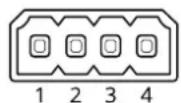
-
Connecttheotherendofthegroundwiretopin1(GND/-).
-
Connect the other end of the power wire top in 2 (DC input/ + ).
- Connect the other end of the I/O wiretopin 3 (I/O output).
Configurethel/Oportinthecamera'swebpage
GoSettingsSystem/Ports.
2.Givetheinputmoduleadescriptivename.
Tomak the PIR detectosendsignatthe camerawhenisensesmotionselectClosed circuitrthdrop-downlist.
TotriggerthecameratostartrecordingwhenitreceivesasignalfromthePIRdetector,youneedtocreatearuleinthecamera's webpage.
Applications
Applications
AXISCameraApplicationPlatform(ACAP)isanopenplatformthatenablesthirdpartiestodevelopanalyticsandotherapplications foAxiproductsToindbutmoreaboutavailableapplicationsdownloadstrialsandicensesgdoaxis.com/applications.
TofindtheusermanualsforAxisapplications,gotoaxis.com.
Note
- Several applications can run at the same time but some applications might not be compatible with each other. Certain combination of applications might require too much processing power or memory resources when run in parallel. Verify that the applications work together before deployment.
AXISPeopleCounter
AXISPeopleCounterisanalyticapplicationthatcanbeinstalledonanetworkcamera.
Thecounterisembeddedinthecamerawhichmeansyoudonotneedadedicatedcomputertoruntheapplication. AXISPeopleCounterisintendedforretailenvironments,likestoresorshoppingmalls,orotherenvironmentswhereyouwantto countpeople.
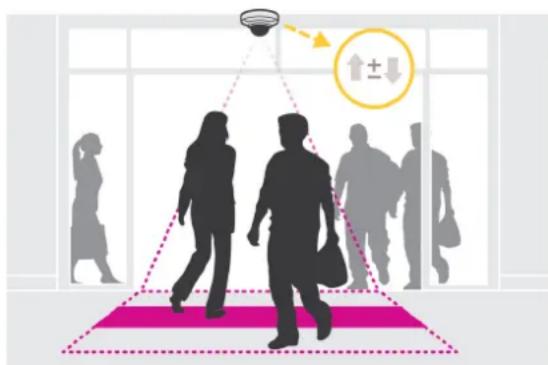
natural_image
Silhouettes of people walking through a smart room with a ceiling light and directional arrows (no text or symbols)Troubleshooting
If you can find what you're looking for heretry the troubleshooting section at axis.com/support.
Resettofactorydefaultsettings
Important
Resettofactorydefaultshouldbeusedwithcaution.Aresettofactorydefaultresetsallsettings,includingtheIPaddress,to thefactorydefaultvalues.
Toresettheproducttothefactorydefaultsettings:
- Disconnectpowerfromtheproduct.
PresandholdtheontrobuttonwhilereconnectingpowerSeeProductvervieworpag6 - Keep the control button pressed for 15–30 seconds until the status LED indicator flashes amber.
- Releasethecontrolbutton. The process is complete when the status LED indicator turns green. The product has been reset that factory default settings in DHCP serve available on the network the default address 192.168.0.90.
- UsetheinstallationandmanagementsoftwaretoolstoassignanlPaddress, setthepassword, andaccessthevideostream.
The installation and management software are available from the support pages or axis.com/support.
It is possible to reparameter factory default through the web interface and Settings System Maintenance and clickDefault.
Checkthecurrentfirmware
Firmwareisthesoftwarethatdeterminesthefunctionalityofnetworkdevices.Oneofyourfirstactionswhentroubleshootinga problemshouldbetocheckthecurrentfirmwareversion.Thelatestversionmaycontainacorrectionthatfixesyourparticular problem.
Tocheckthecurrentfirmware:
-
Gototheproduct'swebpage.
-
Clickonthehelpmenu
3.ClickAbout.
Upgradethefirmware
Important
Preconfiguredandcustomizedsettingsaresavedwhenthefirmwareisupgraded(providedthatthefeaturesareavailableinthenewfirmware)althoughthisisnotguaranteedbyAxisCommunicationsAB.
Important
Makesuretheproductremainsconnectedtothepowersourcethroughouttheupgradeprocess.
Note
When you upgrade the product with the latest firmware in the active track, the product receives the latest functionality available. Always read the upgrade instructions and release notes available with each new release before upgrading the firmware. Find dates firmware and release notes date axis.com/support/firmware.
Download the firmware file your computer available free of charge atxis.com/support/firmware.
- Logintotheproductasanadministrator.
GoSettingsSystemMaintenanceFollowInstructionsorthepageWherthupgradehasfinishedthe productrestartsautomatically.
AXISDeviceManagerabusedomultipleupgradesFindoutmorea taxis.com/products/axis-device-manager.
Technical issues, clues and solutions
If you can find what you're looking for heretry the troubleshooting section at axis.com/support.
Problemsupgradingthefirmware
| Firmwareupgradefailurelfthefirmwareupgradefails,thedevicereloadsthepreviousfirmware.Themostcommonreasonisthatthewrongfirmwarefilehasbeenuploaded.Checkthatthenameofthefirmwarefilecorrespondstoyourdeviceandtryagain. | |
| ProblemssettingthelPaddress | |
| Thedeviceislocatedona differentsubnet | IfthelPaddressintendedforthedeviceandthelPaddressofthecomputerusedtoaccessthe devicearelocatedondifferentsubnets,youcannotsetthelPaddress.Contactyournetwork administratortoobtainanlPaddress. |
| ThelPaddressisbeingused byanotherdevice | DisconnecttheAxisdevicefromthenetwork.Runthepingcommand(inaCommand/DOSwindow,typepingandthelPaddressofthedevice):Ifyoureceive:Replyfrom:bytes=32;time=10... thismeansthatthelPaddressmayalreadybeinusebyanotherdeviceonthenetwork. ObtainanewlPaddressfromthenetworkadministratorandreinstallthedevice.Ifyoureceive:Requesttimedout,thismeansthatthelPaddressisavailable forusewiththeAxisdevice.Checkallcablingandreinstallthedevice. |
| PossiblelPaddressconflict withanotherdeviceonthe samesubnet | ThestaticlPaddressintheAxisdeviceisusedbeforetheDHCPserversetsadynamicaddress. ThismeansthatifthesamedefaultstaticlPaddressisalsousedbyanotherdevice,theremay beproblemsaccessingthedevice. |
| Thedevicecannotbeaccessedfromabrowser | |
| Cannotlogin | WhenHTTPSisenabled,ensurethatthecorrectprotocol(HTTPorHTTPS)isusedwhenattempting tdognYoumayneedmanuallytypehttp://httpsithebrowser'saddressfield.Ifthepasswordfortheuserrootislost,thedevicemustberesettothefactorydefaultsettings.SeeResettofactorydefaultsettingspage17. |
| ThelPaddresshasbeen changedbyDHCP | IPaddressesobtainedfromaDHCPserveraredynamicandmaychange.IfthelPaddresshasbeen changed,useAXISIPUtilityorAXISDeviceManagertolocatethedeviceonthenetwork.Identify thedeviceusingitsmodelorserialnumber,orbytheDNSname(ifthenamehasbeenconfigured).IfrequiredstatidPaddresscarbassignedmanuallyFoinstructionsgdaaxis.com/support. |
| Certificateerrorwhenusing IEEE802.1X | Forauthenticationtoworkproperly,thedateandtimesettingsintheAxisdevicemustbesynchronizedwithanNTPserver.GotoSettings>System codateandtime. |
| Thedeviceisaccessiblelocallybutnotexternally | |
| Toaccessthedeviceexternally,werecommendusingoneofthefollowingapplicationsforWindows*:AXISCompanion:freeofcharge,idealforsmallsystemswithbasicsurveillanceneeds.AXISCameraStation:30-daytrialversionfreeofcharge,idealforsmalltomid-sizesystems.Forinstructionsanddownload,gotoaxis.com/vms. | |
Problemswithstreaming
| MulticastH.264only accessiblebylocalclients | Checkifyourroutersupportsmulticasting,orifteroutersettingsbetweentheclientandthe deviceneedtobeconfigured.TheTTL(TimeToLive)valuemayneedtobeincreased. |
| NomulticastH.264 displayedintheclient | CheckwithyournetworkadministratorthatthemulticastaddressesusedbytheAxisdevice arevalidforyournetwork. |
| Checkwithyournetworkadministratorortoseeifthereisafirewallpreventingviewing. | |
| PoorrenderingofH.264 images | Ensurethatyourgraphicscardisusingthelatestdriver.Thelatestdriverscanusuallybe downloadedfromthemanufacturer'swebsite. |
| Colorsaturationisdifferent inH.264andMotionJPEG | Modifythesettingsforyourgraphicsadapter.Gototheadapter'sdocumentationformore information. |
| Lowerframeratethan expected | •SeePerformanceconsiderationsonpage19.•Reducethenumberofapplicationsrunningontheclientcomputer.•Limitthenumberofsimultaneousviewers.•Checkwiththenetworkadministratorthatthereisenoughbandwidthavailable.•Lowertheimageresolution.•Themaximumframespersecondisdependentontheutilityfrequency(60/50Hz) oftheAxisdevice. |
Performanceconsiderations
Whensettingupyour system, it is important to consider how various settings and situations affect the performance. Some factors affect the amount of bandwidth (the bitrate) required, others can affect the framerate, and some affect both. If the load on the CPU reaches its maximum, this also affects the framerate.
The following factors are them most important to consider:
- Highimageresolutionorlowercompressionlevelsresultinimagescontainingmoredatawhichinturnaffectsthe bandwidth.
- Rotating the image in the GUI will increase the product's CPU load.
- AccessbylargenumbersofMotionJPEGorunicastH.264clientsaffectsthebandwidth.
- Simultaneousviewingofdifferentstreams(resolution, compression)bydifferentclientsaffectsbothframerateand bandwidth.
Use identical streams wherever possible to maintain a high framerate. Stream profiles can be used to ensure that streams are identical.
- AccessingMotionJPEGandH.264videostreamssimultaneouslyaffectsbothframerateandbandwidth.
- Heavyusageofeventsettingsaffectstheproduct'sCPUloadwhichinturnaffectstheframerate.
- UsingHTTPSmayreduceframerate, inparticularifstreamingMotionJPEG.
- Heavynetworkutilizationduetopoorinfrastructureaffectsthebandwidth.
- Viewingonpoorlyperformingclientcomputerslowersperceivedperformanceandaffectsframerate.
- RunningmultipleAXISCameraApplicationPlatform(ACAP)applicationssimultaneouslymayaffecttheframerateand thegeneralperformance.
Specifications
Tfindtheatestversionofthproduct'slatasheetgddtheproducpagataxis.comandocatSupportDocumentation.
LEDIndicators
| StatusLED | Indication |
| Unlit | Connectionandnormaloperation. |
| GreenSteadygreenfor10seconds | fornormaloperationafterstartupcompleted. |
| Amber | Steadyduringstartup.Flashesduringfirmwareupgradeorresettofactorydefault. |
| Amber/RedFlashesamber/redifn | networkconnectionisunavailableorlost. |
| RedFirmwareupgradefailure. |
SDcardslot
NOTICE
- RiskofdamagetoSDcard.Donotusesharptools,metalobjects,orexcessiveforcewheninsertingorremovingthe SDcard.Useyourfingerstoinsertandremovethecard.
- Riskofdatalossandcorruptedrecordings.DonotremovetheSDcardwhiletheproductisrunning.UnmounttheSDcard fromtheproduct'swebpagebeforeremoval.
ThisproductsupportsmicroSD/microSDHC/microSDXCcards.
ForSDcardrecommendations,seeaxis.com.

microSD, microSDHC, and microSDXC Logosaretrademarksof SD-3CLLC.microSD, microSDHC, microSDXCare steredtrademarksof SD-3C, LLCintheUnitedStates, other countries or both.
Buttons
Controlbutton
Thecontrolbuttonisusedfor:
ResettingproductfactorydefaultsettingsSeeResetfactorydefaultsettingspage17.
Connectors
Networkconnector
RJ45EthernetconnectorwithPoweroverEthernet(PoE).
Audioconnector
Aedion3.5minpuformonomicrophoneadine-imonsigna(lefthannelsusedfromsteresignal).
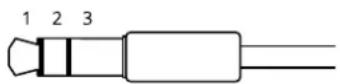
Audioinput
| 1Tip2Ring | 3Sleeve | |
| Unbalancedmicrophone(withorwithoutelectret power)online | Electretpowerifselected | Ground |
Foraudioin, the left channel is used from a stereosignal.
I/Oconnector
Usethel/Oconnectorwithexternaldevicesincombinationwith,forexample,motiondetection,eventtriggering,andalarm notifications.Inadditiontothe0VDCreferencepointandpower(DCoutput),thel/Oconnectorprovidestheinterfaceto:
DigitalInputForconnectingDevice that cartoggle between an open and closed circuitfor example PIRensorsdoor/window contacts, and glassbreakdetectors.
DigitabutputForconnectingexternadevicesuchaselaysandLEDsConnecteddevicesarbactivatedbythe/APIX® ApplicationProgrammingInterfaceorfromtheproduct'swebpage.
4-pinterminalblock
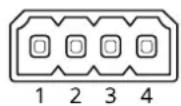
| FunctionPinNotes | Specifications | ||
| DCground | 1 | ||
| DCoutput | 2 | Canbeusedtopowerauxiliaryequipment.Note:Thispincanonlybeusedaspowerout. | 12VDCMaxload=25mA |
| DigitalInput | 3 | Connecttopin1toactivate,orleavefloating(unconnected)todeactivate. | 0tomax30VDC |
| DigitalOutput | 4 | Internallyconnectedtopin1(DCground)whenactive,andfloating(unconnected)wheninactive.lfusedwithainductiveload,e.g.,arelay,connectadiodeinparallelwiththeload,toprotectagainstvoltagetransients. | 0tomax30VDC,opendrain,100mA |
Example
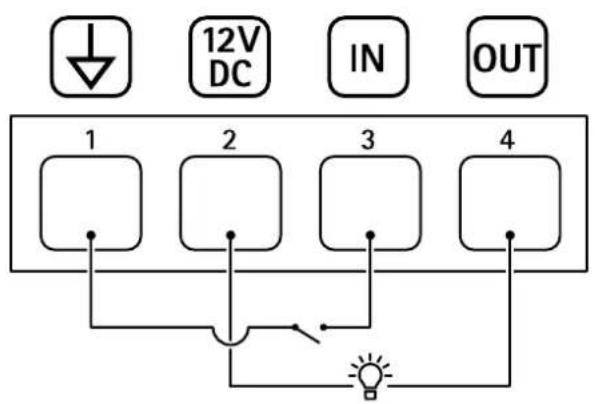
1 DCground
2 DCoutput12V,max25mA
3 Digitalinput
4 Digitaloutput