
11567 - Hovedtelefonforstærker MONOPRICE - Gratis brugsanvisning og manual
Find enhedens vejledning gratis 11567 MONOPRICE i PDF-format.


Brugerspørgsmål om 11567 MONOPRICE
0 spørgsmål om dette apparat. Besvar dem du kender, eller stil dit eget.
Stil et nyt spørgsmål om dette apparat
Download vejledningen til din Hovedtelefonforstærker i PDF-format gratis! Find din vejledning 11567 - MONOPRICE og tag din elektroniske enhed tilbage i hånden. På denne side er alle dokumenter nødvendige for brugen af din enhed offentliggjort. 11567 af mærket MONOPRICE.
BRUGSANVISNING 11567 MONOPRICE
MONOPRICE
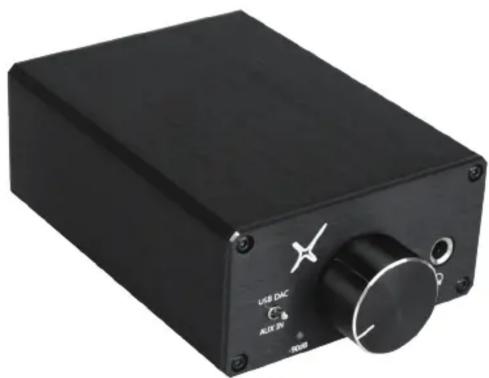
Desktop Headphone Amplifier
PID 11567
natural_image
Black rectangular electronic device with control knob and USB DAC indicator (no readable text beyond labels)Quick Installation Guide
CEFC
Brief Introduction:
This headphone amplifier uses a professional level audio IC from Texas Instruments to achieve low noise and distortion and high output on a wide variety of headphones. The high-current output design allows it to easily drive headphones with a wide impedance range and the line and preamp outputs allow you to connect to an external amplifier or a set of powered speakers.
Specifications:
| USB DAC: | 96KHZ / 24bit |
| Output Power: | ≥ 900mW (32Ω Loaded) |
| ≥ 150mW (300Ω Loaded) | |
| Headphone Impedance Range: | 16Ω ~ 600Ω |
| SNR: | ≥ 100dB (A weight) [AUX IN] |
| Distortion: | < 0.003% [AUX IN] |
| Frequency Response: | 20Hz ~ 20KHz |
| Fixed Line Out: | < 2V rms |
| Adjustable Pre-out: | 0 ~ 6V rms |
| Power Supply: | DC15V, 2A |
Package Contents:
Please verify that you received all the items listed below:
| Headphone Amplifier: 1 PCS | USB Cable: 1 PCS |
| Power Adaptor: 1 PCS | Manual: 1 PCS |
| Audio Cable: 1 PCS |
Operating Instructions:
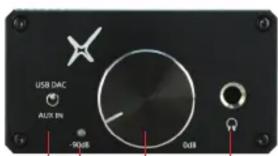
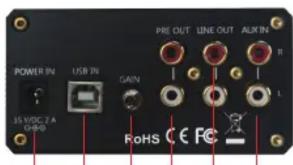
(1) (2) (4) (5) (6) (7) (10)(9)(8)(3)
(1) Input Selector Switch:
USB DAC: Converts digital USB audio from your PC to analog audio for use with headsets and consumer electronics amplifiers/receivers.
AUX IN: Selects the AUX RCA inputs on the back of the amp.
(2) Volume Control / Power Switch:
Turn the knob clockwise to turn the amplifier on and to increase volume. Turn the knob counterclockwise to decrease the volume and to turn the amplifier off.
(3) Power Indicator:
When first turned on, the LED will glow red for 3-4 seconds, then will glow blue indicating that power is on. When power is off, the LED is off.
(4) Headphone Output Jack:
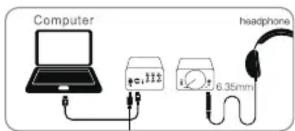
1/4" (6.35mm) stereo headphone jack. See the Specifications section for suitable headphone characteristics.
(5) DC Power Connector:
Plug the included power adapter into this jack. The input voltage range for the power adaptor is AC100\~240V, 50/60 Hz
(6) USB Connector:
Connect the amplifier to a PC using the included USB cable.
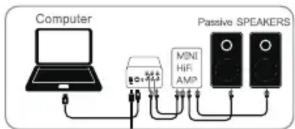
(7) PRE OUT Connectors:
Connect an external amplifier or powered speakers to these outputs. The output level is controlled using the Volume knob and varies from 0 \~ 6V rms.
(8) Gain Switch:
High Gain (up): This setting is suitable for headphones with high impedance or low sensitivity.
Low Gain (down): This setting is suitable for low impedance or high sensitivity headphones.
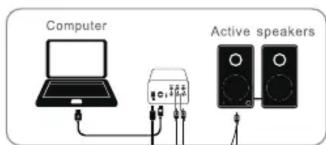
(9) LINE OUT Connectors:
Outputs a line level signal, suitable for use as an input to a CD recorder or tape deck. The volume control does not affect the level of this signal.
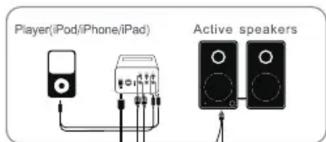
(10) AUX IN Connectors:
Connect a line level audio source, such as a CD player, to these inputs.
Safety Warnings:
- To prevent damage to your hearing, do not listen to music at excessive volume levels. Turn down the volume before connecting headphones. Avoid prolonged use of headphones.
- Keep away from water or moisture of any kind. Do not use in dusty environments.
- Do not open or attempt to repair this amplifier. Always use the included AC power adapter or an exact replacement.
Troubleshooting:
If you cannot hear sound, check the following:
- Double check all connections to ensure that they secure.
- Double check the source and destination routing. Try switching the audio source.
Try a different set of headphones or speakers. Check the power source to ensure it is active.