
4629 - Lyd/video konverter MONOPRICE - Gratis brugsanvisning og manual
Find enhedens vejledning gratis 4629 MONOPRICE i PDF-format.


Brugerspørgsmål om 4629 MONOPRICE
0 spørgsmål om dette apparat. Besvar dem du kender, eller stil dit eget.
Stil et nyt spørgsmål om dette apparat
Download vejledningen til din Lyd/video konverter i PDF-format gratis! Find din vejledning 4629 - MONOPRICE og tag din elektroniske enhed tilbage i hånden. På denne side er alle dokumenter nødvendige for brugen af din enhed offentliggjort. 4629 af mærket MONOPRICE.
BRUGSANVISNING 4629 MONOPRICE
HDMI Converter : VGA to HDMI
User Manual
Table Of Contents
1.0 Introduction......
2.0 Specifications....
3.0 Package Contents....
4.0 Connect and Operate....
5.0 Panel Descriptions....
6.0 Main Features....
7.0 Warning....
HDMI Converter : VGA to HDMI
HDMI Converter
Model No. HCV0101
Dear customer
Thank you for purchasing this product. For optimum performance and safety, please read these instructions carefully before connecting, operating or adjusting this product. Please keep this manual for future reference.
1.0 INTRODUCTION
This kind of the Converter is a VGA video converter. It converts VGA input into HDMI to allow PC users to show their image not only on the PC's monitor, but also on TV, to have a large display. The conversion is along with the R/L audio.
HCV0101 offers solutions for digital entertainment center, HDTV retail and show site, HDTV, STB. DVD and Projector factory, noise space and security concerns, data center control, information distribution, conference room presentation, school and corporate training environments.
1.2 FEATURES
The series of the HDMI Amplifier Switcher have many features that enable them to perform in a superior manner. Among those features you will find:
- Easy to Use: Install in seconds, no need of setting.
- Conversion: It could convert PC's VGA video and R/L audio into completeHDMI.
- Extra VGA and R/L audio outputs: the outputs could be connected back to PC's monitor and speakers.
- Manual adjusting button: used for position the image precisely under some
extreme condition. - HDCP compliant.
2
HOME Converter : VGA to HDMI
| Converter Unit | FCC.CE, |
| Power Supply | CE.FCC |
| Accessories Adaptor | |
| AC Power Adapter | US standard, UK standard and so on |
| User Manual |
Note: Specifications are subject to change without notice.
3.0 PACKAGE CONTENTS
Before attempting to use this unit, please check the packaging and make sure the following items are contained in the shipping carton:
- Main unit. P/N_HCV0101
- 5V DC Power Supply
- User's Manual
4.0 CONNECT AND OPERATE
Before installation, please make sure all devices you wish to connect have been turned off.
1) Connect the VGA video and R/L audio from computer to HCV0101. (Input cables are optional)
2) Connect the HDMI output from HCV0101 to the TV which has HDMI input.
3) Connect the VGA and R/L audio output of HCV0101 back to the computer's monitor and speaker if necessary.
4) Insert the DC side of 5v power supply into VH0101 and then connect the AC side of the power supply into the wall outlet.
5) Power on the computer and TV, choose the input of TV to it's HDMI channel.
6) The image does not need to be adjusted, the HCV0101 will position it automatically, the user may adjust the horizontal position under some extreme condition.
Attention: In contrast / Extract cable monthly
2.0 SPECIFICATIONS
| Signal Inputs/Output | |
| Input Video Signal | 0.5-1.0 volts p-p |
| Input DDC Signal | 5 volts p-p (TTL) |
| Maximum Single Link Range | 1600X1200, 1080P |
| Output Video | HDMI + HDCP1.0/1.1 |
| VGA | 640x480 60Hz 72Hz 75Hz800x600 60Hz 72Hz 75Hz1024x768 60Hz 70Hz 75Hz1280x1024 60Hz1600x1200 60Hz |
| DTV/HDTV | 480/576t/480p/576p/720p/1080t/1080P |
| Digital Signal I/O | |
| HDMI Compliance | HDMI 1.3 |
| Operating Frequency | |
| Frequency | Up to165MHz |
| Video Amplifier Bandwidth | 2.5Gpbs/250MHz |
| Resolutions(HDTV) | |
| Interiaced(50&60Hz) | 480i,576i 1080i |
| Progressive(50&60Hz) | 480p,576p,720p,1080p |
| Mechanical | |
| Size(W-H-D) | 89mmW x 29mmH x 68mmD |
| Weight(Net) | 0.68kgs |
| Warranty | |
| Limited Warranty | 1 Year Parts and Labor |
| Environmental | |
| Operating Temperature | 0 °C to +70°C |
| Operating Humidity | 5% to 90 % RH (no condensation) |
| Storage Temperature | -10°C to +80°C |
| Storage Humidity | 10% to 85 % RH (no condensation) |
| Power Requirement | |
| External Power Supply | 5V DC@1A |
| Regulatory Approvals |
HOMI Converter : VGA to HOME
HOME Converter : VGA to HDMI
5.0 PANEL DESCRIPTIONS
Please study the panel drawings below and become familiar with the signal input(s), output(s) and power requirements.
Input
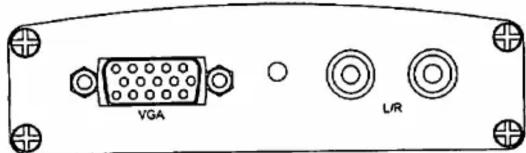
Output
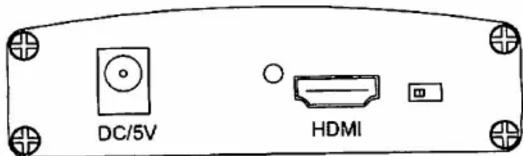
s
6.0 MAIN FEATURES
Analog Video Input Front End Interface
Triple ADC with 12 - 140 MHz Sampling Rate
Integrated line locked PLL generates pixel clock from HSYNC
Integrated 5-bit pixel clock phase adjustment for precise sample timing control
Integrated clamp with timing generator
Integrated Brightness & Contrast controls
Integrated precision voltage reference
Compatible with VGA through SXGA RGB graphics signals
Mid-Scale Clamping
Fully Sync Processing
Black and mid-level precision clamp and calibration*
Input video mode status detection
Digital Video Input Front End Interface
IRGB 444 8/10/12 bits/channel 1/3 channel
Multi-format digital input up to 200M Pixel/sec
Video data input pins re-order function
Input video mode status detection
Inverse Gamma Correcting (De-Gamma)
Programmable Data Enable (DE) generator
Programmable Vertical Sync (VS) generator
Programmable Horizontal Sync (HS) generator
Digital Data Link Engine
HDMI 1.1/1.0
HDCP 1.1/1.0
DVI 1.0
Supports video optional formats: EIA/CEA-861-B
Analog TMDS Interface
TMDS data link up to 2.0G-bit/s each
channel Including 3 data channel and 1 clock
channel Hot Plug detection
TMDS Clock Channel Plug detection
7.0 WARNIN
To Reduce the risk of FIRE,ELECTRIC SHOCK OR PRODUCT DAMAGE:
1) DO NOT EXPOSE THIS APPARATUS TO RAIN, MOISTURE, DRIPPING OR SPLASHING AND THAT NO OBJECTS FILLED WITH LIQUIDS, SUCH AS VASES, SHALL BE PLACED ON THE APPARATUS.
2) DO NOT INSTALL OR PLACE THIS UNIT IN A BOOKCASE, BUILT-IN CABINET OR IN ANOTHER CONFINED SPACE. ENSURE THE UNIT IS WELL VENTILATED.
3) TO PREVENT RISK OF ELECTRIC SHOCK OR FIRE HAZARD DUE TO OVERHEATING, DO NOT OBSTRUCT THE UNIT'S VENTILATION OPENINGS WITH NEWSPAPERS, TABLECLOTHS, CURTAINS, AND SIMILAR ITEMS.
4) DO NOT INSTALL NEAR ANY HEAT SOURCES SUCH AS RADIATORS, HEAT REGISTERS, STOVES, OR OTHER APPARATUS (INCLUDING AMPLIFIERS) THAT PRODUCE HEAT.
5) DO NOT PLACE SOURCES OF NAKED FLAMES, SUCH AS LIGHTED CANDLES, ON THE UNIT.
6) CLEAN THIS APPARATUS ONLY WITH DRY CLOTH.
7) UNPLUG THIS APPARATUS DURING LIGHTNING STORMS OR WHEN UNUSED FOR LONG PERIODS OF TIME
8) PROTECT THE POWER CORD FROM BEING WALKED ON OR PINCHED PARTICULARLY AT PLUGS.
9) ONLY USE ATTACHMENTS/ACCESSORIES SPECIFIED BY THE MANUFACTURER.
10) REFER ALL SERVICING TO QUALIFIED SERVICE PERSONNEL.
Clean this unit with a soft, dry cloth. Never use alcohol, paint thinner or benzine to clean this unit.