
1600 - Lydtuner NAD - Gratis brugsanvisning og manual
Find enhedens vejledning gratis 1600 NAD i PDF-format.


Brugerspørgsmål om 1600 NAD
0 spørgsmål om dette apparat. Besvar dem du kender, eller stil dit eget.
Stil et nyt spørgsmål om dette apparat
Download vejledningen til din Lydtuner i PDF-format gratis! Find din vejledning 1600 - NAD og tag din elektroniske enhed tilbage i hånden. På denne side er alle dokumenter nødvendige for brugen af din enhed offentliggjort. 1600 af mærket NAD.
BRUGSANVISNING 1600 NAD
NAD
1600

natural_image
Front view of a black electronic device with a vertical panel and control panel (no visible text or symbols)OWNER'S MANUAL MANUEL D'UTILISATION BEDIENUNGSANLEITUNG MANUAL DEL USUARIO



FRONT PANEL CONTROLS


C


| NAME 1600 PREAMPLIFIER/TONEK SPECIFICATIONS | ||||
| PREAMPLIFIER SECTION | PROPO EQUIL | MAX ± MC | 47 kdm + 106 PF | <0.0% |
| Input assembly (R and C) | MC | 1.2 mV | ||
| Input assembly at 20 Hz/1 kHz/20 kHz | MC | 13 nV/13 mV/100 mV | 75 dB mil. 15 mV | |
| Signal processing ratio | MC | 75 dB mil. 5 mV | ||
| (A-weighted and cathode coordinated) | MC | 75 dB mil. 5 mV | ||
| THD (20 Hz - 20 kHz and MD at 30 dB level) | MC | 75 dB mil. 15 mV | ||
| RLA response accuracy | 105 dB | |||
| Line Lural inputs (CD, Video, Type) | Input maintenance (R and C) | 50 kdm + 500 PF | ||
| Input maintenance (R and C) | Input monitoring (R and C) | 50 kdm + 500 PF | ||
| Frequency response (20 Hz-20 kHz in one deedral mode) | Frequency response (20 Hz-20 kHz in one deedral mode) | -102 dB | ||
| Frequency response (20 Hz-20 kHz in one deedral mode) | Frequency response (20 Hz-20 kHz in one deedral mode) | -102 dB | ||
| Maximum input signal | Maximum input signal | 100 dB rL 0.5 V | ||
| Standardise redo, A weighted | Standardise redo, A weighted | |||
| Standardise redo, A weighted | Standardise redo, A weighted | |||
| Low Level (audio mining) | Low Level (audio mining) | >8 V to 600 otherwise >250 mV and others | ||
| Flow temperature | Flu temperature | 12 dB above -20 dB | UV into | |
| Controlled | Input sensitivity | 19 dB at 10 Hz | 75 atm in | |
| Baseline | +15 dB at 55 Hz | 12 dB above | ||
| Basal EO | +15 dB at 55 Hz | 12 dB above | ||
| Inbound temperature (switchable) | +15 dB at 55 Hz | 12 dB above | ||
| Low Level (audio mining) | +15 dB at 55 Hz | 12 dB above | ||
| Flu TIMBER SECTIONS | 12 dB above -20 dB | UV into | ||
| Capacity ratio (45 to 65 dB) | 100 Hz 30 dB THD-N | 11 | 1.0 | |
| All recovery (45 to 65 dB) | 100 Hz 30 dB THD-N | 45 | 1.4 | |
| Sedeway | Variable change | >60 dB | 60 dB | |
| Capillary ratio (45 to 65 dB) | MnO, 50 dB 5m | 14 | 1.4 | |
| Capillary ratio (45 to 65 dB) | MnO, 50 dB 5m | 14 | 1.4 | |
| Dose pressure | 50 dB at 36 Hz | 35 | 1.7 | |
| Dose pressure suspension | 50 dB at 36 Hz | 35 | 1.7 | |
| Dose pressure | MnO, 1 kHz | 100 Hz-6 kHz | <0.7% | |
| Th/D Al 100% modulation | MnO, 1 kHz | 100 Hz-6 kHz | <0.7% | |
| Signal rate ratio | MnO | 100 Hz-6 kHz | <0.7% | |
| Frequency response: 30 Hz-15 kHz | 1 kHz | 1 kHz | 50 dB | |
| Frequency response: 30 Hz-15 kHz | 30 Hz-10 kHz | 30 Hz-10 kHz | 55 dB | |
| AR SECTON | 5 pV | |||
| AK SECTON | 5 pV | |||
| Lacka sectony | 5 pV | |||
| Sackay | 5 pV | |||
| Lacka sectony | 5 pV | |||
| Lacka sectony | 5 pV | |||
| SKadey | 5 pV | |||
| Lacka sectony | 5 pV | |||
| AK SECTON | 5 pV | |||
| AK SECTON (Width x Height x Depth) | 45 dB | |||
| Net Weight | (171 z 435 x 153.1m) | |||
| Spring Weight | 825 x 13 dB to 12 oz) | |||
| Roasting Weight | 75 dB (17 dB z oz) | |||
| Power consumption | 30 W | |||
| Standardization are also in effect at the line of pressing. Null reserves the right to charge specifications or decrease. ? . . . and long interval mode. | ||||
© 1980. NAS Electronics Ltd.

REFOTE CONTROL A B C D I I I I

natural_image
Illustration of a hand using a tool to press or adjust a mechanical component, with an arrow indicating the motion direction (no text or symbols present)Figure 11
AMPTUNER MODE
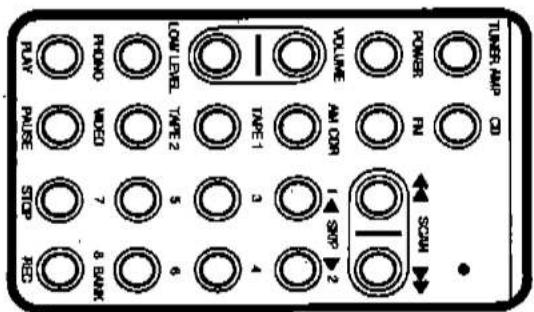
Figure 8


natural_image
Technical line drawing of a mechanical assembly with no visible text or symbolsCD MODE

Figure 9
Figure 10
CASSETTE MODE

NAD 1600 PREAMPLIFIER/TUNER
The UNSWITCHED outlet should be used to power products involving mechanical operations (e.g. a turntable or tape deck); such products should be switched on and off with their own power switches. The UNSWITCHED outlet may also be used to provide power to a device such as a VCR whose clock timer and digital tuner require uninterrupted AC power to maintain information stored in its memory,
The AC power line cords of other stereo components may be plugged into these accessory outlets. The SWITCHED outlet is intended for all-electronic products (e.g. an amplifier, equalizer, or other signal processor); it is switched on and off by the POWER button. A power amplifier rated at up to 100 watts per channel may be turned on and off via the SWITCHED outlet. If your amplifier is larger than that, use its own power switch to turn it on and off, or plug it into a multi-outlet power-socket strip containing a high-current switch.
-
AC CONVENIENCE OUTLETS (120 V units only)
-
AC LINE CORD. Plug the AC line cord into a "live" AC socket.
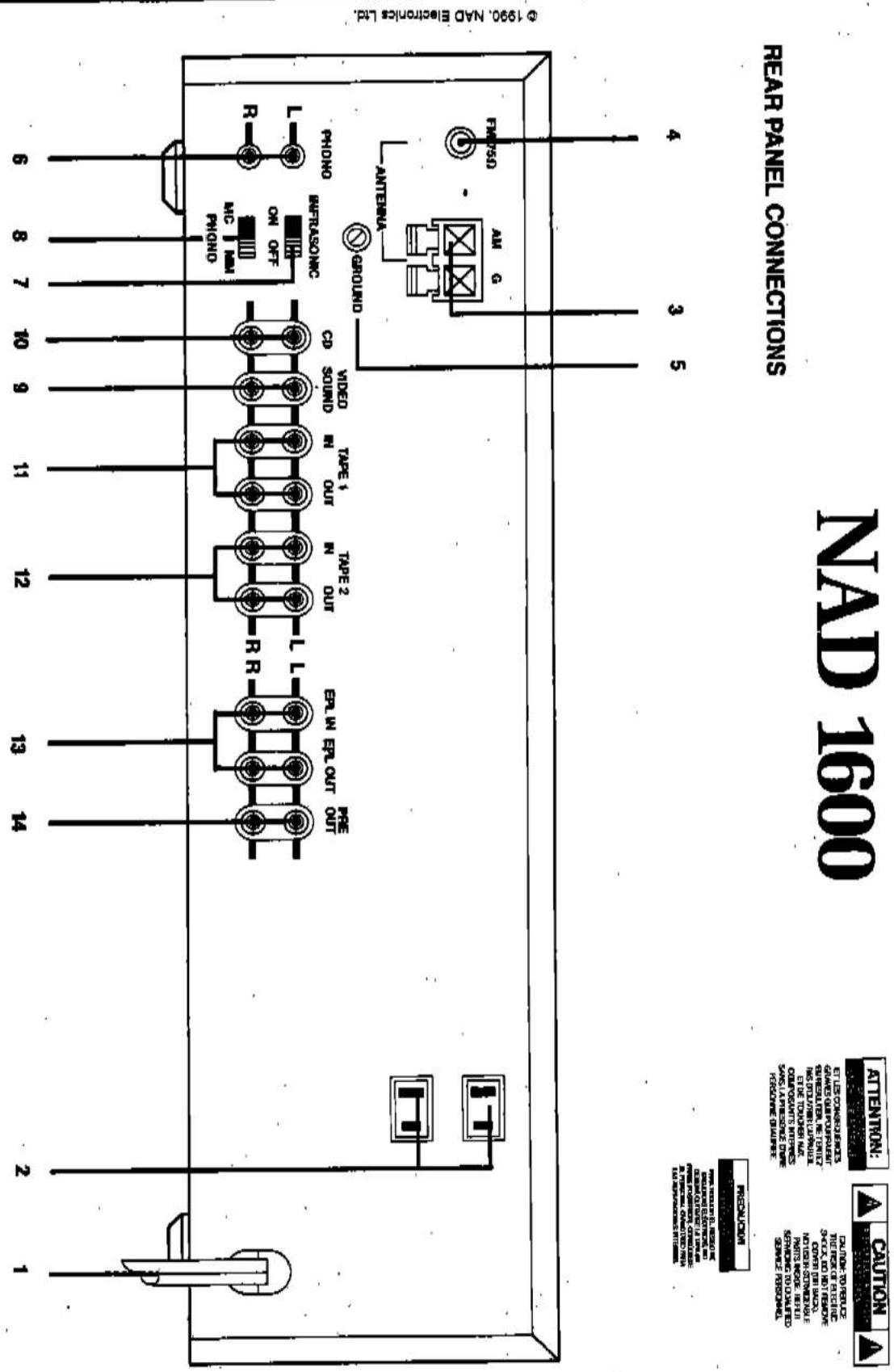
REAR PANEL CONNECTIONS
The remainder of the antenna may be allowed to hang down behind the preamp/liner or may be tacked in place horizontally along the rear of a wooden shelf. (If your equipment is installed on metal shelves, they may impair reception; in that case, stretch out the wire along the wall away from the shelf and tack it in place.) You may wish to experiment with the orientation of the AM antenna, in order to find the position that provides the best reception of the stations you listen to most. The short-wire antenna usually will provide satisfactory reception of local AM broadcasts. For better reception of distant AM stations, attach a long-wire outdoor antenna to the AM terminal. As its name implies, a "long-wire" antenna is a straight wire whose length may be anything from a few feet up to about
An external antenna is required for satisfactory reception of AM broadcasts. For local broadcasts a simple wire up to one meter (three feet) in length will provide ample signal strength, and such a single-wire antenna is included with the preamp/tuner. Connect one end of the wire to the AM terminal. Press down the spring tab below the terminal, and insert the bare end of the wire into the terminal. When you release the spring tab, the terminal will grasp the wire. (See Figure 1.)
- AM ANTENNA TERMINALS.
This unit may be installed on any sturdy, level surface. Since its power transformer generates a magnetic hum field of moderate strength, a turntable (especially one with moving-coil pick-up cartridge) should not be located directly to the left of the amplifier nor directly above it. The preamplifier/tuner requires ventilation. Do not place the amplifier on a rug or other soft surface that it could sink into, obstructing the air inlets on its bottom.
A NOTE ON INSTALLATION
An external antenna is required for satisfactory
An external antenna is required for satisfactory
reception of AM broadcasts. For local broadcasts a simple wire up to one meter (three feet) in length will provide ample signal strength, and such a single-wire antenna is included with the preamp/tuner.
wire antenna is included with the preamp/tuner.
amplifier nor directly above it.
amplifier nor directly above it.
The preamplifier/tuner requires ventilation. Do not place the amplifier on a rug or other soft surface that it could sink into, obstructing the air inlets on its
The preamplifier/tuner requires ventilation. Do not place the amplifier on a rug or other soft surface that it could sink into, obstructing the air inlets on its
The remainder of the antenna may be allowed to hang down behind the preampduner or may be tacked in place horizontally along the rear of a wooden shelf. (If your equipment is installed on metal shelves, they may impair reception; in that case, stretch out the wire along the wall away from the shelf and tack it in place.) You may wish to experiment with the orientation of the AM antenna, in order to find the position that provides the best reception of
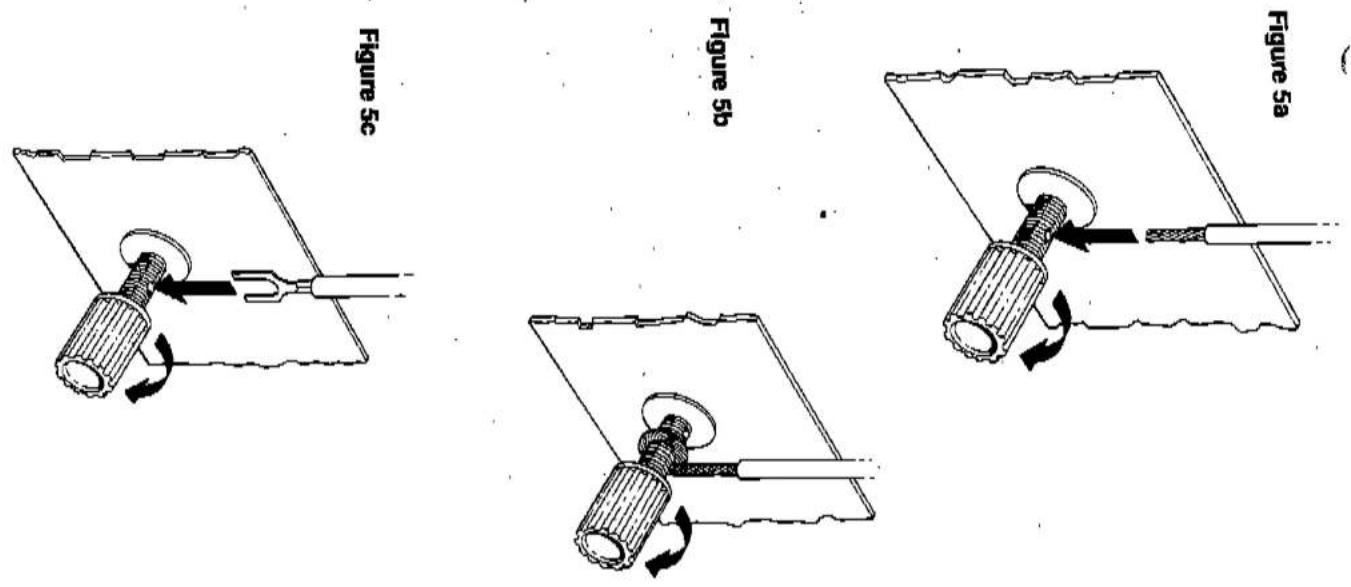
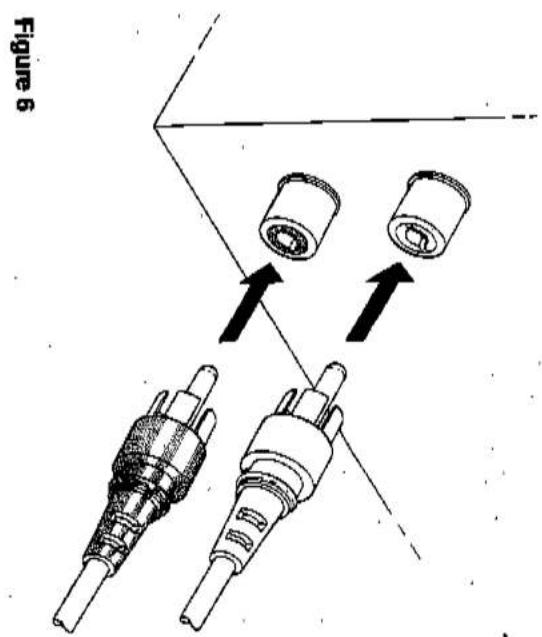
| NOTE: A second microscopic mesh is included in the BASS EQ circuit and is automatically engaged when wire through the small hole in the share of the ground terminal, and legmen the thumbs-up to listen the wire in place. (See Figures 5a-6)If you encounter a persistent low-level turn or buffer (see Figures 5a-6) | NOTE: A second microscopic mesh is included in the BASS EQ circuit and is automatically engaged when wire through the small hole in the share of the ground terminal, and legmen the thumbs-up to listen the wire in place. (See Figures 5a-6)If you encounter a persistent low-level turn or buffer (see Figures 5a-6)If you encounter a persistent low-level turn or buffer (see Figures 5a-6)If you encounter a persistent low-level turn or buffer (see Figures 5a-6)If you encounter a persistent low-level turn or buffer (see Figures 5a-6)If you encounter a persistent low-level turn or buffer (see Figures 5a-6)If you encounter a persistent low-level turn or buffer (see Figures 5a - 7)In order to be connected to the preamp/under for effective reception of stereo FM broadcasts.A ribbon wire "Tolded double" antenna and a balun container are included to get you started.When you start out the ribbon-wire antennaadapar are included to get you started.When you start out the ribbon-wire antenna(See Figures 2-4). |
| 8. MMMC SELECTOR. | This switch sets the input sensitivity and gain of the photo preamble circuit. Set it according to the input level of your phone pickup cassette. Set the output level of the MIMC switch. Begin by setting it to set the switch at MC.Here is another way to determine the preferred setting of the MMMC switch. Begin by setting it to set the switch at MC. After you complete the installation and obtain a statistically loud volume level with a VOL obtain a statistically loud volume level with a VOL-IME control setting between 9 o dock and 3 o'clock. If you have to lamp up the VOLUME control beyond 3 o dock to get adequately loud sound, turn the VOL-IME back down and re set the MMMC switch to MC.9. VIDEO SOUND INPUT.Connect a video-related audio signal here, such as the audio output from a video cassette recorder, video disc player, TV monoracceler, or stereo television decoder. Alternatively, any "line-level" video signal may be connected here, such as the video signal may be connected here, such as the video signal may be connected here, such as the video signal may be connected here, such as the video signal may be connected here, such as the video signal may be connected here, such as the video signal may be connected here, such as the video signal may be connected here, such as the video signal may be connected here, such as the video signal may be connected here, such as the video signal may be connected here, such as 10. CD INPUTConnect the audio signal cadres from a digital computer Disc Player to these jacks. The input signal will be led to the Volume control before reaching any overloaded by high-level signals from the digital computer Disc Player to these jacks. The input signal will be led to the Volume control before reaching any overloaded by high-level signals from the digital Computer Disc Player to these jacks. The input signal will be led to the Volume control before reaching any overloaded by high-level signals from the digital Computer Disc Player to these jacks. The input signal will be led to the Volume control before reaching any overloaded by high-level signals from the digital Computer Disc Player to these jacks. The input signal will be led to the Volume control before reaching any overload by high-level signals from the digital Computer Disc Player to these jacks. The input signal will be led to the Volume control before reaching any overload by high-level signals from the digital computer Disc Player to these jacks. The input signal will be led to the Volume control before reaching any overload by high-level signals from the digital computer Disc Player to these jacks. The input signal will be led to the Volume control before reaching any overload by high-level signals from the digital computer Disc Player to these jacks. The input signal will be led to the Volume control before reaching any overload by high-level signals from the digital computer Disc Player to these jacks. The input signal will be lead to the Volume control before reaching any overload by high-level signals from the digital computer Disc Player to these jacks. The input signal will be led to the Volume control before reaching any overload by high-level signals from the digital computer Disc Player to these jacks. The input signal will be led to the Volume control before reaching any overload by high-level signals from the digital computer Disc Player to these jacks. The input signal will be led to the Volume control before reaching any overload by high-level signalsfrom the digital circuit. For you understand the signal's effect on the target of the earth. A computer tool in each play luty into the socket so that the playing s metal skin fits highly over the socket so that the playing s necessary, comparing the playing model skin slightly so as necessary, comparing the playing model skin slightly so as necessary, comparing the playing model skin slightly so as necessary, comparing the playing model skin slightly so as necessary, comparing the playing model skin slightly so as necessary, comparing the playing model skin slightly so as necessary, comparing the playing model skin slightly so as necessary, comparing the playing model skin slightly so as necessary, comparing the playing model skin slightly so as necessary, comparing the playing model skin slightly so as necessary, comparing the playing model skin slightly soas necessary, comparing the playing model skin slightly so as necessary, comparing the playing model skin slightly so as necessary, comparing the playing model skin slightly soas necessary, comparing the playing model skin slightly soas necessary, comparing the playing model skin slightly soas necessary, comparing the playing model skin slightly soas necessary, comparing the playing model skin slightly soas necessary, comparing the playing model skin slightly soas necessary, comparing the playing model skin slightly soas necessary, comparing the playing model skin slightly soas necessary, comparing the playing model skin slightly soas necessary, comparing the playing model skin slightly soas necessary, comparing the playing model skin slightly soa necessary, comparing the playing model skin slightly soa necessary, comparing the playing model skin slightly soa necessary, comparing the playing model skin slightly soa necessary, comparing the playing model skin slightly soa necessary, comparing the playing model skin slightly soa necessary, comparing the playing model skin slightly soa necessary, comparing the playing model skin slightly soa necessary, comparing the playing model skin slightly soa necessary, comparing the playing model skin slightly soa necessary, comparing the playing model skin slightly soas necessary, comparing the playing model skin slightly soas necessary, comparing the playing model skin slightly soas necessary, comparing the playing model skin slightly soas necessary, comparing the playing model skin slightly soas necessary, comparing the playing model skin slightly soas necessary, comparing the playing model skin slightly soas necessary, comparing the playing model skin slightly soas necessary, comparing the playing model skin slightly soas necessary, comparing the playing model skin slightly soat necessary, comparing the playing model skin slightly soat necessary, comparing the playing model skin slightly soat necessary, comparing the playing model skin slightly soat necessary, comparing the playing model skin slightly soat necessary, comparing the playing model skin slightly soat necessary, comparing the playing model skin slightly soat necessary, comparing the playing model skin slightly soat necessary, comparing the playing model skin slightly soat necessary, comparing the playing model skin slightly soat necessary, comparing the playing model skin slightly soa necessary, comparing the playing model skin slightly soa necessary, comparing the playing model skin slightly soa necessary, comparing the playing model skin slightly soa necessary, comparing the playing model skin slightly soa necessary, comparing the playing model skin slightly soa necessary, comparing the playing model skin slightly soa necessary, comparing the playing model skin slightly soa necessary, comparing the playing model skin slightly soa necessary, comparing the playing model skin slightly soat necessary, comparing the playing model skin slightly soat necessary, comparing the playing model skin slightly soat necessary, comparing the playing model skin slightly soat necessary, comparing the playing model skin slightly soat necessary, comparing the playing model skin slightly soat necessary, comparing the playing model skin slightly soat necessary, comparing the playing model skin slightly soat necessary, comparing the playing model skin slightly soat necessary, comparing the playing model skin slightly soato necessary, comparing the playing model skin slightly soato necessary, comparing the playing model skin slightly soato necessary, comparing the playing model skin slightly soato necessary, comparing the playing model skin slightly soato necessary, comparing the playing model skin slightly soato necessary, comparing the playing model skin slightly soato necessary, comparing the playing model skin slightly soato necessary, comparing the playing model skin slightly soato necessary, comparing the playing model skin slightly soato necessary, comparing the playing model skin slightly soat necessary, comparing the playing model skin slightly soat necessary, comparing the playing model skin slightly soat necessary, comparing the playing model skin slightly soat necessary, comparing the playing model skin slightly soat necessary, comparing the playing model skin slightly soat necessary, comparing the playing model skin slightly soat necessary, comparing the playing model skin slightly soat necessary, comparing the playing model skin slightly soat necessary, comparing the playing model skin slightly soata necessary, comparing the playing model skin slightly soata necessary, comparing the playing model skin slightly soata necessary, comparing the playing model skin slightly soata necessary, comparing the playing model skin slightly soata necessary, comparing the playing model skin slightly soata necessary, comparing the playing model skin slightly soata necessary, comparing the playing model skin slightly soata necessary, comparing the playing model skin slightly soata necessary, comparing the playing model skin slightly soata necessary, comparing the playing model skin slightly soat necessary, comparing the playing model skin slightly soat necessary, comparing the playing model skin slightly soat necessary, comparing the playing model skin slightly soat necessary, comparing the playing model skin slightly soat necessary, comparing the playing model skin slightly soat necessary, comparing the playing model skin slightly soat necessary, comparing the playing model skin slightly soat necessary, comparing the playing model skin slightly soat necessary, comparing the playing model skin slightly socat necessary, comparing the playing model skin slightly socat necessary, comparing the playing model skin slightly socat necessary, comparing the playing model skin slightly socat necessary, comparing the playing model skin slightly socat necessary, comparing the playing model skin slightly socat necessary, comparing the playing model skin slightly socat necessary, comparing the playing model skin slightly socat necessary, comparing the playing model skin slightly socat necessary, comparing the playing model skin slightly socat necessary, comparing the playing model skin slightly soca necessary, comparing the playing model skin slightly soca necessary, comparing the playing model skin slightly soca necessary, comparing the playing model skin slightly soca necessary, comparing the playing model skin slightly soca necessary, comparing the playing model skin slightly soca necessary, comparing the playing model skin slightly soca necessary, comparing the playing model skin slightly soca necessary, comparing the playing model skin slightly soca necessary, comparing the playing model skin slightly soca necessary, comparing the playing model skin slightly soc necessary, comparing the playing model skin slightly soc necessary, comparing the playing model skin slightly soc necessary, comparing the playing model skin slightly soc necessary, comparing the playing model skin slightly soc necessary, comparing the playing model skin slightly soc necessary, comparing the playing model skin slightly soc necessary, comparing the playing model skin slightly soc necessary, comparing the playing model skin slightly soc necessary, comparing the playing model skin slightly soc necessary, comparing the playing model skin slightly socc necessary, comparing the playing model skin slightly socc necessary, comparing the playing model skin slightly socc necessary, comparing the playing model skin slightly socc necessary, comparing the playing model skin slightly socc necessary, comparing the playing model skin slightly socc necessary, comparing the playing model skin slightly socc necessary, comparing the playing model skin slightly socc necessary, comparing the playing model skin slightly socc necessary, comparing the playing model skin slightly socc necessary, comparing the playing model skin slightly sosc necessary, comparing the playing model skin slightly sosc necessary, comparing the playing model skin slightly sosc necessary, comparing the playing model skin slightly sosc necessary, comparing the playing model skin slightly sosc necessary, comparing the playing model skin slightly sosc necessary, comparing the playing model skin slightly sosc necessary, comparing the playing model skin slightly sosc necessary, comparing the playing model skin slightly sosc necessary, comparing the playing model skin slightly sosc necessary, comparing the playing model skin slightly socc necessary, comparing the playing model skin slightly socc necessary, comparing the playing model skin slightly socc necessary, comparing the playing model skin slightly socc necessary, comparing the playing model skin slightly socc necessary, comparing the playing model skin slightly socc necessary, comparing the playing model skin slightly socc necessary, comparing the playing model skin slightly socc necessary, comparing the playing model skin slightly socc necessary, comparing the playing model skin slightly soc necessary, comparing the playing model skin slightly soc necessary, comparing the playing model skin slightly soc necessary, comparing the playing model skin slightly soc necessary, comparing the playing model skin slightly soc necessary, comparing the playing model skin slightly soc necessary, comparing the playing model skin slightly soc necessary, comparing the playing model skin slightly soc necessary, comparing the playing model skin slightly soc necessary, comparing the playing model skin slightly sosc necessary, comparing the playing model skin slightly sosc necessary, comparing the playing model skin slightly sosc necessary, comparing the playing model skin slightly sosc necessary, comparing the playing model skin slightly sosc necessary, comparing the playing model skin slightly sosc necessary, comparing the playing model skin slightly sosc necessary, comparing the playing model skin slightly sosc necessary, comparing the playing model skin slightly sosc necessary, comparing the playing model skin slightly soc necessary, comparing the playing model skin slightly soc necessary, comparing the playing model skin slightly soc necessary, comparing the playing model skin slightly soc necessary, comparing the playing model skin slightly soc necessary, comparing the playing model skin slightly soc necessary, comparing the playing model skin slightly soc necessary, comparing the playing model skin slightly soc necessary, comparing the playing model skin slightly soc necessary, comparing the playing model skin slightly soo necessary, comparing the playing model skin slightly soo necessary, comparing the playing model skin slightly soo necessary, comparing the playing model skin slightly soo necessary, comparing the playing model skin slightly soo necessary, comparing the playing model skin slightly soo necessary, comparing the playing model skin slightly soo necessary, comparing the playing model skin slightly soo necessary, comparing the playing model skin slightly soo necessary, comparing the playing model skin slightly soo necessary, comparing the playing model skin slightly sou necessary, comparing the playing model skin slightly sou necessary, comparing the playing model skin slightly sou necessary, comparing the playing model skin slightly sou necessary, comparing the playing model skin slightly sou necessary, comparing the playing model skin slightly sou necessary, comparing the playing model skin slightly sou necessary, comparing the playing model skin slightly sou necessary, comparing the playing model skin slightly sou necessary, comparing the playing model skin slightly sou necessary, comparing the playing model skin slightly soo necessary, comparing the playing model skin slightly soo necessary, comparing the playing model skin slightly soo necessary, comparing the playing model skin slightly soo necessary, comparing the playing model skin slightly soo necessary, comparing the playing model skin slightly soo necessary, comparing the playing model skin slightly soo necessary, comparing the playing model skin slightly soo necessary, comparing the playing model skin slightly soo necessary, comparing the playing model skin slightly so o necessary, comparing the playing model skin slightly soo necessary, comparing the playing model skin slightly soo necessary, comparing the playing model skin slightly soo necessary, comparing the playing model skin slightly soo necessary, comparing the playing model skin slightly soo necessary, comparing the playing model skin slightly soo necessary, comparing the playing model skin slightly soo necessary, comparing the playing model skin slightly soo necessary, comparing the playing model skin slightly soo necessary, comparing the playing model skin slightly soi necessary, comparing the playing model skin slightly soi necessary, comparing the playing model skin slightly soi necessary, comparing the playing model skin slightly soi necessary, comparing the playing model skin slightly soi necessary, comparing the playing model skin slightly soi necessary, comparing the playing model skin slightly soi necessary, comparing the playing model skin slightly soi necessary, comparing the playing model skin slightly soi necessary, comparing the playing model skin slightly soi necessary, comparing the playing model skin slightly so i necessary, comparing the playing model skin slightly soi necessary, comparing the playing model skin slightly soi necessary, comparing the playing model skin slightly soi necessary, comparing the playing model skin slightly soi necessary, comparing the playing model skin slightly soi necessary, comparing the playing model skin slightly soi necessary, comparing the playing model skin slightly soi necessary, comparing the playing model skin slightly soi necessary, comparing the playing model skin slightly soi necessary, comparing the playing model skin slightly soj necessary, comparing the playing model skin slightly soj necessary, comparing the playing model skin slightly soj necessary, comparing the playing model skin slightly soj necessary, comparing the playing model skin slightly soj necessary, comparing the playing model skin slightly soj necessary, comparing the playing model skin slightly soj necessary, comparing the playing model skin slightly soj necessary, comparing the playing model skin slightly soj necessary, comparing the playing model skin slightly soj necessary, comparing the playing model skin slightly soi necessary, comparing the playing model skin slightly soi necessary, comparing the playing model skin slightly soi necessary, comparing the playing model skin slightly soi necessary, comparing the playing model skin slightly soi necessary, comparing the playing model skin slightly soi necessary, comparing the playing model skin slightly soi necessary, comparing the playing model skin slightly soi necessary, comparing the playing model skin slightly soi necessary, comparing the playing model skin slightly soo necessary, comparing the playing model skin slightly soo necessary, comparing the playing model skin slightly soo necessary, comparing the playing model skin slightly soo necessary, comparing the playing model skin slightly soo necessary, comparing the playing model skin slightly soo necessary, comparing the playing model skin slightly soo necessary, comparing the playing model skin slightly soo necessary, comparing the playing model skin slightly soo necessary, comparing the playing model skin slightly sooi necessary, comparing the playing model skin slightly sooi necessary, comparing the playing model skin slightly sooi necessary, comparing the playing model skin slightly sooi necessary, comparing the playing model skin slightly sooi necessary, comparing the playing model skin slightly sooi necessary, comparing the playing model skin slightly sooi necessary, comparing the playing model skin slightly sooi necessary, comparing the playing model skin slightly sooi necessary, comparing the playing model skin slightly sooi necessary, comparing the playing model skin slightly soio necessary, comparing the playing model skin slightly soio necessary, comparing the playing model skin slightly soio necessary, comparing the playing model skin slightly soio necessary, comparing the playing model skin slightly soio necessary, comparing the playing model skin slightly soio necessary, comparing the playing model skin slightly soio necessary, comparing the playing model skin slightly soio necessary, comparing the playing model skin slightly soio necessary, comparing the playing model skin slightly soio necessary, comparing the playing model skin slightly soi necessary, comparing the playing model skin slightly soi necessary, comparing the playing model skin slightly soi necessary, comparing the playing model skin slightly soi necessary, comparing the playing model skin slightly soi necessary, comparing the playing model skin slightly soi necessary, comparing the playing model skin slightly soi necessary, comparing the playing model skin slightly soi necessary, comparing the playing model skin slightly soi necessary, comparing the playing model skin slightly soio necessary, comparing the playing model skin slightly soio necessary, comparing the playing model skin slightly soio necessary, comparing the playing model skin slightly soio necessary, comparing the playing model skin slightly soio necessary, comparing the playing model skin slightly soio necessary, comparing the playing model skin slightly soio necessary, comparing the playing model skin slightly soio necessary, comparing the playing model skin slightly soio necessary, comparing the playing model skin slightly soia necessary, comparing the playing model skin slightly soia necessary, comparing the playing model skin slightly soia necessary, comparing the playing model skin slightly soia necessary, comparing the playing model skin slightly soia necessary, comparing the playing model skin slightly soia necessary, comparing the playing model skin slightly soia necessary, comparing the playing model skin slightly soia necessary, comparing the playing model skin slightly soia necessary, comparing the playing model skin slightly soia necessary, comparing the playing model skin slightly soio necessary, comparing the playing model skin slightly soio necessary, comparing the playing model skin slightly soio necessary, comparing the playing model skin slightly soio necessary, comparing the playing model skin slightly soio necessary, comparing the playing model skin slightly soio necessary, comparing the playing model skin slightly soio necessary, comparing the playing model skin slightly soio necessary, comparing the playing model skin slightly soio necessary, comparing the playing model skin slightly soiu necessary, comparing the playing model skin slightly soiu necessary, comparing the playing model skin slightly soiu necessary, comparing the playing model skin slightly soiu necessary, comparing the playing model skin slightly soiu necessary, comparing the playing model skin slightly soiu necessary, comparing the playing model skin slightly soiu necessary, comparing the playing model skin slightly soiu necessary, comparing the playing model skin slightly soiu necessary, comparing the playing model skin slightly soiu necessary, comparing the playing model skin slightly soi necessary, comparing the playing model skin slightly soi necessary, comparing the playing model skin slightly soi necessary, comparing the playing model skin slightly soi necessary, comparing the playing model skin slightly soi necessary, comparing the playing model skin slightly soi necessary, comparing the playing model skin slightly soi necessary, comparing the playing model skin slightly soi necessary, comparing the playing model skin slightly soi necessary, comparing the playing model skin slightly soii necessary, comparing the playing model skin slightly soii necessary, comparing the playing model skin slightly soii necessary, comparing the playing model skin slightly soii necessary, comparing the playing model skin slightly soii necessary, comparing the playing model skin slightly soii necessary, comparing the playing model skin slightly soii necessary, comparing the playing model skin slightly soii necessary, comparing the playing model skin slightly soii necessary, comparing the playing model skin slightly soii necessary, comparing the playing model skin slightly soiii necessary, comparing the playing model skin slightly soiii necessary, comparing the playing model skin slightly soiii necessary, comparing the playing model skin slightly soiii necessary, comparing the playing model skin slightly soiii necessary, comparing the playing model skin slightly soiii necessary, comparing the playing model skin slightly soiii necessary, comparing the playing model skin slightly soiii necessary, comparing the playing model skin slightly soiii necessary, comparing the playing model skin slightly soiii necessary, comparing the playing model skin slightly soii necessary, comparing the playing model skin slightly soii necessary, comparing the playing model skin slightly soii necessary, comparing the playing model skin slightly soii necessary, comparing the playing model skin slightly soii necessary, comparing the playing model skin slightly soii necessary, comparing the playing model skin slightly soii necessary, comparing the playing model skin slightly soii necessary, comparing the playing model skin slightly soii necessary, comparing the playing model skin slightly soi necessary, comparing the playing model skin slightly soi necessary, comparing the playing model skin slightly soi necessary, comparing the playing model skin slightly soi necessary, comparing the playing model skin slightly soi necessary, comparing the playing model skin slightly soi necessary, comparing the playing model skin slightly soi necessary, comparing the playing model skin slightly soi necessary, comparing the playing model skin slightly soi necessary, comparing the playing model skin slightly sooi necessary, comparing the playing model skin slightly sooi necessary, comparing the playing model skin slightly sooi necessary, comparing the playing model skin slightly sooi necessary, comparing the playing model skin slightly sooi necessary, comparing the playing model skin slightly sooi necessary, comparing the playing model skin slightly sooi necessary, comparing the playing model skin slightly sooi necessary, comparing the playing model skin slightly sooi necessary, comparing the playing model skin slightly soii necessary, comparing the playing model skin slightly soii necessary, comparing the playing model skin slightly soii necessary, comparing the playing model skin slightly soii necessary, comparing the playing model skin slightly soii necessary, comparing the playing model skin slightly soii necessary, comparing the playing model skin slightly soii necessary, comparing the playing model skin slightly soii necessary, comparing the playing model skin slightly soii necessary, comparing the playing model skin slightly soij necessary, comparing the playing model skin slightly soii necessary, comparing the playing model skin slightly soii necessary, comparing the playing model skin slightly soii necessary, comparing the playing model skin slightly soii necessary, comparing the playing model skin slightly soii necessary, comparing the playing model skin slightly soii necessary, comparing the playing model skin slightly soii necessary, comparing the playing model skin slightly soii necessary, comparing the playing model skin slightly soii necessary, comparing the playing model skin slightly so ii necessary, comparing the playing model skin slightly soii necessary, comparing the playing model skin slightly soii necessary, comparing the playing model skin slightly soii necessary, comparing the playing model skin slightly soii necessary, comparing the playing model skin slightly soii necessary, comparing the playing model skin slightly soii necessary, comparing the playing model skin slightly soii necessary, comparing the playing model skin slightly soii necessary, contrasting to the digital screen display. When you start to use a button to download an orange button to date when you start to download a button to date when you start to download a button to date when you start to download a button to date when you start to download a button to date when you start to download a button to date when you start to download a button to date when you start to download a button to date when you start to download a button to date when you start to download a button to date when you start to download a button to date when you start to download a button to date when you start to download a Button to date when you start to download a Button to date when you start to download a Button to date when you start to download a Button to date when you start to download a Button to date when you start to download a Button to date when you start to download a Button to date when you start to download a Button to date when you start to download a Button to date when you start to download a Button to date when you start to download a Button to date when you start to download a Buttonto a button to download a Button to date when you start to download a Button to date when you start to download a Button to date when you start to download a Button to date when you start to download a Button to date when you start to download a Button to date when you start to download a Button to date when you start to download a Button to date when you start to download a Button to date when you start to download a Button to date when you start to download a Button to date when you start TO download a Button to date when you start TO download a Button to date when you start TO download a Button to date when you start TO download a Button to date when you start TO download a Button to date when you start TO download a Button to date when you start TO download a Button to date when you start TO download a Button to date when you start TO download a Button to date when you start TO download a Button to date when you start TO download a Button to date when you start TO Download a Button to date when you start TO Download a Button to date when you start TO Download a Button to date when you start TO Download a Button to date when you start TO Download a Button to date when you start TO Download a Button to date when you start TO Download a Button to date when you start TO Download a Button to date when you start TO Download a Button to date when you start TO Download a Button to date when you start TO Download a Button to date when you start TO Downloada Button to date when you start TO Downloada Button to date when you start TO Downloada Button to date when you start TO Downloada Button to date when you start TO Downloada Button to date when you start TO Downloada Button to date when you start TO Downloada Button to date when you start TO Downloada Button to date when you start TO Downloada Button to date when you start TO Downloada Button to date when you start TO Downloada Button to date when you start TO DownloadaButton to date when you start TO Downloada Button to date when you start TO Downloada Button to date when you start TO Downloada Button to date when you start TO Downloada Button to date when you start TO Downloada Button to date when you start TO Downloada Button to date when you start TO Downloada Button to date when you start TO Downloada Button to date when you start TO Downloada Button to date when you start TO Downloada Button to date when you start TO Downloada Buttonto a button to download a Button to date when you start TO download a Button to date when you start TO download a Button to date when you start TO download a Button |
10. CO INPU
9. VIDEO SOUND INPUT.
8. MMWC SELECTOR.
| 1. POWER | FORNT PANEL CONTROLS |
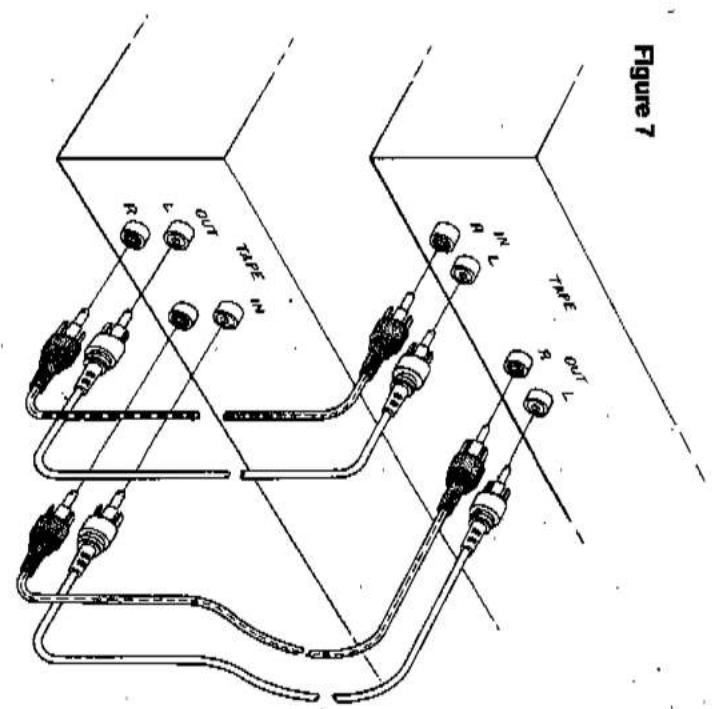
| 1. POWER | After the sound of the playback from laps as well as used to alter signals that are being recorded. If you want to record the processed sound, connected the processor to tape 2 instead, and Copy the processors outlook onto Tape 1 (or vice versa). Or you may simply connected a tape deck to the processors outlook onto the recorders outlook on the TAPE 1 OUT lacks of the 1600 digital, etc. To make recordings, connected a stereo digital, etc. To make recordings, connected a stereo digital, etc. To make recordings, connected a stereo digital, etc. To make recordings, connected a stereo digital, etc. To make recordings, connected a stereo digital, etc. To make recordings, connected a stereo digital, etc. To make recordings, connected a stereo digital, etc. To make recordings, connected a stereo digital, etc. To make recordings, connected a stereo digital, etc. To make recordings, connected a stereo Digital, etc. To make recordings, connected a stereo Digital, etc. To make recordings, connected a stereo Digital, etc. To make recordings, connected a stereo Digital, etc. To make recordings, connected a stereo Digital, etc. To make recordings, connected a stereo Digital, etc. To make recordings, connected a stereo Digital, etc. To make recordings, connected a stereo Digital, etc. To make recordings, connected a stereo Digital, etc. To make recordings, connected a stereo Digital |
| 2. PHONES | Plug stereo headphones in here. The circuit will provide proper drive signals for all conditional state, just one exception: electrostatic headphones usually are supplied with an adapter until which must be needed directly to the speaker terminals on your power ampifiers. NOTE: When listening to headphones, I'm off your loudspeakers by using your power ampifiers. A link-level controls, or by switching off the ampifiers in input-level controls, or by switching off the ampifiers. AC power. |
| 3. EP.(EXTERNAL PROCESSOR LOOP) | Press this button to hear the output of any signal processing accessory connected to the EPJ/Jacks. If the processor is a spectral guarantee used with your loudspeakers, and leave this button. If when listening to those speakers, and leave this button. Un when listening to equations is not wanted (e. when using head phones or extension speakers). If you engage the External Processor button |
13. EXTERNAL PROCESSOR
2. PHONES
FRONT PANEL CONTROLS
| 6. BASS. | Note that the Tape buttons have no effect on the signs that are being recorded. Selection of a |
| The BASS control adjusts the relative level of the | Note that the Tape buttons have no effect on the signs that are being recorded. Selection of a |
| low requirements in the sound. The electrical re- | Note that the Tape buttons have no effect on the signs that are being recorded. Selection of a |
| sporse of the prarampriser is tallest when the conol | Note that the Tape buttons have no effect on the signs that are being recorded. Selection of a |
| is seen in the detent at the 12 o clock position. Rotion | Note that the Tape buttons have no effect on the signs that are being recorded. Selection of a |
| of the kind to the right (dcokwise) increases the level | Note that the Tape buttons have no effect on the signs that are being recorded. Selection of a |
| is seen in the detent at the 12 o clock position. Rotion | Note that the Tape buttons have no effect on the signs that are being recorded. Selection of a |
| wise decreases their level. Aljust the BASS control to | Note that the Tape buttons have no effect on the signs that are being recorded. Selection of a |
| from the receiver. Leave the button OUI to hear the | Note that the Tape buttons have no effect on the signs that are being recorded. Selection of a |
| from the receiver. Leave the button OUI to hear the | Note that the Tape buttons have no effect on the signs that are being recorded. Selection of a |
| recorder, press this button to hear the output signal | Note that the Tape buttons have no effect on the signs that are being recorded. Selection of a |
| or. | Note that the Tape buttons have no effect on the signs that are being recorded. Selection of a |
| if you use the EFL connects for an extra tape | Note that the Tape buttons have no effect on the signs that are being recorded. Selection of a |
| or. | Note that the Tape buttons have no effect on the signs that are being recorded. Selection of a |
| if you use the EFL connects for an extra tape | Note that the Tape buttons have no effect on the signs that are being recorded. Selection of a |
| or. | Note that the Tape buttons have no effect on the signs that are being recorded. Selection of a |
| if you use the EFL connects for an extra tape | Note that the Tape buttons have no effect on the signs that are being recorded. Selection of a |
| or. | Note that the Tape buttons have no effect on the signs that are being recorded. Selection of a |
| Signal for recording is controlled only by the inputSelector and the Copy switch.The Tape buttons allow you to listen to recorded tapes and to check on your own tape recordings as they are being made. If you have a three-head audio recording that prompts of-the tape monitoring, then by engaging that prompts of-the tape monitoring, then by engaging the tape buttons on both the amplifier and the recorder, can hear the playback signals from the tape immediately after its recorded, to monitor itsquality. | |
| 12. LOW LEVEL.This button reduces the volume of the amplifiedsound by approximally 20 decibels. It has no effecton the signal fed to the TAPE OUT Iacks for ordering orprocessing. When the low level mode is diesen-this mode all stations (and the inter-station noise) inbution OUT) partially over rides the scan mulling. Inmanual audade a reduced volume while thelunging is being scanned up or down in frequency. | |
| 13. BALANCEThe balance control adjusts the relative levelsof the left and right channels. It has no effect on ereardings marks the point of equal balance. Restorationposition marks the point of equal balance. Restorationthe needed flow to the center of a station,broadcast channel in order to cure an interferenceproblem, disengage the SEARCH mode. | |
| 16. TURNING.Presses the right-hand TUNING button (4) to unewmpaid to higher requestes, or the left-hand duration(y) to lune downward to lower requestes.When a Turing button is pressed nominality,the needed frequency sinks up or down by one stepwith FM the minimum running step is 0.05 MHz. Withmedium-wave AM the tuning step is 10 kHz in NorthAmerica, 9 kHz in Europe and esewhere.If either Turing button is held down with can-thouss pressure rather than just bring tapped, theclock causes binary and then scans rapidly up ordown in frequency. If the SEARCH is engaged thencour causes binary and then scans rapidly up orsmall turnings steps-To turn a broadcast signal, press continuouslyon either Turing button until the neededfrequency isclose to the desired broadcast frequency. Then hereunder in small increments by tapping a Turing button.If you know the exact frequency of the broadcaststation, simply lune to that frequency. If you dontknow the exact frequency, lune to the vicinity of thencore Frequency and then observe the Signal Strengthand center-tune indicators while the-lung. For Ambroadcasts, time-lune to obtain maximum signulindicator is illuminated. | |
| 14. VOLUMEThe volume control adjusts the overall loadnesslevel of the sound it has no effect on the level of thesignals fed to the TAPE OUT Iacks for recording. Theslow channels, so that the static balance will notits two channels, so that the static balance will notshift nocceability as the loudness of the sound isvalued. It has no effect on the level of thevolume control is designed for accurate tracking ofkits two channels, so that the static balance will notshift nocceability as the loudness of the sound isvalued. | |
| 15. SEARCH MODEThis button engages a SEARCH mode in whichthe user stars station-by-station taster than in serialturnout ranks. When one of the UP/Down Turningbuttons is Uttar, the user scans rapidly up or downin frequency and automatically stops at the nextin frequency and automatically stops at the next | |
| 16. SEARCH MODE | |
| 17. INPUT SELECTOR (PHONO, CD), VIDEOThese buttons, together with the AM and FImeasurement, if Tape 1 and 2 are disappeared, the selectedinput signals is led to the power amplifier and so to theoutspeakers. When Tape 1 or 2 is engaged, theDigital recording (or signal-processing), butout locks for recording (or signal-processing), butthe signal returning from the tape recorder (or pro-essors) is selected for listening. | |
| 18. INPUT SELECTOR (PHONO, CD), VIDEOThese buttons, together with the AM and FImeasurement, if Tape 1 and 2 are disappeared, the selectedinput signals is also led to the TAPE OUTcircuits for input signals in the tape switch is OFF, theselected input signals is also led to the TAPE OUTcircuits for input signals in the tape switch is also. | |
| 19. INPUT SELECTOR (PHONO, CD), VIDEOThese buttons, together with the AM and FIMeasurement, if the COPY switch is OFF, thepreampifier. If the COPY switch is OFF, theselected input signals in the tape switch is OFF, thepreampifier, if the COPY switch is OFF, thepreampifier, if the COPY switch is OFF, thepreampifier, if the COPY switch is OFF, thepreampifier, if the COPY switch is OFF, thepreampifier, if the COPY switch is OFF, thepreampifier, if the COPY switch is OFF, thepreampifier, if the COPY switch is OFF, thepreampifier, if the COPY switch is OFF, thepreampifier, if the COPY switch is OFF. | |
| 10. INPUT SELECTOR (PHONO, CD), VIDEOThese buttons, together with the AM and FIMeasurement, if Tape 1 or 2 is engaged with no tapedecarccles for recording.If Tape 1 or 2 are disappeared, the selectedinput signals in the tape switch is also. | |
| 17. TUNING DISPLAY.This display is in three parts: frequency, signal strength, and tuning.FREQUENCY. The numerical display shows the tuned frequency.SIGNAL STRENGTH. The signal strength meter is a row of five bars below the frequency display. The number of illuminated bars increases with the strength of the received signal. If only one or two bars illuminate, the signal is too weak for noise-free reception in stereo, but reception may be satisfactory in mono. Strong signals are indicated by four or five illuminated bars.TUNING. The center-tuning indicator is located to the right of the digital frequency display. It consists of an illuminated rectangular bar and two triangular pointers. The pointers glow when the tuning is within an FM station's channel but not at the center of that channel. The orientation of the illuminated pointer shows whether the tuning frequency should be increased or decreased. If the arrow points upward, tune to a slightly higher frequency. If the arrow points down, tune to a lower frequency. When the broadcast is accurately centered-tuned, the triangular pointers fade out and only the middle bar is illuminated.At the bottom of the display window is a green LED that glows when remote commands are received. This LED also glows when the unit is in standby mode (plugged in but turned off).18. STATUS INDICATORS.The EPL indicator illuminates when the EPL (external processor) button is engaged.The FM STEREO indicator illuminates when a stereo FM broadcast is received and decoded. Note that if the MONO button is engaged, all broadcasts will be received in mono.If an FM station is broadcasting only in mono, or if a stereo broadcast signal is too weak for rea- | sonably noise-free reception in stereo, then the tuner will automatically switch into the mono mode, and the FM STEREO light will not illuminate. Also, if you have mis-tuned away from the center of a station's broadcast channel, the stereo decoding circuits may not lock onto the signal and it may be received only in mono.19. FM BLEND.The Blend circuit reduces noise in weak FM stereo signals by reducing the stereo separation at high frequencies.It is characteristic of stereo FM that the stereo subcarrier becomes noisler as the received signal becomes weaker. When the Blend is engaged, the contribution of the stereo subcarrier to the sound is reduced at high frequencies, giving up some stereo separation in favor of quieter reception.Disengage the Blend for normal reception of strong signals.20. FM/AM.When the FM or AM button is pressed it switches the preamplifier to the tuner input and selects the FM or medium-wave AM band.21. MONO.The MONO button blends the two stereo channels together to produce monophonic sound. This blend minimizes rumble and surface noise in old monophonic records. Switch the Mono mode off for normal stereo listening.NOTE: If you are making a tape recording, engaging the MONO button may affect the signal being recorded — depending on whether one of the TAPE monitor buttons is also engaged. If a TAPE monitor is not engaged, then pressing MONO will blend the input signal into mono, and the monophonic signal will be recorded. If either TAPE monitor is engaged, then pressing MONO will affect only the sound that you hear as it returns from the recorder; the signal going to the tape will be recorded in stereo. | The MONO button also disables the stereo FM circuits in the tuner. Normally the tuner receives monophonic transmissions in mono and automatically switches on its multiplex decoding circuits when a stereo FM broadcast is received (as shown by the FM STEREO indicator). But when a very weak FM stereo signal is received, it may be excessively noisy because of the multiplex encoding technique used for stereo broadcasting. In that case, press the MONO button to lock the tuner in the mono mode, in order to obtain consistently quieter and cleaner sound.Remember to disengage the MONO button when you re-tune to a stronger signal. As long as MONO is engaged, no broadcasts can be received in stereo.22. MEMORY ENTER.This button engages the Memory Enter mode. Use this mode to enter the frequencies of your favorite stations into the fourteen memory pre-sets (two banks of seven). The procedure is as follows.(1) Decide which station you want to assign to each of the fourteen pre-sets. You may arrange the stations in any order that you find easy to remember or convenient to use.(2) Tune to the first station on your list. Check the center-tune indicator to be sure that you have tuned precisely to the center of the station's broadcast channel.Press the BANK button to select the bank that you want to store the first station in. Press the ENTER button and, within ten seconds, press Pre-set #1 to store the first station in the tuner's memory.(3) Tune to the second station on your list. Press the ENTER button and, within ten seconds, press Pre-set #2 to store the second station. |
| (4) Continue in this manner and you have stored seven stations in the first seven pre-sets. Then press the BALK button to switch to the second bank of pre-sats, and continue the process for the second group of seven stations. If you make a mistake or change your mind, it is not necessary to re-program the pre-sats in se- quonce. You can re-program any pre-set simply by during to the desired frequency, pressing ENTRY, and pressing the pre-set button that you want to re- program. |
| 24. STATION PRE-SETS You can store the requestcases of fourteen sta- tors in these pre-sats, using the BALK and ENTER bution. Then, to tune those stations from day, just set each appropriate bank and press the de- stand pre-set button. The turn will automatically switch to AM or FM accordingly. The circuit has a "last station used" memory. When the power is switched on it automatically re- tunes to the last station that you were tuned to. the pre-sets preserve their frequency assign- menes when the AC line cond is unplugged, for a period of at least two weeks. This you can re- arrange your stereo system, or move the equipment from room to room, without losing the pre-set tre- quencles. But if you leave the power off for a month or more, you may have to re-program the tming pre- sets. in three buttons in the top row are mode selections: they set (by product category) the remanling buildings. The two that are produced by the remaining buildings. The two right-hand collum- ns (colums C and D) select radio stations in the 1600. tracks on a CD, or positions on a tape. the POWER button switches on or off the power to the 1600, regardless of which mode button may have been pressed previously. (if your CD player or tape deck is plugged into the power is switched off, a green LED at the bottom of the tming dispay grows to indicate that the 1600 is in standby mode, ready to receive remote commands. When the power is switched on, the LED lums off thereafter in glows only when remote commands are being re- caved. When the power is swided on, the LOW LEVEL LEVEL button to raise the volume to normal. Several processing functions (Volume Up/Down, Low Level, Tape 1 and Tape 2 Monitor) remain active in all modules. Thus if you have connected an equalizer or other signal processor to Tape 2, you can switch it in or out while playing a CD or any other source. If indicate which bank is in use. This button secies with group of seven pro- grammed stations is asigued to the pre-set boutons. The LED above the BALK button changes color to grammed stations is asigued to the pre-set boutons. the LED above the BALK button changes color to indicate which bank is in use. 23. BANK SELECTION. This button secies with group of seven pro- grammed stations is asigued to the pre-set boutons. the LED above the BALK button changes color to indicate which bank is in use. OPERATING HINTS The boutons are logically arranged in groups. The three buttons in the top row are mode selections: they set (by product category) the remanling buildings. The two that are produced by the remaining buildings. The two right-hand collum- ns (colums C and D) select radio stations in the 1600. tracks on a CD, or positions on a tape. THE POWER button switches on or off the power to the 1600, regardless of which mode button may have been pressed previously. (if your CD player or tape deck is plugged into the power is switched off, a green LED at the bottom of the tming dispay grows to indicate that the 1600 is in standby mode, ready to receive remote commands. When the power is switched on, the LED lums off thereafter in |
24. STATION PRE-SETS
REMOTE CONTROL
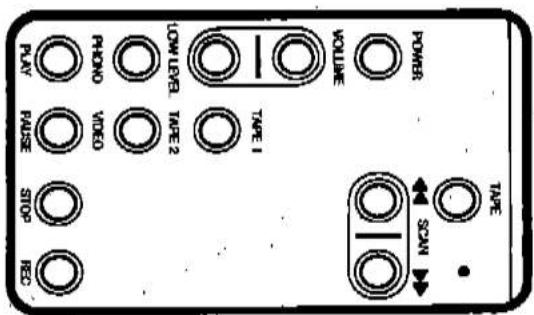
you are recording from FM or CD onto tape, or copying from Tape 1 to Tape 2, you can engage Tape 1 or 2 to monitor the recording, without leaving the CD or Tape control mode. And you can always adjust playback volume, no matter what product you are controlling and what source you are listening to. (Note: in all modes the Volume Up/Down buttons operate the 1600's volume control, not the output level control of a CD player.) Press the Tunet/Amp mode button to operate other controls on the 1600 preamplifier/tuner. The CD mode button performs a dual function: it selects the CD input on the 1600 and also assigns CD. player codes to the keys. To play a CD, simply press the CD mode button followed by PLAY. In the CD mode the Play and Pause buttons have the same effect; each alternates between Play and Pause functions. To hear a tape, press Tape 1 or Tape 2 to hear the output from the tape deck. Then press the Tape mode button to select the recorder control codes in the handset. A remote control can transmit only one command at a time. Commands that require pressing two buttons at the same time (e.g., "punch-in", recording, holding down PLAY while activating RECORD) cannot be executed by remote control. Figures 8, 9, and 10 illustrate which remote control keys are effective in each mode. Each button on the remote control produces the same effect as the corresponding button on the corresponding NAD product.
BATTERY REPLACEMENT It the Transmit indicator (in the upper-right corner of the keypad) does not glow brightly when remote control buttons are pressed, or if the 1600 does not respond to remote commands, the batteries may be weak and should be replaced. The unit requires two 1.5-volt AA-size penlight cells. Alkaline cells are recommended, to obtain maximum operating life. To open the battery compartment, press-down with the thumb at the center of the ribbed area on the back of the remote control unit. The cover of the battery compartment will slide down and off. (See Figure 11.) install fresh AA cells, orienting them as shown on the diagram within the compartment. The coil springs should contact the (-) and of each cell. Slide the battery compartment cover back on until hatches.



Mærke : NAD
Model : 1600
Kategori : Lydtuner