
107DP - Lommeregner CITIZEN - Gratis brugsanvisning og manual
Find enhedens vejledning gratis 107DP CITIZEN i PDF-format.


Brugerspørgsmål om 107DP CITIZEN
0 spørgsmål om dette apparat. Besvar dem du kender, eller stil dit eget.
Stil et nyt spørgsmål om dette apparat
Download vejledningen til din Lommeregner i PDF-format gratis! Find din vejledning 107DP - CITIZEN og tag din elektroniske enhed tilbage i hånden. På denne side er alle dokumenter nødvendige for brugen af din enhed offentliggjort. 107DP af mærket CITIZEN.
BRUGSANVISNING 107DP CITIZEN
Electronic Display/Printing Calculator
CITIZEN 107 DP
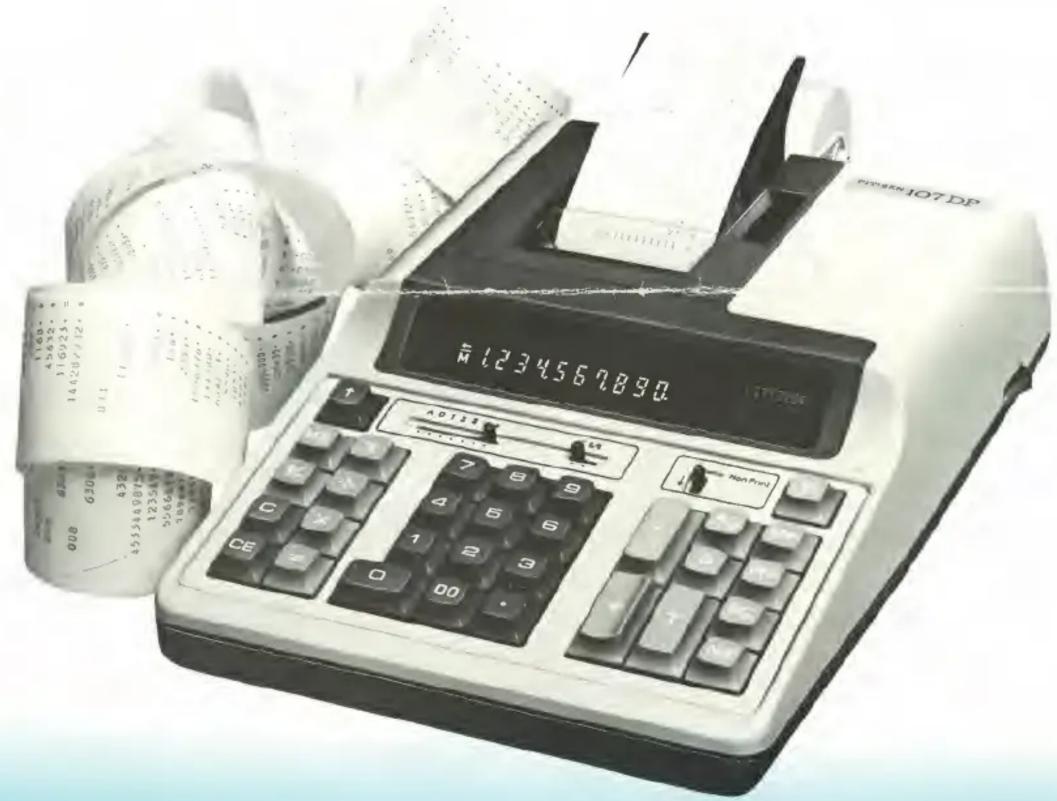
FUNCTION: Four Base Calculation, Data Calculation, Percentage Calculation, Addition/Discount, Mark Up/Down Calculation, Constant Calculation/Repeats Calculation, Power Calculation, Memory Calculation, Rounding System.
SUB FUNCTION: Item Guide: Nan-Ping/Ping Newly mode, Date Mode, Key Chattering/bounding Protection, 2-Key Rollover, Key Input Buffer (6 Keys)
DIMENSIONS: 214(W) x 311(L) x 785(H) mm
WEIGHT: 2.2Kg
CHARACTERS:
* Four Key memory.
* Repeats add, and sub
* Discount/Add-on sequences
- Selectable stored units and Multiplicand and Div sor
* Subtotal, Non-adipart and Late key
* 5/4 round-off, round-off, truncate f. Multipl a on and Division.
- Add mode switch point to the option of default point at any Selection intention
• Printer motor Automatic Start and End
- Green display with Memory, Overflats and other items
KEY DESCRIPTION
① 0 \~ 9 ∞ Numeral Key
② Decimal Point Key
③ + Plus Key
④ - Minus Key
⑤ T Total Key
Depression of this key provides totals of addition and subtraction.
⑥ % Non Add/Date Key
Performs Non Add print after numeral key or date print after twice depressions of □ key.
⑦ Subtotal Key
⑧ Memory Plus Equal Key
This key is employed for addition of the figure entered or the result of calculation into the memory. When this key is depressed to obtain the result of multiplication or division, the result of calculation is added to the memory.
⑨ ME Memory Minus Equal Key
This key is employed for subtraction of the figure or the result of a calculation to the memory. When this key is depressed to obtain the result of multiplication or division, the result to calculation is subtracted from the memory.
⑩ Mo Memory Recall Key
Automatically recalls and prints contents of memory register while retaining contents in memory.
⑪ Mr Memory Clear Key
Automatically recalls, prints and clears contents of memory register.
⑫ P Print Key
Print out a contents of display register on printing tape when non print switch is on.
⑬ ÷ Division Key
Sets an entry or result up to be divided.
⑭ × Multiplication Key
Sets an entry or result up for multiplication.
⑮ = Equal Key
Performs results up for multiplication and division.
⑯ Mark Up/Down Key
Automatically calculates desired % margin.
⑰ CE Clear Entry Key
Depression after number entry clears out that entry.
⑱ C Clear Key
Depression of this key clears out the display and accumulating register.
⑲ Sign Change Key
This key performs sign change of entered figure, from negative to positive and positive to negative.
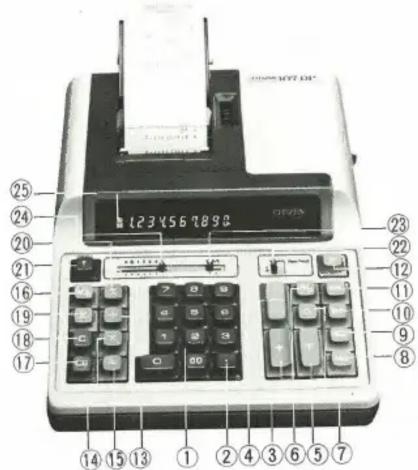
⑳ Percent Key
On multiplication and division mode, depression of this key accept the entered figure as percent rate and completes the calculation.
Use of plus key results in add-on calculation; Minus key obtains discount calculation.
②1 Paper Feed Key
Automatically advances the paper-tape.
②2 Non Print Switch
This switch selects a performance print out or nonprint.
②3 Rounding Switch
Automatically round-off, round-cut, results in multiplication and division.
24 A01234F Decimal Position Selector Switch
A (Add Mode) Automatically provides dollars and cents. F (Free Mode) Free decimal position mode.
0 to 4 Automatically provides fixed decimal place results of the position selected when multiplying and dividing.
DISPLAY DESCRIPTION
⑲ M Memory Sign
Illumination of this sign indicates retention of contents in the memory register.
- Minus Sign
When entered figure and a figure of result are negative, this minus sign indicate it.
← Over Flow Sign
When number of digits in display, accumulating and memory registers exceed over 12 digits, this sign indicates it.
HOW TO CALCULATION
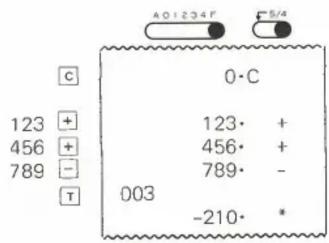
(1) Addition and Subtraction
123 + 456 - 789 = -210
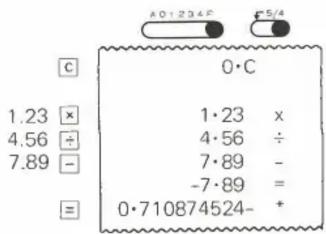
(2) Multiplication and Division
1.23×4.56÷(-7.89)=-0.710874524
(3) Subtotal Calculation
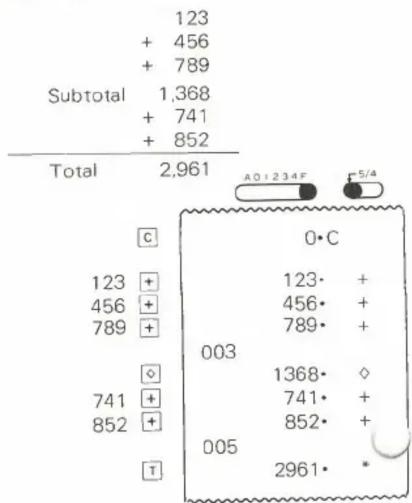
other
| Subtotal | Value | | :--- | :--- | | 123 | + 456 | | 789 | + 789 | | 1,368 | + 741 | | Total | 2,961 | | Value | Subtotal | | :--- | :--- | | 0·C | 003 | | 123· | 1368· | | + | 741· | | 456· | 852· | | + | 2961· | | 789· | * | The chart displays a single data point (0) with an additional symbol (A0+234F) and a separate symbol (5/4). The bottom section contains symbols labeled 'C', '◇', 'T', and 'O' indicating specific values.(4) Constant Calculation
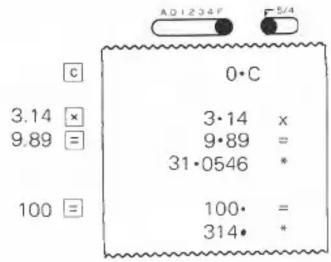
3.14×9.89=31.0546
3.14×100=314

(5) Power Calculation
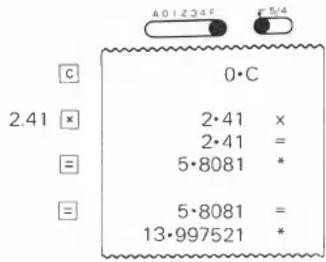
2.41^3 = 13.997521
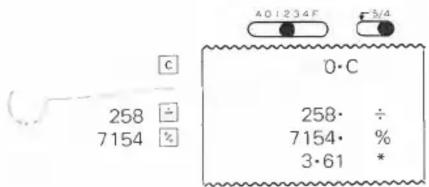
(6) Percentage Calculation
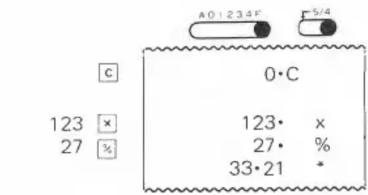
123 × 27100 = 33.21
2587154 × 100 = 3.61
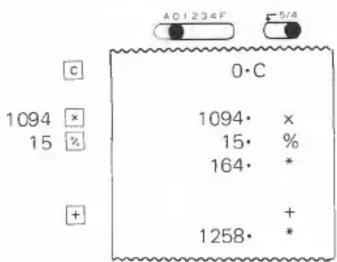
(7) Add-on/Discount Calculation
1094 × (1 + 15100) = 1258
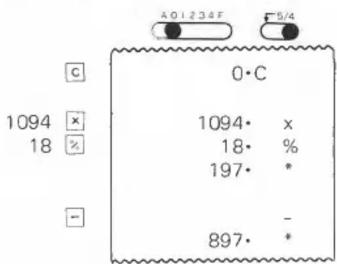
1094 × (1 - 18100) = 897
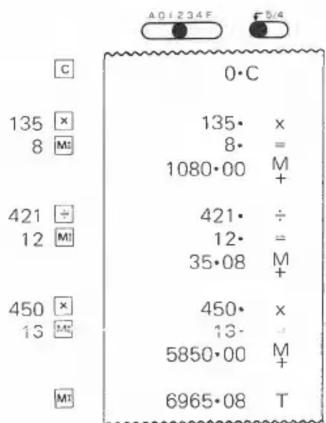
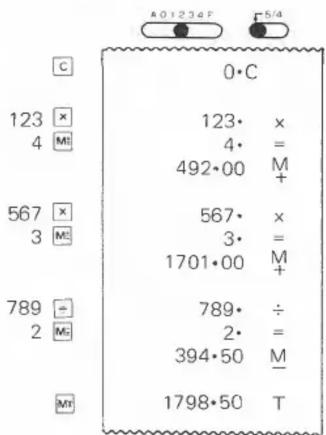
(8) Memory Calculation (1)
135 × 8 = 1,080
+) 421 ÷ 12 = 35.08
+) 450 × 13 = 5,850
Total 6,965.08
123 × 4 = 492 + ) 567 × 3 = 1,701 -) 789 ÷ 2 = 394.50 Total 1,798.50
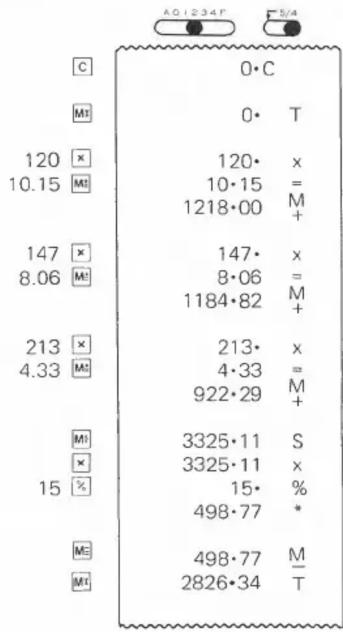
(9) Memory Calculation (2)
| O'ty | Unit price | Price |
| 120 | @10.15 | 1218.00 |
| 147 | 8.06 | 1184.82 |
| 213 | 4.33 | 922.29 |
| 3325.11 | ||
| Discount 15% | 498.77 | |
| Total | 2826.34 | |
other
| Category | Value | |---|---| | C | 0·C | | M1 | 0·T | | 120 × | 120·x | | 10.15 M1 | 10·15 = | | 147 × | 1218·00 M+ | | 8.06 M1 | 147·x | | 213 × | 8·06 = | | 4.33 M2 | 1184·82 M+ | | M1 | 213·x | | × | 4·33 = | | 15 % | 922·29 M+ | | M2 | 3325·11 S | | M1 | 3325·11 x | | 15 % | 15% * | | 498·77 | 498·77 M/ T | | M2 | 498·77 M/ T | | M1 | 2826·34 T |(10) Mark Up/Down Calculation
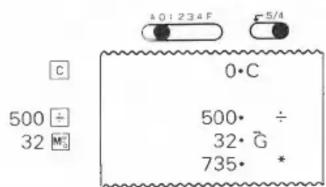
(A) Mark Up 500 ÷ (1 - 32100) = 735.29
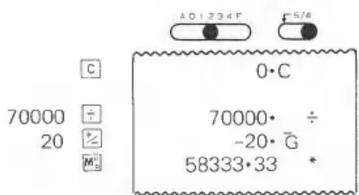
(B) Mark Down
70,000÷(1+20/100)=58333.33
INK RIBBON REPLACEMENT
- Turn OFF the calculator
- Remove the Printer cover by pulling the cover up and toward you.
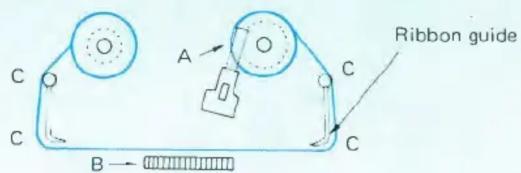
- By moving ribbon lock (A), the ribbon will easily lift out. Discard the old ribbon spools.
- Separate the spools of the new ribbon and unwind approximately 6". Drop the ribbon between the tape and the printer head (B), guide it around the four ribbon guides (C) and place the spools on the top of the shafts. Move ribbon lock (A) toward the center, allowing the ribbon spools to seal themselves. Release the ribbon locks. If necessary, turn each spool back and forth until the pegs on the bottom of the spool seat themselves in holes of the spool holder. Turn either spool to take up any ribbon slack, being certain that the ribbon is positioned on the four guides. Replace the Printer cover, hinging it down from the front. Be careful to guide the tape and tape guard through the cover opening. Your calculator is ready for use.
Ink Ribbon Replacement
ROLL PAPER REPLACEMENT
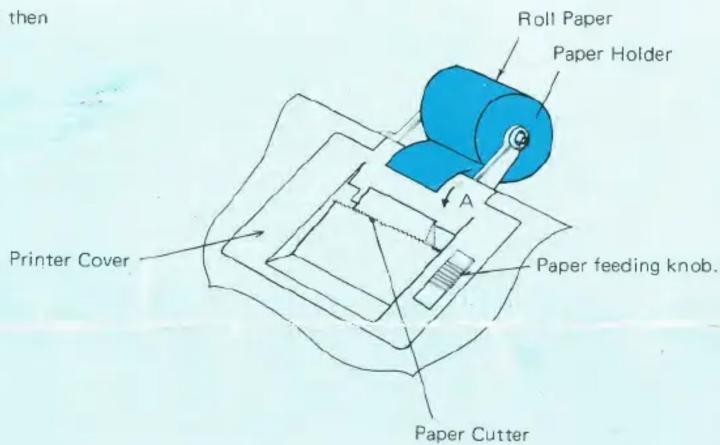
- Insert the shaft through the hole in the paper holder and then all the way through the roll paper.
- Insert the paper into the slit on top of the arrowed A.
- Depress the paper feed key, or use the paper feeding knob.
SPECIFICATIONS
| (1) NUMBER OF DIGITS TO BE PRINTED (INCLUDE DECIMAL POINT) | |
| Number | 10 digits |
| Decimal Point | 1 digit |
| Symbol | 2 digits |
| (2) | OPERATION METHOD |
| Adding machine method |
| (3) SUB FUNCTION |
| Power auto clear |
| Key input buffer (6 Keys) |
| 2 key roll over |
| (4) DECIMAL POINT (A, 0, 1, 2, 3, 4) | |
| F | : Free decimal position |
| A | : Add-Mode |
| (0, 1, 2, 3, 4)* | : Fixed with under-flow |
| (5) PRINTING COLORPositive numbers are printed in black color.Negative numbers, decreased numbers are printed in red color. |
| (6) CALCULATION CAPACITY | |
| Add/Sub | 10 digits ± 10 digits ≤ 10 digits |
| Mul/Div | 10 digits x 10 digits ≤ 10 digits |
| (7) PRINTING SPEED2.5 lines per second |
| (8) DIMENSIONS |
| 214(W) × 311(D) × 78.5(H) mm |
| (9) | WEIGHT |
| 2.2 Kg |
| (10) MAIN COMPONENTS |
| One chip MOS. LSI |
| Printer Model 355 |
| (11) POWER CONSUMPTIONAC 117/230V 50/60Hz |
| (12) OPERATION TEMPERATURE 32^ - 104^ F |
Mærke : CITIZEN
Model : 107DP
Kategori : Lommeregner