
M1125 - Overvågningskamera AXIS - Gratis brugsanvisning og manual
Find enhedens vejledning gratis M1125 AXIS i PDF-format.


Brugerspørgsmål om M1125 AXIS
0 spørgsmål om dette apparat. Besvar dem du kender, eller stil dit eget.
Stil et nyt spørgsmål om dette apparat
Download vejledningen til din Overvågningskamera i PDF-format gratis! Find din vejledning M1125 - AXIS og tag din elektroniske enhed tilbage i hånden. På denne side er alle dokumenter nødvendige for brugen af din enhed offentliggjort. M1125 af mærket AXIS.
BRUGSANVISNING M1125 AXIS
AXISM1125-ENetworkCamera
AboutthisDocument
ThismanualisintendedforadministratorsandusersofAXISM1125-E NetworkCamera, andisapplicabletofirmware5.70andlater.It includesinstructionsforusingandmanagingtheproductionyour network.Previousexperienceofnetworkingwillbeofusewhenusing thisproduct.SomeknowledgeofUNIXorLinux-basedsystemsmay alsobeusefulwhendevelopingshellscriptsandapplications.Later versionsofthisdocumentwillbepostedwww.axis.com.Sealsothe product'sonlinehelp,availablethroughtheweb-basedinterface.
LegalConsiderations
Videosurveillancecanberegulatedbylawsthatvaryfromcountryto country.Checkthelawsinyourlocalregionbeforeusingthisproduct forsurveillancepurposes.
Thisproductincludesone(1)H.264decoderlicense.Topurchase furtherlicenses,contactyourreseller.
Liability
Everycarehasbeentakeninthepreparationofthisdocument.Please informyourlocalAxisofficefanyinaccuraciesoromissions.Axis CommunicationsABcannotbeheldresponsibleforanytechnicalor typographicalerrorsandreservestherighttomakechangestothe productandmanualswithoutpriornotice.AxisCommunicationsAB makesnowarrantyofanykindwithregardtothematerialcontained withinthisdocument,including,butnotlimitedto,theimplied warrantiesofmerchantabilityandfitnessforaparticularpurpose.Axis CommunicationsABshallnotbeliablenorresponsibleforincidentalor consequentialdamagesinconnectionwiththefurnishing,performance oruseofthismaterial.Thisproductisonlytobeusedforitsintended purpose.
IntellectualPropertyRights
AxisABhasintellectualpropertyrightsrelatingtotechnologyembodied intheproductdescribedinthisdocument.Inparticular,andwithout limitation,theseintellectualpropertyrightsmayincludeoneormore ofthepatentslistedatwww.axis.com/patent.htmandoneormore additionalpatentsorpendingpatentapplicationsintheUSandother countries.
Thisproductcontainslicensedthird-partysoftware.Seethemenuitem "About"intheproduct'suserinterfaceformoreinformation.
ThisproductcontainssourcecodecopyrightAppleComputer, Inc.,underthetermsofApplePublicSourceLicense2.0(see www.opensource.apple.com/apsl).Thesourcecodeisavailablefrom https://developer.apple.com/bonjour/
EquipmentModifications
This equipment must be installed and used in strict accordance with the instructions given in the user documentation. This equipment contains no user-serviceable components. Unauthorized equipment changes or modifications will invalidate all applicable regulatory certifications and approvals.
TrademarkAcknowledgments
AXISCOMMUNICATIONS, AXIS, ETRAX, ARTPECandVAPIXare registeredtrademarksortrademarkapplicationsofAxisABinvarious jurisdictions. All other company names and products are trademarksor registeredtrademarksof their respective companies.
Apple,Boa,Apache,Bonjour,Ethernet,InternetExplorer,Linux, Microsoft,Mozilla,Real,SMPTE,QuickTime,UNIX,Windows,Windows VistaandWWWareregisteredtrademarksoftherespectiveholders. JavaandallJava-basedtrademarksandlogosaretrademarkors registeredtrademarksofOracleand/oritsaffiliates.UPnP ^TM is certificationmarkoftheUPnP ^TM ImplementersCorporation.
SD, SDHC and SDXC are trademarks or registered trademarks of SD-3C, LLC in the United States, other countries or both. Also, miniSD, microSD, miniSDHC, microSDHC, microSDXC are all trademarks or registered trademarks of SD-3C, LLC in the United States, other countries or both.
RegulatoryInformation
Europe
CE ThisproductcomplieswiththeapplicableCEmarkingdirectives andharmonizedstandards:
- Electromagnetic Compatibility (EMC) Directive 2004/108/EC. See Electromagnetic Compatibility (EMC) on page 2.
LowVoltage(LVD)Directive2006/95/ECSeeSafetyorpag2
- Restrictions of Hazardous Substances (RoHS) Directive 201 1/65/EU. See Disposal and Recycling on page 3. Acopy of the original declaration of conformity may be obtained from Axis Communications AB. See Contact Information on page 3.
Electromagnetic Compatibility(EMC)
This equipment has been designed and tested to fulfill applicable standards for:
- Radiofrequencyemissionwheninstalledaccordingtothe instructionsandusedinitsintendedenvironment.
- Immunitytoelectricalandelectromagneticphenomenawhen installedaccordingtotheinstructionsandusedinitsintended environment.
USA
This equipment has been tested using a shielded network cable (STP) and found to comply with the limits for a Class Adigital device, pursuant to part 15 of the FCC Rules. These limits are designed to provide reasonable protection against harmful interference when the equipment is operated in a commercial environment. This equipment generates, uses, and can radiate radio frequency energy and, if not installed and used in accordance with the instruction manual, may cause harmful interference or radiocommunication. Operation of this equipment is residential area is likely to cause harmful interference in which case the user will be required to correct the interference at this own expense. The product shall be connected using a shielded network cable (STP) that is properly grounded.
Canada
ThisdigitalapparatuscomplieswithCANICES-3(ClassA).Theproduct shallbeconnectedusingashieldednetworkcable(STP)thatisproperly grounded. CetappareilnumériqueestconformeàlanormeNMBICES-3(classeA).Leproduitdoitêtreconnectéal'aided'uncâbleréseaublindé(STP)qui estcorrectementmisàlaterre.
Europe
ThisdigitalequipmentfulfillstherequirementsforRFemission according to the ClassAlimitofEN55022. The product shall be connected using ashielded network cable (STP) that is properly grounded. Notice! This is Class A product. In domestic environment this product may cause RF finterference, in which case the user may be required to take adequate measures.
This product fulfill therequirements for immunity according to EN61000-6-1 residential, commercial and light-industrial environments.
Thisproductfulfillstherequirementsforimmunityaccordingto EN61000-6-2industrialenvironments.
Australia/NewZealand
ThisdigitalequipmentfulfillstherequirementsforRFemission accordingtotheClassAlimitofAS/NZSCISPR22.Theproductshall beconnectedusingashieldednetworkable(STP)thatisproperly grounded. Notice!ThisisaClassAproduct.Inadomesticenvironment thisproductmaycauseRFinterference,inwhichcasetheusermaybe requiredtotakeadequatemeasures.
Japan
この装置は、クラスA情報技術装置です。この装置を家庭環境で使用すると電波妨害を引き起こすことがあります。この場合には使用者が適切な対策を講ずるよう要求されることがあります。本製品は、シールドネットワークケーブル(STP)を使用して接続してください。また適切に接地してください。
Korea
이기기는업무용(A급)전자파적합기기로서판매자또는사용자는이점을주의하시기바라며,가정외의지역에서사용하는것을목적으로합니다.적절히접지된STP(shielded twistedpair)케이블을사용하여제품을연결하십시오.
Safety
ThisproductcomplieswithIEC/EN/UL60950-1and IEC/EN/UL60950-22,SafetyofInformationTechnology Equipment.Theproductshallbegroundedeitherthroughashielded networkcable(STP)orotherappropriatemethod.
The powersupply used with this product shall fulfill therequirements for Safety Extra Low Voltage (SELV) and Limited Power Source (LPS) according to IEC/EN/UL60950-1.
Battery
TheAxisproductusesa3.0VBR/CR2032lithiumbatteryasthepower supplyforitsinternalreal-timeclock(RTC).Undernormalconditions thisbatterywilllastforaminimumoffiveyears.
LowbatterypoweraffectstheoperationoftheRTC,causingittoresetateverypower-up.Whenthebatteryneedsreplacing,alogmessagewillappearintheproduct'sserverreport.Formoreinformationabouttheserverreport,seetheproduct'ssetuppagesorcontactAxissupport.
The battery should not be replaced unless required, but if the battery does need replacing, contact Axissupport at www.axis.com/techsupfor assistance.
WARNING
- Riskofexplosionifthebatteryisincorrectlyreplaced.
- Replaceonlywithanidenticalbatteryorabatterywhichis recommendedbyAxis.
- Disposeofusedbatteriesaccordingtolocalregulationsor thebatterymanufacturer'sinstructions.
DisposalandRecycling
Whenthisproducthasreachedtheendofitsusefullife,disposeof itaccordingtolocallawsandregulations.Forinformationabout yournearestdesignedcollectionpoint,contactyourlocalauthority responsibleforwastedisposal.Inaccordancewithlocallegislation, penaltiesmaybeapplicableforincorrectdisposalofthiswaste.
Europe

Thissymbolmeanthattheproductshallnotbedisposedof togetherwithhouseholdorcommercialwaste.Directive2012/19/EU onwasteelectricalandelectronicnequipment(WEEE)isapplicable in theEuropeanUnionmemberstates.Topreventpotentialharmto humanhealthandtheenvironment,theproductmustbedisposed ofinanapprovedandenvironmentallysaferecyclingprocess.For informationaboutyournearestdesignatedcollectionpoint,contact yourlocalauthorityresponsibleforwastedisposal.Businessesshould contacttheproductsupplierforinformationabouthowtodispose ofthisproductcorrectly.
ThisproductcomplieswiththerequirementsofDirective2011/65/EUon therestrictionoftheuseofcertainhazardoussubstancesinelectrical andelectronicequipment(RoHS).
China

Thisproductcomplieswiththerequirementsofthelegislative administrationontheControlofPollutionCausedbyElectronic mationProducts(ACPEIP).
ContactInformation
AxisCommunicationsAB
Emdalavägen14
22369Lund
Sweden
Tel:+46462721800
Fax:+4646136130
www.axis.com
Support
Should you require any technical assistance, please contact your Axis reseller. If your questions cannot be answered immediately, your reseller will forward your queries through the appropriate channel to ensure a rapid response. If you are connected to the Internet, you can:
- downloaduserdocumentationandsoftwareupdates
• findanswerstoresolvedproblemsintheFAQdatabase.Search byproduct, category, orphrase
• reportproblemstoAxissupportstaffbyloggingintoyourprivate supportarea - chatwithAxissupportstaff
- visitAxisSupportatwww.axis.com/techsup/
LearnMore!
VisitAxislearningcenterwww.axis.com/academy/forusefultrainings, webinars,tutorialsandguides.
SafetyInformation....6
HazardLevels....6
OtherMessageLevels......6
HardwareOverview....7
ConnectorsandButtons....8
LEDIndicators....9
AccesstheProduct....11
AccessfromaBrowser....11
AccessfromtheInternet....11
SettheRootPassword....12
SetPowerLineFrequency....12
TheLiveViewPage....12
MediaStreams....15
HowtoStreamH.264....15
MJPEG....15
AXISMediaControl(AMC)....15
AlternativeMethodsofAccessingtheVideoStream....16
SetuptheProduct
BasicSetup....18
FocusAdjustment....18
Video....19
SetUpVideoStreams....19
StreamProfiles 21
CameraSettings....21
ViewArea....23
Overlay....23
PrivacyMask....25
Configure the liveViewPage
PTZ(PanTiltZoom)....29
PresetPositions....29
GuardTour....29
Advanced....30
ControlQueue....30
Detectors
CameraTampering....32
MotionDetection....32
Applications....35
ApplicationLicenses....35
InstallApplication....35
ApplicationConsiderations....35
Events....37
SetUpActionRules....37
Add Recipients....39
CreateSchedules....41
SetUpRecurrences....41
Recordings....42
FindRecordings....42
PlayRecording....42
ExportVideoClip....43
ContinuousRecording....43
Languages....44
SystemOptions....45
Security......45
Date&Time......47
Network......47
Storage....53
Ports&Devices....54
Maintenance....54
Support......55
Advanced....56
ResettoFactoryDefaultSettings....56
TableofContents
Troubleshooting....58
ChecktheFirmware....58
UpgradetheFirmware....58
Symptoms, Possible Causes and Remedial Actions....58
TechnicalSpecifications....61
Connectors....62
ConnectionDiagrams....63
PerformanceConsiderations....63
SafetyInformation
HazardLevels
DANGER
WARNING
CAUTION
NOTICE
Indicatesahazardoussituationwhich,ifnotavoided,willresultindeathorseriousinjury.
Indicatesahazardoussituationwhich,ifnotavoided,couldresultindeathorseriousinjury.
Indicatesahazardoussituationwhich,ifnotavoided,couldresultinminorormoderate injury.
Indicatesasituationwhich,ifnotavoided,couldresultindamagetoproperty.
OtherMessageLevels
Important Indicate significant information which is essential for the product to function correctly.
NoteIndicatesusefulinformationwhichhelpsingettingthemostoutoftheproduct.
HardwareOverview
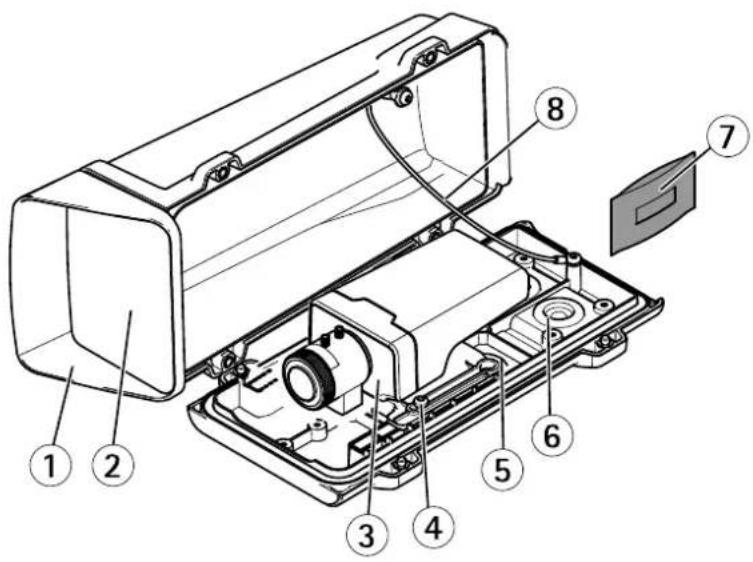
1 Topcover
2 Frontwindow
3 Networkcamera
4 Holderscrew(2x)
5 Drill-outsforextracablesholes
6 Cablegasket
7 Desiccantbag
8 Safetywire
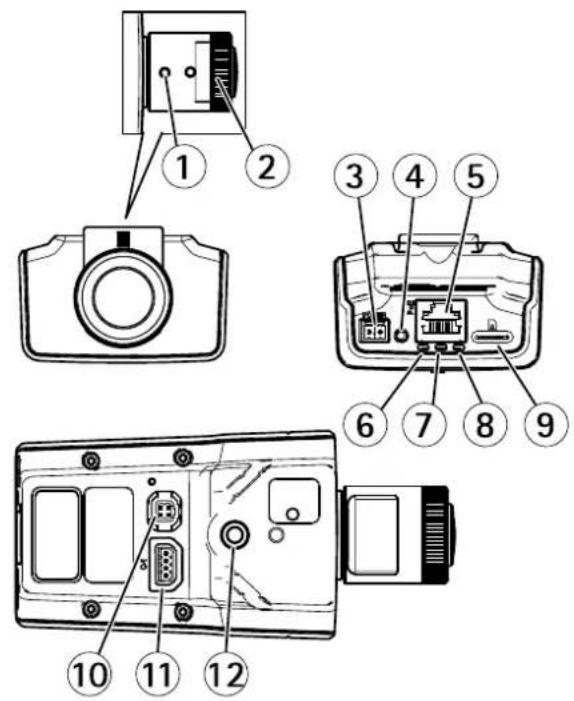
1 Zoompuller
2 Focusring
3 Powerconnector
4 Controlbutton
5 Networkconnector
6 PowerLED
7 StatusLED
8 NetworkLED
9 microSDcardslot
10 Irisconnector
11 I/Oconnector
12 14 " Screwmount
ConnectorsandButtons
Fortechnicalspecifications,seepage61.
NetworkConnector
RJ45EthernetconnectorwithPoweroverEthernet(PoE).
NOTICE
Theproductshallbeconnectedusingashieldednetworkcable(STP).Allcablesconnectingtheproducttothenetworkshall beintendedfortheirspecificuse.Makesurethatthenetworkdevicesareinstalledinaccordancewiththemanufacturer's instructions:oinformationaboutregulatoryrequirementsseeElectromagneticCompatibility(EMC)brpag2
I/OConnector
Use with external devices in combination with, forexample, tampering alarms, motion detection, event triggering, timelapserecording and alarm notifications. In addition to the OVD C reference point and power (DC output), the /O connector provides the interfaceto:
DigitabutputFoconnectingexternadevicesuchaselaysandLEDsConnecteddevicesarboactivatedbythe
VAPIX®ApplicationProgrammingInterface,outputbuttonsontheLiveViewpageorbyanActionRule.Theoutputwill showsactive(shownundeSystemOptionsPortsDevices)thealarmdevicesactivated.
DigitalInputAalarminpuforconnectingdevices that cartoggle between anoperand closed circuitfor example:
PIRs,door/windowcontacts,glassbreakdetectors,etc.Whenasignalisreceivedthestatechangesandtheinputbecomes active(shownunderSystemOptions>Ports&Devices).
PowerConnector
2-pinterminalblockforpowerinput.UseaSafetyExtraLowVoltage(SELV)compliantlimitedpowersource(LPS)witheitherarated outputpowelimited≤100Varatedoutputcurrentlimited≤5A.
SDCardSlot
NOTICE
- RiskofdamagetoSDcard.DonotusesharptoolsorexcessiveforcewheninsertingorremovingtheSDcard.
RisloflatalossPreventlatacorruptionthSDardshouldbeunmountedbeforeremovalTounmountgdSetup> SystemOptionsStorageSDcardandlicUnmount.
ThisproductsupportsmicroSD/microSDHC/microSDXCcards(notincluded).
ForSDcardrecommendations,see www.axis.com
ControlButton
Forlocationofthecontrolbutton,seeHardwareOverviewonpage7.
Thecontrolbuttonisusedfor:
- Resetting the product to factory default settings. See page 56.
Connecting an AXIS/ided Hosting System service Sep page 4 To connect press and hold button for about seconds until the Status LED flashes green.
Connecting to AXIS Interne Dynamic DNS Service Seepage49 to connect press and hold the button for about seconds.
LEDIndicators
Note
The Status LED can be configured down during normabperation to configure grid Setup System Options Ports & Devices > LED. See the online help form more information.
- TheStatusLEDcanbeconfiguredtoflashwhileaneventisactive.
The Status LED carbe configured flashfoid identifying the unit Gd Setup System Options Maintenance
| StatusLED | Indication |
| GreenSteadygreenfornormaloperation. | |
| Amber | Steadyduringstartupandwhenrestoringsettings. |
Note
The NetworkLEDarbeisabledschatdoesoflashwhetherisnetworktrafficconfiguregetSetupSystem Options>Ports&Devices>LED.Seetheonlinehelpformoreinformation.
| IndicaNetworkLED | |
| Green | Steadyforconnectiontoa100Mbit/snetwork.Flashesfornetworkactivity. |
| Amber | Steadyforconnectiontoa10Mbit/snetwork.Flashesfornetworkactivity. |
| UnlitNonetworkconnection. |
Note
The PowerLED can be configured to unlituring normabperationToconfigureSetupSystemOptionsPort& Devices>LED.Seetheonlinehelpformoreinformation.
| PowerLEDIndication | |
| Green | Normaloperation. |
| Amber | Flashesgreen/amberduringfirmwareupgrade. |
AccesstheProduct
ToinstalltheAxisproduct,seetheInstallationGuidesuppliedwiththeproduct.
Theproductcanbeusedwithmostoperatingsystemsandbrowsers.Therecommendedbrowsersare
- InternetExplorer ^® withWindows ^®
- Safari ^ withOSX ^ and
- Chrome TM orFirefox® withotheroperatingsystems.
See Technical Specifications on page 61.
ToviewstreamingvideoinInternetExplorer, allowinstallationofAXISMediaControl(AMC)whenprompted.
TheAxisproductincludesone(1)H.264decoderlicenseforviewingvideostreams. ThelicenseisautomaticallyinstalledwithAMC. Theadministratorcandisabletheinstallationofthedecoders,topreventinstallationofunlicensedcopies.
Note
- QuickTime ^TM is also supported for viewing H.264 streams.
- If your computer restrict the use of additional software components, the product can be configured to use a Java applet for viewing Motion JPEG.
AccessfromaBrowser
1.Startabrowser(Chrome, Internet Explorer, Firefox, Safari).
2.EntertheIPaddressorhostnameoftheAxisproductinthebrowser'sLocation/Addressfield.
ToaccesstheproductfromaMaccomputer(OSX),gotoSafari,clickonBonjourandselecttheproductfromthe drop-downlist.
If you donot know the I paddress, use AXISIP Utility to locate the product on thenetwork. For information about how to discover and assign I paddress, the document Assign I P Address and Access the Video Stream Axis Support web at www.axis.com/techsup
Note
ToshowBonjourasabrowserbookmark, gotoSafari>Preferences.
- Enteryourusernameandpassword.Ifthisisthefirsttimetheproductisaccessed,therootpasswordmustfirstbe configured.Forinstructions,seeSettheRootPasswordonpage12.
- The product'sLiveViewpageopensinyourbrowser.
Note
The controls and layout of the liveView pagemay have been customized to meet specific installation requirements and user preferences. Consequently, some of the examples and functions featured her may differ from those displayed in your own liveView page.
Accessfromthelnternet
Onceconnected,theAxisproductisaccessibleonyourlocalnetwork(LAN).ToaccesstheproductfromtheInternetyoumust configureyournetworkroutertoallowincomingdatatrafficitotheproduct.Todothis,enabletheNAT-traversalfeature,which willattemptautomaticallyconfiguretheroutetallowaccesstheproductThisenabledfromSetupSystemOptions>Network>TCP/IPAdvanced.
FomoreinformationedNATraversa(portmapping)ofPv4rpage56SealsAXISnterneDynamidDNServicat www.axiscam.net
ForTechnicalnotesonthisandothertopics,visittheAxisSupportwebatwww.axis.com/techsup
SettheRootPassword
Taccess the Axi product you must the password for the default administrator user or this is later in the Configur Root Password dialog, which opens when the product is accessed for the first time.
Topreventnetworkeavesdropping,therootpasswordcanbesetviaanencryptedHTTPSconnection,whichrequiresanHTTPS certificate. HTTPS(HypertextTransferProtocoloverSSL)isaprotocolusedtoencrypttrafficbetweenwebbrowsersandservers.The HTTPscertificateensuresencryptedexchangeofinformation.SeeHTTPSonpage45.
The default administrator usename root permanent and cannot be deleted the password for out of the product must be reset the factory default setting. See Reset Factory Default Settings page 56.
TosetthepasswordviaastandardHTTPconnection, enteritdirectlyinthedialog.
TosetthepasswordviaanencryptedHTTPSconnection,followthesesteps:
- ClickUseHTTPS.
A temporary certificate(validforoneyear)iscreated,enabling encryptionofalltraffictoandfromtheproduct,andthe passwordcannowbesetsecurely.
2.Enterapasswordandthenre-enterittoconfirmthespelling.
3.ClickOK.Thepasswordhasnowbeenconfigured.
SetPowerLineFrequency
PowelinfrequencysetfirstimtheAxiproductaccessedandonlychangedfromPlainConfig(sepage56) orbyresettingtheproducttofactorydefault.
Select the power line frequency (50Hz or 60Hz) used at the location of the Axis product. Selecting the wrong frequency may cause image flicker if the product is used in fluorescent light environments.
When using 50Hz, the maximum framerate is limited to 25fps.
Note
Powerlinefrequencyvariesdependingongeographicregion.TheAmericasusuallyuse60Hz,whereasmostotherpartsof theworlduse50Hz.Localvariationscouldapply.Alwayscheckwiththelocalauthorities.
TheLiveViewPage
The controls and layout of the liveView pagemay have been customized to meet specific installation requirements and user preferences. Consequently, some of the examples and functions featured her may differ from those displayed in your own live view page. The following provides an overview of each available control.
ControlsontheLiveViewPage

Click the viewsize button to show the image useful size (righ button) to scale down the image to fit the browser window (left button).
ClickWDRortenableWDRintensbacklightconditionsClickWDRoffalisableWDRnow lightconditionsforoptimalexposure.
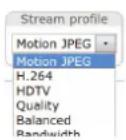
SelectstreamprofileoftheLiveViewpagefromthStreamProfiledrop-downlistEoinformation abouthowtoconfigurestreamprofiles,seepage21.
ClicPulsetactivateproduct'soutputfordefineperiodoftimeEoinformationabouthow toenableandconfigureoutputbuttons,see page28.
ClicktheActive/Inactivebuttonsmanuallyactivateandnactivthproduct'soutputporFor informationabouthowtoenableandconfigureoutputbuttons,seepage28.
The ManualTriggerbutton used trigger action rule from the live View page information about how to configure and enable the button, see ManualTrigger on page 13.

ClickSnapshotsav snapshot the video image this button primarily intended for when the AXISMediaControlview toolbar is not available. Enable this button fromLiveViewConfig> ActionButtons.
ManualTrigger
The ManualTriggerusedTriggeractionrufroonthLiveViewpage. The manuatriggecarfoexamplebusedo validateactionsduringproductinstallationandconfiguration.
Toconfigurethemanualtrigger:
1.GotoSetup>Events.
2.ClickAddtoaddanewactionrule.
BonthTriggedrop-downlistselectnpuSignal.
- From these second drop-downlist, select Manual Trigger.
- Select the desired action and configure the other settings as required.
Formoreinformationaboutactionrules,seeEventsonpage37.
ToshowthemanualtriggerbuttonsintheLiveViewpage:
1.GotoSetup>LiveViewConfig.
UndeActionButtonsselecShowmanuatriggebutton.
AXISMediaControlviewertoolbar
TheAXISMediaControlviewetoolbarsavailableInterneExploreOnlySeeAXISMediaControl(AMC)brpage5omore information.Thetoolbardisplaysthefollowingbuttons:

ThePlaybuttonconnectstotheAxisproductandstartsplayingamediastream.

TheStopbuttonstopsthemediastream.

The Snapshot Button takes snapshot the video image location where the images saved are specified in the AMCControlPanel.

ClickhViewFulScreerbuttonandthevideimagwilfilthentirescreerPresES(Escape)rthecomputer keyboardtocancelfullscreenview.

TheRecordbuttonisusedrecordthecurrentvidestreamonyoucomputerThdocationwherderecordingssavedcarbspecifiedrthAMControlPaneEnablehibuttorfromLiveViewConfigVieweSettings.
PTZControls
Note
These controls are available if glitaPTZ enabled the selected view areased /iewArewpage23.
With the PTControlQueue enabled the time each user is controlled by the PTSetting limited ClickButton requestor release control of the PTControl The PTControl Queue setup de PTControlQueue.

Click the Emulatjoystickmodbutton and click themag to mov the camera view with the direction of the mousepointer.

Click the Centemode button and click the image content the camera view that position.

Click the CtrpanebuttortoperthePTZontropanelwhichprovidesadditionaPTZcontrols. User-definedbuttonscanalsoappearintheControlpanel.SeeControlsonpage30.
Toviewaspecificviewareaorpresetposition,selectitfromtheSourcelist.

PanandTiltbars—Usethearowstopanandtiltthecameraview,orclickona positiononthebartosteerthecameraviewtothatposition.
Zoombar–Usethearrowstozoominandout,orclickonapositiononthebarto zoomtothatposition.

The PTZ control can be disabled under PTZ Advanced ControlsseeControlspage30.
MediaStreams
TheAxisproductprovidesseveralvideostreamformats.Yourrequirementsandthepropertiesofyournetworkwilldeterminethetypeyouuse.
TheLiveViewpageintheproductprovidesaccesstoH.264andMotionJPEGvideostreams,andtothelistofavailablestream profiles.Otherapplicationsandclientscanaccessvideostreamsdirectly,withoutgoingviatheLiveViewpage.
HowtoStreamH.264
H.264can, without compromising image quality, reduce the size of a digital video file by more than 80% compared with the Motion JPEG format and as much as 50% more than the MPEG-4 standard. This means that much less network bandwidth and storage space are required for a video file. Or seen another way, much higher video quality can be achieved for a given bitrate.
Deciding which combination of protocols and method stoused depends on your viewing requirements, and the properties of your network. The available options in AXIS Media Control are:
| UnicastRTP | Thisunicastmethod(RTPoverUDP)isused forliveunicastvideo,especiallywhenitis importanttohaveanup-to-datevideostream, evenifsomeframesaredropped. | Unicastingisusedforvideo-on-demand transmissionsothatthereisnovideotraffic onthenetworkuntilaclientconnectsand requeststhestream.Notethatthereareamaximumof10 simultaneousunicastconnections. |
| RTPoverRTSP | Thisunicastmethod(RTPtunneledoverRTSP) isusefulasitisrelativelysimpletoconfigure firewallstoallowRTSPtraffic. | |
| RTPoverRTSPoverHTTP | Thisunicastmethodcanbeusedtotraverse firewalls.Firewallsarecommonlyconfiguredto allowtheHTTPprotocol,thusallowingRTPto betunneled. | |
| MulticastRTP | Thismethod(RTPoverUDP)shouldbeusedforlivemulticastvideo.Thevideostreamisalways up-to-date,evenifsomeframesaredropped.Multicastingprovidesthemostefficientusageofbandwidthwhentherearelargenumbersof clientsviewingsimultaneously.Amulticastcannothowever,passanetworkrouterunlessthe routerisconfiguredtoallowthis.ItisnotpossibletomulticastovertheInternet,forexample.Notealsothatallmulticastviewerscountasoneunicastviewerinthemaximumtotalof10 simultaneousconnections. | |
AXISMediaControlnegotiateswiththeAxisproducttodeterminethetransportprotocoltouse.Theorderofpriority,listedintheAMCControlPanel,canbechangedandtheoptionsdisabled,tosuitspecificrequirements.
Note
H.264islicensedtechnology.TheAxisproductincludesoneH.264viewingclientlicense.Installingadditionalunlicensed copiesoftheclientisprohibited.Topurchaseadditionallicenses,contactyourAxisreseller.
MJPEG
This formatusesstandardJPEGstillimagesforthevideostream. These images are then displayed and updated at a ratesufficient to create stream that shows constantly updated motion.
TheMotionJPEGstreamusesconsiderableamountsofbandwidth,butprovidesexcellentimagequalityandaccesstoeveryimage containedinthestream.TherecommendedmethodofaccessingMotionJPEGlivevideofromtheAxisproductistousetheAXISMediaControlInInternetExplorerinWindows.
AXISMediaControl(AMC)
AXISMediaControl(AMC)inInternetExplorerinWindowsistherecommendedmethodofaccessinglivevideofromtheAxisproduct.
TheAMCControlPanelcanbeusedtoconfigurevariousvideosettings.PleaseeseetheAXISMediaControlUser'sManualformore information.
TheAMCControlPanelisautomaticallyinstalledonfirstuse,afterwhichitcanbeconfigured.OpentheAMCControlPanelfrom:
- WindowsControlPanel(fromtheStartscreenorStartmenu)
Alternatively right-click the video image Interne Explore and click Settings.
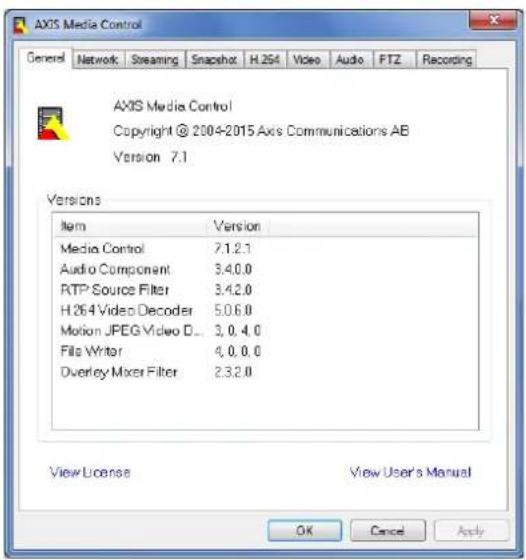
AlternativeMethodsofAccessingtheVideoStream
YoucanalsoaccessvideoandimagesfromtheAxisproductinthefollowingways:
MotionPEGervepush(ifupported by the client Chromo Firefox;example) This option maintains a proper HTTP connection to the browser and sends data as and when required, for as long as required.
StiJPEGimagesBrowserEntethopathhttp://
WindowMediPlayerThisrequiresAXISMediaControlandH.264lecodetbinstalledThefollowingpaths canbeused:
-UnicastviaRTP:axrtpu://<ip>/axis-media/media.amp
-UnicastviaRTSP:axrtsp://<ip>/axis-media/media.amp
-UnicastviaRTSP,tunneledviaHTTP:axrtsphttp://<ip>/axis-media/media.amp
-Multicast:axrtpm://<ip>/axis-media/media.amp
- QuickTime TM. The following pathscanbeused:
-rtsp://<ip>/axis-media/media.amp
-rtsp://<ip>/axis-media/media.3gp
Note
=|Paddress
•TheAxisproductsupportsQuickTime6.5.1andlater.- QuickTimemayaddlatencytothevideostream.
- It maybe possible to use other player to view the H.264 stream using the paths above, although Axis does not guarantee this.
SetUptheProduct
The Axproduct are configured by users with administrator operator rights to the product's setup pages, including the copyright-hand corner of the Live View page.
- Administratorshaveunrestrictedaccesstoallsettings.
- OperatorshaveaccesstoallsettingsexceptSystemOptions
Seealsotheonlinehelp

BasicSetup
BasicSetupprovidesshortcutstothesettingsthatshouldbemadebeforeusingtheAxisproduct:
1.Users.Seepage45.
2.TCP/IP.Seepage47.
3. Date&Time.Seepage47.
4.VideoStream.Seepage19.
5.Focus.Seepage18
TheBasicSetupmenucanbedisabledfromSystemOptions>Security>Users.
FocusAdjustment
The focus can be adjusted in de Basi Setup Focus Follow the on-screen instructions to adjust the focus. For further information about focus, referto the product's Installation Guide.
Video
ItispossibletoconfigurethefollowingvideofeaturesinyourAxisproduct:
•Videostream.See page 19.
- Streamprofiles.See page21.
- Camerasettings.See page21.
-Viewareas.Seepage23.
•Overlayimage.Seepage23.
- Privacymask.See page25.
SetUpVideoStreams
Toetuphproduct'sideestreamsgdVideoVidestream.
Thevideostreamsettingsaredividedintothefollowingtabs:
- Image.See page 19.
•H.264.Seepage20. - Zipstream.Seepage20
- MJPEG.Seepage21.
PixelCounter
Thepixelcountershowsthenumberofpixelsinanareaoftheimage. Thepixelcounterisusefulinsituationswherethereisa requirementthattheimageisacertainsize,forexampleinfacerecognition.
Thepixelcountercanbeaccessedfrom:
VideoVideStreamUndePreviewclickOpenandelecthShowpixelcounteroptionenabletherectangleithemagdUsethmousetomovandesiztherectanglepentethumberbpixelsithWidthandHeightfieldsandclickApply.
Image
The defaultmagsettings are configured under Video Stream Selectdmagtab.
The followingsettingsareavailable:
- Resolution.Selectthedefaultresolution.
CompressionThe compressionlevel affects the image quality bandwidth and file size of saved images, how the compression, the higher the image quality with higher bandwidth requirements and larger filesizes. - Mirrorimage.lfrequired, theimagecanbemirrored.
- Rotateimage.lfrequired,theimagecanberotated.
MaximunframeateAvoidbandwidthproblemstframeatallowedeachviewcarblimitedofixed amountAlternativelythframeatcarbeseUnlimitedwhichmeantheAxisproductalwaysdeliverthehighestframeratepossibleunderthecurrentconditions.
OverlayettingSeeOverlappage23.
ClickSavetoapplythenewsettings.
H.264
H.264,alsoknownasMPEG-4Part10/AVC,isavideocompressionstandardthatprovideshighqualityvideostreamsatlowbitrates. AnH.264videostreamconsistsofdifferenttypesofframessuchasl-framesandP-frames.Anl-frameisacompleteimagewhereas P-framesonlycontainthedifferencesfrompreviousframes.
The H.264streamsettings are configured from the VideoVideStreampageSelectdH.264abThesettings defined this pagewillapplytoallH.264streamsthatdonotuseastreamprofile.
The GOFengthishnumberframesbetweentwoconsecutive-framesincreasinghGOFengthmayaveconsiderablybandwidthrequirementsinsomecases,butmayalsohaveanadverseaffectonimagequality.
TheAxisproductsupportsthefollowingH.264profile(s):
BaselineTheBaselineprofilesecommendedforclientsthadlon'supportCABAGentropycoding.
MainThe Mainprofilprovides higher compression with maintained video quality compared to the Baseline profile but requires more processing power todecode.
HighTheHighprofilprovides reduced bit at and higher compression with maintained video quality compared the Mainprofilebut requires more processing power to decode.
The bitrate increases variable bitrate(VBR)Maximunbitate(MBR)VBR adjusts the bitrate according to the image complexity, using up more bandwidth for increased activity in the image, and less for lower image activity. When the activity in the scene increases, the bitrate would usually increase as well. If there is a surplus in bandwidth, this may not be an issue and selecting variable bitrate(VBR)will be sufficient. But bandwidth limited it recommended that the bitrate selecting Maximunbitate(MBR)When the activity in the scene increases VBR adjusts the bitrate according to the complexity using up more bandwidth for increased activity in the scene, and less for lower scene activity. MBR allows out set target bitrate that limit the bandwidth consumption.
TheMBRtargetbitrateworksliketheceilingofatent.Itlimitsthebitrate,whilemaintainingsomeflexibility.Thebitrate maybounceupanddownwithinthesettargetbutwhenitnearsthesettargetvalue,thelimitationkicksin.However,because MBRwillalwaysprioritizeacontinuousvideostream,itallowstemporaryovershootsfromthetargetbitrate.Becausesettinga targetvaluepreventsthebitratefromincreasing,framerateandimagequalityareaffectednegatively.Topartlycompensatefor this,selectwhichvariableshallbeprioritized,framerateorimagequality.Notsettingaprioritymeansthatframerateand imagequalityareequallyaffected.
The current coordinate can set appearance overlay UndeOverlay Settings select include text and enter the modifier #binthefield.
Toapplythesettings,clickSave.
Axis'ZipstreamTechnology
Zipstreamisabitrate-reductiontechnologyoptimizedforvideosurveillance.ZipstreamreducestheaveragebitrateintheH.264 streambyremovingunnecessarydataandmakesitpossibletoallowhigherresolutions,reducestoragecostortokeeprecordingsfor alongertime.Toreducethebitrate,Zipstreamreducesthenumberofbitsintheareasoftheimagethatarelessinterestingfroma videosurveillanceperspective,forexamplethebackground.Imagedetailsthatareimportantforforensicvideoanalysis,forexample facesandlicenseplates,arepreservedwithenoughnumberofbits.
TheseZipstreamstrengthoptionsareavailable:
-Off.Zipstreamdisabled.
LowesZipstreamstrengthLowbandwidthreductionNovisiblequalitydegradationmostscenes
MediumZipstreamstrengthMediumbandwidthreductionLimitedvisuaqualitydegradationimoprioritizedareasomescenes
HighesZipstreamstrengthHighbandwidthreductionVisiblequalitydegradationimoprioritizedareasmanscenes
LowesZipstreamstrengthdefaultsettingfortheproductThisconfigurationversafeuserallapplicationswhilestill reducingthebitrate.
Forcloud-connectedcamerasorcamerasusinggestoragethatneedtolimitthebitrateforincreasedstoragetimeitis recommendedselectHighesZipstreamstrengthThisettingvergoodcombinewithmotiondetectiontriggeringand variablebitrate(VBR)wherethebitrateisallowedtoadapttochangesincomplexityinthescene.
Axis'ZipstreamTechnologyforH.264conformstotheH.264standardandiscompatiblewiththird-partyclientsandVMSsolutions thatdecodeH.264video.
ThebitratecontrollerbuiltintotheproductcanbecombinedwithZipsteamtoenforceamaximumbitrate(MBR)limit.Axis CommunicationsrecommendsusingVBRorMBRwitharatherhighbitratelimittoenablethefullpotentialofAxis'Zipstream Technology.
MJPEG
Sometimes the imagesize is large duolow light or complex scenery. Adjusting them a maximum framesize help to control the bandwidth and storage used by the Motion PEG video stream in these situations. Setting the framesize default setting provides consistently good image quality at the expense of increased bandwidth and storage usage in low light. Limiting the frame size optimizes bandwidth and storage usage, but may give poor image quality. Top prevent increased bandwidth and storage usage, the maximum framesize should be set to an optimal value.
StreamProfiles
Astreamprofileisasetofpredefinedstreamsettingsincludingresolution,compression,framerateandoverlaysettings.Stream profilescanbeused:
- Whensettinguprecordingusingactionrules.SeeEventsonpage37.
- Whensettingupcontinuousrecording.SeeContinuousRecordingonpage43.
In the ViewpageselectstreamprofilfromtheStreamprofildrop-downlist.
Forquicksetup,useoneofthepredefinedstreamprofiles.Eachpredefinedprofilehasadescriptivename,indicatingitspurpose.If required,thepredefinedstreamprofilescanbemodifiedandnewcustomizedstreamprofilescanbecreated.
To create new profile to modify existing profile and Setup VideoStreamProfiles.
To select default stream profile for the live view page to Setup Live View Config.
CameraSettings
The Video Camer Settings page provides access to advanced image settings for the Axis product.
ImageAppearance
TochangdmagAppearanceddthemenusundeSetupVideoCameraSettings.
Increasing the Colorevel Increase the colosaturation The value 0 gives maximum colosaturation and the value gives minimum colorsaturation.
ThimageBrightnessaradjustedtherange0-100wherehighewalueproducesbrightimage.
IncreasinghSharpness: an increase bandwidth usage sharpeimagenight increase magenoises especially now light conditions. Alowersetting reduces imagenoise, but the whole image will appear less sharp.
The ContrastangestrelativdifferencbteweerlightanddarkcarbadjustedusingtheSlidebar.
LocalContrast applies contrast to specific area of image Use the lidet adjust the contrast where high value produces animagewith high contrast between the dark and light areas.
WhiteBalance
TochangethissettinggotoSetup>Video>CameraSettings
Whitebalanceisusedtomakecolorsintheimageappearthesameregardlessofthecolortemperatureofthelightsource.TheAxis productcanbesettoautomaticallyidentifythelightsourceandcompensateforitscolor.Alternatively,selectthetypeoflight sourcefromthedrop-downlist.Foradescriptionofeachavailablesetting,seetheonlinehelp
The white balance window enabled for the Automation and Automatic outdoor options that appear the White balance drop-down list. Select of the options from the drop-downlist set the white balance window properties. Select Automatic use the default settings for the Automation and Automatic outdoor options (in the White balance drop-downlist). Select Custom manually set a reference window for white balance in the view area.
WideDynamicRange
Widdynamicang(WDRForensiCapture)providebalancedimagesinceneswherthereconsiderablecontrasbetween lightanddarkareasintheimage.Thecameraautomaticallyhandlesthetransitionbetweensuchscenesandlow-lightconditions.In rarelightconditionsdisablingWDRmightgiveabetterimage.
Important
UseWDRincombinationwithautomaticexposurecontrol. Otherexposuresettingscouldgiveundesirableresults.
Use the highlight recovery slides to improve the image appearance by decreasing brightness in the bright parts of the image.
Use shadow recovery, lidetomprov the image appearance by increasing brightness in the dark parts of the image.
ExposureSettings
Configure the exposures setting stosuit the image quality requirements in relation to lighting, framerate and bandwidth considerations.
ExposurevalueUsedExposurevalueclidetadjustoveralbrightnessofhimage.
ExposurecontrolThissettingsadaptahomounbfightusedAutomaticishdefaultsettingandarbusednmostituationsTheshutt speedsautomaticallysetproduceptimumimagqualityFlicker-fre5060HizusedremoveflickenwhichcarbecausedyfluorescentandtheftourcesTheHoldcurrenoptionlockshcurrentexposuresettings.
Exposure zones This setting determines which part of the images used calculate the exposure from the situations the Auto setting can be used. For particular requirements, select a predefined area.
Exposure priority When Motion prioritized and maximum Shuttetimes total value motion blur the images minimized. This can be useful for recognition of moving objects such as people and vehicles. However, prioritizing motion may cause an increase in image noise especially low light situations. When Low noise prioritized and Gain sets total value image noise is minimized. The filesize is reduced, which can be useful for storage space or bandwidth this limited. However, prioritizing low noise may result in a very dark image, especially in low light situations.
Shutter&Gain
NormalLightUsechelidetsethPrioritybetweenLovmotionbluandLownoisdWhenprioritizingownois(slider allthewaytotheleft)theAxisproductwillautomaticallydecreaseshutterspeedasbrightnessdecreases.Whentheshutter speedreached/30theAxisproductwillincreasingairuntithesetmaximungairfonormalightreachedSelectdMax gainvaluefrontdrop-downlistThisdefineshupperlimifogainrthcontextbnormalighMafashuttersets shutterspeedlimitinnormallightconditions.Dependingonascenario,theshutterspeedlimitmayneedtobedefined.Thiss donthroughSystemOptionsAdvancedPlainConfig.
LowLightUschelidetsethPrioritybetweenLowmotionbluandwnoiseWheprioritizingowmotionblu(slider allthewaytotheright)thecamerawillautomaticallyincreasegainasbrightnessdecreases.Whenthegainreachesthet maximumgainforlowlight,thecamerawilldecreaseshutterspeeduntilthesetmaximumshutterforlowlightisreached. Thisisthedefaultprioritysettingforlowlight.
Irisadjustment
SelectEnableautomaticiadjustmentautomaticallycompensatoforchanginglightconditionsThisoptionisotavailable ifafixedirisisused.
Day/Night
TheIRcutfilterpreventsinfrared(IR)lightfromreachingtheimagesensor.Inpoorlightingconditions,forexampleatnight,orwhenusingarexternalRampsetdIRcutfiltertOffThisincreasedightsensitivityandallowtheproducto'seeInfraredightTheimageisshowninblackandwhitewhentheIRcutfilterisoff.
If using automatic exposure control, the R filter to Auto automatically switch between Or and Off according the lighting conditions.
The Day/Night shift event helps to determine whether the camera will shift from day to night mode. Normally, the camera automatically changes the mode from day to night when very dark level 00th leader by setting Day/Night shift value lower value, the camera will change on night mode earlier.
ViewArea
AviewareascroppefarbthfulviewEachviewareatreatedsidescourcerLiveViewandhastownvideostreamandPTZsettings.
When setting up avieware aitis recommended that the videostream resolution is the same size as smaller than the view area size. Setting the videostream resolution larger than the view area size implies digitally scaled up video aftersensor capture, requiring more bandwidth without adding image information.
TenablegddVideoCameraSettingsandelecEnableViewAreas.
Toaddanewviewarea:
- GotoVideo>ViewArea.
2.ClickAdd.
The new view appears under Selected view area Enter descriptive name the Name field.
Select aspectation and video stream resolution.
5.Anewviewareacoversthewholeimage.Usethemousetomoveandresizetheviewarea.
- SelectEnablePTZtoenabledigitalPTZfortheviewarea.
7.ClickSavetosavethesettings.
TomodifyviewareaselecttheviewareartheistandmodifythesettingsasequiredClickSave.
Toremoveaviewarea,selecttheviewareaandclickRemove.
Note
ThePTZfunctionalityisusefulduringinstallationoftheAxisproduct.Useaviewareatocropoutaspecificpartofthefullview.
Overlay
Overlaysareusedtoprovideextrainformation,forexampleforforensicvideoanalysisorduringproductinstallationand configuration.Overlaysaresuperimposedoverthevideostream.
Anoverlaytextcandisplaythecurrentdateandtime,oratextstring.Whenusingatextstring, modifierscanbeusedtodisplay informationsuch the currentbitato the currentframe. Information about available modifiersseeFileNamingft
Date/TimeFormatsintheonlinehelp

Italspossible displaytextwhenactionrulestriggeredsedUseOverlayTextfranActionRule.
Toenableoverlays:
GdVideoVidestreamandelecthæmageab.
Tinclude overlayimages, selectInclude overlayImagethe coordinatesThe overlaymagenusfirstba uploaded to theAxisproduct, see OverlayImage.
Tincluddatandimeselectncluddatandncludtime.
TincludetextstringselectIncludetextandentethtextrthfieldModifiersarbusedseFileNamingft
Date/TimeFormatsintheonlinehelp

- Definetextoverlaycharacteristicsintherelevantfields.
6.ClickSave.
Tomodify that and dim format go System Options DateTime See Date Time or page 47.
OverlayImage
Anoverlayimageisastaticimagesuperimposedoverthevideostream.Theimage,forexampleacompanylogo,isusedtoprovide extrainformationortomaskapartoftheimage.
Sinceitisstatic, the position and size of an overlay image will remain the sameregardless of resolution and Pan/Tilt/Zoom movements.
Useaprivacymasktosetupadynamicmaskwhichwillalwaysmaskthespecifiedpartofmonitoredarea.
Formoreinformationaboutprivacymasks,see PrivacyMaskonpage25.
Touseanoverlayimage, theimagemustfirstbeuploadedtotheAxisproduct. The uploadedimages should be a Windows 24-bit BMP image with maximum 250 colors. The image width and height, in pixels, must be exactly divisible by 4 and cannot belarger than the maximum imageresolution. If combining text and image overlays, take into consideration that the text overlay occupies 16 or 32 pixels in height (depending on the resolution) and has the same width that the video image.
To automatically scale the image of the resolution used by the Axi product selection option Scale with resolution from the Transparency Settingspag which is displayed when uploading in the image.
Touploadanoverlayimage:
1.GotoVideo>OverlayImage.
2.ClickBrowseandbrowsetothefile.
3.ClickUpload.
- The Transparency Settings page is now displayed:
TomakcolothoverlaymagtransparentselectUsertransparencyandentethRGBhexadecimalvalue forthecolor.Example:Tomakwhitetransparent,enterFFFFFF.
Formoreexamplesofhexadecimalvalues,seetheonlinehelp

TscalethemagautomaticallyselectScalewithresolutionThemagwillbecaledlowrtothe resolutionusedbytheAxisproduct.
5.ClickSave.
Toselecttheimagetouseasoverlay:
1.GotoVideo>OverlayImage.
SelecthimageousfromtheUsoverlaymagdistanceClickSave.
Todisplaytheoverlayimage:
GoVideoVideStreamandelectdImagtab.
2ndeOverlaySettingsselectincludeoverlaymagathcoordinates.
To controthemage'positionentethandcoordinatesThe=And=Positionisttopeftcornerpart of theimageispositionedoutsidethevideoimage,theoverlayimagewillbemovedsothatthewholeimageisvisible.
4.ClickSave.
UseOverlayTextinanActionRule
Actionulespage37cardisplayaroverlaytextwhetherulestriggeredltextausedopridinformationforforensicvideoanalysis,notifiesurveillanceoperatorsorvalidatetriggersandactionsduringproductinstallationandconfiguration.
T display overlay text when action rule is triggered, then modify should be used as described below. Whether rules triggered, # Dwill bereplaced by the text specified in the action rule.
Startbyenablingoverlaytextinthevideostream:
GoVideoVideStreamandelectdmagtab.
UndeOverlassettingsselectncludtext.
Entethemodifie#Landoptionallyadditionatextwhichwilbdisplayedalsowhertheactionruleisnotactive.
Createtheactionrule:
- GotoEvents>ActionRules
2.ClickAddtocreateanewrule.
SelectTriggerandoptionallyScheduleandAdditionaConditionsSethonlinehelpodetails.
- From the Actionslist, select OverlayText
Entethtext@display#textfieldThis#th#xthat# dwilbereplacedby.
Specify the Duration The text label displayed while the rule active for fixed number seconds.
Example
TodisplaytheTextMotiondetectedWhenmotionsdetectedente# Birthincludetexfieldandente/MotiondetectedIn theTextfieldwhensettinguptheactionrule.
Note
Todisplaytextinmultipleviewareas, overlaytextmustbeenabledineachviewarea.
PrivacyMask
Aprivacymaskisauser-definedareathatpreventusersfromviewingpartsofthemonitoredarea.Privacymasksappearas blocksofsolidcolororblurredimageelementsandareappliedonthevideostream.Privacymaskscannotbebypassedusingthe VAPIX®applicationprogramminginterface(API).
The PrivacyMaskList(VideoPrivacyMask) shows a theme that are currently configured in the Axiproduct and indicates if they are enabled.
Youcanaddanewmask,re-sizethemaskwiththemouse,chooseacolorforthemask,andgivethemaskaname.
Formoreinformation,seetheonlinehelp

Important
Addingmanyprivacymasksmayaffecttheproduct'sperformance.
ConfiguretheLiveViewPage
YoucancustomizetheLiveViewpageandalterittosuityourrequirements.ItispossibletodefinethefollowingfeaturesoftheLiveViewpage.
-StreamProfile.Seepage21.
- DefaultViewerforBrowser.Seepage27.
-ViewerSettings.Seepage27.
ActionButtonsThesearchbuttonsdescribedControlsorthLiveViewPage0page12.
-UserDefinedLinks.Seepage28.
- OutputButtons.Seepage28.
DefaultViewerforBrowsers
FromLiveViewConfigDefaultVieweselecthedefaultmethodofviewingideoimagesyoubrowserTheproductattempts toshowthevideoimagesintheselectedvideoformatandviewer.Ifthisisnotpossible,theproductoverridesthesettingsand selectsthebestavailablecombination.
| BrowserViewerDescription | ||
| WindowsInternetExplorer | AMC | RecommendedviewerinInternetExplorer(H.264/MotionJPEG). |
| QuickTime | H.264. | |
| Javaapplet | AslowerimagingalternativetoAMC(MotionJPEG).Requiresoneofthe followinginstalledontheclient:•JVM(J2SE)1.4.2orhigher.•JRE(J2SE)5.0orhigher. | |
| StDisplaystillImage | gesonly.ClicktheRefreshbuttoninyourbrosertoviewa newimage. | |
| Otherbrowsers | ServerPush | Recommendedviewerforotherbrowsers(MotionJPEG). |
| QuickTime | H.264. | |
| Javaapplet | AslowerimagingalternativetoServerPush(MotionJPEGonly). | |
| StDisplaystillImage | gesonly.ClicktheRefreshbuttoninyourbrosertoviewa newimage. |
Formoreinformation,pleaseetheonlinehelp

ViewerSettings
Toconfigureoptionsfortheviewer, gotoLiveViewConfig>ViewerSettings.
SelectShowewetoolbata display theAXISmediaControl(AMC)theQuickTimeviewetoolbaundethevideo imageinyourbrowser.
H.264decodeinstallationTheadministratorandisableinstallationofhd1.264decodeincludedwithAXISMedia Control.Thisisusedtopreventinstallationofunlicensedcopies.Furtherdecoderlicensescanbepurchasedfromyour Axisreseller.
SelectShowcrosshainPTZoystickmode enable crosshatwill indicate the center of the image in PTZoystick mode.
SelectUsePTZoystickmodasdefaultenablejoystickmodemodearchangedemporarilyfromthe PTZcontrolpanel.
SelectEnablerecordingbuttonEnablerecordingfromtheLiveViewpageThisbuttonisavailablewhenusingtheAMCviewer.TherecordingsaresavedtothelocationspecifiedintheAMCControlPanel.SeeAXISMediaControl(AMC)onpage15.
UserDefinedLinks
Todisplayuser-definedinkirthLiveViewpageselecthShowcustomlinkoptiongivethdlnnamandtherentethURL tolinkto.Whendefiningaweblinkdonotremovethehttp://'fromtheURLaddress.Customlinkscanbeusedtorunscriptsor activateexternaldevicesconnectedtotheproduct,ortheycanlinktoawebpage.Customlinksdefinedascgilinkswillrunthe scriptinthebackground,inahiddenframe.Definingthelinkasaweblinkwillopenthelinkinanewwindow.
OutputButtons
Externall/OdevicesconnectedtotheAxisproduct'soutputportscanbecontrolleddirectlyfromtheLiveViewpage.
TodisplayoutputbuttonsintheLiveViewpage:
- GotoSetup>LiveViewConfig.
- UnderOutputButtons, select the type of controltouse:
Pulsactivates the output to a fine period of time. The pulse time can be seen from 1/10 seconds to 60 seconds.
-Active/Inactive displaywobuttons, oneoreachaction.
ToconfigureactiveandnactivstatesgodSystemOptionsPortsDevices/Portandethport'Normastate.
Formoreinformationaboutl/Oports,seeI/OPortsonpage54.
PTZ(PanTiltZoom)
ThePTZmenuisavailableifdigitalPTZ(pan,tiltandzoom)isenabledintheselectedviewarea.Formoreinformationonviewareas, seeViewAreaonpage23.
PresetPositions
Apresetpositionisasavedviewthatcanbeusedtoquicklysteerthecameratoaspecificposition.Apresetpositionconsistsof thefollowingvalues:
•Panandtiltpositions
- Zoomposition
Eachviewareahasitsownpresetpositions.
AccessthePresetPositions
Presetpositionscanbeaccessedinseveralways:
- ByselectingthepresetfromtheSourcedrop-downlistintheLiveViewPage.
- Whensettingupactionrules.Seepage37.
- Whensettingupguardtours.See page29.
AddaPresetPosition
- GotoPTZ>PresetPositions.
Click them agous the control to teeth camera view the desire position see Preset Positions.
3.EnteradescriptivenameintheCurrentpositionfield.
4.ClickAddtosavethepresetposition.
To include these positionamaint overlay text data video select include overlay text and the modified Birth field. Form more information about modifiers or File Naming Date/Time format in the online help
?
SettheHomePosition
The entire view are treated at the Home position which is readily accessible by clicking the Home button through the live view page and in the Preset Positions setup window.
TheproductcanbeconfiguredtoreturntotheHomepositionwhenthePTZfunctionalityhasbeeninactiveforaspecifiedlengthoftimeEntethdengthofimintheReturnthomeaftefieldandliclSavSethdimdzerdpreventeproductfromautomaticallyreturningtotheHomeposition.
GuardTour
Aguardtourdisplaysthevideostreamfromdifferentpresetpositions,one-by-one,inapredeterminedorderoratrandomandforconfigurabletimeperiods.Theenabledguardtourwillkeeprunningaftertheuserhasloggedofforclosedthebrowser.
Toaddaguardtour:
GdPTZGuardToundclicAdd.
2.Enteradescriptivename.
-
Specify the pause length between runs.
-
SelectanavailablepresetpositionandclickApply.
-
Specify theViewTimeinsecondsorminutes.
SpecifyViewOrderselecthRandomviewDeoption.
7.ClickSave.
TomodifyremoveguardoursgdoPTZGuardTourselectheguardourithGuardTouListandlicModify/Remove.
Note
ForproductsthatsupportLimitedGuardTour,theproducthasafixedminimumviewtime
Formoreinformationseetheonlinehelp

Advanced
Controls
AdvancedPTZsettingscanbeconfiguredunderPTZ>Advanced>Controls.
The PaneShortcutCommandButtonisshowtheuser-definedbuttonthataraccessedfromtheLiveViewpage'Ctrl panel. These buttons are used to provide direct access command issued using the APIX® application programming interface. ClickAddtoaddanewshortcutcommandbutton.
The following PTZ controls are enabled by default:
•Pancontrol
- Tiltcontrol
- Zoomcontrol
Talisable specific controls deselect options unde Enable/Disable controls.
Ifusing multiple view areas, deselecting a control will only disable the control in these selected view area.
Note
DisablingPTZcontrolswillnotaffectpresetpositions. Forexample, ifthetiltcontrolisdisabled, theproductcanstillmoveto presetpositionsthatrequireatiltmovement.
ControlQueue
Note
- The administratorcanenableanddisablePTZcontrolsforselectedusers.
- Toidentifydifferentusersintheviewergroup,cookiesmustbeenabledontheclient.
The ControlqueupoltimesmeasuredsecondsFomoreinformationsethonlinhelp

The administratocansetupqueufoPTZcontrollerfromPTZControlQueueOncsetupthePTZControlQueuebuttons appearintheLiveViewpageofferingoneviewerexclusivecontrolforalimitedperiodoftime. Otheruserswillbeplacedinqueue.
AuserwhbelongsgroupisedUserspage45withnighePT2prioritycangbeforetheusersinthequeueandake controloftheproduct.Theorderofpriorityisasfollows:
Administrator-AradministratotakesovePTZontroregardlessofwhofirstqueueTheadministrator wilbe removedfromthequeue60secondsafterthelastPTZcontrolcommand.
Event-TheAxproductarbeconfigured@topresepositionwhertriggredeyalarm(seEventspage37). Theeventwillimmediatelybeplacedfirstinthequeueexceptwhenanadministratorisincontrol.
- Operator—Sameas administrator but with lower priority
GuardTour-Aguardou(sepage29)APTZontrofoanindefinitperiodofmidmayoverriddenbyan operator,eventoradministrator.Theguardtourwillresumewhenhigherprioritygroupsleavethequeue.
Viewer-MultipleviewersmustwaifotheiturnTheviewehasSecondPTZontrobeforecontrolpassed ontothenextviewerinqueue.
Detectors
CameraTampering
CameraTamperingcangenerateanalarmwheneverthecameraisrepositioned,orwhenthelensiscovered,spray-paintedorseverely defocused.Tosendanalarm,forexampleanemail,anactionrulemustbesetup.
Toconfigure tampering detection:
- GotoDetectors > CameraTampering.
SethMinimundurationthattheimthatmustlapsbeforealarmigeneratedincreaseimdprevent falsealarmsforknownconditionsthataffecttheimage.
Select Alarmfodarkimagesfalarmshouldbegeneratedfightaredimmedturnedoffpathdenisprayed, covered,orrenderedseverelyoutoffocus.
4.ClickSave.
Toconfiguretheproducttosendanalarmwhentamperingoccurs:
- GotoEvents>ActionRules.
2.ClickAddtosetupanewactionrule.
- EnteraNamefortheactionrule.
UndeConditionselecDetectorfromthTriggerlist.
-
SelectTamperingfromthelistofdetectors.
-
Optionally, select as schedule and set additional conditions.
SelectactionTo send emailselectSendNotificationandselectRecipientfromtheDisbDefinedrecipients.
Note
The Which Executive Option Unde Duration cannot be used with cameramperings since camerampering does not have duration and onceithasbeentriggereditwillnotautomaticallyreturntoitsuntriggeredstate.
Formoreinformationonactionsrules,seeEventsonpage37.
MotionDetection
Motiondetectionisusedtogenerateanalarmwhenevermovementstartsorstopsinthecameraview.
Motiondetectionisconfiguredbydefiningupto10IncludeandExcludewindows:
- Includewindows—defineareaswheremotionsshouldbedetected
Exclude windows defin areas within a window that should be ignored (areas outside include windows are automatically ignored).
Forinstructions, see SetupMotionDetectionWindowsonpage33.
To control the number of motion detection alarm parameters ObjectSizeHistory and Sensitivity can be adjusted to see MotionDetectionParameter on page 33.
Oncemotiondetectionwindowsareconfigured, theAxisproductcanbeconfiguredtoperformactionswhenmotionisdetected. Possible actions include uploading images and startecording from more informationsee SetupActionRulespage37.
Note
- Usingthemotiondetectionfeaturemaydecreasetheproduct'soverallperformance.
- ThepositionoftheMotionDetectionWindowisrelativetotheorientationoftheCamera.Changingtheorientationofthe camerawillalsochangethepositionoftheMotionDetectionWindow.
SetUpMotionDetectionWindows
TosetupamotiondetectionIncludeWindow, followtheseinstructions:
- GotoDetectors > MotionDetection.
Select desired resolution for viewing while setting up Motion Detection from the Viewlist.
Select the Configure included Windows option and click New Select the new window with this of windows and enter adescriptivename.
- Adjustthesize(dragthebottomright-handcorner)andtheposition(clickonthetextatthetopanddragtothedesired position)ofthewindow.
Adjust the Object Size History and Sensitivity profile slider (see Motion Detection Parameters for details) Any detected motion within an active window is indicated by red peaks in the Activity window.
6.ClickSave.
T exclude parts of the inclusion window select the Configure Excluded Windows and position the exclusion window within the inclusion window.
ToletenincludeexcludowindowselecthowindowirtheisbwindowsandlicDel.
MotionDetectionParameters
The parameters controlling motion detection are described in the table below:
| Parameter | ObjectSize | History | Sensitivity |
| Description | Objectsizerelativetowindow size. | Objectmemorylength. | Differenceinluminance betweenbackground and object. |
| Highlevel(100%) | Onlyverylargeobjectstrigger motiondetection. | Anobjectthatappearsin thewindowtriggersmotion detectionforalongtime beforeitisconsideredas non-moving. | Ordinarycoloredobjectson ordinarybackgroundstrigger motiondetection. |
| Mediumlevel(50%) | Alargedifferenceinluminance isrequiredtotriggermotion detection. | ||
| Lowlevel(0%) | Evenverysmallobjectstrigger motiondetection. | Anobjectthatappearsin thewindowtriggersmotion detectiononlyforaveryshort timebeforeitisconsideredas non-moving. | Onlyverybrightobjectson adarkbackgroundtrigger motiondetection. |
| Recommendedvalues | 5–15%60–90%75–95% | ||
| Defaultvalue(60%) | 15%90% |
Note
- Totriggeronsmallobjectsormovements, useseveralsmallmotiondetectionwindowsratherthanonelargewindow andselectalowobjectsize.
- To avoid triggering on small objects, select a high object size.
- Whilemonitoringanareawheremovingobjectsarenotexpected,selectahighhistorylevel.Thiswillcausemotion detectiontotriggeraslongastheobjectispresentinthewindow.
- Toonlydetectflashinglight,selectalowsensitivity.Inothercaseshighsensitivityisrecommended.
Applications
ThirdpartyapplicationscanbeuploadedtoandinstalledontheAxisproduct. Applicationsaddfunctionalitytotheproduct,for examplevideoanalyticsandintelligentvideocapabilitiessuchasrecognition,tracking,detectionandcounting.Forinformation aboutavailableapplications,downloads,trialsandlicenses,gotowww.axis.com/applications
Note
- Several applications can run at the same time but some applications might not be compatible with each other. Certain combination of applications might require too much processing power or memory resources when run in parallel. Verify that the applications work together before deployment.
ApplicationLicenses
Someapplicationsneedalicensetorun.Licensescanbeinstalledinttwoways:
•Automaticinstallation—requiresaccesstothelnternet
- Manualinstallation—obtainthelicensekeyfromtheapplicationvendoranduploadthekeytotheAxisproduct
Torequestalicense, theAxisproductserialnumber(S/N) is required. The serial number can be found on the product label and under SystemOptions > Support > SystemOverview.
InstallApplication
Toinstallandstartanapplication:
1.GotoSetup>Applications.
UndeUploadApplicationclicBrowseLocattheapplicationfileandclicUploadPackage.
- Install the license (if applicable). For instructions, seethedocumentation provided by the application vendor.
Start the applicationGd page Applications select the application irthe disb installed applications and click Start.
- Configuretheapplication.Forinstructions,seethedocumentationprovidedbytheapplicationvendor.
Note
- Applicationscanbeuploadedbyproductadministrators.
- ApplicationsandlicensescanbeinstalledonmultipleproductsatthesametimeusingAXISCameraManagement,version 3.10andlater.
To generate log file for application to Applications Select application and click Log.
ApplicationConsiderations
Ifanapplicationisupgraded, applicationsettings, including the license, will be removed. The license must be installed and the application reconfigured.
If the Axis product's firmware is upgraded, installed applications and their settings will remain unchanged, although this is not guaranteed by Axis Communications AB. Not that the application must be supported by thenew firmware. For information about firmware upgrades, see Upgrade the Firmware.
If the Axis product is restarted, running applications will restart automatically.
If the Axis product is restored, installed applications remain unchanged but must be restarted. Tostart the application, goto Setup Application Select the application in this dis installed applications and click Start Information about restoring the Axis product, see Maintenance.
If theAxisproductisresettofactorydefault, installed applications and their settings are removed. For information about factory default, see ResettoFactoryDefaultSettings.
Events
TheEventpagesallowyoutoconfiguretheAxisproducttoperformactionswhendifferenteventsoccur. Forexample, theproduct canstartarecordingorsendanemailnotificationwhenmotionisdetected.Thesetofconditionsthatdefineshowandwhen theactionistriggerediscalledanactionrule.
SetUpActionRules
Anactionruledefinestheconditionsthatmustbemetfortheproducttoperformanaction,forexemplerecordvideoorsendan emailnotification.Ifmultipleconditionsaredefined,allofthemmustbemettotriggertheaction.
FomoreinformationaboutavailabletriggersandactionssedTriggersorpage3AndActionsorpage39.
The following example describes how to setup an action rule to record video to an network share if there is movement in the camera's field of view.
Setupmotiondetectionandaddanetworkshare:
GadDetectorsMotionDetectionandconfiguremotiondetectionwindowSepage33.
QdsSystemOptionsStorageandetupthetworkshareSeepage54.
Setuptheactionrule:
GddEventsActionRuleandclicAdd.
- SelectEnableruleandenteradescriptivenamefortherule.
SelectDetectorsfromthTriggedrop-downlist.
SelectMotionDetectionfromthedrop-downlistSelectthemotiondetectionwindowtouse.
OptionallyselectScheduleandAdditionaConditionSebelow.
UndeActionsselecRecordVidedfromthTypdrop-downlist.
SelectStreamprofileandconfiguretheDurationsettingsasdescribedbelow.
- SelectNetworkSharefromtheStoragedrop-downlist.
TousemortharondriggefothactionruleselectAdditionaconditionsandlicAddadditionatriggersWhenusing additionalconditions,allconditionsmustbemettotriggertheaction.
To prevent an action from being triggered repeatedly, Waiteastime can be set Entethdimer hours minutes and seconds, during which the triggers should be ignored before the action rule can be activated again.
The recording Duration of actions can be set into a immediately before and after the event Select Pre-trigger time and/or Post-triggered number seconds. When while the active enabled and action is triggered again during the post-trigger time, thereocording timewill be extended with another post-trigger time period.
Formoreinformation,seetheonlinehelp

Triggers
Available actionultriggersandconditionsinclude:
ApplicationsUseinstalled applicationsdriggetheuleSeeApplicationsorpage35.
- Detectors
Events
Day/NightModeTrigger rule whether product switches between day mode (IRcutilten) and night mode (IRcutilteroff). This can forexample be used to control an external infrared (IR) light connected to an output port.
LivStreamAccessedTrigger the rule when any stream is accessed and during edge storage playback. This can forexample be used to send notifications.
MotionDetectionTrigger rule when motion is detected. See Motion Detection or page 32.
TamperingTriggetheulewhertamperingsdetectedSecCameraTamperingorpage32.
- Hardware
NetworkTriggertheulafetworkconnectionisobrestoredThisarfoexampleusedstart recordingtotheSDcard.
TemperatureTriggetheulethtemperaturfallsoutsideinsidtheoperatingangofthproductThis canforexamplebeusedtosendmaintenancenotifications.
- InputSignal
DigitalInputPortTriggetheulwheran/OportreceivesignafromconnecteddevicSed/OPortsonpage54.
ManualTriggerTriggertheulingtheManualTriggerbuttonintheLiveViewpageSecControlson theLiveViewPageonpage12.Thiscanforexamplebeusedtovalidateactionsduringproductinstallation andconfiguration.
VirtualInputscanused by VMSVideoManagementSystemdriggeactionsVirtualInputscanfor example, beconnectedtobuttonsintheVMSuserinterface.
•PTZ
MovingTrigger rule whether the cameraview moves dueto PTZ operation This can be used as an additional condition to prevent an action rule triggered by motion detection to record video while the cameraview moves dueto a PTZ operation.
PreseReachedTrigger the rule where the camera stops to prese position This can be example used with the SendImages action to upload images from the preset position.
•Storage
DisruptionTrigger the rule storage problems are detected for example of storage devices unavailable, removed full, locked or if other reader or write problems occur. This can forexample be used to send maintenance notifications.
RecordingTriggertheulwhertheAxiproductrecorddthstoragedeviceTherecordingstatusrigger canbeusedtonotifytheoperator,forexamplebyflashingLEDlights,iftheproducthasstartedorstoppedto recordtothestoragedevice.Notethat,thistriggercanbeusedonlyforedgestoragerecordingstatus.
•System
SystemReadyTriggetheulwhertheproduchabeerstartedandlservicesarunningThisarfor examplebeusedtosendanotificationwhentheproductrestarts.
•Time
RecurrenceTrigger theul periodically See Up Recurrences or page 4 This afo example used to upload an image every 5 minutes.
UsScheduleTriggertheulaccordingtheselectedscheduleSecCreateSchedulesorpage4.1.
Actions
Availableactionsinclude:
Day/NightVisionModeSetlaymode(IRufilterpn)nightmode(IRufilteroff).
- OutputPort-ActivateanI/Oporttocontrolanexternaldevice.
OverlayTextDisplay=overlaytextSexUseOverlayTextActionRule=page25.
- PTZControl
-PresetPosition-Gotoapresetposition.
GuardTourStartguardourSeeGuardTourpage29.
- RecordVideo–Recordvideotoaselectedstorage.
- SendImages–Sendimagestoarecipient.
- SendNotification-Sendanotificationmessagetoarecipient.
SendNMTrapSendrSNMTrapmessagechoperatorMakeurchaSNMPenabledandconfigured undeSystemOptionsNetworkSNMP.
- SendVideoClip-Sendavideocliptoarecipient.
Statul EDFlas the ED Indicator This afo example should validate triggers such motion detection during product installation and configuration.
- WDRMode-TheWDRModecanbeturnedonoroffwhentheactionruleistriggered.
AddRecipients
Theproduct cansendmediafilesandmessagesto notifyusersaboutevents.Beforetheproductcansendmediafilesornotification messagesyoumustdefinonoremorerecipientsForinformationaboutavailableoptionsseeRecipienttypesorpage39.
Toaddarecipient:
GadEventsRecipientandclicAdd.
2.Enteradescriptivename.
3.SelectarecipientType.
4.Entertheinformationneededfortherecipienttype.
5.ClickTesttotesttheconnectiontotherecipient.
6.ClickOK.
RecipientTypes
The following recipients are available:
| RecipientUsewithaction | Notes | |
| SendImagesSendNotificationSendVideoClip | Anemailrecipientcancontainmultipleemailaddresses. | |
| FTP | SendImagesSendVideoClip | |
| SFTPSendImages | SendVideoClip | EncryptedfiletransferusingSSHFileTransportProtocol(SFTP).SFTPisamoresecuremethodthanFTPbutfiletransfermightbeslower,especiallyforlargefilessuchashighresolutionvideo.SpecifylogininformationfortheSFTPserverandtheserver'spublickeyMD5fingerprint(32hexadecimaldigits).TheSFTPprecipientsupportsSFTPserversusingSSH-2withRSAandDSAhostkeytypes.RSAisthepreferredmethod.TouseDSA,disabletheRSAkeyontheSFTPserver. |
| HTTP | SendImagesSendNotificationSendVideoClip | |
| HTTPSSendImages | SendNotificationSendVideoClip | EncryptedfiletransferusingHyperTextTransferProtocolSecure(HTTPS).SpecifylogininformationfortheHTTPSserverandvalidatetheserver'scertificate.IfthereisaproxybetweentheAxisproductandtheHTTPSserver,alsospecifytheproxysettings. |
| NetworkShareSendImages | SendVideoClip | Anetworksharecanalsobeusedasastoragedeviceforrecordedvideo.GoSystemOptions>Storagetoconfigureanetworksharebeforesettingupacontinuousrecordingoranactionruletorecordvideo.Formoreinformationaboutstoragedevices,seeStorageonpage53. |
| TCPSendNotification |
SetUpEmailRecipients
Emailrecipientscanbeconfiguredbyselectingoneofthelistedemailproviders,orbyspecifyingtheSMTPserver,portand authenticationusedby,forexample,accorporateemailserver.
Note
Some email providers have security filter that prevent users from receiving or viewing large amount of attachments, from receiving scheduled emails and similar. Check the email provider's security policy to avoid delivery problems and locked email accounts.
Tosetupanemailrecipientusingoneofthelistedproviders:
GdEvents Recipients and licAdd.
EnterNameandelecEmaifronthTypeist.
Entethemailaddresses send emails forth the field Usecommasseparatemultiplexddresses.
- Select the email provider from the Provider list.
5.EntertheuserIDandpasswordfortheemailaccount.
6.ClickTesttosendatestemail.
TsetpremailrecipientsusingforexamplecorporatemaierverfollowtheinstructionsabovebutelectUsedefineds ProvideEntethemailaddressappeansendeinthFromfieldSelectAdvancedettingandspecifythSMTServer addressportandauthenticationmethodOptionallyselectUsencryptiontoendmailsoarencryptedconnectionTheserver
certificatecanbevalidatedusingthecertificatesavailableintheAxisproduct.Forinformationonhowtuploadcertificates, seeCertificatesonpage46.
CreateSchedules
Schedulescanbeusedasactionruletriggersorasadditionalconditions,forexampletorecordvideoifmotionisdetectedoutside officehours.Useoneofthepredefinedschedulesorcreateanewscheduleasdescribedbelow.
Tocreateanewschedule:
GdEventsSchedulesandlicAdd.
- Enteradescriptivename and the information needed for daily, weekly, monthly or yearly schedule.
3.ClickOK.
Taus the schedule in action rules select the schedule from the Schedule drop-down list the Action Rule Setup page.
SetUpRecurrences
Recurrencesareusedtotriggeractionrulesrepeatedly,forexampleevery5minutesoreveryhour.
Tosetuparecurrence:
GdEventsRecurrencesandlicAdd.
2.Enteradescriptivenameandrecurrencepattern.
3.ClickOK.
To set the recurrence in action rule first select Time from the triggered drop-down list the Action Rule Setup page and then select the recurrence from these second drop-down list.
To modify remove recurrences select the recurrence path Recurrence List and click Modify Remove.
Recordings
TheAxisproductcanbeconfiguredtorecordvideocontinuouslyoraccordingtoanactionrule:
- Tostartacontinuousrecording,seepage43.
- Tosetupactionrules,seepage37.
•Toaccessrecordings,seeFindRecordingsonpage42.
• Toplayrecordings, see PlayRecordingonpage42.
• Toexportarecordingasavideoclip, see ExportVideoCliponpage43. - Toconfigurecameracontrolledstorage,seeStorageonpage53.
FindRecordings
RecordingstorebirthSCardnetworksharcarbaccessedrothRecordingsListpageThepagedistallrecordingon thestoragedeviceandshowseachrecording'sstartdateandtime,durationandtheeventthattriggeredtherecording.
Note
Therecording'sstartdateandtimeissetaccordingtotheAxisproduct'sdateandtimesettings.IftheAxisproductisconfiguredusatimezonedifferenfromthocatimezonemakeureconfigurehRecordingimefiltersaccordingtchproduct'stizoneDatandtimesettingsareconfiguredundeSystemOptionsDateTimesedDateTimeonpage47.
Tofindarecording, followthesesteps:
- GotoRecordings>List.
Preduct the number of recordings displayed, select the desired options under Filter:
Recordingtime-ListecordingthatstartedbetweenFromanddimes.
EventListecordingthatwerdriggeredbyspecificEventSelectcontinuoustdistcontinuousrecordings.
Storage—Listrecordingsfromaspecificstoragedevice.
Sort—Specifyhowrecordingsshouldbesortedinthelist.
Results—Specifythemaximumnumberofrecordingstodisplay.
To apply the filters click the Filte button Some filters may take long time complete.
- TherecordingsaredisplayedintheRecordinglist.
T play recording select the recording and click Play Se also Play Recording page 4.2.
To view detailed information about recording, select the recording and lic Properties.
To export recording part of recording via eclip select the recording and lic Export Seals Export/Video Clip on page 43.
To remove recording from the storage device, select the recording and click Remove.
PlayRecording
RecordingsontheSDcardornetworksharecanbeplayeddirectlyfromtheAxisproduct'swebpages.
Toplayarecording, followthesesteps:
- GotoRecordings>List.
DreducethenumberofecordingsdisplayedselecthdesiredoptionsundeFilteandclickthFiltebuttorto applythefilters.SeealsoFindRecordingsonpage42.
SelectrecordingandelicPlayTherecordingvilbeplayednewbrowserwindow.
ExportVideoClip
Recordings on the SD cardornetworkshare can be exported as videoclips. It is possible to export a complete recording or part of are cording.
Note
TheexportedrecordingisaMatroskavideofile(.mkv).ToplaytherecordinginWindowsMediaPlayer,AXISMatroskaFile SplittemusbinstalledAXISMatroskaFilSplittercabdownloadedfromwww.axis.com/techsup/software
Toexportavideoclip, followthesesteps:
1.GotoRecordings>List.
DreducethnumbeofecordingslisplayedselecthdesireoptionundeFilteandclickthFiltebuttorto applythefilters.SeealsoFindRecordingsonpage42.
Select recording and click Export The Export Recording dialog opens.
-
Bydefault, the completerecording is selected. To export a part of the recording, modify the start and stop times.
-
Optionally, enterafilename for therecording.
6.ClickExport.
Note
Recordingscanalsobeexportedfromtheplaybackwindow.
ContinuousRecording
The Axproduct are configured continuously saved to storage device. Information about storage devices: Storage or page 51 prevent the disk from becoming full is recommended to configure the disk automatically remove recordings.
Ifanewstreamprofileisselectedwhilearecordingisongoing,therecordingwillbestoppedandsavedintherecordinglistanda newrecordingwiththenewstreamprofilewillstart.Allpreviouscontinuousrecordingswillremainintherecordinglistuntiltheyareremovedmanuallyorthroughautomaticremovalofoldrecordings.
Tostartacontinuousrecording,followthesesteps:
- GotoRecordings>Continuous.
2.SelectEnabled.
-
SelectthetypeofstoragedevicefromtheStoragelist.
-
SelectaStreamprofiletouseforcontinuousrecordings.
5.ClickSavetosaveandstarttherecording.
Languages
MultiplelanguagescanbeinstalledintheAxisproduct.AllwebpagesincludingtheonlinehelpwillbedisplayedintheselectedlanguageTo switchlanguagesgdo SetupLanguagesandfirstuploadthenewlanguagefileBrowseandocatchthe landfillclicktheUploadLanguagebutton.SelectthenewlanguagefromthelistandclickSave.
Note
- Resetting the product to factory default settings will erase any uploaded language files and reset the product language to English.
- ClickingtheRestorebuttonontheMaintenancepagewillnotaffectthelanguage.
- Afirmwareupgradewillnotaffectthelanguageused. However if you have uploaded an ewlanguageto the product and later upgradethe firmware, it may happen that the translation no longer match the product's web pages. In this case, upload an updated language file.
- Alanguagealreadyinstalledintheproductwillbereplacedwhenacurrentoralaterverersionofthelanguagefileisuploaded.
SystemOptions
Security
Users
Use access controlled enabled by default and a configuration under System Options Security Users Administrator can setup other users by giving them usernames and passwords. It is also possible to allow anonymous viewer login, which means that anybody may access the live view page.
Theuserlistdisplaysauthorizedusersandusergroups(accesslevels):
Viewer-AccesstotheLiveViewpage
Operator-Access to theLiveViewpage and to all settingsexceptSystemOptions
Administrator-Unrestrictedaccesstoallsettings;canadd,modifyandremoveotherusers.
UndeHTTP/RTSIPasswordSettingsselectthetypeofpasswordallowYoumayneedallowunencryptepasswordsifhereareviewingclientsthatdonotsupportencryption,orifyouupgradedthefirmwareandexistingclientssupportencryptionbutneedtologinagainandbeconfiguredtousethisfunctionality.
UndeUseSettingsselect the Enablenonymousviewelogimptionallowanonymoususersaccess theLiveViewpage.
Select the Enable Anonymou PTZ control to allow an anonymous users access the PTZ controls.
Deselect the Enable Basi Setup option width the Basi Setup menu Basi Setup provides quick access settings that should be made before using the Axis product.
ONVIF
ONVIF(OpenNetworkVideoInterfaceForum)isaglobalinterfacestandardthatmakesiteasierforendusers,integrators,consultants,andmanufacturerstotakeadvantageofthepossibilitiesofferedbynetworkvideotechnology.ONVIFenablesinteroperabilitybetweendifferentvendorproducts,increasedflexibility,reducedcostandfuture-proofsystems.
BycreatingauseryouautomaticallyenableONVIFcommunication.UsetheusernameandpasswordwithallONVIFcommunication withtheproduct.Formoreinformationseewww.onvif.org
IPAddressFilter
IAddress filtering enable forth System Options Security. Address Filte page. Once enabled the listed address are allowed, denied access the Axis product. Select Allow Den from the distance. Apply to enable address filtering.
The administrator can add up to 256IP addressentriestothelist (asingleentry can contain multiple P addresses).
HTTPS
HTTPS(HyperTextTransferProtocoloverSecureSocketLayer,orHTTPowerSSL)isawebprotocolprovidingencryptedbrowsing. HTTPScanalsobeusedbyusersandclientstoverifythatthecorrectdeviceisbeingaccessed. Thesecuritylevelprovidedby HTTPSisconsideredadequateformostcommercialexchanges.
TheAxisproductcanbeconfiguredtorequireHTTPSwhenusersfromdifferentusergroups(administrator, operator, viewer)login.
TousHTTPSarHTTPScertificatemusfirstbeinstalledGoSystemsSecurityCertificatesinstallandmanage certificates.See Certificatesonpage46.
ToenableHTTPSontheAxisproduct:
-
GotoSystemOptions>Security>HTTPS
-
Selectan HTTPS certificate from the list of installed certificates.
- Optionally, click Ciphers and select the encryption algorithm for SSL.
- SettheHTTPSConnectionPolicyforthedifferentusergroups.
5.ClickSavetoenablethesettings.
Taccess the Axi product via desired protocol, the address field browser. https://forthHTTPProtocol and http://fortheHTTPprotocol.
The HTTP Sport can be changed by the System Options Network TCP/IP Advance page.
IEEE802.1X
IEEE802.1Xisastandardforport-basedNetworkAdmissionControlprovidingsecureauthenticationofwiredandwirelessnetwork devices.IEEE802.1XisbasedonEAP(ExtensibleAuthenticationProtocol).
ToaccessanetworkprotectedbyIEEE802.1X,devicesmustbeauthenticated.Theauthenticationisperformedbyanauthentication servertypicallyRADIUServerexampleswhicharFreeRADIUSandMicrosoftInternetAuthenticationService.
InAxisimplementation, theAxisproductandtheauthenticationserveridentifythemselveswithdigitalcertificatesusingEAP-TLS (ExtensibleAuthenticationProtocolTransportLayerSecurity)ThecertificatesprovidedbyCertificationAuthorityCA). Youneed:
- aCAcertificatetoauthenticatetheauthenticationserver.
- aCA-signedclientcertificatetoauthenticatetheAxisproduct.
To create and install certificates go System Options Security Certificate Sec Certificates or page 40 Many C certificates are preinstalled.
ToallowtheproducttoaccessanetworkprotectedbyIEEE802.1X:
- GotoSystemOptions>Security>IEEE802.1X. Select CACertificate and Client Certificate from the dist of installed certificates.
UndeSettingsselect the EAPOversionan provide the EARidentity associated with the client certificate.
- ChecktheboxtoenableIEEE802.1XandclickSave.
Note
Forauthenticationtoworkproperly, the date and timesettings in the Axis product should be synchronized with an NTP server. See Date & Time on page 47.
Certificates
Certificatesareusedtoauthenticateddevicesonanetwork.Typicalapplicationsincludeencryptedwebbrowsing(HTTPS),network protectionviaIEEE802.1Xandsecureuploadofimagesandnotificationmessagesforexampleviaemail.Twotypesofcertificates canbeusedwiththeAxisproduct:
Server/Clientcertificates-ToauthenticatetheAxisproduct.
CAcertificatesToauthenticatpeecertificatesfoexamplethecertificatoAuthenticationserverincastheAxiproducts connectedtoanIEEE802.1Xprotectednetwork.
Note
Installedcertificates,exceptpreinstalledCAcertificates,willbedeletediftheproductisresettofactorydefault.Preinstalled CAcertificatesthathavebeendeletedwillbereinstalled.
Server/Client certificate can be self-signed issued by Certificate Authority (CA) Self-signed certificate offers limited protection and can be used before CA-issued certificate has been obtained.
Toinstallaself-signedcertificate:
- GotoSetup>SystemOptions>Security>Certificates.
- ClickCreateself-signedcertificateandprovidetherequestedinformation.
TocreateandinstallaCA-signedcertificate:
- Createaself-signedcertificateasdescribedabove.
- GotoSetup>SystemOptions>Security>Certificates.
ClickCreatecertificatesigningequestanprovidetherequestedinformation. - CopythePEM-formattedrequestandsendtotheCAofyourchoice.
Whether signed certificate is returned, click install certificate and upload certificate.
Server/Clientcertificates:baninstalled.Certificatefromsigningequesba.CertificatanprivatekeySelectCertificateandprivatekeyiftheprivatekeyistobeuploadasaseparatefileorifthecertificateisinPKCS#12format.
The Axis product shipped with severapreinstalled CAcertificates required additional CAcertificates can be installed:
- GotoSetup>SystemOptions>Security>Certificates.
- ClickInstallcertificateanduploadthecertificate.
Date&Time
The Axi product's lat and lim setting are configured under System OptionsDateTime.
CurrenServeTimedisplaythecurrentlatandtime(24clock)Thetimecarbeisplayednl2clockrtheextoverlay(see below).
TochangthdatandimsettingsselecthepreferredTimmodundeNewServeTime:
SynchronizwithcomputetimeSetslatandimaccordingthecomputer'slockWiththisoptiondatandtimearesetonceandwillnotbeupdatedautomatically.
SynchronizwithNTPServerObtainslatandimefromNTPerverWiththisoptiondatandimsettingare updatedcontinuouslyEoinformationnNTBettingssedNTPConfigurationorpage50.
IfusinghostnamefortheNTServer,DNServemusteconfiguredSeeDNSConfigurationorpage49.
- Setmanually-Allowsyoutomanuallysetdateandtime.
If using NTServer select your Timezone from the drop-downlist, required check Automatically adjust todaylight saving timechanges.
TheDateTimeFormatUsedImagesthelatandimformatdisplayedstexoverlaythevidestreamUsethe
predefinedformatsorsee FileNaming&Date/TimeFormatsintheonlinehelp forinformationonhowtocatecustomdateand timeformatsIncluddatandimethoverlaytextgVideoandelectIncluddatandIncluddtime.
Network
BasicTCP/IPSettings
TheAxisproductsupportsIPversion4andIPversion6.Bothversionscanbeenabledsimultaneously, andatleastoneversion mustalwaysbeenabled.
IPv4AddressConfiguration
Bydefault, theAxisproductissettouseIPv4(IPversion4) and to obtain theIPaddress automatically via DHCP. TheIPv4settings are configured under SystemOptions > Network > TCP/IP > Basic.
DHCP(DynamicHostConfigurationProtocol) allows network administrator stocentrally manage and automate the assignment of IP addresses. DHCP should only be enabled if using dynamicIP address notification, or if the DHCP can update a DNS server. It is then possible to access the Axis product by name (hostname).
If DHCP is enabled and the product cannot be accessed, run AXISIP Utility to search then network for connected Axis products, or reset the product the factory default settings (see page 56) and perform the installation again.
To usestatid PaddresscheckUseth following Paddress and specify the Paddress subnet masland default router.
IPv6AddressConfiguration
IfIPv6(IPversion6)isenabled,theAxisproductwillreceiveanIPaddressaccordingtotheconfigurationinthenetworkrouter.
TenableIdPv6gctoSystemOptionsNetworkTCP/IPBasicOthesettingsforPvShouldbeconfiguredrthenetworkouter.
ARP/Ping
The product's Address can be assigned using ARP and PingFoinstructions see AssignIPAddress Using ARP/Pingonpage48.
TheARP/Pingserviceisenabledbydefaultbutisautomaticallydisabledtwominutesaftertheproductisstarted,orassoonasanIP addressisassigned.Tore-assignIPaddressusingARP/Ping,theproductmustberestartedtoenableARP/Pingforanadditional twominutes.
Talisable the service go System Options Network TCP/IP Basic and cleath option Enable ARP/Pingetting of Paddress.
Pinging the product is still possible when the service is disabled.
AssignIPAddressUsingARP/Ping
Theproduct'sIPaddresscanbeassignedusingARP/Ping.Thecommandmustbeissuedwithin2minutesofconnectingpower.
1.AcquireafreestaticIPaddressonthesamenetworksegmentasthecomputer.
2. Locatetheserialnumber(S/N) on the product label.
3.Openacommandpromptandenterthefollowingcommands:
Linux/Unixsyntax
arp-s<IPaddress><serialnumber>temp
ping-s408<IPaddress>
Linux/Unixexample
arp-s192.168.0.12500:40:8c:18:10:00temp
ping-s408192.168.0.125
Windowssyntax(thismayrequirethatyourunthecommandpromptasanadministrator)
arp-s<IPaddress><serialnumber>
ping-1408-t<IPaddress>
Windowsexample(thismayrequirethatyourunthecommandpromptasanadministrator)
arp-s192.168.0.12500-40-8c-18-10-00
ping-l408-t192.168.0.125
- Check that thenetwork cable is connected and then restart the product by disconnecting and reconnecting power.
GloschecommanpromptwhertheproductespondswithReplyfrom92.168.0.125:..osimilar.
Openbrowseandyphttp://
intheLocation/Addressfield.For themethods of assigning the address, the document Assigned Address and Access the video Stream or Axis Support web at www.axis.com/techsup
Note
ToperformmanpromptWindowsoperthStartmenuandtypemdrtheRun/Searchfield.
- TousetheARPcommandinWindows8/Windows7/WindowsVista,right-clickthecommandprompticonandselectRunasadministrator.
ToperformmanpromptMacOSxoperthTerminalutilityfromApplicationUtilities.
AXISVideoHostingSystem(AVHS)
AVHSusedinconjunctionwithanAVHSservice,provideseasyandsecureInternetaccesstoliveandrecordedvideoaccessiblefromanylocation.FormoreinformationandhelptofindalocalAVHSServiceProvidergotowww.axis.com/hosting
The AVHSettings are configured under SystemOptions Network TCP Basic The possibility to connect AVHS Service is enabled by default. Todisable, clear the Enable AVHSbox.
One-clickable Presandhold the product's contribution (see Hardware Overview page) about seconds to connect an AVHS service over the Internet. Once registered Always will be enabled and the Axip product stays connected to the AVHS service. If the product is not registered within 24 hours from when the button is pressed, the product will disconnect from the AVHS service.
Always The Axis product will constantly attempt to connect the AVH Service over the Internet. Once registered the product will stay connected to the service. This option can be used when the product is already installed and is not convenient to use the one-click installation.
AXISInternetDynamicDNSService
AXISnterneDynamidDNServicassignshostnameforeasyaccesstthproductFomoreinformationsewww.axiscam.net
ToregistethAxisproductwithAXISnterneDynamicDNSServicegdsystemOptionsNetworkTCP/IPBasidUnderServicesclicktheAXISnterneDynamicDNSServiceSettingbutton(requiresaccessdhdInternet)Thedomainamecurrently registeredatAXISInternetDynamicDNSservicefortheproductcanatanytimeberemoved.
Note
AXISInternetDynamicDNSServicerequiresIPv4.
AdvancedTCP/IPSettings
DNSConfiguration
DNS(DomainNamService)provideshtranslationofhostnameidAddressesTheDNSSettingsareconfiguredundesystem Options>Network>TCP/IP>Advanced.
SelectObtainDNServeaddressidHCRusethDNSettingsprovidedbytheDHCRerver.
TomakemanusettingsselectUschfollowingDNServeaddressandspecifythofollowing:
DomainnameEntethdomain(s)searchfortheshnameusedbytheAxiproductMultipledomainscarbseparated by semicolonsThehoshnameiswaytheirsparbfullyqualifieddomainameforexamplenyserveritheshnamerthefullyqualifieddomainamemyserver.mycompany.conwhermycompany.conith-domainame.
Primary/SecondaryDNServerEntethdAddresses the primary and secondary DNServers The secondary DNServes optionalandwillbeusediftheprimaryisunavailable.
NTPConfiguration
NTP(NetworkTimeProtocol)isusedtosynchronizetheclocktimesofdevicesinanetwork.TheNTPsettingsareconfiguredunder SystemOptions>Network>TCP/IP>Advanced.
SelectObtainNTBerveaddressidHCPOuschNTBettingprovidedbythDHCServer.
TomakemanuasettingsselectUsethfollowingNTBerveaddressandentethoshameorAddressoftheNTBerver.
HostNameConfiguration
TheAxisproductcanbeaccessedusingahostnameinsteadofanIPaddress.ThehostnameisusuallythesameastheassignedDNS nameThehosnameconfiguredundesystemOptionsNetworkTCP/IBAdvanced.
SelectObtainostnamePv4DHCRushostnameprovidedbytheDHCRerverunningnPv4.
SelectUsethehostnametosetthehostnamemanually.
SelectEnableDynamidDNSupdatedodynamicallyupdatedocaDNServerswhenevertheAxisproduct'sAddresschanges.
Formoreinformation,seetheonlinehelp
Link-LocalIPv4Address
Link-LocalAddress=enabledbydefaultandassigntheAxiproduct:additionalPaddresswhichcarbasedaccess theproductfromotherhostsonthesamesegmentonthelocalnetwork.TheproductcanhaveaLink-LocalIPandastatic orDHCP-suppliedIPaddressatthesametime.
This function can be disabled under System Options Network TCP/IP Advanced.
HTTP
The HTTP port used by the Axisproduct are changed under SystemOptionsNetworkTCP/IPAdvanced addition the default setting, which is 80, any portion in the range 1024–65535 can be used.
HTTPS
The HTTP sport used by the Axi product are changed under System Options Network TCP/IP Advanced addition to the default setting, which is 443, any portion in the range 1024–65535 can be used.
TenableHTTPSgdsystemOptionsSecurityHTTPSFomoreinformationsedHTTPSorpage45.
NATtraversal(portmapping)forIPv4
Anetworkrouterallowsdevicesonaprivatenetwork(LAN)toshareasingleconnectiontothelnternet.Thisisdonebyforwarding networktrafficfromtheprivatenetworktothe"outside",thatis,thelnternet.Securityontheprivatenetwork(LAN)isincreased sincemostroutersarepre-configuredtostopattemptsstoaccesstheprivatenetwork(LAN)fromthepublicnetwork(Internet).
Use NATtraversalwhentheAxisproductlocatedranintrane(LAN)andyouwistomakequivallfromthe(WAN)side ofaNATrouter.WithNATtraversalproperlyconfigured,allHTTPtraffictoanexternalHTTPportintheNATrouterisforwardedto theproduct.
NATraversalsconfiguredindeSystemOptionsNetworkTCP/IPAdvanced.
Note
- ForNATtraversaltowork, this must be supported by the router. Therouter must also support UPnP TM.
- In this context, router refer to an any network routing devices such as NATrouter, Networkrouter, Internet Gateway, Broadbandrouter, Broadband sharing device, or as softwares such as firewall.
Enable/Disable Where enabled the Axi product attempts to configure port mapping a NA route by you network using UPnP Notethat UPnP TM must be enabled in the product (see System Options > Network > UPnP).
TM.
Usmanually selected NATouterSelect this option manually select NAToute and enter the address other route in the field. If norouter is specified, the product automatically searches for NATrouterson your network. If more than one router is found, the default router is selected.
Alternative HTTP Port Select this option manually defines external HTTP Port Enter port the range 024-65535. The portfield isemptyor contains the default setting, which is 0, a port number is automatically selected when enabling NAT traversal.
Note
- AnalternativeHTTPportcanbeusedorbeactiveevenifNATtraversalisdisabled. ThisisusefulifyourNATrouterdoesnot supportUPnPandyouneedtomanuallyconfigurereportforwardingintheNATrouter.
- If you attempt to manually enter a port that is already in use, another available port is automatically selected.
Wherthports selected automatically its displayed this field to change this enterprise new port number and click Save.
FTP
TheFTPserverrunningintheAxisproductenablesuploadofnewfirmware,userapplications,etc.TheFTPservercanbedisabled underSystemOptions>Network>TCP/IP>Advanced.
Note
ThisFTPserverhasnothingtodowiththeproduct'sabilitytotransferimagesviaFTPtootherlocationsandservers.
RTSP
TheRTSPserverrunningintheAxisproductallowsaconnectingclienttostartanH.264stream.TheRTSPportnumbercanbe changedundeSystemOptionsNetworkTCP/IPAdvancedThedefaultport554.
Note
H.264videostreamswillnotbeavailableiftheRTSPserverisdisabled.
SOCKS
SOCKSisanetworkingproxyprotocol.TheAxisproductcanbeconfiguredtouseaSOCKSservertoreachnetworksontheother sideofafirewallorproxyserver.ThisfunctionalityisusefuliftheAxisproductislocatedonalocalnetworkbehindafirewall,and notifications,uploads,alarms,etcneedtobesenttoadestinationoutsidethelocalnetwork(forexamplethelnternet).
SOCKSconfigured under SystemOptions Network SOCKSFomoreinformationsetchonlinehelp

QoS(QualityofService)
QoS(QualityofService)guaranteesacertainlevelofaspecifiedresourcetoselectedtrafficonanetwork.AQoS-awarenetwork prioritizesnetworktrafficandprovidesagreaternetworkreliabilitybycontrollingtheamountofbandwidthanapplicationmayuse.
The DoSettings are configured under SystemOptions Network QoS Using DSCI(Differentiated Service Codepoint) values the Axisproduct can mark different types of traffic.
SNMP
TheSimpleNetworkManagementProtocol(SNMP) allows remotemanagementofnetworkdevices.AnSNMPcommunityisthe groupofdevicesandmanagementstationrunningSNMP.Communitynamesareusedtoidentifygroups.
AXISVideoMIB(ManagementInformationBase)forvideohardwarecanbeusedtomonitorAxis-specific,hardware-related issues that may need administrative attention. Form more information about AXISVideoMIBandtodownloadMIBfiles, goto www.axis.com/techsup
Tenable and configure SNMPrtheAxiproductgothSystemOptionsNetworkSNMPage.
Depending on the level of security required, select the version on SNMPouse.
Trapsareused by the Axis product send messages to management system important events and status changes Check Enable traps and enter the address where the trap message should be sent and the trap community that should receive the message.
Note
IfHTTPSisenabled,SNMPv1 and SNMPv2 should be disabled.
TrapfoSNMR1/v2areused by the Axiproduct send messages to management system important events and status change Check Enable trap sent ent the address where the trap message should be sent and the trap community that should receive them message.
The followingtrapsareavailable:
•Coldstart
•Warmstart
•Linkup
- Authenticationfailed
Note
AllAXISVideoMIBtrapsareenabledwhenSNMPv1/v2ctrapsareenabled.Itisnotpossibletoturnonoroffspecifictraps.
SNMR3 provides encryption and secure passwords to desktop with SNMR3 and SNMR3 management application required.
ToisSNMR3HTTPSnusenabledseethTPsorpage45enableSNMR3checktheboxanprovidethenitialuser password.
Note
The initial password can only be set once. If the password is lost, the Axis product must be reset to factory default, see Resetto Factory Default Settings on page 56.
UPnP ^TM
TheAxisproductincludessupportforUPnP ^TM .UPnP ^TM isenabledbydefaultandtheproductisautomaticallydetectedbyoperating systemsandclientsthatsupportthisprotocol.
UPnPTM canbedisabledunderSystemOptions>Network>UPnP
RTP/H.264
The RT Portugal and multicast settings are configured under SystemOptions Network RTP.
The RTP portranged defines the range of ports from which the video ports are automatically selected. Form multicast streams, only certain IP addresses and port numbers should be used.
SelectAlwaysMulticastVidedstartmulticaststreamingwithoubpeningRTSBession.
Bonjour
TheAxisproductincludessupportforBonjour.Bonjourisenabledbydefaultandtheproductisautomaticallydetectedbyoperating systemsandclientsthatsupportthisprotocol.
BonjourcanbedisabledunderSystemOptions>Network>Bonjour.
Storage
SDCard
NOTICE
Topreventdatacorruption, the SDcardshouldbeunmountedbeforeremoval.
Note
ForSDcardrecommendationssee www.axis.com
TheAxisproductsupportsmicroSD/microSDHC/microSDXCcards.
The following SDcardfilesystemsaresupported:
ext4-recommended due to resiliency against datalosif the cards ejected if there is bruppoweloss to access datastoredonthecardfromtheWindowsoperatingsystem,athird-partyext4driverorapplicationisrequired.
- vFAT—supportedbymostoperatingsystemsforpersonalcomputers.
The SDardsmanagedorthSystemOptionsStoragePageClickSDCardoperStorageManagement.
If the card's status shows a failed click Check disk to see if problem can be found and ther't Repair This option only available for SD cards with next 4. For SD cards with v FAT, use a card reader or computer to troubleshoot the card.
T avoid filling the card is recommended to remove recordings continuously. UndeGenera Settings select Remove recordings older than and select then number of days or weeks.
TstopwritingthecardanprotectecordingsfrombeingemovedselecLockundeGeneraSettings.
MountandUnmountSDCard
NOTICE
Topreventcorruptionofrecordings,theSDcardshouldalwaysbeunmountedbeforeitisejected.
TheSDcardisautomaticallymountedwhenthecardisinsertedintotheAxisproductorwhentheproductisstarted.Amanual mountisonlyrequiredifthecardhasbeenunmountedandnotejectedandre-inserted.
TounmounttheSDcard:
OpertheAxiproduct'swebpagesandSetupSystemOptionsStorage.
2.ClickSDCard.
3.ClickUnmount.
- The card can now be removed.
FormatSDCard
NOTICE
FormattingtheSDcardwillremovealldataandrecordingsstoredonthecard.
Important
Ifautoformatisenabled,onlyuseneworemptySDcards.Anydatastoredonthecardwillbelostwhenthecardisinserted intotheAxisproduct.
AnSDcardinsertedintotheproductcanbemanuallyformattedtooneofthesupportedfilesystems.Tomanuallyformatthe SDcard,followthesesteps:
- InserttheSDcardintheSDcardslot.
OpentheAxiproduct'swebpagesandSetupSystemsOptionsStorage.
3.ClickSDCard.
- ClickFormatandselectthedesiredfilesystem.
5.ClickOKtostartformattingthecard.
NetworkShare
NetworkshareallowsyoutoaddnetworkstoragesuchasaNAS(network-attachedstorage).TheNASshallbededicatedfor recordingsanddatafromtheAxisproductsconnectedtothenetwork.ForinformationaboutreferenceNASdevices,goto www.axis.com/products/cam_companion_software/supported.htm
Note
ForNASrecommendationsseewww.axis.com
Toaddanetworkshare:
- GotoSystemOptions>Storage.
2.ClickNetworkShare.
3.EntertheIPaddress,DNSorBonjourametothehostserverintheHostfield.
4.EnterthenameoftheshareintheSharefield.Subfolderscannotbeused.
I ^1 required ^2 selectThesharerequiresloginantethusenameanspassword.
6.ClickConnect.
To eal recording and data from the Axi product's folderth designated share click Clearunde Storage Tools.
T avoid filling the share it recommended remove recordings continuously Under Recording Settings, select Remove recordings older than and select then number of days or weeks.
Tstopwriting the share an protect recordings from being removed select Lockunde Recording Settings.
Ports&Devices
I/OPorts
TheAxisproductprovidesoneinputportandoneoutputportforconnectionofexternaldevices.Forinformationabouthowtoconnectexternaldevices,seeConnectorsonpage62.
The/Oports are configured under System Options, Ports Devices, Ports Carb given descriptive names and their Norm states carb are configured as Open circuit Grounded circuit.
PortStatus
The birth System Options Port Devices Port status page shows the status of the product's input and output ports.
Maintenance
The Axiproduc provides several maintenance functions. These are available under System Options Maintenance.
ClickRestart perform correct start the Axis product no behaving expected This will have any of the current settings.
Note
ArestartclearsallentriesintheServerReport.
ClickRestordoesetmosettingsdhfactorydefaultvaluesThefollowingsettingsarmotaffected:
•thebootprotocol(DHCPorstatic)
- thestaticIPaddress
- thedefaultrouter
- thesubnetmask
- thesystemtime
• theIEEE802.1Xsettings
•thefocusposition
- uploadedapplicationsarekeptbutmustberestarted
ClickDefaultresetSettingsincludinghdAddressddefactoryvaluesThisbuttonshouldusedwithcautionTheAxiproductamalsoresetfactorydefaultusingthecontrolbuttonsedResetFactoryDefaultSettingspage56.
To identify the product testh Status LEDclic FlashLED undel identify and specify duration seconds minutes hours. This can be useful for identifying the product among other products installed in the same location.
Forinformationaboutfirmwareupgrade,seeUpgradetheFirmwareonpage58.
Support
SupportOverview
Th SystemOptionsSupportSupportOverviewpageprovidesinformationtroubleshootingandcontactinformation, shouldyourequiretechnicalassistance.
See also Troubleshooting on page 58.
SystemOverview
Together overview of the Axi product status and settings and System Options Support System Overview Information that can be found here includes firmware version, IP address, network and security settings, event settings, imagesettings and recent log items. Many of the captions are linked to the proper Setup page.
Logs&Reports
The SystemOptionsSupportLogReportpage generates logs and reports useful for system analysis and troubleshooting of contactingAxisSupport, please provide a valid Server Report with your query.
SystemLog-Providesinformationaboutsystemevents.
AccesLogists failed attempt to access the product. The AccesLogans also configured distal connections the product (see below).
ServeReport Provides information about the product status: pop-up window. The Access Log automatically included in the Server Report.
Youcanviewordownloadtheserverreport.Downloadingtheserverreportcreatesa.zipfilethatcontainsacompleteserverreport texfileUTF-FormatSelectdIncludsnapshowwithdefaultmagsettingsoptionincludesnapshobfthproductLive View.Theserverreport.zipfileshouldalwaysbeincludedwhencontactingsupport.
ParametelisShowshproduct parameters and their current setting This may prove useful when troubleshooting or when contacting AxisSupport.
ConnectionList-Listsallclientsthatarecurrentlyaccessingmediastreams.
CrashReport-Generatesanarchivewithdebugginginformation.Thereporttakesseveralminutestogenerate.
Advanced
Scripting
Scriptingallowsexperienceduserstocustomizeandusetheirownscripts.
NOTICE
ImproperusemaycauseunexpectedbehaviorandlossofcontactwiththeAxisproduct.
Axisstronglyrecommendsthatyoudonotusethisfunctionunlessyouunderstandtheconsequences.AxisSupportdoesnotprovide assistanceforproblemswithcustomizedscripts.
To Perth Script Editord System Options Advanced Scripting Scriptause problems, reset the product of factory default settings, see page 56.
Formoreinformation,seewww.axis.com/developer
FileUpload
Files,forexamplewebpagesandimages,canbeuploadedtotheAxisproductandusedascustomsettings.Touloadafile,go toSystemOptions>Advanced>FileUpload.
Uploadedfile accessed through http://
PlainConfig
PlainConfigisforadvanceduserswithexperienceofAxisproductconfiguration.Mostparameterscanbesetandmodifiedfrom thispage.
ToperPlainConfigdSystemOptionsAdvancedPlainConfigAxiSupportdoesnoprovideassistance.
ResettoFactoryDefaultSettings
Important
Resettofactorydefaultshouldbeusedwithcaution.Aresettofactorydefaultwillresetallsettings,includingtheIP address,tothefactorydefaultvalues.
Note
The installation and management software tools are available from the support pages on www.axis.com/techsup
Toresettheproducttothefactorydefaultsettings:
- Disconnectpowerfromtheproduct.
PresandholdhcontrobuttonandeconnectpowerSedHardwareOvervieworpag - Keep the control button pressed for about 15–30 seconds until the status LED indicator flashes amber.
-
Releasethecontrolbutton. The process is complete when the status LED indicator turns green. The product has been reset that factory default settings in DHC servers available on the network the default address 192.168.0.90
-
Using the installation and management software tools, assign an Paddress, set the password, and access the video stream. It is possible to rese parameters for default via the web interface and Setup System Options Maintenance.
Troubleshooting
ChecktheFirmware
Firmwareissoftwarethatdeterminesthefunctionalityofnetworkdevices.Oneofyourfirstactionswhentroublershootingaproblem shouldbetocheckthecurrentfirmwareversion.Thelatestversionmaycontainacorrectionthatfixesyourparticularproblem.The currenfirmwareversiontheAxiproductdisplayedthepagSetupBasiSetupandrSetupAbout.
UpgradetheFirmware
Important
- Yourdealerreservestherighttochargeforanyrepairattributabletofaultyupgradebytheuser.
- Preconfiguredandcustomizedsettingsaresavedwhenthefirmwareisupgraded(providingthefeaturesareavailableinthenewfirmware)althoughthisisnotguaranteedbyAxisCommunicationsAB.
Note
- Aftertheupgradeprocesshascompleted, theproductwillrestartautomatically. Ifrestartingtheproductmanuallyafterthe upgrade, alwayswait10minutesevenifyoususpecttheupgradehasfailed.
- When you upgrade the Axis product with the latest firmware from Axis website, the product receives the latest functionality available. Always read the upgrade instructions and releases notes available with each new release before upgrading the firmware.
Toupgradetheproduct'sfirmware:
-
Savethefirmwarefiletoyourcomputer. The latest version of the firmware is available free of charge from Axis website at www.axis.com/techsup
-
GotoSetup>SystemOptions>Maintenanceintheproduct'swebpages.
UndeUpgradServerclickBrowseandocatchfileyoucomputerClickUpgrade.
- Wait approximately 10 minutes while the product is being upgraded and restarted. Then access the product.
AXISCameraManagementabusedomultiplupgradeSeewww.axis.comfromorinformation.
Symptoms, Possible Causes and Remedial Actions
ProblemssettingtheIPaddress
| WhenusingARP/Ping | Trytheinstallationagain.TheIPaddressmustbesetwithintwominutesafterpowerhasbeen appliedtotheproduct.EnsurethePinglengthissetto408.Forinstructions,seeAssignIPAddressUsingARP/Pingonpage48. |
| Theproductislocatedona differentsubnet | IfthelPaddressintendedfortheproductandthelPaddressofthecomputerusedtoaccessthe productarelocatedondifferentsubnets,youwillnotbeabletosethelPaddress.Contactyour networkadministratortoobtainanIPaddress. |
Troubleshooting
| TheIPaddressisbeingused byanotherdevice | DisconnecttheAxisproductfromthenetwork.RunthePingcommand(inaCommand/DOS window,typepingandthelPaddresssoftheproduct):Ifyoureceive:Replyfrom:bytes=32;time=10... thismeansthatthelPaddressmayalreadybeinusebyanotherdeviceonthenetwork. ObtainanewIPaddressfromthenetworkadministratorandreinstalltheproduct.Ifyoureceive:Requesttimedout,thismeansthatthelPaddressisavailable forusewiththeAxisproduct.Checkallcablingandreinstalltheproduct. |
| PossibleIPaddressconflict withanotherdeviceonthe samesubnet. | ThestaticIPaddressintheAxisproductisusedbeforetheDHCPserversetsadynamicaddress. ThismeansthatifthesamedefaultstaticIPaddressisalsousedbyanotherdevice,theremay beproblemsaccessingtheproduct. |
Theproductcannotbeaccessedfromabrowser
| Cannotlogin | WhenHTTPSisenabled,ensurethatthecorrectprotocol(HTTPorHTTPS)isusedwhenattemptingtdoginYoumayneedmanuallytypehttpithttpsithebrowser'saddressfield. |
| Ifthepasswordfortheuserrootislost,theproductmustberesettothefactorydefaultsettings.SeeResettoFactoryDefaultSettingsonpage56. | |
| ThelPaddresshasbeenchangedbyDHCP | IPaddressesobtainedfromaDHCPserveraredynamicandmaychange.IfthelPaddresshasbeenchanged,useAXISIPUtilityorAXISCameraManagementtolocatetheproductonthenetwork.Identifytheproductusingitsmodelorserialnumber,orbytheDNSname(ifthenamehasbeenconfigured). |
| Ifrequired,astaticlPaddressscanbeassignedmanually.Forinstructions,seethedocumentAssignandAddressandAccesstheVideStreamorAxisSupportwebwww.axis.com/techsup. | |
| CertificateerrorwhenusingIEEE802.1X | Forauthenticationtoworkproperly,thedateandtimesettingsintheAxisproductshouldbesynchronizedwithanNTPserver.SeeDate&Timeonpage47. |
Theproductisaccessiblelocallybutnotexternally
| RouterconfigurationToconfigureyourroutertoallowincomingdatatrafficitotheAxisproduct,enabletheNAT-traversalfeaturewhichwillattempttoautomaticallyconfiguretheroutertoallowaccesstotheAxisproductsedNATraversa(portmapping)forPv4orpage50TheroutemustupportUPnP | TM. | |
| Firewallprotection | CheckthelInternetfirewallwithyournetworkadministrator. | |
| Defaultroutersrequired | CheckifyouneedtoconfiguretheroutersettingsfromSystemOptions>Network>TCP/IP>Basic. | |
ProblemswithstreamingH.264
| ProblemswithAXISMedia Control(InternetExplorer only) | ToenabletheupdatingofvideoimagesinInternetExplorer,setthebrowsertoallowActiveX controls.Also,makesurethatAXISMediaControlisinstalledonyourcomputer. |
| NoH.264displayedinthe client | CheckthattherelevantH.264connectionmethodsandcorrectinterfaceareenabledintheAMC ControlPanel(streamingtab).SeeAXISMediaControl(AMC)onpage15. |
| IrtheAMCcontroPanelselectdH.264bandclicSetdefaultH.264decoder. | |
| CheckthaRTSPenabledundesystemOptionsNetworkTCP/IPAdvanced. | |
| MulticastH.264only accessiblebylocalclients | Checkifyourroutersupportsmulticasting,orifteroutersettingsbetweentheclientandthe productneedtobeconfigured.TheTTL(TimeToLive)valuemayneedtobeincreased. |
| NomulticastH.264 displayedintheclient | CheckwithyournetworkadministratorthatthemulticastaddressesusedbytheAxisproduct arevalidforyournetwork. |
| Checkwithyournetworkadministratortoseeifthereisafirewallpreventingviewing. |
Troubleshooting
| Installationofadditional ActiveXcomponent restrictedorprohibited | ConfiguretheAxisproducttouseaJavaappletforupdatingvideoimagesinyourbrowser.Goto SetupLiveViewConfigandelectJavaappletundeDefaultviewer. |
| PoorrenderingofH.264 images | Ensurethatyourgraphicscardisusingthelatestdriver.Thelatestdriverscanusuallybe downloadedfromthemanufacturer'swebsite. |
| Colorsaturationisdifferent inH.264andMotionJPEG | Modifythesettingsforyourgraphicsadapter.Refertotheadapter'sdocumentationformore information. |
| Lowerframeratethan expected | SeePerformanceConsiderationsonpage63.Reducethenumberofapplicationsrunningontheclientcomputer.Limitthenumberofsimultaneousviewers.Checkwiththenetworkadministratorthatthereisenoughbandwidthavailable.CheckintheAMCControlPanel(H.264tag)thatvideoprocessingisNOTsettoDecodeonly keyframes.Lowertheimageresolution.Themaximumframespersecondisdependentontheutilityfrequency(60/50Hz)oftheAxis product.SeeTechnicalSpecificationsonpage61. |
StatusandNetworkindicatorLEDsareflashingredrapidly
| Hardwarefailure | ContactyourAxisreseller. |
| Productdoesnotstartup | |
| ProductdoesnotstartupIftheproductdoesnotstartupkeepthenetworkcableconnectedandre-insertthepowercable tothemidspan. | |
| Videoandimageproblems,general | |
| Imageunsatisfactory | Checkthevideestreamandcamersettingsundef SetupVideoVideStreamandSetup>Video>CameraSettings. |
| MotionDetectiontriggersunexpectedly | |
| Changesinluminance | Motiondetectionisbasedonchangesinluminanceintheimage.Thismeansthatifthereare suddenchangesinthelighting,motiondetectionmaytriggermistakenly.Lowerthesensitivity settingtoavoidproblemswithluminance. |
| Storageanddiskmanagementproblems | |
| Storagedisruption | Astoragedisruptionalarmissentifastoragedeviceisunavailable,removed,full,lockedorifother readwrite problems occurTo identify the source of the problemcheck the SystemLogunder SystemOptions>Support>LogsetReports.Depending on the problem,itmightbenecessary to re-mountthestorgagedevice.Forinformationonhowtosetupastoragedisruptionalarm,seeEventsonpage37. |
| Videocannotberecorded | CheckthattheSDcardisnotwriteprotected(thatis,readonly). |
| SDcardcannotbemountedReformattheSDcardandthenclickMount. | |
NOTICE
Formattingthecardwillremoveallcontent,includingallrecordings,fromtheSDcard.
TechnicalSpecifications
| Camera | ||
| Imagesensor | ProgressivescanRGBCMOS1/2.8" | |
| Lens | Varifocal,IRcorrected,CS-mount,Megapixelresolution,DC-iris,3-10.5mm,91-32°view | a,49-18°view b |
| DayandnightAutomaticallyremovableinfrared-cutfilter | ||
| Minimumillumination | Color:0.25luxF1.4B/W:0.05luxF1.4 | |
| Shuttertime | 1/143000to2s | |
| Video | ||
| Videocompression | H.264Baseline,MainandHighprofile(MPEG-4Part10/AVC)MotionJPEG | |
| Resolutions | 1920x1080to160x90 | |
| Framerate | H.264:Upto25/30fpsinallresolutionsMotionJPEG:Upto25/30fpsinallresolutions | |
| Vidostreaming | Multiple,individuallyconfigurablestreamsinH.264andMotionJPEGAxis'ZipstreamtechnologyinH.264Controllableframerateandbandwidth,VBR/CBRH.264 | |
| Imagesettings | WDR-ForensicCapture:Upto120dBdependingonscene,Manualshuttertime,Compression,Color,Brightness,Sharpness,Contrast,Whitebalance,Exposurecontrol(includingautomaticgaincontrol),Exposurezones,Finetuningofbehavioratlowlight,Rotation:0°,90°,180°,270°,Aspectratiocorrection,Textandimageoverlay,Privacymask,Mirroringofimages | |
| Pan/Tilt/Zoom | DigitalPTZ | |
| Network | ||
| SecurityPasswordprotection,IPaddressfiltering,HTTPS authentication,Useraccesslog | c encryption,IEEE802.1X c networkaccesscontrol,Digest | |
| Supportedprotocols | IPv4/v6,HTTP,HTTPS c;SSL/TLS c;QoSLayer3DiffServ,FTP,SFTP,CIFS/SMB,SMTP,Bonjour,UPnP (MIB-II),DNS,DynDNS,NTP,RTSP,RTP,TCP,UDP,IGMP,RTCP,ICMP,DHCP,ARP,SOCKS,SSH | TM,SNMPv1/v2c/v3 |
| Systemintegration | ||
| Application Programming Interface | OpenAPIforsoftwareintegration,includingVAPIX®andAXISCameraApplicationPlatform;specificationsatwww.axis.comAXISVideoHostingSystem(AVHS)withOne-ClickConnection.ONVIFProfileS,specificationatwww.onvif.org | |
| Analytics | Videomotiondetection,Activetamperingalarm,SupportforAXISCameraApplicationPlatformenablinginstallationofAXISVideoMotionDetection3,AXISCross-linedetection,AXISDigitalAutotrackingandthird-partyapplications,seewww-axis.com/acap | |
| Eventtriggers | Analytics,Edgestorageevents,Externalinput | |
| Eventactions | Fileupload:FTP,HTTPHTTPS,SFTP,networkshareandemailNotification:email,HTTP,HTTPS,TCPandSNMPtrapVideorecordingtoedgestoragePre-andpost-alarmvideobufferingPTZpreset,GuardtourSendvideoclipDay/NightvisionmodeWDRmodeStatusLEDindicatorOutputport | |
| Data streaming | Eventdata | |
| Built-in installation aids | Pixelcounter |
General
| Casing | IP66-andNEMA4X-rated,IK10impact-resistantpolymerenclosureColor:WhiteNCSS1002-B |
| Memory512MBRAM,256MBFlash | |
| Power | 8-28VDCorPoweroverEthernet(PoE)IEEE802.3afClass2,max.5.0W,typical3.6W |
| Connectors | RJ4510BASE-T/100BASE-TXPoETerminalblockforoneinputandoneoutput(12VDCoutput,max.load15mA)DCinput,terminalblock |
| Edgestorage | SupportformicroSD/microSDHC/microSDXCcardSupportforrecordingtodedicatednetwork-attachedstorage(NAS)ForSDcardandNASrecommendationsseewww axis.com |
| Operating conditions | -20°Cto50°C(-4°Fto122°F)Humidity10-100%RH(condensing) |
| Approvals | EN55022ClassA,EN61000-6-1,EN61000-3-2,EN61000-3-3,EN61000-6-2,EN55024,EN50121-4,FCCPart15SubpartBClassA,ICES-003ClassA,VCCIClassA,C-tickAS/NZSCISPR22ClassA,KCCKN22ClassA,KN24,EN50581,IEC60068-2-1,IEC60068-2-2,IEC60068-2-14,IEC60068-2-30,IEC60068-2-78IEC/EN/UL60950-22,IEC/EN60529IP66,NEMA250Type4X,IEC/EN62262IK10,IEC60721-4-4Class4M4 |
| Dimensions | 222x137x448mm(8.7x5.4x17.6in)includingwallmount |
| Weight | 1.6kg(3.5lb)includingwallmount |
| Included accessories | AXIST94Q01AWallMount,ResistorxT20tool,Connectorkit,InstallationGuide,Windowsdecoder1-userlicense |
| Optional accessories | AXIST94R01PConduitBackBox,AXIST98A16-VESurveillanceCabinetSeries,AXIST91A47PoleMount,AXIST90BIlluminators |
| Video management software | AXISCameraCompanion,AXISCameraStation,VideomanagementsoftwarefromAxis'ApplicationDevelopment Partnersavailableonwww axis.com/techsup/software |
| Warranty | Axis1-yearwarrantyandAXISExtendedWarrantyoption,see www axis.com/warranty |
a. Horizontal AngleofView
b.VerticalAngleofView
d)hisproductincludessoftwaredevelopedbytheOpenSSIProjectfouseirtheOpenSSIToolkit(www.openssl.org)andcryptographisoftwarawriterbyEricYoung(eay@cryptsoft.com).
Moreinformationisavailableatwww.axis.com
Connectors
I/OConnector
4-pinterminalblock
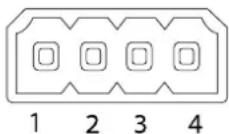
Foranexamplediagram, see ConnectionDiagramsonpage63.
| FunctionPinNotes | Specifications | ||
| 0VDC(-) | 1 | 0DC | |
| DCoutput | 2 | Canbeusedtopowerauxiliaryequipment.Note:Thispincanonlybeusedaspowerout. | 12VDCMaxload=15mA |
| DigitalInput | 3 | Connecttopin1toactivate,orleavefloating(unconnected) todeactivate. | 0tomax30VDC |
| DigitalOutput | 4 | Connectedtopin1whenactivated,floating(unconnected) whendeactivated.Ifusedwithaninductiveload,e.g.arelay, adiodemustbeconnectedinparallelwiththeload,for protectionagainstvoltagetransients. | 0tomax30VDC,opendrain, 100mA |
ConnectionDiagrams
I/OConnector
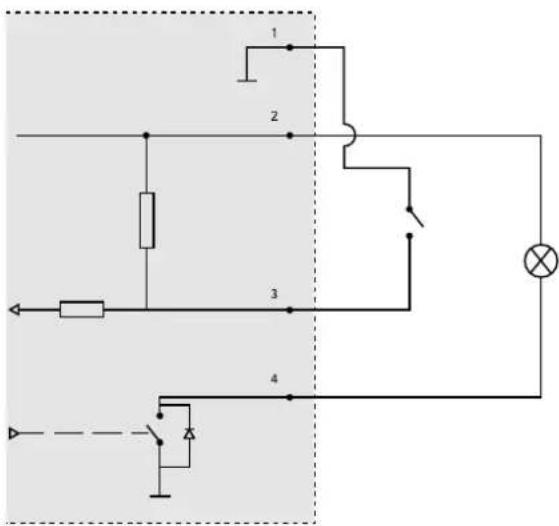
1 OVDC(-)
2 DCoutput12V,max15mA
3 I/Oconfiguredasinput
4 I/Oconfiguredasoutput
PerformanceConsiderations
Whensettingupyour system, it is important to consider how various settings and situations will affect performance. Some factors affect the amount of bandwidth (the bitrate) required, others can affect the framerate, and some affect both. If the load on the CPU reaches its maximum, this will also affect the framerate.
The following factors are among them most important to consider:
- Highimageresolutionand/orlowercompressionlevelsresultinimagescontainingmoredata.Bandwidthaffected.
- AccessbylargenumbersofMotionJPEGand/orunicastH.264clients.Bandwidthaffected.
- Simultaneousviewingofdifferentstreams(resolution, compression)bydifferentclients.Effectonframerateand bandwidth.
- AccessingMotionJPEGandH.264videostreamssimultaneously.Framerateandbandwidthaffected.
- Heavyusageofeventsettingsaffecttheproduct'sCPUload.Framerateaffected.
- UsingHTTPSmayreduceframerate, inparticularifstreamingMotionJPEG.
• Heavynetworkutilizationduetopoorinfrastructure.Bandwidthaffected.
•Viewingonpoorlyperformingclientcomputerslowersperceivedperformance.Framerateaffected.
- Running multiple AXISCameraApplicationPlatform(ACAP)applicationssimultaneouslymayaffectperformance.
- If the product includes several camera units, running applications on multiple cameras may affect the framerate.

- AboutthisDocument
- LegalConsiderations
- Liability
- IntellectualPropertyRights
- EquipmentModifications
- TrademarkAcknowledgments
- RegulatoryInformation
- Electromagnetic Compatibility(EMC)
- USA
- Canada
- Europe
- Australia/NewZealand
- Japan
- Korea
- Safety
- Battery
- WARNING
- DisposalandRecycling
- China
- ContactInformation
- Support
- LearnMore!
- TableofContents
- SafetyInformation
- HazardLevels
- OtherMessageLevels
- HardwareOverview
- ConnectorsandButtons
- NetworkConnector
- NOTICE
- I/OConnector
- PowerConnector
- SDCardSlot
- ControlButton
- LEDIndicators
- Note
- AccesstheProduct
- AccessfromaBrowser
- Accessfromthelnternet
- SettheRootPassword
- SetPowerLineFrequency
- TheLiveViewPage
- ControlsontheLiveViewPage
- ManualTrigger
- AXISMediaControlviewertoolbar
- PTZControls
- MediaStreams
- HowtoStreamH.264
- MJPEG
- AXISMediaControl(AMC)
- AlternativeMethodsofAccessingtheVideoStream
- SetUptheProduct
- BasicSetup
- FocusAdjustment
- Video
- SetUpVideoStreams
- PixelCounter
- Image
- H.264
- Axis'ZipstreamTechnology
- StreamProfiles
- CameraSettings
- ImageAppearance
- WhiteBalance
- WideDynamicRange
- Important
- ExposureSettings
- Shutter&Gain
- Irisadjustment
- Day/Night
- ViewArea
- Overlay
- OverlayImage
- UseOverlayTextinanActionRule
- PrivacyMask
- ConfiguretheLiveViewPage
- DefaultViewerforBrowsers
- ViewerSettings
- UserDefinedLinks
- OutputButtons
- PTZ(PanTiltZoom)
- PresetPositions
- AccessthePresetPositions
- AddaPresetPosition
- SettheHomePosition
- GuardTour
- Advanced
- Controls
- ControlQueue
- Detectors
- CameraTampering
- MotionDetection
- SetUpMotionDetectionWindows
- MotionDetectionParameters
- Applications
- ApplicationLicenses
- InstallApplication
- ApplicationConsiderations
- Events
- SetUpActionRules
- Triggers
- - Hardware
- - InputSignal
- •PTZ
- •Storage
- •System
- •Time
- Actions
- AddRecipients
- RecipientTypes
- SetUpEmailRecipients
- CreateSchedules
- SetUpRecurrences
- Recordings
- FindRecordings
- PlayRecording
- ExportVideoClip
- ContinuousRecording
- Languages
- SystemOptions
- Security
- Users
- ONVIF
- IPAddressFilter
- HTTPS
- IEEE802.1X
- Certificates
- Date&Time
- Network
- BasicTCP/IPSettings
- IPv4AddressConfiguration
- IPv6AddressConfiguration
- ARP/Ping
- AssignIPAddressUsingARP/Ping
- AXISVideoHostingSystem(AVHS)
- AXISInternetDynamicDNSService
- AdvancedTCP/IPSettings
- DNSConfiguration
- NTPConfiguration
- HostNameConfiguration
- Link-LocalIPv4Address
- HTTP
- NATtraversal(portmapping)forIPv4
- FTP
- RTSP
- SOCKS
- QoS(QualityofService)
- SNMP
- UPnP TM
- RTP/H.264
- Bonjour
- Storage
- SDCard
- MountandUnmountSDCard
- FormatSDCard
- NetworkShare
- Ports&Devices
- I/OPorts
- PortStatus
- Maintenance
- SupportOverview
- SystemOverview
- Logs&Reports
- Scripting
- FileUpload
- PlainConfig
- ResettoFactoryDefaultSettings
- Troubleshooting
- ChecktheFirmware
- UpgradetheFirmware
- Symptoms, Possible Causes and Remedial Actions
- TechnicalSpecifications
- Connectors
- ConnectionDiagrams
- PerformanceConsiderations
Mærke : AXIS
Model : M1125
Kategori : Overvågningskamera