
SGI-44 - Lydudstyr Radial Engineering - Gratis brugsanvisning og manual
Find enhedens vejledning gratis SGI-44 Radial Engineering i PDF-format.


Brugerspørgsmål om SGI-44 Radial Engineering
0 spørgsmål om dette apparat. Besvar dem du kender, eller stil dit eget.
Stil et nyt spørgsmål om dette apparat
Download vejledningen til din Lydudstyr i PDF-format gratis! Find din vejledning SGI-44 - Radial Engineering og tag din elektroniske enhed tilbage i hånden. På denne side er alle dokumenter nødvendige for brugen af din enhed offentliggjort. SGI-44 af mærket Radial Engineering.
BRUGSANVISNING SGI-44 Radial Engineering
RADIAL SGI-44 BALANCED GUITAR INTERFACE
When used in combination with the JX44 the optional SGI-44 can either be used as a bi-directional long haul effects loop or as a single ended driver from a guitar to the JX44 and your amps. Balanced audio connections between the JX44 and SGI-44 allow distances up to 100 meters (300 feet) using standard XLR mic cable. This is accomplished using a proprietary hybrid active drive circuit with Jensen transformer isolation to transfer the signal between units without introducing noise or signal loss.
A recessed DRAG control is provided at the SGI-44 input allowing for the most natural tone when driving the JX44 directly from a guitar. As an added convenience, the SGI-44 is equipped with a buffered tuner output. Connecting your tuner here will remove it from your signal chain to prevent digital clock noise from bleeding into your guitar sound.
HOW IT WORKS
When active, the SGI LOOP on-board the JX44 is global to all instrument inputs. The SGI interface converts instruments to a proprietary balanced low impedance signal. The converted signal is then output at the TX (transmit) jack on the back of the JX44.
The SGI-44 receives the signal at its RX (receive) jack and converts it to unbalanced high impedance for connection to effect pedals. The hi-Z output from the pedals is connected back to the SGI-44 where it is re-converted to a balanced low impedance signal and returned to the JX44 to complete the SGI LOOP (Fig.35). In the block diagram below you can see the SGI LOOP is inserted in the signal path after the inputs and before the local EFX effects loop.

flowchart
graph LR
    A["SGI LOOP"] --> B["SGI 44 Unit"]
    B --> C["INPUTS A THRU D"]
    C --> D["SGI TX"]
    C --> E["SGI RX"]
    D --> F["EFX SEND"]
    E --> G["EFX RECV"]
    F --> H["AMPLIFIER OUTPUTS 1 THRU 4"]
    G --> H
    H --> I["LOCAL EFX LOOP"]
USING THE SGI-44
Begin by connecting the included 15VDC power supply to the SGI-44. The power connection includes a cable clamp feature to prevent accidental power loss. Loosen the clamp screw, loop the power cable through and re-tighten so it looks like the photo below. Once connected the POWER LED will illuminate.

natural_image
Yellow electronic device labeled 'fos' connected to a black and red terminal, with magnified inset showing internal wiring (no readable text or symbols)Next, make the balanced connection between the JX44 and the SGI-44 using good quality XLR mic cables. The TX (transmit) output from the JX44 connects to the RX (receive) input on the SGI-44 (Fig.36). Connect your effect pedals to the SGI-44's 14 " hi-Z guitar jacks (Fig.37). Finally, connect the TX output from the SGI-44 to the RX input on the JX44 to complete the loop.
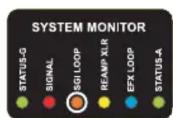
Once the loop is connected depress the ON switch located in the SGI section of the rear panel. The SGI LOOP LED in the SYSTEM MONITOR illuminates when the interface is active. Both the on-board SGI and the SGI-44 are transformer isolated to eliminate noise caused by ground
loops. If you hear hum or buzz after connecting try toggling the LIFT switches on the SGI-44 and on the rear panel of the JX44 at the SGI section. If you don't hear your pedals double check your connections.


flowchart
graph TD
    A["Sensor"] --> B["PCI4"]
    B --> C["Module 1"]
    B --> D["Module 2"]
    B --> E["Module 3"]
    C --> F["Hardware 1"]
    D --> G["Hardware 2"]
    E --> H["Hardware 3"]
Fig.35 - The complete SGI LOOP.

Fig.36 - Balanced XLR connections between the JX44 and SGI-44.

flowchart
graph TD
    A["Audio Video"] --> B["Bone"]
    B --> C["Green Audio"]
    C --> D["Yellow Instrument"]
    D --> E["Radio Station"]
    E --> F["Power Supply"]
    F --> G["Ground"]
Fig.37 - Hi-Z guitar, effect and tuner connections.
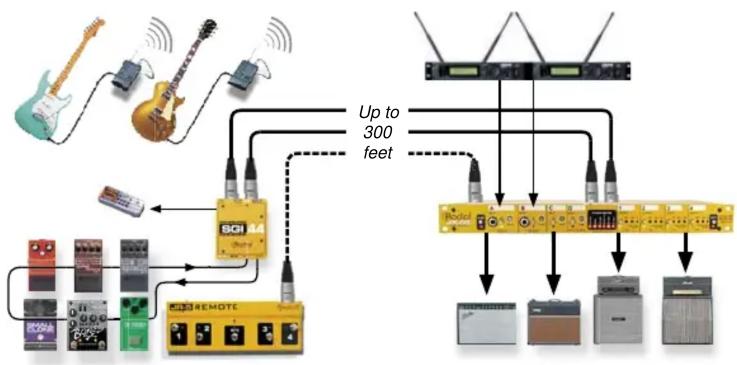
EXAMPLE 1: WIRELESS GUITAR AND LONG HAUL PEDALBOARD
In this application the JX44 is located near the player's wireless receivers and guitar amplifiers. The SGI-44 and JR5 reside on the player's pedalboard. The signal starts at the guitar through the wireless link to the receiver. From the receiver it flows into the JX44 inputs. At this point the SGI LOOP circuit sends the signal out to the pedals and back again via the SGI interface. The artist can enjoy the freedom of the wireless guitar and have their pedals out front at their feet along with the JR5 to control amps.
flowchart
graph TD
    A["Music Player"] --> B["Switch"]
    C["Radio"] --> D["Output"]
    E["Radio"] --> F["Output"]
    G["Radio"] --> H["Output"]
    I["Radio"] --> J["Output"]
    K["Radio"] --> L["Output"]
    M["Radio"] --> N["Output"]
    O["Radio"] --> P["Output"]
    Q["Radio"] --> R["Output"]
    S["Radio"] --> T["Output"]
    U["Radio"] --> V["Output"]
    W["Radio"] --> X["Output"]
    Y["Radio"] --> Z["Output"]
    AA["Radio"] --> AB["Output"]
    AC["Radio"] --> AD["Output"]
    AE["Radio"] --> AF["Output"]
    AG["Radio"] --> AH["Output"]
    AI["Radio"] --> AJ["Output"]
    AK["Radio"] --> AL["Output"]
    AM["Radio"] --> AN["Output"]
    AO["Radio"] --> AP["Output"]
    AQ["Radio"] --> AR["Output"]
    AS["Radio"] --> AT["Output"]
    AU["Radio"] --> AV["Output"]
    AW["Radio"] --> AX["Output"]
    AY["Radio"] --> AZ["Up to 300 feet"]
EXAMPLE 2: REMOTE AMPS IN THE STUDIO
Playing guitar in the control room while recording your amps out in the studio can be particularly advantageous. It allows you to hear the guitar sound exactly as it will be recorded over the studio monitors. To accomplish this, connect your guitar to the SGI-44 14 " guitar input and make a single balanced connection from the SGI-44 to the to the RX jack on the back of the JX44 using an XLR mic cable. In the control room the SGI-44 lets you connect effect pedals and tuners. In the studio the JX44 receives the SGI signal and drives the amplifiers.
Connecting is easy because the SGI interface uses balanced XLR connections that are 100% compatible with studio patchbays and tie lines. You can take this setup one step further and add the JR5 footswitch for selecting the amps remotely from the producers chair.

flowchart
graph TD
    A["SCI Module"] --> B["Up to 300 feet"]
    B --> C["Device 1"]
    B --> D["Device 2"]
    B --> E["Device 3"]
    B --> F["Device 4"]
    B --> G["Device 5"]
    B --> H["Device 6"]
    style SCI Module fill:#FFD700,stroke:#333
    style Battery Modules fill:#F9C1E2,stroke:#333
    style Upper_300_Feet fill:#FFF2CC,stroke:#333
EXAMPLE 3: LONG HAUL PASSIVE GUITAR CONNECTION
The SGI-44 is ideal for the purists who prefer a real cable over a wireless system to make a long distance connection between the guitar and the JX44. The Radial class-A driver and DRAG control combine forces allowing you to dial in the tone that sounds the most natural despite the long cable run. Add the JR5 footswitch and you can control your setup remotely from the base of your vocal mic stand.

flowchart
graph TD
    A["Speaker"] --> B["SOI 84"]
    B --> C["Remote Control Unit"]
    C --> D["Memory Units"]
    D --> E["Up to 300 feet"]
SGI-44 FEATURES AND FUNCTIONS
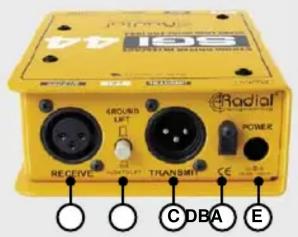
A. RECEIVE - Female XLR receives a proprietary balanced signal from the JX44's SGI-TX output.
B. LIFT - Disconnects the pin-1 ground at the RECEIVE XLR to reduce noise from ground loops.
C. TRANSMIT - Male XLR transmits a proprietary balanced signal to the JX44's SGI-RX input.
D. CABLE CLAMP - Prevents accidental power disconnect.
E. POWER - Connection for the included 15VDC power supply.

F. TUNER OUTPUT - Separately buffered 1/4" high impedance output for electronic tuner.
G. DRAG™ - Load correction function for passive pickups.
H. POWER LED - Indicates the power supply is connected.
I. INPUT - 1/4" jack receives signal from the output of your effects or guitar.
J. OUTPUT - 1/4" jack sends signal to the input of your effect pedals or amp.


Mærke : Radial Engineering
Model : SGI-44
Kategori : Lydudstyr