Hot Shot ABi - Ukategoriseret Radial Engineering - Gratis brugsanvisning og manual
Find enhedens vejledning gratis Hot Shot ABi Radial Engineering i PDF-format.


Brugerspørgsmål om Hot Shot ABi Radial Engineering
0 spørgsmål om dette apparat. Besvar dem du kender, eller stil dit eget.
Stil et nyt spørgsmål om dette apparat
Download vejledningen til din Ukategoriseret i PDF-format gratis! Find din vejledning Hot Shot ABi - Radial Engineering og tag din elektroniske enhed tilbage i hånden. På denne side er alle dokumenter nødvendige for brugen af din enhed offentliggjort. Hot Shot ABi af mærket Radial Engineering.
BRUGSANVISNING Hot Shot ABi Radial Engineering
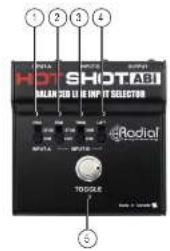
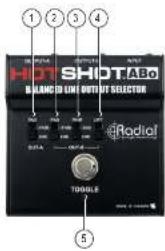
HOT SHOT ABI FEATURES AND FUNCTIONS
① PAD {INPUT-A} inserts a -37dB PAD to lower the level of INPUT-A.
② PAD (INPUT-B) inserts a -37dB PAD to lower the level of INPUT-B.
③ TRIM (INPUT-B) selects a -3dB reduction in level. Used to match the level of INPUT-A.
④ LIFT disconnects the ground on pin-1 of INPUT-B XLR. Used to reduce buzz and hum caused by ground loops.
⑤ TOGGLE heavy-duty latching footswitch selects between INPUT-A and INPUT-B.
OUTPUT XLR sends a balanced signal to microphone snakes and mixing consoles. Rugged glass-filled nylon connector is 100% isolated from the chassis.
⑦ INPUT-B XLR receives balanced signals from a microphone or other audio source. Rugged glass-filled nylon connector is 100% isolated from the chassis.
⑤ INPUT-A XLR receives balanced signals from a microphone or other audio source. Rugged glass-fi led nylon connector is 100% isolated from the chassis.
text_image
HOT SHOT ABI BALAN 200 U HMP IT SELECTION Radial TOGGLE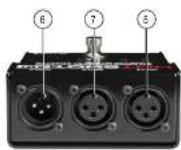
Radial Engineering
Hot Shot ABo & ABI User Guide

IMPORTANT NOTICE!

The Radial Hot Shot ABo & ABI are not intended for use with condenser microphones or active direct boxes that use phantom power. Phantom power puts voltage across the pins of the XLR jack that will create a loud transient when the Hot Shot is switched. Depending on your sound system the transient could be of significant level to damage loudspeakers. Before you start, it is important you know if phantom power is present and how to test your Hot Shot after connecting. Information in this manual will guide you how to safely use the Hot Shot ABo and ABI switchers.
You are responsible to ensure safe and proper use. Using the ABo & ABi confirms you have taken full responsibility. If you are not 100% sure of your actions, please consult a qualified technician for advice.
RADIAL LIMITED THREE YEAR TRANSFERABLE WARRANTY
Radial Engineering Ltd. warrants this product to be free from defects in material and workmanship to the original owner and will remedy any such defects free of charge according to the terms of this warranty. Radial Engineering will repair or replace at its option any defective component(s) of this product, excluding the finish, the footswitch (footswitch is warranted for 90 days), and wear and tear from normal use, for a period of three (3) years from the original date of purchase. In the event that a particular product is no longer available. Radial Engineering reserves the right to replace the product with a similar product of equal or greater value. To make a request or claim under this limited warranty, the product must be returned prepared in the original shipping container (or equivalent) to Radial Engineering or to an authorized repair centre and you must assume the risk of loss or damage. A copy of the original invoice showing date of purchase and the product's return is required for work to be performed under this limited warranty. This limited warranty shall not apply if the product has been damaged due to abuse, misuse, misapplication, accident or as a result of service or modification by any other than an authorized repair centre.
THERE ARE NO EXPRESSED WARRANTIES OTHER THAN THOSE ON THE FACE HEREOF AND DESCRIBED ABOVE. NO WARRANTIES, WHETHER EXPRESSED OR IMPLIED, INCLUDING BUT NOT LIMITED TO, ANY IMPLIED WARRANTIES OF MERCHANTABILITY OR FITNESS FOR A PARTICULAR PURPOSE SHALL EXTEND BEYOND THE RESPECTIVE WARRANTY PERIOD DESCRIBED ABOVE OF THREE YEARS.
RADIAL ENGINEERING LTD. SHALL NOT BE RESPONSIBLE OR LIABLE FOR ANY SPECIAL, INCIDENTAL OR CONSEQUENTIAL DAMAGES OR LOSS ARISING FROM THE USE OF THIS PRODUCT. THIS WARRANTY GIVES YOU SPECIFIC LEGAL RIGHTS, AND YOU MAY ALSO HAVE OTHER RIGHTS, WHICH MAY VARY DEPENDING ON WHERE YOU LIVE.
Radial Engineering
Hot Shot ABo & ABI User Guide

True to the Music
Hot Shot ABI and ABO
Owner's Manual
text_image
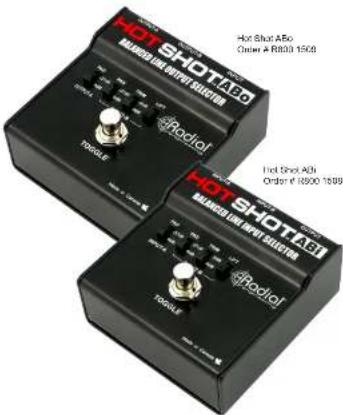
Hot Shot A50 Order: A R800 1608 Hot Shot A50 Order: A R800 1609 Hot Shot A50 Order: A R800 1609
CAUTION: PLEASE READ THE IMPORTANT NOTICE ON THE BACK COVER
Radial Engineering Ltd.
1845 Kingsway Ave, Port Coquitlam, BC V3C 0H3, Canada
Tel: 604-942-1001 • Fax: 604-942-1010
email: info@radialeng.com
Radal HotShot ABu and ABu users guide V1.2 - Part 4: R670.1170.00 (02-2324) Subject to change without notice
CONGRATULATIONS on your purchase of the Radial Hot Shot. The Hot Shot ABo and ABI are passive devices that allows a you to select between two balanced audio sources or route a signal to different destinations with a footswitch. The Hot Shot ABo allows a signal to switch between two outputs. The Hot Shot ABI allows you to select between two inputs.
Designed for professional balanced audio equipment like dynamic microphones, passive direct boxes and line level signals. The Hot Shot ABO & ABI are completely passive, do not require any power and will not color the tone or acid noise. Both the ABO and ABI incorporate features that help match levels and reduce the potential for ground loop noise.
HOT SHOT ABA
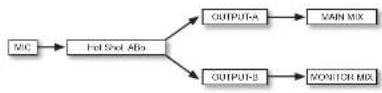
The Hot Shot ABo is a simple balanced AB switcher with one XLR input and two XLR outputs. The footswitch is used to toggle the signal between the two outputs. A microphone signal, for example, could be logged between two different channels on a mixer with one 'normal' channel and another with affects like reverb or chorus. Alternatively, a microphone signal could be toggled between two separate PA systems such as a 'Font of House' PA for audience announcements and a 'Backstage' PA to cut performers.
HOT SHOT ABI
The Hot Shot AB is a simple balanced AB switcher with two XLR Inputs and one XLR output. The footswitch is used to select which input is active. An application could be choosing between two mice. For example, a vocalist who plays keyboards and gutar could fagged between a mix over a piano and another setup center stage. This would save a mixer channel and eliminate having to adjust a stand during a performance.
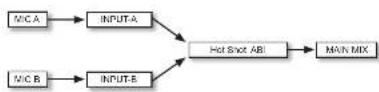
CONNECTING THE RADIAL HOT SHOT ABO AND ABI
Before making any connections, please confirm the sound system is powered off and the volume controls are turned down. Use standard microphone cables to connect the Hot Shot's balanced XLR jacks. Unbalanced signals may also be connected by using adaptors.

Make sure the 48V phantom power is turned off on the channels that you are connecting the ABo & ABI to. Phantom power could cause loud transients in your sound system when the ABo & ABI are switched. Testing at a low volume level first will ensure you do not cause damage to loudspeakers. If you do hear pops or clicks while testing, check to make sure phantom power is turned off before increasing the level.
Radial Engineering
Hot Shot ABo & ABI User Guide
USING THE HOT SHOT ABo & ABI FEATURES
LIFT - The LIFT switch disconnects pin-1 at the XLR connectors and is used when ground loop noise is a problem. If you hear buzz or hum try engaging the LIFT switch.
PAD - The PAD switch inserts a -37dB signal reduction and is used to lower the level of line level signals to mic level, for connection to mic inputs on mixing boards. The ABo uses PADs on its outputs while the ABI places PADs on the inputs.
TRIM • The TRIM switch inserts a -5dB signal reduction on the B channel and is used to match levels between the A and B inputs/outputs.
TOGGLE SWITCH - The footswitch selector on both models are latching type, which means that the unit will toggle each time the footswitch is depressed.
HOT SHOT ABo BLOCK DIAGRAM

flowchart
graph TD
    A["XLR INPUT"] --> B["TOGGLE SWITCH"]
    B --> C["OUTPUT-A -37dB PAD"]
    C --> D["OUTPUT-B -8dB TCM"]
    D --> E["OUTPUT-B XLR"]
    E --> F["OUTPUT-B GROUND LIFT"]
    F --> G["OUTPUT-A XLR"]
HOT SHOT ABI BLOCK DIAGRAM
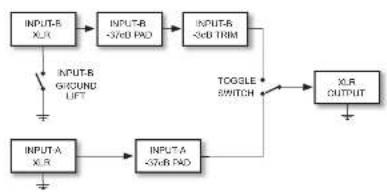
flowchart
graph TD
    A["INPUT-B X_L"] --> B["INPUT-B <5dB PAD"]
    B --> C["INPUT-B <5dB TRIM"]
    C --> D["INTUER G/ROUND LIFT"]
    D --> E["INPUT-A X_R"]
    E --> F["INPUT-A <5dB PAD"]
    F --> G["OUTPUT"]
    G --> H["X_LR OUTPUT"]
    H --> I["TOGGLE SWITCH"]
    I --> J["INPUT-B"]
USING THE ABo & ABI AS A COUGH MUTE
The ABo can be used as a cough-mute by simply not connecting OUTPUT-B. The ASI can also be used as a cough-mute by not connecting INPUT-S. The microphones can now be muted whenever the footswitch is depressed. A simple solution for headset and lavaler mic users!
Radial Engineering
Hot Shot ABo & ABI User Guide
HOT SHOT ABO FEATURES AND FUNCTIONS
① PAD (OUTPUT-A) inserts a -37dB PAD to lower the level of OUTPUT-A.
② PAD (OUTPUT-B) inserts a -37dB PAD to lower the level of OUTPUT-B.
① TRIM (OUTPUT-B) selects a -6dB reduction in level. Used to match the level of OUTPUT-A.
④ LIFT disconnects the ground on pn-1 of OUTPUT-S XLR. Used to reduce buzz and hum caused by ground loops.
⑤ TOGGLE heavy-duty latching footswitch selects between OUTPUT-A and OUTPUT-B.
⑧ INPUT XLR receives a balanced signal from a microphone or other audio source. Rugged glass-filled nylon connector is 100% isolated from the chassis.
OUTPUT-A XLR sends a balanced signal to microphone snakes and mixing consoles. Rugged glass-fi led nylon connector is 100% isolated from the chassis.
OUTPUT-B XLR sends a balanced signal to microphone snakes and mixing consoles. Rugged glass-filled nylon connector is 100% isolated from the chassis.
text_image
HOT SHOT ABoBLANC TO LINE OUTPUT SELECTOR
@Radial TODOLLE
Radial Engineering
Hot Shot ABo & ABI User Guide