
Relay Xo - Commutateur audio Radial Engineering - Gratis brugsanvisning og manual
Find enhedens vejledning gratis Relay Xo Radial Engineering i PDF-format.


Brugerspørgsmål om Relay Xo Radial Engineering
0 spørgsmål om dette apparat. Besvar dem du kender, eller stil dit eget.
Stil et nyt spørgsmål om dette apparat
Download vejledningen til din Commutateur audio i PDF-format gratis! Find din vejledning Relay Xo - Radial Engineering og tag din elektroniske enhed tilbage i hånden. På denne side er alle dokumenter nødvendige for brugen af din enhed offentliggjort. Relay Xo af mærket Radial Engineering.
BRUGSANVISNING Relay Xo Radial Engineering
FEATURES
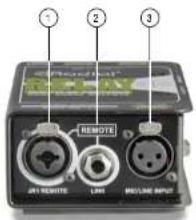
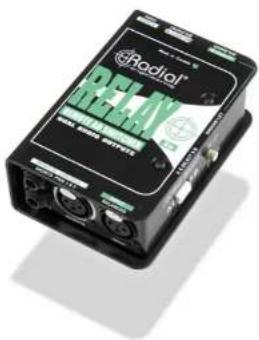
- JR1 REMOTE: Locking XLR and 14 * combo jack used to connect a remote switch. Use with footswitches, MIDI contact closures or the Radial JR1.
- REMOTE LINK: Used to link the switching of additional Relay Xo units. Allows stereo and multi-channel switching systems.
- MIC/LINE INPUT: Balanced XLR input. The Relay Xo signal path is 100% passive. Audio signals will pass through unchanged without added noise or distortion.
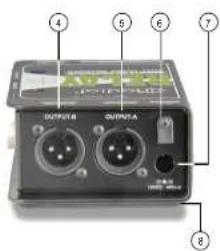
- OUTPUT-B: Alternate balanced XLR output. This output is active when the select switch is pressed inward or when a remote switch is closed. The B LED illuminales when the output is active.
- OUTPUT-A: Main balanced XLR output. This output is active when the switch is in the outward position or when a remote switch is open. The A LED illuminates when the output is active.
- CABLE CLAMP: Prevents accidental power disconnection by locking down the AC adapter cable.
- POWER JACK: Connection for the included 15 volt (400mA) AC power adapter
- FULL-BOTTOM NO-SLIP PAD: This provides electrical isolation and plenty of 'stay-put' friction to keep the Relay Xo in one place.
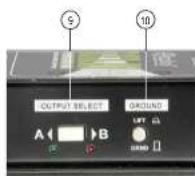
- OUTPUT SELECT: This switch toggles the Relay Xo's outputs. Two LED indicators display which output is active.
- GROUND LIFT: Disconnects pin-1 (ground) on the input XLR jack to help reduce hum and buzz caused by ground loops.
Radial engineering
True to the Music
Relay Xo specifications
| Audio circuit type: | Passive balanced A/B switcher |
| Switch: | Electronically controlled relay |
| XLR input and outputs: | AES standard; pin-1 ground pin-2 (+), pin-3 (-) |
| Ground lift: | Lifts pin-1 on the XLR Input |
| Power: | 15W/400mA, 120W/240 power adapter included |
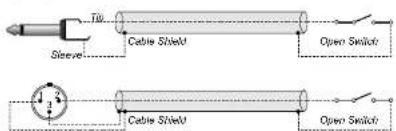
Wiring diagram for custom JR1 REMOTE switch
RADIAL ENGINEERING 3 YEAR TRANSFERABLE LIMITED WARRANTY
RADIAL ENGINEERING LTD. ("Radial") warrants this product to be free from defects in material and workmanship and will remedy any such defects free of charge according to the terms of this warranty. Radial will repair or replace (at its option) any defective component(s) of this product (excluding finish and wear and tear on components under normal use) for a period of three (3 years from the original date of purchase). In the event that a particular product is no longer available, Radial reserves the right to replace the product with a similar product of equal or greater value. In the unlikely event that a defect is uncovered, please call 634-942-1000 or email service@radialeng.com to obtain an RA number (Return Authorization number) before the 3 year warranty sent out expires. The product must be returned prepaid in the original shipping container (or equivalent) to Radial or to an authorized Radial repair center and you must assume the risk of loss or damage. A copy of the original invoice showing sale of purchase and the dealer name must accompany any request for work to be performed under this limited and transferable warranty. This warranty shall not apply if the product has been damaged due to abuse, misuse, misoplication, accident or as a result of service or modification by any other than an authorized Radial repair center.
THERE ARE NO EXPRESSED WARRANTIES OTHER THAN THOSE ON THE FACE HEREOF AND DESCRIBED ABOVE NO WARRANTIES WHETHER EXPRESSED OR IMPLIED, INCLUDING BUT NOT LIMITED TO, ANY IMPLIED WARRANTIES OF MERCHANTABILITY OR FITNESS FOR A PARTICULAR PURPOSE SHALL EXTEND BEYOND THE RESPECTIVE WARRANTY PERIOD DESCRIBED ABOVE OF THREE YEARS. RADIAL SHALL NOT BE RESPONSIBLE OR LIABLE FOR ANY SPECIAL, INCIDENTAL OR CONSEQUENTIAL DAMAGES OR LOSS ARISING FROM THE USE OF THIS PRODUCT. THIS WARRANTY GIVES YOU SPECIFIC LEGAL RIGHTS, AND YOU MAY ALSO HAVE OTHER RIGHTS, WHICH MAY VARY DEPENDING ON WHERE YOU LIVE AND WHERE THE PRODUCT WAS PURCHASED.
Radial engineering
True to the Music

USER GUIDE
Radial Engineering Ltd.
1845 Kingsway Ave, Port Coquillam, BC V3C 1S9
tel: 604-942-1001 • fax: 604-942-1010
email: info@radialeng.com
Made in Canada
Relay Xo™ User Guide - Part# R370 1275 00 / 08 2022
Specifications and appearance are subject to change without notice.
© Copyright 2014 all rights reserved
OVERVIEW
Thank you for purchasing the Radial Relay Xc, a simple yet effective switching device designed to toggle a microphone or other balanced audio signal between two channels on a PA system. As with all products, getting to know the feature set is essential if you intend to get the most out of the Relay. Please take a minute to read through this short manual. If you are left with unanswered questions, feel free to send us an email at info@radialeng.com and we will do our best to reply in short order. Now get ready to remotely switch to your heart's content!
The Relay is basically a 1-in. 2-out straight-wire switcher for balanced audio. There is no transformer or buffering circuitry in between the input and outputs. This means the Relay Xo can not introduce distortion or noise into the source signal and allows it to be used with mic or line level sources. A link feature allows multiple Relay Xo units to be combined and switch stereo or multichannel audio systems. Switching can be done on the Relay Xo, via remote footswitch or by MIDI contact closure.
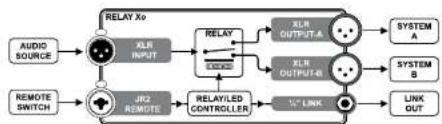
flowchart
graph LR
    A["AUDIO SOURCE"] --> B["RELAY XO"]
    C["REMOTE SWITCH"] --> D["RELAY/LED CONTROLLER"]
    B --> E["XLR INPUT"]
    D --> F["XLR OUTPUT-1"]
    D --> G["XLR OUTPUT-2"]
    E --> H["SYSTEM A"]
    F --> I["SYSTEM B"]
    G --> J["LINK OUT"]
    D --> K["1st LINK"]
MAKING CONNECTIONS
Before making any connections, make sure volume levels are turned off or down and/or power is turned off. This will help you avoid turn-on or power-on transients that could harm more sensitive components like tweeters. There is no power switch on the Relay. Simply plug in the included 15 VDC supply and it will spring to life. A cable clamp next to the power jack can be employed to prevent accidental disconnection.
The audio input and outputs employ balanced XLR connections wired to the AES standard with pin-1 ground, pin-2 hot (+), and pin-3 cold (-). Connect your source device such as a microphone or wireless mic receiver to the Relay Xo input jack. Connect the A and B outputs to two inputs on a mixer.
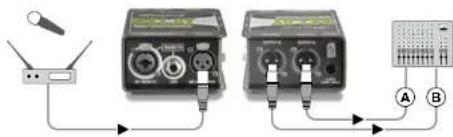
Switching between the outputs can be done using the OUTPUT SELECT push button on the side panel. Start by setting up channel-A. Set the AB selector switch set to the A position (outward). Speak into the mic while slowly bringing up the volume levels. To set up the channel-B depress the AB selector switch to toggle the output. The LED indicators illuminate to display the active output.
REMOTE CONTROL
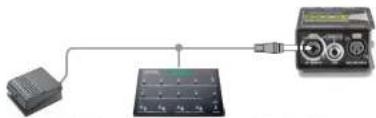
The Relay Xo's outputs may be toggled remotely using an external 'latching' or 'momentary' switch connected to the 'JR1 REMOTE' jack. This combo jack features a locking XLR and 14 " input. The 14 " connection works with any standard footswitch such as a momentary sustain pedal or a latching amplifier channel switch. It can also work with any device equipped with a 14 " contact-closure output like a MIDI controller.
natural_image
Simple electrical connection diagram showing a battery connected to a solar panel and an analog multimeter (no text or symbols visible)Simple footswitches and contact-closure devices like MDDI controllers use X^ cables to connect to the Reisy Xo.
Both the combo jack's XLR and 1/4" connection work with the optional Radial JR1 footswitches. The JR1 footswitches are also equipped with locking XLR jacks allowing you to use either type of cable. Locking connectors are beneficial on busy stages as it reduces the opportunity for a connection to come lose during a performance. The JR1 footswitches are available in momentary (JR1-M) or latching (JR1-L) formats to address various needs on stage and include A/B LED status indicators.
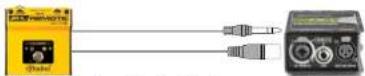
The JR1 uses either 14 " or locking XLR cable to connect to the Relay Xo:
Because footswitches are either momentary or latching it's important to understand how the Relay Xo works with these two types of switches. A momentary footswitch, like the JR1-M or a keyboard sustain pedal, will toggle to output-B only while held down. Once the momentary footswitch is released the Relay Xo will toggle back to output-A. A latching footswitch, like the JR1L or an amplifier AB channel selector switch will toggle the Relay each time it is pressed. One press will toggle to output-B. Pressing again with toggle back to output-A.
MULTI-CHANNEL SWITCHING
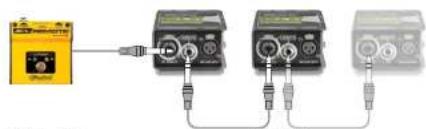
Two or more Relay Xo units can be switched in tandem by simply bridging the devices together using a standard 14 " patch cable. The LINK feature allows switching of stereo and multi-channel audio systems from a single switch. Connect a footswitch to the first unit or use the side panel OUTPUT SELECT switch. Connect the 12 " LINK jack on the first unit to the JR1 REMOTE jack on the second. You can connect as many successive units as you like this way.
natural_image
Three connected electronic devices with connectors, one showing a small device and others in series (no visible text or symbols)JR1-M or JR1-L
% Link Cables
Relay Xo ^TM Relay Xo Radial Engineering Ltd. Radial Engineering Ltd. Radial Engineering Ltd.
USING THE RELAY XO FOR A TALK-BACK SYSTEM
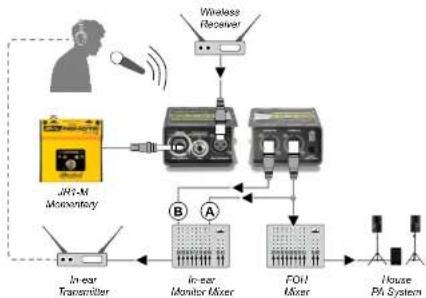
A momentary footswitch, like the optional JR1M, is recommended when using the Relay Xo as a talk-back or communication mic switcher as this requires holding the footswitch 'on' to speak with other band members or the crew. Releasing the footswitch reverts back to normal. This avoids accidentally leaving the Relay on 'communication mode' which could otherwise prove to be embarrassing if left on.
flowchart
graph TD
    A["Wireless Receiver"] --> B["Monitory"]
    B --> C["JPH-M Monitory"]
    C --> D["In-car Transmitter"]
    D --> E["In-car Monitor Mixer"]
    E --> F["FOH Mixer"]
    F --> G["House PA System"]
    H["In-ear Monitor"] --> E
    I["In-ear Transmitter"] --> E
USING THE RELAY XO TO SWITCH MIXER CHANNELS
Using a latching switch, like the optional JR1L, is suggested when switching between audio channels on a PA system. Switching channels lets you alternate between a dry channel for communication with the audience and a wet channel with echo and reverb for singing.
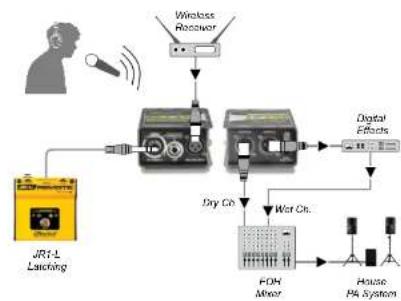
flowchart
graph TD
    A["User"] --> B["Wireless Recovery"]
    B --> C["FOH Mixer"]
    C --> D["House PA System"]
    D --> E["House PA System"]
    F["JRF-L Latching"] --> C
    G["Digital Effects"] --> C
    H["Dry Ch."] --> C
    I["Wet Ch."] --> C
^TM Relay


Mærke : Radial Engineering
Model : Relay Xo
Kategori : Commutateur audio