779N - Termometer PCE Instruments - Gratis brugsanvisning og manual
Find enhedens vejledning gratis 779N PCE Instruments i PDF-format.


Brugerspørgsmål om 779N PCE Instruments
0 spørgsmål om dette apparat. Besvar dem du kender, eller stil dit eget.
Stil et nyt spørgsmål om dette apparat
Download vejledningen til din Termometer i PDF-format gratis! Find din vejledning 779N - PCE Instruments og tag din elektroniske enhed tilbage i hånden. På denne side er alle dokumenter nødvendige for brugen af din enhed offentliggjort. 779N af mærket PCE Instruments.
BRUGSANVISNING 779N PCE Instruments

Suite 8 Jupiter
FL-33458
USA
From outside US: +1
Tel: (561) 320-9162
Fax: (561) 320-9176
info@pce-americas.com
PCE Instruments UK Ltd.
Units 12/13
Southpoint Business Park
Ensign way
Hampshire / Southampton
United Kingdom, SO31 4RF
From outside UK: +44
Tel: (0) 2380 98703 0
Fax: (0) 2380 98703 9
info@industrial-needs.com
www.pce-instruments.com/english
www.pce-instruments.com
Manual
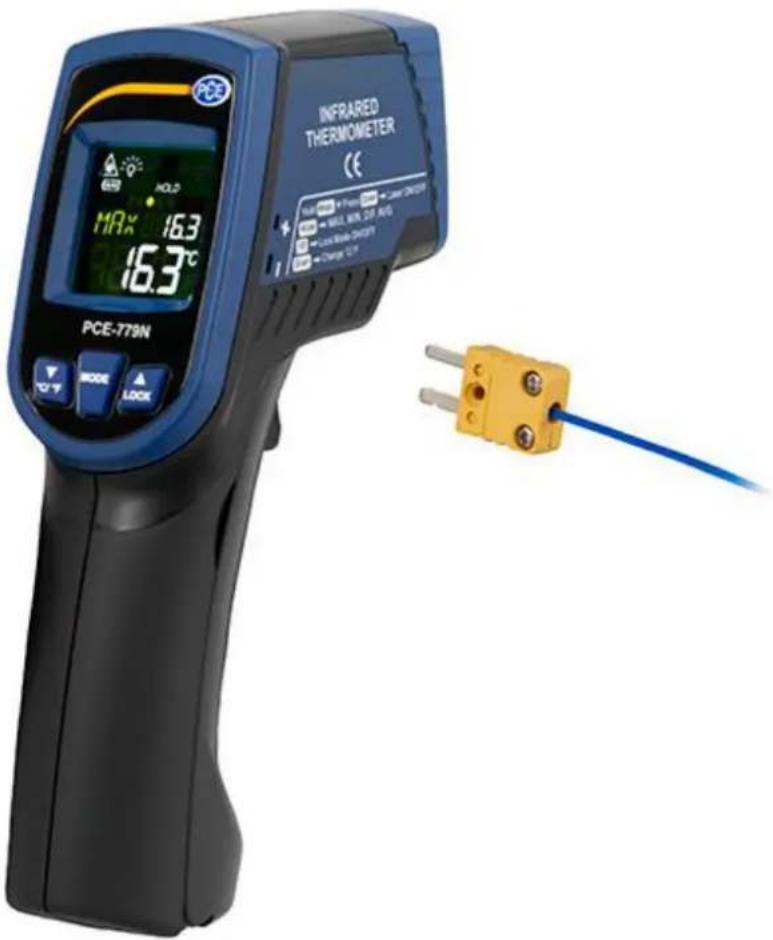
Condition Monitoring Thermometer PCE-779N
Contents
1 Introduction ....3
1.1 Delivery content 3
2 Safety notes....3
3 Specifications....4
4 System description....4
5 Instructions....5
5.1 How to make a measurement 5
5.2 Measurement with external sensor 5
5.3 Functions 5
5.4 Settings.... 5
6 LCD error messages....6
7 Storage and cleaning....6
8 Batteries....6
9 Contact....7
9.1 PCE Instruments UK 7
9.2 PCE Americas 7
1 Introduction
Thank you for purchasing a PCE-779N from PCE Instruments.
This compact non-contact infrared thermometer can measure surface temperatures quickly and has various measurement functions such as max, min and average measurement as well as an alarm function. The device is equipped with a dual laser for targeting the measuring point. It has a large display and is easy to use. The PCE-779N is frequently used for food inspection and hygiene testing, in heating and air conditioning, switch cabinet monitoring, road construction, production monitoring as well as for temperature measurements on motors.
1.1 Delivery content
1 x HVAC Meter PCE-779N,
1 x thermocouple type K (max. 200 °C),
2 x AAA battery,
1 x instruction manual
2 Safety notes
Please read this manual carefully and completely before you use the device for the first time. The device may only be used by qualified personnel and repaired by PCE Instruments personnel. There is no warranty of damages or injuries caused by non-observance of the manual.
- Keep the thermometer away from children.
- Do not use this instrument for safety-related applications.
- In order to prevent permanent eye injuries, do not look directly into the laser beam when the device is in use. Be very careful when using the laser. Do not point it towards people's or animals' eyes.
- The device may only be used in the approved temperature range.
- The measurement range only applies to the thermometer. Make sure to choose the adequate type of probe for your application. To avoid damage of the probe, make sure that the target to be measured does not exceed the temperature range of the probe.
- To avoid electric shock or damage of the thermometer, do not measure in live circuits where the voltage exceeds 24 V ac RMS or 60 V dc with the thermocouple.
- After measuring high temperatures, the probe may remain hot for a while.
- EMC / RFI: your readings may be affected if the device is operated within a radio frequency electromagnetic field strength of approximately 3 V/m. However, the device's performance will not be permanently affected.
- The case should only be opened by qualified personnel of PCE Instruments.
- The instrument should never be placed with the user interface facing an object (e.g. keyboard side on a table).
- You must not make any technical changes to the device.
- The appliance should only be cleaned with a damp cloth / use only pH-neutral cleaner.
This manual is published by PCE Instruments without any guarantee.
We expressly point to our general guarantee terms which can be found in our general terms of business.
If you have any questions please contact PCE Instruments.
3 Specifications
| Item | Infrared thermometer | K-type thermocouple |
| Measurement range | -60 ... +760 °C (-76 ... +1400 °F) | -64 ... +1400 °C (-83.2 ... +2552 °F) |
| Resolution | 0.1 °C / 0.1 °F (at -83.2 ... 999.9 °C / °F), otherwise 1 °C / 1 °F | |
| Accuracy ( T_obj = 15 ... 35°C, T_amb = 25°C) | ±1.0 °C (1.8 °F) | +/-1 % of reading or 1 °C (1.8 °F) whichever is higher(at T_amb = 23 ±6 °C) |
| Accuracy ( T_amb = 23 ±3 °C) | T_obj = -60 ... 0: +/- (2 + 0.05 x reading) °C, T_obj =0 ... 760: +/-2 % of reading or 2 °C (4 °F) whichever is higher | |
| Note: under an electromagnetic field strength of 3V/m from 200 to 600 MHz, the maximum error is 10 °C (18 °F) | ||
| Emissivity | 0.95 default – adjustable 0.1 to 1 in steps of 0.01 | |
| Response time (T90) | 1 second | |
| Distance:spot | 30:1 | |
| Automatic Power Off | after more than1 minute of inactivity | in PRB mode: after more than 12 minutes of inactivity |
| Operating conditions | 0 ... +50 °C (32 ... +122 °F) | |
| Battery life (alkaline) | min. 30 hours continuous use without laser min. 3 hours continuous use with laser and white LED | |
| Dimensions | 119.2 x 47.5 x 171.8 mm (4.7 x 1.87 x 6.76") | |
| Weight | 255.7 g (9.02 oz) including batteries (2 x AAA) | |
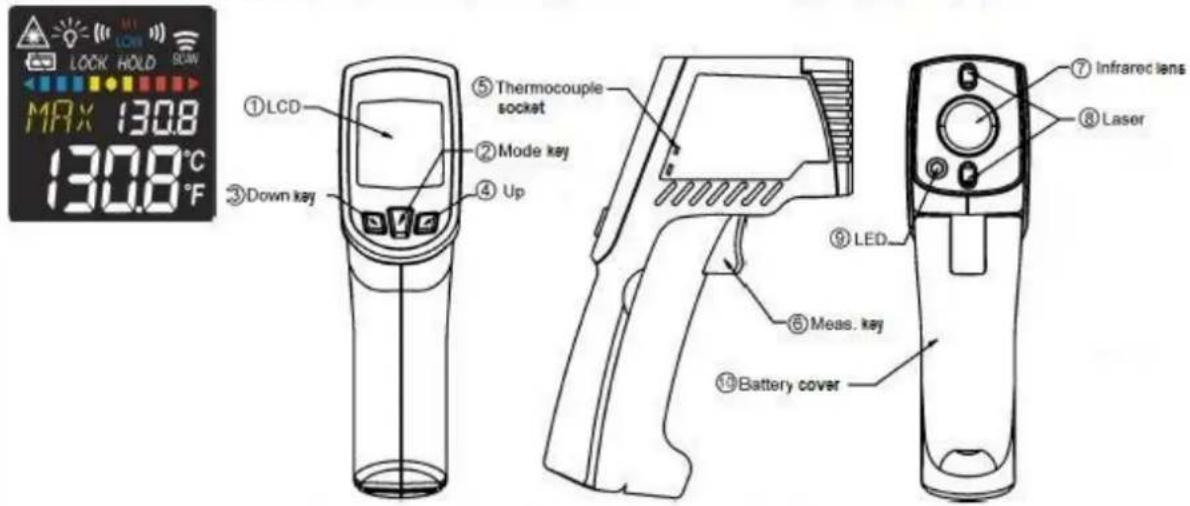
4 System description
5 Instructions
5.1 How to make a measurement
To make a measurement, simply target the lens (7) of thermometer at the object to be measured and press the measurement key (6). The surface temperature will then be displayed. The distance-to-spot – ratio is 30:1. Please make sure that the target area is within the field of view.
5.2 Measurement with external sensor
Connect an external K-type thermocouple to the meter via the mini jack at the side of the device. Press the Mode key until PRB appears in the display. Then press the Measurement key. The display will now show the temperature measured by the external thermocouple.
5.3 Functions
Press the mode key (2) to see the following functions:
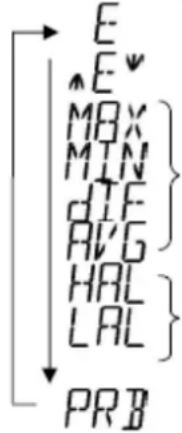 | Here, you can see the emissivity. The default emissivity is 0.95. |
| Press the mode key (2), then press the up (4) or down key (3) to set the emissivity. Press mode key (2) to confirm. You can select an emissivity between 0.10 (10 E) and 1 (100 E). | |
| Press the mode key (2) to enter maximum (MAX), minimum (MIN), difference between MAX and MIN (DIF) and average (AVG) modes. During measurement, the respective reading will be displayed next to the mode icon. | |
| Press the up (4) or down (3) key to change the high alarm (HAL) or low alarm (LAL). Then press measurement key (6) to confirm your entry. When the reading exceeds the high alarm (HAL) or falls below the low alarm (LAL), the high or low icon will flash and you will hear a beep sound. | |
| Use the thermocouple socket (5) to connect the probe. Place the probe on the object to be measured. The thermometer will display the temperature automatically. To see the maximum or minimum value during probe measurement, please press and hold the up (4) or down key (3).⚠ After measuring high temperatures, the probe may remain hot for a while. |
5.4 Settings
| In E, MAX, MIN, DIF, AVG modes: | Press the up key (4) to lock or unlock. Lock mode is particularly useful for continuous temperature measurements of up to 60 minutes. |
| Press the down key (3) to switch between °C and °F. | |
| In MAX, MIN mode: press and hold the measurement key (6). | The bar indicator shows the measured temperature. The bars will be RED when the reading is close to the maximum value or BLUE when it comes close to the minimum value. They will be YELLOW when the temperature is between the maximum and the minimum value. 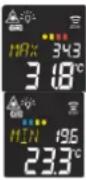 |
| Backlight | The LCD backlight is always on.  |
| In all modes: Press and hold the measurement key (6). | Then press the down key (3) to turn the laser on or off.  |
6 LCD error messages
| Error message | Reason | |
 | “Hi” or “Low” is displayed when the temperature measured is outside the HAL and LAL limits. | |
 | “Er 2” is displayed when the ambient temperature changes quickly. “Er 3” is indicated when the ambient temperature falls below 0 °C (32 °F) or exceeds +50 °C (122 °F). Allow at least 30 minutes for the thermometer to adapt to the room temperature. | |
 | “Er 5” ... “Er 9” means that you must reset the thermometer. To do so, turn the device off, remove the battery and wait for at least one minute before you reinsert the battery and turn the device back on. If the error remains, please contact PCE Instruments. | |
 | “Hi” or “Lo” is indicated when the temperature measured is outside the measurement range. | |
7 Storage and cleaning
The device should be stored at room temperature. The sensor lens is the most sensitive part of the thermometer. Therefore, it should always be kept clean. Please be careful when cleaning it. Use a soft cloth or cotton swab with water or medical alcohol. Do not submerge any part of the instrument.
8 Batteries
The battery level indication can be as follows:

"Battery OK": measurements are possible.

"Battery low": measurements are still possible, but battery needs to be replaced.

"Battery flat": measurements are no longer possible.

When the "Battery low" icon appears, the battery should immediately be replaced by a new 1.5 V battery. To avoid malfunction, please switch off the device before replacing the battery.

Dispose of used batteries immediately and keep them away from children.
For the disposal of batteries, the 2006/66/EC directive of the European Parliament applies. Due to the contained pollutants, batteries must not be disposed of as household waste. They must be given to collection points designed for that purpose.
In order to comply with the EU directive 2012/19/EU we take our devices back. We either re-use them or give them to a recycling company which disposes of the devices in line with law.
9 Contact
If you have any questions about our range of products or measuring instruments please contact PCE Instruments.
9.1 PCE Instruments UK
By post:
PCE Instruments UK Ltd.
Units 12/13 Southpoint Business Park
Ensign Way, Southampton
Hampshire
United Kingdom, SO31 4RF
By phone:
02380 987 035
9.2 PCE Americas
By post:
PCE Americas Inc.
711 Commerce Way
Suite 8
Jupiter
33458 FL
USA
By phone:
561 320 9162