
NMP620-P10 - Kompakt computer VIEWSONIC - Gratis brugsanvisning og manual
Find enhedens vejledning gratis NMP620-P10 VIEWSONIC i PDF-format.


Brugerspørgsmål om NMP620-P10 VIEWSONIC
0 spørgsmål om dette apparat. Besvar dem du kender, eller stil dit eget.
Stil et nyt spørgsmål om dette apparat
Download vejledningen til din Kompakt computer i PDF-format gratis! Find din vejledning NMP620-P10 - VIEWSONIC og tag din elektroniske enhed tilbage i hånden. På denne side er alle dokumenter nødvendige for brugen af din enhed offentliggjort. NMP620-P10 af mærket VIEWSONIC.
BRUGSANVISNING NMP620-P10 VIEWSONIC
Quick Guide
Ultra Tiny PC
NMP620-P10
VS17044

natural_image
Black square electronic device with a control panel and indicator lights (no visible text or symbols)ViewSonic®
Package Contents
The box contains the following items. If any of the items is missing or damaged, please contact agency or dealer immediately.

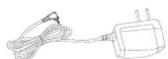
Power AdapterNMP620-P10


VESA Mount Quick Guiderews

HDMI Cable
Interface
Front View Rear View
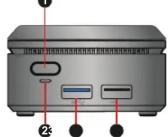
Rear View


Left View Right View
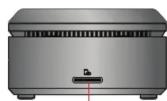
Right View
1 Power Button
6 LAN Port
② Power Status LED
⑦ Micro USB 2.0 Port for power adapter
③ Standard USB 3.0 Port
8 Anti-Theft Key Lock Hole
4 Standard USB 2.0 Port
9 Micro SD Card Slot
⑤ HDMI Port
Getting Started
- Connect the HDMI port of the mini PC to the HDMI port of a TV or LCD monitor with the HDMI cable. Then set the TV or LCD monitor by selecting the connected HDMI port as "video input signal".
- USB power supply: Insert the power adapter into a standard AC power outlet and connect Micro USB end of power adapter to this device.
- It supports both USB mouse/keyboard and Bluetooth mouse/keyboard.
- Plug the RJ45 Ethernet cable to LAN port for WAN connection.
- Press the power button to start the system.

flowchart
graph TD
    A["Front View"] --> B["USB mouse/keyboard"]
    B --> C["Bluetooth mouse/keyboard"]
    C --> D["Power Adapter"]
    D --> E["HDMI cable"]
    E --> F["Rear View"]
    F --> G["Front View Rear View"]
    G --> H["WiFi"]
    H --> I["+"]
    I --> J["+"]
    J --> K["+"]
    K --> L["+"]
    L --> M["+"]
    M --> N["+"]
    N --> O["+"]
    O --> P["+"]
    P --> Q["+"]
    Q --> R["+"]
    R --> S["+"]
    S --> T["+"]
    T --> U["+"]
- Secure VESA Mount onto the backboard of TV or LCD monitor with 4 screws.

- Fasten two screws on the bottom of the case.

- Locate to the holes and insert the screws into them and slide the case down until it is fixed.
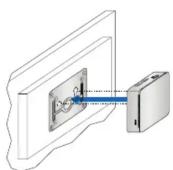
SpecificationVESA Mount (Optional)
| Model Name | VS17044 |
| Sale Name | NMP620-P10 |
| Processor | Intel® Celeron® Processor N3350 |
| Main Memory | 2GB LPDDR4 (2400) |
| Storage | 32GB |
| I/O port | 1x HDMI port1x Micro USB 2.0 port1x USB 3.0 Host port1x USB 2.0 Host port1x Micro SD Card slot1x LAN port |
| Buttons & Indicators | Power ButtonPower Status LED |
| Networking | 802.11 ac/b/g/n dual band Wireless LANBluetooth 4.1 for BT peripherals |
| Power Adapter* | ASIAN POWER DEVICES INC.WA-24Q12FU |
| Note: * Please don't use in other product. The Voltage is 12V DC output. | |
| OS | Windows 10 IoT Enterprise |
| Thermal design | Fan with sink |
| Operation Temp. | 0~40°C |
| Dimensions | 70mm*70mm*31.4mm |
| Color | Black |
Notice and Safety
Failure to use the included ASIAN POWER DEVICES INC. WA-24Q12FU Power Adapter may violate regulatory compliance requirements and may expose the user to safety hazards.
Risk of explosion if the battery is replaced with an incorrect type. Batteries should be recycled where possible. Disposal of used batteries must be in accordance with local environmental regulations.
Modification of the wireless antennas, thermal solution, or enclosure may violate regulatory compliance requirements and may expose the user to safety hazards. Please do not try to repair your equipment, and always follow the instructions in the User Guide.
FCC Compliance Statement
This device complies with part 15 of FCC Rules. Operation is subject to the following two conditions:
(1) this device may not cause harmful interference, and (2) this device must accept any interference received, including interference that may cause undesired operation.
Industry Canada ICES-003 Compliance: CAN ICES-3 (B)/NMB-3(B)

Manufacturer: ViewSonic Corporation
Address: 10 Pointe Dr. Suite 200. Brea, CA 92821, USA


Mærke : VIEWSONIC
Model : NMP620-P10
Kategori : Kompakt computer