
VT-61015 - Bộ sạc pin V-TAC - Hướng dẫn sử dụng miễn phí
Tìm hướng dẫn sử dụng thiết bị miễn phí VT-61015 V-TAC ở định dạng PDF.


Câu hỏi của người dùng về VT-61015 V-TAC
0 câu hỏi về thiết bị này. Trả lời những câu bạn biết hoặc đặt câu hỏi riêng.
Đặt câu hỏi mới về thiết bị này
Tải xuống hướng dẫn cho thiết bị của bạn Bộ sạc pin ở định dạng PDF miễn phí! Tìm hướng dẫn của bạn VT-61015 - V-TAC và lấy lại thiết bị điện tử của bạn. Trên trang này được đăng tải tất cả các tài liệu cần thiết để sử dụng thiết bị của bạn. VT-61015 thương hiệu V-TAC.
HƯỚNG DẪN NGƯỜI DÙNG VT-61015 V-TAC
V-TAC
Meaningful Innovation.
INSTRUCTION MANUAL
DRID-TIED SOLAR INVERTER
natural_image
Simple blue star-shaped symbol on a plain white background (no text or symbols)| SKU | MODEL |
| 11381 | VT-6605310 |
| 11382 | VT-6608310 |
| VT-661031011383 | |
| 11630 | VT-61015 |
Preface
The manual is intended to provide detailed information of product, installation, application, shooting, precautions and maintenance of iMars series grid-tied solar inverter. The manual does contain all the information of photovoltaic system. Please read this manual carefully and follow precautions seriously before any moving, installation, operation and maintenance to ensure correct and high performance of operation without the i
The use of the iMars series grid-tied solar inverters must comply with local laws and reg grid-tied power generation.
The manual needs to be kept well and be available at all times.
All rights reserved. The contents in this document are subject to change without notice.
There might be some deviations on actual inverter and data due to product updating, please the actual product.
Contents
Preface .... i
Contents ...... ii
1. Safety precautions 1
1.2 Safety guidance .... 1
1.2.1 Transport and installation 3
1.2.2 Grid-connected operation....3
1.2.3 Maintenance and inspection ....4
1.2.4 Waste disposal 4
2 Product overview ....5
2.1 PV grid-connected power generation system 5
2.1.1 Supported grid connection structure 5
2.2 Product appearance....7
2.3 Nameplate description....8
2.4 Prod model 9
2.5 Outline dimension and weight 10
2.6 The LED light panel 11
2.6.1 The LED light panel 11
2.6.2 LCD operation panel 12
2.7 Bottom of the inverter 13
3 Inverter storage 14
4 Installation ....15
4.1 Unpacking confirmation....15
4.2 Prepare before installation 17
4.2.1 Installation tool 17
4.2.2 Installation environment....17
4.3 Space requirements 18
4.4 Mounting bbaize 20
4.5 Wall installation 20
4.6 Install the inverter 21
5 Electrical connection....23
5.1 Overview of electrical connections....23
5.2 Connect the protective ground wire 23
5.3 Connection of PV string 24
5.4 Connection of DRM & RS485 26
5.5 Three-phase inverter grid access 27
6 Running 29
6.1 Inspection before running 29
6.2 Inverter grid-connected running....29
6.3 Inverter stop 30
6.4 Daily maintenance and inspection 30
6.4.1 Periodic maintenance on the inverter 30
6.4.2 Maintenance guidance 31
7 Troubleshooting....33
8 Contact information ....37
9 Appendix 38
1. Safety precautions
iMars series grid-tied solar inverters are designed and tested strictly in accordance with rel international safety standards. As an electrical and electronic device, all relevant safety regulation be strictly complied during installation, operation, and maintenance. Incorrect use or misuse may result in:
●Injury to the life and personal safety of the operator or other people.
●Damage to the inverter or other property belonging operator or other people.
In order to avoid personal injury, damage to the inverter or other devices, please strictly following safety precautions.
This chapter mainly describes various warning symbols in operation manual and provides safety instructions for the installation, operation, maintenance and use of the iMars series grid-tied sol-inverters.
1.1 Warning marks
Warning marks is alerting users to conditions which may cause serious physical injury or damage to the device. They also tell users how to prevent the dangers. The warning marks operation manual are shown below:
| Mark | Name Instruction | Abbreviation | |
 Danger Danger | Danger | Serious physical injury or even death may not follow relevant requirements. | oc  |
 Warning Warning | Warning | Physical injury or damage to the device may if not follow relevant requirements. |  |
 Forbid Forbid | lectrostatic sensitive | Damage may occur if relevant requirements a not followed. |  |
 Hot Hot | High temperature | Do not touch the base of the inverter become hot. | as  |
| Note Note | The procedures taken for ensuring proper operation. | Note | |
1.2 Safety guidance
 | After receiving this product, first please confirm the product package is intact. any question, please contact the logistic company or local distributor immediately.The installation and operation of PV inverter must be carried out by professi technicians who have received professional training and thoroughly familiar with all the contents in this manual and the safety requirements of the electrical system.Do not carry out cable connection/disconnection, cover open for inspection and unit replacement operations on the inverter when power is connected. Before wiring and inspection, users must confirm the breakers on DC and AC side disconnected and wait for at least 5 minutes. |
 | Ensure there is no strong electromagnetic interference caused by other electronic or electrical devices around the installation site.Do not refit the inverter unless authorized.All the electrical installation must conform to local and national electrical standards. |
 | Do not touch the housing of the inverter or the radiator to avoid scald as may become hot during operation |
 | Must be reliably grounded before operation. |
 | Do not open the surface cover of the inverter unless authorized. The electron components inside the inverter are electrostatic sensitive. Do take proper anti-electrostatic measures during authorized operation. |
 | Grounding mark. The inverter must be reliably grounded. |
 | Discharging mark. Ensure that DC and AC side circuit breakers have been disconnected and wait at least 5 minutes before wiring and checking. |
| Note: Technical personnel who can perform installation, wiring, commissioning, maintenance, troubleshooting and replacement of the iMars series grid-tied solar inverters must meet the following requirements: | |
| Operators need professional trainingOperators must read this manual completely and master the related safety precautionsOperators need to be familiar with the relevant safety regulations for electrical systems. | |
- Operators need to be fully familiar with the composition and operating principle of the entire grid-tied photovoltaic power generation system and related standards of the countries/regions in which the project is located.
- Operators must wear personal protective equipment.
1.2.1 Transport and installation

- During storage or transport, ensure the inverter package and the chassis is into dry and clean.
● The movement and installation of the inverter require at least two persons due its heavy weight. - Select proper tools for movement and installation to ensure the inverter can operate normally and avoid physical injury. The installation personnel must take mechanical protective measures such as wearing anti-drop shoes or working clothes to protect physical security
● The inverter must be installed by professional technicians.
● Do not store or install the inverter on or close to flammable and explosive of - Do not install the inverter in the place where children and other touch public can
- Remove the metal accessories in hands eg ring or bracelet before device installation and electrical connection to avoid electric shock.
- The solar cell module exposed to the sunlight may generate dangerous voltage. Users must cover the solar cell with fully-lightproof materials before electrical connection
- The inverter input voltage cannot exceed the max input voltage, otherwise the inverter may be damaged.
- PV grid-connected inverter is not applicable to the positive or negative ground system of solar cell panel.
- Ensure inverter PE is grounded properly, otherwise the inverter cannot run normally.
● Ensure the inverter is installed firmly and electrical wiring is reliable
Note: PV grid-connected inverter is only suitable for crystalline silicon-type solar battery component.
1.2.2 Grid-connected operation

- Permissions by local electric power agency must be obtained and the inverter grid-connected power generation operation must be done by professional technicians.
● All electrical connections must meet the electrical standards of the
| countries/regions in which the project is located.● Ensure the inverter is installed firmly and electrical wiring is reliable operating on the inverter.● Do not open the inverter when it is running or connecting power |
1.2.3 Maintenance and inspection
 | ●The maintenance, inspection and repair of the inverter must be done by well trained and qualified professional technicians.●Contact distributor or manufacture for inverter repairing.●In order to avoid irrelevant personnel entering the maintenance area during maintenance, temporary warning labels must be placed to warn non-professionals to enter or please isolate with fences.●Before carrying out any maintenance operations, users must disconnect the breaker on grid side, then disconnect the breaker connected to the PV module; wait-at least 5 minutes until the internal parts of the inverter are fully discharged●The internal of inverter are mostly electrostatic-sensitive circuits and parts, users must follow electrostatic protection rules and take anti-electrostatic measures.●Do not use components provided by other companies when repairing the invert●The inverter can be started again for grid-connected power generation only after confirming there is no fault that may impact performance safety of the inverter.●Do not get close to or touch the grid or any metal conductive parts in the power generation system during operation, otherwise electric shock or fire may occur. Take note of any safety marks and instructions such as “Danger, electric shock risk”. |
1.2.4 Waste disposal
- Do not dispose of the inverter together with household waste. The responsibility and obligation to send it to the designated organization and disposal.
user has 1 for recycling
2 Product overview
This chapter mainly introduces the appearance, package accessories, nameplate, technical parameters of the grid-connected inverter.
2.1 PV grid-connected power generation system
PV grid-connected power generation system is comprised of solar battery component, grid-connected inverter, power energy gauging device and public grid.
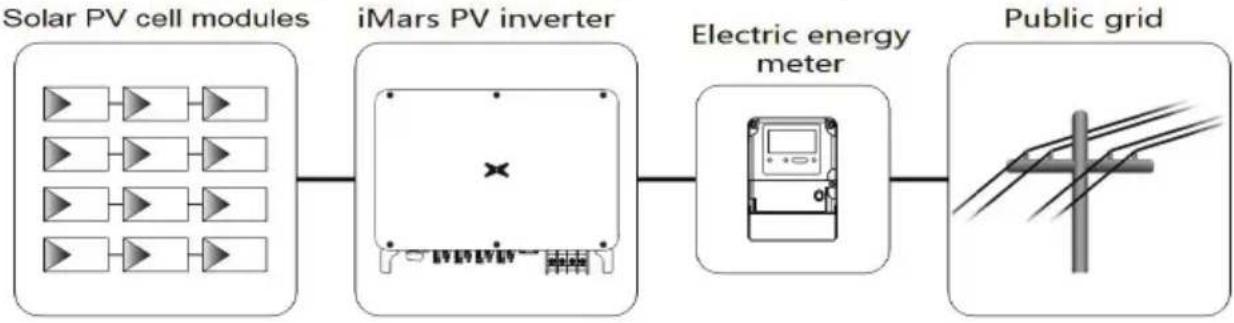
flowchart
graph LR
    A["Solar PV cell modules"] --> B["iMars PV inverter"]
    B --> C["Electric energy meter"]
    C --> D["Public grid"]
Fig 2.1 Application of PV grid-connected inverter
The PV grid-connected inverter is the core part of solar PV grid-connected power generation. The sunlight can be converted through PV panel to DC power, which further converted by gr inverter to the sine AC current with the same frequency and phase position as the public g feedback the AC power to the grid.
The PV grid-tied inverter is only for the solar PV power generation grid-tied system, and the Crystalline Silicon Solar Cells whose positive and negative electrodes are not grounded as input.
| ! | ● It is recommended that the PV array to be installed conforms to standards. | IEC 61730 |
2.1.1 Supported grid connection structure
iMars series grid-tied solar inverters support TN-S, TN-C, TN-C-S, TT and IT grid connected applied to the TT connection, the N-to-PE voltage should be less than 30V.
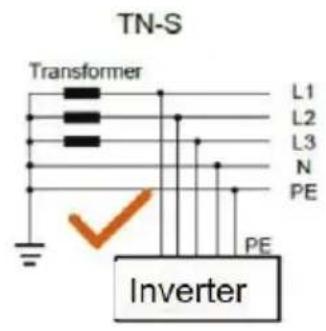
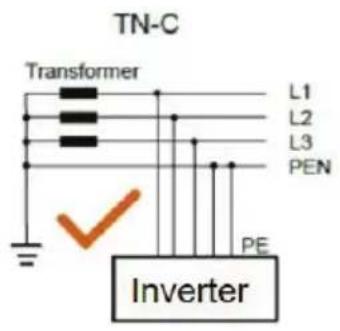
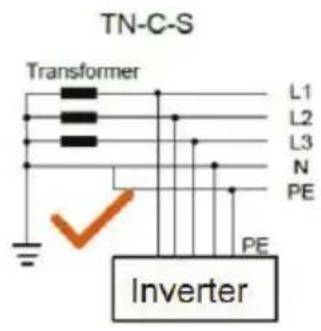
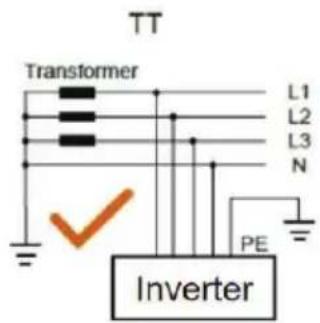
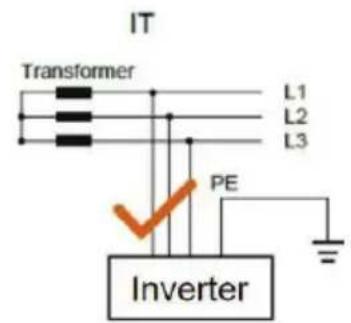
Fig 2.2 Grid forms supported by PV grid-tied inverters
2.2 Product appearance
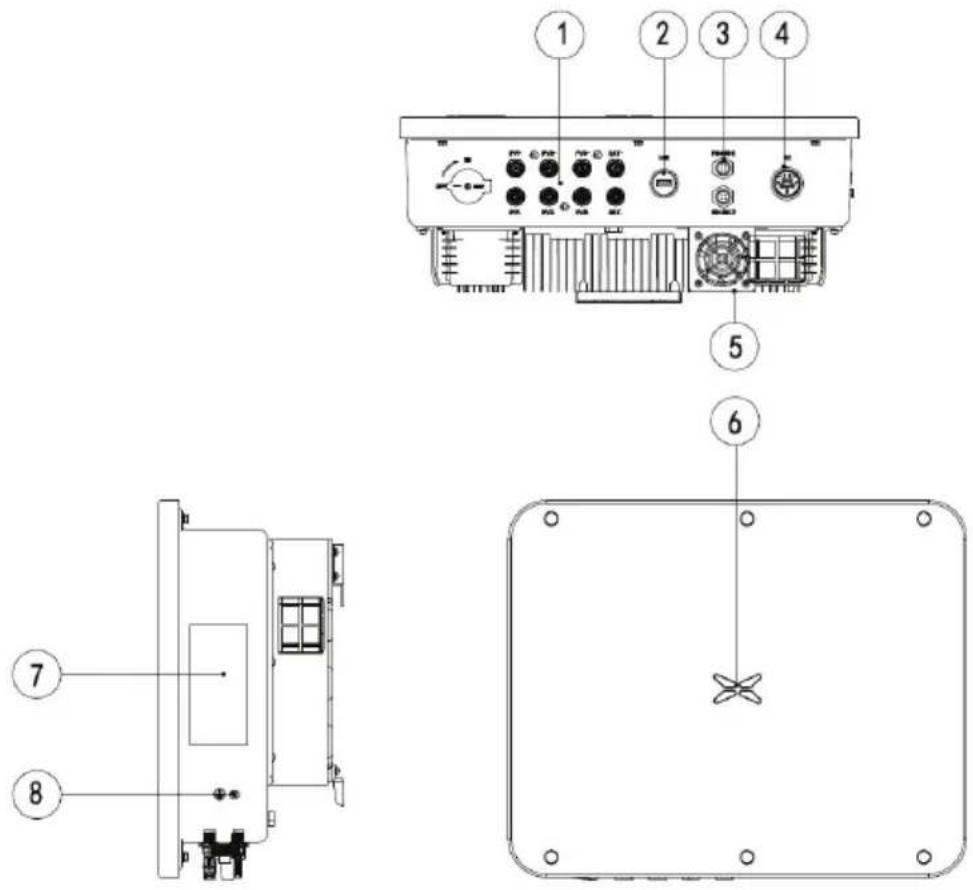
Figure 2.3 Appearance of the three-phase PV inverter
Table 2-1 Description of key exterior components of three-phase PV inverters
| Number | Name Introduction | |
| 1 DC | input interface Inverter | DC input terminal, connected to the PV array |
| 2 Communication interface USB | communication interface | |
| 3 RS | 485-1 485 communication | interface |
| 4 AC | terminal Inverter AC output port, connect to public grid | |
| 5 | Fan Installation components | Air inlet, for fixing the fan |
| 6 LED | pilot lamp Instructions | inverter current working condition |
| 7 Nameplate | Mark the inverter rating parameter | |
| 8 Ground terminal | There are two in total, choose at least one of them to connect | |
2.3 Nameplate description
Figure 2.4 shows the inverter nameplate.
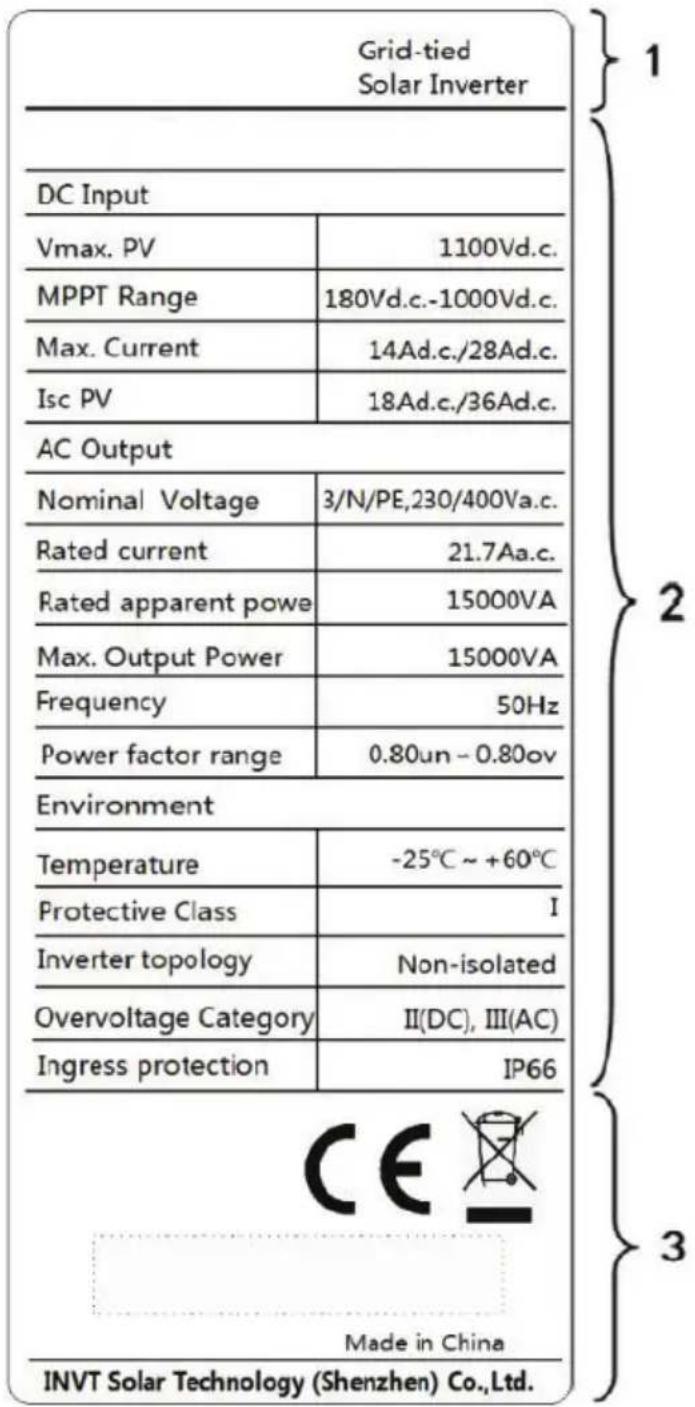
Figure 2.4 Nameplate
(1) Trademarks and product types
(2) Model and important technical parameters
(3) Certification system of the inverter confirming, serial number, company name and country of origin
| Icons Instruction | |
 | ● TUV certification mark. The inverter is certified by TUV |
 | ● CE certification mark. The inverter complies with the CE directive |
 | ● CQC certification mark. The inverter passed CQC certification |
 | ● EU WEEE mark. The inverter cannot be disposed of as domestic waste |
2.4 Product model
Table 2-2 Models of three-phase PV grid-connected inverters
| Product name Model Rated output power (W) | ||
| Three-phase (L1、L2、L3、N、PE) | ||
| Three-phase PV grid-connected inverter XG6KTR 6000 | ||
| Three-phase PV grid-connected inverter XG12KTR 12000 | ||
| Three-phase PV grid-connected inverter XG15KTR1 15000 | ||
Note: Technical parameters of PV grid-connected inverter refer to the appendix.
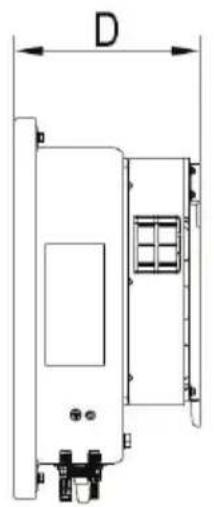
2.5 Outline dimension and weight
natural_image
Technical line drawing of a mechanical component with dimension label D (no text or symbols present)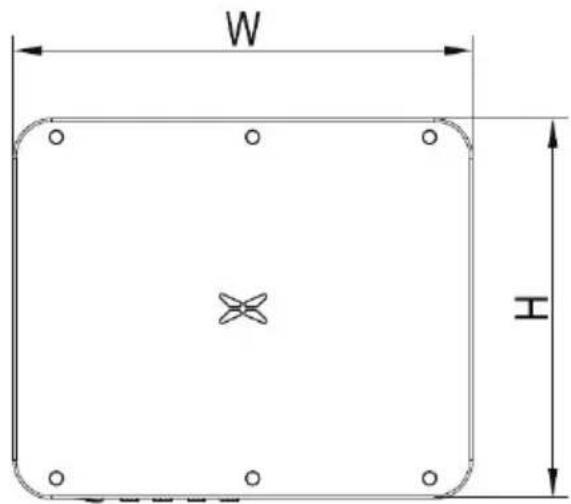
Figure 2.5 Outline dimensions of the inverter
Table 2-3 Dimensions and net weight of the inverter
| Model Height(mm) Width(mm) Depth(mm) Net weight(kg) | ||||||
| XG6KTR 390 | 476 | 188 | 11.5 | |||
| XG12KTR 390 | 476 | 188 | 12.7 | |||
| XG15KTR1 390 | 476 | 188 | 13.8 | |||
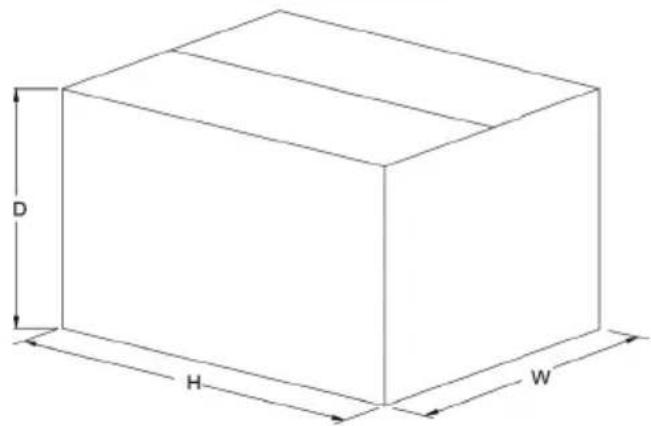
Fig 2.6 Dimension of paper package
Table 2-4 Dimension and gross weight
| Model | Height (mm) | Width (mm) | Depth (mm) | Weight (kg) | Package material |
| XG6KTR 483 | 575 | 384 | 14 | Corrugated case | |
| XG12KTR | 483 | 575 | 384 | 15 | Corrugated case |
| XG15KTR1 | 483 | 575 | 384 | 16 | Corrugated case |
2.6 The LED light panel
The LED indicator panel as the human-computer interaction interface, may indicate the work state of the inverter.
2.6.1 The LED light panel
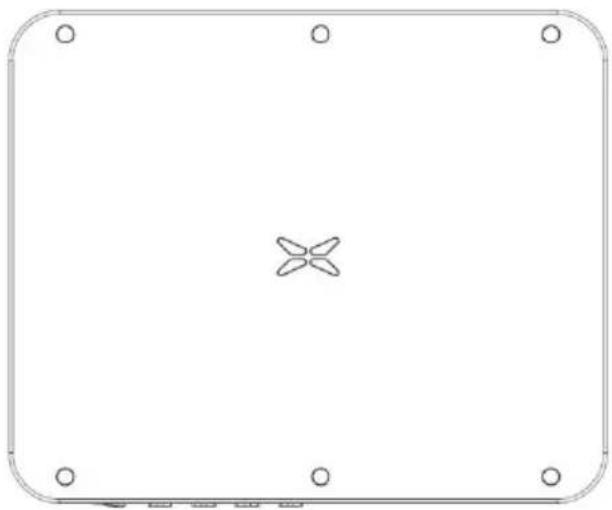
natural_image
Empty rounded square frame with a central cross-shaped symbol at the center (no text or labels)Figure 2.7 LED Front View
LED indicator status description:
 | Steady blue | Normal, grid-tied and generating power |
| Blinking blue at short interval (0.2s) | Bluetooth connected and with communication. And inverter has error | |
| Blinking blue at long interval (2s) | DC or AC connected, inverter standby or starting (no power generation) | |
 | Steady red | Error occurs.( The inverter fail connect to the grid) |
| Blinking red | Bluetooth connected and in communicating but inverter has error | |
| Red light off AC and DC have been powered off. | ||
2.6.2 LCD operation panel
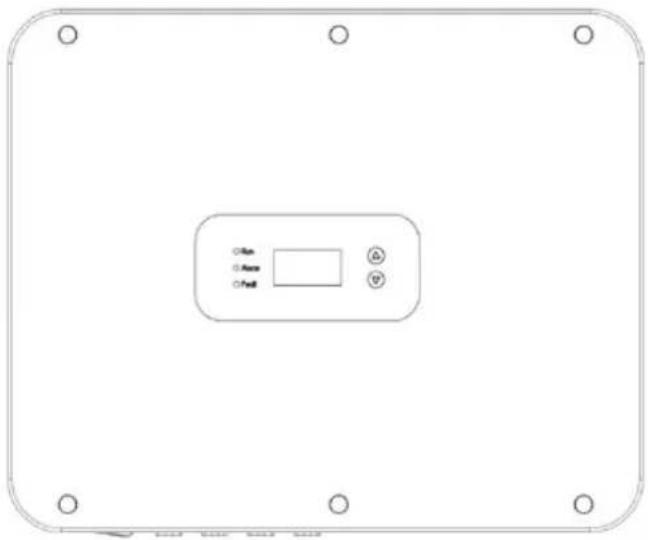
natural_image
Front view of a rectangular electronic device with control buttons and mounting holes (no text or symbols on the device itself)Figure 2.8 LCD Front View
Definition of LCD operation panel:
| 1"Run", running status, shows green light' | 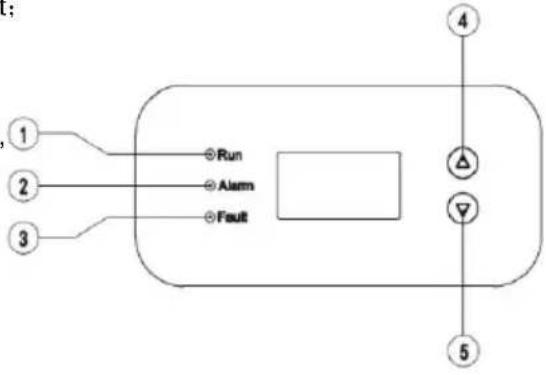 |
| 2"Alarm", fault alert, shows yellow light; | |
| 3 "Fault", the PV string is disconnected shows red light; | |
| 4 Select upwards, short press to move upwards, long press to confirm; | |
| 5Select downward, short press to move down, long press to return. |
LED light display status description:
| Indicator light | Instruction State | Description | |
| Run | Grid-connected indicator light | Green light on connected to grid | |
| Green light off Not connected to grid | |||
| Green light flashes 0.5s On, 0.5s Off) | The inverter is in maintenance status | ||
| Alarm Alarm indicator | Yellow light The | inverter is in fault state | |
| Yellow light flashes slowly 1s On, 4S | The Inverter is in alarm state | ||
| Yellow light flashes | The inverter is under | ||
| (0.5s on, 0.5s off) | maintenance | ||
| Fault | The PV connection indicator light | Red light on | The power-on indicator light, it indicates that at least one of the PV strings is connected normally and the input voltage is ≥20V |
| Red light off | The inverter is disconnected from all PV strings, or the DC input voltage of all MPPT circuits is less than 200V | ||
2.7 Bottom of the inverter
XG3-15KTR is equipped with a DC switch, which connects or disconnects all PV inputs.
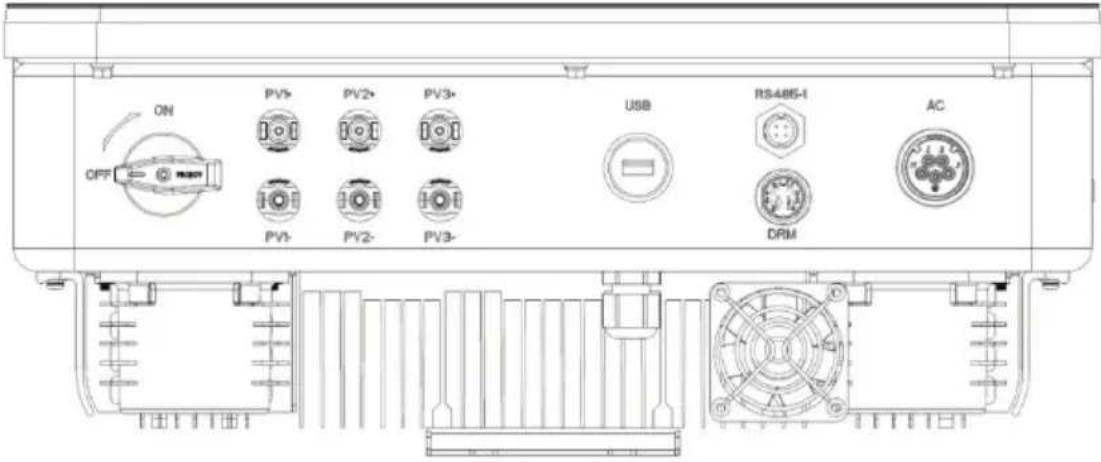
Figure 2.9 XG15KTR1 Bottom View
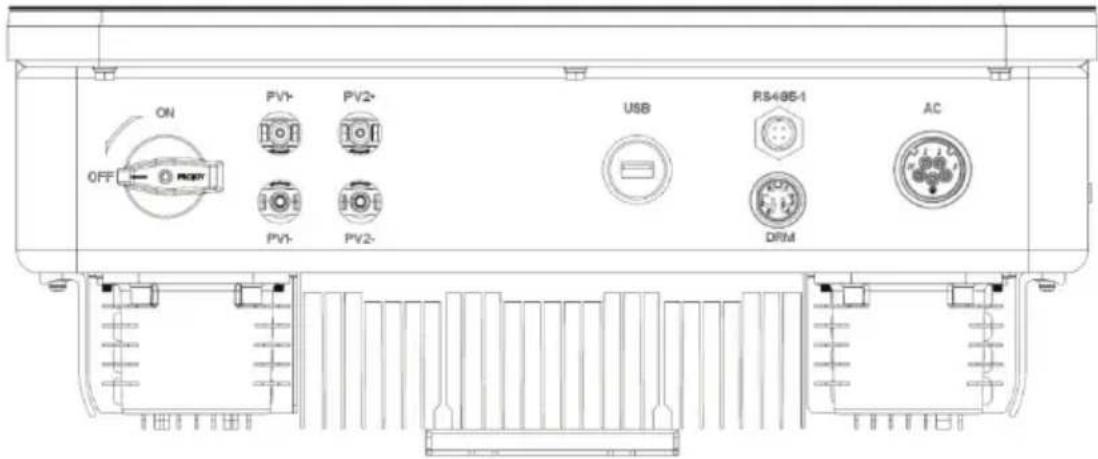
Figure 2.10 XG3-12KTR Bottom View
3 Inverter storage
If the inverter is not put into use immediately, the storage of inverter should meet the f requirements:
- Do not remove the inverter outer package.
- The inverter needs to be stored in a clean and dry place, and to prevent the erosion of dust and moisture.
- The storage temperature should be kept at -30^ +70^ , and the relative humidity should be kept at 5% RH 95% RH .
- If multiple inverters to be stacked, it is recommended to place them according to the stacking layer number at the time of delivery. When stacking, please place the inverter avoid personal injury or equipment damage caused by equipment tipping.
- Avoid chemical corrosive substances, otherwise it may corrode the inverter.
- During storage, regular inspections are required. If insect bites or packaging damage are found, the packaging materials must be replaced in time. After long-term storage, the inverter need inspected and tested by professionals before it can be put into use.
4 Installation
This chapter introduces the installation of the inverter and the connection of the inverter to power generation system. Connecting inverters to PV power generation systems mainly involves PV strings and public grids connect to the inverter.
Please read this chapter carefully before installation, and ensure that all installation condition met by professional technicians to complete the inverter installation.
4.1 Unpacking confirmation
The inverter has been thoroughly tested and rigorously checked before delivery, but damage still occur during transportation. Before unpacking, check carefully whether the product information order is consistent with that on the nameplate of the package box and whether the product intact. If any damage is detected, please contact the shipping company or the supplier directly also provide photos of the damage to get our fastest and best
When the inverter is left unused, please put it in the original packing box and take meat prevent moisture and dust.
Take out the inverter after unpacking, please check the following items:
(1) Confirm that the inverter is complete and not damaged;
(2) Confirm that there are manuals, interface accessories and installation accessories in the box;
(3) Confirm that there is no damage or shortage in the delivery content in the packing
(4) Check what the order is consistent with the product information on the nameplate of inverter;
(5) The standard delivery list is as follows.
Standard deliverables of three-phase inverter:
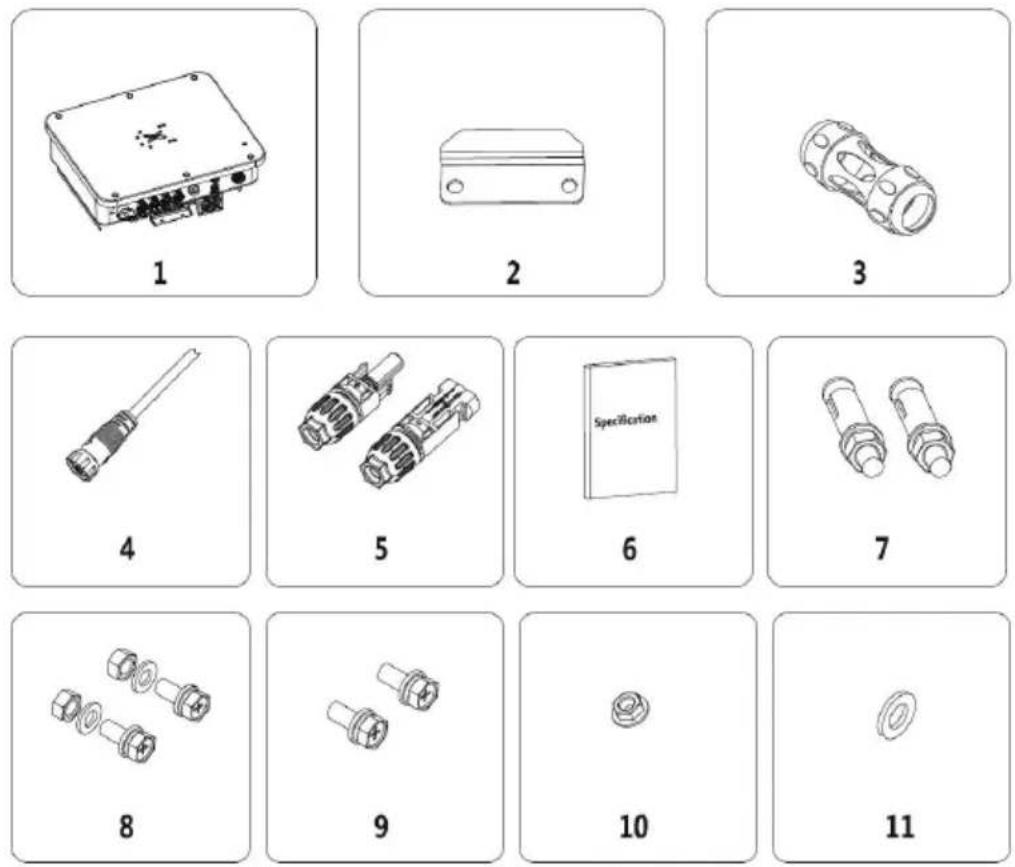
Fig4.1 Delivery content of three-phase inverter 3-15kW
Table 4-1 delivery contents of three-phase inverter
| Number | Name Quantity | |
| 1 Inverter 1 | ||
| 2 Mounting bracket 1 | ||
| 3 AC side quick connect terminal 1 | ||
| 4 DRM communication cable 1 | ||
| 5 DC connector (pair) | 12 | |
| 6 User manual | 1 | |
| 7 Stainless Steel Expansion Bolts M4*50 | 4 | |
| 8 M6 combination bolt | 4 | |
| 9 M4 combination bolt | 6 | |
| 10 M6 nut | 4 | |
| 11 M6 Flat Washer | 4 | |
Please check the above carefully. If you have any questions, please contact the supplier in time.
4.2 Prepare before installation
4.2.1 Installation tool
Table 4-2 List of installation tools
| Number | Installation tools instruction | |
| 1 Marker pen Mark the mounting holes | ||
| 2 Electric drill Drill holes in the bracket or wall | ||
| 3 Hand hammer Knock the expansion bolt | ||
| 4 Adjustable wrench For fixed mounting bracket | ||
| 5 | Hexagon screwdriver | For locking anti-theft screws and for disassembling and disassembling AC junction box |
| 6 | "Flat" or "Cross" screwdriver | For AC wiring |
| 7 | Meg ohmmeter | Measure insulation performance and impedance to ground |
| 8 | Multi-meter | Detect circuit and measure AC and DC voltage |
| 9 | Electric soldering iron | Welding communication cable |
| 10 | Crimping Tool | Crimp DC terminal |
| 11 | Hydraulic clamp | Crimp ring terminal for AC wiring |
4.2.2 Installation environment
(1) The inverter can be installed in indoor and outdoor environment.
(2) During the operation of the inverter, the temperature of the chassis and heat sink will be relatively high. Please do not install the inverter in the easily touched position.
(3) Do not install inverters in areas where flammable and explosive materials are stored.
(4) The inverter shall be installed in a well-ventilated environment to ensure inverter heat dissipation.
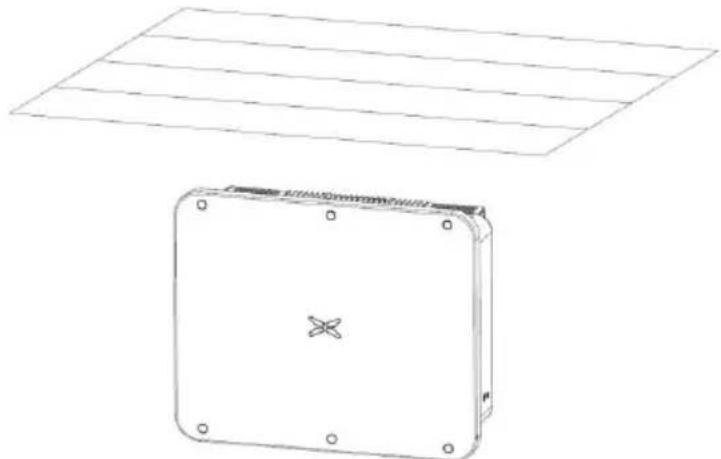
(5) It is recommended to choose the installation site with shelter or build
natural_image
Technical line drawing of a rectangular electronic device with mounting holes and a flat panel above (no text or symbols)Fig 4.2 Sunshade
(6) The installation environment temperature is - 25 ℃ \~ 60 ℃;
(7) The installation site should be far away from the electronic equipment with strong electromagnetic interference;
(8) The installation site should be fixed and solid object surface, such as wall, metal sup
(9) The installation position shall ensure the reliable grounding of the inverter, and the gross metal conductor material shall be consistent with the reserved ground integral of the inverter.
4.3 Space requirements
(1) The height of installation position shall ensure that the line of sight and LED display the same horizontal plane, so as to check the inverter status conveniently.
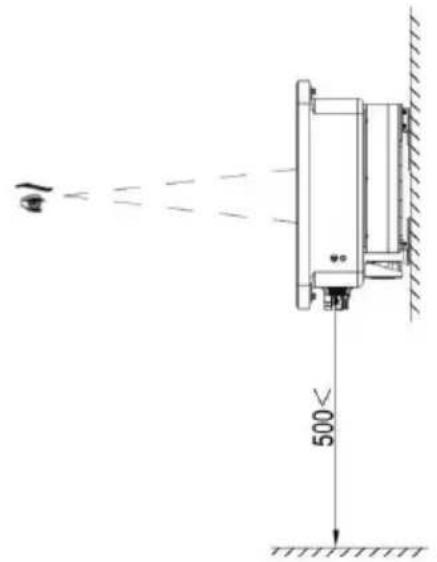
Fig4.3 Optimum installation height area
(2) There is enough reserved space around the installation site to facilitate the disassembly assembly of inverter and air convection. As shown in Fig 4.3.

Fig 4.4 Installation spacing of inverter
(3) When installing multiple inverters, a certain distance shall be reserved between the inverter shown in Figure 4.4. At the same time, sufficient distance shall be reserved between the lower parts of the inverter to ensure good heat dissipation.

flowchart
graph LR
    A["Step 1: X"] -->|≥400mm| B["Step 2: X"]
    B -->|≥400mm| C["Step 3: X"]
Fig 4.5 Size requirements for side-by-side installation
(4) The installation surface should be perpendicular to the horizontal line, as shown in Fig. Please install the inverter vertically or backward ≤ 15^ to facilitate the heat dissipation of th Do not tilt the inverter forward, horizontally, upside down, leaning too far, or tilting to the
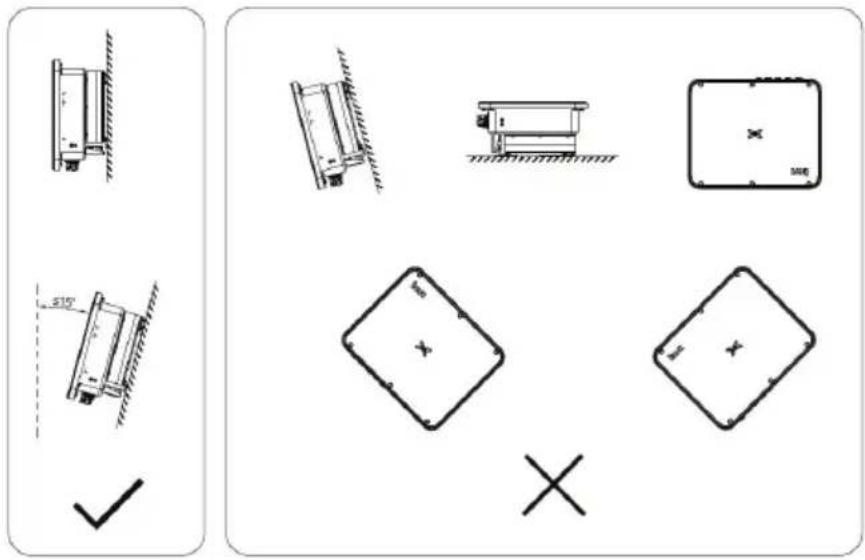
Fig 4.6 Installation position of inverter
4.4 Mounting board size
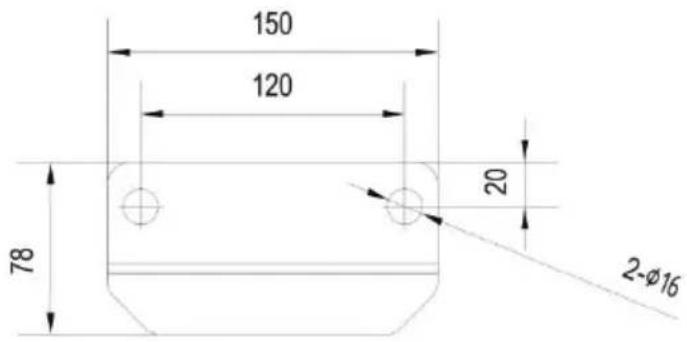
Fig 4.7 Dimensions of the mounting plate
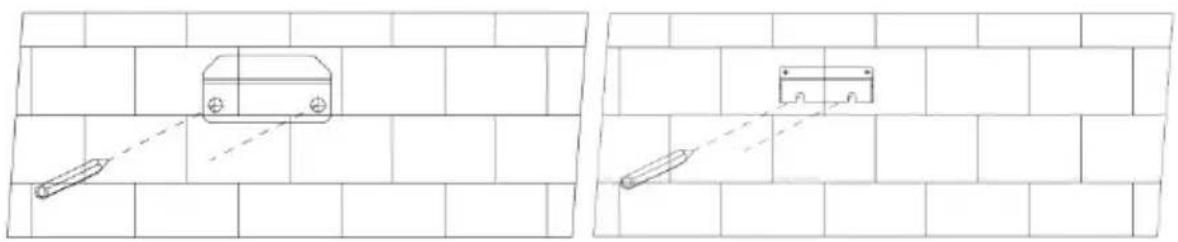
4.5 Wall installation
Step 1: Place the hanging board on the wall mounting point, use a level to adjust the angle, and mark with a marker.
natural_image
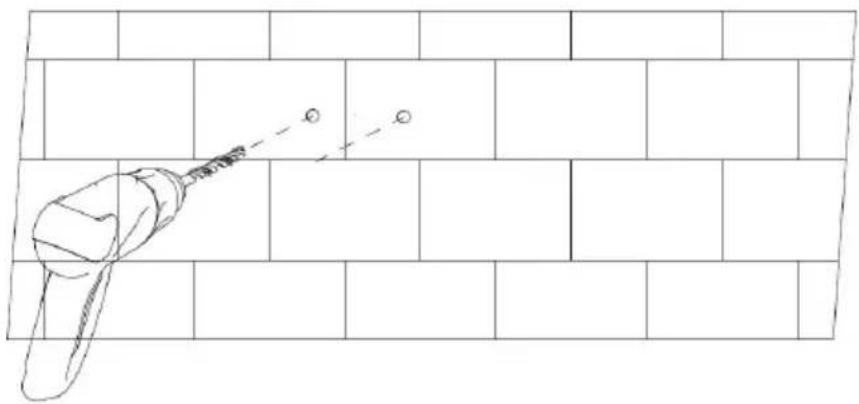
Two technical line drawings of a vehicle on a brick wall, showing front and side views with no text or symbols.Step 2: Use a hammer drill to drill holes and install expansion bolts. Users need to pre-expansion bolts by themselves. It is recommended to use M8×60 stainless steel pressure expansion bolts.
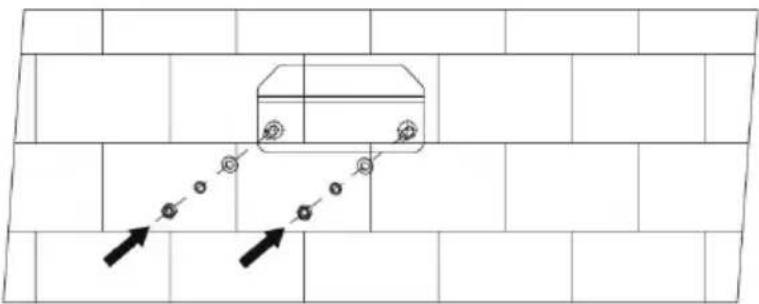
Step 3: Fix the hanging board. Clean the holes, use a rubber hammer to drive the expansion bolt into the hole, use a wrench to tighten the nut to fix the end of the bolt, then remove washer and flat washer, and then fix the wall mount plate to the wall and lock it with torque of 13N^*m 。
4.6 Install the inverter
Step 1: Take the inverter out of the packaging box.
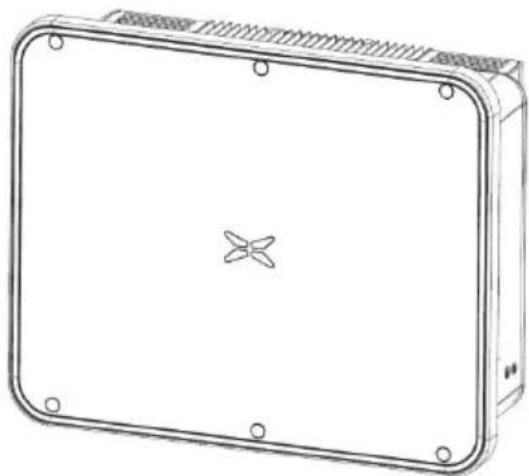
Step 2: If the installation location is high, you need to lift the inverter to the hanging plate, use the
lifting equipment to lift the inverter 100mm off the ground and then pause, check the tight hoisting ring and rope. After confirming that the connection is secure, lift the inverter to a destination.
natural_image
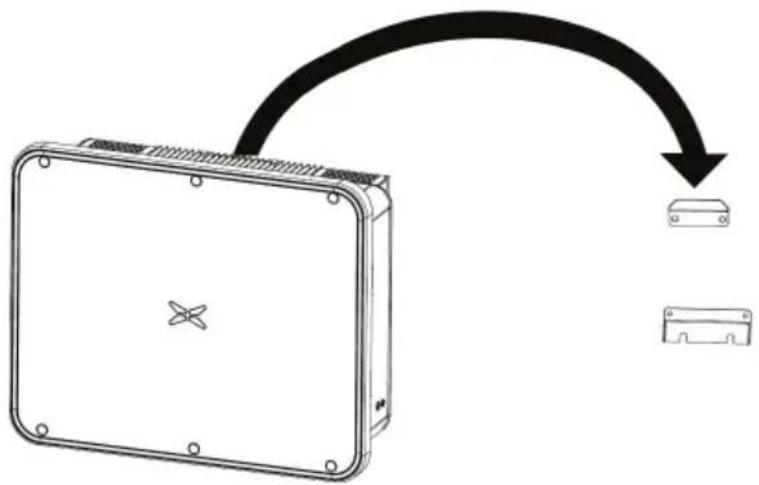
Line drawing of a rectangular electronic device with mounting holes and a central star-shaped symbol (no text or labels)Step 3: After lifting the inverter, buckle the bracket plate on the back of the machine into the
wall-mounting plate, and make sure that the machine bracket plate fits well with the groov hanging plate.
flowchart
graph TD
    A["Device Box"] --> B["Arrow"]
    B --> C["Device 1"]
    B --> D["Device 2"]
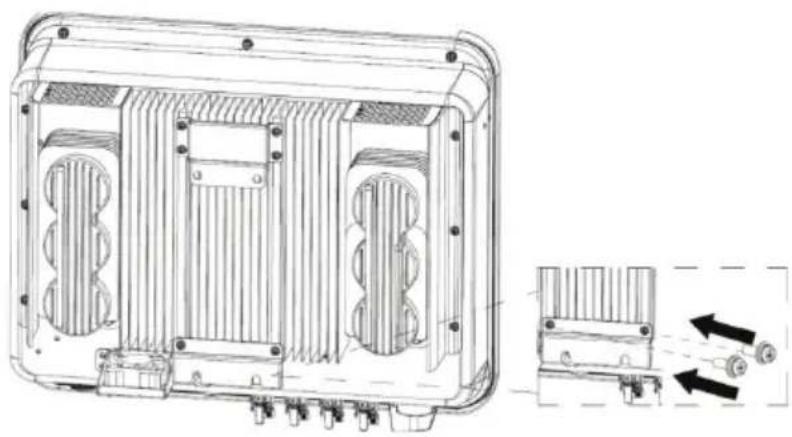
Step 4: Use an M4×12 screw to fix the inverter with the hole on the left side of the chassis and the wall mount, and the tightening torque is 2.5N*m
natural_image
Technical line drawing of a rectangular electronic device with internal cooling fins and mounting holes, showing internal structure and assembly (no text or symbols)5 Electrical connection
5.1 Overview of electrical connections
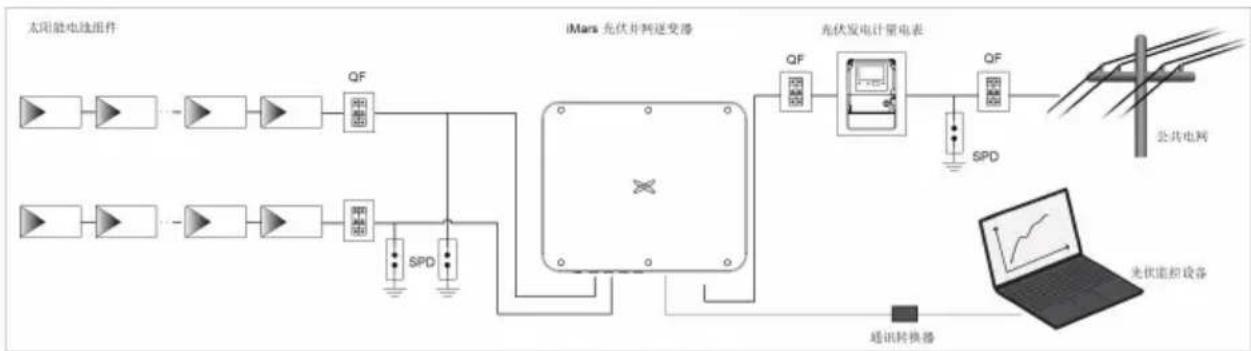
This section will introduce the electrical connection related content and related safety precaution detail.
flowchart
graph LR
    A["太阳能电池组件"] --> B["QF"]
    C["太阳能电池组件"] --> D["SPD"]
    B --> E["iMars 充伏并网逆变器"]
    D --> E
    E --> F["QF"]
    F --> G["充电发电计量电表"]
    G --> H["QF"]
    H --> I["公共电网"]
    G --> J["SPD"]
    J --> K["光伏能控设备"]
    L["通讯转换器"] --> M["手机界面显示"]
Fig 5.1 Schematic diagram of PV grid-connected system connection
 | ● Electrical connections must be completed by professional worker. Wrong operation may cause equipment damage during system operation, and even personal injury.● All electrical installations must comply with national/regional electrical safety regulations.● Ensure that all cables are installed tightly, without any damage, and meet the specified safety requirements.● It is not allowed to turn on the AC and DC circuit breakers before the inverter completes the electrical connection and check. |
| Note | ● Read this section carefully and operate strictly according to the requirements.● Pay attention to the rated voltage and current values specified in this manual, do not exceed the limit values specified in this manual. |
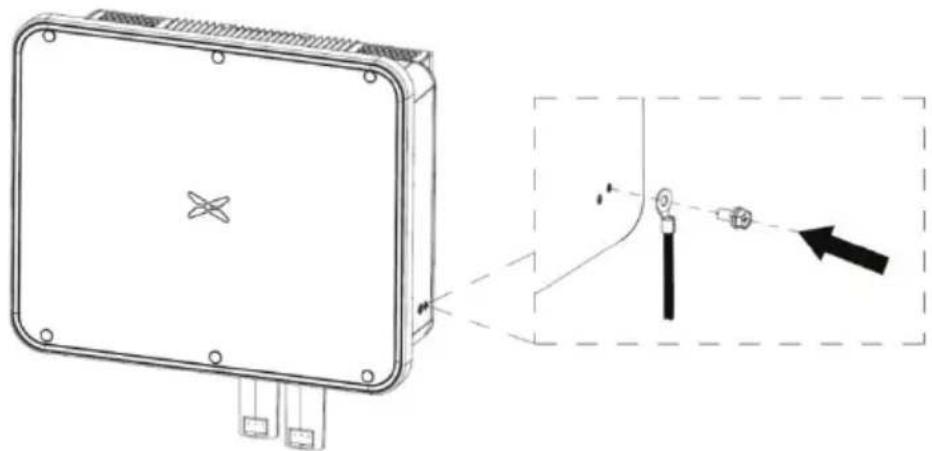
5.2 Connect the protective ground wire
Step 1: Crimp the OT terminal to the ground wire
Step 2: Remove the screw at the grounding position on the side of the chassis, fix the ground wire with the screw and tighten the tightening torque 7-9N·m.
natural_image
Technical line drawing of a device with mounting holes and a close-up inset showing a vertical alignment with a pointer (no text or symbols)Fig 5.2 PV grounding diagram
 | ● The inverter must be grounded through the side screws to ensure reliable grounding and reliable lightning protection. |
5.3 Connection of PV string
Step 1: Connect the outlet line of the PV panel to the MC4 terminal delivered by the machine
The MC4 terminal crimping method is as follows:
(1) As shown in Fig 5.2, connect the output wire of the PV string to the DC connecto Loosen the fastening nut of the connector; strip off the 15mm insulation layer of the DC cal crimping pliers to press the standard metal terminal tightly. The tightening torque of the water the tail is 2.5 - 3Nm . The wiring method of the positive and negative connectors is the same. the positive and negative poles of the PV string correspond correctly to the positive and neg connectors, then connect them firmly;
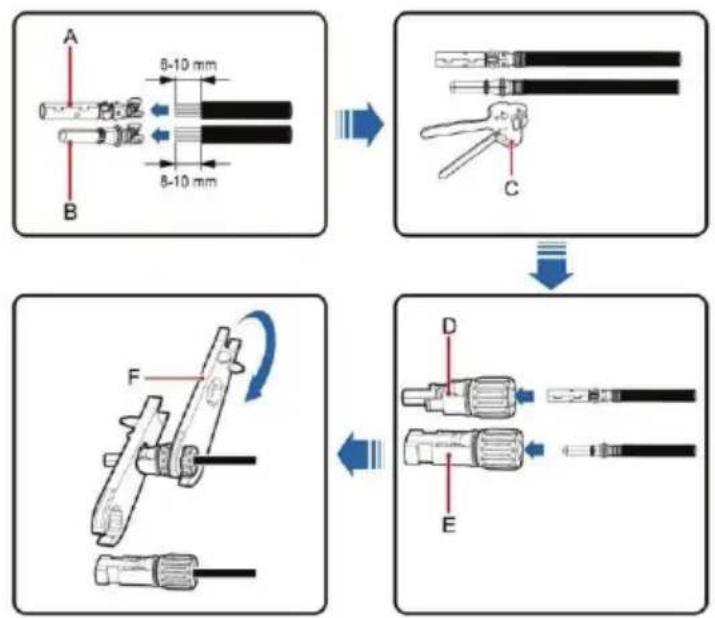
Fig 5.3 Connection between MC4 DC connector and PV string
(2) After the DC connector is connected, use a multi-meter to measure the voltage of the string, verify the polarity of the DC input cable, and ensure that the voltage of each string allowable range of the inverter, as shown in Fig 5.3.
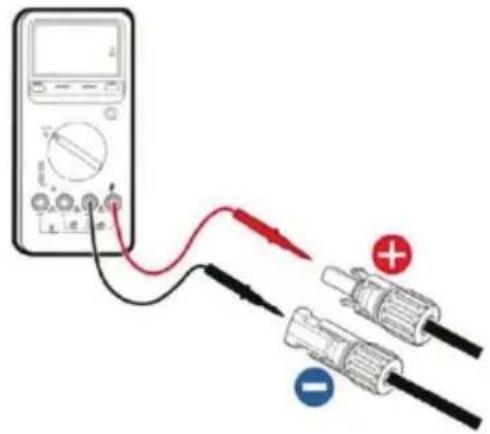
Fig 5.4 Measuring DC input voltage
| ● The PV string connected to iMars series inverter must adopt the DC connector configured especially for the inverter, do not use other connection devices with authorization from our company, otherwise damage to the device, unstable operation or fire may occur and our company will not undertake quality assurance or assume |
Step 2: After the DC terminal is connected, it is directly connected to the MC4 terminal of the inverter.
(1) Connect the positive and negative connectors of the PV strings that have been connected corresponding positions of the inverter DC interface, and confirm the tight connection, as shown 5.5;
(2) When disassembling the DC connector from the inverter, insert the tip of a slotted sc into the raised hole in the middle of the connector, available for the connector to withdraw.
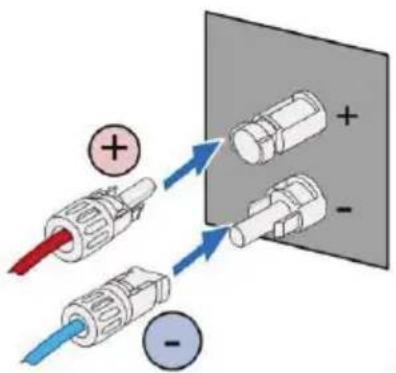
Fig 5.5 PV DC string connected to the inverter
5.4 Connection of DRM & RS485
The picture of DRM & RS485 connector is as follows:

natural_image
Technical line drawing of a USB connector with pinout and cable (no text or symbols)Fig 5.6 DRM & RS485 connector side view
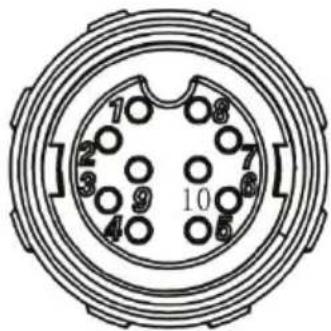
Fig 5.7 DRM & RS485 connector Front view
Table 5-1 The DRM & RS485 connector Signal description
| Pin NO. | Cable color Signal name | |
| 1 Red RS485- | ||
| 2 Brown RS485+ | ||
| 3 Yellow Dry contact- | ||
| 4 Green Dry contact+ | ||
| 5 White COM | ||
| 6 | Blue | REF |
| 7 | Black | DRM4/8 |
| 8 | Orange | DRM3/7 |
| 9 Purple | DRM2/6 | |
| 10 | Grey | DRM1/5 |
5.5 Three-phase inverter grid access
Table 5-2 Three-phase photovoltaic inverter AC connector interface description
| Inverter AC connector interface | Three-phase grid Remarks | |
| L1 L1 (A) No phase sequence | ||
| L2 L2 (B) No phase sequence | ||
| L3 L3 (C) No phase sequence | ||
| N | N(Neutral line) | Support N-wire and non-N-wire connection |
 | PE ground wire (grounding point on the outside of the chassis) | Must be connected |
5.5.1 Connection terminal grid access
(1) Connect the four wires of the three-phase public power grid L1, L2, L3 and N to the interface according to Table 5-1, and connect the grounding wire to the grounding point on the chassis, and ensure that the conductors are crimped firmly without exposure, As shown
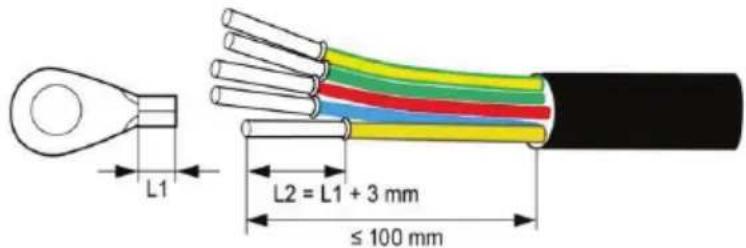
Fig 5.8 Crimp cable terminal
(2) Then tighten the L1, L2, L3, N, crimped terminals according to Fig 5.9 to a torque the PE grounding torque of the outer side of the chassis to a torque of 7 - 9N· m ; then tight Tighten the waterproof cap.
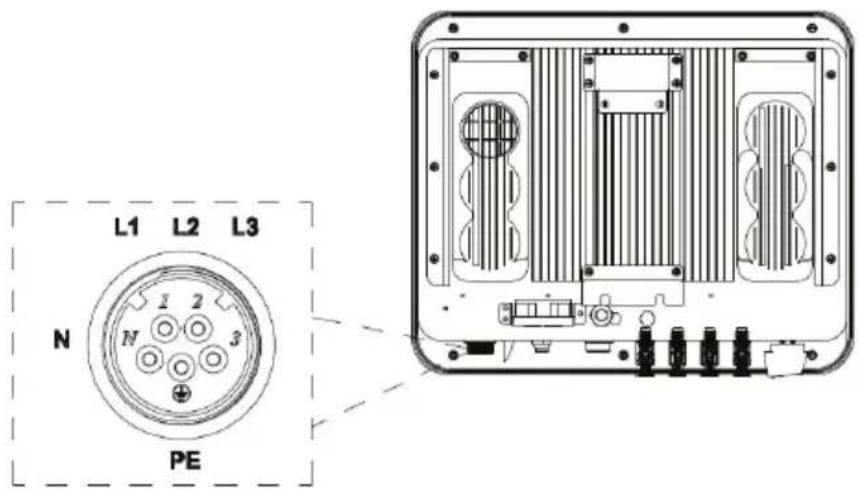
Fig 5.9 Three-phase inverter grid connection
5.5.2 Parallel requirements for multiple inverters
Use multiple inverters to directly connect to the low-voltage three-phase grid solution. If the capacity of the inverters is greater than 1MVA, please contact our after-sales service personnel
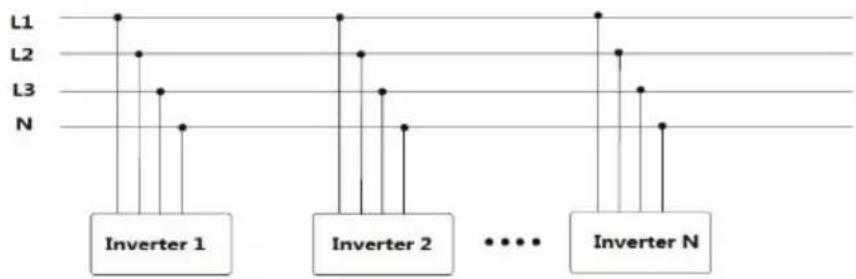
scatter
| Inverter | Level | Value | | -------- | ----- | ----- | | Inverter 1 | L1 | 100 | | Inverter 1 | L2 | 50 | | Inverter 1 | L3 | 30 | | Inverter 1 | N | 20 | | Inverter 2 | L1 | 100 | | Inverter 2 | L2 | 60 | | Inverter 2 | L3 | 40 | | Inverter 2 | N | 30 | | Inverter N | L1 | 100 | | Inverter N | L2 | 70 | | Inverter N | L3 | 50 | | Inverter N | N | 40 |Use multiple inverters to connect the low-voltage side of the medium-voltage transformer, an high-voltage side to directly connect to the medium-voltage power grid. At the same time, the must meet the total output power requirements of the inverter and have a neutral point or a neutral conductor.
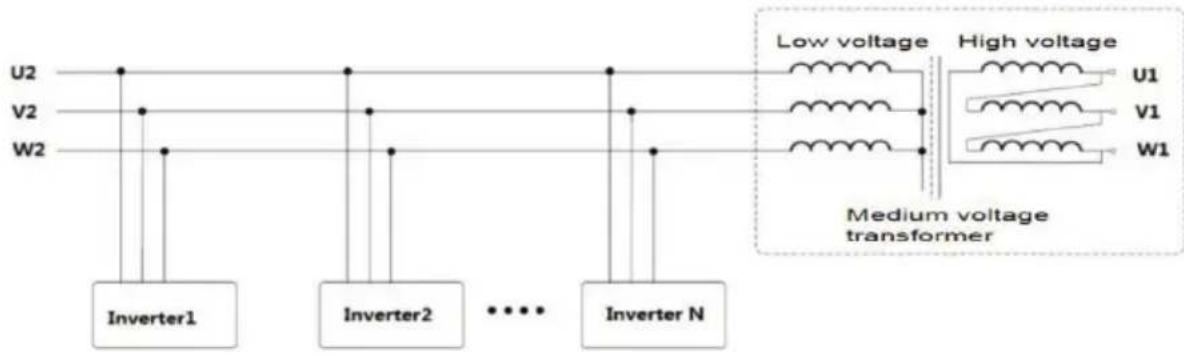

- It is recommended to use a transformer with short-circuit impedance ≤7%
5.5.3 Grid voltage requirements
Before installing the PV inverter, you need to confirm the working voltage of the AC side product. There are two rated voltages of 400Vac and 480Vac;

- For 400Vac systems, the AC side of the inverter can be directly connected to domestic three-phase power grid;
- For the 480Vac system, the inverter needs to be connected to the three-phas grid through a transformer, the transformer ratio is 480V/400V, and the capacity refers to the actual inverter power.
6 Running
This chapter introduces the related operations during the use of the inverter, which mainly pre-operation inspections, grid-connected operation of the inverter, inverter shutdown, and precaution for daily maintenance and repair of the inverter.
6.1 Inspection before running
The following items must be checked strictly before running the PV grid-connected inverter (including but not limited to the following items):
(1) Confirm the installation site of the inverter meet requirements of section 4.2.2 to ensure convenient installation, disassemble, operation and inspection on the inverter;
(2) Confirm the mechanical installation of the inverter meet requirements of section 5.3;
(3) Confirm the electrical connection of the inverter meet the requirements of section 4.4;
(4) Confirm all the switches are in "OFF" state;
(5) Confirm the open-circuit voltage of PV module conforms to the parameter requirement inverter DC side in appendix;
(6) Confirm the electrical safety marks on the installation site is clear enough.

- In order to ensure a safe, normal and stable operation of the PV power ge system, all the newly installed, renovated and repaired PV grid-connected power generation system and its grid-connected inverter must undergo inspection before running.
6.2 Inverter grid-connected running
Please strictly follow the steps below to turn on the inverter and complete the grid-connected operation of the inverter::
| Note | ● For the first operation of the inverter, a country must be selected to set grid-connected standards.● Please keep the inverter powered on for at least 30 minutes, and charging of the built-in clock battery of the inverter to ensure the normal operation of the clock! |
(1) Make sure that the inspection items in Section 6.1 meet the requirements;
(2) Turn on the AC side circuit breaker of the inverter public grid;
(3) Turn on the DC switch integrated in the inverter;
(4) Turn on the switch on the DC input side of the photovoltaic string;
(5) Observe the status of the inverter's LED lights or the information displayed on the Li (refer to section 2.6 for LED status lights and LCD display information);
(6) Wait for the inverter to connectrido successfully.
6.3 Inverter stop
When it is necessary to perform power failure maintenance, overhaul, and troubleshooting of inverter, please strictly follows the steps below to shut down the inverter:
(1) Disconnect the AC side circuit breaker of the inverter public grid;
(2) Disconnect the DC switch integrated in the inverter;
(3) Disconnect the line switch on the DC input side of the photovoltaic string;
(4) Wait at least 3 minutes until the internal components of discharger and the inverter shutdown operation is completed.
6.4 Daily maintenance and inspection
In the PV grid-connected system, even if the day and night change and the season charge grid-connected inverter can automatically complete grid-connected power generation, shutdown and start-up operations without human control. In order to ensure and prolong the service life of in addition to using the inverter in strict accordance with specified in this manual, it is also necessary to carry out the necessary daily maintenance and inspection of the inverter.
6.4.1 Periodic maintenance on the inverter
| Check Item | Inspection Method | Maintenance Cycle |
| Save inverter operating data | The monitoring software is used to read the data of the inverter in real time, and the data recorded by the monitoring software is regularly backed up. Save the inverter's operating data, parameters and logs recorded in the monitoring software to a file. Check the monitoring software and check the inverter parameter settings through the handheld keyboard. | Once per quarter |
| Inverter running status | Observe whether the inverter is installed firmly and whether it is damaged or deformed. To listen whether there's any abnormal sound during inverter running.When the system is connected to the grid, check various variables. Check whether the heating of the inverter shell is normal, and use a thermal imager to monitor the heating of the system. | Once per half a year |
| Clean the inverter | Check the RH and dust around the inverter, and inverter when necessary. Refer to section 6.4.2. | Once per half a year |
| Electrical connections | Check whether the system cable connection is loose,whether the inverter wiring terminal is loose, and then tighten it according to the method specified in section 4. Check whether the cable is damaged, especially whether the rubber skin in contact with the metal surface has cut marks. | Once per half a year |
| Cooling fan maintenance and replacement | For three-phase inverter products, observe whether the air inlet and outlet are normal, and check whether there are cracks in the fan blades. Listen for abnormal order at per half when the fan is running. If necessary, clean the air a in year and outlet; if the fan is abnormal, it needs to be replaced in time, see section 6.4.2. | |
| Security function | Check the inverter LCD and the shutdown function of the system. Simulate stop and c the stop signal communication. Check the warning labels and replace a year them if necessary. | Once per half place a year |
6.4.2 Maintenance guidance
Inverter cleaning
The cleaning steps are as follows:
(1) Disconnect the input and output connections.
(2) Wait ten minutes.
(3) Use a soft brush or vacuum cleaner to clean the surface of the inverter and the outlet.
(4) Repeat the operation content in section 6.1.
(5) Restart the inverter.
Fan maintenance
 | ● Stop the inverter before maintenance work, and all power inputs of the inverter must be disconnected.● Wait at least 3 minutes for the capacitors inside the inverter to fully discharge before starting maintenance work.● Only professional electricians can perform maintenance and replacement of the fan. |
Step 1: Stop the inverter and disconnect the electrical connection.
(1) Disconnect the input and output connections.
(2) Turn the DC switch to the "OFF" position.
(3) Wait ten minutes.
(4) Disconnect all electrical connections at the bottom of the inverter.
Step 2: Disconnect the fan power plug and remove the fan cover at the bottom of the chassis.
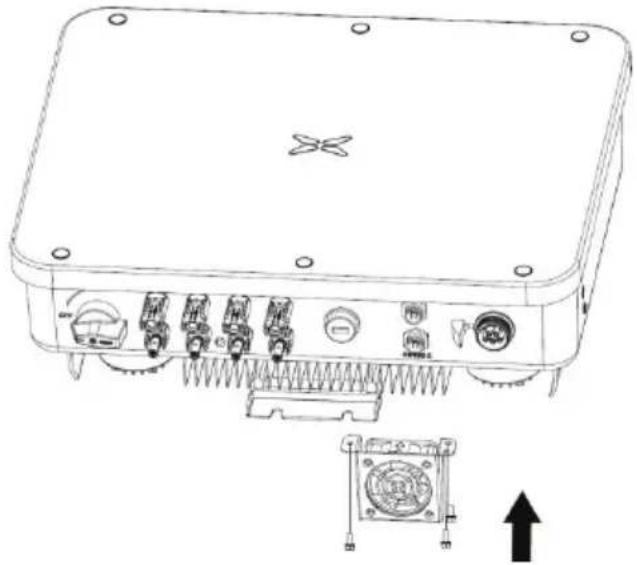
natural_image
Technical line drawing of an electronic device with ports and connectors, showing internal components and a mounting bracket (no text or symbols)Step 3: Use a soft brush or vacuum cleaner to clean the fan. If the fan is damaged, follow step 4.
Step 4: If the fan is damaged, remove the damaged fan and install the good fan to it position.
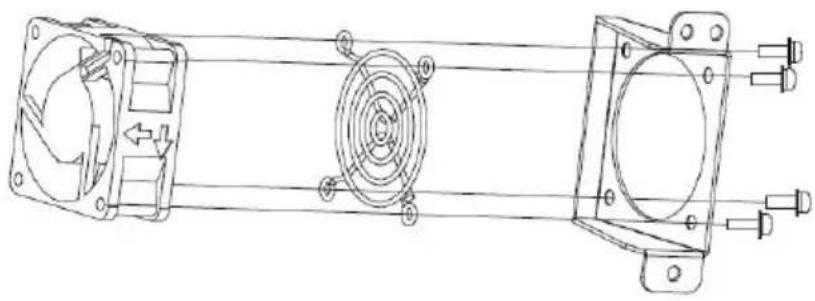
natural_image
Technical line drawing of a mechanical assembly with fan, motor, and housing components (no text or labels)Step 5: Re-install the fan tray to the inverter in the reverse order and restart the inverter.
| Note | ● Once the inverter stops due to an alarm, it is prohibited to start the inverter immediately. You should find out the cause and confirm that all faults have be eliminated before starting the inverter. The inspection should be carried out strict in accordance with the steps in section 6.1. |
7 Troubleshooting
This chapter introduces fault alarms and codes, which are used to quickly find inverter fault
Table 7-1 Inverter fault codes
| Number | Fault types | Fault code | Fault information Solution | |
| 1 | PV voltage fault | 01-01 | Low PV voltage | Check whether the PV terminal is plugged in properly |
| 01-02 | High PV voltage | Check whether the panels are connected in series correctly | ||
| 2 | BUS voltage error | 03-01 | Low BUS voltage | If the inverter does not work normally, please contact customer service |
| 03-02 | High BUS voltage | |||
| 03-03 | BUS voltage imbalance | |||
| 3 Flow failures | 05-01 | Inverter hardware flow | If the fault is reported repeatedly, firstly check whether there is capacitive or inductive equipment on the grid side repeatedly cutting into the grid; if not, please contact customer service | |
| 05-02 | Inverter software flow | |||
| 05-03 | The BOOST hardware flow | |||
| 05-04 | The BOOST software flow | |||
| 4 Thermal failure | 06-01 | Inverter over temperature | Check whether the air inlet and outlet are blocked and whether the ambient temperature is too high | |
| 06-02 | BOOST over temperature | |||
| 06-03 | Heatsink over temperature | |||
| 06-04 | Ambient over temperature | Check for obstacles around the inverter | ||
| 5 | Insulation detection fault | 07-01 | Insulation detection fault | Check whether the panel wiring terminals have entered the water, or are damaged and exposed to the ground |
| 6 Drive fault 08-01 | Drive fault | Please contact customer service | ||
| 7 | Communication fault | 09-01 | DSP1 and ARM SCI fault | Please contact customer service |
| 09-02 | DSP2 and ARM SCI fault | |||
| 09-03 | DSP1 SPI fault | |||
| 09-04 | DSP2 SPI fault | |||
| 09-05 | DSP1 and MCU SCI fault | |||
| 8 | Leakage current fault | 10-01 | The static leakage current is high | Check whether the panel wiring terminals have entered the water, or are damaged and exposed to the ground |
| 10-02 | 30mA mutation failure | |||
| 10-03 | 60mA mutation failure | |||
| 10-04 | 150mA mutation failure | |||
| 9 Relay fault | 11-01 | Relay open | Please contact customer service | |
| 11-02 | Relay short circuit | |||
| 10 DC fault | 14-01 | DCI R phase fault | Please contact customer service | |
| 14-02 | DCI S phase fault | |||
| 14-03 | T the DCI fault | |||
| 11 | Consistency failure | 19-01 | Inconsistent AC voltage detection | Please contact customer service |
| 19-02 | Inconsistent BUS voltage detection | |||
| 19-03 | Inconsistent ISO voltage detection | |||
| 19-04 | Inconsistent PV voltage detection | |||
| 19-05 | GFCI inconsistent | |||
| 12 | Mains voltage fault | 31-01 | Low mains voltage | Use a multimeter Check whether the grid voltage at the inverter end is normal |
| 31-02 | Mains voltage high | |||
| 13 | Mains frequency fault | 33-01 | Mains frequency is low | Check with a multimeter whether the grid frequency at the inverter end is normal |
| 33-02 | Mains frequency is high | |||
| 14 | Leakage current self-checking of failure | 43-01 | Leakage current sensor fault | Please contact customer service |
| 15 | Auxiliary power failure | 45-01 | Auxiliary power off | Please contact customer service |
Table 7-2 Inverter warning code
| Number | Alarm types | Alarm code | Alarm information | Display information |
| 1 | Fan speed low | 01-01 | Fan1 | Please contact customer service |
| is 01-02 | Fan2 | |||
| 01-03 | Fan3 | |||
| 01-04 | Fan4 | |||
| 2 | Lightning protector | 02-01 Lightning protector | Please contact customer service | |
| 3 | String current | 03-01 String 1 | Unplug the faulty string, and check if the positive and negative terminals are reversed with a multimeter. | |
| 03-02 | String 2 | |||
| 03-03 | String 3 | |||
| 03-04 | String 4 | |||
| 03-05 | String 5 | |||
| 03-06 | String 6 | |||
| 03-07 | String 7 | |||
| 03-08 | String 8 | |||
If any problem, please contact with the supplier and provide following information:
- Model of the inverter:
- Serial No. of the inverter:
- System version:
—version 1: ____;
—version 2: ;
—MCU software version: ;
- Fault code:
- Fault description
8 Contact information
IN CASE OF ANY QUERY/ISSUE WITH THE PRODUCT
FOR MORE PRODUCTS RANGE
INQUIRY PLEASE CONTACT OUR DISTRIBUTOR OR NEAREST DEALERS.
V-TAC EUROPE LTD.
BULGARIA, PLOVDIV 4000
BUL.L.KARAVELOW 9B
support@v-tac.eu
9 Appendix
Table 9-1 Technical parameters of three-phase PV grid-connected inverter
| Model | VT-6605310 | VT-6608310VT-6610310VT-61015 | |||
| DC side | Maximum input power(W) | 8000 16000 | 12800 | 24000 | |
| Maximum DC voltage(Vdc) | 1100 | 11001100 | 1100 | ||
| Starting voltage(Vdc) | 160 | 160 | 160 | 250 | |
| MPPT voltage range(Vdc) | 140-1000 | 140-1000 | 140-1000 | 200-1000 | |
| Full load MPPT voltage range(Vdc) | 250-850 | 320-850 | 450-850 | 480-800 | |
| Number of MPPT channels | 2 | 2 | 2 | 2 | |
| Maximum number of strings per MPPT | 1 | 1 | 1 2/2 | ||
| Maximum input current per MPPT (A) | 13 | 13 | 13 | 32 | |
| Maximum short-circuit current of each MPPT (A) | 16 | 16 | 16 | 40 | |
| AC side | Rated output power (W) | 5000 | 8000 | 10000 | 15000 |
| Rated output voltage (Vac) | 230 | 230 | 230 | 230 | |
| Rated output voltage frequency (Hz) | 50/60 | 50/60 | 50/60 | 50/60 | |
| Maximum output current (A) | 8 | 12.8 | 15.9 24.1 | ||
| Output voltage frequency range (Hz) | 45~55/55~65 | ||||
| Power factor | -0.8~+0.8 (adjusttable) | ||||
| Harmonic distortion | <3% (rated power) | ||||
| System | cooling method | Natural (XG15KTR1 weak wind cooling) | |||
| Maximum efficiency | 98.70% | ||||
| European efficiency | 98.60% | ||||
| MPPT efficiency | 99.90% | ||||
| Protection level | IP66 | ||||
| Power consumption at night | <1W | ||||
| Security Level | I | ||||
| Overvoltage protection level | AC:III,PV:II | ||||
| Inverter topology | non-isolated | ||||
| Pollution level | 3 | ||||
| Operating environment temperature | -25°C~+60°C (automatic derating after exceeding 45°C) | ||||
| Relative humidity | 0~100% | ||||
| Maximum allowable altitude (m) | ≤2000, derating is required after more than 2000m | ||||
| show | LED/LCD (optiona) | ||||
| System language | English, Chinese, German, Dutch | ||||
| communication method | RS485 (standard); Ethernet, WiFi (optional) | ||||
| DC terminal | MC4 DC waterproof terminal | ||||
| Noise dB(A) | ≤55 | ||||
| Installation method | Wall-mounted | ||||
| Protection function | Input overvoltage protection, input overcurrent protection, DC insulation monitoring, DC monitoring, ground fault current monitoring, grid monitoring, islanding protection, short circuit protection and overheating protection, etc. | ||||

- V-TAC
- INSTRUCTION MANUAL
- Preface
- Contents
- Preface .... i
- Contents ...... ii
- Safety precautions 1
- Product overview ....5
- Inverter storage 14
- Installation ....15
- Electrical connection....23
- Running 29
- Troubleshooting....33
- Contact information ....37
- Appendix 38
- Safety precautions
- Warning marks
- Safety guidance
- Transport and installation
- Grid-connected operation
- Maintenance and inspection
- Waste disposal
- Product overview
- PV grid-connected power generation system
- Supported grid connection structure
- Product appearance
- Nameplate description
- Product model
- Outline dimension and weight
- The LED light panel
- The LED light panel
- LCD operation panel
- Bottom of the inverter
- Inverter storage
- Installation
- Unpacking confirmation
- Prepare before installation
- Installation tool
- Installation environment
- Space requirements
- Mounting board size
- Wall installation
- Install the inverter
- Electrical connection
- Overview of electrical connections
- Connect the protective ground wire
- Connection of PV string
- Connection of DRM & RS485
- Three-phase inverter grid access
- Connection terminal grid access
- Parallel requirements for multiple inverters
- Grid voltage requirements
- Running
- Inspection before running
- Inverter grid-connected running
- Inverter stop
- Daily maintenance and inspection
- Periodic maintenance on the inverter
- Maintenance guidance
- Inverter cleaning
- Fan maintenance
- Troubleshooting
- Contact information
- Appendix
Thương hiệu : V-TAC
Mẫu : VT-61015
Danh mục : Bộ sạc pin