SB522 - Loa SoundBot - Hướng dẫn sử dụng miễn phí
Tìm hướng dẫn sử dụng thiết bị miễn phí SB522 SoundBot ở định dạng PDF.


Câu hỏi của người dùng về SB522 SoundBot
0 câu hỏi về thiết bị này. Trả lời những câu bạn biết hoặc đặt câu hỏi riêng.
Đặt câu hỏi mới về thiết bị này
Tải xuống hướng dẫn cho thiết bị của bạn Loa ở định dạng PDF miễn phí! Tìm hướng dẫn của bạn SB522 - SoundBot và lấy lại thiết bị điện tử của bạn. Trên trang này được đăng tải tất cả các tài liệu cần thiết để sử dụng thiết bị của bạn. SB522 thương hiệu SoundBot.
HƯỚNG DẪN NGƯỜI DÙNG SB522 SoundBot
SoundBot®
SB522 Quick Start Guide & User Manual
PRODUCT FEATURE
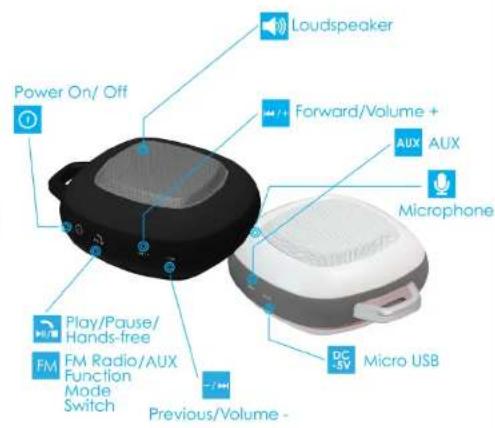
KEY FUNCTION

Power On/Off: Hold the power button for 2 seconds to switch SB522 on or off.

Press the multi-function key once to answer/end the calls or play/pause the music when SB522 is connected via Wireless. Long press Play/Pause button to transfer to FM radio. Short press Play/Pause button to scan FM radio station automatically.

Press once to go to the previous soundtrack. Press & hold to decrease the volume.

Press once to go to the next soundtrack. Press & hold to increase the volume.
Tips: When the speaker is connected via AUX audio cable, the multi-fiction, volume-/previous/backward, and volume+/next/forward control feature will be replaced and managed by the control buttons on the media device.
BUILT-IN RADIO FUNTION

Press play button to pause/play the radio station. Press and hold play button to auto-scan radio channels. Press next/previous button to skip to or go back to the previous radio station.
SPECIFICATIONS

WIRELESS FEATURES EFFICIENT POWER CONSUMPTION & HIGHER DATA TRASFER RATE

7 HOURS PLAYBACK TIME HOO HOURS STANCRE TIME

HANDFREE TALKING

BUILT-IN 3.5mm AUX CABLE


3 WAIT PREMIUM AUDIO W/ 40MM SPEAKER DRIVER

SHOCK RESISTANT

DUST RESISTANT

UNIVERSAL COMPATIBILITY

CHARGING THE BATTERY
SB522 uses a rechargeable battery. A normal full charge process can takes about 2-3 hours. The red LED will turn on when charging & turn off when charging is completed.
Please make sure the battery has been fully charged your first three uses to ensure the battery's best performance.
Always use correct DC 5V AC Power Adapter to charge the headset. Using any incorrect power supply device may cause damage and void the warranty.
Upon completion of charging, please unplug the charging cable from SB522. Do not put and leave the speaker in charging mode after it's fully charged. This will shorten the lifetime of the battery.
www.SoundBot.com
SoundBot is a registered trademark and property of Laltitude LLC. Other trademarks and trade names are those of their respective owners.
GENERAL USE AND NOTICES
Please read the following information before using this product. Users are not permitted to make changes or modify the product and the accessories in any way.
- DO NOT use the product while operating a motor vehicle.
- To avoid electronic interference and/or compatible conflicts, TURN OFF the product in any facilities where posted notices instruct you to do so. For example: Aircraft, Military Base, Hospital or Health Care Facilities.
- To avoid impairing your hearing in the long-term operation, keep the speaker volume in the moderate level.
- Keep away of fire, water, and high voltage equipments.
- Follow the charging procedure described in this guide to charge the product.
Do not use the headset in extreme weather condition. It is recommended to keep the environment temperature between 15 and 25 degree. Dot not install, place or use the headset near any source of heat such as a stove, radiator, oven, toaster, coffee maker or other apparatus (including microwave oven) that gives off heat.