R4S - Högtalare Antelope - Gratis bruksanvisning och manual
Hitta enhetens manual gratis R4S Antelope i PDF-format.


Användarfrågor om R4S Antelope
0 fråga om denna apparat. Svara på dem du kan eller ställ din egen.
Ställ en ny fråga om denna apparat
Ladda ner instruktionerna för din Högtalare i PDF-format gratis! Hitta din manual R4S - Antelope och ta tillbaka ditt elektroniska enhet i hand. På denna sida publiceras alla dokument som behövs för att använda din enhet. R4S av märket Antelope.
BRUKSANVISNING R4S Antelope
Turn left/right to change the level. To Mute, press and hold the Rotary control knob. Press and hold the knob again to unmute.
To access the Trim Offset feature, press and hold the desired 'Monitor' (1, 2, 3 or 4) / 'Input' (Ch1,2,3,4,5,6,7 or 8) button. Then, turn left/right the Rotary Control knob to trim (-6dB to +6dB in 1 dB steps). Double-click to set to 0 dB.
6. Mono Dim, M/S & Sub
Pressing the Mono button sets the currently selected monitor output to mono. This button corresponds to the last setting selected in the Mono effects dropdown menu in the Satori software control panel.
Press the Dim button to activate the -20dB attenuator. Press once more to restore normal volume.
When Mono is activated you also have the option to select M/S.
Pressing the M/S button selects either the sum or the difference between the left and the right channel. This supplies a stereo effect, which allows you to monitor just the center or just the periphery of the audio.
Pressing the Sub button activates the LFE output.
4. Rear Panel Explained
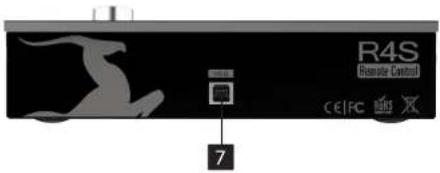
- USB Connector
R4S uses USB connector, Type B.
5. Technical Specifications
USB: USB 2.0 Full-Speed interface
on USB Type B connector
Operating Temperature: 0-50°C, 32-122°F
Weight (unit): 0.71 kg, 1.57 lb
Dimensions (unit): 220 mm(W) x 55 mm(H) x 85 mm(D)
8.66"(W) × 2.22"(H) × 3.31"(D)

R4S
Remote Control
WWW.ANTELOPEAUDIO.COM
v. July 2015

Antelope
QUICK START GUIDE
R4S
Remote Control
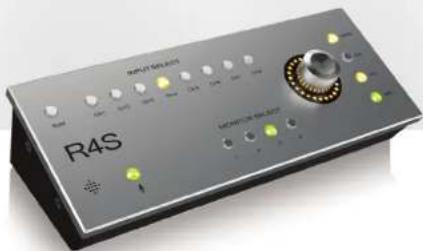
USB BUS Powered

1. Safety Notes
To reduce the risk of electrical shocks, fire, and related hazards:
- Do not remove screws, cover, or cabinet. There are no user serviceable parts inside. Refer servicing to qualified service personnel.
- Do not expose this device to rain, moisture or spillover of liquid of any kind.
- Should any form of liquid or a foreign object enter the device, do not use it. Unplug the USB Cable. Do not operate the device again until the foreign object is removed or the liquid has completely dried and its residues fully cleaned up. If in doubt, please consult the manufacturer.
- Do not handle the device and USB cable with wet hands!
- Avoid placing things on the cabinet. Risk of falling or actuating a button.
- If anything goes wrong, turn off the device by unplugging the USB cable. Do not attempt to repair the device yourself: consult authorized service personnel or your dealer.
- Do not install near any heat sources such as radiators, stoves, or other apparatus (including amplifiers) that produce heat.
- Do not use harsh chemicals to clean your unit. Clean only with specialized cleaners for electronics equipment.
■ The device is designed to operate in a temperate environment, with a correct Operating Temperature of: 0-50 °C, 32-122 °F
2. Installation Guide
It only takes a few moments to harness the benefits of the Satori Remote Control, R4S. Follow these simple steps to connect the R4S to your system setup:
- Ensure that you have downloaded and installed the latest Satori software control panel from the Antelope Audio website: http://antelopeaudio.com/en/support/downloads
- Install the latest firmware update for your Satori device by clicking on the firmware update button on the 'Options Panel' (of the software control panel).
- Connect the USB cable between the rear panel of your R4S device and the computer on which you are running the Satori software control panel.
- Turn on the Satori by pressing the power button on the front panel of the unit or the power button on the software control panel of the Satori.
Note: R4S is powered by the USB bus and does not require a separate power supply when connected to a computer.
3. Front Panel Explained
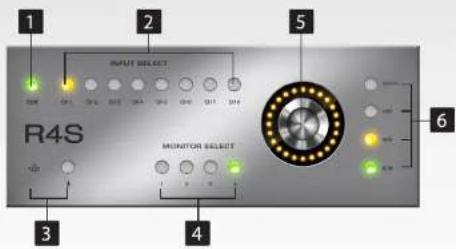
1. SUM Select button
The Sum Select button allows you to send your stereo sum to your selected monitor output.
2. Input Select buttons, channels 1-8
Input Select allows you to switch between your desired input source, which will be fed to your selected monitor output.
3. Talkback button
Press the Talkback button to activate the talkback microphone. This can be distributed to your selected headphones using the software control panel.
4. Monitor Select buttons 1-4
These allow you to be able to select between the four monitor outputs. Whatever source is selected will be fed to the selected monitor out.
5. Rotary control
Large stepped relay attenuator for main monitor output.