
CCD-PC1 - Videokamera SONY - Gratis bruksanvisning och manual
Hitta enhetens manual gratis CCD-PC1 SONY i PDF-format.


Användarfrågor om CCD-PC1 SONY
0 fråga om denna apparat. Svara på dem du kan eller ställ din egen.
Ställ en ny fråga om denna apparat
Ladda ner instruktionerna för din Videokamera i PDF-format gratis! Hitta din manual CCD-PC1 - SONY och ta tillbaka ditt elektroniska enhet i hand. På denna sida publiceras alla dokument som behövs för att använda din enhet. CCD-PC1 av märket SONY.
BRUKSANVISNING CCD-PC1 SONY
Color Video Camera
Operating Instructions
Before operating the unit, please read this manual thoroughly and retain it for future reference.
CCD-PC1
© 1995 by Sony Corporation Printed in Japan
Owner's Record
The model number and the serial number are located on the bottom exterior. Record the serial number in the space provided below. Refer to these numbers whenever you call upon your Sony dealer regarding this product.
Model No. CCD-PC1
Serial No.
WARNING
To prevent fire or shock hazard, do not expose the unit to rain or moisture.
This equipment has been tested and found to comply with the limits for a Class B digital device, pursuant to Part 15 of the FCC Rules. These limits are designed to provide reasonable protection against harmful interference in a residential installation. This equipment generates, uses, and can radiate radio frequency energy and, if not installed and used in accordance with the instructions, may cause harmful interference to radio communications. However, there is no guarantee that interference will not occur in a particular installation. If this equipment does cause harmful interference to radio or television reception, which can be determined by turning the equipment off and on, the user is encouraged to try to correct the interference by one or more of the following measures: — Reorient or relocate the receiving antenna.
— Increase the separation between the equipment and receiver.
— Connect the equipment into an outlet on a circuit different from that to which the receiver is connected.
— Consult the dealer or an experienced radio/TV technician for help.
You are cautioned that any changes or modifications not expressly approved in this manual could void your authority to operate this equipment.
Features
Wide-angle lens and a high resolution CCD imager (270,000 pixels) give you wide views with high resolution.
- Compact design and flexible arm enable versatile shooting positions.
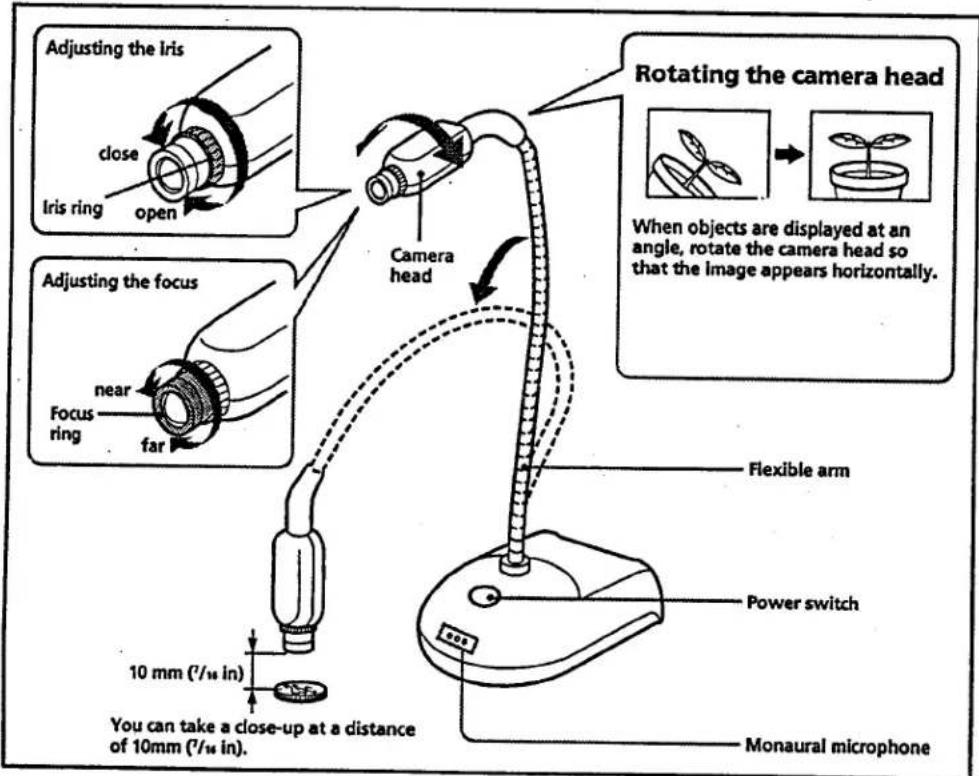
- Manual focus allows sharp image from less than half inch (10mm) to infinity.
- Manual iris allows good image in various lighting.
- Rotating camera head allows flexible angle of the picture.
Connections
Connect your Color Video Camera to a personal computer, TV or VCR equipped with an audio/video input. Some connections may require extra cables. Refer to the instruction manual of the equipment to be connected.
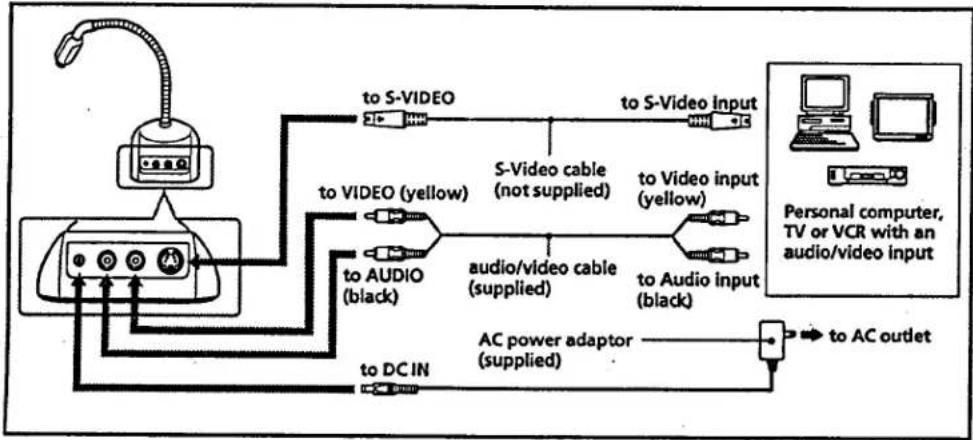
flowchart
graph TD
    A["User"] --> B["AC"]
    B --> C["to DC IN"]
    B --> D["to AUDIO (black)"]
    B --> E["to VIDEO (yellow)"]
    B --> F["to S-VIDEO"]
    F --> G["S-Video cable (not supplied)"]
    G --> H["to S-Video input"]
    G --> I["to Audio input (black)"]
    I --> J["to Audio/video cable (supplied)"]
    J --> K["AC power adaptor (supplied)"]
    K --> L["to AC outlet"]
    style A fill:#f9f,stroke:#333
    style L fill:#ccf,stroke:#333
If your equipment has an S-Video input
It is recommended to use S-Video cable (not supplied) for the connection of the video signal for higher picture quality.
Notes
- You cannot connect this product to a personal computer that is not equipped with a video or S-Video input. Some computers may require a video capture board and/or sound board and software in order to use this product. For details, consult your computer dealer.
- Use only the supplied AC power adaptor. Do not use any other AC power adaptor.
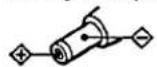
Polarity of the plug
How to use
Notes
- Do not hold the camera head when carrying.
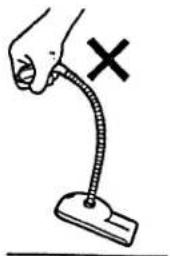
natural_image
Simple line drawing of a hand holding a flexible tube with a cross mark, no text or symbols present- Do not apply too much force when turning the camera head, focus ring or iris ring, or the camera may be damaged.
- Do not apply too much force when bending the flexible arm, or the flexible arm may be damaged.
- When bending the flexible arm, depending on the angle, the arm may not remain in the position you want.
- Do not turn up the volume on the connected equipment too high. If you do so, howling may occur or sound may be distorted.
Precautions
- If the light exceeds the illumination range, the image may not be displayed clearly.
- Do not focus on a stationary object or bright object for too long, or the color filter may be damaged.
Precaution on copyright
Television programs, pictures, magazines, and other materials may be copyrighted. Unauthorized recording or storing of such materials violates the provision of the copyright laws.
Maintenance
- Clean the lens with a blower brush to remove dust. If there are fingerprints on it, remove them with a soft cloth.
- Clean the Color Video Camera body with a dry soft cloth, or a soft cloth lightly moistened with a mild detergent solution.
- Do not use any type of solvent which may damage the finish.
Troubleshooting
| Symptom | Remedy |
| The picture does not appear on the TV or computer screen. | Make sure the connections are made correctly.Connect to other equipment for example a TV, to check if the camera is damaged. |
| The picture and sound quality on the computer screen is not good as that on a TV. | Depending on the computer brand, you may not be able to obtain the same quality of picture as a TV.For more detail, consult your computer retailer. |
| Strong sound beat occurs. | Turn down the volume of the TV or computer.Move the camera away from the speaker and change the direction of the microphone. |
Specifications
System
Video signal NTSC color, EIA standards
Image device 1/4 inch color CCD (270,000 pixels)
Lens f=3.9 mm, F=1.8
Macro Approx. 7/16 in (10 mm)
Minimum illumination
91lux
Illumination range
9 to 10,000 lux
White balance Auto
Iris Manual
Electronic shutter 1/60 fixed
Focus adjustment
Manual
Supplied accessories
AC power adaptor (AC 120V, 60 Hz) (1)
Audio/video cable (1)
Operating instructions (1)
Design and specifications are subject to change without notice.
General
Power requirements
DC 6.0V
Power consumption
1.8 W
Video output 1 Vp-p, 75Ω, unbalanced, sync
negative
S video output 4-pin mini DIN
Audio output Output 327 mV (monaural),
impedance less than 2.2 kΩ
Operating temperature
41°F to 104°F (5°C to 40°C)
Storage temperature
-4°F to 140°F (-20°C to +60°C)
Dimensions (w x h x d)
Base: approx. 3^5/8 × 1^13/16 × 5^1/_4
in (91 x 45 x 132 mm)
Camera: approx. 1 x ^7 /s x 2 ^7 /s in
(25×22×73mm)
Arm length: approx. 11 ^1/4 in (285
mm)
Mass Approx. 1lb 7 oz (650 g)
Microphone Monaural
DC jack 6.0 V


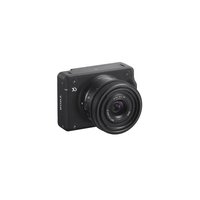
Märke : SONY
Modell : CCD-PC1
Kategori : Videokamera