
VR43 - Ura SEIKO - Brezplačna navodila za uporabo
Brezplačno poiščite navodila za napravo VR43 SEIKO v formatu PDF.


Vprašanja uporabnikov o VR43 SEIKO
0 vprašanje o tej napravi. Odgovorite na tiste, ki jih poznate, ali zastavite svoje.
Zastavite novo vprašanje o tej napravi
Prenesite navodila za vaš Ura v formatu PDF brezplačno! Poiščite svoja navodila VR43 - SEIKO in vzemite svojo elektronsko napravo nazaj v roke. Na tej strani so objavljeni vsi dokumenti, potrebni za uporabo vaše naprave. VR43 znamke SEIKO.
NAVODILA ZA UPORABO VR43 SEIKO
Navodila za uporabo
NAVODILA
JCC06·V175C·
JV176·JVR4C·
F33
Ustrezni modeli
V172·V174·V175·V176·VR42·VR43·
VS72 · VS75 · VS76
Seiko Watch Corporation
2206
Za popravila in druga vprašanja o naših izdelkih se obrnite na prodajalca, pri katerem ste izdelek kupili. Za dodatne informacije nas kontaktirajte na spodnji naslov.
Brezplačna telefonska številka: 0120-612-911
Služba za stranke
〒100-0005 Tokio, Čijoda-ku, Marunouči 3-1-1, Mednarodna stavba
〒550-0013 Osaka, Niši-ku, Šinmači 1-4-24, Osaka Yotsubashi Shinmachi Building
Seiko Watch Corporation
https://www.seikowatches.com/
Značilnosti
- Ta sončna ura je opremljena s funkcijo štoparice.
- Sončna celica pod številčnico pretvarja katero koli obliko svetlobe v "električno energijo" za delovanje ure. ※ "Kronograf" pomeni uro s funkcijo štoparice.
■ Funkcija štoparice
Štoparica lahko meri do 60 minut v korakih po 1/5 sekunde. Po izmerjenih 60 minutah se štoparica samodejno ustavi.
Funkcija alarma
Enkratni alarm je mogoče nastaviti tako, da se oglasi samo enkrat ob nastavljenem času. Čas alarma je mogoče nastaviti v korakih po eno minuto do časa, ko je doseženih 11 ur in 59 minut. (Na voljo samo za V172, V174 in VS72)
Funkcija sončnega polnjenja
Sončna celica pod številčnico pretvarja katero koli obliko svetlobe v "električno energijo" za delovanje ure. Ko je popolnoma napolnjena, za V172, V174, V175, V176, VS72, VS75 in VS76 ura deluje približno šest mesecev, za VR42 in VR43 pa približno štiri mesece.
■ Imena delov in funkcije
■V172 · VS72: Opremljena s štoparico in alarmom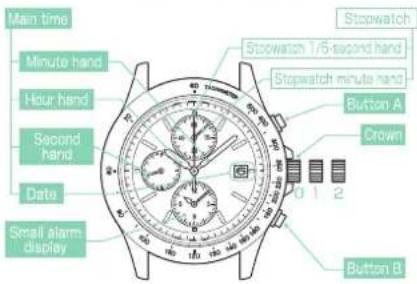
Prvi klik: nastavitev datuma, nastavitev časa alarma. Drugi klik: nastavitev časa, predhodna nastavitev položaja kazalcev štoparice, ponastavitev vgrajenega IC. ※ Če ima vaša ura krono z vijačno zaklepom, nosite uro z zaklenjeno krono.
■V174: Opremljena s štoparico, alarmom in 24-urnim kazalcem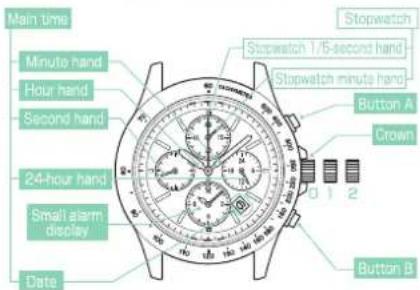
Prvi klik: nastavitev datuma, nastavitev alarma Drugi klik: nastavitev časa, predhodna nastavitev položaja kazalcev štoparice, ponastavitev vgrajenega IC-ja. Če ima vaša ura krono z vijačno zaporo, nosite uro z zaklenjeno krono.
■V175-VS75: Opremljena s štoparico in 24-urnim kazalcem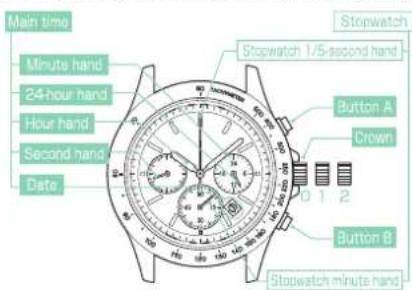
Prvi klik: nastavitev datuma, nastavitev alarma Drugi klik: nastavitev časa, predhodna nastavitev položaja kazalcev štoparice ■ Če ima vaša ura krono z vijačno zaporo, nosite uro z zaklenjeno krono.
■V176 · VS76: Opremljena s štoparico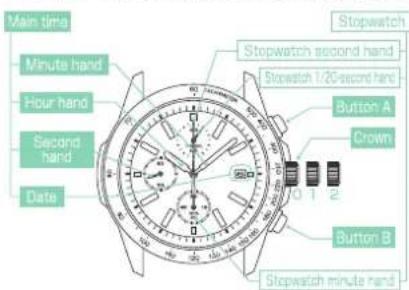
Prvi klik: nastavitev datuma Drugi klik: nastavitev časa, predhodna nastavitev položaja kazalcev štoparice, ponastavitev vgrajenega IC-ja ※ Če ima vaša ura krono z vijačno zaporo, nosite uro z zaklenjeno krono.
■VR42: Opremljena s štoparico in 24-urnim kazalcem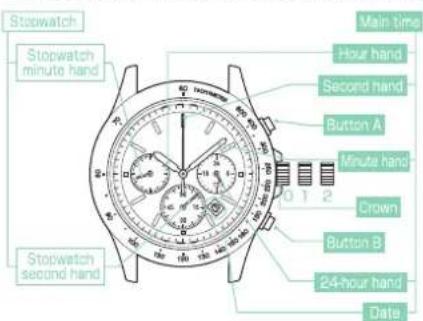
Prvi klik: nastavitev datuma Drugi klik: nastavitev časa, predhodna nastavitev položaja kazalcev štoparice ※ Če ima vaša ura krono z vijačno zaporo, nosite uro z zaklenjeno krono.
Krona
■VR43: Opremljena s štoparico in 24-urnim kazalcem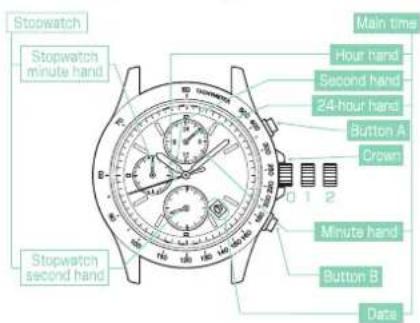
Prvi klik: nastavitev datuma Drugi klik: nastavitev časa, predhodna nastavitev položaja kazalcev štoparice ※ Če ima vaša ura krono z vijačno zaporo, nosite uro z zaklenjeno krono.
Obstajata dve vrsti kron: običajna krona in krona z vijačno zaporo.
Preverite vrsto krone na vaši uri.
![graph TD A["While pressing the crown in, turn it in the direction indicated by the arrow."] --> B["The crown turns"] B --> C["Normal crown: Pull out the crown and operate it."] D["When the crown is not allowed if it comes into a ring"] --> E["Screw-lock type crown: Unlock the crown before operating…](/content/2026/06/1178373/images/fd98dec33bdc20785feeb37bad82a9aaf84618585199022042e8b248a78e9b14.jpg)
※Če ima vaša ura krono z vijačno zaporo, se krona privije v uro, da prepreči okvare in poveča vodoodpornost. ※Pazite, da krone ne privijete na silo, saj lahko poškodujete utore na kroni.
Kako nastaviti čas in datum
■ Kako nastaviti čas in datum
※ Pri nastavljanju samo datuma glejte "Ročna nastavitev datuma ob koncu meseca".
① Preverite, ali ura deluje.
Preverite, ali se sekundni kazalec premika v enosekundnih intervalih. Če se sekundni kazalec premika v dvosekundnih intervalih ali se je ustavil, napolnite uro tako, da številčnico izpostavite svetlobi.
② Preverite, ali urni in minutni kazalec ne kažeta časa med 21.00 in 1.00.
Če urni in minutni kazalec kažeta čas med 21.00 in 1.00, potegnite krono na drugi položaj in jo zavrtite, da premaknete kazalca na čas po 1.00.
Ta postopek je potreben za zagotovitev pravilnega vklopa pogonskega kolesa za datum. Vsakič, ko urni kazalec naredi dva polna obrata z vrtenjem krone, se datum premakne za en dan. Med vrtenjem krone se datum spremeni točno ob polnoči. Pri nastavljanju urnega kazalca pazite, da je AM/PM pravilno nastavljen (pri modelih V174, V175, VR42, VR43 in VS75 lahko 24-urni kazalec uporabite kot indikator AM/PM).
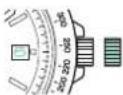
③ Potegnite krono na prvi položaj.
※ Ura še
naprej deluje.
※ Če ima vaša ura
krono z vijačno
zaklepom, jo
odklenite.
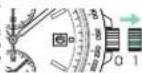

Zavrtite krono, da nastavite datum na datum prejšnjega dne.
V172 V174 V175 V176 VS72
VS75: v smeri urinega kazalca
VR42. VR43: v nasprotni smeri urinega kazalca
Npr. Če želite
nastaviti datum na "6."
ga najprej nastavite na "5"
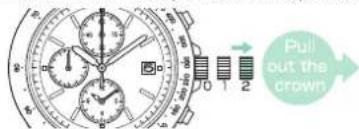
⑤ Potegnite krono na drugi položaj, ko je sekundni kazalec na položaju 0 sekund.
Sekundni kazalec se bo ustavil na položaju 0 sekund.
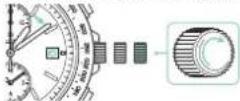
Za premikanje kazalcev v smeri urinega kazalca obračajte krono
v smeri puščice, da nastavite datum na želeni dan.
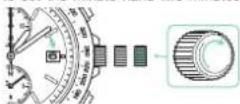
⑦ Za premikanje kazalcev v smeri urinega kazalca obračajte krono v smeri puščice, da nastavite glavni čas.
Pri nastavljanju časa pazite, da je AM/PM pravilno nastavljen. Pri modelih V174, V175, VR42, VR43 in VS75 lahko 24-urni kazalec uporabite kot indikator AM/PM.
※ Nastavite minutni kazalec nekaj minut pred točnim časom, nato pa ga premaknite na točne minute.
● Če imate model V172, V174 ali VS72:
Priporočljivo je, da minutni kazalec nastavite dve minuti
pred točnim časom.
nadaljujte z delovanjem
na delovanje
na delovanje
postopek 8
● Če imate model V175, V176, VR42, VR43,
VS75 in VS76: Nadaljujte na postopek

⑥ Za pomik kazalcev v smeri urinega kazalca zavrtite krono
v smeri puščice, da nastavite datum na želeni dan.
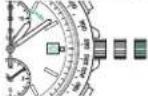

⑦ Za pomik kazalcev v smeri urinega kazalca zavrtite krono v smeri puščice, da nastavite glavni čas.
Pri nastavljanju časa pazite, da je AM/PM pravilno nastavljen.
Pri modelih V174, V175, VR42, VR43 in VS75 lahko 24-urni kazalec uporabite kot indikator AM/PM. Minutni kazalec nastavite nekaj minut naprej od točnega časa, nato pa ga pomaknite na točno minuto. ● Če imate model V172, V174 ali VS72:
Priporočljivo je, da minutni kazalec nastavite dve minuti
naprej od točnega
časa (nadaljujte
z delovanjem
do delovanja
postopek 8
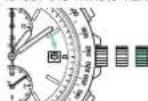

● Če imate model V175, V176, VR42, VR43,
VS75 in VS76: Nadaljujte na postopek ⑨
8 Pritisnite gumb B, da nastavite čas alarma na isti čas kot glavni čas (samo za modele V172, V174 in VS72).
Če gumb B držite pritisnjen, se kazalci alarma hitro premikajo.
※Čas alarma
je mogoče nastaviti
na 12-urni
osnovi
Mali alarm
prikaz
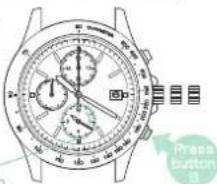
9 Potisnite krono nazaj v normalni položaj v skladu s časovnim signalom. Nastavitev časa alarma je končana.
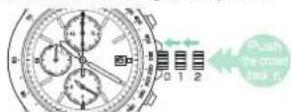
※ Če ima vaša ura krono z vijačno zaporo, zaklenite krono.
■ Ročna nastavitev datuma ob koncu meseca
Ura samodejno prikazuje datum od "1" do "31." Datum nastavite prvi dan po mesecu, ki ima manj kot 31 dni: februar, april, junij, september in november.
※ Pri nastavljanju samo datuma izvedite ta postopek.
① Prepričajte se, da ura deluje.
Prepričajte se, da se sekundni kazalec premika v enominutnih intervalih. Če se sekundni kazalec premika v dvosekundnih intervalih ali se je ustavil, napolnite uro tako, da številčnico izpostavite svetlobi.
② Prepričajte se, da urni kazalci ne prikazujejo časa med 9.00 in 1.00.
Če urni kazalci prikazujejo čas med 21.00 in 1.00, nastavite čas po postopku "Nastavitev časa in datuma → stran 78." ali najprej spremenite čas na čas zunaj tega obdobja, nato nastavite datum in ponovno nastavite pravilen čas.
③ Izvlecite krono do prvega klika.
※ Ura še naprej deluje.
※ Če ima vaša ura krono z vijačno
zaklepom, odklenite krono.
Npr. Če želite spremeniti datum iz "31" v "1"
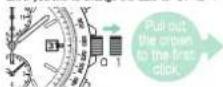
Obračajte krono, da nastavite datum.
※ V172, V174, V175, V176, VS72,
VS75: v smeri urinega kazalca
VR42, VR43: v nasprotni smeri urinega kazalca
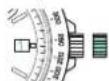
⑤ Potisnite krono nazaj v normalni položaj.
Če ima vaša ura krono z vijačno
zaporo, zaklenite krono.
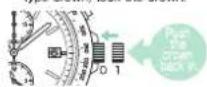
■ Funkcija štoparice
Štoparica lahko meri do 60 minut v korakih po 1/5 sekunde. Po izmerjenih 60 minutah se kazalci štoparice samodejno ustavijo na položaju 0 minut 0 sekund.
■ Imena delov in funkcije štoparice (V172, V174, VS72)
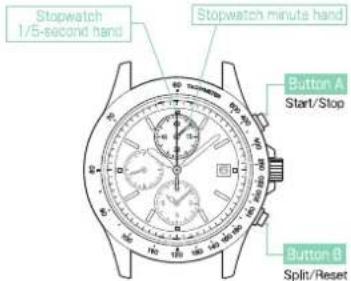
■ Imena delov in funkcije štoparice (V175, VS75)
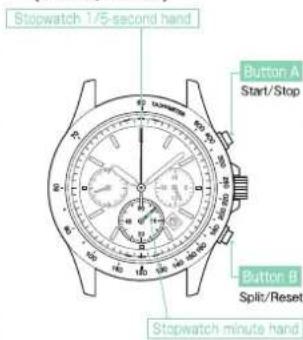
Štoparica lahko meri do 60 minut v korakih po 1/20 sekunde. Po izmerjenih 60 minutah se kazalci štoparice samodejno ustavijo na položaju 0 minut 0 sekund.
■ Imena delov in funkcije štoparice (V176, VS76)
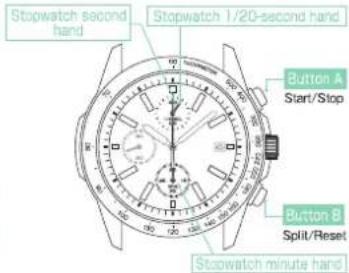
• Ko se štoparica zažene, se kazalec 1/20 sekunde štoparice premika približno 1 minuto in se samodejno ustavi na položaju "0". - Ko se meri vmesni čas ali se meritev ustavi, se premakne, da prikaže pretečene 1/20 sekunde. - Ko se vmesni čas sprosti ali se meritev ponovno zažene, se premika približno 1 minuto in se samodejno ustavi. - Na enak način, če se štoparica večkrat ustavi in ponovno zažene ali se vmesni čas večkrat izmeri in sprosti, se bo premikala največ 2 minuti po zadnjem dejanju.
VR42, VR43 lahko merita do 29 minut 59 sekund v korakih po 1 sekundo. Po meritvi se štoparica samodejno ustavi.
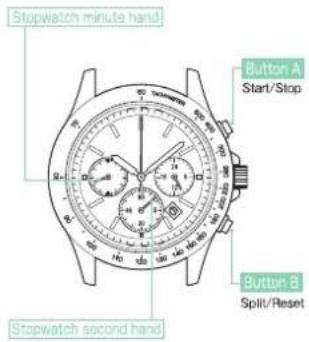
Kako uporabljati štoparico
※ Ko se sekundni kazalec premika v dvosekundnih intervalih, štoparice ni mogoče upravljati. O energiji - Standardna meritev Npr. tek na 500 metrov
![graph LR A["Start the measurement"] --> B["Stop"] B --> C["Reset"] style A fill:#f9f,stroke:#333 style B fill:#ccf,stroke:#333 style C fill:#cfc,stroke:#333](/content/2026/06/1178373/images/79957ef772aa2574b6c2be8573969fc4bfafcaf35a3b47b2cea409191f323c59.jpg)
- Merjenje skupnega pretečenega časa
Npr. Merjenje časa za nogometno tekmo
![graph LR A["Start"] --> B["Stop"] B --> C["Start"] C --> D["Stop"] D --> E["Reset"] A --> F["Start match."] B --> G["Stop match."] C --> H["Start again."] D --> I["The match ends."] F --> J["Reset the stopwatch to 0 min, ute 0 sec ond."] G --> K["* Restart and stop of the stopwatch can be repeated."…](/content/2026/06/1178373/images/33315c3f38f8ce37b4f3203ec6dfddf048f065c21025c25e3678aa4d5c0e21e6.jpg)
- Merjenje vmesnega časa (split time) Npr. tek na 5000 metrov ※ "Vmesni čas" je čas, ki je pretekel od začetka dejavnosti do poljubne faze.
![graph LR A["Start"] --> B["Start measurement"] B --> C["Split"] C --> D["Split release"] D --> E["Stop"] E --> F["Reset"] subgraph Measurement G["The number passed the P point.<br>The immediate release time is displayed"] H["Split and split release can be repeated as many times as necessary during a…](/content/2026/06/1178373/images/ba49fd65e68bf60a6759b9a23eaaeb8df0e8abe4070d5111aa65ea1daf2aca05.jpg)
• Merjenje dveh tekmovalcev
![graph LR A["Start"] --> B["Start"] B --> C["(Split) B"] C --> D["(Stop) A"] D --> E["(Solt release) B"] E --> F["Reset"] F --> G["Reset the stop-watch to 0 minute 0 second."] subgraph Start H["Start"] --> I["First runner finishes. The finish time of the first run is displayed."] end subgraph Split J…](/content/2026/06/1178373/images/794cec2867bdd184ee6fcdbb5078051ddb73d7e8b0bf2e74d0e6da364c0bddd2.jpg)
Nastavitev začetnega položaja kazalcev štoparice
Če se kateri od kazalcev štoparice po ponastavitvi ne vrne na položaj 0 minut 0 sekund, je lahko začetni položaj kazalcev zamaknjen. Začetni položaj sekundnega in minutnega kazalca štoparice je 0 minut 0 sekund. Začetni položaj je lahko zamaknjen zaradi naslednjih razlogov.
- V primeru močnega udarca: Do zamika lahko pride, če uro spustite ali udarite.
- V primeru magnetnega vpliva: Do zamika lahko pride, če uro približate predmetu, ki ustvarja magnetizem. ※ Če izvedete nastavitev začetnega položaja, ura pridobi ali izgubi čas. Po nastavitvi začetnega položaja kazalcev obvezno ponastavite glavni čas in čas alarma.
V172·V174·V175·VS72·VS75
① Prepričajte se, da ura deluje.
Prepričajte se, da se sekundni kazalec premika v enominutnih intervalih. Če se sekundni kazalec premika v dvosekundnih intervalih ali se je ustavil, napolnite uro tako, da številčnico izpostavite svetlobi.
② Izvlecite krono na drugi položaj.
Sekundni kazalec se bo ustavil.
※ Če ima vaša ura krono z vijačno zaklepom, odklenite krono.
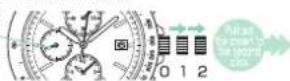
③ Pritisnite in držite gumb A (3 sekunde), dokler se minutni kazalec štoparice ne začne premikati.
Minutni kazalec štoparice se premakne za en polni obrat in ura vstopi v način nastavitve začetnega položaja minutnega kazalca štoparice.
※ Če ne veste, kateri kazalec je minutni kazalec štoparice, si oglejte razdelek Imena delov in funkcije.
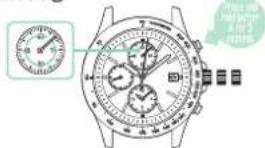
Pritisnite gumb B, da ponastavite minutni kazalec štoparice na 0 minut.
Napredovanje za eno minuto: pritisnite gumb B enkrat in ga spustite.
Neprekinjeno napredovanje: če gumb B držite pritisnjen dve sekundi ali dlje, se kazalec začne premikati. Ko gumb B spustite, se kazalec ustavi.
※ Če je minutni kazalec štoparice ponastavljen na 0 minut, nadaljujte s postopkom ⑤.
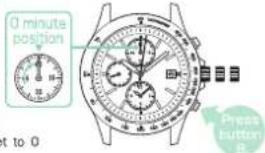
⑤ Pritisnite in držite gumb A (3 sekunde), dokler se kazalec 1/5 sekunde štoparice ne začne premikati.
Kazalec 1/5 sekunde štoparice se premakne za en polni obrat in ura vstopi v način nastavitve predhodnega položaja kazalca 1/5 sekunde štoparice.
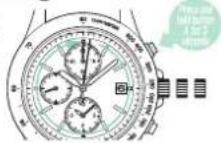
⑥ Pritisnite gumb B, da ponastavite kazalec 1/5 sekunde štoparice na 0 minut.
| One minute Advance | Press button B once and then release it. |
| Continuous Advance | When button B is kept pressed for two seconds or longer, the hand will start moving.When button B is released, the hand will stop. |
※ Če je kazalec 1/5 sekunde štoparice ponastavljen na 0 minut, nadaljujte s postopkom ⑦.
⑦ Potisnite krono nazaj v normalni položaj.
⑧ Nastavite glavni čas in čas alarma.
Če se izvede nastavitev predhodnega položaja, lahko glavni čas in čas alarma pridobita ali izgubita čas. Ko sta glavni čas in čas alarma nastavljena, je postopek končan.
V176·VS76
① Prepričajte se, da ura deluje.
Prepričajte se, da se sekundni kazalec premika v enominutnih intervalih. Če se sekundni kazalec premika v dvosekundnih intervalih ali se je ustavil, napolnite uro tako, da številčnico izpostavite svetlobi.
② Izvlecite krono do drugega klika.
Sekundni kazalec se bo ustavil.
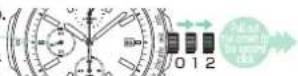
※ Če ima vaša ura krono z vijačno ključavnico, odklenite krono.
A (za 3 sekunde), dokler se štoparski kazalec ne začne premikati.
Štoparski kazalec za 1/20 sekunde se zavrti za en polni krog in ura preide v način predhodne nastavitve položaja štoparskega kazalca za 1/20 sekunde.
※ Če ne veste, kateri kazalec je štoparski kazalec za 1/20 sekunde, si oglejte poglavje Imena delov in funkcij.
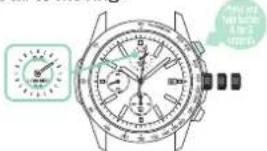
④ Pritisnite gumb B, da ponastavite štoparski kazalec za 1/20 sekunde na 00.
Napredovanje za 1/20 sekunde: pritisnite gumb B enkrat in ga spustite.
Če gumb B držite pritisnjen dve sekundi ali dlje, se kazalec začne premikati.
Ko spustite gumb B, se kazalec ustavi.
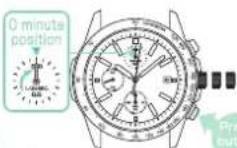
※ Če je štoparski kazalec za 1/20 sekunde ponastavljen na 00, nadaljujte s postopkom ⑤.
⑤ Pritisnite in držite gumb A (za 3 sekunde), dokler se štoparski sekundni kazalec ne začne premikati.
Štoparski sekundni kazalec se zavrti za en polni krog in ura preide v način predhodne nastavitve položaja štoparskega sekundnega kazalca.
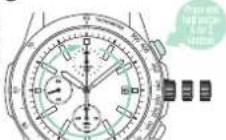
⑥ Pritisnite gumb B, da ponastavite štoparski sekundni kazalec na 0 sekund.
| One second Advance | Press button B once and then release it. |
| Continuous Advance | When button B is kept pressed for two seconds or longer, the hand will start moving.When button B is released, the hand will stop. |
※ Če je štoparski sekundni kazalec ponastavljen na 0 sekund, nadaljujte s postopkom ⑦.
⑦ Pritisnite in držite gumb A (za 3 sekunde), dokler se štoparski minutni kazalec ne začne premikati.
Kazalec minut štoparice se zavrti za en polni obrat in ura preide v način predhodne nastavitve položaja kazalca minut štoparice.
⑧ Pritisnite gumb B, da ponastavite kazalec minut štoparice na 0 minut.
| One minute Advance | Press button B once and then release it. |
| Continuous Advance | When button B is kept pressed for two seconds or longer, the hand will start moving.When button B is released, the hand will stop. |
※ Če je kazalec minut štoparice ponastavljen na 0 minut, nadaljujte s postopkom 9.
⑨ Nastavite glavni čas.
Če je bila izvedena predhodna nastavitev položaja, lahko glavni čas pridobi ali izgubi čas. Ko je glavni čas nastavljen, je postopek končan.
10 Potisnite krono nazaj v normalni položaj.
VR42·VR43
① Prepričajte se, da ura deluje. Prepričajte se, da se sekundni kazalec premika v enominutnih intervalih. Če se sekundni kazalec premika v dvosekundnih intervalih ali se je ustavil, napolnite uro tako, da izpostavite številčnico svetlobi.
② Izvlecite krono do drugega klika. Sekundni kazalec se bo ustavil. ※ Če ima vaša ura krono z vijačno zaporo, odprite krono.
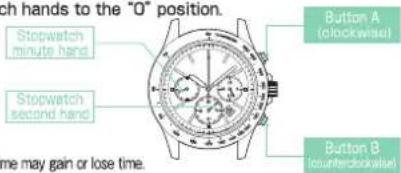
③ Pritisnite gumb "A" ali "B", da nastavite kazalce štoparice na položaj "O".
Pritisnite A: za premik kazalcev štoparice v smeri urinega kazalca. Pritisnite B: za premik kazalcev štoparice v nasprotni smeri urinega kazalca. Kazalca minut in sekund štoparice se premikata hitro, če gumb "A" ali "B" držite pritisnjen. Premika kazalca minut in sekund štoparice sta povezana.
④ Nastavite glavni čas.
Če je bila izvedena predhodna nastavitev položaja, lahko glavni čas pridobi ali izgubi čas. Ko je glavni čas nastavljen, je postopek končan.
Kako uporabljati tahimeter
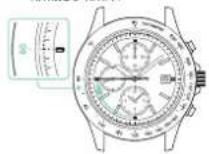
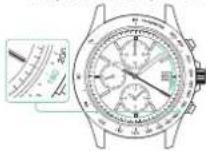
Številke na tahimetrski lestvici lahko preberete, da določite, koliko sekund traja preteči 1 km, ali za merjenje časa, potrebnega za dokončanje 1 dela.
• Kako izmeriti kilometre na uro
① Izmerite čas (v 1 minuti), ki ga potrebujete za preteči 1 km.
2 Preberite številko na tahimetrski skali, na katero kaže kazalec štoparice. Npr. Če za 1 km potrebujete 45 sekund...80 km/h
Kako izmeriti urno stopnjo delovanja
① Izmerite čas (v 1 minuti), ki ga potrebujete za dokončanje 1 dela.
② Preberite številko na tahimetrski skali, na katero kaže kazalec štoparice. Npr. Če za dokončanje enega izdelka potrebujete 20 sekund...180 izdelkov/uro
Kako uporabljati budilko (V172·V174·VS72)
Enkratno budilko je mogoče nastaviti tako, da se oglasi samo enkrat ob določenem času.
Ko glavni čas doseže določen čas budilke, budilka zazvoni. Čas budilke je mogoče nastaviti v enominutnih korakih v naslednjih 11 urah in 59 minutah.
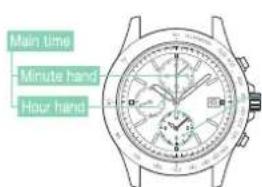
Ko se sekundni kazalec premika v dvosekundnih intervalih, budilka ne zazvoni ob nastavljenem času. In časa budilke ni mogoče nastaviti. O energiji.

Ko je čas budilke nastavljen: prikaže se določen čas budilke.
Ko čas budilke ni nastavljen: prikaže se trenutni čas (enak glavnemu času).
■ Kako nastaviti čas budilke
① Izvlecite krono do prvega klika
※ Ura še naprej deluje. ※ Če ima vaša ura krono z vijačno zaporo, odklenite krono. Krona.
② Pritisnite gumb B, da nastavite čas alarma. Če gumb B držite pritisnjen, se kazalca alarma hitro premikata naprej.
■ Če se kazalca alarma premakneta več, kot je želeni čas alarma, še naprej pritiskajte gumb B, da kazalca naprej pomaknete na želeni čas alarma. ■ Gumb B: gumb B držite pritisnjen, dokler se kazalca alarma ne ujameta z glavnim časom; nato se kazalca alarma ustavita in alarm se izklopi.
③ Potisnite krono nazaj v normalni položaj.
※ Če ima vaša ura vijačno krono,
zaklenite krono.

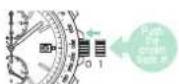
■ Kako ustaviti alarm
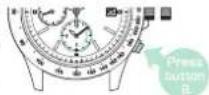
• Alarm se oglasi za 20 sekund ob nastavljenem času alarma. • Za zaustavitev alarma pritisnite gumb A ali B. ※ Medtem ko se kazalca štoparice premikata, alarm zveni drugače kot običajni alarm. To ni okvara. ※ Ko alarm zvoni, če pritisnete gumb A ali B, alarm preneha zvoniti, vendar štoparice ni mogoče upravljati. Ko alarm preneha zvoniti, lahko štoparico upravljate.
■ Kako izklopiti nastavljeni čas alarma
- Če želite izklopiti nastavljeni čas alarma, ponastavite čas alarma na isti čas kot glavni čas. ■ Preizkus zvoka alarma
- Če želite preizkusiti zvok alarma, potegnite krono na prvi klik in nato dolgo pritisnite gumb A (približno 4 sekunde). Alarm zvoni, dokler je gumb A pritisnjen. ※ Ko končate s preizkusom zvoka, potisnite krono nazaj na položaj 0. Če ima vaša ura vijačno krono, zaklenite krono.
Kako preveriti raven rezerve moči (VR42 · VR43)
① Prepričajte se, da je merjenje s štoparico ustavljeno in ponastavljeno. ② Pritisnite in držite gumb B 2 sekundi, nato ga spustite. Kazalec sekund štoparice se bo ustavil na položaju 30 sekund.
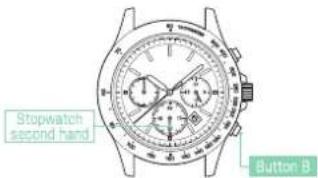
| The power reserve amount | High | Middle | Low |
| The position of stopwatch second hand | 45second position | 40second position | 35second position |
③ Kazalec sekund štoparice prikazuje raven energije (približno 3 sekunde) ※Upoštevajte, da je raven energije lahko prikazana le okvirno. ※Če se kazalec sekund premika v dvosekundnih intervalih, napolnite uro tako, da izpostavite številčnico svetlobi. ④ Kazalec sekund štoparice se samodejno vrne na položaj 0
O polnjenju
■ Kako napolniti uro Izpostavite številčnico svetlobi, da napolnite uro. Za optimalno delovanje ure poskrbite, da je ura vedno dovolj napolnjena. V naslednjih primerih bo energija ure verjetno izčrpana, kar lahko povzroči zaustavitev ure: - Ura je skrita pod rokavom. - Ura se uporablja ali shranjuje v pogojih, kjer dalj časa ni izpostavljena svetlobi. ※ Pri polnjenju ure pazite, da se ura ne segreje na visoko temperaturo. (Za temperaturno območje delovanja glejte tabelo ■Specifikacije.) ※ Ko uro uporabljate prvič ali ko jo začnete uporabljati po tem, ko se je ustavila zaradi izpraznjene energije, jo dovolj napolnite v skladu s tabelo.
■ Standardni čas polnjenja
Za približen čas, potreben za polnjenje ure, si oglejte spodnjo tabelo.
| Environment/ lightsource(lux) | V172.V174.V175.V176 | VR42.VR43 | VS72.VS73.VS75 | ||||||
| A (min-utes) | B (hours) | C (hours) | A (min-utes) | B (hours) | C (hours) | A (min-utes) | B (hours) | C (hours) | |
| General offices/ Flourescent light (700) | 150 | 60 | — | 108 | 24 | — | 90 | 35 | — |
| 30w20cm / Flourescent light (3000) | 33 | 13 | 110 | 27 | 6 | 83 | 20 | 8 | 65 |
| Cloudy weather/ Sunlight (10000) | 9 | 3.5 | 30 | 8 | 2 | 25 | 6 | 2.5 | 18 |
| Fair weather/ Sunlight (100000) | 2 | 0.6 | 5 | 1 | 0.2 | 3 | 2 | 0.6 | 5 |
A: Čas za polnjenje za 1 dan delovanja C: Čas, potreben za popolno polnjenje
※Čas polnjenja se nekoliko razlikuje glede na model ure.
■ Nepravilen prikaz ali nepravilno delovanje (razen VR42 · VR43)
Ko ura kaže nepravilen prikaz ali ne deluje pravilno, ali se sploh ne premika ali se premika v enosekundnih intervalih tudi po popolnem polnjenju, sledite spodnjim navodilom za ponastavitev vgrajenega IC-ja. Nato bo ura nadaljevala z normalnim delovanjem.
■ Ponastavitev vgrajenega IC-ja
① Izvlecite krono na drugi klik.
Sekundni kazalec se ustavi.
Če ima vaša ura krono z vijačno zaporo, odklenite krono. Krona
sekundni kazalec
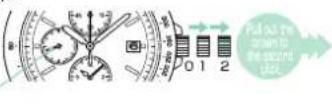
② Istočasno pritisnite in držite gumba A in B tri sekunde, nato ju spustite.
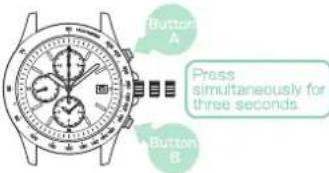
③ Potisnite krono nazaj v normalni položaj.
Sekundni kazalec se začne premikati.
Če se sekundni kazalec premika v dvosekundnih intervalih, popolnoma napolnite uro, dokler se ne začne premikati v enosekundnih intervalih.
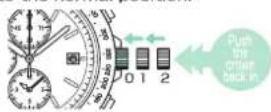
4 Prilagodite predhodni položaj kazalcev štoparice (1/5 sekunde in minute), nato nastavite čas in datum.
※Glejte »Prilagajanje predhodnega položaja kazalcev štoparice (1/5 sekunde in minute)«.
※Glejte »Nastavitev časa in datuma«.
Ko so predhodni položaji kazalcev štoparice (1/5 sekunde in minute) ponastavljeni ter sta čas in datum pravilno nastavljena, je postopek ponastavitve vgrajenega IC-ja končan.
Opombe o bateriji
Baterija, uporabljena v tej uri, je posebna sekundarna baterija, ki se popolnoma razlikuje od navadnih srebrovih oksidnih baterij.
Za razliko od drugih baterij za enkratno uporabo, kot so suhe celice ali gumbne celice, je to sekundarno baterijo mogoče uporabljati znova in znova s ponavljanjem ciklov praznjenja in polnjenja.
Vendar pa se lahko zaradi različnih razlogov, kot sta dolgotrajna uporaba ali pogoji uporabe, zmogljivost ali učinkovitost polnjenja sekundarne baterije postopoma poslabšata. Obrabljeni ali onesnaženi mehanski deli ali degradirana olja lahko prav tako skrajšajo cikle polnjenja. Če se učinkovitost sekundarne baterije zmanjša, dajte uro popraviti.
OPOZORILO
Opombe o zamenjavi sekundarne baterije
- Ne odstranjujte sekundarne baterije sami. Zamenjava sekundarne baterije zahteva strokovno znanje in spretnosti. Prosimo, da za popravilo zaprosite urarja. - Namestitev navadne srebrove oksidne baterije lahko povzroči toploto, ki lahko privede do razpočenja ali vžiga.
Funkcija preprečevanja prekomernega polnjenja.
Ko je sekundarna baterija popolnoma napolnjena, se samodejno aktivira funkcija preprečevanja prekomernega polnjenja, da se prepreči nadaljnje polnjenje. Ni se treba bati poškodb zaradi prekomernega polnjenja, ne glede na to, koliko je sekundarna baterija napolnjena preko »časa, potrebnega za popolno napolnitev ure«.
※Glejte »Smernice za čas polnjenja« na strani 54, da preverite čas, potreben za popolno napolnitev ure.
OPOZORILO
Opombe o polnjenju ure
- Pri polnjenju ure je ne postavljajte preblizu žarnic z žarilno nitko ali drugih svetlobnih virov, saj se lahko temperatura ure močno dvigne in poškoduje dele v uri.
- Ko uro izpostavljate sončni svetlobi za polnjenje, je ne puščajte dlje časa na armaturni plošči avtomobila itd., saj se temperatura ure močno dvigne.
· Vedno poskrbite, da temperatura ure ne preseže 50 °C.
■ Za ohranjanje kakovosti vaše ure
OPOZORILO
- Takoj prenehajte nositi uro v naslednjih primerih:
○ če se na ohišju ure ali pasu pojavi korozija itd.
○ če zatiči štrlijo iz pasu
※ Takoj se posvetujte s prodajalcem, pri katerem ste uro kupili, ali s SERVISNIM CENTROM SEIKO.
- Uro in dodatke hranite izven dosega dojenčkov in otrok.
Paziti je treba, da dojenček ali otrok ne pogoltne dodatkov.
· Ne odstranjujte sekundarne baterije iz ure.
※ O sekundarni bateriji → Glejte ■ OPOMBE O BATERIJI
Zamenjava sekundarne baterije zahteva strokovno znanje in spretnosti.
Za zamenjavo sekundarne baterije se obrnite na prodajalca ur. Namestitev navadne srebrove oksidne baterije lahko povzroči segrevanje, ki lahko privede do razpočenja in vžiga.
- Ure ne uporabljajte za potapljanje z jeklenko ali nasičeno potapljanje. Različni pregledi v simuliranih težkih okoljih, ki so običajno potrebni za ure, namenjene potapljanju z jeklenko ali nasičenemu potapljanju, niso bili opravljeni na vodoodporni uri s prikazom BAR (barometrični tlak). Za potapljanje uporabljajte posebne ure.
POZOR
- Izogibajte se nošenju ali shranjevanju ure na naslednjih mestih:
○ Kjer izhlapevajo hlapne snovi (kozmetika, kot so odstranjevalec laka, sredstvo proti insektom, razredčila itd.)
○ Kjer temperatura dlje časa pade pod 5 °C ali naraste nad 35 °C
○ Krajih z visoko vlažnostjo
- Mesta, na katera vplivata močan magnetizem ali statična elektrika - Prašna mesta
○ Mesta, na katera vplivajo močne vibracije
- Če opazite kakršne koli alergijske simptome ali draženje kože, takoj prenehajte nositi uro in se posvetujte s strokovnjakom, kot sta dermatolog ali alergolog.
- Ne dovolite, da tekoča voda iz pipe udari ob uro.
Vodni tlak vode iz pipe je dovolj visok, da zmanjša vodoodpornost ure, vodoodporne za vsakodnevno uporabo. - Ne obračajte ali izvlecite krone, ko je ura mokra; voda lahko prodre v uro.
※ Če je notranja površina stekla dolgo časa motna zaradi kondenzacije ali se v uri pojavijo kapljice vode, je vodoodpornost ure poslabšana. Takoj se posvetujte z
prodajalcem, pri katerem ste uro kupili, ali s SERVISNIM CENTROM SEIKO.
- Na uri ne puščajte dlje časa vlage, znoja in umazanije. Zavedajte se tveganja, da se vodoodpornost ure lahko zmanjša zaradi poslabšanja lepila na steklu ali tesnilu ali razvoja rje na nerjavnem jeklu.
- Ure ne nosite med kopanjem v kadi ali obiskom savne. Para, milo ali nekatere sestavine termalnih vrelcev lahko pospešijo poslabšanje vodoodpornosti ure.
- Druga opozorila
○ Ure ne razstavljajte ali ne posegajte vanjo. Uro hranite izven dosega dojenčkov in otrok. Posebno pozornost posvetite preprečevanju tveganja poškodb ali alergijskih izpuščajev ali srbenja, ki jih lahko povzroči dotik ure. Pri odstranjevanju rabljenih baterij upoštevajte navodila lokalnih oblasti. Če je vaša ura žepna ali obesek, lahko trak ali verižica, pritrjena na uro, poškoduje vaša oblačila ali poškoduje roko, vrat ali druge dele telesa.
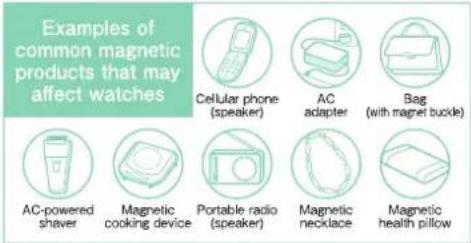
●Magnetna odpornost
Na uro lahko vpliva bližnji magnetizem, zaradi česar lahko začasno pospeši, zaostane ali se ustavi.
| Indication on the case back | Condition of use |
| No Indication | Keep the watch more than 10 cm away from magnetic products. |
| Keep the watch more than 5 cm away from magnetic products.(JIS level-1 standard) | |
| Keep the watch more than 1 cm away from magnetic products.(JIS level-2 standard) |
Če se ura namagneti in se njena natančnost poslabša preko predpisane stopnje pri normalni uporabi, jo je treba razmagneti. V tem primeru boste zaračunani za razmagnetitev in ponovno nastavitev natančnosti, tudi če se to zgodi v garancijskem roku. Razlog, zakaj na uro vpliva magnetizem: vgrajeni motor ima magnet, na katerega lahko vpliva močno zunanje magnetno polje.
●Vsakodnevna nega
Ura zahteva dobro vsakodnevno nego.
- Ure ne umivajte, ko je krona izvlečena.
· Vlago, znoj ali umazanijo obrišite z mehko krpo.
· Po namakanju ure v morski vodi jo obvezno sperite
v čisti vodi in previdno obrišite do suhega.
※Če je vaša ura označena kot "nevodoodporna" ali "vodoodporna za vsakodnevno uporabo", je ne umivajte.
●Vrtenje krone
• Da preprečite rjavenje krone, jo občasno zavrtite.
Enako storite tudi pri uri z vijačno krono.
●Vodoodpornost
Pred uporabo si oglejte spodnjo tabelo, ki opisuje stopnje vodoodpornosti vaše ure.
| Indication on the case back | Water resistant performance | Condition of use | |
| No indication | Non-water resistance | Avoid drops of water or sweat | |
| WATER RESISTANT | Water resistance for everyday use | The watch can withstand accidental contact with water in everyday life. | Not suitable for swimming |
| WATER RESISTANT 5 BAR | Water resistance for everyday use at 5 barometric pressures. | The watch is suitable for sports such as swimming. | |
| WATER RESISTANT 10(20)BAR | Water resistance for everyday use at 10 (20) barometric pressures. | The watch is suitable for diving not using an air cylinder. | |
Pašček
Pašček je v neposrednem stiku s kožo in se umaže od znoja ali prahu. Zato lahko pomanjkanje nege pospeši propadanje paščka ali povzroči draženje kože ali madeže na manšeti rokava. Ura zahteva veliko pozornosti za dolgo življenjsko dobo.
Kovinski pašček
Vlaga, znoj ali umazanija bodo povzročili rjo tudi na nerjavnem jeklu, če ostanejo dlje časa.
Pomanjkanje nege lahko povzroči rumenkaste ali zlate madeže na manšeti srajc.
Čim prej obrišite vlago, znoj ali umazanijo z mehko krpo.
Za čiščenje umazanije v režah med členi paščka jo obrišite in nato očistite z mehko zobno ščetko.
(Zaščitite ohišje ure pred brizganjem vode tako, da ga zavijete v plastično folijo itd.)
Ker nekatere titanove zapestnice uporabljajo zatiče iz nerjavnega jekla, ki ima izjemno trdnost, lahko na delih iz nerjavnega jekla nastane rja.
Če se rja razširi, lahko zatiči štrlijo ven ali izpadejo, ohišje ure lahko pade z zapestnice ali pa se zaponka ne odpre.
Če zatič štrli ven, lahko pride do telesnih poškodb. V tem primeru ure ne uporabljajte in zahtevajte popravilo.
Usnjeni pašček
Usnjen pašček je občutljiv na razbarvanje in propadanje zaradi vlage, znoja in neposredne sončne svetlobe. Čim prej obrišite vlago in znoj z nežnim tapkanjem s suho krpo. Ure ne izpostavljajte dalj časa neposredni sončni svetlobi. Bodite previdni pri nošenju ure s svetlim paščkom.
saj so madeži ali umazanija verjetno vidni.
- Izogibajte se nošenju ure z usnjenim paščkom, razen paščkov Aqua Free, med kopanjem, plavanjem in delom z vodo, tudi če je ura sama vodoodporna za vsakodnevno uporabo (10 barov).
Poluretanski pašček
Poluretanski pašček je občutljiv na razbarvanje zaradi svetlobe, topila ali vlažnost zraka pa ga lahko poškodujejo. - Še posebej prosojni, beli ali bledo obarvani paščki zlahka vpijejo druge barve, kar povzroči madeže ali razbarvanje. - Umazanijo sperite z vodo in pašček očistite s suho krpo. (Zaščitite ohišje ure pred brizganjem vode tako, da ga zavijete v plastično folijo itd.) - Ko pašček postane manj prožen, ga zamenjajte z novim. Če ga boste še naprej uporabljali, lahko sčasoma poči ali postane krhek.
Opomba o draženju kože in alergijah:
Draženje kože, ki ga povzroča pašček, ima različne vzroke, kot so alergija na kovine ali usnje, ali kožne reakcije na trenje, prah ali sam pašček.
Opombe o dolžini paščka
Pašček prilagodite tako, da bo med njim in zapestjem ostalo malo prostora za pretok zraka. Pri nošenju ure pustite dovolj prostora, da lahko med pašček in zapestje vstavite prst.
Tehnični podatki
| Caliber number | V172 | V174 | V175 | V176 | VR42 · VR43 | VS72 | VS75 | VS76 |
| 1.Basic function | Main time with 3 hands (hour, minute, second)Date displayStopwatch (1/5-second and minute hands)Small alarm display (hour and minute hands) | Main time with 3 hands (hour, minute, second)24-hour handDate displayStopwatch (1/5-second and minute hands)Small alarm display (hour and minute hands) | Main time with 3 hands (hour, minute, second)24-hour handDate displayStopwatch (1/5-second and minute hands) | Main time with 3 hands (hour, minute, second)Date displayStopwatch (1/20-second, and minute hands) | Main time with 3 hands (hour, minute, second)24-hour handDate displayStopwatch (second and minute hands) | Main time with 3 hands (hour, minute, second)Date displayStopwatch (1/5-second and minute hands)Small alarm display (hour and minute hands) | Main time with 3 hands (hour, minute, second)24-hour handDate displayStopwatch (1/5-second and minute hands) | Main time with 3 hands (hour, minute, second)Date displayStopwatch (1/20-second and minute hands) |
| 2.Frequency of crystal oscillator | 3 2, 7 6 8 Hz(Hz = Hertz ... Cycles per second) | |||||||
| 3.Loss/gain (monthly rate) | Loss / gain ± 15 seconds on a monthly rate (When it is worn on the wrist within a normal temperature range between 5°C and 35°C.) | Loss / gain ± 20 seconds on a monthly rate (when it is worn on the wrist within a normal temperature range between 5°C and 35°C.) | ||||||
| 4.Operational temperature range | -10°C~+60°C | -5°C~+50°C | ||||||
| 5.Driving system | Step Motor, 4 pieces | Step Motor, 4 pieces | Step Motor, 3 pieces | Step Motor, 4 pieces | Step Motor, 2 pieces | Step motor, 4 pieces | Step motor, 3 pieces | Step motor, 4 pieces |
| 6.Power source | Secondary battery, 1 piece | |||||||
| 7.Duration of operation | Approx. 6 months (if the stopwatch is used for 1 hour per day, and the alarm is used one time to sound for 20 seconds per day) | Approx. 6 months (if the stopwatch is used for 1 hour per day) | Approx. 4 months (if the stopwatch is used for 1 hour per day) | Approx. 6 months (if the stopwatch is used for 1 hour per day)and the alarm is used one time to sound for 20 seconds per day) | Approx. 6 months (if the stopwatch is used for 1 hour per day) | |||
| 8.IC (Integrated Circuit) | Oscillator, frequency divider and driving circuit C-MOS-IC, 1 piece | |||||||
Funkcija zaščite pred prekomernim polnjenjem ※ Tehnični podatki se lahko spremenijo brez predhodnega obvestila zaradi izboljšav izdelka. Ko je sekundarna baterija popolnoma napolnjena, se samodejno aktivira funkcija zaščite pred prekomernim polnjenjem, da prepreči nadaljnje polnjenje. Ni se treba bati poškodb zaradi prekomernega polnjenja, ne glede na to, koliko je sekundarna baterija napolnjena preko "časa, potrebnega za popolno polnjenje ure".
Poprodajne storitve
Opombe o garanciji in popravilih
- Za popravilo se obrnite na prodajalca, pri katerem ste uro kupili, ali na SEIKO CENTER ZA STRANKE.
- V garancijskem roku predložite garancijski list za uveljavljanje popravila.
Jamstvo je opisano v garancijskem listu. Pozorno ga preberite in shranite.
Za popravila po izteku garancijskega roka, če je funkcije ure mogoče
obnoviti s popravilom, bomo popravilo opravili na zahtevo in ob plačilu.
●Nadomestni deli
- SEIKO običajno hrani zalogo nadomestnih delov za to uro 7 let. Nadomestni deli so tisti, ki so bistveni za ohranjanje funkcionalne celovitosti ure.
- Pri popravilu ure upoštevajte, da če originalni deli niso na voljo, se lahko deli nadomestijo z nadomestki, katerih videz se lahko razlikuje od originalov. Prav tako upoštevajte, da se lahko zamenja celoten komplet delov z ohišjem ali pa se ura, če je popravilo težavno, zamenja z uro enake kakovosti.
- NAVODILA ZA UPORABO
- NAVODILA
- JCC06·V175C
- JV176·JVR4C
- F
- USTREZNI MODELI
- SEIKO WATCH CORPORATION
- BREZPLAČNA TELEFONSKA ŠTEVILKA
- SLUŽBA ZA STRANKE
- ZNAČILNOSTI
- IMENA DELOV IN FUNKCIJE
- KRONA
- KAKO NASTAVITI ČAS IN DATUM
- ① PREVERITE, ALI URA DELUJE
- ② PREVERITE, ALI URNI IN MINUTNI KAZALEC NE KAŽETA ČASA MED 21.00 IN
- ③ POTEGNITE KRONO NA PRVI POLOŽAJ
- ZAVRTITE KRONO, DA NASTAVITE DATUM NA DATUM PREJŠNJEGA DNE
- ⑤ POTEGNITE KRONO NA DRUGI POLOŽAJ, KO JE SEKUNDNI KAZALEC NA POLOŽAJU 0 SEKUND
- ZA PREMIKANJE KAZALCEV V SMERI URINEGA KAZALCA OBRAČAJTE KRONO
- ⑦ ZA PREMIKANJE KAZALCEV V SMERI URINEGA KAZALCA OBRAČAJTE KRONO V SMERI PUŠČICE, DA NASTAVITE GLAVNI ČAS
- ⑥ ZA POMIK KAZALCEV V SMERI URINEGA KAZALCA ZAVRTITE KRONO
- ⑦ ZA POMIK KAZALCEV V SMERI URINEGA KAZALCA ZAVRTITE KRONO V SMERI PUŠČICE, DA NASTAVITE GLAVNI ČAS
- PRITISNITE GUMB B, DA NASTAVITE ČAS ALARMA NA ISTI ČAS KOT GLAVNI ČAS (SAMO ZA MODELE V172, V174 IN VS72)
- POTISNITE KRONO NAZAJ V NORMALNI POLOŽAJ V SKLADU S ČASOVNIM SIGNALOM. NASTAVITEV ČASA ALARMA JE KONČANA
- ROČNA NASTAVITEV DATUMA OB KONCU MESECA
- ① PREPRIČAJTE SE, DA URA DELUJE
- ② PREPRIČAJTE SE, DA URNI KAZALCI NE PRIKAZUJEJO ČASA MED 9.00 IN
- ③ IZVLECITE KRONO DO PRVEGA KLIKA
- OBRAČAJTE KRONO, DA NASTAVITE DATUM
- ⑤ POTISNITE KRONO NAZAJ V NORMALNI POLOŽAJ
- FUNKCIJA ŠTOPARICE
- IMENA DELOV IN FUNKCIJE ŠTOPARICE (V172, V174, VS72)
- IMENA DELOV IN FUNKCIJE ŠTOPARICE (V175, VS75)
- IMENA DELOV IN FUNKCIJE ŠTOPARICE (V176, VS76)
- KAKO UPORABLJATI ŠTOPARICO
- NASTAVITEV ZAČETNEGA POLOŽAJA KAZALCEV ŠTOPARICE
- V176·VS
- VR42·VR
- KAKO UPORABLJATI TAHIMETER
- KAKO UPORABLJATI BUDILKO (V172·V174·VS72)
- KAKO NASTAVITI ČAS BUDILKE
- KAKO PREVERITI RAVEN REZERVE MOČI (VR42 · VR43)
- O POLNJENJU
- STANDARDNI ČAS POLNJENJA
- NEPRAVILEN PRIKAZ ALI NEPRAVILNO DELOVANJE (RAZEN VR42 · VR43)
- PONASTAVITEV VGRAJENEGA IC-JA
- ① IZVLECITE KRONO NA DRUGI KLIK
- ③ POTISNITE KRONO NAZAJ V NORMALNI POLOŽAJ
- PRILAGODITE PREDHODNI POLOŽAJ KAZALCEV ŠTOPARICE (1/5 SEKUNDE IN MINUTE), NATO NASTAVITE ČAS IN DATUM
- OPOMBE O BATERIJI
- OPOZORILO
- ZA OHRANJANJE KAKOVOSTI VAŠE URE
- POZOR
- ●MAGNETNA ODPORNOST
- ●VSAKODNEVNA NEGA
- ●VRTENJE KRONE
- ●VODOODPORNOST
- PAŠČEK
- KOVINSKI PAŠČEK
- USNJENI PAŠČEK
- POLURETANSKI PAŠČEK
- TEHNIČNI PODATKI
- POPRODAJNE STORITVE
- OPOMBE O GARANCIJI IN POPRAVILIH
- ●NADOMESTNI DELI
Znamka : SEIKO
Model : VR43
Kategorija : Ura