
MC-E563K - Aspirator PANASONIC - Manual de utilizare gratuit
Găsiți gratuit manualul dispozitivului MC-E563K PANASONIC în format PDF.


Întrebările utilizatorilor despre MC-E563K PANASONIC
0 întrebare despre acest aparat. Răspundeți la cele pe care le cunoașteți sau puneți-vă propria.
Pune o întrebare nouă despre acest aparat
Descărcați instrucțiunile pentru Aspirator în format PDF gratuit! Găsiți manualul dvs. MC-E563K - PANASONIC și luați din nou în mână dispozitivul dvs. electronic. Pe această pagină sunt publicate toate documentele necesare pentru utilizarea dispozitivului dvs. MC-E563K mărcii PANASONIC.
MANUAL DE UTILIZARE MC-E563K PANASONIC
Operating Instructions
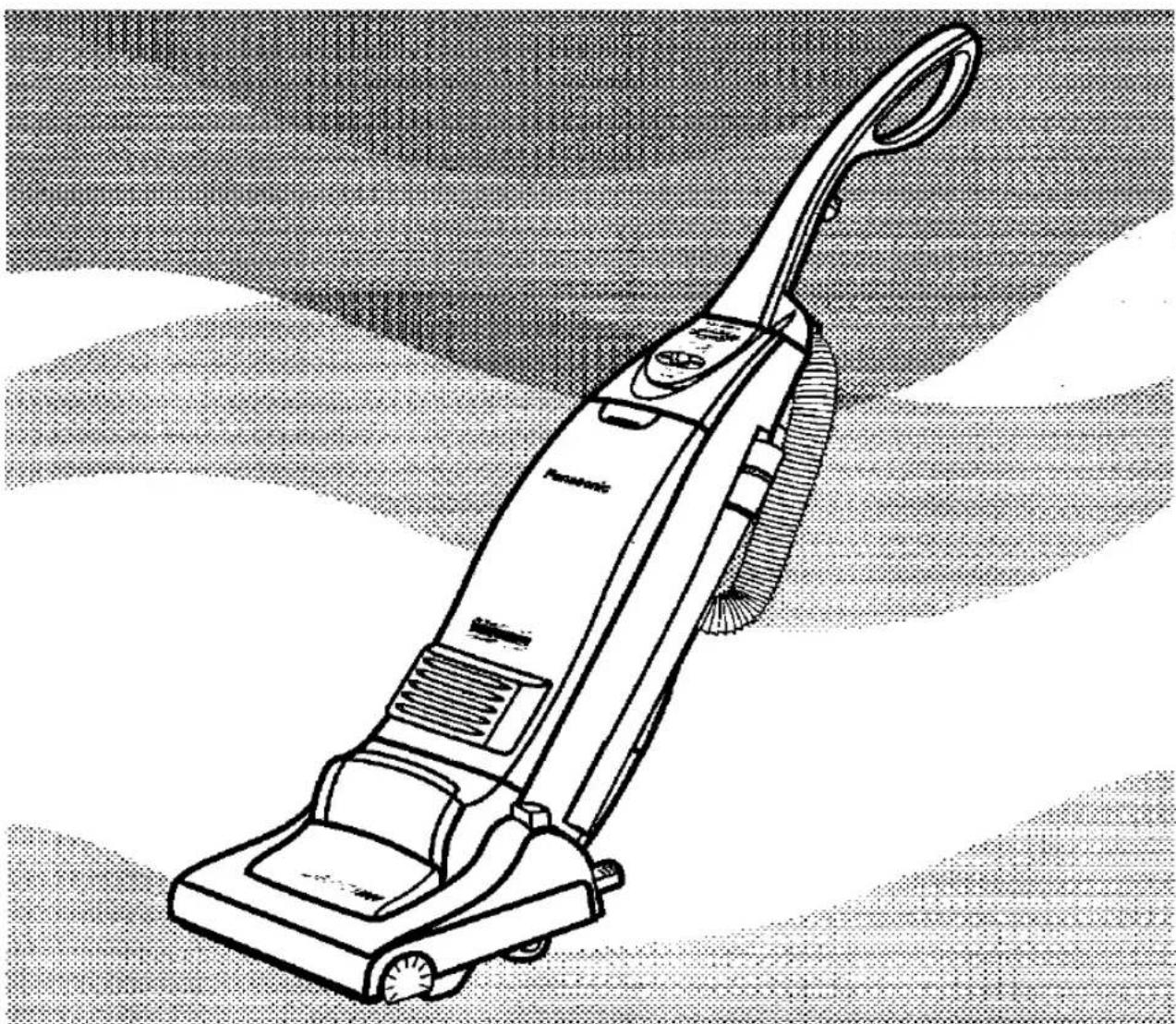
Vacuum Cleaner
MC-E563K
natural_image
Line drawing of a vacuum cleaner with handle and wheels, shown against a textured background (no text or symbols)Panasonic
We would particularly advise that you carefully study these Operating Instructions before attempting to operate the unit and that you note the Important Safety Instructions.
Please keep in a safe place with your Authorised Dealer Service booklet.
This product complies with the directives 73/23/EEC and 89/336/EEC.
TABLE OF CONTENTS
| Page | Page | ||
| • Caution for AC Mains Lead | 2 | F) Automatic height adjustment | 7 |
| • Important Safety Instructions for the user | 3 | G) Floor Scratch prevention | 7 |
| • Cautions | 3 | H) How to use the accessories | 8 |
| • Identification of main parts | 4 | I) Dust bag check indicator | 8 |
| HOW TO ASSEMBLE / OPERATE YOUR CLEANER | MAINTENANCE AND SERVICING | ||
| A) Handle assembly | 5 | • How to change the dust bag | 9 |
| B) Power cord release / storage | 5 | • Filter care | 9 |
| C) ON/OFF Switch and Variable power control | 6 | • Blockages | 10 |
| D) Dust sensor | 6 | • Maintenance for the rotary brush | 10 |
| E) Foot pedal body adjustment / Automatic beater bar ON/STOP | 7 | • Replacing parts | 11 |
| • Trouble shooting guide | 12 |

CAUTION FOR AC MAINS LEAD
FOR YOUR SAFETY PLEASE READ THE FOLLOWING TEXT CAREFULLY
This appliance is supplied with a moulded three pin mains plug for your safety and convenience.
A 13 amp fuse is fitted in this plug.
Should the fuse need to be replaced please ensure that the replacement fuse has rating of 13 amps and that it is approved by ASTA or BSI to BS1362.
Check for the ASTA mark 📄 or the BSI mark 🌐 on the body of the fuse.
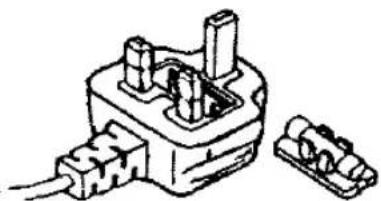
If the plug contains a removable fuse cover you must ensure that it is refitted when the fuse is replaced.
If you lose the fuse cover the plug must not be used until a replacement cover is obtained.
A replacement fuse cover can be purchased from your local Panasonic Dealer.
IF THE FITTED MOULDED PLUG IS UNSUITABLE FOR THE SOCKET OUTLET IN YOUR HOME THEN THE FUSE SHOULD BE REMOVED AND THE PLUG CUT OFF AND DISPOSED OF SAFELY.
THERE IS A DANGER OF SEVERE ELECTRICAL SHOCK IF THE CUT OFF PLUG IS INSERTED INTO ANY 13 AMP SOCKET.
If a new plug is to be fitted please observe the wiring code as shown below.
If in any doubt please consult a qualified electrician.
IMPORTANT: The wires in this mains lead are coloured in accordance with the following code:
Blue : Neutral
Brown : Live
As the colours of the wire in the mains lead of this appliance may not correspond with the coloured markings identifying the terminals in your plug, proceed as follows:
The wire which is coloured BLUE must be connected to the terminal in the plug which is marked with the letter N or coloured BLACK.
The wire which is coloured BROWN must be connected to the terminal in the plug which is marked with the letter L or coloured RED.
Under no circumstances should either of these wires be connected to the earth terminal of the three pin plug, marked with the letter E or the Earth Symbol 12
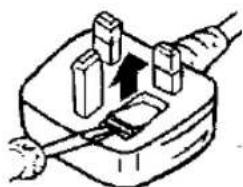
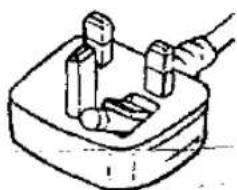
How to replace the Fuse:
- There are two types of the supplied AC Mains Lead: A and B as shown below.
1 Open the fuse compartment with a screwdriver.
2 Replace the fuse and fuse cover if detachable.
natural_image
Diagram of a plug with a cable inserted, showing internal components and an upward arrow (no text or symbols)TYPE A
natural_image
Simple line drawing of a hand using a tool to press or install a component, no text or symbols present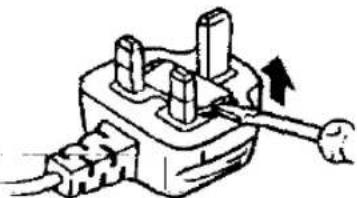
natural_image
Simple line drawing of a plug with three pins and a handle, no text or symbols presentTYPE B
natural_image
Technical line drawing of a mechanical component with two connectors and wires (no text or symbols)Fuse cover Part No.: AMC8D48C0000.
IMPORTANT SAFETY INSTRUCTIONS FOR THE USER

When using this vacuum cleaner, please observe these basic precautions. WARNING: To reduce the risk of fire, electric shock, or injury:
- Do not leave the vacuum cleaner plugged in to mains outlet. Unplug from the outlet when not in use and before cleaning the appliance or undertaking maintenance operations.
• Electric shocks can occur if used outdoors or on wet surfaces.
• Make sure that hands and feet (particularly of small children) are kept away from the cleaner. - Do not use with damaged cord or plug. If the vacuum cleaner is not working as it should be, or has been dropped, damaged, left outdoors, or come into contact with water, consult an authorised Panasonic Service Centre.
- Do not pull or carry by cord, use cord as a handle, close a door on cord, pull cord around sharp edges or corners. Do not run vacuum cleaner over the cord. Keep cord away from heated surfaces.
- Do not handle plug or vacuum cleaner with wet hands.
- Do not put any object into openings. Do not use with any opening blocked; keep free of dust, lint, hair and anything that may block or reduce air flow.
- Keep hair, loose clothing, fingers, and all parts of body away from openings and moving parts.
- Do not use without filters and / or dust bag in place. Never try to patch a broken dust bag.
- Turn off all controls before unplugging.
- Use extra care when cleaning on stairs.
- Do not use to pick up flammable or combustible liquids such as gasoline or use in areas where they may be present.
- This appliance should be serviced by an authorised Panasonic Service Centre, and only genuine Panasonic spare parts should be used.
- Keep feet, fingers and hands away from the rotary brush. (It may cause injury).

CAUTIONS
natural_image
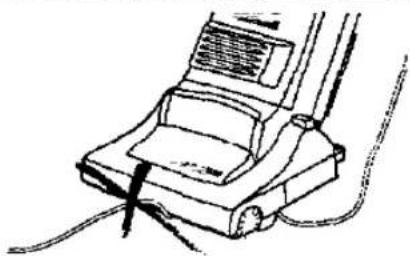
Line drawing of a vacuum cleaner with attached wires (no text or symbols)- To avoid any possible damage to the mains cable, never run over the cord or allow it to become caught in the rotary brush when using the vacuum cleaner.
natural_image
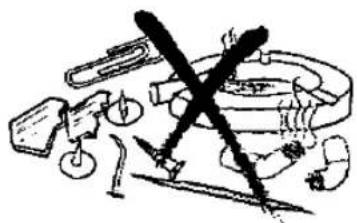
Illustration of various mechanical components and tools (no text or symbols visible)- To avoid damaging the machine or the dust bag, never let the vacuum cleaner pick up wet matter, mud, burning ashes or large and sharp objects.
natural_image
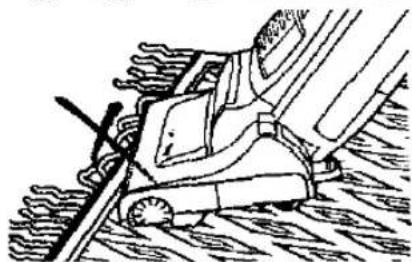
Technical line drawing of a mechanical assembly with no visible text or symbols- Do not run the vacuum cleaner over tassels or fringes of rugs or mats as they could get caught up in the rotary brush and may cause damage to the brush and belt.
natural_image
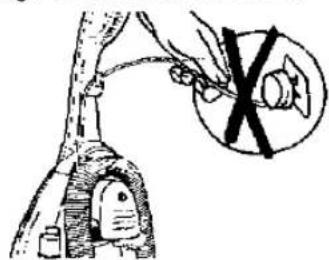
Illustration of a hand holding a tool with a circular component and a crossed-out black symbol (no text or labels)- Do not pull on the cord when disconnecting the appliance from the mains, always pull on the plug body itself.
natural_image
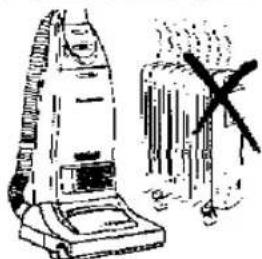
Illustration of a vacuum cleaner and a suitcase with a cross mark (no text or symbols)- Keep the vacuum cleaner away from heat sources such as radiators, fires, direct sunlight, etc.
natural_image
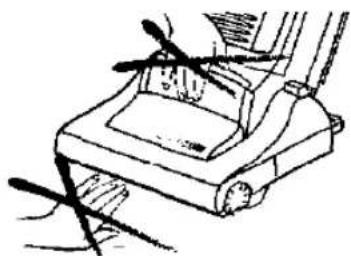
Line drawing of a mechanical device with a handle and lever mechanism (no text or symbols)- To avoid injury, keep your fingers and hands away from the rotary brush, and never put them between the cleaner bodies.
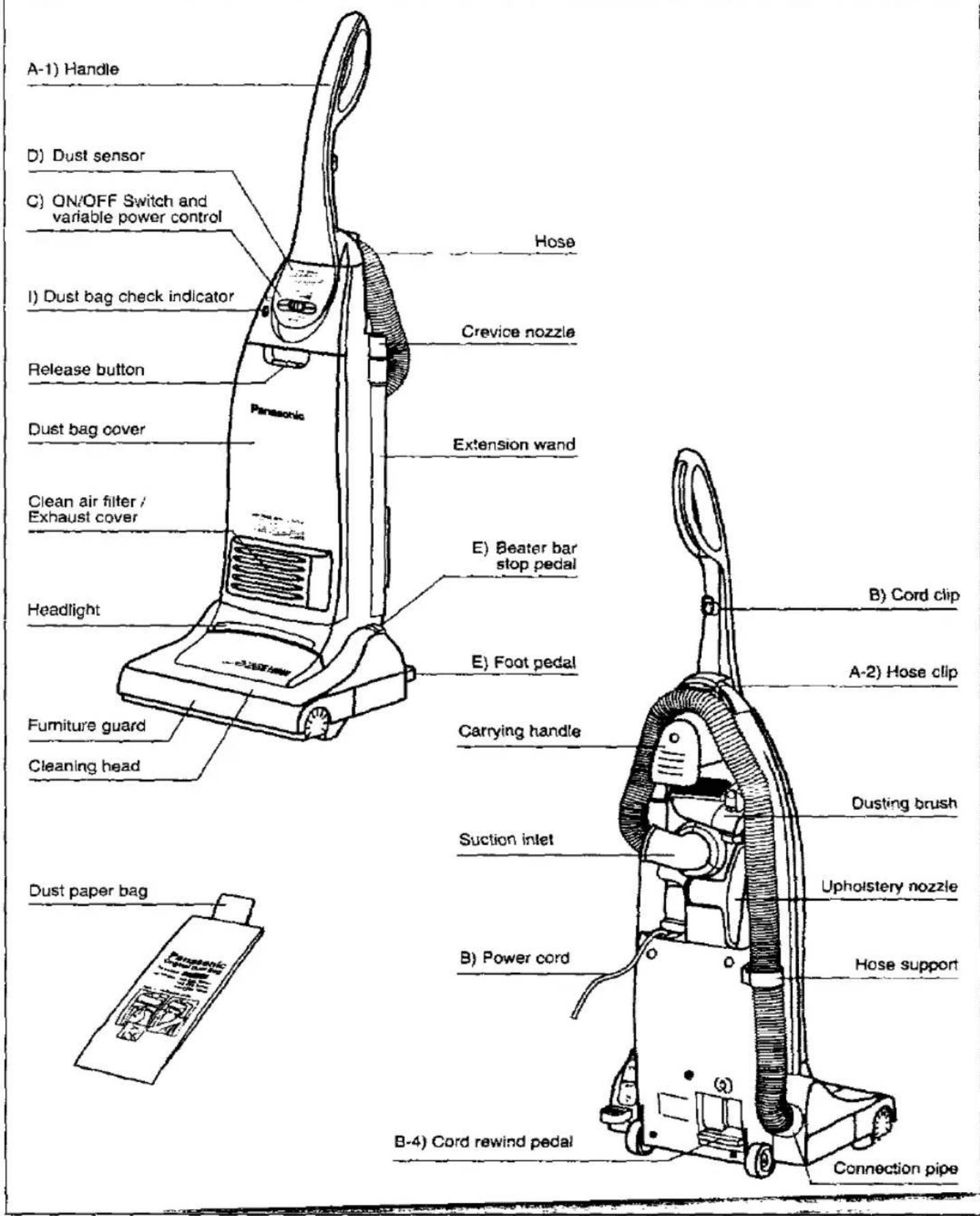
IDENTIFICATION OF MAIN PARTS
HOW TO ASSEMBLE / OPERATE YOUR CLEANER
A) HANDLE ASSEMBLY
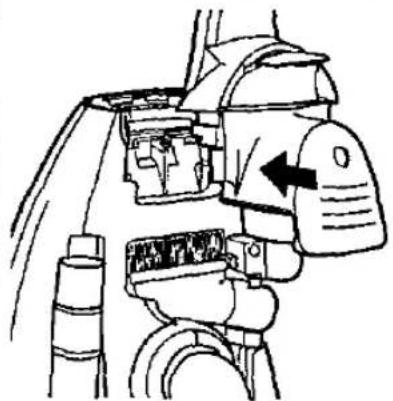
natural_image
Technical line drawing of a mechanical device with no visible text or symbols1) Align the handle with the body of the cleaner in the proper position as shown in the illustration.
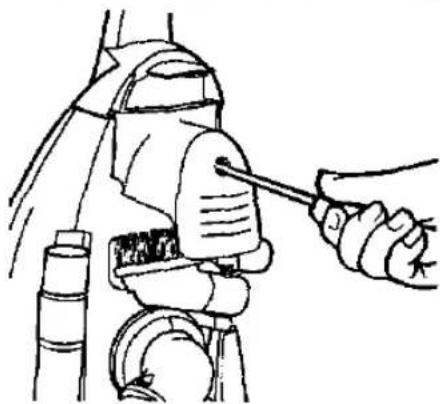
natural_image
Line drawing of a robotic arm with a hand holding a tool, no text or symbols present2) Insert the base of the handle into the top of the body of the machine as shown. Push in handle and tighten the screw. The screw can be found in the vinyl bag with these operating instructions. IMPORTANT: Do not over tighten the screw.
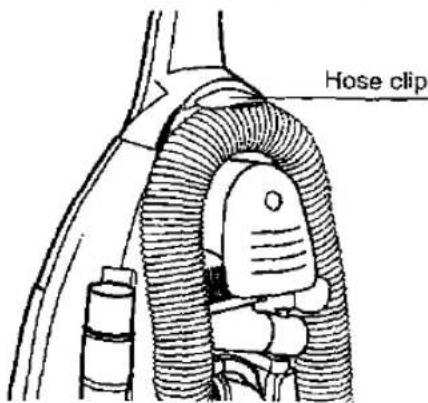
3) Place the hose into the hose clip. Push inwards to secure.
NOTE: Always place the hose in the clockwise direction.
B) POWER CORD RELEASE / STORAGE
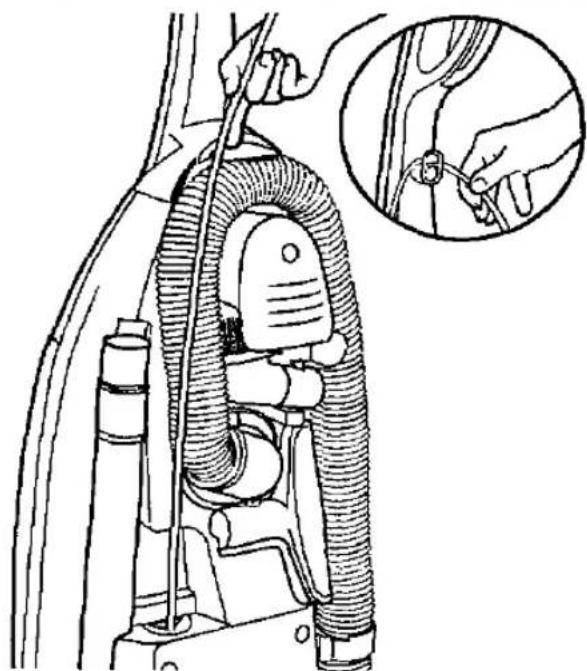
natural_image
Technical line drawing of a car's airbag assembly with a close-up inset showing hand fastening details (no text or symbols)1) To release the cord pull it out by hand and fix it on the upper hook in order to help secure the cord during use.
NOTE: When in use it is advisable to pull out the full power cord length.
natural_image
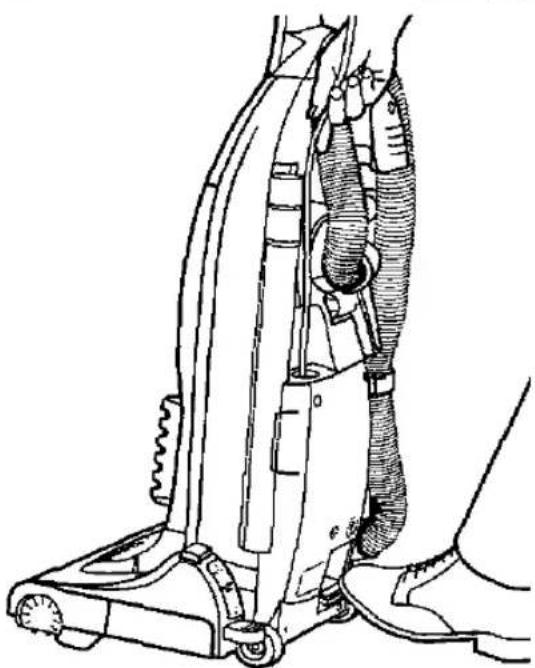
Line drawing of a vacuum cleaner with attached tubing and foot (no text or symbols)2) To rewind the cord, press and hold the rewind pedal, allowing the cord to be automatically rewound into the cleaner.
IMPORTANT: When rewinding the cord, keep the cord/plug in one hand to avoid damaging the cleaner.
NOTE: To avoid any possible damage to the power cord, never run over the cord or allow it to become caught in the rotary brush.
C) ON / OFF SWITCH AND VARIABLE POWER CONTROL
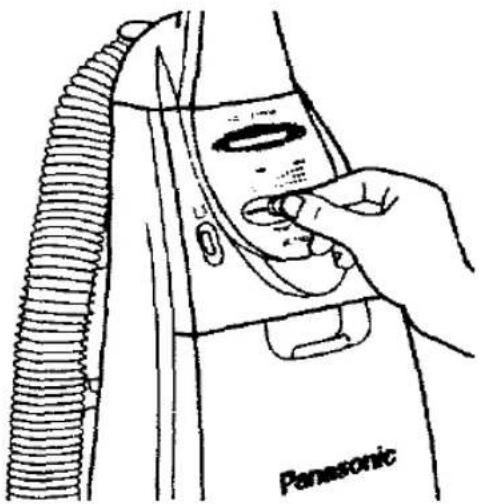
The sliding button - located on the control panel - is used to switch the vacuum cleaner ON/OFF and vary the motor speed depending on the suction required.
To switch ON, slide the button sideways. By sliding the button further sideways, the power will gradually be increased.
To switch OFF, slide the button backward until it clicks back at "0" position.
natural_image
Line drawing of a hand inserting a component into a Panasonic washing machine (no text or symbols on the diagram itself)VARIABLE POWER CONTROL
These vacuum cleaner have a variable power control to select the most suitable power, according to your cleaning needs.
MIN.: To clean curtains and soft furnishing's etc.. with tool attached.
MAX.: To clean with high suction continuously on carpets.

D) DUST SENSOR
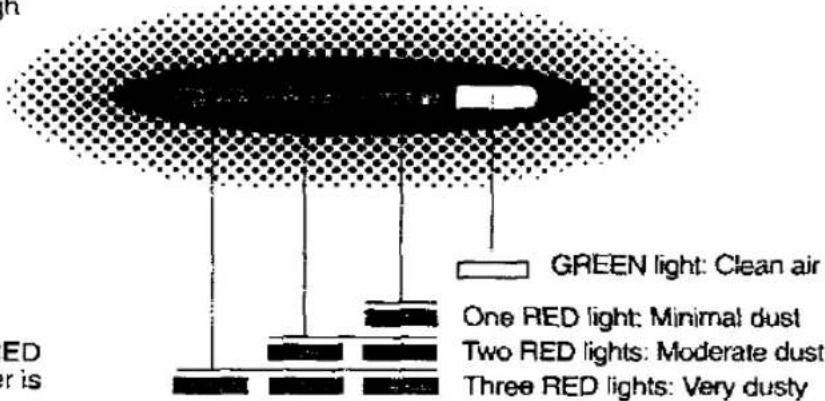
The dust sensor indicator warns you about cleaning conditions through GREEN / RED lamps. It works automatically, changing from GREEN to RED when dust is sucked through the suction inlet.
In some cases the sensor will not operate if there is not enough air flow.
Depending on the amount of dust present in the vacuumed air, the RED lights will illuminate in three positions, as indicated in the illustration.
The GREEN light is displayed when there is no longer any dust present in the vacuumed air.
NOTE: As normal function, sometimes the RED light could come on when the vacuum cleaner is switched ON or OFF.
DUST SENSOR
E) FOOT PEDAL BODY ADJUSTMENT / AUTOMATIC BEATER BAR ON / STOP
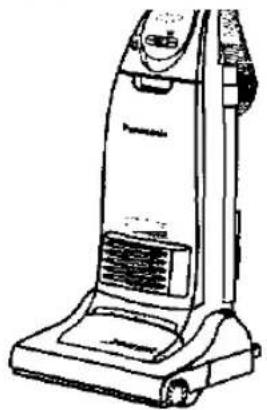
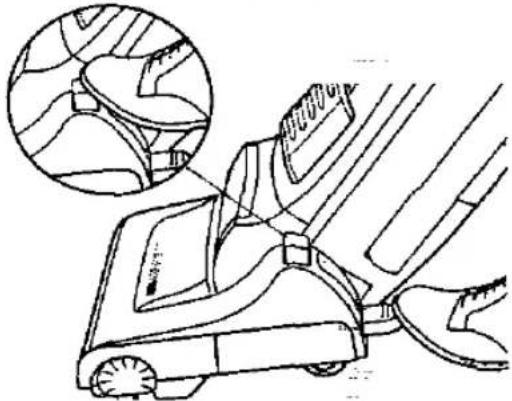
To lower the body of the cleaner, step on the foot release pedal on the bottom left corner of the vacuum cleaner. Once the body is reclined the rotary brush will automatically start to rotate.
If you wish to stop the rotary brush, simple return the cleaner into the upright position. In case you want to stop the rotary brush whilst the cleaner is in the reclined position, push the beater bar stop pedal located on the left side of the floor head, just above the foot release pedal.
natural_image
Line drawing of a vacuum cleaner (no text or symbols)- Upright position /on board tools The body should be in an upright position when cleaning tools are used.
natural_image
Line drawing of a lawn mower with an inset showing detailed blade details (no text or symbols)- Middle position /normal use For normal cleaning, depress the foot pedal and pull back the handle to a comfortable angle, then release the pedal to lower the cleaning head.
natural_image
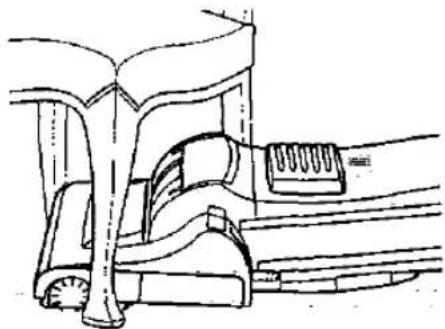
Technical line drawing of a mechanical assembly with no visible text or symbols- Low position For cleaning under furniture, depress the pedal a second time and lower the handle down to the floor as shown.
F) AUTOMATIC HEIGHT ADJUSTMENT
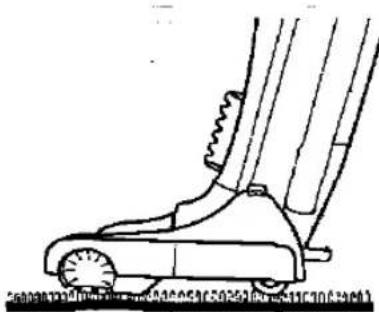
Your Panasonic vacuum cleaner is designed with an Automatic Height Adjustment, which adjusts the cleaning head to the proper height of any carpet pile.
This system allows you to move from one carpeted area to another, without having to make time consuming manual adjustments.
natural_image
Line drawing of a person's lower body and foot, showing mechanical components without any text or symbols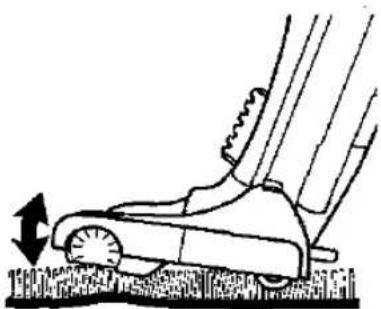
natural_image
Line drawing of a lawn mower on grass, showing motion direction (no text or symbols)G) FLOOR SCRATCH PREVENTION
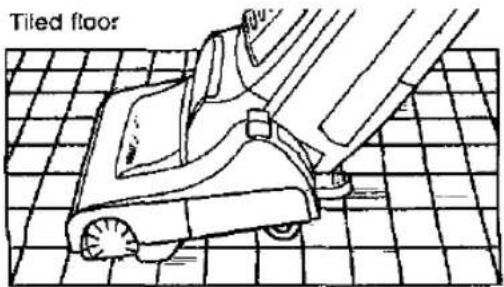
To prevent floor scratching when using the vacuum cleaner on tiled or polished floors, two small wheels are built into the base plate.
These two wheels also make it easy to slide the vacuum cleaner across carpeted floors.
natural_image
Line drawing of a tiled floor with a small robotic arm and foot, no text or symbols present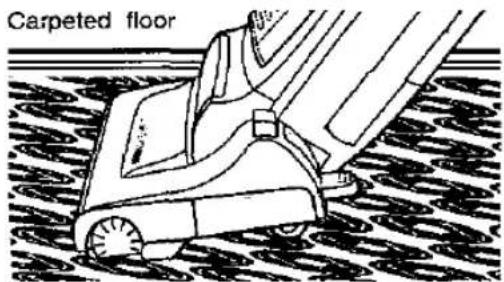
H) HOW TO USE THE ACCESSORIES
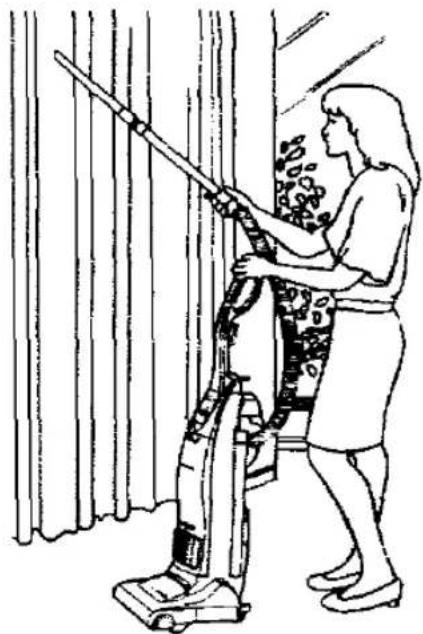
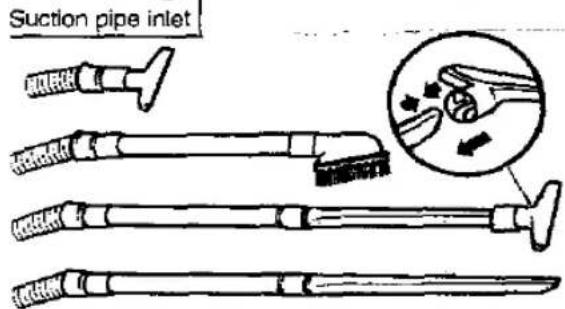
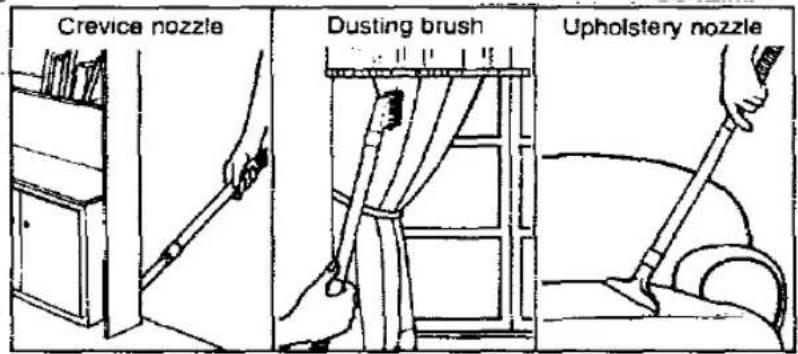
1) To use the accessories always keep the vacuum cleaner in the upright position.
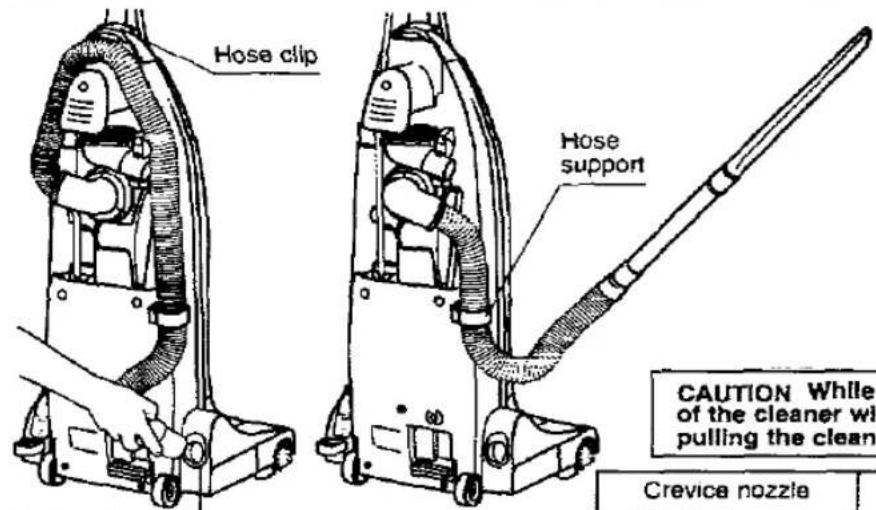
2) Pull out the hose from the suction pipe inlet and remove it from the hose clip. Then slide the hose through the hose support and connect any accessory as illustrated below.
Important: For a longer reach, remove the hose support from its fastening and hold the handle of the cleaner with one hand to avoid pulling the cleaner over.
NOTE: After finishing with the accessories, re-insert the hose to the suction pipe inlet and re-install the hose into the hose clip and hose support.
natural_image
Line drawing of a person using a vacuum cleaner to clean or store items (no text or symbols present)CAUTION While using the accessories, hold the handle of the cleaner with one hand, as shown above, to avoid pulling the cleaner over.
I) DUST BAG CHECK INDICATOR
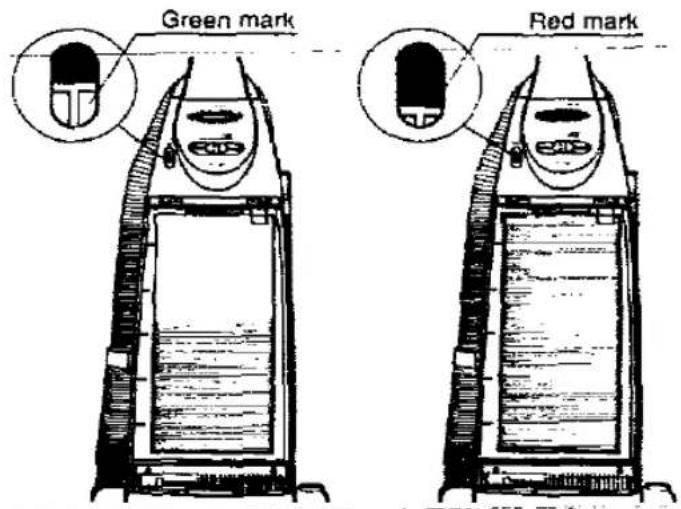
The dust bag check indicator is a visual aid to advise you of the condition of the dust bag.
The GREEN mark indicates that the dust bag is still empty.
The RED mark will appear when airflow through the bag is insufficient. When this happens, check the paper bag, it may be full or blocked with fine dust and needs to be replaced.
NOTE: If after having replaced the bag, the RED mark continues appearing in the window, check to see if the hose or suction inlet is clogged. (see BLOCKAGES).
When using the crevice nozzle the red mark may appear, this is due to air flow and not an indication the bag is full.

IMPORTANT NOTE: Before servicing any part, always DISCONNECT THE CLEANER FROM THE ELECTRICITY MAINS
HOW TO CHANGE THE DUST BAG
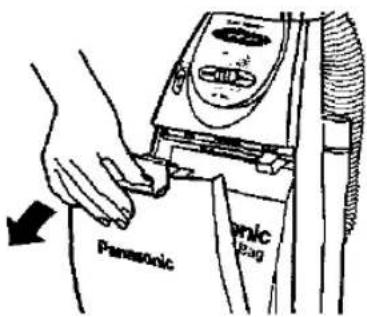
1) Push the release button on the dust cover as shown, and pull it forward.
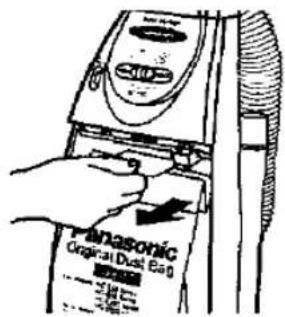
2) Grip the cardboard on the dust bag and pull out.
IMPORTANT: Dust bags should be changed regularly for the maximum efficiency of the filters and prolonged motor efficiency.
We recommend the use of genuine Panasonic bags Type U-2E only.
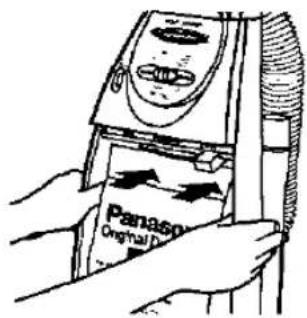
3) Install the dust bag by pressing the cardboard as shown. Before replacing the dust cover, make sure all edges of dust bag are completely inside the bag compartment.
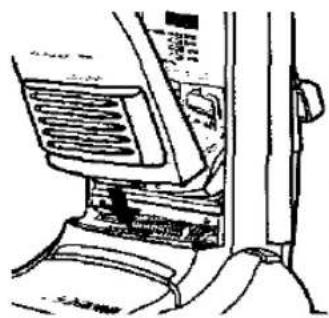
natural_image
Line drawing of a mechanical component with no visible text or symbols4) Replace the dust cover by inserting the protruding tab into the body slot then push the top of the cover into place.
NOTE: If the dust bag is fitted incorrectly or it is not installed, the dust cover will not close.
FILTER CARE
natural_image
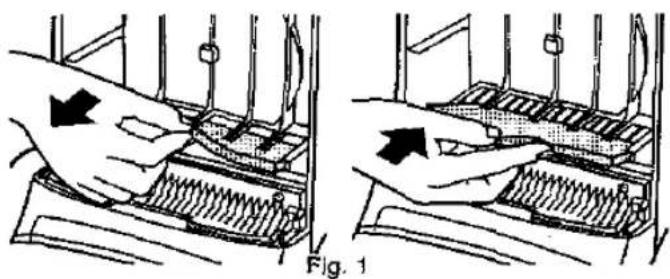
Illustration of two hands operating a mechanical device with spring-like components, labeled Fig. 1 (no text or symbols on the devices themselves)Central Filter (Fig. 1) Part no. AMC8F03M1000
The central filter (foam filter), is installed in the dust bag compartment to protect the motor from dirt. Simply rinse it out in warm water and dry it thoroughly before replacing.
To remove the central filter, hold the filter at the top (as illustrated) and pull it towards you.
IMPORTANT: Ensure that the filter is completely dry before re-installing it into the cleaner.
natural_image
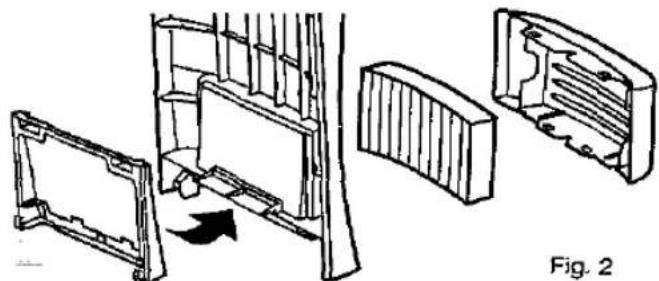
Technical line drawing of a mechanical assembly with cutaway views showing internal components (no text or symbols)Clean Air Filter (Fig. 2) Type F-2S
The clean air filter (electrostatic), is installed in the dust cover. This filter retains any small dust particles which may be present in the expelled air. It is advisable to change the clean air filter when it becomes dirty. As a guide, once or twice a year is usually sufficient, depending on use. To change the clean air filter, remove the dust cover and slide out the filter support, then take out the filter from the exhaust cover and replace it.
IMPORTANT: Make sure that the tabs of the filter support are correctly fixed in the exhaust cover slots.
IMPORTANT: Never use the cleaner without the correct filters properly installed. Failure to do so may result in motor damaged.
BLOCKAGES
If your cleaner stops to pick up dust, or the dust bag check indicator shows "Full" while the dust bag is still empty, a blockage may have occurred.
Remove the hose from the top suction inlet by pushing the two small clips inwards, turn the hose to the right and pull it outwards (Fig. 1). Clear any obstruction from the hose and/or top suction inlet using a blunt implement, taking care not to damage the hose.
If the obstruction occurs in the suction pipe inlet, it can be removed with care as shown in Fig. 2.
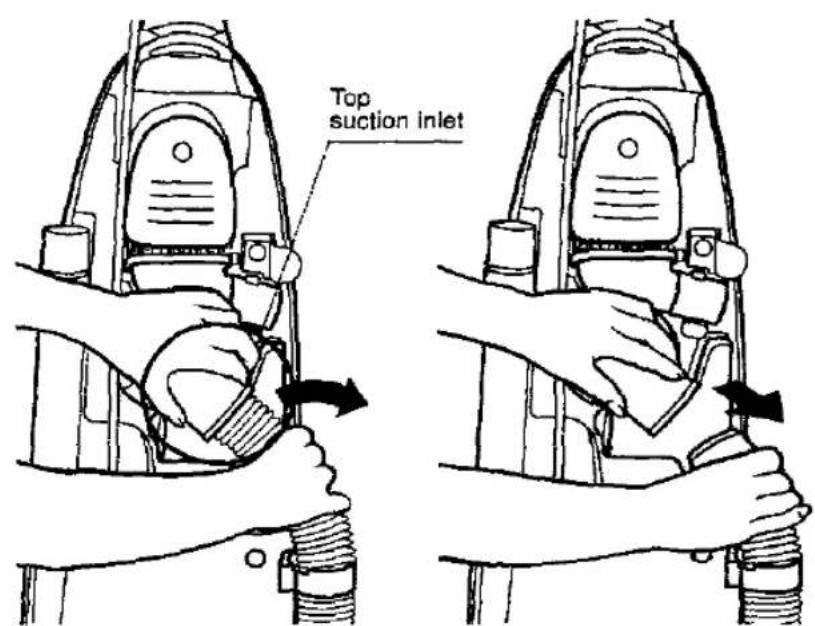
Fig. 1
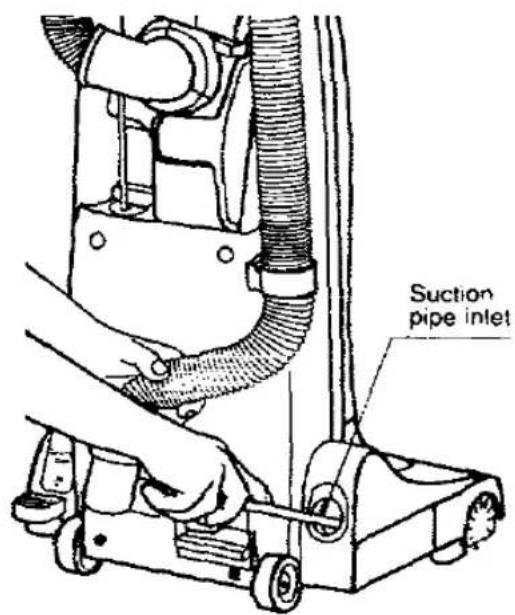
Fig. 2
MAINTENANCE FOR THE ROTARY BRUSH
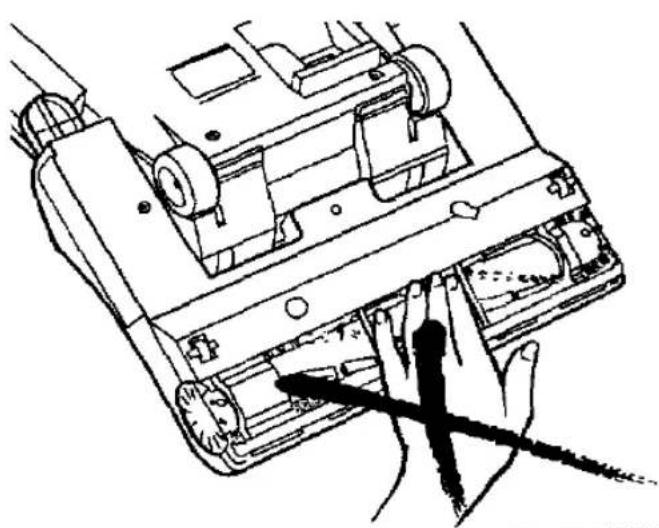
DO NOT USE YOUR FINGERS OR HANDS TO REMOVE OR CLEAN THE ROTARY BRUSH, AND ENSURE THE PRODUCT IS DISCONNECTED FROM THE MAINS SUPPLY.
If it is necessary to remove threads, strings, hairs, etc., which have wound around the rotary brush, cut across them with a pair of scissors making sure not to cut the bristles on the rotary brush.
natural_image
Line drawing of a hand inserting a device into a computer case (no text or symbols)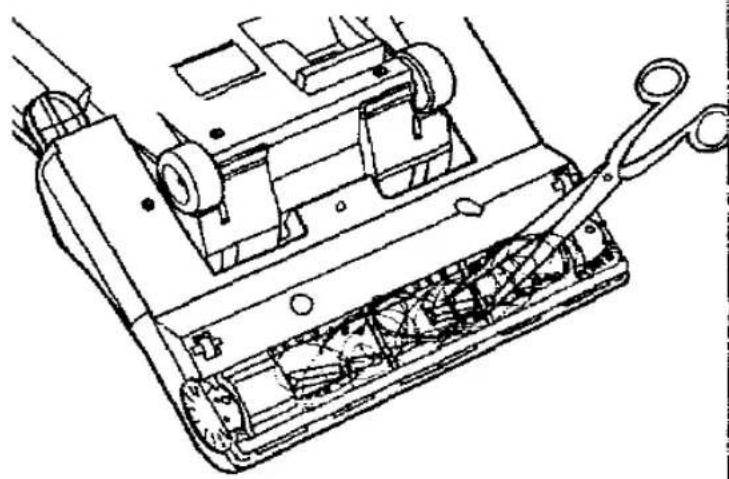
natural_image
Technical line drawing of a mechanical device with internal components and a tool interacting with it (no text or symbols present)REPLACING PARTS
Before replacing any part DISCONNECT THE CLEANER FROM THE ELECTRICITY SUPPLY.
We always recommend you use genuine Panasonic replacement parts only.
If you have any query, contact your local Panasonic dealer/ service centre. (Please refer to your Authorised Service booklet).
To replace any of the following parts, place the vacuum cleaner in the horizontal position by using the pedal. Then turn it over exposing the underside.
HOW TO REPLACE - DRIVE BELT TYPE UB-1L / ROTARY BRUSH ASSEMBLY
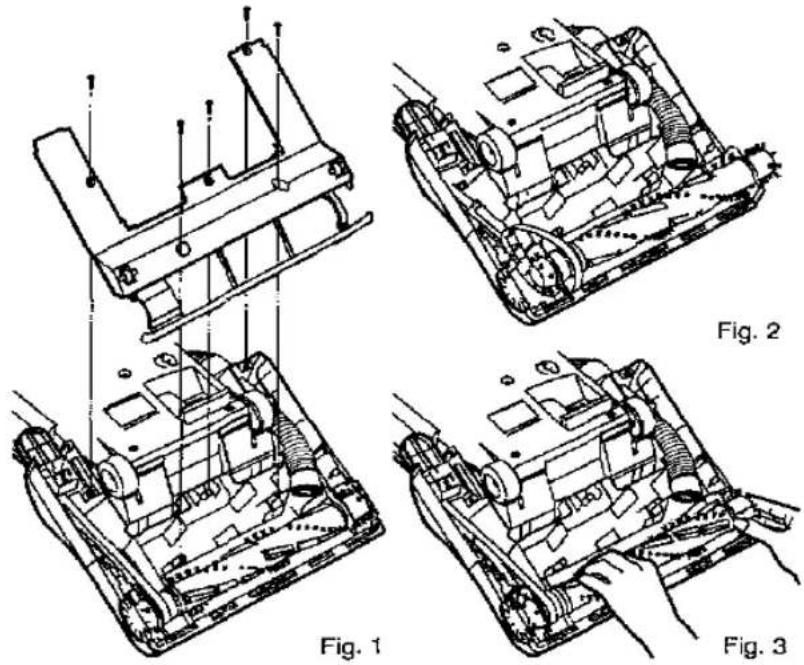
- Remove the 5 screws from the base plate and lift it off. (Fig. 1)
- Release the belt from the motor shaft and lift the rotary brush assembly to remove the belt. (Fig. 2)
- To reassemble the rotary brush assembly, simply return the belt to the motor shaft and rotary brush pulley. Re-insert the rotary brush mounts to their holding points, and turn the rotary brush to ensure that the belt has been seated correctly. (Fig. 3)
IMPORTANT: Make sure the belt is correctly settled in the selector lever.
- Replace the base plate and re-fasten the screws securely.
IMPORTANT: Make sure the belt is correctly settled in the selector lever. 4. Replace the base plate and re-fasten the screws securely.
HOW TO REPLACE - ROTARY BRUSH / SIDE BRUSHES / BEARING SUPPORT A-B
- First remove the base plate, drive belt and lift out the rotary brush assembly (as illustrated above).
- Remove the 2 screws at both ends of the rotary brush assembly and separate the different parts as shown in the exploded view.
- Replace any damaged part and reassemble in reverse order.
HOW TO REPLACE HEADLIGHT BULB
- Remove 2 screws from the lens cover and remove it. (Fig. 1)
- Remove the old bulb by simply pulling forward, and replace with a new one. (Consult your local dealer / Service agent for a suitable replacement bulb). (Fig. 2)
- Replace the lens cover and re-fasten the screws securely.
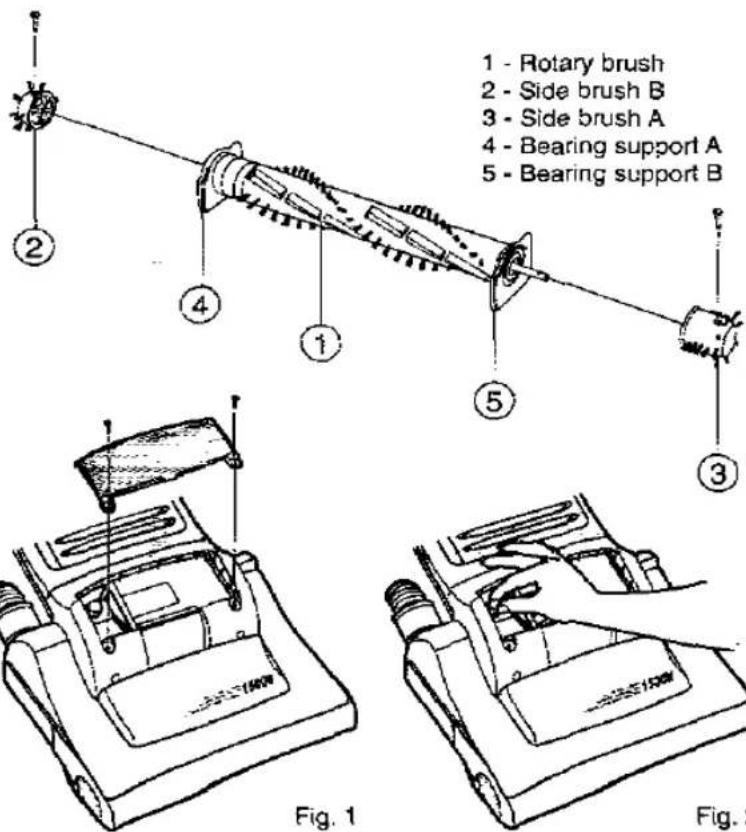
1 - Rotary brush
2 - Side brush B
3 - Side brush A
4 - Bearing support A
5 - Bearing support B
| TROUBLE SHOOTING GUIDE | ||
| Before returning the vacuum cleaner to a Panasonic Service Centre, check the following points: | ||
| TROUBLE | CHECK POINT | CAUSE / REMEDY |
| Motor fails to rotate(no noise is heard at all). | Mains plug connection.Mains plug fuse. | Mains plug connected firmly and mains outlet is ON.Check fuse and replace if blown. |
| Motor runs but no suction. | Hose inlet is clogged.Check dust indicator.Paper bag broken.Central filter. | If there is a blockage, remove it.If shows full, replace the paper bag.If paper bag is broken, replace it.If the central filter is full of dust, clean or replace it. |
| Rotary brush does not rotate. | Rotary brush housing is clogged.Belt broken or loose. | If there is any obstruction, remove it.If belt is broken replace it. If loose re-install it again. |
| Cord rewind does not operate. | Bad cord rewind. | Pull out the cord and rewind it again. |
| Dust sensor(GREEN light remains on even if the carpet is dirty) | Hose inlet is clogged.Dirt sticking on the dust sensor. | Find the blockage and remove it.Clean stuck dirt from the dust detector. |
This vacuum cleaner is attached with a thermal-fuse device, that will operate when over heating occurs. If your cleaner does not work, it is possible that the over heating device has operated. If this occurs, take the vacuum cleaner to an official Panasonic Service Centre to be repaired.
If the flexible cord becomes damaged, it must be repaired by Panasonic, or an Authorised Service Centre or a qualified person in order to avoid any hazard.
| SPECIFICATIONS | MC-E563K |
| Power source | 230-240V~50Hz |
| Max. output | 1500W |
| Nominal output | 1200-1300W |
| Dimensions (WxLxH) mm | 335x330x1080 |
| Net weight | 7,7 kg |
| Dusting brush | √ |
| Upholstery nozzle | √ |
| Cervice nozzle | √ |
| Extension wand | √ |
Design and specifications may be changed without notice. Weight and dimensions shown are approximate.
REMINDER FOR CUSTOMER
The model and serial number of this product may be found on the name plate located at the back of your cleaner. You should note the model and serial number in the spaces provided and retain this book as a permanent record of your purchase.
| Model Number: |
| Senal Number: |
| Date Purchased: |
| Where Purchased: |
Panasonic España, S.A.
DIVISION DE ASPIRADORAS
Zona Industrial del Polígono de CELRA
17460 CELRA (Girona) SPAIN
Z07M30900.
Printed in Spain


- Operating Instructions
- Panasonic
- CAUTION FOR AC MAINS LEAD
- FOR YOUR SAFETY PLEASE READ THE FOLLOWING TEXT CAREFULLY
- How to replace the Fuse:
- IMPORTANT SAFETY INSTRUCTIONS FOR THE USER
- When using this vacuum cleaner, please observe these basic precautions. WARNING: To reduce the risk of fire, electric shock, or injury:
- CAUTIONS
- HOW TO ASSEMBLE / OPERATE YOUR CLEANER
- A) HANDLE ASSEMBLY
- B) POWER CORD RELEASE / STORAGE
- C) ON / OFF SWITCH AND VARIABLE POWER CONTROL
- VARIABLE POWER CONTROL
- D) DUST SENSOR
- E) FOOT PEDAL BODY ADJUSTMENT / AUTOMATIC BEATER BAR ON / STOP
- F) AUTOMATIC HEIGHT ADJUSTMENT
- G) FLOOR SCRATCH PREVENTION
- H) HOW TO USE THE ACCESSORIES
- I) DUST BAG CHECK INDICATOR
- IMPORTANT NOTE: Before servicing any part, always DISCONNECT THE CLEANER FROM THE ELECTRICITY MAINS
- HOW TO CHANGE THE DUST BAG
- FILTER CARE
- BLOCKAGES
- MAINTENANCE FOR THE ROTARY BRUSH
- REPLACING PARTS
- HOW TO REPLACE - DRIVE BELT TYPE UB-1L / ROTARY BRUSH ASSEMBLY
- HOW TO REPLACE - ROTARY BRUSH / SIDE BRUSHES / BEARING SUPPORT A-B
- HOW TO REPLACE HEADLIGHT BULB
- REMINDER FOR CUSTOMER
Marcă : PANASONIC
Model : MC-E563K
Categorie : Aspirator