JA-50P - Cameră de supraveghere Joblotron - Manual de utilizare gratuit
Găsiți gratuit manualul dispozitivului JA-50P Joblotron în format PDF.


Întrebările utilizatorilor despre JA-50P Joblotron
0 întrebare despre acest aparat. Răspundeți la cele pe care le cunoașteți sau puneți-vă propria.
Pune o întrebare nouă despre acest aparat
Descărcați instrucțiunile pentru Cameră de supraveghere în format PDF gratuit! Găsiți manualul dvs. JA-50P - Joblotron și luați din nou în mână dispozitivul dvs. electronic. Pe această pagină sunt publicate toate documentele necesare pentru utilizarea dispozitivului dvs. JA-50P mărcii Joblotron.
MANUAL DE UTILIZARE JA-50P Joblotron
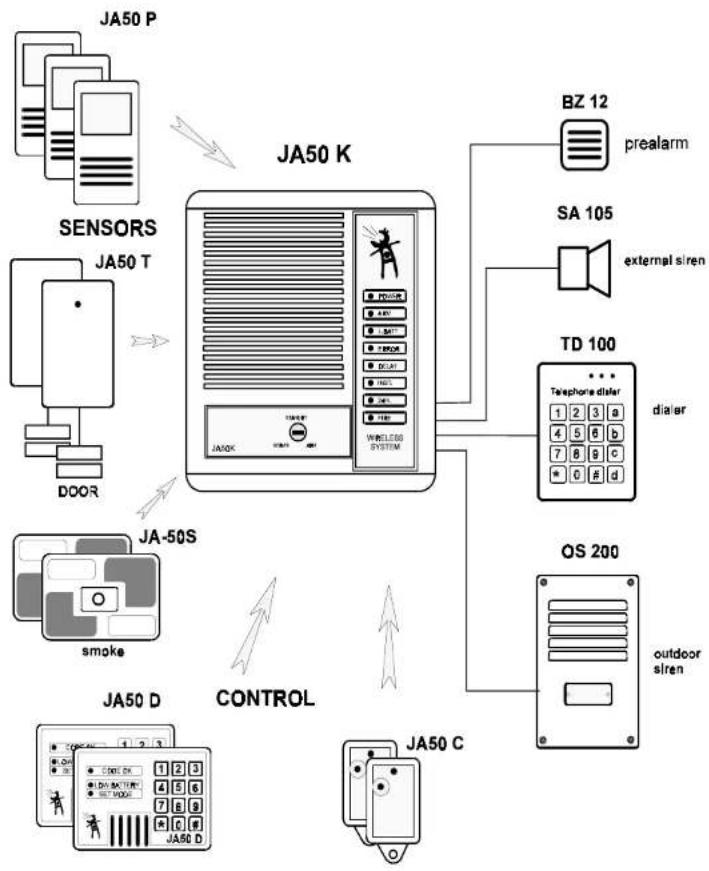
Wireless Alarm System JA-50 Wireless motion detector JA-50P
model BK611
flowchart
graph TD
    A["JA50 P"] -->|Sensor| B["JA50 K"]
    C["SENSORS"] -->|Sensor| B
    D["DOOR"] -->|Sensor| B
    E["JA-50S"] -->|Sensor| B
    F["smoke"] -->|Sensor| B
    G["JA50 D"] -->|Control| H["JA50 C"]
    I["BZ 12"] --> J["prealarm"]
    K["SA 105"] --> L["external siren"]
    M["TD 100"] --> N["dialer"]
    O["OS 200"] --> P["outdoor siren"]
    B --> Q["WIRELESS SYSTEM"]
    Q --> R["Telephone dialser"]
    R --> S["dialer"]
    T["JA50 C"] --> U["Outdoor siren"]
    U --> V["Outdoor siren"]
    style A fill:#f9f,stroke:#333
    style C fill:#f9f,stroke:#333
    style D fill:#f9f,stroke:#333
    style E fill:#f9f,stroke:#333
    style F fill:#f9f,stroke:#333
    style G fill:#f9f,stroke:#333
    style I fill:#f9f,stroke:#333
    style K fill:#f9f,stroke:#333
    style M fill:#f9f,stroke:#333
    style O fill:#f9f,stroke:#333
Description:
The JA-50P wireless indoor motion sensor is a part of the JA-50 wireless alarm system. It detects human (animal) body movement and sends a coded radio signal to the control panel. The JA-50P has a high resistance to false alarms. This is because a built in microcontroller makes complete digit analysis of sensor's signals. The sensor has a very low power consumption because of special sleeping software. It also has a built in low battery detector. Tamper protection is also provided. You can use an unlimited number of JA-50P detectors in your JA-50 system as you need.
Specifications:
detection method: dual pyroelectric passive infrared sensor
detection coverage: 90 degrees to a distance of 12 meters
operating voltage: 9V battery
operating current: 40nA (stand by)
house code: 8bits
sleeping time between two transmissions: 5min.
transmitting distance: 60m (open area)
working frequency:
used transmitter:
433.92MHz
model TX-3
Note: The following description expects that the basic JA-50 wireless system has been installed. If not, use WIRELESS ALARM SYSTEM JA-50 INSTALLATION MANUAL to perform the installation.
Location of the detector
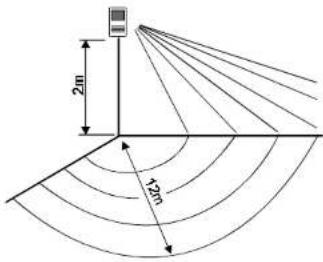
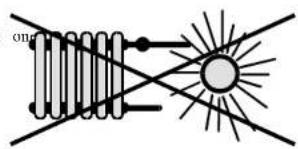
The JA-50P indoor motion detector detects human body movement within a 12 meter distance. Jablotron recommends that the detector is mounted in the corner of a room, 2 meters above the floor. Consider that this detector is also sensitive to animal body movements (dogs, cats, etc.). Do not install the detector near any heating devices or in a position that sunlight can shine directly into the lens. The detector must have an unobstructed view of the room (there must not be any curtains or glass in front of it).
Large metal objects near the detector can also be an obstacle for detector's radio communication with the control panel.
Preparation of the detector
- Switch the control panel to the SERVICE position.
- Open the front cover of the detector and open detector which has been installed.
- Copy HOUSE CODE to the new detector
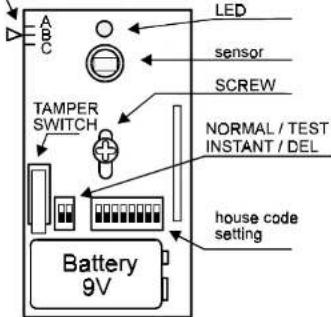
- Unscrew the Printed Circuit Board (PCB) from the rear part of the new opened detector housing.
To do this, remove the one screw that is in the center.
ANGLE SCALE
Detector installation
- Remove the punch out screw holes for mounting on the housing (one hole on the top and the second one on the bottom). We suggest that you use a screw driver or some other sharp device. Be careful not to place your hand on the opposite side of the hole that will be punched.
- Screw the housing in the desired location (the arrow inside the housing should point up). Be careful not to deform the housing.
- Install the PCB back into the housing (battery holder down).
- Adjust the position of the PCB in the housing in such a way that the small arrow on the left side of the plastic housing will point to the "B" on the scale printed on the top left corner of PCB.
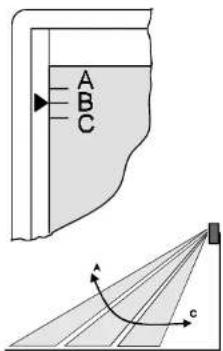
Warning: the detector has a built-in energy saving function, which is activated automatically 10 minutes after closing of the detector housing. After this period the LED is switched off completely and the signal from the detector can be transmitted to the control panel only if 5 minutes elapsed from the previous transmission as a minimum. If you need a longer period to detector testing, simply open and close the housing again (you will get next 10 minutes of testing period).
If the detector does not cover the room properly (looks too high or too low), you can adjust its detection range. This is usually only necessary when the detector was not installed 2m above the floor. Open the detector housing and loosen the screw in the middle of the PCB a bit. By sliding the PCB up or down in its housing the area covered can be modified. If you change the position of the PCB, close the housing and perform the walking test again. Once you have the PCB in the desired position, tighten the screw. Use the key to switch the control panel to the "STAND BY" position. Two beccps will confirm that the control panel is ready and the ERROR LED should turn off. Your system is now ready for operation.
Determination of detector to zone
You can select which of the control panel's zones will be triggered after a detector's activation. There is a miniature DIP switch marked INST/DEL in the JA-50P detector. When you set this switch to the INST position (upward), the detector will trigger the INSTANT zone of the control panel. This means that an alarm starts immediately after such a detector was triggered (when the control panel is in "ARM" position). Use this setting for detectors inside the house. If the switch is in "DEL" (down), the detector triggers the DELAY zone of the control panel. This zone provides for an exit and entrance delay (see users manual). Use this setting for detectors which are close to the main entrance door of the house. You can set as many detectors to each zone as you desire. The tamper switch signal is always sent to the 24Hr zone. The 24 hour zone will trigger an alarm immediately, regardless if the control panel is in the "Arm" or "Home" setting.
Digital signal analyze
The built-in sensor detects any movement of subjects which temperature which is close to human body temperature. The signal from the sensor converted to the digital form and analyzed by a special software, software checks, if the signal has a form which is characteristic for a human body movement. This way the false alarms can be eliminated. The longer time for analyze is provided to the microcontroller, the more exact result it can make. This time can be adjusted NORMAL/TTEST miniature D switch. If you install the detector to the place, which is more problematic (frequent changes of temperature, high RF noise etc.), set this switch to TEST positiontests the signal twice, reaction is a slower).
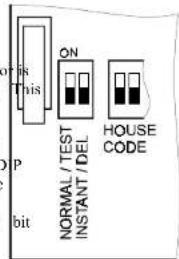
Low battery indication
position Each detector checks its own battery condition. If it is necessary to replace a battery, the detector will inform the control panel. A blinking L.BATT LED on the control panel indicates that a detector needs a new battery. To find this detector is easy: In normal working mode the built in LED in all detectors is permanently off. However, if the detector (transmitter) needs a battery replacement, the LED in it will flash if you move in front of the sensor. If the detector's LED flashes, replace the battery in this device. Do not forget to switch the control panel to SERVICE position before you open the detector.
NOTE: We recommend that you use only high quality alkaline batteries. The average life time of a high quality battery in a detector should be a few months.
Testing
Install a 9V battery (Jablotron recommends that you use only high quality alkaline batteries). Close the housing of detector (lens upward). Wait 1 minute for the detector to warm-up. Test how the detector covers the room by walking across the room.
The built-in LED indicates the sensor's function. If you continue to walk, the LED will remain light continuously for a while. It indicates that the detector was triggered and the corresponding signal was transmitted to the control panel. At the same moment the control panel will beep and a corresponding LED on it will flash to show which zone was triggered.
Wireless P.I.R. detector JA-50P v. I.A.E 2/2 BK503A