
K-3255 - Klawiatura ActiveJet - Bezpłatna instrukcja obsługi
Znajdź bezpłatnie instrukcję urządzenia K-3255 ActiveJet w formacie PDF.


| Typ produktu | Klawiatura |
| Marka | ActiveJet |
| Model | K-3255 |
| Interfejs | USB |
| Wymiary (dł. x szer. x wys.) | Około 450 x 150 x 30 mm |
| Waga | Około 800 g |
| Zasilanie | Przez USB (5 V) |
| Podświetlenie | 3 kolory (niebieski, czerwony, fioletowy) z regulacją jasności i efektem oddychania |
| Liczba klawiszy | 104 (standardowa pełna klawiatura) |
| Funkcje multimedialne | Skróty FN + F1-F10: Media Sel, głośność, odtwarzanie, e-mail, przeglądarka itp. |
| Blokada klawisza Windows | Tak (tryb gry FN + klawisz z logo) |
| Blokada klawiatury | FN + F11 blokuje wszystkie klawisze |
| Kompatybilność systemowa | Windows 7, 8, 10 |
| Długość kabla | Około 1,5 m |
| Kolor | Czarny z czerwonymi akcentami |
| Materiał | Tworzywo sztuczne |
| Zawartość zestawu | Klawiatura, instrukcja obsługi |
| Czyszczenie i konserwacja | Przecierać miękką, suchą szmatką; unikać kontaktu z płynami |
| Bezpieczeństwo | Nie narażać na wilgoć, nie używać w pobliżu źródeł ciepła |
| Gwarancja | 2 lata (standardowa) |
Często zadawane pytania - K-3255 ActiveJet
Pytania użytkowników dotyczące K-3255 ActiveJet
0 pytanie dotyczące tego urządzenia. Odpowiedz na te, które znasz, lub zadaj własne.
Zadaj nowe pytanie dotyczące tego urządzenia
Pobierz instrukcję dla swojego Klawiatura w formacie PDF za darmo! Znajdź swoją instrukcję K-3255 - ActiveJet i weź swoje urządzenie elektroniczne z powrotem w ręce. Na tej stronie opublikowane są wszystkie dokumenty niezbędne do korzystania z urządzenia. K-3255 marki ActiveJet.
INSTRUKCJA OBSŁUGI K-3255 ActiveJet

natural_image
Black and red keyboard with standard keys and a small 'Adagri' button (no visible text or symbols on keys)USER MANUAL
Welcome
Thank you for choosing this WELLJET product. To ensure optimum performance and safety, please read these instructions carefully before operating this product. It is strongly recommended you keep this manual for future reference.
Product Layout:
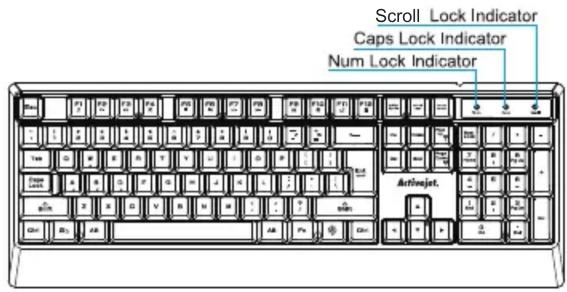
01
Product Specifications
| Item | Specifications | Remarks | |
| Subject size | M | 485mm | |
| D | 705mm | ||
| H | 90m | ||
| Subject weight | SB+5g | ||
| Color | Black | ||
| Supported Operating Systems | Windows | ||
| Sable length | 1800mm±30mm | ||
| Interface | SB | ||
| Anxious data transfer rate | SB 2.0~480Mbps | ||
| Connector Shape | SB | ||
| Electrical characteristics | input voltage | pV | |
| input current | 00 mm ± 3 msa | ||
| Use environment | temperature | 0^ C - ^ C | |
| humidity | 10~90%dot | ||
| Storage environment | temperature | 0^ C - ^ C | |
| humidity | 5~95%dot | ||
| Any stroke | 0.6 mm ± 0.2 mm | ||
| Dynamic force | 0.2 kg | ||
| Number of keystrokes | 48 million times windows | ||
| System Requirements | AP/Vista/7/8/10 or later, USB port | ||
Instructions
- Quick Access to Internet and Multimedia Shortcut Keys
| FN + F1 | Media Sel | FN + F2 | Vol- |
| FN + F3 | Vol+ | FN + F4 | Mute |
| FN + F5 | CD Stop | FN + F6 | Previous |
| FN + F7 | Play/Pause | FN + F8 | Next |
| FN + F9 | FN + F10 | Web/Home | |
| FN + F11 | Keyboard Lock | FN + F12 | Calculator |
Note: Press FN + F1-F10 key allows you to quickly access the internet and multimedia. Press and hold the FN key whilst pressing any of the F1-F10 keys allows you to access the desired function.
2. Backlight Switch & Setting
1) Three backlit colors to switch/turn off with three brightness settings. It could be switched among three colors which are blue, red, purple successively, switch it off as well. Press FN+ to adjust the brightness from low to high. Press FN+ to adjust it from high to low, choose the level you need.
2) Backlight breath and pace setting Press FN+ button to switch breath mode. The backlit gets from dim to bright, then dim again in three colors circle. Press FN+ button to speed up breath pace in three levels, FN+ button to slow it down in three levels. It can be adjusted base on your need. Note: The pace by default is 10MS. Press FN + once speed it up to 20MS, press twice to 30MS.
-
Game Lock Function FN+ ☐ combination lock the game with red GAME indicator lit up. Press the combination twice to unlock the game with red GAME indicator switched off. This function can avoid gaming board being switched back to desktop when gamers press the Windows button by accident.
-
Keyboard Lock Button FN+ F11 combination locks all the keys to prevent that gamers touch the keyboard by accident or change the computer status while you are away.



Marka : ActiveJet
Model : K-3255
Kategoria : Klawiatura