
Collection MTP-1303PD-1FVEF - Zegarek CASIO - Bezpłatna instrukcja obsługi
Znajdź bezpłatnie instrukcję urządzenia Collection MTP-1303PD-1FVEF CASIO w formacie PDF.


| Typ produktu | Zegarek analogowy |
| Rodzaj mechanizmu | Kwarcowy |
| Kolekcja | MTP |
| Model | MTP-1303PD-1FVEF |
| Średnica koperty | 42 mm |
| Materiał koperty | Stal nierdzewna |
| Materiał szkiełka | Mineralne |
| Wodoszczelność | 30 m (3 ATM) |
| Rodzaj paska | Stal nierdzewna |
| Funkcje | Wskazanie czasu (godziny, minuty, sekundy), data (dzień), bezel obrotowy do pomiaru czasu |
| Zasilanie | Bateria (SR626SW lub odpowiednik) |
| Żywotność baterii | Około 2–3 lata |
| Kolor tarczy | Czarny |
| Pozycja koronki | Pierwsze kliknięcie: ustawienie daty; drugie kliknięcie: ustawienie czasu |
| Wskazówki | Analogowe (godzinowa, minutowa, sekundowa) |
| Czyszczenie i konserwacja | Czyścić miękką suchą szmatką; unikać kontaktu z chemikaliami i wodą po użyciu |
| Bezpieczeństwo | Nie nosić podczas nurkowania; unikać ekstremalnych temperatur i silnych wstrząsów |
| Części zamienne | Bateria i pasek dostępne w autoryzowanych serwisach |
| Gwarancja | 2 lata (standardowa producenta) |
Często zadawane pytania - Collection MTP-1303PD-1FVEF CASIO
Pytania użytkowników dotyczące Collection MTP-1303PD-1FVEF CASIO
0 pytanie dotyczące tego urządzenia. Odpowiedz na te, które znasz, lub zadaj własne.
Zadaj nowe pytanie dotyczące tego urządzenia
Pobierz instrukcję dla swojego Zegarek w formacie PDF za darmo! Znajdź swoją instrukcję Collection MTP-1303PD-1FVEF - CASIO i weź swoje urządzenie elektroniczne z powrotem w ręce. Na tej stronie opublikowane są wszystkie dokumenty niezbędne do korzystania z urządzenia. Collection MTP-1303PD-1FVEF marki CASIO.
INSTRUKCJA OBSŁUGI Collection MTP-1303PD-1FVEF CASIO
Operation Guide ANALOG (HK-W)
CASIO®
- Your watch may differ somewhat from the one shown in the illustration.
[Modules 1362, 1398, 1770, 2799, 3378, 4370]
To set the time
Pull out the crown. Set the hands by rotating the crown. Push the crown back in on a time signal to resume timekeeping.

Crown
[Modules 705, 706, 1300, 1311, 1330, 1344, 1360, 1399, 1747, 1771, 4394, 5049]
To set the time
- When the second hand is at 12 o'clock, pull out the crown to stop it.
- Set the hands by rotating the crown. Move the minute hand four or five minutes past the setting you want, and then back them up to the setting.
- Push the crown back in on a time signal to resume timekeeping.

[Modules 707, 708, 1331, 1332, 1342, 1345, 1346, 1787, 2717, 2718, 2719, 2725, 2731, 2748, 2749, 2783, 2784, 3363, 3711, 3712, 4393, 5025, 5044]
To set the time
- When the second hand is at 12 o'clock, pull out the crown to the second click to stop it.
- Set the hands by rotating the crown. Move the minute hand four or five minutes past the setting you want, and then back them up to the setting
- Push the crown back in on a time signal to resume timekeeping.
To set the day
- Avoid setting the day between 8:00 p.m. and 2:00 a.m. The day may not change in the following day if you do.
- Pull out the crown to the first click
- Set the day by rotating the crown
- Push the crown back in to its normal position.
First click (Day setting)

Second click (Time setting)
[Module 4746]
Crown (Normal position)

First click (Day setting)
[Modules 709, 1333, 1347, 3716]
To set the time
- When the second hand is at 12 o'clock, pull out the crown to the second click to stop it.
- Set the hands by rotating the crown. Move the minute hand four or five minutes past the setting you want, and then back them up to the setting.
- Push the crown back in on a time signal to resume timekeeping.
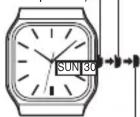
To set the day and day of the week
- Avoid setting the day and day of the week between 8:00 p.m. and 4:00 a.m. The day and day of the week may not change in the following day if you do.
- Pull out the crown to the first click.
- Set the day by rotating the crown counterclockwise.
- Set the day of the week by rotating the crown clockwise. Confirm that the correct language (English or Spanish) is selected.
- Push the crown back in to its normal position.
First click (Day, day of week setting)
Crown (Normal position)
Second click
(Time setting)
[Days of the Week]
| English Spanish |
| SUN DOM |
| MON LUN |
| TUE MAR |
| WED MIER |
| THU JUEV |
| FRI VIER |
| SAT SAB |
For watch with the elapsed time bezel Rotate the elapsed time bezel to align the V mark with the minute hand. After certain amount of time elapsed, read the graduation on the elapsed time bezel which the minute hand points to. The elapsed time is indicated.
![CASIO Collection MTP-1303PD-1FVEF - [Days of the Week] - 1](/content/2026/06/1168679/images/e6f672378390b1094eb9860bd00f6139a902b7f8a096c8b5135eb2a2ee55675e.jpg)
Elapsed time bezel
- Some water resistant models are equipped with a screw lock crown.
- With such models, you must unscrew the crown in the direction noted in the illustration to loosen it before you can pull it out. Do not pull too forcibly on such crowns.
- Also note that such watches are not water resistant while their crowns are loosened. Be sure to screw the crowns back in as far as they will go after making any setting.
![CASIO Collection MTP-1303PD-1FVEF - [Days of the Week] - 2](/content/2026/06/1168679/images/034df96e5abcad9954644fff0eb75de0a6d73aea8517c0b5b3ea7913d8625ea7.jpg)


Marka : CASIO
Model : Collection MTP-1303PD-1FVEF
Kategoria : Zegarek