
EFR-S567DC-1AVUEF - Zegarek CASIO - Bezpłatna instrukcja obsługi
Znajdź bezpłatnie instrukcję urządzenia EFR-S567DC-1AVUEF CASIO w formacie PDF.


| Typ produktu | Zegarek analogowy ze stoperem |
| Marka | Casio |
| Model | EFR-S567DC-1AVUEF |
| Numer modułu | 5618 |
| Dokładność | ±20 sekund na miesiąc |
| Zasilanie | Bateria SR927SW |
| Żywotność baterii | Około 5 lat (przy 30-minutowym używaniu stopera dziennie) |
| Stoper - zakres | 29 minut 59 sekund (30 minut) |
| Stoper - jednostka | 1 sekunda |
| Stoper - tryby | Czas przejściowy, międzyczas |
| Wskaźnik niskiego poziomu baterii | Sekundnik skacze co 2 sekundy |
| Korekta położenia wskazówek stopera | Możliwa ręczna kalibracja (przycisk A i B) |
| Datownik | Dzień miesiąca (kalendarz 31-dniowy) |
| Zalecenia dotyczące datownika | Nie zmieniać między 21:00 a 1:00 |
| Użycie stopera | Nie używać przy wyciągniętej koronce |
| Czyszczenie | Miękką suchą szmatką |
| Wymiana baterii | Zalecana w autoryzowanym serwisie |
| Przycisk A (stoper) | Start/Stop |
| Przycisk B (stoper) | Reset |
| Wskazówki | Godzinowa, minutowa, sekundnik + wskazówki stopera (sekundnik i minutnik) |
| Pozycje koronki | Click 1 (ustawianie daty), Click 2 (ustawianie czasu) |
| Automatyczne zatrzymanie stopera | Po 30 minutach |
| Instrukcja obsługi | Dołączona w języku polskim |
Często zadawane pytania - EFR-S567DC-1AVUEF CASIO
Pytania użytkowników dotyczące EFR-S567DC-1AVUEF CASIO
0 pytanie dotyczące tego urządzenia. Odpowiedz na te, które znasz, lub zadaj własne.
Zadaj nowe pytanie dotyczące tego urządzenia
Pobierz instrukcję dla swojego Zegarek w formacie PDF za darmo! Znajdź swoją instrukcję EFR-S567DC-1AVUEF - CASIO i weź swoje urządzenie elektroniczne z powrotem w ręce. Na tej stronie opublikowane są wszystkie dokumenty niezbędne do korzystania z urządzenia. EFR-S567DC-1AVUEF marki CASIO.
INSTRUKCJA OBSŁUGI EFR-S567DC-1AVUEF CASIO
Operation Guide 5619
CASIO®
- Your watch may differ somewhat from the one shown in the illustration.

Stopwatch functions
To adjust the time setting
When the second hand is at 12 o'clock, pull the Crown out to Click 2.
Rotate the Crown to change the time setting.
Push the Crown back in on a time signal to resume timekeeping.
Note
- Take care that you set the correct AM or PM time. - When changing the time, move the minute hand four or five minutes past your final setting, and then back it up to the setting you want.
To change the day indicator setting
Pull the Crown out to Click 1.
Rotate the Crown away from you to set the day.
Push the Crown back in.
Note
- The day indicator setting uses a 31-day month. Make adjustments for months of shorter lengths. - Avoid changing the day indicator setting between the hours of 9:00 p.m. and 1:00 a.m. Otherwise, the day indicator may not change correctly at midnight.
Low Battery Alert
The second hand will jump at two-second intervals to alert you when the charge is low. Have the battery replaced as soon as possible after low battery alert is indicated. Stopwatch operation is disabled during low battery alert.
- If low battery alert occurs during a stopwatch operation, the stopwatch will automatically reset to all zeros and stop.
Crown Operations
Some water-resistant models (100 meters, 200 meters) have a screw-in crown. When you need to perform a crown operation, rotate it towards you to unscrew it. Then pull the crown out. Avoid applying undue force when pulling. The watch loses its water resistance while the crown is unscrewed. After performing a crown operation, fully screw the crown back in.

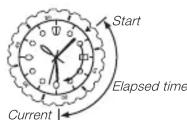
If your watch has a rotary bezel...
You can rotate the bezel to align its ▼ mark with the minute hand. Then you will be able to tell how much time has elapsed since aligning the ▼ mark.
Using the Stopwatch
The stopwatch measures elapsed time in 1-second increments up to 29 minutes, 59 seconds.
Elapsed time


Start Stop Resume Stop Reset
Split time


Start Split Split release Stop Reset
Important!
- Do not operate the stopwatch with the crown pulled out.
Note
- An elapsed time operation will stop automatically at the end of 30 minutes.
Correcting the 0 Positions of the Hands
Perform the following procedure if the stopwatch hands do not return to their 0 (zero) positions when you reset the stopwatch.
Pull the Crown out to Click 2.
Use Ⓐ to align the Stopwatch Second Hand with 12 o'clock, and Ⓑ to align the Stopwatch Minute Hand with 12 o'clock.


After all of the hands are the way you want, push the Crown back in.
Important!
- Timekeeping stops while the crown is pulled out. Correct the current time setting after performing the above operation.
Specifications
| Module No. | Accuracy at normal temperature (per month) | Battery type | Battery life(30 minutes stopwatch operation per day) |
| 5619 ±20 seconds SR927SW Approx. 5 years | |||
Stopwatch: Measuring Capacity: 29'59" (30 minutes)
Measuring Unit: 1 second
Measurements: Elapsed time; split time
Other: Low battery alert
Specifications are subject to change without notice.



- Operation Guide 5619
- CASIO®
- To adjust the time setting
- Note
- To change the day indicator setting
- Low Battery Alert
- Crown Operations
- If your watch has a rotary bezel...
- Using the Stopwatch
- Elapsed time
- Start Stop Resume Stop Reset
- Split time
- Start Split Split release Stop Reset
- Important!
- Correcting the 0 Positions of the Hands
Marka : CASIO
Model : EFR-S567DC-1AVUEF
Kategoria : Zegarek