
Alba 2.4 Retro 503628 - Nieznany ARCHOS - Bezpłatna instrukcja obsługi
Znajdź bezpłatnie instrukcję urządzenia Alba 2.4 Retro 503628 ARCHOS w formacie PDF.


| Typ produktu | Zegar radiowy retro |
| Marka | ARCHOS |
| Model | Alba 2.4 Retro 503628 |
| Wymiary (przybliżone) | 15 x 8 x 5 cm |
| Waga (przybliżona) | 300 g |
| Zasilanie | Sieć 230 V, bateria zapasowa CR2032 |
| Wyświetlacz | LED 2,4 cala, czerwony |
| Radio | FM, zakres 87,5-108 MHz |
| Funkcje | Budzik, regulacja głośności, ustawianie czasu |
| Głośnik | Mono, 3 W |
| Materiał | Tworzywo sztuczne, retro design |
| Bezpieczeństwo | Nie narażać na wilgoć, używać zgodnie z instrukcją |
| Czyszczenie | Suchą, miękką ściereczką, nie używać wody ani środków chemicznych |
| Naprawa | Tylko przez autoryzowany serwis, brak części zamiennych |
| Informacje ogólne | Produkt dekoracyjny, nie gwarantuje precyzyjnego pomiaru czasu |
Często zadawane pytania - Alba 2.4 Retro 503628 ARCHOS
Pytania użytkowników dotyczące Alba 2.4 Retro 503628 ARCHOS
0 pytanie dotyczące tego urządzenia. Odpowiedz na te, które znasz, lub zadaj własne.
Zadaj nowe pytanie dotyczące tego urządzenia
Pobierz instrukcję dla swojego Nieznany w formacie PDF za darmo! Znajdź swoją instrukcję Alba 2.4 Retro 503628 - ARCHOS i weź swoje urządzenie elektroniczne z powrotem w ręce. Na tej stronie opublikowane są wszystkie dokumenty niezbędne do korzystania z urządzenia. Alba 2.4 Retro 503628 marki ARCHOS.
INSTRUKCJA OBSŁUGI Alba 2.4 Retro 503628 ARCHOS
Alba Feature Phone
Accessing all menus
- From the homescreen, press the OK Key □
- Use the Navigation Key to choose desired operation and
press the OK Key to enter the selected operation. - You can exit a menu and return to standby mode by passing the Right Soft Key (back) on the End Key
pressing the Right Sort Key (back) of the End Key.
Phonebook Call History Organizer
Multimedia Messages File Manager
Profiles Audio player Camera
Services App Zone Settings
Services App Zone Settings
Changing your ringtone and ringtone volume
- From the homescreen press the OK key
- Select Profiles
- Select the desired profile and select Options with the Left soft key.
- Scroll down to select Settings and press the OK key.
- Select Ring settings to change your ringtone.
Note that you need to load new ringtones to a micro SD card to use 'more ringtones'. - To adjust ringtone volume, call volume, power on/off
ringtone volume etc., (in Profiles- options – settings) scroll
down to Adjust volume. Select the ringtone you want to
adjust and adjust volume up and down with the navigation key (5)
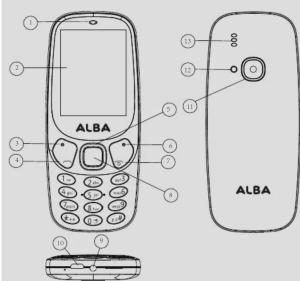
Device buttons
1 Receiver/Loudspeaker 8 OK key
2 Screen 9 Earphone jack
3 Left soft key 10 USB/Charging interface
4 Dial key 11 Camera
5 Navigation key 12 Flash
6 Right soft key 13 Loudspeaker
7 End/Power key
Button description
Left/Right soft key: press to perform the function currently
displayed in the bottom left/right corner of the screen. In standby mode, press left soft key to wake phone.
Dial key: answer all calls, make calls from SIM1/SIM2 card.
Navigation key: within a menu press Up, Down Left or Right
to scroll through menu options. From the home screen
up=camera, right=calendar, down=audio player, left=text
End/Power key: press and hold a call or reject an incoming call.
OK key: press to access the main menu from home screen.
Special functions of buttons
Unlock phone from keypad lock
Press Left Soft Key and right soft key to unlock keypad, Torch
A long press of the Zero key (in the home screen) activates
the torch
Calling a recently dialled number
- In the device's homescreen, press
- Scroll left or right to a call type.
- Press the OK key to view details of the call or to dial
the number
Adding a new contact
- From the home screen, select the OK key to access Menu
and scroll up to select Contacts. - Press the Left soft key to open Options, then New.
- Select the storage location.
- Enter the contact information and press the Left soft key
to save.
Creating an SMS
- From the home screen, press the OK key and select
Messages. - Select write Message and select the recipient or type the phone number
- Press the Navigation key Down to enter text.
- To switch between the input methods, press # and select
an option. - Type your text.
- Pass the Left
ABC. Abc. abc modes
Press an appropriate alphanumeric key until the character
you want appears on the display.
125 mode Press an ar
To use other features for text input
Icon description
Vertical bars indicate the signal strength of the GSM
network signal. Five bars indicate that your current position has the best reception.
position has the best reception.
Indicates you have one or more unread messages.
A
L
Indicate www.thene was the clust type of "Silent"
Indicates your phone uses the alert type of "Earphone".
•
indicates you are using Bluetooth.
Changing the auto keypad lock time
- Select the OK button to open Menu.
- Inside Menu, select Settings > Display.
- Select Auto keypad lock, then the desired duration.
- Press the OK button to confirm
Ch
Changing the wallpaper
- Select the OK button to open Menu.
- Inside Menu, select Settings > Display settings > Wallpaper
settings
To move the cursor, press the Navigation key
To delete characters one by one, press Clear.
To delete words quickly, press and hold Clear
To insert a space between characters, press 0
Mobile tracker
Mobile tracker is used for getting the phone number of the
new user of your stolen phone.
1. Go to App Zone and select Mobile tracker
2. Type the password "1234" and make the status ON.
3. Set 5 receiver numbers.
when a new SIM is entered into your phone, a SMS will be sent from the new SIM to the numbers set above containing
the number of the new SIM.
Default password
The default password for your data protection is: 1234
Transferring files to/from your computer
- Connect the phone to a PC using a micro-USB cable (not
provided).
The PC will auto detect the phone as a removable disk. - You can access the device memory to transfer files. To have a large capacity of storage, you need to install a
To have a large capacity of storage, you need to install a microSD card (not provided).
∴ m = 3/11
Troubleshooting
Note that this phone will not work with a 3 UK SIM in the UK. At the
time of writing (2017) 3's UK network does not support 2G. This is a
- Select one wallpaper among "Static wallpaper" or select
More pictures for more choices of wallpaper. Note: You need to insert a microSD card before using the
option "More pictures"
Setting up shortcuts
- Select the OK button to open Menu
- Select the OK button to open Menu.
- Inside Menu, select Settings > Phone
E. Inside Menu, Select Settings > Phone Settings > Shortcut settings. - Define the desired shortcuts.
Setting a password
- Select the OK button to open Menu.
- Inside Menu, select Settings > Security settings
- Modify any desired password. The phone default password
Call blocking and whitelisting
- Select the OK button to open Menu.
- Inside Menu, select Settings > Security settings.
- Scroll down to select Blacklist or Whitelist
- To each category, add the desired numbers.
Charging the battery
If the battery is completely discharged
you cannot turn on the phone, even with
the charger connected. Allow a depleted
battery to charge for a few minutes
before you try to turn on the phone.
save energy, unplug the travel adapter when not in use.
Unable to turn on: press the power ON key for over 1
second. Check that the battery is properly connected.
install it again, retry to turn on. Check if battery
is charged.
Unable to connect network: weak signal.
Move to a location with strong signal and try connecting to the network again. Ensure that you are not beyond
to the network again. Ensure that you are not beyond the network coverage of service providers. Ensure you
the network coverage of service providers. Ensure you have a valid SIM card and that you have credit. Please contact your network
provider for further information.
Poor quality of calling: Check the sound volume
In an area with poor signal, (e.g. warehouse, supermarket, parking
structure) try moving to a location with stronger signal and call
again. While using the mobile phone in the peak period of communication, like commute time, you may be unable to
call be
launching the camera
Before starting to make pictures insert a microSD card
Before starting to make pictures, insert a microSD card. 1. From the home screen press OK scroll to multimedia and
1. From the hot select camera.
2. Inside the camera app, press the Left Soft key to show
options and define the desired settings
Audio player
Before starting to use the Multimedia section, insert a
microSD card with mp3 files on it.
1. Select the OK button to open Menu.
2. Select Audio Player and add music or go directly to the audio files in My Files. After selecting, the music will approve
audio files in My Files. After selecting, the music will appear in audio player automatically
Turning ON/OFF
To turn your photo
5. Press and hold
6. Enter your PIN and press OK if necessary.
7. When the setup wizard opens, customise your phone as
desired by following the screen.
If the battery remains fully discharged or removed from the
phone, the time and date will be reset.
To turn your phone off, press and hold
Making a call
- In the device's homescreen, enter a phone number
For an international call, do not forget to enter the country
code.
-
Press to dial the number.
-
To end the call, press
Answering a call
-
Will
-
When a call comes in, press 2. To and the call press
Adjusting the volume during a cell
Adjusting the volume during a call
During a call, press the Navigation key UP to increase the
volume and the Navigation key Down to decrease it
∴ m = 3/11
∴ m = 3/11
∴ m = 3/11
FM radio
-
Select the OK button to open Menu.
-
Scroll down to select Multimedia, then select FM Radio
-
Plug in your earphones to make them work as an antenna.
-
Select Options to tune the radio.
Locking your phone manually (keypad lock)
The keypad lock prevents you from dialing accidentally when
the phone is in your pocket.
From the home screen, press the End key. From any other
menu you can also press the end key several times to exit
and lock the keyp
Pairing a device by Bluetooth
- From the home screen press Ok and select Application
- Scroll down to Bluetooth and select
- Check the Bluetooth box
- Scroll down to paired device and select it
- Click add new device
- Now activate the dev
- Now activate the device you want to pay
- Put us a good deal with the one of the
- Return to your phone, the name of the new device should
appear on the list. Select it to pair - When reconnecting, you don't need to pair, but return to
the Same menu and select the device from the list and press
connect
∴ m = 3/11
∴ m = 3/11
∴ m = 3/11
∴ m = 3/11
∴ m = 3/11
The Ground Truth image displays a single, solid horizontal line. According to Rule 2 (UNDERSCORE & LINE RULES), this is a stylistic or background line, not a placeholder underscore. Therefore, the OCR result must ignore it and output nothing or only meaningful text. The provided OCR content is "____", which consists of four underscores. This is an incorrect interpretation of the line as a placeholder, violating the rule that stylistic lines must be ignored. The OCR has hallucinated underscores where none should exist based on the GT's visual context. Hence, the OCR result is inconsistent with the Ground Truth.
[Non-Text]
[Non-Text]
[Non-Text]
[Non-Text]
[Non-Text]
[Non-Text]
[Non-Text]
[Non-Text]
[Non-Text]
[Non-Text]
[Non-Text]
[Non-Text]
[Non-Text]
[Non-Text]
[Non-Text]
[Non-Text]
[Non-Text]
[Non-Text]
[Non-Text]
[Non-Text]
[Non-Text]
[Non-Text]
[Non-Text]
[Non-Text]
[Non-Text]
[Non-Text]
[Non-Text]
[Non-Text]
[Non-Text]
[Non-Text]
[Non-Text]
[Non-Text]
[Non-Text]
[Non-Text]
[Non-Text]
[Non-Text]
[Non-Text]
[Non-Text]
[Non-Text]
[Non-Text]
[Non-Text]
[Non-Text]
[Non-Text]
[Non-Text]
[Non-Text]
[Non-Text]
[Non-Text]
[Non-Text]
[Non-Text]
[Non-Text]
[Non-Text]
[Non-Text]
[Non-Text]
[Non-Text]
[Non-Text]
[Non-Text]
[Non-Text]
[Non-Text]
[Non-Text]
[Non-Text]
[Non-Text]
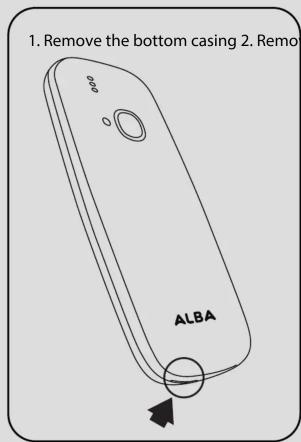
Install the SIM & micro SD cards & battery
SIM cards: carefully slide in your standard size (25mmx15mm) SIM card into the SIM slot 1 or 2 as shown in the diagram.
Micro SD: the Micro SD slot is smaller than the SIM slots. Open the micro SD slot by putting your thumb-nail into the slot and pushing gently up until it clicks, then hinge open the metal gate by putting your thumb nail under the bottom of the gate and lifting it open. Place your micro SD card in the molded slot, you will see that it can only fit the correct way up. Then close the gate onto the card, put your thumb-nail in the slot again and pull it gently down until it clicks.


Argos declares that this device is in compliance with the essential requirements and other relevant provisions of Directive 2014/53/EU.
A copy of the declaration of conformity can be obtained from: Argos Ltd. 489-499 Avebury Boulevard Milton Keynes, MK9 2NW, UK
SAR value : Head Max:0.978W/Kg; Body Max:1.008W/Kg
Alba Phones Helpline
For detailed advice on this or any other issue concerning your Alba phone you can consult with the technical support helpline- 020 8068 1044
PN:116463

| WMAN | ||
| Frequency band | Maximum output power | |
| GSM B2/B3 | 26~32dBm | |
| GSM B5/B8 | 29~34dBm | |
| Bluetooth | ||
| Bluetooth Version | Frequency Range | Avg. Power (dBm) |
| EDR | 2.402~2.480GHz | -3.41~-2.51dBm |
| BLE | 2.402~2.480GHz | NA |


- ALBA FEATURE PHONE
- ACCESSING ALL MENUS
- CHANGING YOUR RINGTONE AND RINGTONE VOLUME
- DEVICE BUTTONS
- BUTTON DESCRIPTION
- CALLING A RECENTLY DIALLED NUMBER
- ADDING A NEW CONTACT
- CREATING AN SMS
- ICON DESCRIPTION
- POSITION HAS THE BEST RECEPTION
- A
- CHANGING THE AUTO KEYPAD LOCK TIME
- CHANGING THE WALLPAPER
- MOBILE TRACKER
- DEFAULT PASSWORD
- TRANSFERRING FILES TO/FROM YOUR COMPUTER
- TROUBLESHOOTING
- SETTING A PASSWORD
- CALL BLOCKING AND WHITELISTING
- CHARGING THE BATTERY
- LAUNCHING THE CAMERA
- AUDIO PLAYER
- TURNING ON/OFF
- MAKING A CALL
- ADJUSTING THE VOLUME DURING A CELL
- FM RADIO
- PAIRING A DEVICE BY BLUETOOTH
Marka : ARCHOS
Model : Alba 2.4 Retro 503628
Kategoria : Nieznany