KA9140 - Ukategorisert ATEN - Gratis bruksanvisning og manual
Finn enhetens veiledning gratis KA9140 ATEN i PDF-format.


Brukerspørsmål om KA9140 ATEN
0 spørsmål om dette apparatet. Svar på dem du kjenner, eller still ditt eget.
Still et nytt spørsmål om dette apparatet
Last ned instruksjonene for din Ukategorisert i PDF-format gratis! Finn veiledningen din KA9140 - ATEN og ta den elektroniske enheten tilbake i hendene. På denne siden er alle dokumenter som er nødvendige for bruken av enheten din publisert. KA9140 av merket ATEN.
BRUKSANVISNING KA9140 ATEN
ATEN
ATEN Allusen
KA9140 Serial CPU Module
Quick Start Guide
4.2016年1月1日,中国证券报、上海证券报
The following table provides the results of the 190 minutes
Tru 2019. R@S### 2019 12/14/2018 Press Date: 01/25/19
Online Registration
Truckload Flaree Sappati
KIMYORKIE
[Unreadable]
- 2013年5月1日
-5-3-2018年
· 2013年1月1日
black fanwys
cc
CE
A. Information, documentation, information, and performance contained in the package are subject to what with your own name for a publication. For example, this is also known as the company's name and the other of its own name.
1 Package Contents
This Quick Start Guide briefly describes how to install and operate the KA9140 Serial CPU Module with ATEN's PS/2 or Matrix type KVM Switch.
The complete package consists of
• 1 KAP140
• 1 Power Adapter
• 1 Rock Mount Kit
• 1 Ferroan Uprank Cable
+4 Door Pads
• 1 User Instructions
公司名称:四川华源股份有限公司
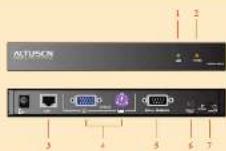
2 Hardware Overview
-
Link (Green) LED
-
Power (Orange) LED
-
Link Part
-
Console Port
-
Social Terminal Post
-
Firmware Upgrade Port
-
Firmware Upgrade Switch
3 Hardware Installation
You will trade
+ At least one KVM Switch and one VT-100 compatible Terminal
• 1 standard 9 pm RS 232 serial to serial interface cable
+1 RMS cable (max 120μm) for Matrix type KVM
- 1 standard PS2 to PS2 cable for PS2 type KVM
• 1 standard 15-pin VGA to VGA cable for PS2 type KVM
For RJ45 Matrix Type KVM:
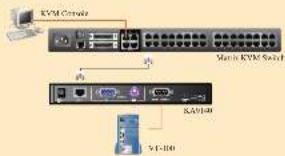
- If you have a Matrix type KVM, simply plug one end of a RJ45 cable into any available CPU port on your KVM switch and plug the other end into the RJ45 Link Port on your KA9140
- Ping one end of a standard 9 put serial cable into the Terminal Port on your KA9140 and the other end into the serial port on your VT-100 terminal.
- Plug the Power Adapter into a wall socket, then plug the card end into the Power Jack on your KAP140.
- Use Harness to configure the part settings.
For PS/2 Type KVM:
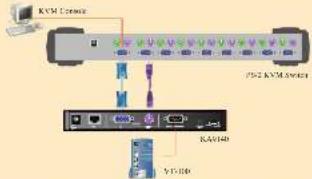
- If you have a PS2 type KVM, plug one end of a standard 15-pin VGA to VGA cable into any available CPI VGA port on your KVM then plug the other end into the VGA Console Port on your KA9140.
- Plug one end of a standard PS/2 to PS/2 cube into a matching PS/2 Keyboard on your KVM then plug the other end into the Keyboard Console Port on your KA9140
- Play one end of a standard 9 pin serial cable into the Terminal Port on your KA9140 and the other end into the serial port on your VT 100 terminal.
- Plug the Power Adapter into a wall socket, then plug the card end into the Power back on your KAP140.
- Use Hotkey to configure the part settings.
4 Configuration
Use keyboard Hotkey combinations to configure your port settings. Press the [ALT] key twice to invoke Hotkey Mode. A prompt will appear on your screen with your current settings. Press any Hotkey below to change your setting. When done, press the [ESC] or speaker in save and exit.
| [A]: Cleanfp | |
| [A] 9800 bps band rate* | [1] 8 bit data* |
| [B] 19200 bps band rate | [1] 5 bit data |
| [C] 38-00 bps band rate | [K] 2 stop bus |
| [D] 57600 bps band rate | [1.] 1 stop hit* |
| [E] 115200 bps band rate | |
| [F] Parity None* | |
| [G] Parity Even | |
| [H] Parity Odd | |
[El: Backscueil Color
1.1.1.
[A] Black
[2] Rec
[5] CMA
(D) Yes
E| BkC
121 Mioen
[5] Cyar
[同] 王俊
[1] English
[1] French reserved
C German (postcard)
(1) Restore Default Value
[25] 300,000.00
* default
Note: the video resolution depends on the terminal. The recommended resolutions are 800 x 600 @ 60 Hz for 80 characters per line and 1152 x 864 @ 75 Hz for 132 characters per line. Flow control (Xon Xoft or Hardware) is also determined by your terminal.
5 Firmware Upgrade Utility
The KAP1-0's software can be upgraded via a cable connection to a computer. Follow the steps listed below if you need to upgrade.
- From any computer that is not part of your KVM installation, you online to the www.aren.com website and download the latest Firmware Upgrade for your KAO 40.
- Power oil and anplay the KA9140 from your KVM and connect it to your computer with the included Firmware Upgrade Cable. Ping one end into the Firmware Upgrade Port on your KA9140 and the other end to a serial port on your computer.
- Slide the Firmware Upgrade Switch to the UPGRADE position.
- Power On you: KA5140.
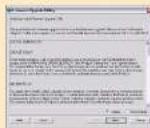
License Annex
- Run the self-extracting firmware upgrade file. The instructions are self explanatory.
- The main screen will display all the devices that are detected and can be upgraded.
- If you check the Check Firmware Version box, The upgrade utility will check to see if the firmware version is newer than what is already embedded.
- If the file is never, follow the instructions on the screen. If not, you will be promptual with a warning message and instructed to continue or exit.
- If you continue, the firmware will be reprogrammized and if successful, will prompt you with a Upgrade Successful message.
- If you receive a Upgrade Failed message, you should check all the transactions and repeat the upgrade procedure from the beginning.
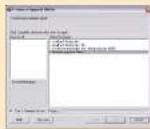
Ferrari: Upgrade Utility
6 Specifications
| Curtains | Pumbus K 4918 | ||
| Corporate | 60-25 | 1st Feb 2014 | |
| Greek Sea | Leg | 1st Feb 2014 | |
| Requival | 1st Feb 2014 | ||
| Wks | 1st Feb 2014 | ||
| Uprada | 1st Feb 2014 | ||
| LLDs | Port | 1300 gm | |
| Link | 300 gm | ||
| Switch Control / Pressure Power Consumption | Crude Top | 1st July 2014 | |
| Crude Top | 12/11/2014 | ||
| Environment | Seagles | 20-307 | |
| Hindiy | 0.85-0.84 Nonconducts | ||
| Physical Properties | Bougs | Metal | |
| Naples | 0.50 kg | ||
| Diamine (La WaS) | 300 L ± 500 x 350 gm | ||
* All social norms are subject to change without notice.