2X-EA13 - Ukategorisert ATEN - Gratis bruksanvisning og manual
Finn enhetens veiledning gratis 2X-EA13 ATEN i PDF-format.


Brukerspørsmål om 2X-EA13 ATEN
0 spørsmål om dette apparatet. Svar på dem du kjenner, eller still ditt eget.
Still et nytt spørsmål om dette apparatet
Last ned instruksjonene for din Ukategorisert i PDF-format gratis! Finn veiledningen din 2X-EA13 - ATEN og ta den elektroniske enheten tilbake i hendene. På denne siden er alle dokumenter som er nødvendige for bruken av enheten din publisert. 2X-EA13 av merket ATEN.
BRUKSANVISNING 2X-EA13 ATEN
C14 Smart-Lock Plug Connector 2X-EA13 / 2X-EA14
Installation Guide

MISC10000032 06/2022 V2.0
Package Contents
| 2X-EA 13 | 2X-EA14 | ||
| Qty | Description | Qty | Description |
| 10 | C14 Smart-Lock Plug Connector | 10 | C14 Smart-Lock Plug Connector (Compatible with PE5221T, PE5342T & PG95348) |
| 1 user instructions | 1 user instructions | ||
Installation
To secure a power cable in place, using C14 Smart-Lock Plug Connector, do the following:
Note: The unit used in the illustrations below is a C14 EZ-Lok Plug Connector, the procedure for connecting the 2X-EA13 and 2X-EA14 is identical.
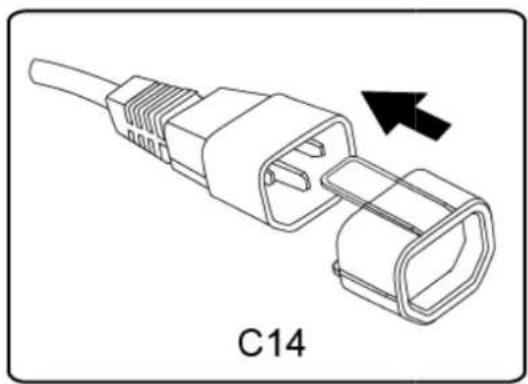
- Slide and attach the Smart-Lock P lug Connector onto a C14 plug until it clicks into place.
natural_image
Line drawing of a connector with a black arrow indicating direction, labeled C14 (no text or symbols on the diagram itself)- Insert the plug, with the Smart-Loc k Plug Connector attached, into any available socket on a PDU by sliding it directly over and straight into the socket.
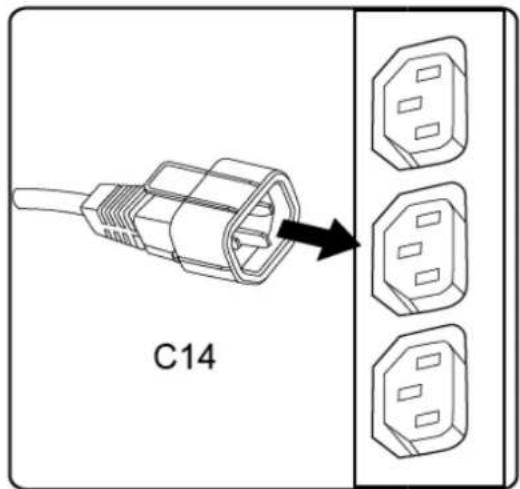
- To disconnect the plug from the PDU, grip onto and squeeze the Smart-Lock Plug Connector as you pull and detach the plug from the PDU socket.