NT-1508 - TV Naxa - Gratis bruksanvisning og manual
Finn enhetens veiledning gratis NT-1508 Naxa i PDF-format.


Brukerspørsmål om NT-1508 Naxa
0 spørsmål om dette apparatet. Svar på dem du kjenner, eller still ditt eget.
Still et nytt spørsmål om dette apparatet
Last ned instruksjonene for din TV i PDF-format gratis! Finn veiledningen din NT-1508 - Naxa og ta den elektroniske enheten tilbake i hendene. På denne siden er alle dokumenter som er nødvendige for bruken av enheten din publisert. NT-1508 av merket Naxa.
BRUKSANVISNING NT-1508 Naxa
 | |
16” WIDE SCREEN HD LED TVMODEL NO.: NT-1508 Instruction Manual Instruction Manual | |
| USER’S MANUAL | PLEASE READ CAREFULLY BEFORE USE |
Safety Information
Warning
To prevent fire and/or electric shock, do not use this plug with an extension cord, receptacle or other outlet unless the blades can be fully inserted to prevent blade exposure. Do not expose this appliance to rain or moisture.

CAUTION! RISK OF ELECTRIC SHOCK DO NOT OPEN

AVIS RISQUE DE CHOC ELEC TRIOUE/NE PAS OUVRIR
Important Safety Instructions
Read these instructions.
Keep these instructions.
Heed all warnings.
Follow all instructions
Please, unplug the TV power cord when the following conditions occur:
-When there is a thunderstorm (Please, pull out the power cord and antenna).
-When cleaning the TV set.
-When the TV set is not used for a long time.
Do not use corrosive depurative when cleaning the TV set.
Do not put the TV set under direct sunlight or near heat.
Do not put a heat source, such as a candle or heater, on top of or near the TV set.
Leave plenty of space (al least 10cm) around the TV set for ventilation
Place the TV set away from where it can be ruined by rain or water (such as near a
window).
Don't put a container with liquid (such as a vase) on top of the TV set.
Do not move the TV set when the power is on
Do not touch, push or scratch the surface of the TV set with hard materials or items.
When TV surfaces are dirty, please use a wet cotton cloth or soft cloth with non-
corrosive cleaners to clean it carefully. Don't use acetone, toluene or alcohol to
clean the TV set
Be aware and careful of moisture, which can damage inner electronic components.
When condensed moisture is present, the TV screen may appear blurry or spotty.
It is recommended that a technician install the TV set on a wall, if such placement is
desired.
An incorrect wall installation will be unsafe and hazardous.
Do not let children climb on or play around the TV set to avoid falls, collisions.
damages and injuries.
Do not hit the TV panel with hard objects to prevent damages
Do not cover the TV set with blankets or other objects when it is connected to a
power source to prevent overheating and fire.
Batteries shall not be exposed to excessive heat such as sunshine, fire or the like.
Mains plug is used as disconnect device from the mains, the disconnect
device shall remain readily operate.
Apparatus with class I construction shall be connected to a mains socket
outlet with a protective earthing connection.
Important Safety Precautions
Safety
Please, immediately pull out the AC power plug from adaptor if there is an abnormal sound or smell or the LED TV has sound but no picture, and contact after sales support.


The LED TV should be kept free from rain, moisture and dust to prevent electrical shock and short circuits. Do not cover the ventilation openings with table clothes, curtains, newspapers, etc.
The LED TV should be kept from high temperature heating sources or direct sunlight. Good ventilation is required. Allow 10 cm. between the LED TV and other appliances or built-in cabinet walls.
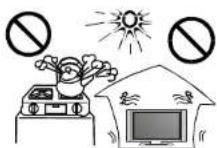

When you wipe the front cabinet, please make sure the power plug is pulled out and use a soft, dry, lint-free cloth and handle it with care. Do not repeatedly wipe the panel, nor scrape, tap or strike the panel with a hard object.
Do not wipe the LED TV with any petrol, chemical or alcohol based solvents as it will lead to product damage of the panel and cabinet.

Important Safety Precautions
Safety

Do not place the LED TV on an unstable surface.
Do not place the power cord or other cables across a walkway in case it is trampled on. Do not overload the power cord or power socket. When the power plug is used to disconnect and connect the device, it should easily into the power source.

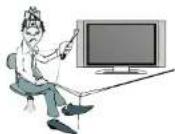
Do not disassemble the back cover, as it contains high voltages inside and will cause electric shock. Only qualified professionals should conduct internal adjustments, maintenance, and checks.
The TV set should not be subjected to water droplets, vapor, or splash. This equipment should not be placed on objects filled with liquids. Do not place flame sources, such as lit candles, on or near the LED TV. Please, pull out the power plug and contact after sales support if there are abnormal objects or water in the TV.


Pull out the power cord and antenna cable during electrical storms so the LED TV is not damaged by electrical surges. Keep all people away from the antenna cable during electrical storms.

ENERGY STAR® Qualification.
This product has earned the ENERGY STAR ^® for meeting U.S. Federal energy efficiency guidelines as set by the Department of Energy and Environmental protection agency. The ENERGY STAR ^® program exists to provide energy saving guidelines and help promote energy efficient products and practices. Changes to certain features, settings and functions of this TV can change and/or increase its power consumption.
As-shipped mode is the mode in which the product qualifies for ENERGY STAR ^® .
Table of Contents
Introduction
| Features | 2 |
| Specifications | 3 |
Accessories
General Description 4-7
Overview of front panel 4
Overview of back panel 5
Overview of remote control 6
Installing Batteries in the remote control 7
Antenna connection 7
External Connection 8-12
Connecting VCR 8
Connecting Digital Audio System 9
Connecting DVD Player/Set-Top Box via HDMI 10
Connecting PC 11
Connecting a Headphone/USB 12
Supporting signals 12
Basic operation 13
Turning the TV On and Off 13
OSD Menu Operations 14-21
INPUT SOURCE SELECTION 14
BASIC OPERATION 14
FIRST TIME INSTALLATION 14
PICTURE 15
SOUND 16
TIME 17
SETUP 17-18
LOCK 19
CHANNEL 20
PC SETTINGS 21
USB Operation 21-22
Troubleshooting 23
Picture defects and the reason 24
Introduction
Features
• TV adopts TFT LED display screen
● HDTV Compatible(480p, 480i, 720p, 1080i, 1080p)
● Support American TV Standard 8V\$B/Free 64/256QAM,NTSC System, ATSC System
- Connect to computer directly to realize TV/monitor combo.
● Zero X radiation complies to green environment protection requirement
● Advanced Chroma Processing
● Closed captioning/Program Control
- SAP/STEREO/MONO; ATSC.
- HDMIinput
- USB input
Input terminals used for external equipment connection
One computer VGA/PC input One PC Audio input
One AV input One HDMI input
One EARPHONE output One USB input
One ANTENNA input One Coaxial output
Introduction
Specifications
| Display screen type | Color active matrix LED display |
| Model | NT-1508 |
| The maximum resolution | 1366X768 |
| Image control | Fine digital control |
| Power supply | DC 12V |
| TV receive system | NTSC System, ATSC System |
| Frequency range | Antenna: 2~69; Cable: 2~125 |
| Antenna input impedance | 75Ω (Unbalance) |
| Sound output | 2×3W |
| Power supply for remote controller | DC 3V (Two AAA size batteries) |
| Power consumption | 24 W |
| Dimensions (LXWXH) | 14.9×4.6×10.6 inch |
| Weight (Net weight) | 1.2 kg |
| Operation environment temperature | 0°C-40°C |
Note:
Design and specification modification maybe made at any time without prior notice; all data and dimensions are approximations.
Accessories
Please make sure the following items are included with your LED TV. If any items are missing, contact your dealer.

Remote Control &
Batteries (AAAx 2)


Owner's
Instructions

Adapter
General Description
Overview of front panel
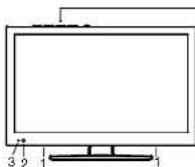
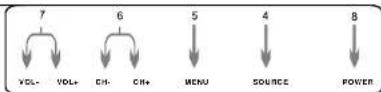
I SPEAKER
② REMOTE CONTROL SENSOR
Aim the remote control towards this spot on the TV.
③ POWER INDICATOR
Blue: In power on mode.
Red: In standby mode.
4 SOURCE
Toggles between all the available input sources (TV, AV, HDMI, VGA, USB).
⑤ MENU
Press to see an on-screen menu of your TV's features.
6 CH+/-
Press to change channels.
In the on-screen menu, use the CH +/- buttons as up/down arrow buttons.
⑦ VOL+/-
Press to increase or decrease the volume. In the on-screen menu, use the VOL +/- buttons as left/right arrow buttons.
8 POWER
Press POWER button to toggle between normal and standby mode.
General Description
Overview of back panel
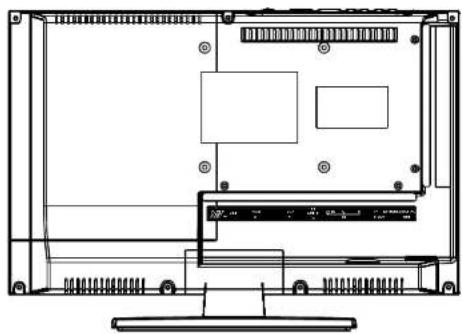
natural_image
Technical line drawing of a device rear panel with mounting hardware and internal compartments (no text or symbols)
text_image
POWER INPUT USB HDMI VGA PC AUDIO OVS L R RF REQUIRE COXIAL IN OUT OUT 1 2 3 4 5 6 7 8 9-
Power input
-
USB
USB Input
- HDMI
Connect to the HDMI jack of a device with a HDMI output.
- VGA/PC IN
Connect to the video output jack on your PC.
- PC AUDIO
Audio input for external devices.
- AV input
Video input for external devices, such as
a camcorder or VCR.
- Antenna Input
Connect to an antenna or cable NTSC & ATSC. 8. EARNPHONE
Connect a set of phone for private listening.
- COAXIAL
Connect to a Digital Audio device.
General Description
Overview of remote control
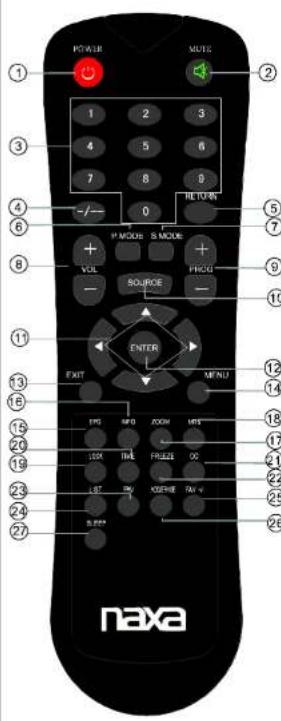
text_image
POWER MUTE 1 2 3 4 5 6 7 8 9 -/- 0 I' MODE S MODE + VOL SOURCE ENTER EXIT MENU TPO INFO ROOM MRS LTX TIME FRAUSE 00 18" TV KOREA TAV S PSS naxa-
POWER: Switch a LED TV when at standby mode or vice versa.
-
MUTE: Press to mute the sound. Press again or press VOL+ to unmute.
-
Number key(0-9): Press 0-9 to select a TV channel directly when you are watching TV. The channel change after 3 seconds.
-
-: Press this button to enter a program number for multiple program channel such as 2-1, etc.
-
RETURN: Return to the previous channel viewed.
-
P.MODE: Press repeatedly to cycle through the available video picture modes.
-
S.MODE: Press to cycle through the different sound settings.
-
VOL +/-: Press to increase/decrease the sound level.
-
PROG +/-: Press to scan through channels.
-
SOURCE: Press to change input source.
-
ARROW BUTTONS ( ▲ ▼ ◀ ▶ )' Use to move cursor up/down/left/right.
-
ENTER: Validation key
-
EXIT: Press to exit all menu.
-
MENU: TV system setup
-
EPG: Press to display the EPG menu.
-
INFO: Displays the channel information.
-
ZOOM: Press to change the screen scale.
-
MTS: Press to select the audio channels.
-
LOCK: Press to display the Lock menu.
-
Time: Press to display current time.
-
CC: Press to display the closed caption.
-
FREEZE: Press to freeze the screen.
-
FAV: Selects favorite channels.
-
LIST: Press to display the TV program list.
-
FAV +/-: Press this button +/- the favorite program list.
-
ADD: Add this program to the favorite channels list. ERASE: Delete this program from the favorite channels list.
-
SLEEP: Set the sleep timer.
General Description
Installing Batteries in the Remote Control
Installing Batteries
1 Open the battery compartment cover on the back side.


2 Insert two 1.5V AAA size batteries in correct polarity. Don't mix old or used batteries with new ones.

+ Point the remote towards the remote control sensor of the wireless TV and use it within 7 meters.
Put the used batteries into the recycling bin since it can negatively affect the environment.
3 Closed the cover.

Note:
• One loading of batteries will last for 1 year under normal use.
- If you do not intend to use the remote controller for a long period of time, remove them to avoid damage due to leakage.
• Do not use old and new batteries together.
- The batteries shall not be eposed to excessive heat such as sunshine fire of the like.
External Connection
Antenna connection
Antenna input impedance of this unit is 75ohm. VHF/UHF 75ohm coaxial cable can be connected to the antenna jack directly, if the antenna cable is 300ohm parallel flat feeder cable, you need to use the 300ohm/75ohm converter to connect the antenna cable to the antenna jack. For details Please refer to the following drawing.
Antennas with 30ohm flat twins Leads
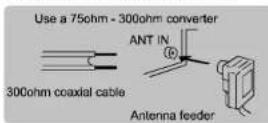
Antennas with 75ohm Round Leads

External Connection
Connecting VCR
These instructions assume that you have already connected your TV to an antenna or a cable TV system. Skip step 1 if you have not yet connected to an antenna or a cable system.

text_image
VCR Rear Panel RF Cable (Not supplied) Audio Cable (Not supplied) Video Cable (Not supplied) POWER INT'L US$ HONI YGA PC AUDIO SVBS L R RF EMPIRONE COASTAL OUT U.S. DC SD IN IN IN IN IN IN IN IN IN IN IN IN IN IN IN IN IN IN IN IN IN IN IN IN IN IN IN IN IN IN IN IN IN IN IN IN IN IN IN IN IN IN IN IN IN IN IN IN IN IN IN IN IN IN IN IN IN IN IN IN IN IN IN IN IN IN IN IN IN IN IN IN IN IN IN IN IN IN IN IN IN IN IN IN IN IN IN IN IN IN IN IN IN IN IN In In In In In In In In In In In In In In In In In In In In In In In In In In In In In In In In In In In In In In In In In In In In In In In In In In In In In In In In In In In In In In In In In In In In In In In In In In In In In In In In In In In In In In In In In In In In In In In In In In In In I N U S U S U S U S U S U S U S U S U S U S U S U S U S U S U S U S U S U S U S U S U S U S U S U S U S U S U S U S U S U S U S U S U S U S U S U S U S U S U S U S U S U S U S U S U S U S U S U S U S U S UFollow the instructions in Viewing a VCR or Camcorder Tape to view your VCR tape. Each VCR has a different back panel configuration.
When connecting a VCR, match the color of the connection terminal to the cable. We recommend the use of cables with a Ferrite Core.
- Unplug the cable or antenna from the back of the TV.
- Connect the cable or antenna to the ANT IN terminal on the back of the VCR.
- Connect an RF Cable between the ANT OUT terminal on the VCR and the ANT IN terminal on the TV.
- Connect a Video Cable between the VIDEO OUT jack on the VCR and the VIDEO IN jack on the TV.
- Connect Audio Cables between the AUDIO OUT jacks on the VCR and the AUDIO L and AUDIO R jacks on the TV.
- If you have a mono (non-stereo) VCR, use a Y-connector (not supplied) to hook up to the right and left audio input jacks of the TV. If your VCR is stereo, you must connect two cables.
External Connection
Connecting Digital Audio System
The rear panel jacks on your TV make it easy to connect a Digital Audio System to your TV.

text_image
Digital Audio System COAXIAL Cable (Not supplied)5.1 CH audio is possible when the TV is connected to an external device supporting 5.1 CH.
We recommend the use of cables with a Ferrite Core.
1. Connect a COAXIAL Cable between the SPDIF jacks on the TV and the Digital Audio Input jacks on the Digital Audio System. When a Digital Audio System is connected to the SPDIF terminal: Decrease the gain (volume) of the TV, and adjust the volume level with the system's volume control.
External Connection
Connecting DVD Player/Set-Top Box via HDMI
This connection can only be made if there is a HDMI Output connector on the external device.

text_image
DVD Player/Set-Top Box HDMI Cable (Not supplied) POWER INPUT USB USB IN VGA IN PG AUDIO IN CVBS L R RF OUT EPAHME OUT COXIALWhat is HDMI.
HDMI, or high-definition multimedia interface, is a next-generation interface that enables the transmission of digital audio and video signals using a single cable without compression.
Multimedia interface is a more accurate name for it especially because it allows multiple channels of digital audio (5.1 channels).
The difference between HDMI and DVI is that the HDMI device is smaller in size, has the HDCP(High Bandwidth Digital Copy Protection) coding feature installed, and supports multi-channel digital audio.
Each DVD player/STB has a different back panel configuration.
We recommend the use of cables with a Ferrite Core.
- Connect an HDMI Cable between the HDMI connector on the TV and the HDMI connector on the DVD player/Set-Top Box.
External Connection
Connecting PC

text_image
PC PC AUDIO Cable (Not supplied) D-Sub Cable (Not supplied) POWER INPUT USB HDMI VGA PC AUDIO CVBS L R RF EAT/HDMI CC/AXIAL IN OUT IN IN IN IN IN IN IN IN IN IN IN IN IN IN IN IN IN IN IN IN IN IN IN IN IN IN IN IN IN IN IN IN IN IN IN IN IN IN IN IN IN IN IN IN IN IN IN IN IN IN InEach PC has a different back panel configuration.
The HDMI jacks do not support PC connection.
We recommend the use of cables with a Ferrite Core.
- Connect a D-Sub Cable between RGB/PC IN connector on the TV and the PC output connector on your computer.
- Connect the PC audio input jack on the TV.
External Connection
Connecting a Headphone/USB
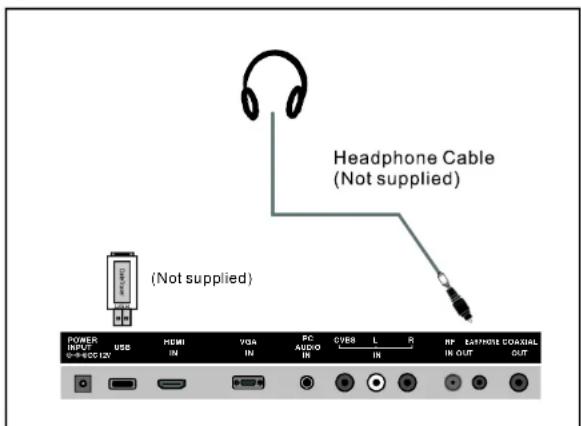
text_image
Headphone Cable (Not supplied) POWER INPUT USB HDMI IN VGA IN PC AUDIO IN CVBS L R RF EATMODE COXIAL IN OUT OUT (Not supplied)Plug headphone connector into headphone jack on the TV. Then the TV speaker will be muted.
Connect a USB 2.0 memory device into USB slot of this TV for multimedia files playback.
- This USB slot only supports Music and Photo multimedia files playback.
- This TV is compatible with most USB devices in the market. However, we cannot guarantee the compatibility of all USB devices, due to multiple technology standards used.
Supporting signals
| VGA/PC | Up to 1366×768@60Hz |
| HDMI | 480i, 480p, 720p, 1080i, 1080p |
Basic Operation
Turning the TV On and Off
How to turn the TV on or off
- Insert the power cord plug into a polarized AC outlet.
- Press ⬆ button on remote control or POWER button on the LED TV.
- Normal picture will be displayed on the screen after 6 seconds. If no signal input, "No Signal" will be displayed on the screen.
- If temporary POWER off is required, press Ⓞ button on remote control or POWER button on the LED TV.
- If you want to completely switch off the power for this unit, unplug the power cord plug for this unit.
- After switching off the unit, you should turn on the TV again at least 5 seconds later. Status indication lamp
Blue: In power on mode.
Red: In standby mode.
Auto power off
If there is no signal input in TV mode, the TV will automatically access the standby state in about 10 minutes.
Memory before turning TV off
The settings of picture and the preset channels will be memorized at turning off the unit. When being started up again, the unit will work according to the mode set before being turned off.
OSD Menu Operations
INPUT SOURCE SELECTION
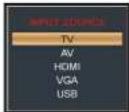
Press SOURCE button to display the input source list;
Press ▼/▲ button to select the input source you want to watch;
Press ENTER button to enter the input source;
BASIC OPERATION
- Press MENU button on unit top or remote control to display the main menu.
- Press LEFT or RIGHT navigation button to select Picture/Audio/Time/Setup/Lock/Channel.
- Press DOWN navigation button to enter submenu page.
- Press UP or DOWN navigation button to select the option that want to adjust.
- Press LEFT or RIGHT navigation button to adjust selected option to desired value.
- Press RIGHT navigation button or ENTER button to enter next menu page.
- Press MENU button to return to previous menu page.
- Press EXIT button to exit menu page.

text_image
Picture Mode Continuous Brightness Color Light Diagrams Color Shift User 30 30 30 0 30 Color Close OK Select OK Move Cancel ExitFIRST TIME INSTALLATION
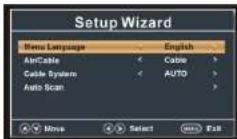
If this is your first time turning on this TV, Setup Wizard will appear on the screen.
- Press UP or DOWN navigation button to select preferred item.
- Press LEFT or RIGHT navigation button to adjust the value.
Menu Language
To choose your menu language.
Air/Cable
To choose your signal type: Air, Cable.
Cable System
To choose your Cable System: AUTO, STD, IRC, HRC.
NOTE: Cable System is adjustable only when your signal type is set to Cable.
Auto Scan
Highlight Auto Scan, press ENTER to search and store all available channels.

OSD Menu Operations
PICTURE
1. Picture Mode
Available options: User, Standard, Dynamic, Mild.
2. Contrast
The value of Contrast can be adjusted from 0-100.
3. Brightness
The value of Brightness can be adjusted from 0-100.
4. Color
The value of Color can be adjusted from 0-100.
5. Tint
The value of Tint can be adjusted from -50 to 50.
NOTE: Tint is adjustable only in certain TV system.
6. Sharpness
The value of Sharpness can be adjusted from 0-100.
NOTE: If the value of Contrast, Brightness, Color, Tint or Sharpness has been changed, the picture mode will turn to User automatically.
7. Color Temp. (Color Temperature)
Available options: Normal, Warm, Cool.

text_image
Picture Mode Content Brightness Color Noise Color Temp User 30 30 30 6 30 30 Color Close Print Select Style Mask Quick EndOSD Menu Operations
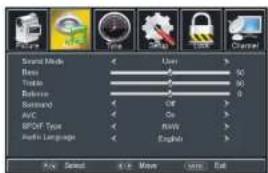
AUDIO
1. Sound Mode
Available options: User, Music, Movie, Standard.
2. Bass
The value of Bass can be adjusted from 0-100.
3. Treble
The value of Treble can be adjusted from 0-100.
4. Balance
The value of Balance can be adjusted from -50 to 50.
NOTE: If the value of Bass, Treble, or Balance has been changed, the sound mode will turn to User automatically.
5. Surround
This item is used to turn on/off Sound Surround function.
6. AVC (Auto Volume Control)
Available options: On, Off
7. SPDIF Type
This item is used to select preferred SPDIF audio output type.
Available options: RAW, PCM
8. Audio Language
This item is used to select preferred audio language.
NOTE: This item is adjustable only for digital programs.
text_image
Image Color Style Style Channel Smart Mode User Menu Tools Tools Balance Balance Standard Off AFC On BPOUT Type Mainly Audio Language English OK Select OK Now Cancel ExitOSD Menu Operations
TIME
1. Sleep Timer
Available options: Off, 5 min, 10 min,
15 min, 30 min, 45 min, 60 min, 90 min.
120 min, 180 min, 240 min.
2. Time Zone
Available options: Eastern, Central
Mountain, Pacific, Alaska, Hawaii, Atlantic.
3. Daylight Saving Time
Available options: On, Off
NOTE: This item is adjustable only for digital programs.
4. Clock
When an available digital program is present, this unit will get Date and Time information automatically from current program. And it's not user adjustable.

text_image
Snap Time Time Zone Clock 2010/01/08 10:30 AM OK Cancel OK Cancel OK Cancel OK Cancel OK Cancel OK Cancel OK Cancel OK Cancel OK Cancel OK Cancel OK Cancel OK Cancel OK Cancel OK Cancel OK Cancel OK Cancel OK Cancel OK Cancel OK Cancel OK Cancel OK Cancel OK Cancel OK Cancel OK Cancel OK Cancel OK Open Select OK None Cancel ExitSETUP
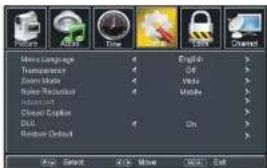
1. Menu Language
This item is used to select preferred OSD menu language.
2. Transparency
This item is used to turn on/off Transparent OSD menu.
3. Zoom Mode
This item is used to select preferred zoom mode of display screen.
Available options: Normal, Wide, Zoom, Cinema
text_image
Movie Language Transparency Zoom Mode Noise Reduction Internet Closed Caption DLL Random Default English Off Wide Mobile On Auto Select Add: Move Move ExitNOTE: The available zoom mode may be different for different input source.
4. Noise Reduction
Available options: Off, Weak, Middle, Strong.
5. Advanced
This item is adjustable only for PC/VGA input signal.
6. Closed Caption
CC Mode
Available options: CC on Mute, Off, On.
Basic Selection
Available options: CC1, CC2, CC3, CC4, Text1, Text2, Text3, Text4.
OSD Menu Operations
SETUP
Advanced Selection
Available options: Service1, Service2, Service3, Service4, Service5, Service6.
Option
Mode
Available options: Default, Custom.
Font Style
Available options: Default, Font 0, Font 1, Font 2, Font 3, Font 4, Font 5, Font 6, Font 7.
Font Size
Available options: Default, Normal, Large, Small.
Font Edge Style
Available options: Default, None, Raised, Depressed, Uniform, Left Shadow,
Right Shadow.
Font Edge Color
Available options: Default, Black, White, Red, Green, Blue, Yellow, Magenta, Cyan.
FG Color
Available options: Default, White, Red, Green, Blue, Yellow, Magenta, Cyan.
BG Color
Available options: Default, Black, Red, Green, Blue, Yellow, Magenta, Cyan.
FG Opacity
Available options: Default, Solid, Flashing, Translucent, Transparent.
BG Opacity
Available options: Default, Solid, Flashing, Translucent, Transparent.
7. DLC
This item is used to turn on/off Dynamic Luminance Control.
8. Restore Default
This item is used to reset to factory default settings.
OSD Menu Operations
LOCK
- Input the password by pressing number buttons on remote control. NOTE: The factory default password is 0000.
1. Change Password
- Press RIGHT navigation button or ENTER button to enter it.
- Press number buttons to input the new password and input it again to finish password changing.
2. System Lock
This item is used to turn on/off system lock.

text_image
Change Power System Lock 4 On US Console RST Setting Reset RST Move Next Best Return3. US
TV
- Press RIGHT navigation button or ENTER button to enter it.
- Press navigation buttons to move the cursor.
- Press ENTER button to block or unblock it.
MPAA
Available options: N/A, G, PG, PG-13, R, NC-17, X.
4. Canada
Canada English
Available options: E, C, C8+, G, PG, 14+, 18+
Canada French
Available options: E, G, 8 ans+, 13 ans+, 16 ans+, 18 ans+.
NOTE: US, Canada, RRT Setting and Reset RRT items are adjustable only when System Lock is On.
5. RRT Rating
This item is available only when viewing programs which contain related Advance Rating information.
6. Reset RRT
This item is used to reset RRT Rating.
OSD Menu Operations
CHANNEL
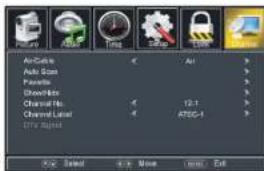
1. Air/Cable
This item is used to select preferred signal receiving type.
2. Auto Scan
-Press RIGHT or ENTER button to enter it.
2.1 Cable System
This item is used to select preferred cable system.
Available options: AUTO, STD, IRC, HRC.
NOTE: This item is adjustable only when your signal type is set to Cable.
2.2 Start to Scan
- Press RIGHT or ENTER button to start auto scanning.
- Press MENU or EXIT button to exit auto channel searching.
3. Favorite
- Press RIGHT or ENTER button to enter it.
- Press UP or DOWN navigation button to select preferred channel.
- Press ENTER button to label the selected channel as a favorite one or not.
4.Show/Hide
- Press RIGHT or ENTER button to enter it.
- Press UP or DOWN navigation button to select preferred channel.
- Press ENTER button to show or hide the selected channel.
5. Channel No.
- Press LEFT or RIGHT navigation button to select preferred channel number.
6. Channel Label
- Press RIGHT or ENTER button to enter it.
- Press LEFT or RIGHT navigation button to move the cursor.
- Press UP or DOWN navigation button to adjust the value
NOTE: If no available channel is present, Favorite, Show/Hide, Channel No., and Channel Label will not be adjustable.
7. DTV Signal
This item is not user adjustable.
text_image
AirCache Auto Scan Favorite Showlist Channel No. Channel Level One Image Auto Auto Scan Favorite Showlist Channel No. Channel Level One Image
text_image
MF ON Fixed 7 2 More Next OK ReturnOSD Menu Operations
PC SETTINGS
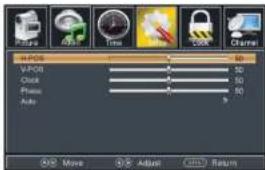
- Press SOURCE button on unit top or remote control to set the unit in VGA mode.
- Press MENU button to display the main menu and select Setup item. Then press DOWN navigation button to enter Setup menu page.
- Press UP or DOWN navigation button to select Advanced and press RIGHT navigation button or ENTER button to enter it.
1. H-POS (Horizontal Position)
Available range: 0-100.
2. V-POS (Vertical Position)
Available range: 0-100.
3. Clock
Available range: 0-100.
4. Phase
Available range: 0-100.
5. Auto
If this item is entered, it will adjust the PC screen automatically.
text_image
P-POS V-POS Clock Phase Auto 50 50 50 50 50 Move Adjust ReturnUSB
USB Operation
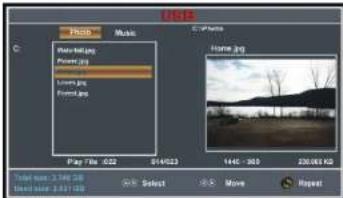
● Before following operations, insert a USB memory device first, which contains Photo and Music files.
- Press SOURCE button on unit top or remote control to set the unit in USB mode.
text_image
Photo Music Water.jpg Power.jpg Water.jpg Lawn.jpg Forest.jpg Play Time: 022 014523 Income.jpg 144C - 300 20.08162 Total size: 3.196 MB Total size: 3.411 MB Select Move Reset- Press LEFT/RIGHT navigation button to select Photo/Music in the main menu.
- Press UP/DOWN navigation button to select preferred file.
OSD Menu Operations
USB Operation
Photo Playback
- Select Photo item in the main menu.
- Press UP/DOWN navigation button to select preferred folder/file and press ENTER button to enter a folder or play selected file.

text_image
Photo Music Play File: 022 614623 Image.jpg Home.jpg 1400 - 300 20.05 KB Select Select Movie RepeatDuring normal playing:
- Press UP/DOWN navigation button to play previous/next photo.
- Press LEFT/RIGHT navigation button to rotate a photo counterclockwise/
clockwise. - Press EXIT button to return to file selecting page.
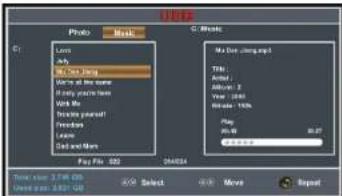
Music Playback
- Select Music item in the main menu.
- Press UP/DOWN navigation button to select preferred folder/file and press ENTER button to enter a folder or play selected file.
text_image
USB Photo Music C:\Users Locus why Wds: 100 Hz Wds: 50 Hz Wds: 20 Hz Wds: 10 Hz Wds: 50 Hz Wds: 20 Hz Wds: 10 Hz Wds: 50 Hz Wds: 20 Hz Play File: 682 24434 Make the image? Title: Created: About: 3 View: (RGB) Readout: 100% Play: Win: 98 Play: 100%During normal playing:
- Press INFO button to display/hide the tool bar.

- Press LEFT/RIGHT navigation button to select preferred option and press ENTER button to confirm it.
Troubleshooting
If you have any problem, check the countermeasures for each symptom listed below. The following symptoms may have caused by inappropriate adjustment rather than actual malfunction of the unit. If the trouble persists, contact the service center.
| Symptoms | Possible solutions |
| No power | Please check the power cord is plugged in. Unplug the power cord and plug it after 60 seconds and restart the TV. |
| No picture | Please check antenna connection. Station may experience problems, please tune to another station. Please adjust the settings of contrast and brightness. |
| Good picture but no sound | Please increase the volume. Please check TV is under mute mode, press MUTE button on the remote control. Please check sound settings. |
| Good sound but abnormal color or no picture | Please check the antenna connection. |
| No remote control | Batteries of remote control may have been exhausted, if necessary, please change the batteries. Clean the remote control lens. The distance between LED TV and remote control should be within 8m. |
| Full screen flickering under VGA | V-HEIGHT value may be set too big, restart computer and enter safe mode, then set monitor parameters to correct value according to adjustment description. |
| Horizontal stripes under VGA | Sample phase may be deflected, adjust phase according to picture position. |
| Colored dots may be present on the screen | This product is the high resolution LED display device and a few cell defects can occur in the manufacture of the LED. Several colored dots visible on the screen would be acceptable. in line with other LED manufacturers and would not mean that the LED is faulty. We hope you will understand that it could not be changed or refunded. |
Picture defects and the reason

Snowy Picture
Snowy picture is usually due to weak signal. Adjust antenna or install an antenna amplifier.

Double Image or Ghosts
Double images are usually caused by reflections from tall buildings. Adjust the direction of the antenna or raise it.

Radio Wave Interference
Wave patterns are moving on the screen, which are usually caused by nearby radio transmitters or short-wave receiving equipment.

High Temperature Electrothermal Interference
Diagonal or herringbone patterns appear on the screen or part of picture is missing. This is probably caused by high temperature electrothermal equipment in a nearby hospital.