NAS-3036 - NAS Naxa - Gratis bruksanvisning og manual
Finn enhetens veiledning gratis NAS-3036 Naxa i PDF-format.


Brukerspørsmål om NAS-3036 Naxa
0 spørsmål om dette apparatet. Svar på dem du kjenner, eller still ditt eget.
Still et nytt spørsmål om dette apparatet
Last ned instruksjonene for din NAS i PDF-format gratis! Finn veiledningen din NAS-3036 - Naxa og ta den elektroniske enheten tilbake i hendene. På denne siden er alle dokumenter som er nødvendige for bruken av enheten din publisert. NAS-3036 av merket Naxa.
BRUKSANVISNING NAS-3036 Naxa
Portable Speaker With USB/SD/MMC And FM Radio Function
Features
- Plays MP3 Files stored in your SD Card* or USB Disk Drive*
*Max Capacity 8GB for SD Card or USB stick
FM Radio with up to 20 Preset Memory Stations
Rechargeable Lithium Ion Battery
Play/Pause /Forward/Rewind Buttons on unit & remote for easy access.
Full Function Infrared Remote Control
On/Off Power Switch
LINE IN to connect to External Audio Players (ipods®/iphones®/ipads®/smartphones® etc.)
5 EQ Modes (SD/USB Mode only): Classic, Pop, Rock, Jazz & Norma
Charging the Unit
Place the supplied Rechargeable Lithium-ion (BL-SC) into the battery compartment at the back of the unit. Connect one end of the supplied USB cable to your computer or Compatible USB AC/DC Adaptor (not included) & the other end of the cable to the speaker to charge the speaker unit. The Red charging light on the control panel will come on. Do not charge the unit for more than 5 hours as this will shorten the Battery Life. DO NOT USE THE UNIT WHILE CHARGING THE BATTERY.
You can use the Unit without the battery in the battery compartment, as long as the unit is connected to a compatible USB power source.
Playing MP3 Files through the Speaker using the SD Card or the USB Stick
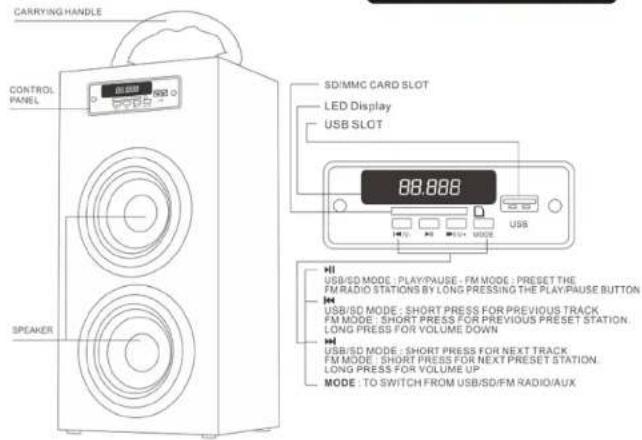
The control panel is located at the back of the Speaker Unit.
1. Plug in your USB Disk and/or SD Card in the slots provided. Please make sure you use the correct file format in your media devices - MP3 FILES ONLY.
2. Turn on the power switch, the LED display will come on. Press the "MODE" button on the Unit or remote to switch between USB or SD or FM Radio or AUX. The files from your media should start playing, if not If it does not play, press the PLAY/PAUSE. Please ensure that your speaker is fully charged & that your files are MP3 format, or that the Mode button is on the correct source.
3. Turn up the volume to the desired level, either from the unit's volume control on the control panel by long pressing PREV VOL - for Volume Down or NEXT VOL + for Volume up, or from the remote by pressing Vol- for Down or Vol+ for up. The Sound Output Quality off the speakers will depend on the quality of the MP3 files.
4. Short Press the PREV VOL - to listen to the previous track or NEXT VOL + to skip to the next track. OR press | ◀◀ button to listen to the previous track or ▶▶ on the Remote Control.
5. To Pause a track, please the PLAY/PAUSE button from the Control Panel or the ▶ | from the Remote Control.
6. Please remember to turn off the power of the Speaker before removing the USB Disk or SD Card - FAILURE TO FOLLOW THESE INSTRUCTIONS MAY DAMAGE THE SPEAKER SYSTEM & WILL VOID THE WARRANTY.
7. For external Devices such as iPods®, iPhones®, iPads®, smartphones, MP3, MP4 players or other audio devices, use the included 3.5mm to 3.5mm cable and connect it to the AUX. Press AUX on the unit or press MODE on the remote control to switch to AUX mode.
PLEASE NOTE THAT WHILE IN AUX MODE, THE VOLUME CAN BE CONTROLED FROM YOUR EXTERNAL DEVICE OR FROM
THE SPEAKER/REMOTE
Listening to the FM Radio from the Speaker
- Press the Mode button on the Speaker unit or Remote Control to receive FM Frequency.
- LONG Press PLAY / PAUSE on the unit to auto scan and the unit will store the frequencies with strong signal reception into the preset stations (up to 20). Use
PREV VOL-/NEXT VOL + buttons to switch between preset stations. - From the Remote Control, Press | ◀◀ or ▶▶ | to access the preset stations up or down. Press the CH+ button to manually move the radio frequency up or CH- to move down.
- To Tune into a specific frequency, please use the remote control number pad by directly entering a frequency number.
iPod®, iPhone® & iPad®, are registered Trademarks of Apple Computer Inc. This product is not Designed, Manufactured or Distributed by Apple Computer Inc.
All other Trademarks & Trade Names belong to their respective owners.
Please keep this manual in a safe place for future reference.

NAS-3036
Portable Speaker With USB/SD/MMC
And FM Radio Function
text_image
CARRYING HANDLE CONTROL PANEL SD/MMC CARD SLOT LED Display USB SLOT 88.888 USB/SD MODE: PLAY/PAUSE - FM MODE : PRESET THE FM RADIO STATIONS BY LONG PRESSING THE PLAY/PAUSE BUTTON USB/SD MODE: SHORT PRESS FOR PREVIOUS TRACK FM MODE: SHORT PRESS FOR PREVIOUS PRESET STATION LONG PRESS FOR VOLUME DOWN USB/SD MODE: SHORT PRESS FOR NEXT TRACK FM MODE: SHORT PRESS FOR NEXT PRESET STATION LONG PRESS FOR VOLUME UP MODE: TO SWITCH FROM USB/SD/FM RADIO/AUX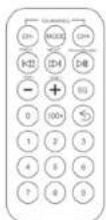
On FM Mode: Press for Manual Frequency Down
FM Mode: Press for Manual Frequency Up
Switch from SD Card / USB Disk / FM Radio / AUX
USB / SD Mode: Skip to Previous Track.
FM Mode Press to go to the previous Preset Station
USB / SD Mode: Skip to Next Track,
- For mode Press to go to the Next Press Station
USB / SD Mode: Play / Pause
EM Mode: Long Press to Scan
Volume Down for USD/UBS, \1m, and \4M
Volume Down for SD/USB, FM mode and AUX
Volume Up for SD/USB.FM mode and AUX
EQ EQ Mode: Classic, Pop, Rock, Jazz, Normal & Live - Only available in USB/SD
Mode(Will not work in FM radio or Line in Mode)
Repeat Current File / Track Playing
USB / SD Mode: Directly Select the File From 100+
SD USB Mode: Go directly to that File Number
FM Mode: Pressing consecutive numbers will take you to that
Frequency - i.e. press 97.1 and you will get to Frequency 97.1