SDI-CVBS-S - Lyd/video konverter Apantac - Gratis bruksanvisning og manual
Finn enhetens veiledning gratis SDI-CVBS-S Apantac i PDF-format.


Brukerspørsmål om SDI-CVBS-S Apantac
0 spørsmål om dette apparatet. Svar på dem du kjenner, eller still ditt eget.
Still et nytt spørsmål om dette apparatet
Last ned instruksjonene for din Lyd/video konverter i PDF-format gratis! Finn veiledningen din SDI-CVBS-S - Apantac og ta den elektroniske enheten tilbake i hendene. På denne siden er alle dokumenter som er nødvendige for bruken av enheten din publisert. SDI-CVBS-S av merket Apantac.
BRUKSANVISNING SDI-CVBS-S Apantac
SDI-CVBS-S
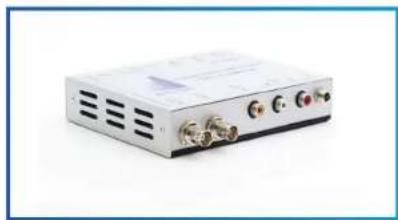
3G/HD/SD-SDI to CVBS Converter
natural_image
Exterior view of a silver electronic device with three ports and ventilation slots (no visible text or symbols)USER MANUAL
Package Contents
1 CVBS-SDI-S
1 User manual
1 Power adapter DC 12V
1 Mounting plate
Introduction
This converter is intended for monitoring use only, not for transmission or on-air use
Features
Auto-detect 3G/HD/SD-SDI input
Looping SDI output
RCA Stereo analog audio output
Coaxial audio output
| SPECIFICATIONS | |
| SDI Input 1 x BNC | |
| SDI Loop Out (non-re-clocked) | 1 x BNC |
| CVBS Output 1 x RCA | |
| Serial Digital SMPTE 424M, 2 | 92M, 259M |
| Equalization | 120m at 2.97 Gbps, 140m at 1.48 Gbps, 400m at 270 Mbps with Belden 1694A |
| Return Loss > 15db up to 1.485 Gbps > 10db up to 3G | |
| Embedded Audio SMPTE-272 | M-A |
| Composite NTSC (SMPTE-170 | M), PAL (ITU624-2) |
| Signal Level | 1V nominal |
| DC Offset | 0V, + - 0.1V |
| Impedence | 75 ohm for BNC, 100 ohm for DVI-I |
| Return Loss | 40db up to 5MHz |
| Analog Audio Out | 2 x RCA |
| Coaxial (SPDIF) Out | 1 x RCA |
| Analog Audio sample rate | 48 KHz |
| Digital Audio sample rate | 48 KHz |
| Power | 12 DC |
| Weight | 3 lbs (1.5 kg) |
| Dimension (LxWxH) | 171 x 119 x 25 mm |
FRONT VIEW
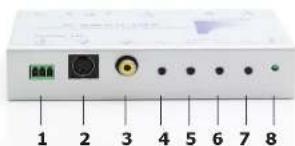
- RS-232 Control Port
Rx pin: connect to the RxD pin of the RS232 from PC
Tx pin: connect to the TxD pin of the RS232 from PC
GND pin: connect to the GND pin of the RS232 from PC
- S-Video out Port
- CVBS (composite video) out Port
- OSD "Menu" Button (on/off OSD)
- OSD "Down" Button
- OSD "Up" Button
- OSD "Enter" Button
- Power LED
REAR VIEW
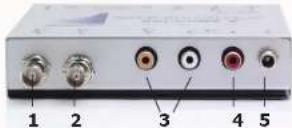
- Auto-detect 3G/HD/SD-SDI input
- Non-reclocked SDI output
- Coaxial audio output
- Stereo analog audio output
- Power Indicator
| INPUT VIDEO SUPPORT | |
| Input Frequency | |
| 480i 59.94 Hz | |
| 576i 50 Hz | |
| 720P 50/59.94/ | 50 Hz |
| 1080i 50/59.94/ | 60 Hz |
| 1080P 23.97/24/ | 25/29.97/30/50/59.94/60 Hz |
OSD Operations
Press the "Menu" button, the OSD menu will appear, press it again to close the OSD and saves all the settings
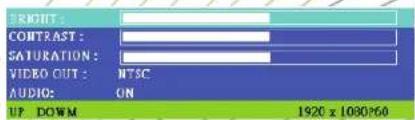
"Enter" button, this will enter the "EDIT" mode. Change the values by "up" or "down" buttons, go back by press the "menu" button
"UP" or "DOWN" button:
The user can select various functions by pressing "up" or "down" button in the front panel to move the selection bar
RS232 Control Protocol
Baud Rate: 4800bps, 8-bit data, 1 stop bit
The unit will respond following receiving the command from the server
| Command byte Data byte Checksum byte | |
| Byte#0 Byte#1 Byte#2 | |
| Command byte | Data byte ACK type(from SDI-CVBS-S) | Funtion |
| Oxa0 0x00 | B Get Model Name | |
| 0x01 B Get possible | output resolution number | |
| 0x02 B Get adjustable | video parameter number | |
| 0x03 B Get supported | audio control | |
| Oxa1 0x00 | 0xff A Brightness | Default: 0x80 |
| Oxa2 0x00 | -0xff A Contrast | Default: 0x80 |
| Oxa3 0x00 | -0xff A Saturation | Default:0x80 |
| 0xb0 | 0x00/0x01 | A Output resolution0: NTSC1: PALDefault: 0x00 |
| 0xb1 | 0x00/0x01 | A Audio enable0:off / 1:0nDefault: 0x01 |
Example:
To set the brightness to be the value 0x02
Server sends: 0xa1, 0x02, 0x5d
SDI-CVBS-S replies: 0xa5, 0x96
SDI-CVBS-S => Server command
Type "A" format
| Ack byte | Checksum byte | Note |
| 0xa5 | 0x5b | Means "ACK", the unit received a valid command |
| 0x6a | 0x96 | Means "NAK", the unit received an unknown command or data byte that is out of range |
Type "A" ACK format
| Ack byte | Checksum byte | Note |
| 0xa5 | 0x5b | Means "ACK", the unit received a valid command |
| 0x6a | 0x96 | Means "NAK", the unit received an unknown command or data-byte that is out of range |
Type "B" ACK format
| ACK byte | Length byte | Data byte | checksum byte | |
| Order | Byte#0 | Byte#1 | Byte#2~Byte#N | Byte#N+1 |
| Value | 0x5a | N+2 | 0x00~0xff | 0x00~0xff |
*checksum byte: check sum from Byte#0\~Byte#N+1
Example:
To get model of the unit
Server sends: 0xa0, 0x00, 0x60
The unit will respond 0x5a, 0x0a, '3', 'S', 'C', '-', '0', '2', 'M', 'W', 0xa0
© 2012 APANTAC LLC, All rights reserved
7470 SW BRIDGEPORT ROAD
PORTLAND, OR 97224, USA
PHONE +1 503 968 3000, FAX +1 503 389 7921
The content of this document are provided in connection with
Apantac LLC ("Apantac") products. Apantac makes no
representation or warranties with respect to the accuracy or completeness of the contents of this publication and reserves the right to make changes to specifications and product descriptions at any time without notice
APANTAC