CM-3001W - Kaffetrakter Gevalia - Gratis bruksanvisning og manual
Finn enhetens veiledning gratis CM-3001W Gevalia i PDF-format.


Brukerspørsmål om CM-3001W Gevalia
0 spørsmål om dette apparatet. Svar på dem du kjenner, eller still ditt eget.
Still et nytt spørsmål om dette apparatet
Last ned instruksjonene for din Kaffetrakter i PDF-format gratis! Finn veiledningen din CM-3001W - Gevalia og ta den elektroniske enheten tilbake i hendene. På denne siden er alle dokumenter som er nødvendige for bruken av enheten din publisert. CM-3001W av merket Gevalia.
BRUKSANVISNING CM-3001W Gevalia
Care and Use
Instructions
12 Cup
Automatic
Coffeemaker
Created Exclusively
For

GEVALIA®
CM-3001B
CM - 3001W
IMPORTANT SAFEGUARDS
When using electrical appliances, basic safety precautions should always be followed to reduce the risk of fire, electric shock, and/or personal injury including the following:
- READ ALL INSTRUCTIONS BEFORE OPERATING OR USING THIS APPLIANCE.
- Do not touch hot surfaces.
- To protect against electrical shock, do not place cord, plugs, or appliance in water or other liquids.
- Close supervision is necessary when any appliance is used by or near children.
- Unplug from outlet when not in use and before cleaning. Allow to cool before putting on or taking off parts, and before cleaning the appliance.
- Do not operate any appliance with a damaged cord or plug or after the appliance malfunctions, or has been damaged in any manner. Return appliance to our authorized service facility for examination. See warranty for return information.
- The use of an accessory not evaluated for use with this appliance may cause injuries.
- Do not use outdoors.
- Do not let cord hang over edge of table or counter, or touch hot surfaces.
- Do not place on or near a hot gas or electric burner or in a heated oven.
- Do not move entire unit when appliance is "ON" or when the carafe contains hot liquids.
- Prior to connecting or disconnecting the plug from the wall outlet, turn all controls to "OFF".
- Do not use appliance for other than intended use.
- WARNING: To reduce the risk of fire or electric shock, do not remove bottom cover. No user-serviceable parts are inside. Any repairs should be done by authorized personnel only.
- Scalding may occur if the Reservoir Cover is opened during the brewing cycle.
- Always use cold, filtered or bottled water for best results. Warm water or other liquids could cause damage to the Coffeemaker.
Short Cord Instructions
A short power-supply cord is provided to reduce the risks of becoming entangled in or tripping over a longer cord. Extension cords are available and may be used if care is exercised in their use. If an extension cord is used, the marked electrical rating of the extension cord should be at least as great as the electrical rating of the appliance, and the cord should be arranged so it will not drape over the counter top or table top where it can be pulled on by children or tripped over unintentionally.
This appliance has a polarized plug (one blade is wider than the other). To reduce the risk of electric shock, the plug is intended to fit into a polarized outlet only one way. If the plug does not fit fully into the outlet, reverse the plug. If it still does not fit, contact a qualified electrician. Do not attempt to modify the plug in any way.
OPERATING NOTICE
To avoid Filter Basket overflow during brewing:
-
Make sure the Filter Basket is securely locked in place in the Filter Basket Holder.
-
Ensure the Carafe is correctly inserted in the Coffeemaker with the lid on to activate the Pause & Serve mechanism.
-
Place only one filter paper into the Filter Basket; insure paper filter doesn't bend or fold. After brewing is completed, there may still be some HOT liquid in the Filter Basket. Allow to drain completely and open Reservoir Cover carefully. Do not move Coffeemaker immediately after operation.
GLASS CARAFE PRECAUTIONS:
To avoid damage of, or injury from the Carafe, please follow these instructions.
- The Glass Carafe is designed for use with this appliance only. It must never be used in any other drip-type Coffeemaker, on a range top, or in a microwave oven.
- Never clean inside the Carafe with a hard implement, scouring pad or other abrasive cleaners. Scratches in the glass can eventually cause the Glass Carafe to break.
- Never stir inside the Carafe with a spoon or other utensils.
- Do not use a cracked Glass Carafe or a Carafe having a loose or weakened handle. If the Glass Carafe should break, do not consume beverage.
- Never use ice cubes in Carafe, or place Carafe in the refrigerator.
- Never drink directly from Carafe. Always check beverages for broken glass before drinking.
- Do not use by or near children. This product is not intended for use by children.
- Do not tilt or overturn the Carafe except when pouring, as liquids may flow out.
- When carrying the Carafe, always use the handle.
DESCRIPTION OF PARTS
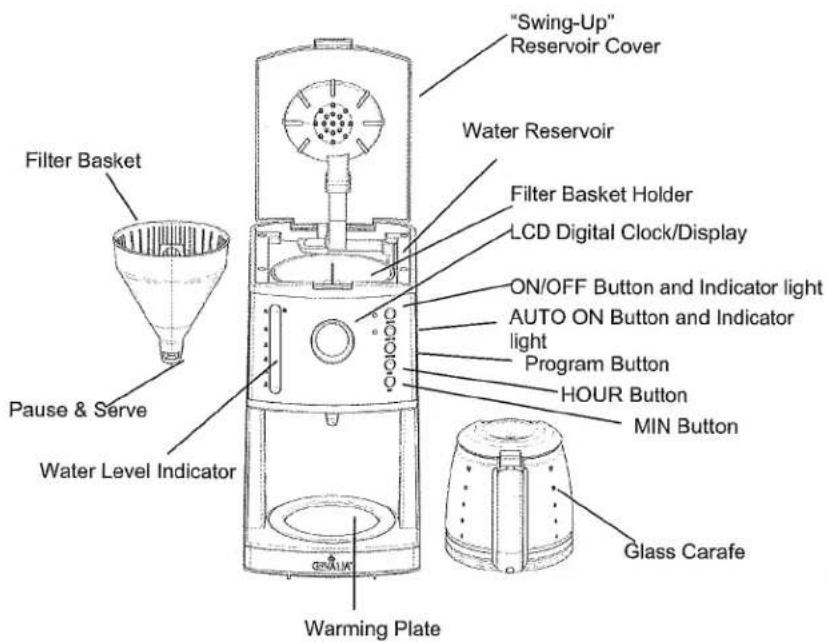
SAVE THESE INSTRUCTIONS
HOW TO USE THE AUTOMATIC 12 CUP COFFEEMAKER
Before first use:
Before the first use it is suggested that you clean your new Coffeemaker. Simply run through 2 brew cycles as described below without using coffee or a coffee filter.
PREPARATION FOR USE – Manual Operation
-
Place the Coffeemaker on a hard, flat surface. With the Coffeemaker turned off, plug into a 120V outlet.
-
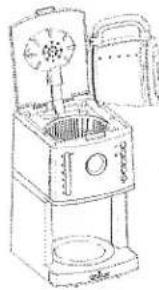
Fill the Carafe with fresh, cold water (preferably bottled or filtered water). Open the "Swing Up" Reservoir Cover and pour the water into the Water Reservoir. The number of cups is shown by the Water Level Indicator. Do not exceed the maximum fill level. We do not recommend making less than 4 cups.
Notes:
- There are drip holes on the back of the Water Reservoir to prevent exceeding the capacity of the Coffeemaker. If you add too much water, it will seep out from the back of the unit.
- The amount of brewed coffee will be less than the water placed in the Coffeemaker since about 10% is absorbed by the coffee grounds and the filter.
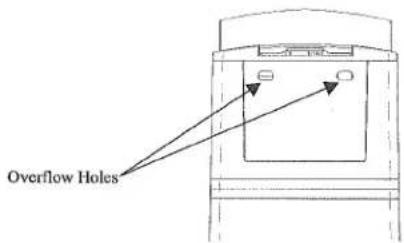
- Place the Carafe with the Lid on in the Coffeemaker making sure it is fully seated on the Warming Plate. This will activate the Pause & Serve mechanism.
CAUTION: To avoid Filter Basket overflow, the Carafe must fit securely into the Coffeemaker with the lid on. If not properly positioned on the Warming Plate it could cause hot water or hot coffee to overflow.
-
With the Reservoir Cover in the full opened position, insert a Gevalia #4 cone filter, into the Filter Basket making sure the filter has a snug fit in the basket. Use a fresh filter for each Carafe of coffee.
-
Add Gevalia coffee using the measuring scoop provided. Brew Gevalia coffee with the coffee water ratio you normally use when you prepare ground coffee. If you prefer strong coffee, we
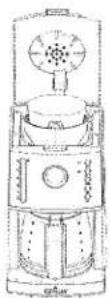
Proper placement of filter paper into Filter Basket
natural_image
Line drawing of a vintage kitchen appliance with open lid and side panel (no text or symbols)Proper method for filling the Water Reservoir - rest spout of Carafe on the Coffeemaker while filling
recommend the following European method, which produces rich, full-bodied flavor. Use one level Gevalia scoop for each cup (6 fluid ounces) or 10 level scoops per full pot of coffee. Experiment with the amount of coffee used in order to adjust the flavor to your taste. Do not exceed the 12 cup level when filling the Reservoir with water.
-
Make sure the Filter Basket is securely pushed down and locked in place in the Filter Basket Holder.
-
Close the Reservoir Cover making sure it is securely closed.
-
With the Reservoir Cover firmly closed and the Carafe securely in place, press the ON button. The red ON LED light will illuminate to indicate the brew cycle has started.
CAUTION: Never open the Reservoir Cover during the brewing cycle; as hot steam could cause injury. If water/coffee is not draining from the Coffeemaker, IMMEDIATELY unplug the unit and wait 10 minutes before opening and checking the Filter Basket.
-
When the brewing process ends and the Water Level Indicator is empty, there will still be hot liquid in the Filter Basket. Wait a few minutes for the rest of the liquid to drip through into the Carafe.
-
After the coffee grounds have cooled, open the Reservoir Cover and carefully remove the Filter Basket by grasping the tab on the Filter Basket, lifting straight up from the Filter Basket Holder. Discard the used coffee filter and grounds.
CAUTION: The Coffeemaker becomes very hot during the brew cycle. Please handle with care.
- The Warming Plate will operate for up to two hours, as long as the red ON/OFF button is lit illuminated.
- Always switch the Coffeemaker to OFF when the Carafe is empty or you no longer want to keep coffee hot. The Coffeemaker will shut off automatically after 2 hours, and the red light will go out.
- If two (2) or more pots of coffee are to be made it is recommended that the Coffeemaker be allowed to cool for 10 minutes between each brewed pot. The Filter Basket should also be rinsed out after each brew cycle.
PROGRAMMING YOUR COFFEEMAKER - Automatic Operation
SETTING THE CLOCK
- You may set the clock any time before or after brewing.
- Press the HOUR and then the MIN buttons to set the current time. Press and hold the buttons to scroll through numbers quickly. When the number displayed approaches the desired setting, press and release the button to advance one digit at a time. Make sure the AM/PM indicator is properly set.
Note: AM is indicated above the LED digital clock/display and PM is below the LED digital clock/display. - Please Note the clock will flash for several seconds until time is set.
SETTING THE AUTO BREW START TIME
- In order to use the Auto Brew feature, you must first set the Clock. Please see instruction above for setting the Clock.
- To set the desired Auto Brew start time, first press the PROGRAM button. The word PROGRAM will begin flashing on the LED digital clock/display to indicate an Auto Brew start time is being set.
- Set the time you want coffee to begin brewing by using the HOUR and MIN buttons following the same directions for setting the Clock. Make sure the AM/PM indicator is properly set.
Note: After setting the Auto Brew start time the PROGRAM indicator will automatically stop flashing after a few seconds, and the display will return to the current time. -
To confirm your Auto Brew start time simply press the PROGRAM button and the pre-set time will be displayed for a few seconds on the LCD display. The PROGRAM indicator will continue to flash while confirming the pre-set Auto Brew time. It will automatically return to the current time after a few seconds.
-
After setting the Auto Brew start time, prepare coffee following the directions in preparation for use.
- Press the AUTO ON button. A green LCD light will light up and the word AUTO will be displayed above the LCD display
- Your Coffeemaker will automatically begin brewing at the pre-set time. When the brew cycle begins, the AUTO ON light will go out and the red ON light will come on to indicate the Coffeemaker is in operation.
- To re-set the Auto Brew time for the same pre-set time for the next day simply press the AUTO ON button. The green LCD light will light up and the word AUTO will again be displayed above the LCD display.
PAUSE & SERVE
Allows you to interrupt the brewing cycle and pour a cup of coffee before the entire Carafe is finished brewing.
CAUTION: While this will temporarily stop the coffee from dripping into the Carafe, it does not stop the brewing cycle. After serving, the Carafe should be immediately returned to the Warming Plate to prevent the Filter Basket from overflowing. Make sure the Carafe is positioned firmly against the back of the Coffeemaker.
NOTE: While the Pause & Serve is a convenient way to pour a cup of coffee mid-cycle, we recommend you wait until the completion of the brew cycle as the strength and flavor of coffee poured mid-cycle will vary from the finished brew.
CLEANING YOUR COFFEEMAKER
-
Always unplug the Coffecemaker and allow it to cool before cleaning.
-
Wash Carafe and removable Filter Basket in hot, sudsy water or place in top rack of the dishwasher. DO NOT place the Carafe Lid or any other part of your Coffeemaker in the dishwasher.
-
Never use harsh or abrasive cleansers on any part of your Coffeemaker. To clean, simply wipe off with a soft, damp cloth. The Warming Plate may be wiped with a clean, damp cloth when necessary. For hard to remove stains, use a plastic mesh pad or cloth damped with vinegar.
IMPORTANT: Never immerse the Warming Plate or main housing in water or any other liquid. Do not try to clean the inside of the Water Reservoir with a cloth, this will leave a residue of lint and may clog your Coffeemaker. Just rinse with cold water periodically.
DECALCIFYING YOUR COFFEEMAKER
Calcium build-up frequently occurs in drip Coffeemakers. This build-up is normal and is caused by the minerals commonly found in drinking water. Periodically, your Coffeemaker will need cleaning to remove calcium or mineral deposits that may form. You will know when your unit needs decalcifying when you notice an obvious slow down in brewing time. We recommend decalcifying your unit with Gevalia Cleancaf Cleaner & Descaler or a solution of white vinegar and cold water. Nontoxic, biodegradable and odorless Cleancaf is a quick and easy way to keep Coffeemakers clean, fresh and odor free. Use bi-monthly to remove or prevent oil residue and mineral buildup. Please follow the directions found on the package of Cleancaf. You can order Cleancaf by calling 1-800-GEVALIA (1-800-438-2542) or visiting us at www.gevalia.com.
A solution of two tablespoons of white vinegar to one carafe (60 ounces) of cold water also works. Pour this solution into the Water Reservoir, and follow your normal operating instructions, without a paper filter or any coffee in the Filter Basket. When the brew cycle is finished, empty the Carafe and rinse with water. Refill the Water Reservoir with cold water and repeat the brew cycle with water only. Refill the Water Reservoir again with cold water and repeat the brew cycle a second time using only water. This will rinse out any remaining vinegar solution.
LIMITED WARRANTY
Global Marketing Corp. warrants this appliance shall be free from defects in materials and workmanship under normal home use for a period of one year from the date of purchase or receipt. During that period, defects will be repaired or the product will be replaced at the manufacturer's option without charge. This warranty does not cover damage or failure which results from alteration, accident, misuse, abuse, neglect, commercial use, or improper maintenance as published in our use and care book. Incidental or consequential damages are not covered by this guarantee. This guarantee expressly excludes glass and thermal carafes broken by accident or misuse. However, replacements can easily be ordered by calling Gevalia Kaffe Import Service at 1-800-438-2542. This warranty gives you specific legal rights, and you may also have other rights which vary from state to state.
FOR SERVICE:
- Call the Gevalia Kaffe Import Service at 1-800-438-2542 for further information on repair or replacement of your defective Coffeemaker.
Gevalia Kaffe is only available through the Gevalia Kaffe Import Service.
To place an order or obtain additional information, call us toll free at: 1-800-GEVALIA (1-800-438-2542)
NOTE: To facilitate service and better answer your questions, please have the model number of your Gevalía Coffeemaker and the date code of manufacture available, when calling .This model information can be located by looking at the bottom of your Coffeemaker for the word: 'MODEL' in the Rating Plate.
This date code information can be located either at the bottom of your Coffecemaker as a 4-digit code or on the blades of your electrical plug. On the blades of your electrical plug, the date code is the 4-digit number that follows the letter 'G'.
Printed in China