
CA-HM-EXEO.001 - Auto audio accessoire PIONEER - Gratis gebruiksaanwijzing en handleiding
Vind de handleiding van het apparaat gratis CA-HM-EXEO.001 PIONEER in PDF-formaat.


| Type product | Installatieset voor dubbel DIN-radio |
| Merk | Pioneer |
| Model | CA-HM-EXEO.001 |
| Compatibiliteit | Audi A4 (B6/B7) en Seat Exeo |
| Inhoud van de set | Metalen frame, installatieset, montageframe, sierplaat |
| Afmetingen van het metalen frame | Ong. 180 x 100 x 50 mm |
| Gewicht van de set | Ong. 300 g |
| Stroomvoorziening | Niet van toepassing (mechanische bevestiging) |
| Functies | Montage van dubbel DIN-apparaten in specifieke voertuigen |
| Installatie | Professionele installatie aanbevolen |
| Onderhoud en reiniging | Afnemen met een droge, zachte doek |
| Veiligheid | Laat installatie uitvoeren door een gekwalificeerde professional |
| Reserveonderdelen | Metalen frame, installatieset, montageframe, sierplaat |
| Repareerbaarheid | Geen elektronica; mechanische onderdelen vervangbaar |
| Garantie | Raadpleeg de garantievoorwaarden van Pioneer |
| Inclusief handleiding | Installatiehandleiding (PDF) |
Veelgestelde vragen - CA-HM-EXEO.001 PIONEER
Gebruikersvragen over CA-HM-EXEO.001 PIONEER
0 vraag over dit apparaat. Beantwoord die u kent of stel uw eigen vraag.
Stel een nieuwe vraag over dit apparaat
Download de handleiding voor uw Auto audio accessoire in PDF-formaat gratis! Vind uw handleiding CA-HM-EXEO.001 - PIONEER en neem uw elektronisch apparaat weer in handen. Op deze pagina staan alle documenten die nodig zijn voor het gebruik van uw apparaat. CA-HM-EXEO.001 van het merk PIONEER.
GEBRUIKSAANWIJZING CA-HM-EXEO.001 PIONEER
Installation Manual Double DIN Kit
Pioneer
Installation Manual
Double DIN Kit
Standard (black): 381320-15
Standard (anthrazit): CA-HM-EXEO.001
Rubber-Touch (black): 391320-15
- Audi A4 (B6/B7)
- Seat Exeo
Compatible with these Pioneer double DIN devices
Pioneer Navigation
1

natural_image
Electronic component assembly with metallic parts and connectors (no visible text or symbols)2
3

natural_image
Two rectangular metal frame components with mounting holes, one labeled with the number 4 (no text or symbols on the frames themselves)Double DIN Set contents
• (1) Metal Frame
• (2) Installation Kit
• (3) Mounting Frame
• (4) Facia Plate
Installation Manual Double DIN Kit
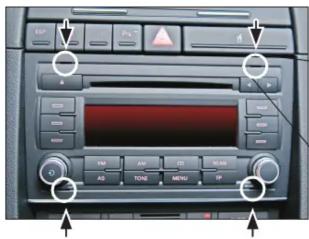
- Put four radio release keys in the appropriate slots of the OEM radio


natural_image
Interior view of a computer monitor displaying internal cables and components (no visible text or symbols)-
Remove the OEM head unit by pulling it towards your direction.
-
Place the mounting frame on the dashboard.
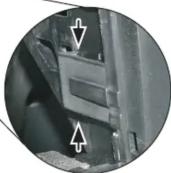
Seat Exeo only: The mounting frame has to be clipped behind the fixed OEM frame (see photo)

natural_image
Interior view of a computer monitor with cables and connectors, showing no visible text or symbols on the device itself.- Fix the mounting frame with two screws (see arrows)
Push the Metal Frame into the mounting frame

natural_image
Interior view of a mechanical device with mounting holes and a central control unit (no visible text or symbols)(sample photo) (sample photo)
Mount the metal brackets to the double DIN head unit.

natural_image
Pure electrical circuit lines without any symbolsThe position of the copper coloured holder can be adjusted to your needs for perfect fit. (see sample)

- Connect all required circuit points and push the double DIN head unit in the metal frame until it snaps in.
Place the facia plate to finish installation.
All installation work must be performed by a qualified professional installer only. The manufacturer / dealer is not liable for any kind of incidental or indirect damages.
Merk : PIONEER
Model : CA-HM-EXEO.001
Categorie : Auto audio accessoire