
LM571R-I - Laserpointer Uni-T - Gratis gebruiksaanwijzing en handleiding
Vind de handleiding van het apparaat gratis LM571R-I Uni-T in PDF-formaat.


| Merk | Uni-T |
| Model | LM571R-I |
| Type product | Nivellierlaser |
| Laserklasse | Klasse 2 (IEC 60825-1) |
| Lasertype | 1V1H (1 verticale en 1 horizontale lijn) |
| Golflengte | 635 nm |
| Uitgangsvermogen | 10 mW |
| Uitbreidingshoek | H: 130°, V: 150° |
| Nauwkeurigheid | ±2 mm op 10 m |
| Zelfnivellerend bereik | 3° ± 1° |
| Zelfnivelleringstijd | ≤3 seconden |
| Werkafstand (lijn) | 20 m (zonder detector), >30 m (met detector) |
| Werktijd | >12 uur (alle lasers aan) |
| Stroomvoorziening | 4× AA (LR6) batterijen |
| Bedrijfstemperatuur | -10°C tot 40°C |
| Opslagtemperatuur | -20°C tot 70°C |
| Inclusief accessoires | Lasernivellier, 4× AA batterijen, PV1 statief, draagtas, handleiding |
| Bevestiging | 1/4 inch adapter (statiefmontage) |
| Modus | Zelfnivellerend en handmatig |
| Veiligheid | Niet in de straal kijken; klasse 2 laser |
| Onderhoud | Reinigen met vochtige doek; batterijen verwijderen bij langdurig niet gebruiken |
Veelgestelde vragen - LM571R-I Uni-T
Gebruikersvragen over LM571R-I Uni-T
0 vraag over dit apparaat. Beantwoord die u kent of stel uw eigen vraag.
Stel een nieuwe vraag over dit apparaat
Download de handleiding voor uw Laserpointer in PDF-formaat gratis! Vind uw handleiding LM571R-I - Uni-T en neem uw elektronisch apparaat weer in handen. Op deze pagina staan alle documenten die nodig zijn voor het gebruik van uw apparaat. LM571R-I van het merk Uni-T.
GEBRUIKSAANWIJZING LM571R-I Uni-T


CE RoHS


P/N:110401108063X
UNI-T®

LM571R-I
User Manual

Laser Level
UNI-T
LM571R-I
Contents
I. Product Appearance 1
II. Packing List 2
III. Safety Information 2
IV. Operation Mode 4
V. Product Application 6
VI. Technical Specifications 7
VII. Maintenance 8
LM571R-I
LM571R-I
UNI-T®
I. Product Appearance
-
Power switch
-
Laser emission window
3.Lock switch


- Battery compartment
5.1/4 inch adapter screw hole
II. Packing List
| Item | Quantity |
| Meter | 1 |
| AA Battery | 4 |
| PV1 Stand | 1 |
| Handbag with lining | 1 |
| User Manual | 1 |
III. Safety Information
Please read user manual and safetyinformation thoroughly before using this product. User must fully understand and follow all the Notes and Warnings.
Notes:
a. Do not expose your eyes to the laser beam during operation. Prolonged exposure to the laser beam can cause eye damage.
b. Some product set provide with accessory glasses. Note that this kindof glasses is not safety glasses. It only helps the user to easily identify the laser beam when it is in strong ambient light or far away from the laser meter source.
\LM571R-I
LM571R-I
UNI-T®
Warnings:
The following print (or label) shown on the product describes safety and related disposal information.


a. Do not look at the laser beam or use optical instrument to look at it directly. And do not set the meter at visual height (to avoid exposing eyes to the laser beam).
b. Do not disassemble the laser meter. The inner parts cannot be repaired.
c. Do not modify the meter in any way. Unauthorized modifications may emit harmful laser radiation.
d. Do not use laser meter around children.
e. Level 2 laser should not be observed for more than two seconds.
IV. Operation Mode
a. Tap the top button or toggle the power/lock switch to turn the meter on. Laser line will switch between horizontal, vertical, and cross line.
b. Press the button (top of the meter) to turn the meter off only when the meter's pendulum is locked. The laser line will also turn off.
Self-leveling Mode
a. Self-leveling mode can only be turned on when the meter pendulum is unlocked.
b. When the meter exceeds self-leveling working range ( 3° ± 1° ), the laser line flashes quickly at a frequency of 0.5s to remind the user its operating mode / state.
c. In self-leveling mode, its full-time pulse function can be used normally with the laser receiver.
d. Press and hold the power button for 3 seconds, brightness will decrease and LED light will be on; outdoor pulse mode will be turned on. Repeat the same operation, and brightness will return to normal and LED light will be off; full-time pulse mode will be turned on.
Manual Mode
a. After the meter is turned on, manual mode is
LM571R-I
LM571R-I
UNI-T
activated when the pendulum is in locked position. The laser line can set to different angles as needed. Special Note: In manual mode, the laser line cannot be used as reference line for horizontal or vertical.
b. In manual mode, self-leveling mode has been turned off. The laser line will flash at a frequency of 3 seconds to remind the user that manual mode has been turned on.

V. Product Application
a. Square
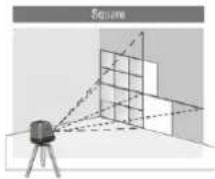
b. Level Transfer

c. Plumb Transfer

LM571R-I
LM571R-I
UNI-T
VI. Technical specifications
| Model No. | LM571R-I |
| Type | 1V1H |
| Expanded Angle | H130°/V150° |
| Laser class | Class 2 |
| Light source | 10mW |
| Laser wavelength | 635nm |
| H/V accuracy | ±2mm/10mm |
| Self-leveling range | 3°±1° |
| Self-leveling time | 3s |
| Working distance(Line) | 20m、>30mWithdetector |
| Operating time | >12h(all lasers on) |
| Power source | 4×AA(LR6) |
| Operating temperature range | -10°C to 40°C |
| Storage temperature range | -20°C to 70°C |
VII. Maintenance
- The meter has been carefully calibrated and packaged according to various precise specifications before leaving the factory.
- It is recommended that the user test the accuracy before first time use, and perform accuracy test regularly, especially during high precision work requirements.
- Turn the meter power off and make sure the pendulum is locked when it is not in use.
- In manual mode, the self-leveling mode is off. The laser beam can not be the reference line of horizontal or vertical.
- Do not short-circuit the battery contacts, charge the alkaline battery, or throw the battery into fire, these actions may cause dangerous accidents.
- Do not use old and new batteries at same time. Be sure to replace all of them with the same battery of the same brand.
- Keep the battery out of the reach of children.
- Remove the battery, if the meter is not in use for a long time, such as several months.
- Avoid sunlight and high temperatures. The meter shell and some parts are made of plastic; it may cause damage in high temperature environments.
- Use a damp cloth to clean the outer plastic parts. Although these parts
have some kind of resistance to solvents, it is not
LM571R-I
recommended to clean it with dissolvent. It is better to use a dry soft cloth to wipe away moisture before putting the meter into the box.
- Store the meter in bag and remove battery when is not in use for a long time.
- Do not dispose the meter into household trash.
- Dispose the battery in accordance with local laws and regulations. Follow the WEEE (Waste Electrical and Electronic Equipment) rules to dispose electronic waste equipment.
UNI-T®
UNI-TREND TECHNOLOGY (CHINA) CO., LTD.
No6, Gong Ye Bei 1st Road,
Songshan Lake National High-Tech Industrial
Development Zone, Dongguan City,
Guangdong Province, China
Tel: (86-769) 8572 3888
http://www.uni-trend.com
Merk : Uni-T
Model : LM571R-I
Categorie : Laserpointer