
Connect AHSS31 - Bewegingsdetector ALC - Gratis gebruiksaanwijzing en handleiding
Vind de handleiding van het apparaat gratis Connect AHSS31 ALC in PDF-formaat.


| Type product | Bewegingsdetector |
| Merk | ALC |
| Model | Connect AHSS31 |
| Compatibiliteit | Compatibel met ALC AHS613, AHS616 en AHS629 beveiligingssystemen |
| Voeding | 3 AA-batterijen (voorgeïnstalleerd) |
| Installatie | Muurmontage met dubbelzijdige tape; hoekmontage mogelijk |
| Montagehoogte | 2-2,5 meter (6-8 ft) vanaf de vloer |
| Connectiviteit | Draadloos via ALC Control Hub |
| Pairing | Via Pair-knop en Connect-app |
| Detectiemethode | Passieve infrarood (PIR) bewegingsdetectie |
| Bereik | Ongeveer 10-12 meter (typisch) |
| Afmetingen (ca.) | 10 cm hoog, 6 cm diameter |
| Gewicht (ca.) | 200 g (inclusief batterijen) |
| Kleur | Wit |
| Materiaal | Kunststof |
| Gebruiksomgeving | Binnen |
| Garantie | 1 jaar beperkte garantie (zie www.ALCWireless.com/support) |
| Meegeleverd | Dubbelzijdige tape (dik en dun), handleiding |
| Vereiste app | Connect app (iOS/Android) |
| Onderhoud | Afstoffen met zachte, droge doek; geen water of schoonmaakmiddelen gebruiken |
Veelgestelde vragen - Connect AHSS31 ALC
Gebruikersvragen over Connect AHSS31 ALC
0 vraag over dit apparaat. Beantwoord die u kent of stel uw eigen vraag.
Stel een nieuwe vraag over dit apparaat
Download de handleiding voor uw Bewegingsdetector in PDF-formaat gratis! Vind uw handleiding Connect AHSS31 - ALC en neem uw elektronisch apparaat weer in handen. Op deze pagina staan alle documenten die nodig zijn voor het gebruik van uw apparaat. Connect AHSS31 van het merk ALC.
GEBRUIKSAANWIJZING Connect AHSS31 ALC
Operation
When first turning on the app you will enter the Control Hub (or System Name you gave) Selection window. Simply tap your Control Hub to enter.
2 The Status screen will appear. Here you can control the connected devices as well as access the Scenario, Event and Setting's screens.

For detailed installation and setup and to view the ALC 1 Year Limited Warranty, please refer to the complete Connect Series User's Guide available on our website:
www.ALCWireless.com/support

SCAN
TO VIEW
COMPLETE
USER'S GUIDE
ALC™
CONNECT
Home Security Anytime from Anywhere
ACCESSORY
Compatible with ALC AHS613, AHS616, and AHS629 Security Systems
Motion Detector

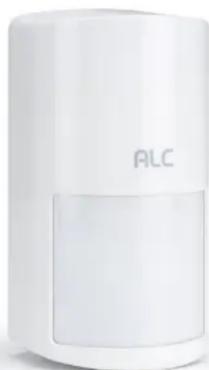
Model: AHSS31
QUICK START GUIDE
Please read these instructions completely before operating this product.
InstallationPairing
For first time use, batteries are pre-installed (3 AA batteries 3). Apply the double-sided tape to the rear of the Motion Detector as shown. Use the thick tape for flat wall mount or the thin table for corner mounting. Select a location between 2-2.5 meters (6-8 ft) from the floor.


This Motion Detector is an accessory to be used along with the Connect series Control Hub Kit. Please refer to this quick start guide as well as the Connect series owner's manual, see back cover for details.
IMPORTANT: This device needs to be paired with the Control Hub as follows.
1 Since this device is an added accessory, you should have downloaded the Connect App and installed the ALC Control Hub as described in the Connect Series owner's manual.
2 At the Status screen, tap +.
3 Remove the insulating plastic tab then open the detector by pressing the tab at the bottom. Press the Pair button.
4 Tap Motion Detector. Tap Pair and follow the on screen instructions. At the final screen, enter the Motion Detector's name and location and tap Save.


Trouble Pairing? If it did not detect the detector, remove the battery for 5 seconds and press the Pair button again. Repeat step 4.
Merk : ALC
Model : Connect AHSS31
Categorie : Bewegingsdetector