
HD7994 - Koffiezetapparaat PHILIPS - Gratis gebruiksaanwijzing en handleiding
Vind de handleiding van het apparaat gratis HD7994 PHILIPS in PDF-formaat.


| Type product | Theepadhouder voor SENSEO® koffiezetapparaten |
| Model | HD7994 |
| Merk | Philips |
| Geschiktheid | Alleen voor SENSEO® Deluxe en Supreme modellen HD7832, HD7830, HD7826, HD7824, HD7820 |
| Materiaal | Metaal en kunststof |
| Afmetingen (ca.) | 10 x 10 x 5 cm (geschat) |
| Gewicht (ca.) | 50 g (geschat) |
| Vermogen | Niet van toepassing (geen eigen voeding) |
| Inhoud | 1 theezakje (Pickwick T-pod) |
| Functies | Bereiden van thee met SENSEO® machine, afneembare plastic uitloop voor eenvoudige reiniging |
| Onderhoud en reiniging | Reinigen met heet water en afwasmiddel of in de vaatwasser (bovenste rek) |
| Veiligheid | Alleen gebruiken met compatibele SENSEO® modellen; nooit gescheurde pads of losse thee gebruiken |
| Onderdelen en repareerbaarheid | Vervangbare plastic uitloop; overige onderdelen niet los verkrijgbaar |
| Garantie | Standaard Philips garantie (zie gebruiksaanwijzing) |
| Inhoud verpakking | Theepadhouder HD7994, gebruiksaanwijzing |
| Kleur | Zwart/metaalkleurig (zoals afgebeeld) |
Veelgestelde vragen - HD7994 PHILIPS
Gebruikersvragen over HD7994 PHILIPS
0 vraag over dit apparaat. Beantwoord die u kent of stel uw eigen vraag.
Stel een nieuwe vraag over dit apparaat
Download de handleiding voor uw Koffiezetapparaat in PDF-formaat gratis! Vind uw handleiding HD7994 - PHILIPS en neem uw elektronisch apparaat weer in handen. Op deze pagina staan alle documenten die nodig zijn voor het gebruik van uw apparaat. HD7994 van het merk PHILIPS.
GEBRUIKSAANWIJZING HD7994 PHILIPS
Cleaning
1 Remove the tea pod holder from the SENSEO ^® machine and throw away the T-pod.
2 Disconnect the plastic tea outlet from the bottom of the pod holder by turning the detachable plastic part anticlockwise (Fig. 3).
3 Clean both parts in hot water.
If necessary, use some washing-up liquid or put the parts in the dishwasher.
4 Make sure the sieve in the centre of the pod holder is not clogged. If the sieve is clogged, unclog it by rinsing the pod holder under a running tap. If necessary, use a washing-up brush to clean the sieve.
5 Rinse the parts with fresh water after cleaning.
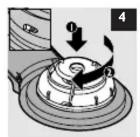
6 Reconnect the plastic tea outlet to the bottom of the pod holder by turning the plastic part clockwise. Make sure that the pins of the pod holder slip properly into the holes of the tea outlet (Fig. 4).
7 Place the tea pod holder back into the machine or store it.
Assistance
For assistance, call toll free: 1-866-473-6736 or visit our website: www.senseo.com. Information is available 24 hours a day, 7 days a week.


HD7994
Tea pod holder

natural_image
Close-up of a black and silver cleaning brush with a circular lid, labeled 'Ser' (no other text or symbols visible)Senseo
Introduction
Pickwick and Philips have created this tea pod holder exclusively for brewing tea in your SENSEO® machine with Pickwick T-pods. You can now brew your tea as conveniently and quickly as you brew your coffee. With this special tea pod holder, you can make a delicious cup of Pickwick tea.
This instruction leaflet is a supplement to the user manual of your SENSEO® machine. It only describes how you should use the specially designed tea pod holder in your SENSEO® machine. For all other instructions, please consult the user manual that came with your SENSEO® machine.

This tea pod holder is only suitable for use in SENSEO® Deluxe and Supreme machine models HD7832, HD7830, HD7826, HD7824, and HD7820. It is NOT suitable for use in SENSEO® machine models HD7811 and HD7810.

www.philips.com

4222 200 00661

General description (Fig. 1)
A Metal pod holder
B Handle
© Detachable plastic tea outlet
Before first use
Clean the tea pod holder with hot water and some washing-up liquid or in the dishwasher.
Using the tea pod holder
Tip: If you have just used the SENSE® machine to make coffee, rinse the machine with water before you brew tea. This ensures the best taste and temperature for your cup of tea. To rinse the machine, put the tea pod holder in the machine without a T-pod and press the 1-cup button.
1 Fill the water reservoir with cold water up to the MAX indication and put it back onto the machine.
Never pour milk, tea, hot water or carbonated water into the water reservoir.
- Make sure that you fill the water reservoir at least to the 2-cup MIN line before you start to brew tea.
- A full reservoir allows you to make tea a number of times. This makes it unnecessary to fill the water reservoir each time you want to make a cup of tea.
2 Press the on/off button.
The indicator light flashes when the water heats up. This takes approx. 75 seconds. When the light is on continuously, the machine is ready for use.
HD7832/30/26/24 only: the light rings around the 1-cup button □ and the 2-cup/1-mug button □□/□ also go on when the machine is ready for use.
3 Open the lid of the machine.
If there is still a coffee pod holder in the machine, remove it.
4 Place the Pickwick tea pod holder in the machine.
The 1-cup and 2-cup/1-mug SENSEO® coffee pod holders are NOT suitable for brewing tea.
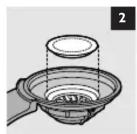
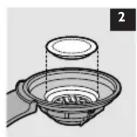
5 Select a Pickwick T-pod in your favourite flavour and place it properly in the centre of the metal holder with the convex size pointing downwards (Fig. 2).
Make sure the tea in the pod is evenly distributed and press the pod lightly into the pod holder.
- Only use Pickwick T-pods, as they have been specially designed to brew tea in the SENSEO® machine with the special tea pod holder.
- Each Pickwick T-pod contains the optimal amount of tea for one cup.
1

Never use torn pods or loose tea, as this causes the machine to become blocked.
6 Close and lock the lid.
Make sure the lid is properly locked.
Never brew tea with the lid open.
7 Place one glass or mug with a capacity of at least 5oz under the spout.
HD7832/30 only: The cups you use should have a capacity of at least 4oz when you select a small cup ⚙, 5oz when you select a medium cup ⚙ and 6oz when you select a large cup ⚙. Do not use cups that are too large, as they cause the tea to get cold more quickly.
8 Press the 1-cup button ▽.
The SENSEO® machine starts to brew tea.
The machine automatically supplies the optimal amount of water for one cup of tea. You can interrupt the brewing process at any time by pressing the on/off button. If you switch the machine back on after interrupting the brewing process, the machine does not complete the interrupted brewing cycle.
Do not remove the water reservoir during a brewing cycle, as this causes the machine to draw in air. When this happens, the next cup is only partly filled.
9 Lift the tea pod holder out of the machine and empty it.
Be careful when you do this. There may still be some water/tea on the T-pod or in the tea pod holder.





Merk : PHILIPS
Model : HD7994
Categorie : Koffiezetapparaat