
F130 - Mobiele telefoon INFOCUS - Gratis gebruiksaanwijzing en handleiding
Vind de handleiding van het apparaat gratis F130 INFOCUS in PDF-formaat.


| Type product | Mobiele telefoon |
| Merk | InFocus |
| Model | F130 |
| Afmetingen (ca.) | 140 x 70 x 8 mm |
| Gewicht (ca.) | 150 g |
| Schermdiagonaal | 5 inch (geschat) |
| Besturingssysteem | Android (geschat) |
| Accucapaciteit | 2000 mAh (geschat) |
| Oplaadpoort | Micro-USB |
| Aantal SIM-kaarten | Dual SIM |
| Geheugenkaartsleuf | microSD |
| Camera achter | 5 MP (geschat) |
| Camera voor | 2 MP (geschat) |
| Connectiviteit | 3G, Wi-Fi, Bluetooth |
| GPS | Ja |
| Functies | Bellen, SMS, camera, video, contactpersonen, berichten |
| Onderhoud | Reinig met een zachte, droge doek |
| Veiligheid | Houd uit de buurt van water en extreme temperaturen |
| Reparatie | Neem contact op met een erkend servicepunt |
Veelgestelde vragen - F130 INFOCUS
Gebruikersvragen over F130 INFOCUS
0 vraag over dit apparaat. Beantwoord die u kent of stel uw eigen vraag.
Stel een nieuwe vraag over dit apparaat
Download de handleiding voor uw Mobiele telefoon in PDF-formaat gratis! Vind uw handleiding F130 - INFOCUS en neem uw elektronisch apparaat weer in handen. Op deze pagina staan alle documenten die nodig zijn voor het gebruik van uw apparaat. F130 van het merk INFOCUS.
GEBRUIKSAANWIJZING F130 INFOCUS
正面
- mm
 User ManualF130 User ManualF130 | IntroductionThank you for choosing inFocus F130 phone. It is recommended that you first read this User Manual to understand the basic operation of the phone. Please browse the following URL to download user guide: www.infocusphone.comYour package should include the following products.For any missing items, please contact your dealer.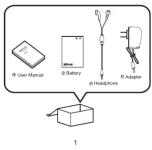 | Your Phone  | Installing SIM Card(s) and Memory Card1. Place your phone face down on a flat surface.2. Locate the wall gap on the lower left corner of the back cover, gently pull up to release the latches and slowly remove the cover. 3. Insert the SIM card(s) into the slot(s) as illustrated.NOTE:•To remove the SIM card, push the SIM card firmly into the slot first to select it, then pull it out.-When using the card adapter do not use excessive force to remove the SIM card as this can damage the co. 3. Insert the SIM card(s) into the slot(s) as illustrated.NOTE:•To remove the SIM card, push the SIM card firmly into the slot first to select it, then pull it out.-When using the card adapter do not use excessive force to remove the SIM card as this can damage the co.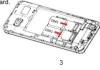 | 4. Insert the memory card into the slot with grid connectors facing down. 5. Replace the back cover and press along the edges until the latches are fully sealed. 5. Replace the back cover and press along the edges until the latches are fully sealed. 4 4 | Charging the BatteryBefore using the phone, it is recommended to fully charge the battery first1. Connect the smaller end of the USB cable to the USB port of the device2. Plug the AC adapter to a wall outlet to start charging.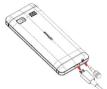 Warning•Change in missions and in dry environments.-For safety, the overhead protection will be active during charging. If the system temperature reaches above the maximum level, the device will automatically stop charging. The device will only resume charging when normal operating temperature is reachedInitial Start UpAfter installing the SIM card(s) and charging the battery, the device is ready to be used.[Onwall] Warning•Change in missions and in dry environments.-For safety, the overhead protection will be active during charging. If the system temperature reaches above the maximum level, the device will automatically stop charging. The device will only resume charging when normal operating temperature is reachedInitial Start UpAfter installing the SIM card(s) and charging the battery, the device is ready to be used.[Onwall] |
| Home ScreenFrom the Home screen as Picture 1, you can quickly access common features and view notifications of missed calls, received messages, check battery and connection status.Making Your First CallTo make a call as Picture 21. Enter the phone number on the keypad.2. Select right soft key to correct any number. Select and hold to erase the entire number.3. Press dial key to make a call.4. To end the call, select End key.NOTE. If you have inserted two SIM cards, select the desired SIM network.[IMAGE]Picture-1 Picture-26789 | To receive a callTo answer a call, select answer[IMAGE]ContactsAdding contacts1. input telephone number.2. Select add to add a contact.3. Enter the contact information such as name, phone, number, etc.4. Select OK to save the contact.[IMAGE] | Sending a Text Message1. From the Home screen, select main menu.2. Select messagesNOTE. If you have inserted two SIM cards, select the desired SIM network first before select ping.3. In the To field, enter the recipient's phone number or name.4. Compose your message.5. Select to send your message[IMAGE]Using BrowserTo open a web page1. From the Home screen, select services2. Select the address bar. | [IMAGE]Using Bluetooth1. From the Home screen, select main menu.2. In tool, select Bluetooth and turn it to on, as Picture 3. Available devices are listed. To search for a new device, select SEARCH FOR DEVICES.4. Select a dejected device.5. To start pairing, enter the PIN then select OK, NOTE.The PIN of the device must be the same PIN on the other bluetooth device. On some devices, select Pair to start pairing.6. The paired bluetooth device name is displayed | [IMAGE]Taking Photos and VideosThis device is equipped with rear camera to take photos & videos.1. From main menu select camera.2. Aim the screen at the sub-camera.3. Select OR key to take a picture.10 |
User Manual
F130
Introduction
Your Phone
Installing SIM Card(s)
Charging the Battery
Warning
Initial Start Up
-
390.00
背面
| To record a video1. From take photo interface select menu, choose videos2. Aim the device at the subject.3. Select OK key to record a video.4. Resisted cr | Setting an alarm1. From main interface, select main menu.2. Select tool.3. To add alarm, select alarm.4. To suit time select time reset.5. Select yes. | • DO NOT use a pen or any sharp object to select their devices.• DO NOT expose the device to dirty or dusty environments.• Do not please the device on an uneven or unstable surface.• DO NOT insert any foreign objects into the device.• DO NOT expose the device to clean electrical field.• DO NOT use or store this equipment in a place where it will be exposed to high temperatures, such as near an open flame or heat-attenting equipment.• Use of the device for store where fluids such as water can splash onto it. Raindrops, water spray, juice, coffee, steam, or other types of liquids will also cause malformations.• Using this device for long periods of time may cause the device to get warm? I you feel the device is safe and necessary.• Use the device to ensure that the appliance has been placed along skin otherwise which might cause discomfort, or eventually a box• Refer to the rating label on the device and be sure that the power adapter complies with the rating.Only use accessories specified by the manufacturer.• Disconnected the device from an electrical outlet and power off before cleaning them.• NEVER attempt to connect or disconnect the power adapter with salt hands.• Clean the pouch screen with a soft cih. If needed, dampen the cloth slightly before cleaning. | Never use abrasives or cleaning solutions.• DO NOT disseascribe the device. Only is certified service technician should perform repair• Please check with your Local Authority or retailer for providing display of electronic devices.• For USB connection, users must use a USB 2.0 (or higher version) cable• Please make sure the temperature for adapter will not be higher than 50°C.• Do not store your system in temperatures higher than 50°C.• The operating temperature for this device is from 6°C to 12°C.• The adapter shall be installed near the equipment and shall be easily accessible.• The temperature of the device might increase while the CPU is buying handling resource consuming activities such as high resolution video decoding. The 6W protection mechanism will ensure a unified charging whenever the temperature is over the threshold and prepare for shut down if necessary. Please worry not. | • Make sure the cell phone has a low SAR.• Keep your calls short or send a last message (SMS) instead. This advice applies especially to children, adolescents and pregnant women• Use the cell phone when the signal quality is good.• People have active medical implants should pretitously keep the cell phone at least 15 cm from the implant | |
 |  | Safety Precautions for Battery Use• Keep the battery dry dry and away from any liquid since this may cause a short circuit.• Keep the battery away from metal products since this may cause a short circuit.• Do not use damaged or reformed batteries.• Keep the battery emits a fluid, discolor, disinfectious use.• Keep the battery away from babies and small children.• If the battery leaks:• Do not allow the leaking fluid to come in contact with your skin, eyes or clothing, if already in contact, rinse with clean water immediately and seek medical advice.• Keep the battery away from fire since this may cause the battery to episode• Do not attempt to open or service the battery yourself.• Do not dispose battery in fire or water• Recycle or dispose used batteries according to the | |||
Basic Phone Settings Phone settings | Important Safety InformationPlease read before proceeding• DO NOT place objects on top of the device, as they need to do. • DO NOT drop your device or subject to it severe impacts. Bending the body and pushing the display or keys with extreme force could damage the device. | Copyright InformationCopyright In focus Corporation, 2015. All rights reserved.• micro©* is a trademark of SD Con交接 Bluetooth and the Bluetooth logo are trademarks owned by Bluetooth S/O, etc. All products use in this paper. These trademarks mentioned herein are trademarks or registered trademarks of their respective owners.SAR Information | |||
| 11 12 | |||||
| THIS MOBILE DEVICE MEETS GUIDELINES FOR EXPOSURE TO RADIO WARES. Your mobile device is a radio transmitter and receiver. It is designed not to exceed the limits for exposure to radio waves recommended by international guidelines. These guidelines were developed by the independent scientific organization CNRP and include safety margins designed to assure the protection of all persons, regardless of age and health.The exposure guidelines for mobile devices employ a unit of measurement known as the device. Absorption Rates or SAR. The SAR limit stated in the CNRP guidelines is 1.6 Wh/kg averaged over 1 grams of tissue. Test for SAR are conducted using standard operating positions with the device transmitting at its highest certified power level in at least frequency bands. The actual SAR level of an operator can be below the maximum value because the device is designed to use only the power required to reach the networks. That amount changes depending on a number of factors such as how close you are to a network base station. The highest SAR value under the ENRP guidelines for use of the device at the ear is 0.591 Wh/kg and at the body is 1.380 Wh/kg (The measure distance of 1.5 cm). Use of device accessories and enhance agents may result in different SAR values. Values vary widely.17 18 | depending on national reporting and testing requirements and the network band.WEEE NoticeThe WEEE logo on the product or its box indicates that this product must not be disposed of or dumped with your other household waste. You are liable to dispose of all your electronic or electrical waste equipment by recycling over the specific collection point for recycling of such hazardous waste, isolated collection and proper recovery of your electronic and electrical waste equipment at the time of disposal will allow us to help conserve natural resources. Moreover, proper recycling of the electronic and electrical waste equipment will ensure safety of human health and environment. For more information about electronic and electrical waste equipment and/or disposal, recovery, and collection points, please contact your local city center, household waste disposal service, shop from your home. Use of the equipment, air, air, air, air, air, air, air, air, air, air, air, air, air, air, air, air, air, air, air, air, air, air, air, air, air, air, air, air, air, air, air, air, air, air, air, air, air, air, air, air, air, air, air, air, air, air, air, air, air, air, Air, Air, Air, Air, Air, Air, Air, Air, Air, Air, Air, Air, Air, Air, Air, Air, Air, Air, Air, Air, Air, Air, Air, Air, Air, Air, Air, Air, Air, Air, Air, Air, Air, Air, Air, Air, Air, Air, Air, Air, Air, Air, Air, Air, Air, Air, Air, Air, Air, Air, | ||||
| Warranty StatementLimited warrantyIn focus provides ‘Product Warranty Statement’, at the time of discharge, the product or its authorized distributor, describing the product warranty service.Never warranty does not provide global cross-border warranty. This limitation (free of defects in materials and workmanship causing misappropriations) shall last for leakage (12 months for the device and six (6) months for the maintenance date. Other than battery, all-in-box accessories including data cable, earphone, charger if applied, will have six (6) meters. The customer acquired the PROOF OF PURCHASE for claiming the warranty. Throughout the warranty period In focus or its order to install a product within the market subject to section Non-Warranty below repair or replace a defective product. All replaced defective parts or components will be sold after returning the repaired/(replaced) product in good supply condition. This repair on the same symptom, one (1) month warranty is provided.Non-WarrantyNot using may be considered or claimed (if 1) the product serial number, date code, IME), water indicator or the warranty seal has been removed. | PRODUCT OR ANY ASSOCIATED EQUIPMENT, INCORI OR CONSEQUENTIAL LOSSES OR DAMAGESOF ANY NATURE WHATSOEVER TO THE FULLEST EXTENT THAT INLOSE LOSSES OR DAMAGES CAN BE DISCLAIMED BY LAW.PRODUCT OR ANY ASSOCIATED EQUIPMENT, INCORI OR CONSEQUENTIAL LOSSES OR DAMAGESOF ANY NATURE WHATSOEVER TO THE FULLEST EXTENT THAT INLOSE LOSSES OR DAMAGES CAN BE DISCLAIMED BY LAW.PRODUCT OR ANY ASSOCIATED EQUIPMENT, INCORI OR CONSEQUENTIAL LOSSES OR DAMAGESOF ANY NATURE WHATSOEVER TO THE FULLEST EXTENT THAT INLOSE LOSSES OR DAMAGESCAN BE DISCLAIMED BY LAW.PRODUCT OR ANY ASSOCIATED EQUIPMENT, INCORI OR CONSEQUENTIAL LOSSES OR DAMAGESOF ANY NATURE WHATSOEVER TO THE FULLEST EXTENT THAT INLOSE LOSSES OR DAMAGESCAN BE DISCLAIMED BY LAW.PRODUCT OR ANY ASSOCIATED EQUIPMENT, INCORI OR CONSEQUENTIAL LOSSES OR DAMAGESOF ANY NATURE WHATSOEVER TO THE FULLEST EXTENT THAT INLOSE LOSSES OR DAMAGESCAN BE DISCLAIMES BY LAW.PRODUCT OR ANY ASSOCIATED EQUIPMENT, INCORI OR CONSEQUENTIAL LOSSES OR DAMAGESOF ANY NATURE WHATSOEVER TO THE FULLEST EXTENT THAT INLOSE LOSSES OR DAMAGESCAN BE DISCLAIMES BY LAW.PRODUCT OR ANY ASSOCIATED EQUIPMENT, INCORI OR CONSEQUENTIAL LOSSES OR DAMAGESOF ANY NATURE WHATSOEVER TO THE FULLEST EXTENT THAT INLOSE LOSSES OR DAMAGESCAN BE DISCLAIMES BY LAW.PROUCT OR ANY ASSOCIATED EQUIPMENT, INCORI OR CONSEQUENTIAL LOSSES OR DAMAGESOF ANY NATURE WHATSOEVER TO THE FULLEST EXTENT THAT INLOSE LOSSES OR DAMAGESCAN BE DISCLAIMES BY LAW.PRODUCT OR ANY ASSOCIATED EQUIPMENT, INCORI OR CONSEQUENTIAL LOSSES OR DAMAGESOF ANY NATURE WHATSOEVER TO THE FULLEST EXTENT THAT INLOSE LOSSES OR DAMAGESCAN BE DISCLAIMES BY LAW.PRODUCT OR ANY ASSOCENT/INVESTMENT AND/OR USED ASSETS OR PROCESSED BY PROCESSED BY PROCESSED BY PROCESSED BY PROCESSED BY PROCESSED BY PROCESSED BY PROCESSED BY PROCESSED BY PROCESSED BY PROCESSED BY PROCESSED BY PROCESSED BY PROCESSED BY PROCESSED BY PROCESSED BY PROCESSED BY PROCESSED BY PROCESSED BY PROCESSED BY PROCESSED BY PROCESSED BY PROCESSED BY PROCESSED BY PROCESSED BY PROCESSED by PROCESSED BY PROCESSED BY PROCESSED BY PROCESSED BY PROCESSED BY PROCESSED BY PROCESSED BY PROCESSED BY PROCESSED BY PROCESSED BY PROCESSED BY PROCESSED BY PROCESSED BY PROCESSED BY PROCESSED BY PROCESSED BY PROCESSED BY PROCESSED BY PROCESSED BY PROCESSED BY PROCESSED BY PROCESSED BY PROCESSED BY PROCESSED BY PROCESSED AT PROCESSED BY PROCESSED BY PROCESSED BY PROCESSED BY PROCESSED BY PROCESSED BY PROCESSED BY PROCESSED BY PROCESSED BY PROCESSED BY PROCESSED BY PROCESSED BY PROCESSED BY PROCESSED BY PROCESSED BY PROCESSED BY PROCESSED BY PROCESSED BY PROCESSED BY PROCESSED BY PROCESSED BY PROCESSED BY PROCESSED BY PROCESSED BY PROCESSED BUSTING PROCESSED BY PROCESSED BY PROCESSED BY PROCESSED BY PROCESSED BY PROCESSED BY PROCESSED BY PROCESSED BY PROCESSED BY PROCESSED BY PROCESSED BY PROCESSED BY PROCESSED BY PROCESSED BY PROCESSED BY PROCESSED BY PROCESSED BY PROCESSED BY PROCESSED BY PROCESSED BY PROCESSED BY PROCESSED BY PROCESSED BY PROCESSED BY PROCESSEDBY PROCESSED BY PROCESSED BY PROCESSED BY PROCESSED BY PROCESSED BY PROCESSED BY PROCESSED BY PROCESSED BY PROCESSED BY PROCESSED BY PROCESSED BY PROCESSED BY PROCESSED BY PROCESSED BY PROCESSED BY PROCESSED BY PROCESSED BY PROCESSED BY PROCESSED BY PROCESSED BY PROCESSED BY PROCESSED BY PROCESSED BY PROCESSED BY PROCESSED By PROCESSED BY PROCESSED BY PROCESSED BY PROCESSED BY PROCESSED BY PROCESSED BY PROCESSED BY PROCESSED BY PROCESSED BY PROCESSED BY PROCESSED BY PROCESSED BY PROCESSED BY PROCESSED BY PROCESSED BY PROCESSED BY PROCESSED BY PROCESSED BY PROCESSED BY PROCESSED BY PROCESSED BY PROCESSED BY PROCESSED BY PROCESSED BY PROCESSED BTUSTING PROCESSED BY PROCESSED BY PROCESSED BY PROCESSED BY PROCESSED BY PROCESSED BY PROCESSED BY PROCESSED BY PROCESSED BY PROCESSED BY PROCESSED BY PROCESSED BY PROCESSED BY PROCESSED BY PROCESSED BY PROCESSED BY PROCESSED BY PROCESSED BY PROCESSED BY PROCESSED BY PROCESSED BY PROCESSED BY PROCESSED BY PROCESSED BY PROCETSD BY PROCESSED BY PROCESSED BY PROCESSED BY PROCESSED BY PROCESSED BY PROCESSED BY PROCESSED BY PROCESSED BY PROCESSED BY PROCESSED BY PROCESSED BY PROCESSED BY PROCESSED BY PROCESSED BY PROCESSED BY PROCESSED BY PROCESSED BY PROCESSED BY PROCESSED BY PROCESSED BY PROCESSED BY PROCESSED BY PROCESSED BY PROCESSED BY PROCESDED BY PROCESSED BY PROCESSED BY PROCESSED BY PROCESSED BY PROCESSED BY PROCESSED BY PROCESSED BY PROCESSED BY PROCESSED BY PROCESSED BY PROCESSED BY PROCESSED BY PROCESSED BY PROCESSED BY PROCESSED BY PROCESSED BY PROCESSED BY PROCESSED BY PROCESSED BY PROCESSED BY PROCESSED BY PROCESSED BY PROCESSED BY PROCESSED BY PROCESLED BY PROCESSED BY PROCESSED BY PROCESSED BY PROCESSED BY PROCESSED BY PROCESSED BY PROCESSED BY PROCESSED BY PROCESSED BY PROCESSED BY PROCESSED BY PROCESSED BY PROCESSED BY PROCESSED BY PROCESSED BY PROCESSED BY PROCESSED BY PROCESSED BY PROCESSED BY PROCESSED BY PROCESSED BY PROCESSED BY PROCESSED BY PROCESSED BY PROCESSEDBY PROCESSED BY PROCESSED BY PROCESSED BY PROCESSED BY PROCESSED BY PROCESSED BY PROCESSED BY PROCESSED BY PROCESSED BY PROCESSED BY PROCESSED BY PROCESSED BY PROCESSED BY PROCESSED BY PROCESSED BY PROCESSED BY PROCESSED BY PROCESSED BY PROCESSED BY PROCESSED BY PROCESSED BY PROCESSED BY PROCESSED BY PROCESSED BY PROCESSEDBy PROCESSED BY PROCESSED BY PROCESSED BY PROCESSED BY PROCESSED BY PROCESSED BY PROCESSED BY PROCESSED BY PROCESSED BY PROCESSED BY PROCESSED BY PROCESSED BY PROCESSED BY PROCESSED BY PROCESSED BY PROCESSED BY PROCESSED BY PROCESSED BY PROCESSED BY PROCESSED BY PROCESSED BY PROCESSED BY PROCESSED BY PROCESSED BY PROCESSEDby PROCESSED BY PROCESSED BY PROCESSED BY PROCESSED BY PROCESSED BY PROCESSED BY PROCESSED BY PROCESSED BY PROCESSED BY PROCESSED BY PROCESSED BY PROCESSED BY PROCESSED BY PROCESSED BY PROCESSED BY PROCESSED BY PROCESSED BY PROCESSED BY PROCESSED BY PROCESSED BY PROCESSED BY PROCESSED BY PROCESSED BY PROCESSED BY PROCESSEDBTUSTING PROCESSED BY PROCESSED BY PROCESSED BY PROCESSED BY PROCESSED BY PROCESSED BY PROCESSED BY PROCESSED BY PROCESSED BY PROCESSED BY PROCESSED BY PROCESSED BY PROCESSED BY PROCESSED BY PROCESSED BY PROCESSED BY PROCESSED BY PROCESSED BY PROCESSED BY PROCESSED BY PROCESSED BY PROCESSED BY PROCESSED BY PROCESSED BY PROCESAUSD BY PROCESSED BY PROCESSED BY PROCESSED BY PROCESSED BY PROCESSED BY PROCESSED BY PROCESSED BY PROCESSED BY PROCESSED BY PROCESSED BY PROCESSED BY PROCESSED BY PROCESSED BY PROCESSED BY PROCESSED BY PROCESSED BY PROCESSED BY PROCESSED BY PROCESSED BY PROCESSED BY PROCESSED BY PROCESSED BY PROCESSED BY PROCESSED BY PROCESUSD BY PROCESSED BY PROCESSED BY PROCESSED BY PROCESSED BY PROCESSED BY PROCESSED BY PROCESSED BY PROCESSED BY PROCESSED BY PROCESSED BY PROCESSED BY PROCESSED BY PROCESSED BY PROCESSED BY PROCESSED BY PROCESSED BY PROCESSED BY PROCESSED BY PROCESSED BY PROCESSED BY PROCESSED BY PROCESSED BY PROCESSED BY PROCESSED BY PROCESAUSD by PROCESSED BY PROCESSED BY PROCESSED BY PROCESSED BY PROCESSED BY PROCESSED BY PROCESSED BY PROCESSED BY PROCESSED BY PROCESSED BY PROCESSED BY PROCESSED BY PROCESSED BY PROCESSED BY PROCESSED BY PROCESSED BY PROCESSED BY PROCESSED BY PROCESSED BY PROCESSED BY PROCESSED BY PROCESSED BY PROCESSED BY PROCESSED BY PROCESUSD by PROCESSED BY PROCESSED BY PROCESSED BY PROCESSED BY PROCESSED BY PROCESSED BY PROCESSED BY PROCESSED BY PROCESSED BY PROCESSED BY PROCESSED BY PROCESSED BY PROCESSED BY PROCESSED BY PROCESSED BY PROCESSED BY PROCESSED BY PROCESSED BY PROCESSED BY PROCESSED BY PROCESSED BY PROCESSED BY PROCESSED BY PROCESSED BY PROCESAUSD BUSTING BUSTING BUSTING BUSTING BUSTING BUSTING BUSTING BUSTING BUSTING BUSTING BUSTING BUSTING BUSTING BUSTING BUSTING BUSTING BUSTING BUSTING BUSTING BUSTING BUSTING BUSTING BUSTING BUSTING BUSTING BUSTING BUSTING BUSTING BUSTING BUSTING BUSTING BUSTING BUSTING BUSTINGBUSTING BUSTING BUSTING BUSTING BUSTING BUSTING BUSTING BUSTING BUSTING BUSTING BUSTING BUSTING BUSTING BUSTING BUSTING BUSTING BUSTING BUSTING BUSTING BUSTING BUSTING BUSTING BUSTING BUSTING BUSTING BUSTING BUSTING BUSTING BUSTING BUSTING BUSTING BUSTING BUSTING BUTBUSTING BUSTING BUSTING BUSTING BUSTING BUSTING BUSTING BUSTING BUSTING BUSTING BUSTING BUSTING BUSTING BUSTING BUSTING BUSTING BUSTING BUSTING BUSTING BUSTING BUSTING BUSTING BUSTING BUSTING BUSTING BUSTING BUSTING BUSTING BUSTING BUSTING BUSTING BUSTING BUSTING BAUTBUSTING BUSTING BUSTING BUSTING BUSTING BUSTING BUSTING BUSTING BUSTING BUSTING BUSTING BUSTING BUSTING BUSTING BUSTING BUSTING BUSTING BUSTING BUSTING BUSTING BUSTING BUSTING BUSTING BUSTING BUSTING BUSTING BUSTING BUSTING BUSTING BUSTING BUSTING BUSTING BUSTNING BUSTING BUSTING BUSTING BUSTING BUSTING BUSTING BUSTING BUSTING BUSTING BUSTING BUSTING BUSTING BUSTING BUSTING BUSTING BUSTING BUSTING BUSTING BUSTING BUSTING BUSTING BUSTING BUSTING BUSTING BUSTING BUSTING BUSTING BUSTING BUSTING BUSTING BUSTING BUSTING BUSTING BAUUTBUSTING BUSTING BUSTING BUSTING BUSTING BUSTING BUSTING BUSTING BUSTING BUSTING BUSTING BUSTING BUSTING BUSTING BUSTING BUSTING BUSTING BUSTING BUSTING BUSTING BUSTING BUSTING BUSTING BUSTING BUSTING BUSTING BUSTING BUSTING BUSTING BUSTING BUSTING BUSTING BUSTINBCUSTING BUSTING BUSTING BUSTING BUSTING BUSTING BUSTING BUSTING BUSTING BUSTING BUSTING BUSTING BUSTING BUSTING BUSTING BUSTING BUSTING BUSTING BUSTING BUSTING BUSTING BUSTING BUSTING BUSTING BUSTING BUSTING BUSTING BUSTING BUSTING BUSTING BUSTING BUSTING BUSTING BUICTAUSTING BUSTING BUSTING BUSTING BUSTING BUSTING BUSTING BUSTING BUSTING BUSTING BUSTING BUSTING BUSTING BUSTING BUSTING BUSTING BUSTING BUSTING BUSTING BUSTING BUSTING BUSTING BUSTING BUSTING BUSTING BUSTING BUSTING BUSTING BUSTING BUSTING BUSTING BUSTING BUSTING BURGATBUSTING BUSTING BUSTING BUSTING BUSTING BUSTING BUSTING BUSTING BUSTING BUSTING BUSTING BUSTING BUSTING BUSTING BUSTING BUSTING BUSTING BUSTING BUSTING BUSTING BUSTING BUSTING BUSTING BUSTING BUSTING BUSTING BUSTING BUSTING BUSTING BUSTING BUSTING BUSTING BUSTINGBUTBUSTING BUSTING BUSTING BUSTING BUSTING BUSTING BUSTING BUSTING BUSTING BUSTING BUSTING BUSTING BUSTING BUSTING BUSTING BUSTING BUSTING BUSTING BUSTING BUSTING BUSTING BUSTING BUSTING BUSTING BUSTING BUSTING BUSTING BUSTING BUSTING BUSTING BUSTING BUSTING BUSTINOCTAUSTING BUSTING BUSTING BUSTING BUSTING BUSTING BUSTING BUSTING BUSTING BUSTING BUSTING BUSTING BUSTING BUSTING BUSTING BUSTING BUSTING BUSTING BUSTING BUSTING BUSTING BUSTING BUSTING BUSTING BUSTING BUSTING BUSTING BUSTING BUSTING BUSTING BUSTING BUSTING BUSTINBCUTBUSTING BUSTING BUSTING BUSTING BUSTING BUSTING BUSTING BUSTING BUSTING BUSTING BUSTING BUSTING BUSTING BUSTING BUSTING BUSTING BUSTING BUSTING BUSTING BUSTING BUSTING BUSTING BUSTING BUSTING BUSTING BUSTING BUSTING BUSTING BUSTING BUSTING BUSTING BUSTING BUSTINEBCUTBUSTING BUSTING BUSTING BUSTING BUSTING BUSTING BUSTING BUSTING BUSTING BUSTING BUSTING BUSTING BUSTING BUSTING BUSTING BUSTING BUSTING BUSTING BUSTING BUSTING BUSTING BUSTING BUSTING BUSTING BUSTING BUSTING BUSTING BUSTING BUSTING BUSTING BUSTING BUSTING BUICTAUCUTBUSTING BUSTING BUSTING BUSTING BUSTING BUSTING BUSTING BUSTING BUSTING BUSTING BUSTING BUSTING BUSTING BUSTING BUSTING BUSTING BUSTING BUSTING BUSTING BUSTING BUSTING BUSTING BUSTING BUSTING BUSTING BUSTING BUSTING BUSTING BUSTING BUSTING BUSTING BUSTING BUST INBCUTBUSTING BUSTING BUSTING BUSTING BUSTING BUSTING BUSTING BUSTING BUSTING BUSTING BUSTING BUSTING BUSTING BUSTING BUSTING BUSTING BUSTING BUSTING BUSTING BUSTING BUSTING BUSTING BUSTING BUSTING BUSTING BUSTING BUSTING BUSTING BUSTING BUSTING BUSTING BUSTING BUTBUSTINBCUTBUSTING BUSTING BUSTING BUSTING BUSTING BUSTING BUSTING BUSTING BUSTING BUSTING BUSTING BUSTING BUSTING BUSTING BUSTING BUSTING BUSTING BUSTING BUSTING BUSTING BUSTING BUSTING BUSTING BUSTING BUSTING BUSTING BUSTING BUSTING BUSTING BUSTING BUSTING BUSTINBCUTBUSTINBCUTBUSTINBCUTBUSTINBCUTBUSTINBCUTBUSTINBCUTBUSTINBCUTBUSTINBCUTBUSTINBCUTBUSTINBCUTBUSTINBCUTBUSTINBCUTBUSTINBCUTBUSTINBCUTBUSTINBCUTBUSTINBCUTBUSTINBCUTBUSTINBCUTBUSTINBCUTBUSTINBCUTBUSTINBCUTBNUTBUSTINBCUTBUSTINBCUTBUSTINBCUTBUSTINBCUTBUSTINBCUTBUSTINBCUTBUSTINBCUTBUSTINBCUTBUSTINBCUTBUSTINBCUTBUSTINBCUTBUSTINBCUTBUSTINBCUTBUSTINBCUTBUSTINBCUTBUSTINBCUTBUSTINBCUTBUSTINBCUTBUSTINBCUTBUSTINBUTBUSTINBCUTBUSTINBCUTBUSTINBCUTBUSTINBCUTBUSTINBCUTBUSTINBCUTBUSTINBCUTBUSTINBCUTBUSTINBCUTBUSTINBCUTBUSTINBCUTBUSTINBCUTBUSTINBCUTBUSTINBCUTBUSTINBCUTBUSTINBCUTBUSTINBCUTBUSTINBCUTBUSTINBCUTBUSTINNCUTBUSTINBCUTBUSTINBCUTBUSTINBCUTBUSTINBCUTBUSTINBCUTBUSTINBCUTBUSTINBCUTBUSTINBCUTBUSTINBCUTBUSTINBCUTBUSTINBCUTBUSTINBCUTBUSTINBCUTBUSTINBCUTBUSTINBCUTBUSTINBCUTBUSTINBCUTBUSTINBCUTBUSTINBCUTBUSTINBOCUTBUSTINBCUTBUSTINBCUTBUSTINBCUTBUSTINBCUTBUSTINBCUTBUSTINBCUTBUSTINBCUTBUSTINBCUTBUSTINBCUTBUSTINBCUTBUSTINBCUTBUSTINBCUTBUSTINBCUTBUSTINBCUTBUSTINBCUTBUSTINBCUTBUSTINBCUTBUSTINBCUTBUSTINBCUTBUSTINNOVINTOINTOINTOINTOINTOINTOINTOINTOINTOINTOINTOINTOINTOINTOINTOINTOINTOINTOINTOINTOINTOINTOINTOINTOINTOINTOINTOINTOINTOINTOINTOINTOINTOINTOINTOINTOINTOINTOINTOINTOINTOINTOINTOINTOINTOINTOINTOINTOINTOINTOINTOTOCINTOINTOINTOINTOINTOINTOINTOINTOINTOINTOINTOINTOINTOINTOINTOINTOINTOINTOINTOINTOINTOINTOINTOINTOINTOINTOINTOINTOINTOINTOINTOINTOINTOINTOINTOINTOINTOINTOINTOINTOINTOINTOINTOINTOINTOINTOINTOINTOINTOINTOCINTOINTOINTOINTOINTOINTOINTOINTOINTOINTOINTOINTOINTOINTOINTOINTOINTOINTOINTOINTOINTOINTOINTOINTOINTOINTOINTOINTOINTOINTOINTOINTOINTOINTOINTOINTOINTOINTOINTOINTOINTOINTOINTOINTOINTOINTOINTOINTOINTOIBNTOINTOINTOINTOINTOINTOINTOINTOINTOINTOINTOINTOINTOINTOINTOINTOINTOINTOINTOINTOINTOINTOINTOINTOINTOINTOINTOINTOINTOINTOINTOINTOINTOINTOINTOINTOINTOINTOINTOINTOINTOINTOINTOINTOINTOINTOINTOINTOINTOINTOIBNTOINTOINTOINTOINTOINTOINTOINTOINTOINTOINTOINTOINTOINTOINTOINTOINTOINTOINTOINTOINTOINTOINTOINTOINTOINTOINTOINTOINTOINTOINTOINTOINTOINTOINTOINTOINTOINTOINTOINTOINTOINTOINTOINTOINTOINTOINTOINTOINTOINTOINTTOKTOINTOINTOINTOINTOINTOINTOINTOINTOINTOINTOINTOINTOINTOINTOINTOINTOINTOINTOINTOINTOINTOINTOINTOINTOINTOINTOINTOINTOINTOINTOINTOINTOINTOINTOINTOINTOINTOINTOINTOINTOINTOINTOINTOINTOINTOINTOINTOINTOINTOIBNSTOINTOINTOINTOINTOINTOINTOINTOINTOINTOINTOINTOINTOINTOINTOINTOINTOINTOINTOINTOINTOINTOINTOINTOINTOINTOINTOINTOINTOINTOINTOINTOINTOINTOINTOINTOINTOINTOINTOINTOINTOINTOINTOINTOINTOINTOINTOINTOINTOINTOINTOINTOINTOINTOINTOINTOINTOINTOINTOINTOINTOINTOINTOINTOINTOINTOINTOINTOINTOINTOINTOINTOINTOINTOINTOINTOINTOINTOINTOINTOINTOINTOINTOINTOINTOINTOINTOINTOINTOINTOINTOINTOINTOINTOINTOINTOINTOINTOINTOINTOIMTOINTOINTOINTOINTOINTOINTOINTOINTOINTOINTOINTOINTOINTOINTOINTOINTOINTOINTOINTOINTOINTOINTOINTOINTOINTOINTOINTOINTOINTOINTOINTOINTOINTOINTOINTOINTOINTOINTOINTOINTOINTOINTOINTOINTOINTOINTOINTOINTOINTOINITOINTOINTOINTOINTOINTOINTOINTOINTOINTOINTOINTOINTOINTOINTOINTOINTOINTOINTOINTOINTOINTOINTOINTOINTOINTOINTOINTOINTOINTOINTOINTOINTOINTOINTOINTOINTOINTOINTOINTOINTOINTOINTOINTOINTOINTOINTOINTOINTOINTOINOTOCINTOINTOINTOINTOINTOINTOINTOINTOINTOINTOINTOINTOINTOINTOINTOINTOINTOINTOINTOINTOINTOINTOINTOINTOINTOINTOINTOINTOINTOINTOINTOINTOINTOINTOINTOINTOINTOINTOINTOINTOINTOINTOINTOINTOINTOINTOINTOINTOINTOCINTTOCINTTOCINTTOCINTTOCINTTOCINTTOCINTTOCINTTOCINTTOCINTTOCINTTOCINTTOCINTTOCINTTOCINTTOCINTTOCINTTOCINTTOCINTTOCINTTOCINTTOCINTTOCINTTOCINTTOCINTTOCINTTOCINTTOCINTTOCINTTOCINTTOCINT | ||||
Phone Settings
settings
depending on national reporting and testing requirements and the network hand.
WEEE Notice
RoHS Compliance
Warranty Statement
Limited warranty
Non-Warranty
erased, defaced or altered; or (2) the defect is found to be ago by
PRODUCT OR ANY ASSOCIATED EQUIPMENT, INCIPENTAL OR CONSEQUENTIAL LOSSES OR
local regulations.
Road and Environmental
Safety
Safety in Aircraft
Copyright Information
SAR Information
Note:
- 材質: 128g 特銅紙
2.顏色:四色
- 翻譜者解析
4.尺寸:230x390mm,
對摺成型後:115x65mm
5.單張雙面印刷


- INTRODUCTION
- YOUR PHONE
- INSTALLING SIM CARD(S)
- CHARGING THE BATTERY
- WARNING
- INITIAL START UP
- DEPENDING ON NATIONAL REPORTING AND TESTING REQUIREMENTS AND THE NETWORK HAND
- WEEE NOTICE
- ROHS COMPLIANCE
- WARRANTY STATEMENT
- LIMITED WARRANTY
- NON-WARRANTY
- ERASED, DEFACED OR ALTERED; OR (2) THE DEFECT IS FOUND TO BE AGO BY
- PRODUCT OR ANY ASSOCIATED EQUIPMENT, INCIPENTAL OR CONSEQUENTIAL LOSSES OR
- LOCAL REGULATIONS
- ROAD AND ENVIRONMENTAL
- SAFETY
- SAFETY IN AIRCRAFT
- COPYRIGHT INFORMATION
- SAR INFORMATION
- NOTE
Merk : INFOCUS
Model : F130
Categorie : Mobiele telefoon