ADDERLink DV100 HDMI - Audio/video-omzetter Adder - Gratis gebruiksaanwijzing en handleiding
Vind de handleiding van het apparaat gratis ADDERLink DV100 HDMI Adder in PDF-formaat.


Gebruikersvragen over ADDERLink DV100 HDMI Adder
0 vraag over dit apparaat. Beantwoord die u kent of stel uw eigen vraag.
Stel een nieuwe vraag over dit apparaat
Download de handleiding voor uw Audio/video-omzetter in PDF-formaat gratis! Vind uw handleiding ADDERLink DV100 HDMI - Adder en neem uw elektronisch apparaat weer in handen. Op deze pagina staan alle documenten die nodig zijn voor het gebruik van uw apparaat. ADDERLink DV100 HDMI van het merk Adder.
GEBRUIKSAANWIJZING ADDERLink DV100 HDMI Adder
Warranty
Adder Technology Ltd warrants that this product shall be free from defects in workmanship and materials for a period of two years from the date of original purchase. If the product should fail to operate correctly in normal use during the warranty period, Adder will replace or repair it free of charge. No liability can be accepted for damage due to misuse or circumstances outside Adder's control. Also, Adder will not be responsible for any loss, damage or injury arising directly or indirectly from the use of this product. Adder's total liability under the terms of this warranty shall in all circumstances be limited to the replacement value of this product.
Regulatory information
EMC directive 2004/108/IEC
This equipment has been tested and found to comply with the limits for a class A computing device in accordance with the specifications in the European standard EN55022. These limits are designed to provide reasonable protection against harmful interference. This equipment generates, uses and can radiate radio frequency energy and if not installed and used in accordance with the instructions may cause harmful interference to radio or television reception. However, there is no guarantee that harmful interference will not occur in a particular installation. If this equipment does cause interference to radio or television reception, which can be determined by turning the equipment on and off, the user is encouraged to correct the interference with one or more of the following measures: (a) Reorient or relocate the receiving antenna. (b) Increase the separation between the equipment and the receiver. (c) Connect the equipment to an outlet on a circuit different from that to which the receiver is connected. (d) Consult the supplier or an experienced radio/TV technician for help.
FCC compliance statement (United States)
This equipment generates, uses and can radiate radio frequency energy and if not installed and used properly, that is, in strict accordance with the manufacturer's instructions, may cause interference to radio communications. It has been tested and found to comply with the limits for a Class A computing device in accordance with the specifications in Subpart J of part 15 of FCC rules, which are designed to provide reasonable protection against such interference when the equipment is operated in a commercial environment. Operation of this equipment in a residential area may cause interference, in which case the user at his own expense will be required to take whatever measures may be necessary to correct the interference. Changes or modifications not expressly approved by the manufacturer could void the user's authority to operate the equipment.
Safety information
• For use in dry, oil free indoor environments.
- Ensure that the twisted pair interconnect cable is installed in compliance with all applicable wiring regulations.
- Do not connect the interconnect cable to any other equipment, particularly network or telecommunications equipment.
- Do not attempt to service the units yourself.
Web: www.adder.com
Contact: www.adder.com/contact-details
Support: forum.adder.com
© 2013 Auder Technology Limited • All trademarks are acknowledged. Part No. MAN QS AL DV100 ADDER • Release 1.5d

AdderLink DV100 User Guide
Your AdderLink DV100 package
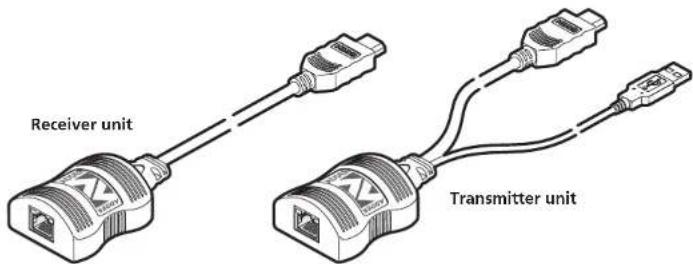
The AdderLink DV100 allows you to extend HDMI digital video over a maximum of 50 meters of twisted pair cable with the minimum of infrastructure and fuss. It is simply powered via USB from the transmitter end, so that no additional power supply is required at the receiver, simultaneously saving time and space as well as making installation very straightforward. In addition to this brief guide, your package should contain the following:
Supplied items
ALDV100P package includes: 1 transmitter unit and 1 receiver unit
What you may additionally need
natural_image
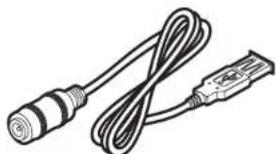
Illustration of a cable and connector with no text or symbolsThis power kit is only required if the host computer or other device with a USB port cannot provide sufficient power.
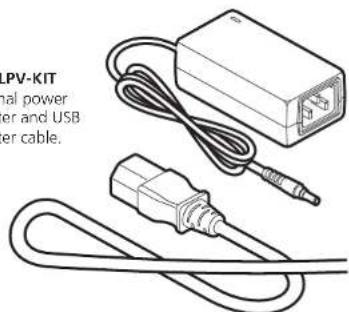
PSU-LPV-KIT
External power adapter and USB adapter cable.
natural_image
Illustration of a connected power adapter cable with a USB socket (no text or symbols)Connecting your AdderLink DV100
Transmitter unit
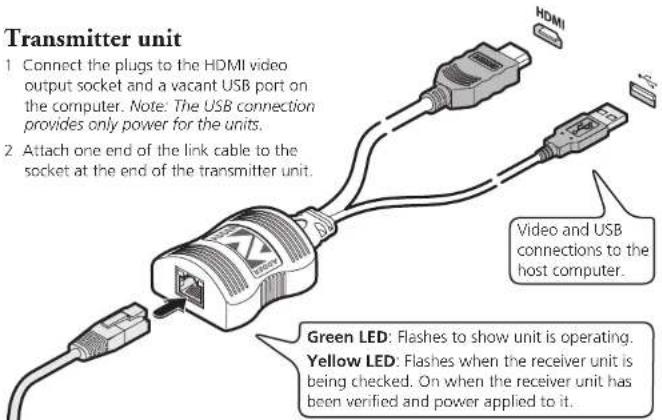
1 Connect the plugs to the HDMI video output socket and a vacant USB port on the computer. Note: The USB connection provides only power for the units.
2 Attach one end of the link cable to the socket at the end of the transmitter unit.
IMPORTANT:
• Use only screened (FTP) cable (CAT6 or better) to connect the two units.
- Do not connect the transmitter unit, via the CATx cable, to anything other than the receiver unit.
Green LED: Flashes to show the unit is operating.
Yellow LED: Flashes if HDCP encoded content is present in the video feed.
Receiver unit
1 Connect the video plug to the HDMI socket on the display screen.
2 Attach the other end of the link cable to the socket at the end of the receiver unit.
Power control
IMPORTANT: Do not connect the transmitter unit, via the CATx cable, to anything other than the receiver unit.
Low voltage power for the receiver unit is fed via the same link cable as is used for the video. The transmitter unit always performs a check before applying power along the link cable.
The transmitter unit will disable the power if:
• The cable is disconnected, or
• Line power is overloaded.
Cable considerations
To ensure correct operation, Category 6 (or better) shielded twisted pair cable, no longer than 50 meters in length, must be used to connect the transmitter and receiver units. The use of shielded cables is important to maintain compliance with radio frequency energy emission regulations and ensure a suitably high level of immunity to electromagnetic disturbances.
For best results, Adder recommends S/FTP CAT7 cable such as Adder part number VSCAT7-50. Patch panels or cable couplers should only be used close to the transmitter unit, connected by CAT7 patch cables of no more than 2m in length. The overall cable run must be reduced by 5m if a coupling is used.
HDMI operation
The AdderLink DV100 can support HDMI video (including 480p, 720p and 1080p) and audio up to a maximum 165MHz clock rate.
High-bandwidth Digital Content Protection (HDCP) is supported, however, the Consumer Electronics Control (CEC) scheme is not.
Video display (EDID) information
Extended Display Identification Data (or EDID) is an industry standard scheme which allows video displays to declare their capabilities to the computer's video adapter circuitry, allowing the latter to optimize their outputs accordingly. Since the widespread adoption of the scheme, video adapters have become increasingly dependent on receiving relevant EDID information during start-up, before they will output anything more than a rudimentary video signal.
Each time that the AdderLink DV100 units are powered on, the receiver unit attempts to read the EDID information from the connected video display. The information is then transferred to the transmitter unit and made available to the computer's video adapter when required.