
Lite HAC-HDW2231MP-0280B - Bewakingscamera Dahua Technology - Gratis gebruiksaanwijzing en handleiding
Vind de handleiding van het apparaat gratis Lite HAC-HDW2231MP-0280B Dahua Technology in PDF-formaat.


| Producttype | Bewakingscamera (HDCVI-domecamera) |
| Model | Lite HAC-HDW2231MP-0280B |
| Merk | Dahua Technology |
| Beeldresolutie | 2 MP (1920 x 1080) |
| Videosysteem | HDCVI (ook CVBS SD-uitvoer) |
| Beeldsensor | High-performance CMOS |
| IR-bereik | Smart IR, tot 20 m (schatting) |
| Wide Dynamic Range | WDR/DWDR ondersteund |
| Ruisonderdrukking | 3D ruisonderdrukking (sommige modellen 2D) |
| Dag/nacht | ICR-switch voor dag/nacht |
| OSD-menu | Instelbaar via coaxiale bediening |
| Lens | Vaste lens, 2.8 mm (model 0280B) |
| Beeldhoek | circa 90° (schatting op basis van lens) |
| Voeding | DC 12V (sommige modellen ook AC 24V) |
| Stroomverbruik | Max. 5W (schatting) |
| Beschermingsgraad | IP67 (stof- en waterdicht) |
| Bedrijfstemperatuur | -30°C tot +60°C (schatting) |
| Afmetingen (ø x H) | circa 70 x 60 mm (schatting) |
| Gewicht | circa 250 g (schatting) |
| Montage | Plafond- of wandmontage |
| Meegeleverde accessoires | Montagemal, schroeven, pluggen |
| Onderhoud | Reinig lens met zachte doek en alcohol; behuizing met milde zeep |
| Veiligheid | Alleen gebruiken met goedgekeurde voeding; installatie door vakman |
Veelgestelde vragen - Lite HAC-HDW2231MP-0280B Dahua Technology
Gebruikersvragen over Lite HAC-HDW2231MP-0280B Dahua Technology
0 vraag over dit apparaat. Beantwoord die u kent of stel uw eigen vraag.
Stel een nieuwe vraag over dit apparaat
Download de handleiding voor uw Bewakingscamera in PDF-formaat gratis! Vind uw handleiding Lite HAC-HDW2231MP-0280B - Dahua Technology en neem uw elektronisch apparaat weer in handen. Op deze pagina staan alle documenten die nodig zijn voor het gebruik van uw apparaat. Lite HAC-HDW2231MP-0280B van het merk Dahua Technology.
GEBRUIKSAANWIJZING Lite HAC-HDW2231MP-0280B Dahua Technology
HDCVI Camera User's Manual
Version 1.0.0
Table of Contents
1 General Introduction....I
1.1 Overview....
1.2 Features....
2 Device Framework 2
3 Device Cable Structure 4
4 Installation....5
4.1 Installation for Model A and Model B 5
4.2 Installation for Model C and Model D 6
4.3 Installation for Model E....8
5 Menu....10
5.1 HCVR Settings....10
5.2 Set Audio Coax....10
5.3 Menu Operation....11
Welcome
Thank you for purchasing our HDCVI camera!
This user's manual is designed to be a reference tool for your system.
Please read the following safeguard and warnings carefully before you use this series product!
Please keep this user's manual well for future reference!
Important Safeguards and Warnings
1. Electrical safety
- All installation and operation here should conform to your local electrical safety codes.
- The power shall conform to the requirement in the SELV (Safety Extra Low Voltage) and the Limited power source is rated DC 12V or AC24V in the IEC60950-1. (Power supply requirement is subject to the device label).
- Please install easy-to-use device for power off before installing wiring, which is for emergent power off when necessary.
- Please check if the power supply meets the requirements of working voltage of the camera before operating the device (The material and length of the power supply cable will influence terminal voltage value).
- Please prevent the line cord from being trampled or pressed, especially the plug, power socket and the junction from the device.
2. Environment
- Please don't aim the device at strong light (such as lighting, sunlight and so on) to focus.
- Please transport, use and store the device within the range of allowed humidity and temperature.
- Please do not allow water and other liquid falling into the camera in case that the internal components are damaged.
- Please keep the sound ventilation in case of heat accumulation.
- Heavy stress, violent vibration or water splash are not allowed during transportation, storage and installation.
- Please pack the device with standard factory packaging or material with same quality when transporting the device.
- It is recommended to use the device together with lightning protection device to enhance lightning protection effect.
- It is recommended to GND the device to enhance device reliability.
- It is advised to use qualified video transmission cable to improve video quality. It is recommended to use RG59 coaxial cable or higher standard.
3. Warning
- Please use the standard accessories provided by manufacturer and make sure the device is installed and fixed by professional engineers.
- Please prevent the device surface from the radiation of laser beam when using laser beam device.
- Please do not provide two or more power supply modes for the device, otherwise it may cause damage to the device.
4. Statement
- Please refer to the actual product for more details; the manual is just for reference.
- The manual will be regularly upgraded according to the product update; the upgraded content will be added in the manual without prior announcement.
- Please contact the customer service for the latest procedure and supplementary documentation.
• The company is not liable for any loss caused by the operation which is not followed by the manual. - Please refer to the company's final explanation if there is any doubt or dispute.
1 General Introduction
1.1 Overview
This series HDCVI camera conforms to the HDCVI standard. It supports video signal high-speed long distance transmission without any delay. It can be controlled by the HCVR conforming to the HDCVI.
1.2 Features
- Adopt high performance CMOS image sensor, megapixel definition.
- For 720P series, it supports RG59 coaxial cable transmission without any loss. The distance is over 800m. For 1080P, 4M and 4K series, it supports RG59 coaxial cable transmission without any loss. The distance is over 500m.
● High speed, long distance real-time transmission.
● Support HDCVI HD video and CVBS analog SD video output. - Support 3D noise reduction (some models support 2D noise reduction), excellent low illuminance performance.
● Support ICR switch to realize surveillance both in the daytime and at night.
● Support OSD menu adjustment parameters.
● Support smart IR function.
● Support WDR/DWDR function.
● Support DC 12V power supply. (Some models support DC 12V/AC 24V power supply).
• Support IP67 compliance. - It can be applied to environments which requires high definition image, such as banking, supermarket, telecom, government, school, airport, factory, hotel, museum and etc.
2 Device Framework
Note:
It fails to support OSD menu operation when it outputs SD video for model A, B, C and D; it realizes zoom and focus operation via UTC when it outputs SD video for model E.
See Figure 2-1 for the dimension of model A. The unit is mm.
![95.5 [3.76°] Ø110.0 [Ø4.33°] Ø84.0 [Ø3.31°] Ø4.5 [Ø0.18°]](/content/2026/05/1123968/images/ed65e25e95c5e99a60ef2a8b4f05f65573bccd7fa1c3bd68f1922972633c7096.jpg)
Figure 2-1
See Figure 2-2 for the dimension of model B. The unit is mm.
![93.7 [3.69°] Ø106 [Ø4.17°] Ø69 [Ø2.72°]](/content/2026/05/1123968/images/690bfed8ae1e8ed012a6789e1b248f6ce3fccc9038cc9030f25c99211ebcf5ed.jpg)

Figure 2-4
See Figure 2-5 for the dimension of model E. The unit is mm.
![Ø122.0 [4.8"] 104.9 [4.13"]](/content/2026/05/1123968/images/6d9fc87e997f17c91cc45685b592030f7b3629bc28503049b6640bff908607c7.jpg)
![3-Ø4.5 [Ø0.18"] Ø122.0 [Ø4.8"] Ø84.0 [Ø3.31]](/content/2026/05/1123968/images/d86e05d3e40c6c74adefee731129e65e2c326764224c1b9ee7737040ada4d889.jpg)
Figure 2-5
3 Device Cable Structure
See Figure 3-1 for DC 12V power input port.

Figure 3-1
See Figure 3-2 for DC 12V/AC 24V power input port.

natural_image
Technical line drawing of a plug with two connector terminals (no text or symbols)Figure 3-2
See Figure 3-3 for video output port.

natural_image
Technical line drawing of a mechanical connector with top and side views (no text or symbols)Figure 3-3
Note:
● Video output port (yellow): analog video output port.
● Video output port (black): HDCVI HD video output port.
4 Installation
Eyeball camera mainly uses ceiling installation; installation surface includes ceiling and wall. Users can install the device with the installation position map and the screws in the accessories bag.
Attention:
- Please install the device in time after it is taken apart, which is to avoid the camera module being exposed to damp environment for too long.
- Before the installation, please make sure the installation surface is thick enough to sustain at least 3X weight of the camera.
- For the installation mode of side outlet, make sure the direction of side outlet is in accordance with that of the installation position map when sticking the installation position map. Besides, pull the cable through the pedestal cable slot before locking the screw.
- Please don't tear off the electrostatic adsorption film on the surface of transparent cover before installation debugging is completed, which is to avoid damage during installation; do not touch the dome cover after the adsorption film is removed, which is to avoid leaving stain on the cover.
- The installation figures below are for reference only, please refer to the actual model for more details.
4.1 Installation for Model A and Model B

Step 1
Dismantle the pedestal ③. There are two ways to dismantle the pedestal according to different models.
- Model A: Press ④ shown in Figure 4-1 to make the pedestal open. Press the dome cover location below the outlet exit to separate the pedestal from the enclosure.
- Model B: Loosen the locking screw counterclockwise to separate the pedestal from the enclosure.
Step 2
Take out the installation position map from the accessories bag, paste it on the ceiling or wall ① and dig holes on the installation surface according to the installation position map.
Step 3
Use tools to fix the expansion bolts ② into the installation holes.
Step 4
Adjust the pedestal ③ location (pull the cable through side cable slot if it is side cable outlet).
Align the bolt fixing hole of device pedestal with the expansion bolt fixing holes of the installation surface; insert the self-tapping screws ⑤ into the expansion bolts ② and secure
them firmly to fix the pedestal on the installation surface (if it is top outlet, pull the cable through the outlet hole on the installation surface after the pedestal is fixed firmly)
Step 5
Install dome body ⑥ and enclosure ⑦. It includes following two installation modes according to different models.
- Model A: Put the enclosure together with the dome body into the pedestal, rotate both the enclosure and dome body to a proper monitoring location.
- Model B: Put the enclosure together with the dome body into the pedestal, twist the locking screw clockwise and fix it preliminarily; rotate the enclosure and dome body to proper monitoring location; finally tighten the locking screw firmly to fix it completely.
So far, the device installation and cable connection have been completed, you can check monitoring image via back-end encoding device.
4.2 Installation for Model C and Model D
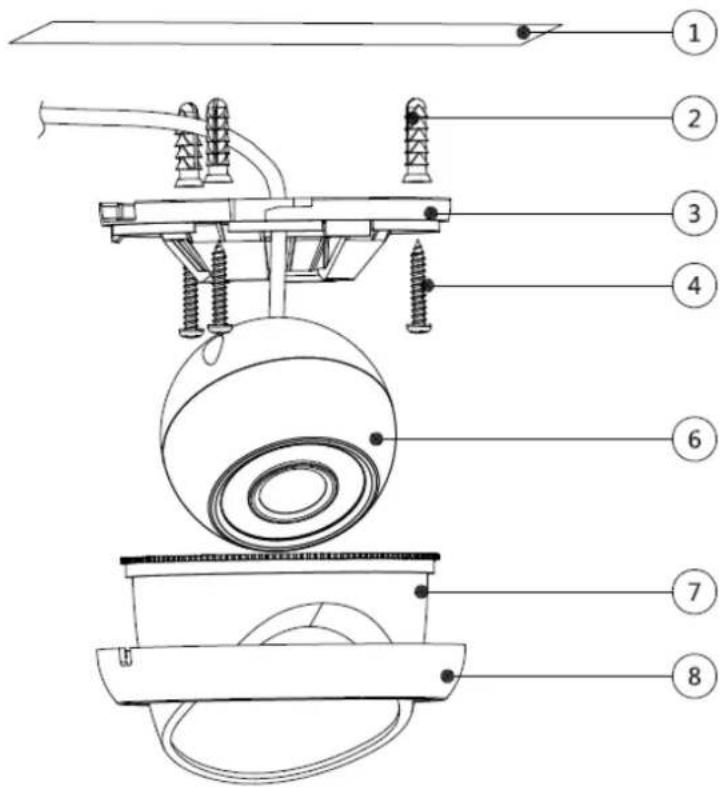
Figure 4-2
Step 1
Dismantle the pedestal ③ according to different models:
- Model C: Hold the decoration ring tightly, rotate the pedestal counterclockwise, release the buckle and take off the pedestal.
● Model D: Hold decoration ring tightly and rotate away the pedestal counterclockwise.
Step 2
Take out the installation position map from the accessories bag, paste it on the ceiling or wall ① and dig holes on the installation surface according to the installation position map.
Step 3
Use tools to fix the expansion bolts ② into the installation holes.
Step 4
Adjust the pedestal location (pull the cable through side cable slot if it is side cable outlet). Align the bolt fixing holes of device pedestal with the expansion bolt fixing holes of the installation surface; insert the self-tapping screws ⑤ into the expansion bolts ② and secure them firmly to fix the pedestal on the installation surface (if it is top outlet, pull the cable through the outlet hole on the installation surface after the pedestal is fixed firmly)
Step 5
Install dome body ⑥, enclosure ⑦ (or compression cover) and the decoration ring ⑧ according to different models:
- Model A: Close the buckle, rotate the enclosure and dome body to proper monitoring location, and finally rotate the decoration ring tightly.
- Model B: Rotate the decoration ring and fix it preliminarily, then rotate the compression cover and dome body to proper monitoring location, finally rotate the decoration ring tightly.
So far, you have completed device installation and cable connection, you can check monitoring picture via back-end coding device.
4.3 Installation for Model E

Adjust the pedestal location (pull the cable through side cable slot if it is side cable outlet).
Align the bolt fixing holes of device pedestal with the expansion bolt fixing holes of the installation surface; insert the self-tapping screws ④ into the expansion bolts ② and secure
them firmly to fix the pedestal on the installation surface (if it is top outlet, pull the cable through the outlet hole on the installation surface after the pedestal is fixed firmly)
Step 5
Rotate the enclosure ⑧ and dome body ⑤ to a proper monitoring location; Insert it into the pedestal and tighten the locking screw firmly.
Step 6
Connect the video output port of the device to the back-end encoding device, and connect power port to the power.
Step 7
Adjust the lens zoom and focus via back-end encoding device to make image clear.
So far, you have completed the device installation and cable connection, you can check the monitoring image via back-end coding device.
5 Menu
5.1 HCVR Settings
This HDCVI camera series can adjust OSD menu via coaxial control. After connected the camera to the HDCVI series HCVR, from Main Menu->Setting->System->PTZ, you need to select the channel number for access and set control mode as HDCVI and the protocol as HD-CVI. Click "Save" button to save current setup. See Figure 5-1.

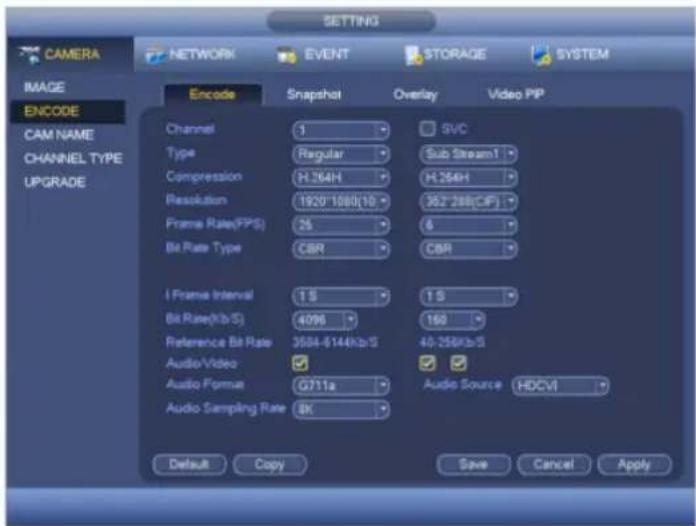
Figure 5-2
5.3 Menu Operation
Click the right mouse button and select "PTZ Control", then you will see the "PTZ Setup" menu, which is as shown in Figure 5-3 and Figure 5-4.


Figure 5-4
See Sheet 4-1 for the details of button functions.
| Button | Function | ||
 | Open menu | ||
 | Select menu item | ||
 | Select menu value | ||
 | Zoom | Adjust lens zoom and auto trigger focus | Note:Some of the buttons can only be applied for the motorized vari-focal camera. |
 | Focus | Adjust lens focus | |
 | Iris | Auto focus under current zoom rate | |
 | Lens reset | ||
Sheet 4-1
If there is “←”, click the “Confirm” button in “Menu Operation” interface to go to the 2nd menu. Click “Return” button to go back to the previous menu interface.
Appendix I Maintenance
Attention:
Please maintain the device according to the following instructions in order to ensure the image effect and long-term stable operation of the device.
Maintenance for lens and mirror surface
The lens and mirror surface are covered with antireflection coating, so it may produce hazardous substance and lead to performance reduction or scratch, dimness etc when it is stained with dust, grease, fingerprint and so on, please refer to the following methods to deal with once dirt is found:
Stained with dirt
Use oil-free soft brush or hair dries to remove it gently.
Stained with grease or fingerprint
Use soft cloth to wipe the water drop or oil gently to make it dry, then use oil-free cotton cloth or paper soaked with alcohol or detergent to wipe from the lens center to outward. It is ok to change the cloth and wipe several times if it is not clean enough.
Camera Body Maintenance
Use a soft dry cloth to clean the camera body when it is dirty, in case the dirt is hard to remove, use a clean dry cloth soaked with mild detergent and wipe gently, make it dry later. Don't use volatile solvent like alcohol, benzene, thinner and etc or strong detergent with abrasiveness, otherwise it will damage the surface coating or reduce the working performance of the device.
Maintenance for Dome Cover
Dome cover is an optical device, please don't touch or wipe cover surface directly during
Note
- This manual is for reference only. Slight difference may be found in the user interface.
- All the designs and software here are subject to change without prior written notice.
- All trademarks and registered trademarks mentioned are the properties of their respective owners.
- If there is any uncertainty or controversy, please refer to the final explanation of us.
- Please visit our website or contact your local service engineer for more information.
- Table of Contents
- Welcome
- Important Safeguards and Warnings
- Electrical safety
- Environment
- Warning
- Statement
- General Introduction
- Overview
- Features
- Device Framework
- Note:
- Device Cable Structure
- Installation
- Attention:
- Installation for Model A and Model B
- Step 1
- Step 2
- Step 3
- Step 4
- Step 5
- Installation for Model C and Model D
- Installation for Model E
- Step 6
- Step 7
- Menu
- HCVR Settings
- Menu Operation
- Appendix I Maintenance
- Maintenance for lens and mirror surface
- Camera Body Maintenance
- Maintenance for Dome Cover
- Note
Merk : Dahua Technology
Model : Lite HAC-HDW2231MP-0280B
Categorie : Bewakingscamera