GeoVision 5060 - GPS PRESTIGIO - Bezmaksas lietošanas instrukcija
Atrodiet ierīces rokasgrāmatu bez maksas GeoVision 5060 PRESTIGIO PDF formātā.


Lietotāju jautājumi par GeoVision 5060 PRESTIGIO
0 jautājums par šo ierīci. Atbildiet uz tām, ko zināt, vai uzdodiet savu.
Uzdot jaunu jautājumu par šo ierīci
Lejupielādējiet instrukcijas savam GPS PDF formātā bez maksas! Atrodiet savu rokasgrāmatu GeoVision 5060 - PRESTIGIO un atgūstiet kontroli pār savu elektronisko ierīci. Šajā lapā ir publicēti visi dokumenti, kas nepieciešami jūsu ierīces lietošanai. GeoVision 5060 zīmola PRESTIGIO.
LIETOŠANAS INSTRUKCIJA GeoVision 5060 PRESTIGIO
Prestigio
GEOVISION 5060

Unboxing

Getting started

Specifications

Troubleshooting

Safety
You may find detailed warranty information at: prestigio.com/use © Copyright2019 Prestigio. All rights reserved.
Prestigio
Unboxing

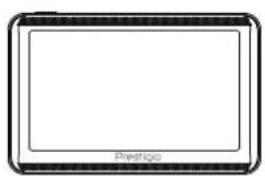
Inside your package Device overview
Inside your package
natural_image
Simple line drawing of a tablet device with no text or symbols on the screen or body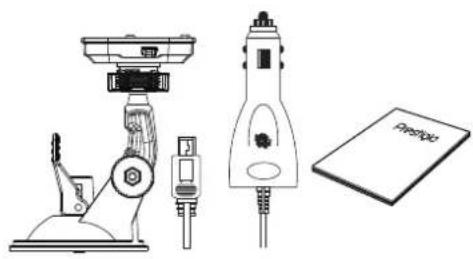
natural_image
Technical line drawing of mechanical components including a microscope, a pen-like device, and a notebook (no text or symbols)Device overview
natural_image
Front view of a tablet device with no visible text or symbols on the screen or body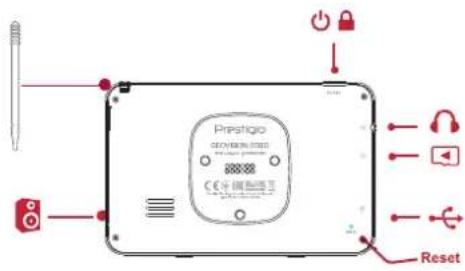
Prestigio
Getting started

Install memory card Mount your device Charge the battery Power on your device
Congratulations on your purchase and welcome to Prestigio. To get the most from your product and enjoy all that Prestigio has to offer, please visit: prestigio.com/gps
For more details about your product, please visit: prestigio.com/use
Install memory card
Before power on, please insert a microSD card (not included) into the slot until it locks in place.
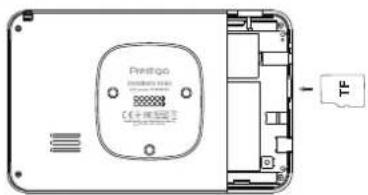

The device will automatically recognize it as default storage, and save mapping data or user's music, photo or video on this card.
Mount your device
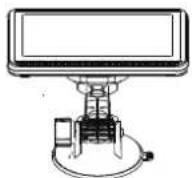
- Install the bracket to mounting cradle.
- Remove the protection plastic film from the suction cup, and position it on the clean windshield or dashboard.
- Hold firmly against the surface and lock the suction cup lever. The mount will suction and stick firmly onto the surface.
- Lock device on the bracket with bottom on the appropriate socket.
- Rotate the knob to adjust device to desired viewing angle.

Make sure that the device has a clear view of sky to attain best GPS reception.
Prestigio

Install memory card Mount your device Charge the battery Power on your device
Dismount your device
- Push the tap on top of the mounting cradle to release the device.
- Lift the suction cup lever to easily remove the suction cup from windshield or dashboard.
Charge the battery
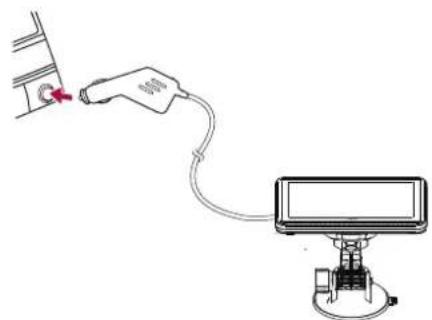
- Using the car charger: after vehicle engine is started, charge the device through vehicle 12V cigarette lighter, to protect the device from sudden surges in current.
- Using mini USB cable: connect the device to AC adapter or the USB port of a computer.
natural_image
Diagram showing a medical device connected to a monitor, with a red arrow pointing to the device (no text or symbols present)Power on your device
Press and hold the power button to turn on your device.

To turn it off, press and hold the power button, and then tap power icon on the pop-up screen.
Prestigio
Specifications


MSB2531 Cortex A7, 800 MHz

RAM 128 MB + 4GB Flash

Micro SD/TF card up to 64GB

5" LCD 480*272

600mAh

135*86.5*17.38mm (H*W*D)

177.6 g
Prestigio
Troubleshooting

Take steps described in the tables below to solve simple problems before contacting customer service.

Immediately turn off the device and disconnect the power adapter if the device is not working properly. Never try to repair the unit without authorized professionals for it may damage the unit.
Users can't turn on the unit.
- Connect the adaptor correctly.
- Use the adaptor to supply power or charge the battery.
There is no sound.
- Turn up the volume or turn on the sound output.
There is no picture.
- Adjust the brightness of the LCD.
The unit can't receive satellite signals or can't orient.
- Make sure to use the unit out of room; if in the
vehicle, you can use the external GPS antenna to solve this problem.
The unit can receive signals now but can't then; signals received are not stable.
- Use the adaptor to supply power or charge the battery.
- Remove the veil.
- Avoid great swing of the unit.
Prestigio
Safety instructions

- To reduce the risk of electric shock, do not remove the cover (or back). Only PRESTIGIO certified technicians are qualified to repair your device.
- The manufacturer should not hold responsibility for the damage caused by any substitutions and modifications of the product without authorization from the manufacturer or authorized unit.
- To prevent fire or shock hazard, do not expose your device to rain or moisture.
- Do not put, store or leave your device near heat sources, in direct strong sunlight, or in a high temperature location.
- Maintain well-ventilated conditions around the unit to avoid overheating.
• Operating temperature: -20°C to 60°C.