
OV91SNT3C - Forno ILVE - Manuale utente e istruzioni gratuiti
Trova gratuitamente il manuale del dispositivo OV91SNT3C ILVE in formato PDF.


| Tipo di prodotto | Forno elettrico da incasso |
| Marchio | ILVE |
| Modello | OV91SNT3C |
| Tipo di installazione | Da incasso sotto piano o a colonna |
| Dimensioni complessive (AxLxP) | 900 x 600 x 550 mm |
| Capacità del forno | 77 litri |
| Peso netto | 38 kg |
| Fonte di energia | Elettrico |
| Classe di efficienza energetica | A+ |
| Metodi di riscaldamento | Convenzionale, Ventilato, Grill, Grill ventilato, Calore inferiore, Calore superiore, Modalità pizza, Modalità pane |
| Intervallo di temperatura | 50°C a 250°C |
| Tipo di pulizia | Autopulizia pirolitica |
| Comandi | Controllo touch + manopole rotanti, display digitale |
| Caratteristiche di sicurezza | Blocco bambini, spegnimento automatico, porta a freddo |
| Luce interna | Alogena, commutabile |
| Numero di ripiani | 5 livelli di ripiano |
| Accessori inclusi | 1 teglia universale, 1 griglia metallica, 1 pietra per pizza |
| Disponibilità ricambi | Centri di assistenza autorizzati ILVE, negozio online ricambi |
| Indice di riparabilità | 8.5/10 (stimato in base al design) |
| Garanzia | 2 anni (può variare in base alla regione) |
Domande frequenti - OV91SNT3C ILVE
Domande degli utenti su OV91SNT3C ILVE
0 domanda su questo apparecchio. Rispondi a quelle che conosci o fai la tua.
Fai una nuova domanda su questo apparecchio
Scarica le istruzioni per il tuo Forno in formato PDF gratuitamente! Trova il tuo manuale OV91SNT3C - ILVE e riprendi in mano il tuo dispositivo elettronico. In questa pagina sono pubblicati tutti i documenti necessari per l'utilizzo del tuo dispositivo. OV91SNT3C del marchio ILVE.
MANUALE UTENTE OV91SNT3C ILVE
USER, OPERATING & INSTALLATION MANUAL
PRO-LINE, PROFESSIONAL PLUS & NOSTALGIE BUILT-IN OVENS
(ALL OVEN TYPES)

KITCHEN APPLANCES HANDMADE IN ITALY
Congratulations, you are now the proud owner of an ILVE cooking appliance. Thank you for purchasing ILVE and welcome to the exciting world of cooking the ILVE way.
This instruction manual has been specially created to inform you of the full range of features your ILVE appliance has to offer and serves as an introduction to the wonderful benefits of ILVE's dynamic cooking systems.
We present detailed information on each of the advanced cooking systems built into ILVE appliances. Once you have read this section you will be able to choose the most appropriate settings for your appliance when cooking different types of food.
We ask you to read the instructions in this booklet very carefully as this will allow you to get the best results from using your appliance.
KEEP THE DOCUMENTATION OF THIS PRODUCT FOR FUTURE REFERENCE.
YOUR FREE MASTERCLASS
Although we encourage you to dive right in, as the owner of a brand new ILVE oven we'd also like to invite you to attend a complimentary 2 hour masterclass. As part of the class you'll learn how to prepare and cook a number of delicious signature ILVE dishes, not to mention our top tips for getting the meat out of your ILVE oven. From improving cooking results to general maintenance information, we know you'll enjoy this comprehensive, fun masterclass.
Simply go to ilve.com.au/bookings or Phone 1300 MY ILVE (694 583)
ilve.com.au
natural_image
Roasted meat dish served on a square white plate with blue trim, being placed on a gas stove (no text or symbols visible)
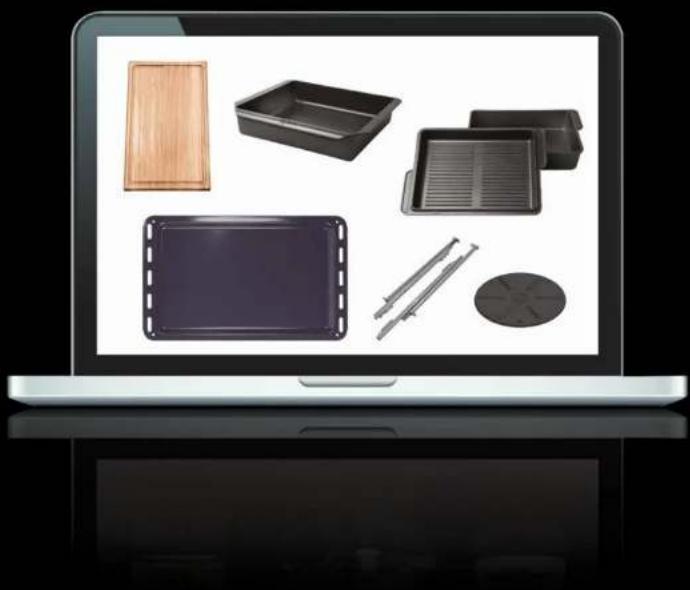
natural_image
Laptop screen displaying various kitchen utensils including wooden tray, rectangular bins, and a film reel (no text or symbols visible)OPEN 24/7
ILVE ACCESSORIES ONLINE SHOP
For a wide range of Genuine ILVE accessories at the click of a button go to ilve.com.au
CONTENTS
USER GUIDE
7 IMPORTANT SAFETY WARNINGS
7 Appliances' data
10 First start-up
11 USER INSTRUCTIONS
11 'MP' models
13 'MP' models with 5 key programmer
14 'E3' models with 5 key programmer
20 TFT touch display
23 'T3' static model with TFT touch
25 Oven Accessories
26 CLEANING AND MAINTENANCE
26 Oven cleaning and care
27 Oven door disassembly
28 Recommendations for cleaning the oven and the
front panel
29 Lamp replacement
30 PROBLEM SOLVING
30 Problem Solving
30 Child Lock
31 TFT display errors
32 COOKING CHART
32 Fan oven cooking chart
33 Natural convection oven cooking chart
i ILVE
6
OPERATION / USER
IMPORTANT SAFETY WARNINGS

APPLIANCE DATA
CAUTION

- As well as being shown on the cover, the data plate is applied to the oven door frame and is visible with the door open.
• These warnings refer to different types of appliance. Pay attention in properly identifying the type you own (see the data plate).
• These warnings are valid for the countries mentioned in the plate. - Before using the cooker, read the instructions booklet carefully. This contains very important information concerning safety during installation, use and maintenance. The instructions booklet must be kept with care for later consultation.
- The electrical safety of this cooker is guaranteed only if it is correctly grounded as required by the regulations. It is fundamental to ensure that these regulations have been respected; if you are in doubt, contact a skilled technician to have the electric system accurately checked. The manufacturer is not responsible for damage caused by a bad grounding system.
- Before powering the appliance, check that the technical features shown on the data plate match those of the electrical system perfectly.
- Installation/regulation must be carried out by qualified personnel.
- Check that the electrical system and the sockets have the capacity to withstand the maximum power of the appliance which is shown on the plate. If in doubt, contact a qualified person.
- The device must be connected directly to the power supply with the correct polarity. The connection must have a device ensuring disconnection from the network, with an opening distance of the contacts that allows complete disconnection in the conditions of over voltage category III, in accordance with installation instructions.
- If the socket is not suitable for the plug, replace it with a suitable one and in this case contact a qualified person
7
i ILVE
IMPORTANT SAFETY WARNINGS

who will also check if the cable section of the socket can withstand the power consumed by the appliance. The power cable does not have a fitted plug. For connection see "Electrical connection" section. The use of adapters, multiple sockets or extension leads, is not recommended
- When the appliance is not used for a long time, remove the electrical connection and disconnect the mains switch.
- Do not block ventilation or heat dissipation slots.
- If the appliance's electrical power cable is damaged, it must only be replaced by a manufacturer approved service centre.
- The appliance must only be used for the purposes it is intended for (cooking). Any other use (e.g. heating a room) is improper and dangerous. The manufacturer declines any responsibility for damages caused by such improper uses.
- The use of any electrical appliance requires that a number of fundamental rules be respected:
1. Never touch the appliance with wet or damp hands or feet;
2. Never use the appliance with bare feet;
3. Avoid using extension cords and possibly take all possible precautions;
4. Do not pull the electric wire to disconnect it from the socket;
5. Do not expose the appliance to atmospheric agents (rain, sun, etc.)
6. Keep children under the age of 8 away from the appliance if they are not continuously supervised. This appliance can be used by children from 8 years and by persons with reduced physical, sensory or mental capacities or with lack of experience and knowledge if they are under adequate supervision or if they have been instructed about the use of the appliance safely and if they realize the related dangers. Children must not play with the appliance. Cleaning and maintenance operations must not be carried out by children without supervision.
OPERATION / USER

- The appliance and its accessible parts become very hot during use. Care should be taken not to touch the heating elements. Children must be kept at a distance. Children under 8 years of age must be kept away unless constantly supervised.
- Before cleaning the appliance or performing maintenance, disconnect the appliance by disconnecting the power cord or by cutting off the electricity using the special switch.
- In case of breakdown or malfunction switch off the appliance and do not attempt any repairs that must only be performed by an authorized service centre. Always insist on original spare parts.
- Failure to comply with these instructions may compromise the appliance's safety.
- It is strongly recommended not to make accessible the parts that can be dangerous, especially if there are children who could use the appliance for play.
- Do not use flammable liquids (alcohol, petrol, ...) near the appliance in operation.
- The materials used for the construction of our appliance are compatible with the environment and therefore recyclable. The packaging residues must not be left within the reach of children, but must be disposed of using the appropriate separate collection channels. For the scrapping of your equipment the disposal options must be used at your retailer and/or at your municipal administration; remember to scrap your appliance before making it useless.
- Do not use steam cleaners to clean the inside of the oven.
- Do not use abrasive detergents or sharp metal tools to clean the glass door of the oven, as they could damage the surface and cause it to break.
- Warning: Make sure the product is off before replacing the lamp to avoid the possibility of electric shock.

IMPORTANT SAFETY WARNINGS
First start-up
- When using the oven for the first time, let it work empty for about 1 hour (230 °C), possibly leaving the kitchen windows open.
- When you first turn the oven on, a bad smell is emitted due to production residues such as grease, oils or resins.
- When the oven has cooled clean it following the instructions in the «Cleaning and care section».
- Once the indicated time has elapsed, the oven is ready for its first cooking. Do not cover the inside of the oven with aluminium foil to facilitate the cleaning.
- This operation alters the appliance's performance and can damage the enamel.
- All accessories in direct contact with food must be thoroughly cleaned using suitable products before their first use.
- Cooking food in direct contact with grills and oven trays is not allowed

OPERATION / USER
INSTRUCTIONS FOR USE Models MP
Description of the 5 keys programmer controls for the standard oven
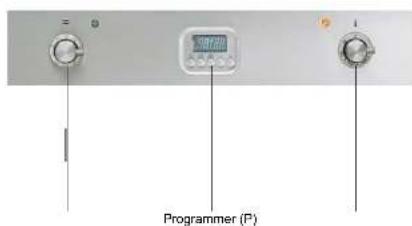
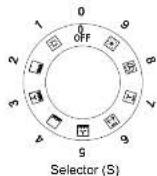
S Multifunction electric oven selector
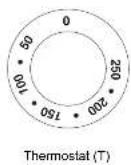
P Programmer/Clock/Timer T Thermostat
Use of the thermostat (T)
This knob allows you to select temperatures from 50 °C to 250 °C.
Turning on and off
Choose one of the cooking operations by turning the selector (S) and adjust the temperature (from 50°C to 250°C) with the thermostat (T). We recommend preheating the oven.
Safety thermostat
The oven is equipped with a safety thermostat that disconnects the power supply. The reset of the thermostat, depending on the lowering of the oven temperature, is automatic. To reuse the oven it is sufficient to wait for the cooling. If the intervention of the thermostat is caused by a defect in the components it is necessary to call technical assistance.
How to use the multifunction oven
Choose one of the 9 cooking functions by turning the selector (S) and adjust the temperature (from 50^ to 250^ ) with the thermostat (T). If your model is equipped with a programmer, set it up for cooking.
Oven light
To turn the light on or off, press the selector knob (S) lightly. The light does not work if the selector is in position (0).
INSTRUCTIONS FOR USE - PRO-LINE (ELECTRIC OVEN) - Use of the electric oven multifunction: MP models
— Functions list
| Pos. | Symbol | Function |
| 1 | Pizza cookingThis function is particularly suitable for cooking pizza, saccizi and bread. The main source of heat is from the bottom heating element that works in combination with the oven's other resistances. | |
| 2 | Normal static cookingIt is the oven's classic function particularly suited to cooking the following foods: pork chops, sausages, cod, braised beef, game, roast veat, meringues and biscuits, baked fruit, etc. | |
| 3 | Cooking from underneathThis is the most suitable menu to finish the food cooking, in particular confectionery (biscuits, meringues, leavened cakes, fruit desserts, etc.) and other foods. | |
| 4 | Cooking from aboveEspecially suitable for browning and to give the final touch of colour to many foods; it is recommended for hamburgers, pork chops, roal steaks, sake, cuttofish, etc. | |
| 5 | Closed door grill cookingThe suitable function for fast and deep gilling, to brown and roast meats in general, fillet sugars. Florentine steaks, grilled fish and also grilled vegetables. Cooking with the electric grill must be made with the thermostat at 180 °C. | |
| 6 | Fan grill cookingParticularly fast and deep with significant energy savings. This function is suitable for many foods such as pork chops, sausages, pork or mixed splits, game, gnocchi eta romana, etc. Cooking with the electric grill must be made with the thermostat at 180 °C. | |
| 7 | Intensive cookingIs the quick and intense cooking function for various dishes; best for baked fish, braised vegetables, spits, quick, chicken, etc. | |
| 8 | Multiple fan cookingIt is the function that allows simultaneous cooking of different dishes without the smells blending; you can cook lasagne, pizza, croissants and briaches, tarts, cakes, etc. | |
| 9 | Quick StartThis function sounds up your oven's pre-heating. We suggest you use this function when you set a cooking temperature from between 200 and 250 °C. Use of the QuickStart function for temperatures under 200 °C is not advantageous. To use QuickStart, rotate the selector knob (S) until it is positioned on the symbol (I), then set the desired temperature with the thermostat knob (T). Once the oven has reached the temperature, the thermometer's orange light will turn off and the oven is ready for accepting the food to be cooked. At this point set the dosmed cooking function with selector knob (S).WARNING: the Quick Start function is not suitable for cooking foods, it is only for quickly pre-heating the oven.DO NOT USE THE QUICK START FUNCTION FOR MORE THAN TWENTY MINUTES. |
COOKING INSPECTION
If you need to inspect the food being sacked, you can open the oven door. In this case the lights come on and the forced fan stops (in case of ventilated cooking) and the soil rotation. (in case of grill cooking with the door closed). Closing the door re-activates the previously set function.
i ILVE
12 13
OPERATION / USER
INSTRUCTIONS FOR USE - PRO-LINE (ELECTRIC OVEN) MP models with 5 key programmer
| Functions | 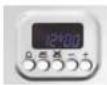 | TimerDuration and manual functionAutomatic program |
| Display | Button for timer and buzzerAutomatic cooking durationSetting cooking end time[-]/[+] Decrease / Increase the selected parameter | |
| Setting a function | Select the desired function by pressing the corresponding button and set the time using the +/- buttons. | |
| Appliance operation | At first power up, the display shows the flashing clock that increases by one unit every minute. Follow the "Setting the clock" procedure in the next paragraph.By pressing the ,and ,buttons simultaneously you enter the "Manual operation".You can set the temperature using the thermostat knob (T) and select the function using the selector (S). | |
| Setting the clock | The clock function is activated by simultaneously pressing ,and cooking duration ,end buttons. The time is then set by adjusting the +/- keys. Any previously set programs are automatically deleted. | |
| Manual function | To set this function simultaneously press the ,cooking duration and ,end buttons.The "A" symbol goes out and the pan symbol appears. The previously set programs are deleted. | |
| Semi-automatic operation with cooking duration | Select the duration function (button ,), and set the time with the +/- buttons. The "A"symbol and the symbol ,appear. The oven switches on. When the hour of the day coincides with the final time, viewable through the end of cooking button ,the oven will turn off and the pan symbol will disappear. The buzzer will sound.The "A" symbol will flash. | |
| Semi-automatic operation with end of cooking | Select the duration function (button ,) and set the end time with the +/- buttons. The"A" symbol and the pan symbol appear. The oven switches on. When the hour of the day coincides with the final time the oven will turn off and the pan symbol will disappear.The buzzer will sound. The "A" symbol will flash. | |
| Automatic operation with duration and end of cooking | Select the duration function ,and set the end time with the +/- buttons. The "A"symbol appears. The oven switches on and the pan symbol ,appears. Set the endtime by pressing the end of cooking button ,Use the +/- buttons to set the end timeactually required. The oven switches off and the pan symbol disappears.The pan symbol will appear again when the time of day coincides with the end time lessthe cooking time. | |
-
i ILVE
INSTRUCTIONS FOR USE
MP models with 5 key programmer
| At the end of the automatic program, the "A" symbol will flash.The buzzer will sound, the oven and the pan symbol will turn off. with the end time less the cooking time. At the end of the automatic program, the "A" symbol will flash. The buzzer will sound, the oven and the pan symbol will turn off. | |
| Timer | Select the timer function (button 🔒) and set the end time with the +/- buttons. During the set time the bell symbol 🔒 will remain lit. When the time comes to an end, the buzzer will sound. |
| Buzzer | The buzzer operates at the end of the cooking duration and timer function, and remains active for 7 minutes.The buzzer can be stopped by pressing any button 🔒 📄 ⚫.The intensity of the buzzer can be changed by pressing the "-" button without selecting a function. You can choose from 3 different sound intensities and duration depends on the time pressure is exerted on the button "-" |
| Starting a program and control | The selected program starts after the time has been set. The time remaining can be displayed at any time by selecting the corresponding function again. |
| Identifying a programming error | There is a programming error if the time shown by the clock is between the cooking start time and the cooking end time.The error is signalled by the buzzer sounding and by the intermittent flashing of the symbol "A". |
| Cancellation of a program | Cancellation of a program is done by selecting the manual mode. At the end of the selected program, this will automatically cancel. |
i ILVE
14 15
OPERATION / USER
INSTRUCTIONS FOR USE
E3 models with 5 key programmer
Button legend
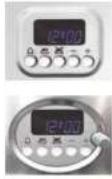
[NO TEXT]
Set minute minder
表2
Setting the cooking start time
图
Set end time cooking
[-]
Decreases the selected parameter
[÷]
Increases the selected parameter
Display
F4-digit format, shows:
• In stand-by: the actual time.
1
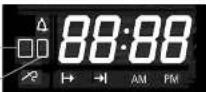
• During manual cooking: the set temperature.
• During timed automatic cooking: the set temperature.
- During meat probe cooking: the probes temperature.
• With timer on and oven in stand-by: the actual time.
Icons
1
Main oven icon [1]. If flashing the display shows the temperature and cooking duration settings of the main oven (only in the double oven)*
2
Secondary oven icon [2]. If flashing the display shows the temperature and cooking duration settings of the secondary oven (only in the double oven).
△
If lit the timer is on. If flashing, timer is over. It will flash while the timer is being set.
→
If lit, the oven is working in delayed start mode. During the delayed start, it stays on.
→
If lit, the oven is working in automatic end of cooking mode. It flashes during the delayed start mode, and then stays on when cooking is over.
AM
If lit, the clock is in 12-hour a.m. mode.
PM
If lit, the clock is in 12-hour p.m. mode.
(*) In the case of simultaneous use of ovens and to display the temperature and cooking time settings of the primary or secondary oven, press the corresponding thermostat knob.
i ILVE
INSTRUCTIONS FOR USE E3 models with 5 key programmer
| Appliance operation | At first power up, the display shows the flashing clock that increases by one unit every minute. The oven cannot operate and the possible operations to release it are: "Setting the clock" procedure through the [+] and [-] buttons or alternatively directly turning on the oven which involves the acceptance of the current clock value whatever it is. Detailed clock setting, timer, duration and end of cooking operations are indicated in the respective para-graphs below. Through the various setting buttons( ), you enter the display and changing mode (indicated by a flashing display), in which [+] and [-] buttons are enabled to adjust the value shown on the display. This value is still accepted after 4 seconds from the last press of a button (the display remains lit). All settings are can be cancelled by pressing keys and . |
| Setting the clock | Press the buttons , and , simultaneously for 5" (the display starts to flash) and change the time using the [+] and [-] keys. The clock setting is allowed only with the oven in stand-by.It is possible to change the time format: during the time adjustment phase press the button , for 4 seconds; with the [+] key you can choose the option 24 hours or 12 hours AM / PM. |
| Turning the oven on and off | Turn selector [S]. The display shows "On". The light inside the oven comes on after two seconds and the display shows the default temperature expected from the selected cooking mode. To turn off during cooking, turn back the selector to [0], the display shows "OFF". |
| Timer | The function does not interact with the loads, and is available regardless of the oven's status. Press the button , he bell symbol lights up and the display shows "0 00". Set the time with [+] and [-], up to a maximum of 180 minutes, after 4 seconds without any increase or decrease the information is accepted, the bell remains on. By pressing the button , after changing the timer value it reverts to clock mode, having accepted the just altered value. Upon expiry of the set time a buzzer sounds together with the symbol flashing. To stop the buzzer and the flashing, simply press any button. |
| Indefinite manual operation | Turn the oven on. Select a cooking function from those available. With knob [T] select the desired temperature. After 4 seconds after the last setting the oven operates for an indefinite time and the selected temperature remains on the display. |
| Semi-automatic end of cooking operation | Turn the oven on. Press button , the display shows "End". Set the end of cooking time with [+] and [-] buttons (the maximum cooking time is 10 hours). By pressing the button , after changing the duration value it reverts to clock mode, having accepted the just altered value. After 4 seconds from the last setting the oven is on for the set time. Having reached the programmed time you enter cooking finished mode. |
| Automatic operation | Turn the oven on. Press button , and select the cooking start time with [+] and [-] buttons. Press button , the display shows "End". Set the end of cooking time with [+] and [-] buttons. If no cooking time is selected, the oven remains in manual cooking mode indefinitely. After 4 seconds from the last setting the oven is on up to the specified time. You can always select a cooking function from those available and the temperature can be changed. Having reached the programmed time you enter cooking finished mode. |
i ILVE
16 17
OPERATION / USER
INSTRUCTIONS FOR USE E3 models with 5 key programmer
| Cooking oven mode | At the end of timed cooking, the oven switches off all loads, a triple intermittent acoustic signal is activated of average intensity, the display shows the time, the cavity symbol flashes. To unlock the oven, simply press any of the programmer buttons: the acoustic signal ends and the oven is ready to receive new commands. This function is not available with the grill and fan grill cooking program. |
| Cooking temperature selection | At the end of the cooking time, the oven switches off all loads, a triple intermittent buzzer of medium intensity sounds, the display shows the time, the cavity symbol flashes. To unlock the oven, simply press any button on the programmer: the buzzer ends and the oven is ready to receive new instructions. |
| Oven light control | The oven light remains on for 1 minute when the oven is turned on, and again for 1 minute at the end of preheating. Whilst waiting for a delayed start, the oven light is off. The oven light can always be turned on by pressing knob [T] and tums off automatically after 1 minute.During cooking, you can always leave the light on by pressing the knob [T] for 3 seconds. |
| Child safety lock | The oven is equipped with a safety device that prevents unwanted or accidental starting. To activate the safety: with oven off press and hold knob [T] for 3 seconds. A short beep sounds and the screen displays the symbol "n-0". In this situation it is impossible to start the oven. To remove the previously activated safety, keep knob[T] pressed for 3 seconds. |
i ILVE
INSTRUCTIONS FOR USE
- 5 button electronic programmer E3 (ELECTRIC OVEN)
— Functions list
| Pos. | Symbol | Function |
| 1 | Pizza cookingThis function is particularly suitable for cooking pizza, fococci and bread. The main source of heat is from the bottom heating element that works in combination with the oven's other resistances. | |
| 2 | Normal static cookingIt is the oven's classic function particularly salted to cooking the following foods: pork chops, sausages, cod, braised beef, game, roast veat, meringues and biscuits, baked fruit, etc. | |
| 3 | Cooking from underneathThis is the most suitable mode to finish the food cooking, in particular confectionery (biscuits, meringues, leavened cakes, fruit desserts, etc.) and other foods. | |
| 4 | Cooking from aboveEspecially suitable for browning and to give the final touch of colour to many foods; it is recommended for hamburgers, pork chops, veat steaks, solo, cuttlefish, etc. | |
| 5 | Closed door grill cookingThe suitable function for fast and deep grilling, to brown and roast meats in general, file steaks. Florentine steaks, grilled fish and also grilled vegetables. Cooking with the electric grill must be made with the thermosta at 180 °C. | |
| 6 | Fan grill cookingParticularly fast and deep with significant energy savings, this function is suitable for many foods such as pork chops, sausages, pork or mixed spills, game, gnocchi alta romana, etc. Cooking with the electric grill must be made with the thermosta at 180 °C. | |
| 7 | Intensive cookingIs the quick and intense cooking function for various dishes; best for baked fish, braised vegetables, spits, duck, chicken, etc. | |
| 8 | Multiple fan cookingIt is the function that allows simultaneous cooking of different dishes without the smells blending; you can cook lasagne, pizza, croissants and broches, larts, cakes, etc. | |
| 9 | Quick StartThis function speeds up your oven's pre-heating. We suggest you use this function when you set a cooking temperature from between 200 and 250 °C. Use of the QuickStart function for temperatures under 200 °C is not advantageous. To use QuickStart, roise the selector knob (S) until it is positioned on the symbol (S), then set the desired temperature with the thermostal knob (T). Once the oven has reached the temperature, the thermostal's orange light will turn off and the oven is ready for accepting the food to be cooked. At this point set the desired cooking function with selector knob (S).WARNING: the Quick Start function is not suitable for cooking foods, it is only for quickly pre-heating the oven.DO NOT USE THE QUICK START FUNCTION FOR MORE THAN TWENTY MINUTES. |
COOKING INSPECTION
If you need to inspect the food being cooked, you can open the oven door. In this case the lights come on and the forced fan stops (in case of ventilated cooking) and the spit rotation. (in case of grill cooking with the door closed). Closing the door re-activates the previously set function.
INSTRUCTIONS FOR USE
- 5 button electronic programmer E3 (ELECTRIC OVEN)
| Cooking inspection | If you need to inspect the food being cooked, you can open the oven door. In this case the lights come on and the cooking process stops. Closing the door re-activates the previously set function. |
| Dry/moist cooking | The oven has an automatic device which allows steam from cooking, in some functions, to be expelled from the oven: this is dry cooking (dry). If the cooking requires that the moisture remains inside the oven, (moist cooking), the automatic device can be switched off as follows:after selecting the desired cooking function, when [ON] appears on the display hold down the “-” programmer button for about 2 seconds until [HUM] appears on the display.This involves a choice that allows you to modify dry cooking with moist cooking to your liking.The functions concerned are:23478○○ |
| Cooking with probe(only available on some models) | N.B. Cooking with probe cannot be used in the “DEFROST”, “QUICK START”, “PIZZA” and “ECO” functions. When the oven is in stand-by insert the meat probe into the connecting socket on the right hand wall of the oven: the clock displays “MEAT” for 2 seconds and the “probe” symbol fl ashes. Next the probes default temperature(75°C) appears on the display. By turning and then pressing the adjustment button, select the end of cooking temperature from the 2 limit values of 40° and 100°C (the food’s internal temperature). After 4 seconds from the last setting, the set value is memorized and the probe symbol stays on. Tum on the oven, select the cooking function and the desired temperature using the appropriate knobs. The display will show the probes temperature reading.Upon reaching the programmed temperature the oven will turn off, a buzzer sounds and the display shows the message “End” and you enter the cooking over mode.During cooking it is always possible to change the probes temperature by pressing and then turning the adjustment knob 3 times.NOTE: If you insert the probe into the special socket during cooking, the oven will turn off and “Off” appears on the display.If, during cooking, the probe is removed from the special socket, the oven will turn off and “Off” appears on the display. |
INSTRUCTIONS FOR USE TFT touch display - Icons legend

Pause

Home

Start

Light

°C - °F

Timer

Screen lock

Exit - Term

Confirmation

Time

Settings

Settings Confirmation

Meat probe Off


Knob present in some models (allows to set and confirm the TFT functions besides the Touch)

Knob present in some models (allows to set and confirm the TFT functions besides the Touch)
i ILVE
20 21
OPERATION / USER
INSTRUCTIONS FOR USE TFT touch display - Settings
natural_image
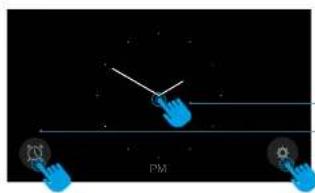
Three blue hand icons with a diagonal arrow and 'PM' label, set against a black background (no readable text or symbols)Home: display start page.
3 options
Allows you to proceed to the cavity setting screen
Allows you to set the timer
Allows direct access to the settings
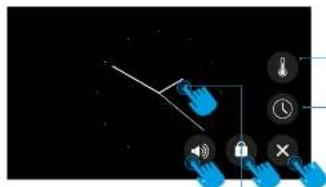
Settings
Choice of degree scale (°C or °F).
Setting the time.
Exit - Term
Screen lock
To unlock, tap on the display for 10 seconds
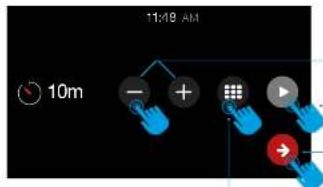
Set a timer
Increase or decrease time.
Confirm once the desired time has been set.
An acoustic signal will indicate the term.
Confirm and return to the home page.

ATTENTION: if the display does not respond to the commands (touch locked), simply open and close the oven door
i ILVE
INSTRUCTIONS FOR USE TFT touch display - Settings
OPERATION / USER
INSTRUCTIONS FOR USE
T3 static model with TFT touch - Cooking process
natural_image
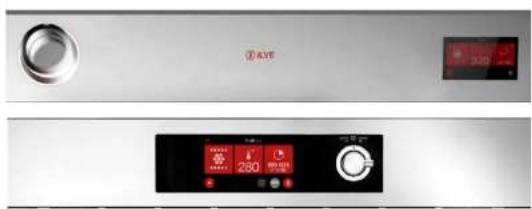
Front and back view of a stainless steel air conditioner unit with digital display and control buttons (no readable text or symbols)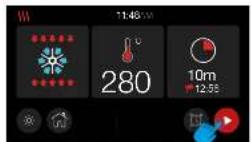
SETTED CAVITY
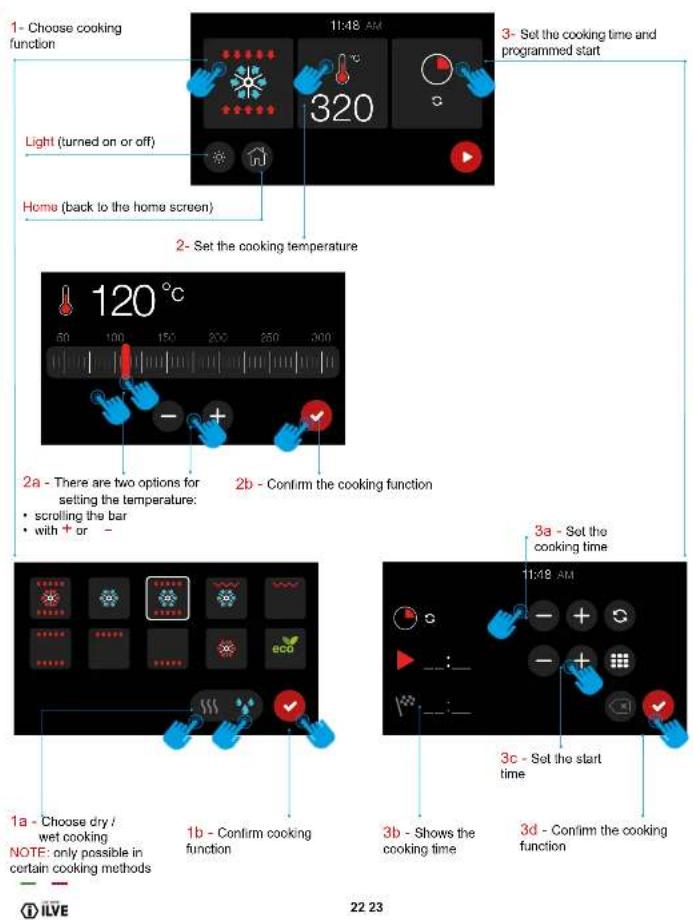
Once the cavity has been set (cooking function, temperature and timer set) confirm to start preheating. At this point the display will switch to preheating mode
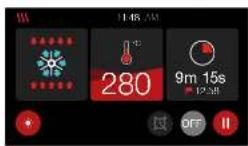
PRE-HEATING PHASE
There are four levels that allow you to monitor the preheating process. The red part will progressively increase until it fills the display
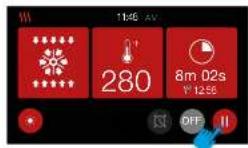
PRE HEATING ENDED
When the set temperature is reached, the display will turn red to indicate the end of the preheating phase, and the start of the cooking phase. If a cooking time was set, the oven will automatically switch off when the time expires.
In case of no cooking time set, it is possible to suspend

and then finish cooking
COOKING WITH MEAT PROBE
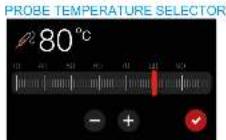
HEATING MODE WITH PROBE
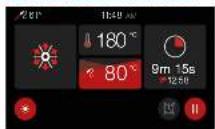
i ILVE
INSTRUCTIONS FOR USE T3 static model with TFT touch - Icons

Pizza function
This function is particularly suitable for cooking pizzas, focaccias and bread. The main source of heat comes from the lower heating element which works in combination with the other furnace elements.

Normal static cooking
This it is the classic function of the electric oven particularly suitable for cooking the following foods: pork chop, sausages, cod, braised meal, game, roast, veal, meringues and biscuits, baked fruit, etc.

Cooking from below
This is the best function to finish cooking food, especially pastry (biscuits, meringues, leavened cakes, fruit desserts, etc.) and other foods.

Cooking from above
Particularly suitable for browning and to give the final touch of color to many foods, it is the recommended function for hamburgers, pork chops, veal steaks, sole, cuttlefish, etc.

Grill cooking with closed door
Function used for quick and deep grilling, for grilling and roasting meat in general, fillet, Florentine steak, grilled fish and even grilled vegetables. Cooking with the electric grill must be carried out with the thermostat at 180 °C.

Ventilated grill cooking
Particularly fast and deep with considerable energy savings, this function is suitable for many foods such as: pork chop, sausages, pork or mixed skewers, gains, Roman-style grocchi, etc. Cooking with the electric grill must be carried out with the thermometer at 180 °C.

Intensive cooking
A function for rapid and intense cooking of various dishes, suitable for: baked fish, braised vegetables, skewers, duck, chicken, etc.

Multiple ventilated cooking
A function that allows the simultaneous cooking of different dishes without the smells mixing together; you can cook baked lasagna, pizza, croissants and croissants, pies, cakes, etc.

Eco cooking
It is the function that allows you to cook with a considerable saving on electricity consumption. To make the most of this feature it is useful, before inserting the ECO function, to introduce the dish inside the oven, positioning it in the centre of the cavity. With the Eco function, cooking times adapt to slow cooking such as braised meals, white meals, baked pasta, delicate pastries. Note: Eco cooking cannot be selected with the most probable inserted.

Thawing
Allows quick thawing of all frozen foods in general that are quickly brought to room temperature. For an optimal result it is advisable to always program a temperature not exceeding 100 °C.

Quick Start (only available on some models)
This function speeds up your oven's pre-heating. We suggest you use this function when you set a cooking temperature from between 200 and 300/320 °C. Use of the QuickStart function for temperatures under 200 °C is not advantageous. WARNING: the Quick Start function is not suitable for cooking foods, it is only for quickly pre-heating the oven. DO NOT USE THE QUICK START FUNCTION FOR MORE THAN TWENTY MINUTES

Dry / wet cooking
The oven is equipped with an automatic device that allows the condensation vapours of the cooking. In some functions, to be expelled from the oven, this involves dry cooking (dry). If the need for cooking requires that the humidity remain inside the oven, most cooking (moisture) the automatic device can be switched off by touching the appropriate icon.
COOKING INSPECTION
If it is necessary to inspect the food during cooking it is possible to open the oven door. In this case the lights come on and forced ventilation stops, in the case of ventilated cooking, and the rotation of the spit, in the case of grill cooking with the door closed. When the door is closed again, the previously set function is reactivated.
i ILVE
24 25
OPERATION / USER
INSTRUCTIONS FOR USE Accessories
Use of the turn-spit (only on some models)
Slide the meat to be cooked onto the spit, blocking it with the special forks. Place the spit on the special supports previously inserted in the drip pan and insert it in the spit-roast horn. Turn on the static grill with closed door function. To extract the spit together with the drip pan pull it out just enough to allow complete extraction.
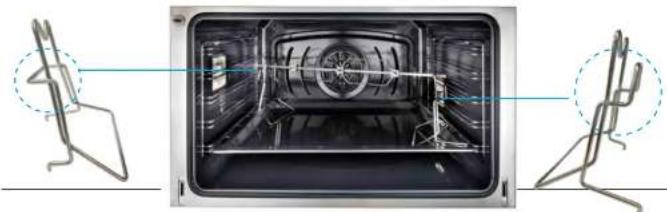
Telescopic runners (only in certain models)
This solution has been studied to increase the ergonomics, the practica and safety when moving baking trays in the oven. The kit includes completely extendible lateral runners, which slide on ball bearings to facilitate the removal and positioning of the trays. The runners are anti tip-over for better safety. It is possible to remove them to clean them or move them as illustrated in the pictures below.
Pull down the part highlighted in red to remove it from the oven.
Turn over the grill and place it on a 1st surface with the talasopic runner facing down.
To unhook the clip, loosen whit a flat head screwdriver
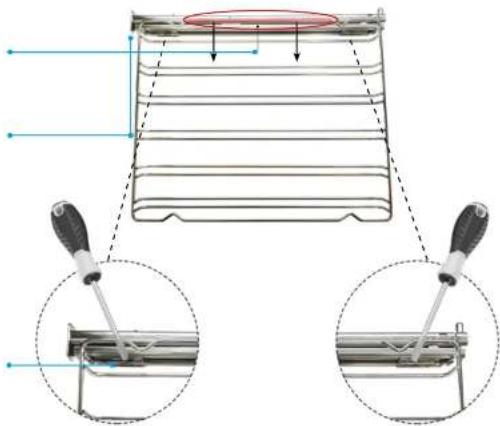
Repeat the operations backwards to repositions the grills.
i ILVE
CLEANING AND MAINTENANCE Removing the oven
Procedure to follow
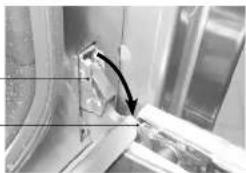
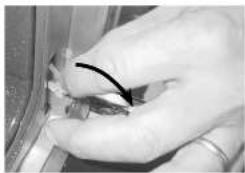
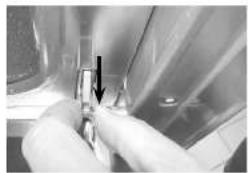
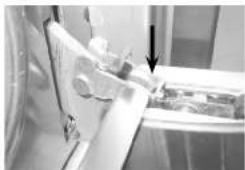
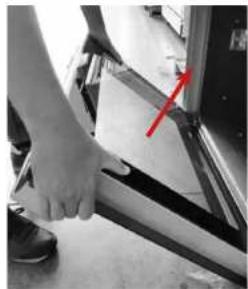
For ease of intensive cleaning it is practical to dismantle the door following these instructions:
- open the door
- mow the hook C to the hinge zone D, following the steps

C
D
natural_image
Close-up of a mechanical component with a black arrow pointing to a section (no visible text or symbols)
natural_image
Close-up of hands holding a small mechanical component with a curved line indicating motion (no text or symbols visible)
natural_image
Close-up of hands holding a small object with an arrow pointing to it, against a blurred background (no visible text or symbols)
natural_image
Close-up of a mechanical component with an arrow pointing to a detail (no visible text or symbols)
natural_image
Close-up of a hand using a tool to adjust or install a mechanical component, with a red arrow pointing to a detail (no visible text or symbols)i ILVE
26 27
OPERATION / USER
CLEANING AND MAINTENANCE Glass disassembly and cleaning
Procedure to follow
The oven door is composed of three glass (two in some models). The glass parts are cleaned using non-abrasive absorbent kitchen paper and a common detergent. Do not use rough abrasive materials or sharp metal scrapers to clean the glass doors of the oven as they can scratch the surface and cause the glass to shatter. The internal crystals are removable to make cleaning easier. For this purpose it is necessary to dismantle the oven door or, alternatively, position it at the intermediate click.
Sequence for removal of the door glass
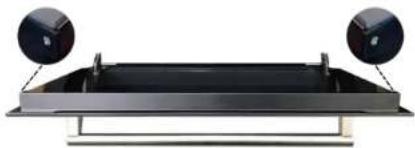
WARNING! Any operation must always be carried out with the door removed from the oven and placed in a suitable shelf so as not to damage the front of the door

Unscrew the 2 right / left side screws in the upper strip
natural_image
Modern black rectangular tray with two circular domes on top, mounted on a metallic frame (no text or symbols visible)
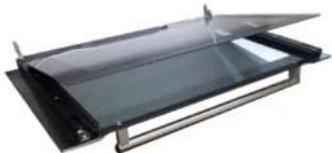
Raise the upper glass and remove it
natural_image
Exterior view of a modern office building (no signage)
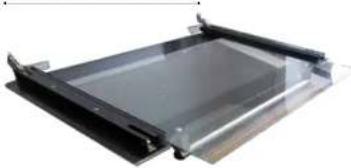
Remove the intermediate glass
natural_image
Exterior view of a modern office building (no signage)i ILVE
CLEANING AND MAINTENANCE
- Recommendations for cleaning the oven and the front panel
| OVEN | ||
| COMPONENT | CLEANING METHOD | WARNINGS |
| Oven inside | It is recommended to clean the oven after every use. Dirt is cleaned more easily avoiding to let it burn several times at high temperatures. Remove every removable part and clean it separately with hot water and non-abrasive detergent. The cavity is cleaned with a soft cloth soaked with neutral soap. Rinse and dry. | Do not use vapour cleaner to clean the interior of the oven. Do not use abrasive/ corrosive detergents or sharp tools to clean the glass of the door as they could damage and break the surface. |
| Tray | Immerse in a solution made of water and neutral soap. Dry afterwards. | Remove residual food immediately after use. |
| Grills | Clean with warm water and non-abrasive detergents or with a suitable degreaser. | In case of encrusted and hardened dirt, we recommend soaking the grills for a few hours before cleaning them. |
| FRONT PANEL | ||
| COMPONENT | CLEANING METHOD | WARNINGS |
| Steel surfaces | Clean the parts with lukewarm water and non-corrosive liquid detergent and then dry them with a soft cloth or micro fibre. | Brilliance is maintained through regular cleaning with specific products which can be found in commerce. Never use abrasive powders |
| Painted surfaces | To maintain the characteristics of the painted parts, it is necessary to frequently clean them with soapy water. | Avoid leaving acid or alkaline substances on the painted parts (vinegar, lemon juice, salt, tomato juice, etc.) and washing when the painted parts are still hot. |
FOR MORE DETAILED CLEANING GUIDELINES, PLEASE CONTACT US ABOUT OUR CLEANING GUIDE
i ILVE
28 29
OPERATION / USER
CLEANING AND MAINTENANCE – Lamp replacement
| Procedure to follow | If the oven light does not work, disconnect the appliance from the mains, remove the lamp protection glass and replace the lamp.It should of course be noted that the lamp to be inserted is suitable for use at high temperatures and has the characteristics for such use. | |
| 1 | Loosen with a slotted screwdriver | 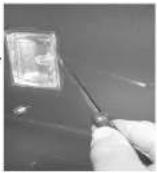 |
| 2 | Remove the lamp cover glass | 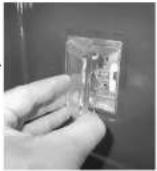 |
| 3 | Remove the lamp | 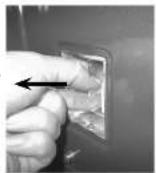 |
| 4 | Replace and close again | 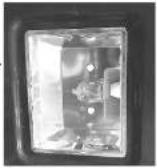 |
PROBLEM SOLVING
- Guide for the resolution
ATTENTION:

- During the guarantee period repairs can only be carried out by the authorized after-sales service.
- Before repairing, unplug the appliance from the power supply, that is, unplug the power cable or use the appropriate switch.
- Unauthorized interventions and repairs can cause electrocution or short circuit, therefore do not carry them out. Leave these works to authorized technicians.
• In case of small disturbances, it is possible to solve the problem following the instructions.
• After sales service intervention during the guarantee period is not free, if the appliance does not work because of incorrect use. - The elimination of the faults or complaints, caused by incorrect use or installation, will not be repaired under guarantee. In such cases, the repair costs will be borne by the user
Child Lock
How to resolve
Symbol that represents the children lock
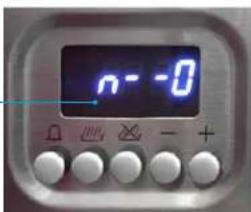
ATTENTION:

If this symbol shows up in your oven, do not worry. The children lock may have accidentally been selected.
The oven is equipped with a safety feature which prevents the unwanted start-up of the oven.
How to disable
To disable the safety lock, hold the thermostat knob which regulates the temperature for 5". On the display will appear "n—o" followed by "OFF".
How to activate
To activate the safety lock, hold down the thermostat knob for 5", with the oven turned off. You'll hear a short acoustic signal and, on the display, will appear "n—o" followed by "ON". I will then not be possible to start up the oven.
i ILVE
30 31
OPERATION / USER
PROBLEM SOLVING
- TFT display errors
System errors
The following errors are detected:
The error code syntax is: 'E YY X', where:
YY = error code
x = cavity number when error occurred or '0' for general errors
Description
Error ID
Cavity probe in open circuit
00
Cavity probe in short circuit
01
Meat probe in open circuit
04
Meat probe in short circuit
05
Overheating
08
Tangential fan not working
16
Incorrect mapping card
19
Communication error
20
ERROR MESSAGE
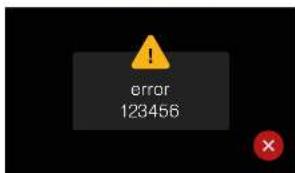
DOOR OPEN MESSAGE
(DURING OPERATION)
In case of error disconnect and reconnect the
appliance.
If the error is present again you will need the inter-
vention of an authorized technician
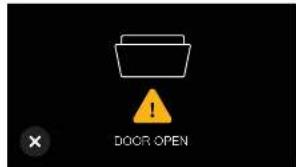
Close the oven door.
i ILVE
COOKING CHART
Fan oven cooking chart (by way of example only)
| DISH | TEMP. C* | MIN. | |
| MEATS | |||
| Roast beef | 170-180 | 2/3 | 40/50 |
| Roast ox | 170-190 | 2/3 | 40/60 |
| Roast veal | 180-180 | 2/3 | 65/90 |
| Roast lamb | 140-160 | 2/3 | 100/130 |
| Rara roast beef | 180-190 | 2/3 | 40/45 |
| Roast hare | 170-180 | 2/3 | 80/100 |
| Roast rabbit | 160-170 | 2 | 80/100 |
| Roast turkzy | 160-170 | 2 | 160/240 |
| Roast goosee | 160-180 | 2/3 | 120/160 |
| Roast duck | 170-180 | 2/3 | 100/160 |
| Roast chicken | 180 | 2/3 | 90/120 |
| FISH | 160-180 | 2/3 | 15/25 |
| CAKES | |||
| Fruit cake | 180-200 | 2 | 40/50 |
| Plain square cake | 180-190 | 2 | 40/45 |
| Brioches | 170-190 | 2 | 40/60 |
| Spongs cake | 190-200 | 2 | 25/35 |
| Plain ring cake | 180-180 | 2 | 35/45 |
| Sweet biscuits | 180-200 | 2 | 20/30 |
| Yeast cake | 190-200 | 2 | 30/40 |
| Strudel | 160 | 2 | 25/35 |
| Savoy biscuits | 150-180 | 2 | 50/60 |
| Apple frillers | 180-200 | 2 | 18/25 |
| Biscuits pudding | 170-180 | 2 | 30/40 |
| BAKERY | |||
| Bread | 180-200 | 3 | 45 |
| Pizza | 250/300 | 3 | 10/20 |
| Toast | 185-195 | 2 | 25/35 |
Important Insert the foods when the oven is hot.
Grill baking
Cooking with the electric grill is done at 180°C with the door closed. The food to be grilled should be placed on the relative grid preferably in the fourth shelf.
i ILVE
32 33
OPERATION / USER
COOKING CHART
Natural convection oven cooking chart (by way of example only)
| DISH | TEMP. C* | MIN. | |
| MEATS | |||
| Roast beef | 225 | 2/3 | 60/60 |
| Roast ox | 250 | 2/3 | 50/60 |
| Roast veal | 225 | 2/3 | 60/60 |
| Roast lamb | 225 | 2 | 40/50 |
| Rano roast beef | 230 | 2/3 | 60/50 |
| Roast hare | 250 | 2/3 | 40/50 |
| Roast rabbit | 250 | 2 | 40/50 |
| Roast turkey | 250 | 2 | 50/60 |
| Roast goose | 225 | 2/3 | 60/70 |
| Roast duck | 250 | 2/3 | 45/60 |
| Roast chicken | 250 | 2/3 | 40/45 |
| FISH | 200/225 | 1/2 | 15/25 |
| CAKES | |||
| Fruit cake | 225 | 2 | 35/40 |
| Plain square cake | 175/200 | 2 | 50/60 |
| Brioches | 175/200 | 2 | 25/30 |
| Sponge cake | 220/225 | 2 | 20/30 |
| Plain ring cake | 180/200 | 2 | 30/40 |
| Sweet biscuits | 200/220 | 2 | 15/20 |
| Yeast cake | 250 | 2 | 25/35 |
| Struckel | 180 | 2 | 20/30 |
| Sewoy biscuits | 180/200 | 2 | 40/50 |
| Apple frillers | 200/220 | 2 | 15/20 |
| Biscuits pudding | 200/220 | 2 | 20/30 |
| BAKERY | |||
| Bread | 180-200 | 3 | 45 |
| Pizza | 250/300 | 3 | 10/20 |
| Toasi | 185-195 | 2 | 25/35 |
Important
Insert the foods when the oven is hot.
Grill baking
Cooking with the electric grill is done at 180" C with the door closed. The food to be grilled should be placed on the relative grid preferably in the fourth shelf.
i ILVE
INSTALLATION
Instructions for installation
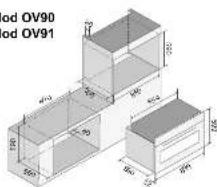
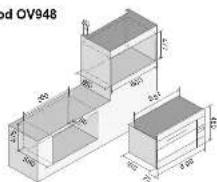
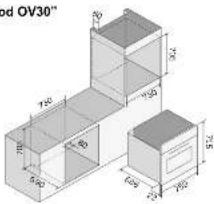
The small plate containing details of the appliance, voltage, consumption, directions for installation including the required aperture is affixed to the flap of the oven door. This plate can be seen when the oven door is open. The appliance must be located in a suitable housing of the correct dimensions (see plate on oven door for details) it is most important the housing is sufficiently rigid and sturdy to adequately carry the weight of the appliance. Care must be taken to ensure all material, coatings and glue can withstand temperatures of at least 150°C without distortion or melting. Screws and all fittings to complete the in stal lation are included. The following illustrations show how to install the oven.
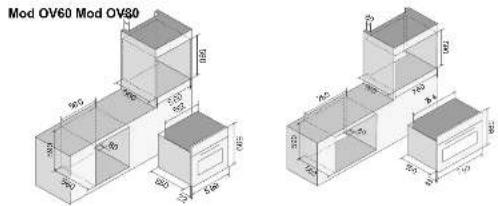
Mod OV90
Mod OV91
Mod OV948
Mod OV30"
Mod OV70
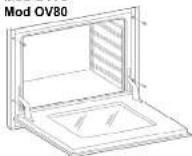
Mod OV90Mod OV60 -
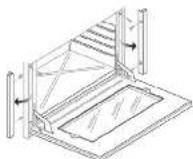
i ILVE
34 35
INSTALLATION
INSTALLATION
Electrical connection
The instructions below are intended for the skilled technician who will install the cooker, regulate it and perform technical maintenance and who will ensure that these operations are carried out in the most correct way possible, in compliance with the regulations in force.
Important: the cooker must be disconnected from the electric socket before performing all regulating or maintenance operations.
Installation rules
This appliance complies with the following directives
DIRECTIVE 2002/96/CE
LOW TENSION DIRECTIVE 2014/35/EU
ELECTROMAGNETIC COMPATIBILITY DIRECTIVE 2014/30/EU
REGULATION No. 1935/2004 (contact with foods)
The installation must be done in a workmanlike manner and in full compliance with the regulations in force concerning electrical installation. Otherwise the manufacturer declines all responsibility. In this booklet you will also find the wiring diagram of your appliance.
The appliances are designed to be connected to the voltage shown on the data plate.
Before connecting the appliance to the mains, make sure that:
The characteristics of the electromagnetic switch or of the socket can withstand the load of the equipment (see data on the plate);
The power supply system must have an effective earth connection.
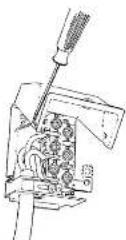
The appliance is supplied with a cable (1.2 or 1.8 m) without plug: the connection must be made taking into account that the yellow-green cable is the earth conductor and must never be interrupted.
The socket must be visible and reachable so that you can easily disconnect the appliance. For direct connection to the network, it is necessary that:
• The limiting valve and the domestic system can bear the load of the equipment (see serial number plate);
• The power supply system is equipped with an effective ground connection;
- The socket or omni polar switch, with a minimum opening of 3 mm, is easily accessible once the appliance has been installed;
- A land line disconnect switch is incorporated in accordance with the installation rules.

The yellow-green earth conductor must never be interrupted even by the switch. The power supply cable must be positioned so that it does not come into contact with surfaces that have a temperature higher than 50 °C above the environment. If it is necessary to replace the power supply cable, contact the assistance service.
i ILVE
INSTALLATION
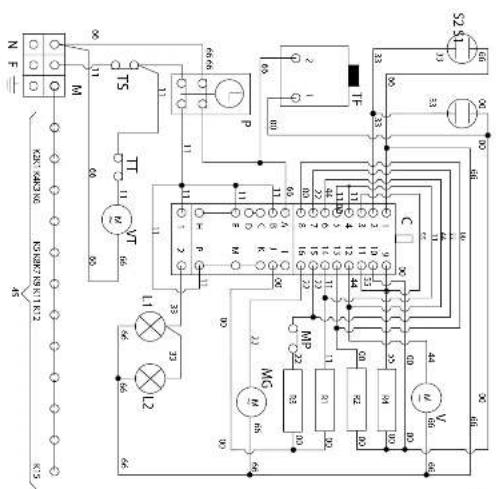
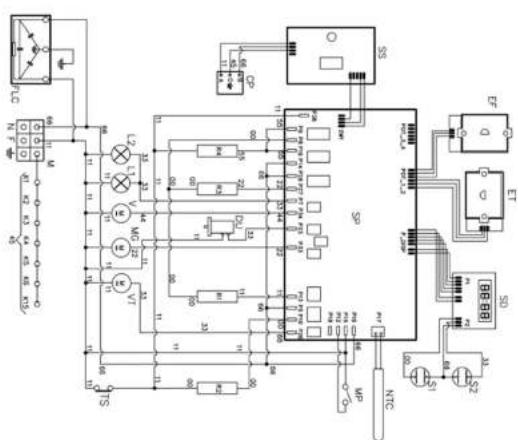
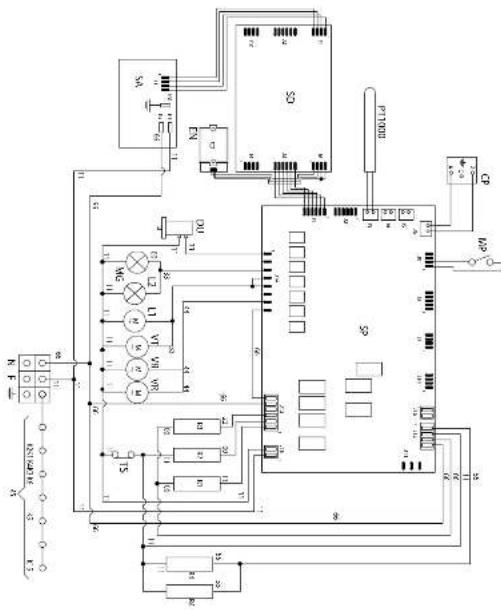
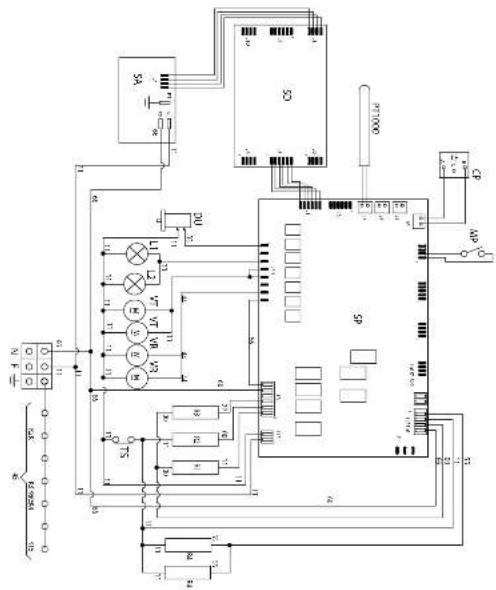
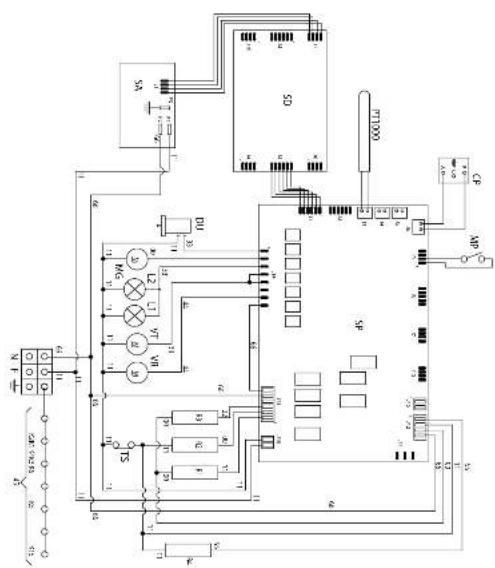
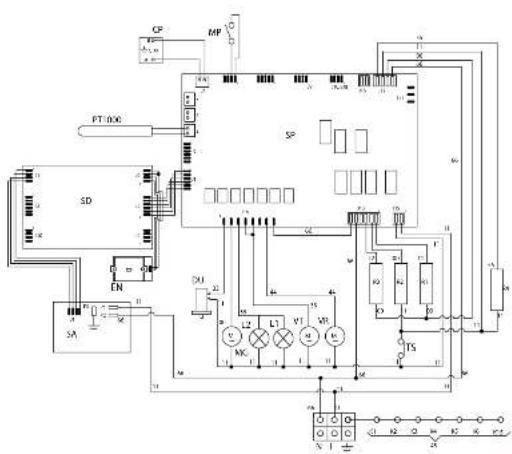
Wiring diagrams
Absorption (kW)
| Model | kW (230V) | Resistance | |||
| Bottom (kW) | Top (kW) | Grill (kW) | Fan (kW) | ||
| OV60 | 2,45 | 1,1 | 1 | 2,1 | 2,1 |
| OV80 - OV948 OV90 | 2,75 | 1,35 | 1,2 | 2,15 | 2,1 |
| OV30 | 3,1 | 1,6 | 1,2 | 3,0 | 2x1,05 |
| OV91 | 2,95 | 1,6 | 1,2 | 2,15 | 2,1 |
| with Quickstart | -- | -- | -- | -- | |
| OV60 | 3,2 | 1,1 | 1 | 2-1 | 2,1 |
| OV80 - OV948 OV90 | 3,40 | 1,35 | 1,2 | 2,15 | 2,1 |
| OV30 | 3,40 | 1,6 | 1,2 | 3,0 | 2x1,05 |
| OV91 | 3,4 | 1,6 | 1,2 | 2,15 | 2,1 |
Key
| 00 | Black | P | Timer/Programmer |
| 11 | Brown | P | Timer/Clock |
| 22 | Red | R1 | Upper resistance |
| 33 | White | R2 | Lower resistance |
| 44 | Yellow | R3 | Grill resistance |
| 45 | Yellow-Green | R4 | Circulating resistance |
| 55 | Grey | S1 | Oven warning light |
| 66 | Blue | S2 | Mains warning light |
| C | Commutator | SD | Display board |
| CP | Cooking probe | SE | Selector |
| DU | Thermal actuator | SP | Power board |
| discharging steam | SS | Probe board | |
| EF | Functions encoder | T | Grill thermostat |
| ET | Thermostat encoder | TF | Oven thermostat |
| F | Phase | TS | Safety thermostat |
| FLC | Filter | TT | Bypass thermostat |
| K1 | Earth wire terminal block | TST | Safety cooling fan thermostat |
| K2 | " " Lower resistance | V | Oven fan |
| K3 | " " oven fan | VT | Cooler fan |
| K4 | " " circulating resistance | SA | Supply |
| K5 | " " upper resistance | GL | LED light |
| K6 | " " oven light 1 | NTC | Probe NTC |
| K7 | " " oven light 2 | PT1000 | PT1000 |
| K8 | " " roaster | ||
| K9 | " " cooling fan | ||
| K11 | " " oven thermostat | ||
| K12 | " " programmer/timer | ||
| K15 | " " frame | ||
| L1 | Oven light | ||
| L2 | Oven light | ||
| M | Terminal block | ||
| MG | Roaster | ||
| MP | Door micro switch | ||
| N | Neutral | ||
| NTC | Temperature probe |
i ILVE
36
INSTALLATION
Wiring diagrams
INSTALLATION
Quick Start
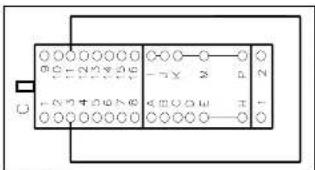
OV 60 PM T3 OV 80 PM T3
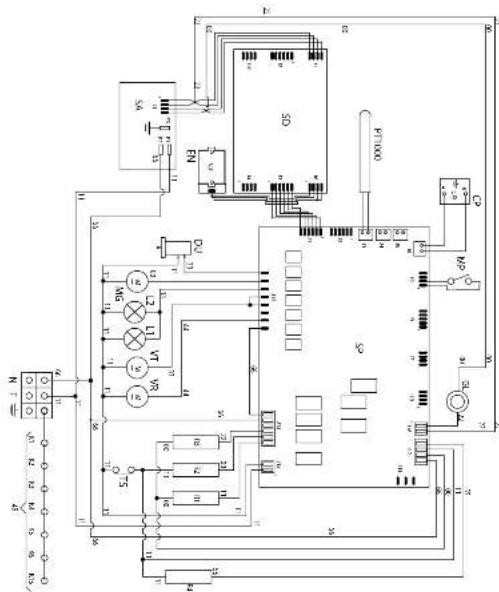
37
i ILVE
INSTALLATION
Wiring diagrams
OV 60 MP OV 80 MP OV 90 MP
INSTALLATION
Wiring diagrams
INSTALLATION
OV 60...E3 OV 80...E3 OV 90...E3 OV 948...E3
i ILVE
38
39
i ILVE
INSTALLATION Wiring diagrams
OV 30 ST3
INSTALLATION Wiring diagrams
OV 30 STCT3
INSTALLATION
i ILVE
40
41
i ILVE
INSTALLATION
Wiring diagrams
OV 60 STCT3
OV 80 STCT3
OV 90 STCT3
i ILVE
42
INSTALLATION
Wiring diagrams
INSTALLATION
OV 30 PMT3
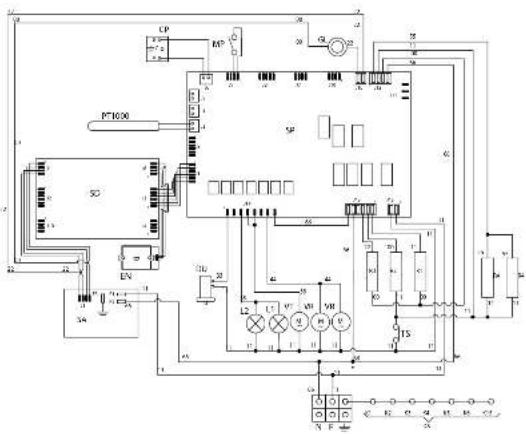
OV 60 ST3
OV 80 ST3
OV 90 ST3
43
i ILVE
iWarranty
REGISTER YOUR WARRANTY ONLINE NOW
GO TO: ilve.com.au > support > product registration
As a part of our continued customer service offering, you can
now register your ILVE products online at
ilve.com.au > support > product registration
Just follow our simple online registration process.
Please ensure that you always keep your proof of purchase in order for your warranty to remain valid should you ever need to use it.
As always, you can contact us on
1300 856 411
INSTALLATION
WARRANTY
Eurolinx Pty Limited A.B.N. 50 001 473 347 trading as ILVE ("ILVE")
Office:
48-50 Moore Street, Leichhardt N.S.W 2040 Post:
Locked Bag 3000, Annandale, N.S.W 2038 P: 1300 856 411
WARRANTY REGISTRATION
Your ongoing satisfaction with your ILVE product is important to us. We ask that you complete the enclosed Warranty Registration Card and return it to us so that we have a record of the ILVE product purchased by you, Alternitivley, you can now register your warranty online at http://support.eurolinx.com.au/
PRIVACY
ILVE respects your privacy and is committed to handling your personal information in accordance with the National Privacy Principles and the Privacy Act 1988 (Cth). A copy of the ILVE Privacy Policy is available at www.ilve.com.au. ILVE will not disclose any personal information set out in the Warranty Registration Card ("Personal Information") without your consent unless required by:
-
law:
-
any ILVE related company;
-
any service provider which provides services to ILVE or assist ILVE in providing services (including repair and warranty services) to customers. Our purpose in collecting the Personal Information is to keep a record of the ILVE product purchased by you, in order to provide a better warranty service to you in the unlikely event that there is a problem with your ILVE product. ILVE may contact you at any one or more of the addresses, email addresses or telephone numbers set out in the Warranty Registration Card. Please contact ILVE on 1300 694 583 should you not wish to be contacted by ILVE.
WARRANTY
- Warranty
ILVE warrants that each ILVE product will remain, for a period of twenty four (24) months computed from the date of purchase of the ILVE product, free from defects arising in the manufacture of the ILVE product ("Warranty"). Except for consumer guarantees set
out in the Competition and Consumer Act 2010 (Cth) ("Act"), ILVE does not make any further warranties or representations in relation to ILVE products.
- What is not Covered by the Warranty.
The Warranty does not apply if an ILVE product is defective by a factor other than a defect
arising in the manufacture of the ILVE product, including but not limited to:
(a) damage through misuse (including failure to maintain, service or use with proper care), neglect, accident or ordinary wear and tear (including deterioration of parts and accessories and glass breakage):
(b) use for purpose for which the ILVE product was not sold or designed;
(c) use or installation which is not in accordance with any specified instructions for use or installation;
(d) use or operation after a defect has occurred or been discovered;
(e) damage through freight, transportation or handling in transit (other than when ILVE is responsible);
(f) damage through exposure to chemicals, dusts, residues, excessive voltage, heat, atmospheric conditions or other forces or environmental factors outside the control or ILVE;
(g) repair, modification or tampering by the purchaser or any person other than ILVE, an employee of ILVE or an authorised ILVE service contractor ^* ;
(h) use of parts, components or accessories which have not been supplied or specifically approved by ILVE.
(i) damage to surface coatings caused by cleaning or maintenance using products not recommended in the ILVE product handbook provided to the purchaser upon purchase of the ILVE product;
(j) damage to the base of an electric oven due to items having been placed on the base of the oven cavity or covering the base, such as aluminium foil (this impedes the transfer of heat from the element to the oven cavity and can result in irreparable damage); or
(k) damages, dents or other cosmetic
imperfections not affecting the performance of the ILVE in respect of an ILVE product purchased as a "factory second" or from display
The Warranty does not extend to light globes used in ILVE products.
- Domestic Use
Each ILVE product is made for domestic use. This Warranty may not extend to ILVE products used for commercial purposes.
- Time for Claim under the Warranty
You must make any claim under this Warranty within twenty eight (28) days after the occurrence of an event which gives rise to a claim pursuant to the Warranty, by booking a service call on the telephone number below.
Continued over...
WARRANTY
- Proof of Purchase
Customers must retain proof of purchase in order to be eligible to make a warranty claim in respect of an ILVE product.
- Claiming under the Warranty
Customers will bear the cost of claiming under this Warranty unless ILVE determines the expenses are reasonable, in which case the customer must claim those expenses by providing written evidence of each expense to ILVE at the address on the Warranty Registration Card.
- Statutory Rights
(a) These terms and conditions do not affect your statutory rights.
(b) The limitations on the Warranty set out in this document do not exclude or limit the application of the consumer guarantees set out in the Act or any other equivalent or corresponding legislation in the relevant jurisdiction where to do so would: (i) contravene the law of the relevant jurisdiction; or
(ii) cause any part of the Warranty to be void. (c) ILVE excludes indirect or consequential loss of any kind (including, without limitation, loss of use of the ILVE product) and (other than expressly provided for in these terms and conditions) subject to all terms.
conditions and warranties implied by custom, the general law, the Act or other statute.
(d) The liability of ILVE to you for a breach of any express or non-excludable implied term, condition or warranty is limited at the option of ILVE to:
(i) replacing or repairing the defective part of the ILVE product;
(ii) paying the cost of replacing or repairing the defective part of the ILVE product;
(iii) replacing the ILVE product; or
(iv) paying the cost of replacing the ILVE product. (e) Our goods come with guarantees that cannot be excluded under the Australian Consumer Law. You are entitled to a replacement or refund for a major failure and for compensation for any other reasonably foreseeable loss or damage. You are also entitled to have the goods repaired or replaced if the goods fail to be of acceptable quality and the failure does not amount to a major failure.
- Defects
Any part of an ILVE product deemed to be defective and replaced by ILVE is the property of ILVE. ILVE reserves the right to inspect and test ILVE products in order to determine the extent of any defect and the validity of a claim under the Warranty.
*For your closest ILVE authorised service agent go to
https://support.eurolinx.com.au/#/map/retailers
All warranty service calls must be booked through ILVE's Customer Care Centre on customercare@eurolinx.com.au or
1300 85 64 11 option 1
01072021
Warranty Card tear off
| WARRANTY REGISTRATION CARD Please complete and send to ILVE at: REPLY PAID 83617 01072021 LEICHARDT NSW 2040 | ||
| Last Name: First Name: | ||
| Address: | ||
| State: Postcode: Email: | ||
| Home Phone: Mobile: | ||
| Purchase Date: / / (Please attach proof of purchase to validate warranty) | ||
| MODEL NUMBER | SERIAL NUMBER (if you cannot locate the serial number please call ILVE on 1300 85 64 11) | |
| 1 | ||
| 2 | ||
| 3 | ||
| 4 | ||
01072021
äurolinx LUXURY KITCHEN APPLIANCES
NATIONAL SERVICE CENTRE
Our high quality appliances are designed and manufactured to give you many years of cooking pleasure.
Should you have any questions or issues with your appliance please email our national service centre
customercare@eurolinx.com.au or phone us on 1300 85 64 11.
Our experienced staff are on hand to log your service request and ensure any matter is attended to promptly.
For after sales enquiries please contact us at customercare@eurolirx.com.au or 1.300 85 64 11 option 1 For spare parts contact us at spares@eurolirx.com.au or 1.300 85 64 11 option 2
Technical support is available to authorised and licensed service providers only by contacting us at
tech.support@eurolinx.com.au All other technical enquiries should be directed to customercare@eurolinx.com.au
P: 1300 694 583 E: info@euroline.com.au W: euroline.com.au
FOLLOW US ON:

facebook.com/ILVEappliances

instagram.com/ILVE_appliances

youtube.com/ILVEappliances

livewithilve.com
Australia National Telephone Number 1300 MYILVE (694 583) New Zealand Telephone Number 64 3 344 5913
ILVE showroom hours: Tuesday to Friday - 9am-5pm, Saturday - 10am-4pm, Sunday and Monday - closed
* Melbourne showroom hours: Tuesday to Saturday - 10am-4pm
NSW & ACT (Head Office)
48-50 Moore Street
Leichhardt
F 02 8569 4699
QLD
1/42 Cavendish Road
Coorparoo
F 07 3397 0850
WA & NT
Unit 10/55 Howe Street
Osborne Park
F 08 9201 9188
New Zealand
PO Box 11.160
Sockburn Christchurch
F 03 344 5906
- USER, OPERATING & INSTALLATION MANUAL
- PRO-LINE, PROFESSIONAL PLUS & NOSTALGIE BUILT-IN OVENS
- YOUR FREE MASTERCLASS
- OPEN 24/7
- ILVE ACCESSORIES ONLINE SHOP
- CONTENTS
- USER GUIDE
- IMPORTANT SAFETY WARNINGS
- USER INSTRUCTIONS
- CLEANING AND MAINTENANCE
- PROBLEM SOLVING
- COOKING CHART
- IMPORTANT SAFETY WARNINGS
- APPLIANCE DATA
- CAUTION
- First start-up
- INSTRUCTIONS FOR USE Models MP
- Use of the thermostat (T)
- Turning on and off
- Safety thermostat
- How to use the multifunction oven
- Oven light
- INSTRUCTIONS FOR USE - PRO-LINE (ELECTRIC OVEN) - Use of the electric oven multifunction: MP models
- COOKING INSPECTION
- INSTRUCTIONS FOR USE - PRO-LINE (ELECTRIC OVEN) MP models with 5 key programmer
- Display
- Icons
- INSTRUCTIONS FOR USE TFT touch display - Icons legend
- INSTRUCTIONS FOR USE TFT touch display - Settings
- INSTRUCTIONS FOR USE T3 static model with TFT touch - Icons
- INSTRUCTIONS FOR USE Accessories
- CLEANING AND MAINTENANCE Removing the oven
- CLEANING AND MAINTENANCE Glass disassembly and cleaning
- PROBLEM SOLVING
- - Guide for the resolution
- ATTENTION:
- Child Lock
- How to resolve
- How to disable
- How to activate
- - TFT display errors
- System errors
- Description
- INSTALLATION
- Wiring diagrams
- INSTALLATION Wiring diagrams
- iWarranty
- REGISTER YOUR WARRANTY ONLINE NOW
- WARRANTY
- WARRANTY REGISTRATION
- PRIVACY
- FOLLOW US ON:
Marca : ILVE
Modello : OV91SNT3C
Categoria : Forno