
32PHA4300S - 177 PHILIPS - Panduan pengguna gratis
Temukan panduan perangkat secara gratis 32PHA4300S PHILIPS dalam format PDF.


Pertanyaan pengguna tentang 32PHA4300S PHILIPS
0 pertanyaan tentang perangkat ini. Jawab yang Anda tahu atau ajukan milik Anda sendiri.
Ajukan pertanyaan baru tentang perangkat ini
Unduh instruksi untuk 177 dalam format PDF gratis! Temukan panduan Anda 32PHA4300S - PHILIPS dan ambil kembali perangkat elektronik Anda. Di halaman ini diterbitkan semua dokumen yang diperlukan untuk penggunaan perangkat Anda. 32PHA4300S merek PHILIPS.
PANDUAN PENGGUNA 32PHA4300S PHILIPS
Register your product and get support at
4300 Series
www.philips.com/welcome
User manual
Panduan pengguna
Panduan pengguna
คู่มือผู้ใช้
Tài liệu huống dẫn sử dụng
دليل المستخدم

Environmental Protection Use Period
This logo labelled on the product itself indicates that the Environmental Protection Use Period thereof is 10 years.
The Environmental Protection Use Period of electrical information products refers to the time period during which the toxic and hazardous substances or elements contained within the product will not leak or suddenly spoil, and users of such products will not cause any serious environmental pollution or serious damage to human and property.
During the Environmental Protection Use Period, please use this product according to the instructions given in this user manual.
The Environmental Protection Use Period does not cover consumable parts: the battery.
Suggestive description of the Recycling Administrative Regulations for Waste Electrical and Electronics Products
In order to care and protect the Earth in a better way, please adhere to the national and applicable laws in relation to the recycling management of waste electrical and electronics products when the user no longer needs to use this product, or when it has reached the end of its product life.
Contents
1 Caution 2
2 Important 3
3 Your TV 5
Control Panel 5
Remote Control 5
Remote control usage 6
4 Use your TV 7
Switch TV on or off 7
Switch channels 7
Watch connected devices 7
Adjust TV volume 8
5 Product information 8
Display resolutions 8
Multimedia 9
Sound power 9
Inherent resolution 9
Tuner / Reception / Transmission 9
Remote Control 9
Power Supply 9
Supported TV mounts 9
6 Troubleshooting 10
General issues 10
Channel issues 10
Picture issues 10
Sound issues 10
HDMI connection issues 11
Computer connection issues 11
Contact us 11
1 Caution
2014© TP Vision Europe B.V. All rights reserved. Specifications are subject to change without notice. Trademarks are the property of Koninklijke Philips N.V or their respective owners. TP Vision Europe B.V. reserves the right to change products at any time without being obliged to adjust earlier supplies accordingly. The material in this manual is believed adequate for the intended use of the system. If the product, or its individual modules or procedures, are used for purposes other than thosepecifiedherein,confirmationoftheir validity and suitability must be obtained. TP Vision Europe B.V. warrants that the material itself does not infringe any United States patents. No further warranty is expressed or implied.
TP Vision Europe B.V. cannot be held responsible neither for any errors in the content of this document nor for any problems as a result of the content in this document. Errors reported to Philips will be adapted and published on the Philips support website as soon as possible.
Terms of warranty
- Risk of injury, damage to TV or void of warranty! Do not attempt to repair the TV yourself.
• Use the TV and accessories only as intended by the manufacturer. - The caution sign printed on the back of the TV indicates risk of electric shock. Never remove the TV cover. Always contact Philips Customer Support for service or repairs.
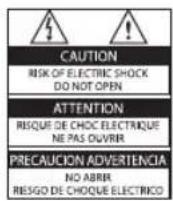
Any operation expressly prohibited in this
manual, or any adjustments and assembly procedures not recommended or authorised in this manual shall void the warranty.
Pixel characteristics
This LCD/LED product has a high number of color pixels. Although it has effective pixels of 99.999% or more, black dots or bright points of light (red, green or blue) may appear constantly on the screen. This is a structural property of the display (within common industry standards) and is not a malfunction.
Mains fuse (/56)
This TV is fitted with an app roved moulded plug. Should it become necessary to replace the mains fuse, this must be replaced with a fuse of the same value as indicated on the plug (example 10A).
1 Remove fuse cover and fuse.
2 The replacement fuse must comply with BS 1362 and have the ASTA approval mark. If the fuse is lost, contact your dealer in order to verify the correct type.
3 Refit the fuse cover.
Copyright

*Kensington and Micro Saver are registered US trademarks of ACCO World corporation with issued registrations and pending applications in other countries throughout the world.

HDMI,the HDMI logo and High-Definition Multimedia Interface are trademarks or registered trademarks of HDMI licensing LLC in the United States and other countries. All other registered and unregistered trademarks are the property of their respective owners.
2 Important
Read and understand all instructions before you use your TV. If damage is caused by failure to follow instructions, the warranty does not apply.
Safety
Risk of electric shock or fire!
- Never expose the TV to rain or water. Never place liquid containers, such as vases, near the TV. If liquids are spilt on or into the TV, disconnect the TV from the power outlet immediately. Contact Philips Consumer Care to have the TV checked before use.
- Never place the TV, remote control or batteries near naked flame or rather heat sources, including direct sunlight. To prevent the spread of fire, keep candles or other flames away from the TV, remote control and batteries at all times.

• Never insert objects into the ventilation slots or other openings on the TV.
- When the TV is swivelled ensure that no strain is exerted on the power cord. Strain on the power cord can loosen connections and cause arcing.
• To disconnect the TV from the mains power, the power plug of the TV must be disconnected. When disconnecting the power, always pull the power plug, never the cord. Ensure that you have full access to the power plug, power cord and outlet socket at all times.
Risk of short circuit or fire!
• Never expose the remote control or batteries to rain, water or excessive heat.
- Avoid force coming onto power plugs.
Loose power plugs can cause arcing or fire.
Risk of injury or damage to the TV!
• Two people are required to lift and carry a TV that weighs more than 25 kg or 55 lbs.
- When stand mounting the TV, use only the supplied stand. Secure the stand to the TV tightly. Place the TV on a flat, level surface that can support the combined weight of the TV and the stand.
- When wall mounting the TV, use only a wall mount that can support the weight of the TV. Secure the wall mount to a wall that can support the combined weight of the TV and wall mount. TP Vision Europe B.V. bears no responsibility for improper wall mounting that results in accident, injury or damage.
• If you need to store the TV, disassemble the stand from the TV. Never lay the TV on its back with the stand installed.
- Before you connect the TV to the power outlet, ensure that the power voltage matches the value printed on the back of the TV. Never connect the TV to the power outlet if the voltage is different.
- Parts of this product may be made of glass. Handle with care to avoid injury and damage.
Risk of injury to children!
Follow these precautions to prevent the TV from toppling over and causing injury to children:
- Never place the TV on a surface covered by a cloth or other material that can be pulled away.
- Ensure that no part of the TV hangs over the edge of the surface.
- Never place the TV on tall furniture (such as a bookcase) without anchoring both the furniture and TV to the wall or a suitable support.
• Educate children about the dangers of climbing on furniture to reach the TV.
Risk of swallowing batteries!
- The product/remote control may contain a coin-type battery, which can be swallowed. Keep the battery out of reach of children at all times!
Risk of overheating!
- Never install the TV in a confined space. Always leave a space of at least 4 inches or 10 cm around the TV for ventilation. Ensure curtains or other objects never cover the ventilation slots on the TV.
Risk of injury, fire or power cord damage!
- Never place the TV or any objects on the power cord. - Disconnect the TV from the power outlet and antenna before lightning storms. During lightning storms, never touch any part of the TV, power cord or antenna cable.
Risk of hearing damage!
- Avoid using earphones or headphones at high volumes or for prolonged periods of time.
Low temperatures
- If the TV is transported in temperatures below 5°C or 41°F, unpack the TV and wait until the TV temperature matches room temperature before connecting the TV to the power outlet.
Screen care
- Avoid stationary images as much as possible. Stationary images are images that remain on-screen for extended periods of time. Example: on-screen menus, black bars and time displays. If you must use stationary images, reduce screen contrast and brightness to avoid screen damage. - Unplug the TV before cleaning. - Clean the TV and frame with a soft, damp cloth. Never use substances such as alcohol, chemicals or household cleaners on the TV.
- Risk of damage to the TV screen! Never touch, push, rub or strike the screen with any object.
• To avoid deformations and color fading, wipe off water drops as soon as possible.
Recycling

Your product is designed and manufactured with high quality materials and components, which can be recycled and reused.
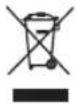
When this crossed-out wheeled bin symbol is attached to a product it means that the product is covered by the European Directive 2002/96/EC. Please inform yourself about the local separate collection system for electrical and electronic products.
Please act according to your local rules and do not dispose of your old products with your normal household waste.
Correct disposal of your old product helps to prevent potential negative consequences for the environment and human health.

Your product contains batteries covered by the European Directive 2006/66/EC, which cannot be disposed of with normal household waste. Please inform yourself about the local rules on separate collection of batteries because correct disposal helps to prevent negative consequences for the environment and human health.
3 Your TV
Congratulations on your purchase, and welcome to Philips! To fully benefit from the support that Philips offers, register your TV at www.philips.com/welcome.
Control Panel
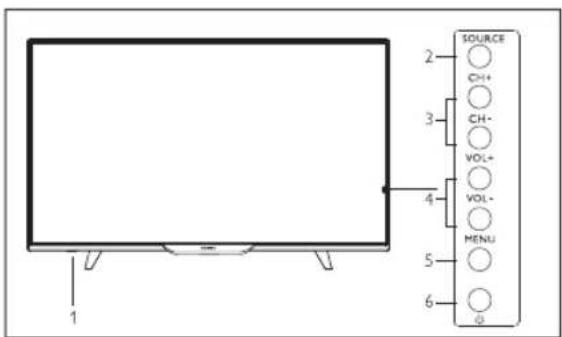
- Indicator/Remote Control Sensor
- Source : display the list of signal sources.
- CH+/- : switch to the previous/next channel.
- VoL+/- : increase/reduce the volume.
- Menu : turn on/off the main menu.
- ⏻ : turn on/off the TV; to cut off power supply, please unplug the power cable.
Remote Control
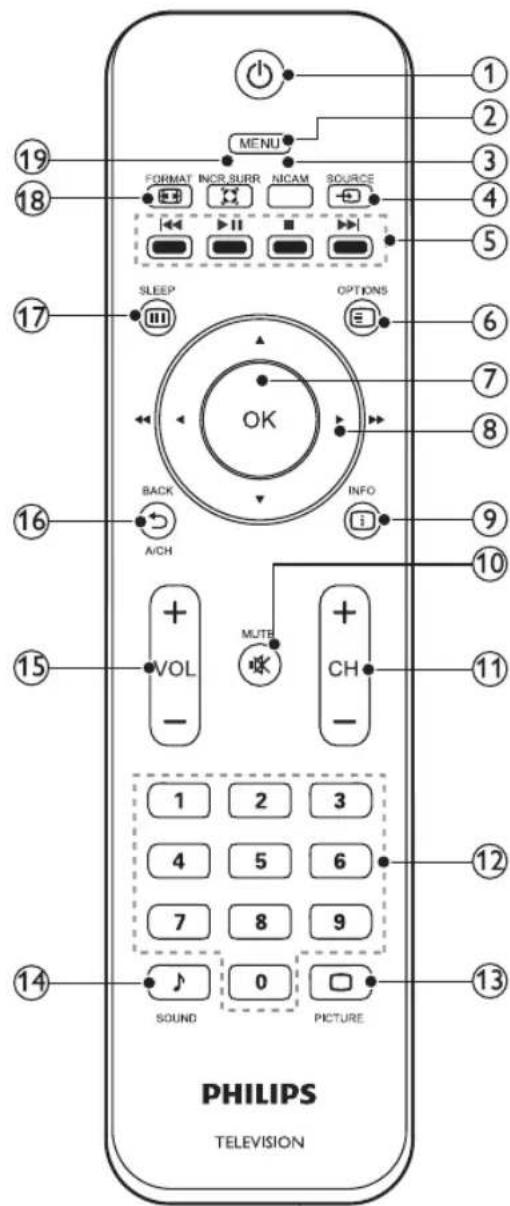
English
① ⏻ (Power/Standby button)
- After power-up, press it to turn on the TV;
- Press it again to switch to standby mode.
② Menu
Turn on /off the menu.
③ NICAM
Switch between sound effects (only available for TV signal sources that support NICAM function).
④ Source
Select an input source for the TV.
⑤
Shortcut keys in USB mode: previous, start/pause, stop, next.
⑥ Options
Access the options related to the current activity.
⑦ OK
- In menu mode: confirm the input or selection
• In USB mode: play/pause.
⑧ ▲▼◀▶ Navigation keys
- In menu mode: navigate the menu.
- In USB mode: press ◀▶ to search forward or backward while playing music or video files.
⑨ i Info.
Display the program information when available.
⑩ Mute
Mute or unmute the sound.
⑪ CH +/−
Switch to the previous/next channel in TV mode.
⑫ Numeric keys (0\~9)
Select a channel or value.
⑬ PICTURE
Switch to the preset image mode.
⑭ SOUND
Switch to the preset audio mode.
⑮ Volume +/-
Increase/reduce the volume.
⑯ Return / CH Switch
Return to the previous channel.
⑰ Sleep
Switch the TV to the standby mode when the preset time is out.
⑱ FORMAT
Select the aspect ratio of image.
⑲ Incredible Surround
Enable or disable the virtual surround audio effect.
Remote control usage
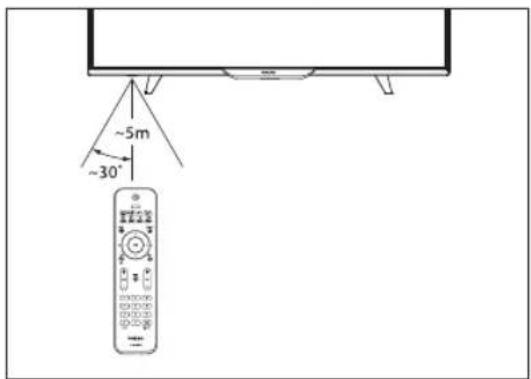
When you use the remote control, hold it close to the TV and point it at the remote control sensor. Make sure that the line-of-sight between the remote control and TV is not blocked by furniture, walls or other objects.
4 Use your TV
This section helps you perform basic TV operations.
Switch TV on or off
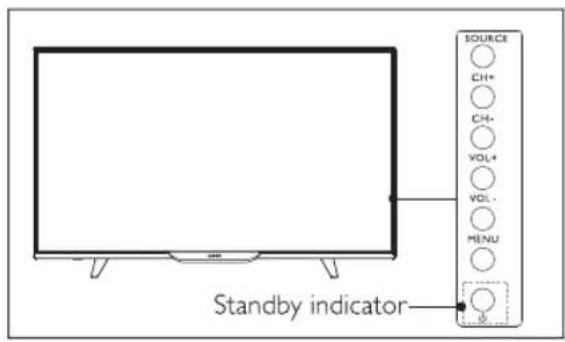
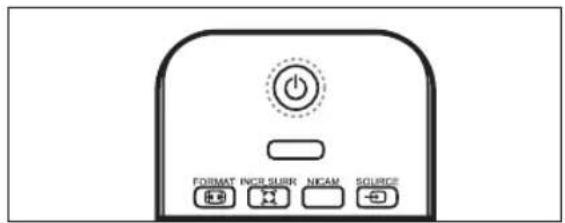
To switch on
• Plug in the power plug.
» If the standby indicator is lights up, press ⏻ (Standby-On) on the remote control.
To switch to standby
- Press ⏻ (Standby-On) on the remote control.
» The standby indicator switches to lights up.

Tip
- Though your TV consumes very little power when in standby mode, energy continues to be consumed. When not in use for an extended period of time, disconnect the TV power cable from the power outlet.
Switch channels
English
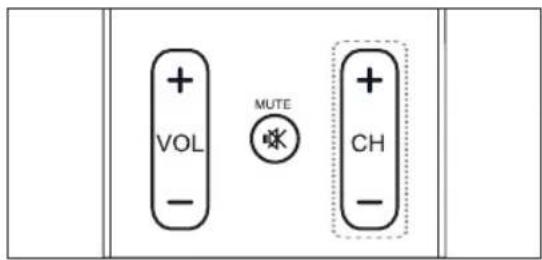
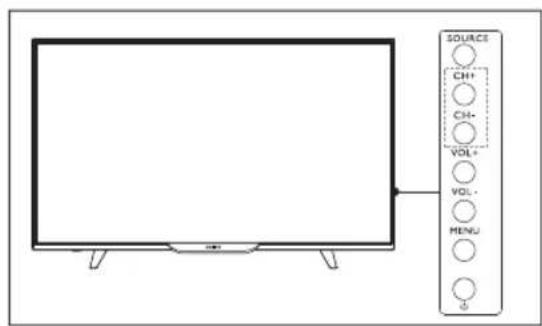
- Press CH +/- on the remote control or the lower right part of the TV.
- Enter a channel number using the numeric buttons on the remote control.
- Press on the remote control to switch and return to the previous channel.
Watch connected devices

Note
- Switch on the device before selecting it as an external signal source.
Use the Source button
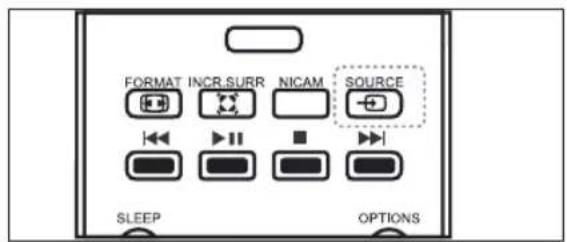
1 Press ✪ SOURCE.
» The source list appears.
2 Press ▲▼ to select a device.
3 Press OK to select.
» The TV switches to the selected device.
Adjust TV volume
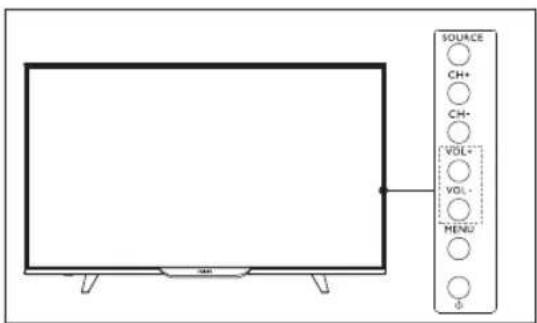
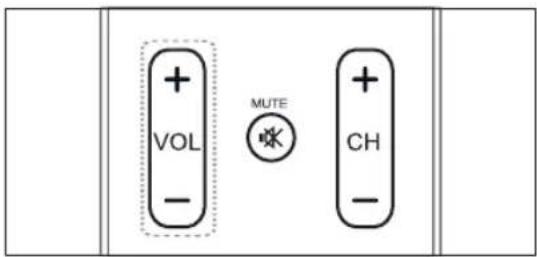
To increase or decrease volume
- Press VOL +/- at the lower right part of the TV or the Volume Control+/- on the remote control.
To mute or unmute sound
- Press ⚙ (Mute).
- Press ✕ again to restore the sound.
5 Product information
Product information is subject to change without notice. For detailed product information, please visit www.philips.com/support.
Display resolutions
Computer Formats
• Resolution - refresh rate:
640×480-60Hz
800×600-60Hz
• 1024×768-60Hz
• 1360×768-60Hz
• 1920 × 1080 - 60Hz
Video Formats
• Resolution - refresh rate:
480i - 60Hz
• 480p - 60Hz
576i - 50Hz
576p - 50Hz
• 720p - 50Hz, 60Hz
• 1080i - 50Hz, 60Hz
• 1080p - 50Hz, 60Hz.
Multimedia
• Supported storage device: USB (only FAT or FAT 32 USB storage devices are supported.)
• Compatiblemultimediafileformats:
• Image: JPEG
- Audio: MP3
• Video: MPEG 2/MPEG 4, H.264
Sound power
- 43":8W×2
Inherent resolution
• 43":1920×1080
Tuner / Reception / Transmission
• Aerial input: 75ohm coaxial (IEC75)
• TV system: PAL,NTSC
• Video playback: PAL,NTSC, SECAM
Remote Control
- Batteries: 2 × AAA
Power Supply
• Main Power Supply: 100-240V\~, 50/60Hz
• Standby Energy Consumption: ≤0.5W
• Environment Temperature: 5-40°C
• Power consumption:
43": 75W
Supported TV mounts
To mount the TV, please purchase a Philips TV mount or any TV mount compliant with the VESA standard. To prevent damage to cables and connectors, be sure to leave a clearance gap of at least 2.2 inches or 5.5cm between the back of the TV to the wall.

Warning
- Please follow all instructions provided with the TV mount. TP Vision Europe B.V. bears no responsibility for improper TV mounting that results in accident, injury or damage.
| Model No. | Required Pixel Pitch (mm) | Required Mounting Screws |
| 43" | 200×300 | 4×M6 |
6 Troubleshooting
This section covers common problems and their accompanying solutions.
General issues
The TV cannot be switched on:
- Disconnect the power cable from the power outlet. Wait for one minute before reconnecting it.
- Check that the power cable is securely connected.
The remote control is not working properly:
- Check that the remote control batteries are correctly inserted according to the +/- orientation.
- Replace the remote control batteries if they are flat or weak.
• Clean the remote control and TV sensor lens.
The TV menu is in the wrong language.
- Change the TV menu to your preferred language.
When turning the TV On/Off or to Standby, you hear a creaking sound from the TV chassis:
- No action is required. The creaking sound comes from the normal expansion and contraction of the TV as it cools down and warms up. This does not impact its performance.
Channel issues
Previously installed channels do not appear in the channel list:
• Check that the correct channel list is selected.
Picture issues
The TV is on, but there is no picture:
- Check that the antenna is properly connected to the TV.
- Check that the correct device is selected as the TV source.
There is sound but no picture:
- Check that the picture settings are correctly set.
Poor TV reception from the antenna connection:
- Check that the antenna is properly connected to the TV.
- Loudspeakers, unearthed audio devices, neon lights, high buildings and other large objects can influence reception quality. If possible, try to improve the reception quality by changing the antenna direction or moving devices away from the TV.
• If the reception on one particular channel is poor, please fine tune this channel.
There is poor picture quality from connected devices:
- Check that the devices are connected properly.
- Check that the picture settings are correctly set.
The picture does not fit the screen; it is too big or too small:
• Try using a different picture format.
The picture position is incorrect:
• Picture signals from some devices may not fit the screen correctly. Please check the signal output of the device.
Sound issues
The pictures are showing but sound quality is poor:
- Check that all cables are properly connected.
• Check that the volume is not set to 0.
• Check that the sound is not muted. - Check that the sound settings are correctly set.
The pictures are showing but sound comes from one speaker only:
- Verify that sound balance is set to the centre.
HDMI connection issues
There are problems with HDMI devices:
- Please note that HDCP (High-bandwidth Digital Content Protection) support can delay the time taken for a TV to display content from a HDMI device.
- If the TV does not recognise the HDMI device and no picture is displayed, please try switching the signal source to another device before switching it back again.
- If there are intermittent sound disruptions, please check that output settings from the HDMI device are correct.
Computer connection issues
The computer display on the TV is not stable:
- Check that your PC uses the supported resolution and refresh rate.
• Set the TV picture format to unscaled.
Contact us
If you cannot resolve your problem, please refer to the FAQs for this model at www.philips.com/support.
If the problem remains unresolved, please contact your local Philips Customer Service Centre.

Warning
- Do not attempt to repair the TV yourself. This may cause severe injury, irreparable damage to your TV or void your warranty.

Note
- Please make a note of your TV model and serial number before you contact Philips Customer Service Centre. These numbers are printed on the back/bottom of the TV and on the packaging.


- Environmental Protection Use Period
- Suggestive description of the Recycling Administrative Regulations for Waste Electrical and Electronics Products
- Contents
- Caution
- Terms of warranty
- Pixel characteristics
- Mains fuse (/56)
- Important
- Safety
- Risk of electric shock or fire!
- Risk of short circuit or fire!
- Risk of injury or damage to the TV!
- Risk of injury to children!
- Risk of swallowing batteries!
- Risk of overheating!
- Risk of injury, fire or power cord damage!
- Risk of hearing damage!
- Low temperatures
- Screen care
- Recycling
- Your TV
- Remote control usage
- Use your TV
- To switch on
- To switch to standby
- Tip
- Watch connected devices
- Note
- Product information
- Display resolutions
- Computer Formats
- Multimedia
- Sound power
- Inherent resolution
- Tuner / Reception / Transmission
- Remote Control
- Power Supply
- Supported TV mounts
- Warning
- Troubleshooting
- General issues
- The TV cannot be switched on:
- The remote control is not working properly:
- The TV menu is in the wrong language.
- When turning the TV On/Off or to Standby, you hear a creaking sound from the TV chassis:
- Channel issues
- Previously installed channels do not appear in the channel list:
- Picture issues
- The TV is on, but there is no picture:
- There is sound but no picture:
- Poor TV reception from the antenna connection:
- There is poor picture quality from connected devices:
- The picture does not fit the screen; it is too big or too small:
- The picture position is incorrect:
- Sound issues
- HDMI connection issues
- There are problems with HDMI devices:
- Computer connection issues
- The computer display on the TV is not stable:
- Contact us
Merek : PHILIPS
Model : 32PHA4300S
Kategori : 177